
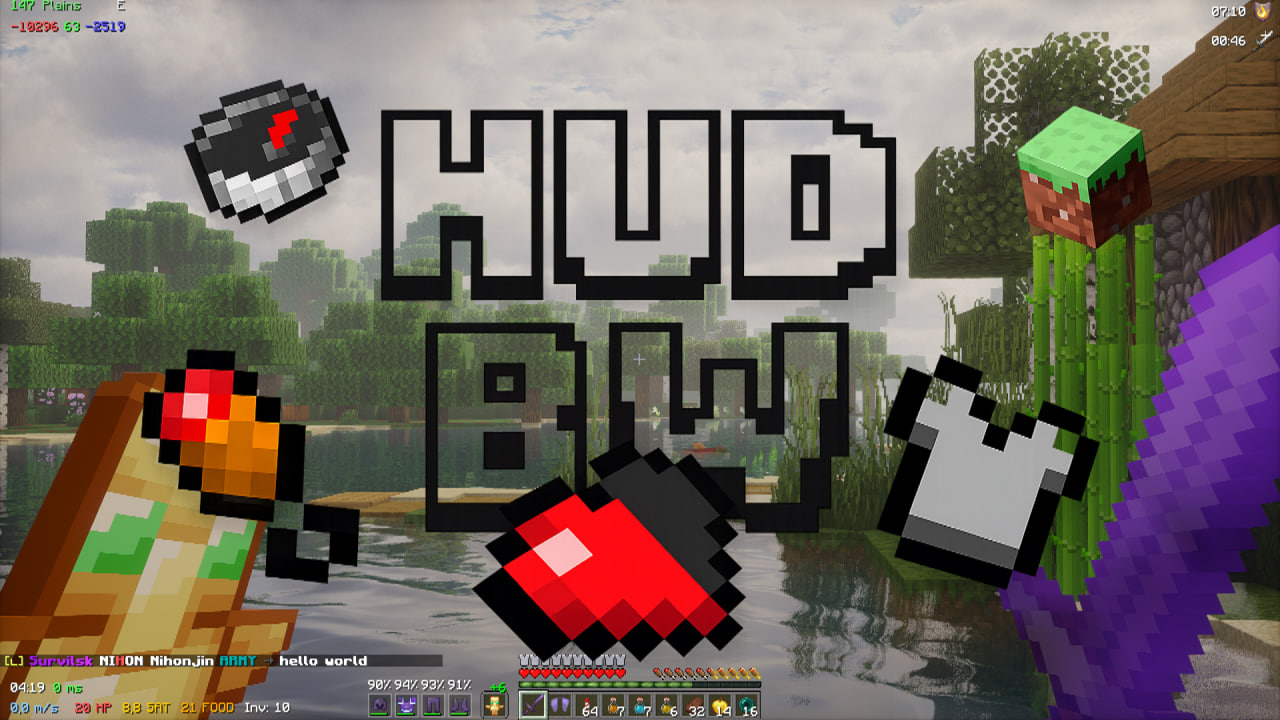
 Better HUD Widgets 添加了大量小部件,让玩家的生活更轻松。它包括用于盔甲、药水、速度、坐标、生物群系、饥饿值等的多个小部件。每个小部件都可以单独自定义,例如大小、背景和样式。
- 这是旧版本 2.0 的视频..
✨功能特性
- 交互式 GUI – 简单的小部件自定义、拖放、调整大小等。
- 柔和动画 – 将鼠标悬停在列表中的小部件上时,其余部分会淡出。
- 拖拽预览 – 在移动小部件时,GUI 会隐藏。
- 快速撤销 – 操作失误?Ctrl+Z 即可恢复。
- 计算器 – 好吧,有时候你确实需要一个。
/hbw calc或/calcu。 - 隐藏功能 – 隐藏你不需要的部件。你还可以从顶部设置栏中完全隐藏这些小部件。
- 配置方案(Profiles) – 保存你的布局,一键切换并与朋友分享!
- 吸附对齐 – 将小部件对齐到网格或像素完美(按住 Shift)。
- 本地化 – 支持英语、西班牙语、印地语、俄语、白俄罗斯语和乌克兰语。
? 编辑器控件
按 K(默认)打开 GUI:
| 动作 | 结果 |
|---|---|
| 左键单击 (LMB) | 拖动一个小部件 |
| 右键单击 (RMB) | 打开其设置(背景、大小、模式和小部件特定选项) |
| 中键单击 (MMB) | 显示或隐藏小部件 |
| 滚轮 | 循环浏览显示模式(如果悬停在侧面板上,则滚动侧面板的列表) |
| Ctrl+Z | 撤销你的上一个移动、切换或设置更改 |
| 侧面板 | 点击任意行以立即切换可见性,滚动查看更多,或从其边缘的选项卡折叠整个面板 |
| 顶部栏 | Hide All(全部隐藏)、Grid Snap(网格吸附)、Reset(重置,带确认)、Profiles(配置方案)、Durability Warning(耐久警告)切换、Show-Hidden(显示隐藏项)切换、F3-Hide(隐藏 F3 信息)切换的快速按钮。将鼠标悬停在任何按钮上可查看工具提示 |
比起精确点击,更偏好使用鼠标滚轮?每个小部件的设置弹出窗口也有自己的 Visible(可见)切换开关,因此你无需仅依赖滚轮或中键。
? 小部件与模式
在编辑器中将鼠标悬停在某个小部件上可循环切换其模式。右键单击它以进行其他操作。
?️ 盔甲 - 四种风格
- 盔甲(经典) - 原始的合列形式(头盔 → 靴子 → 主手)。设置允许你完全隐藏手部物品,并选择耐久度文本显示在哪一侧。
- 盔甲(顶部) - 仅头盔 + 胸甲,可选择在主手 / 副手 / 两者上方或下方放置手部物品。
- 盔甲(底部) — 仅护腿 + 靴子,手部物品选项同上。
- 盔甲(快捷栏样式) — 盔甲部件绘制为紧挨真实快捷栏的一排假快捷栏槽位。选择带有边框的“槽位”样式或纯图标,在每个槽位上方以百分比或原始数值显示耐久度,并可添加一个或两个手部物品作为额外槽位。
所有四种风格共享相同的耐久度显示模式(当前/最大、仅当前、百分比),在缺失部件的地方保持适当的空白间隙,而不是所有内容挤在一起,并且可以自由组合——你可以将盔甲分为“顶部 + 底部”,或者让经典模式与快捷栏样式并存,一切取决于你的 HUD 需求。
? 目标生命值
查看怪物或玩家时,会以简洁的数字显示其当前生命值——屏幕上没有其他内容,只有数字。
? 角度 / 旋转
- 偏航角 (Yaw) — 水平视角角度(例如
168.4) - 俯仰角 (Pitch) — 垂直视角角度(例如
-24.3) - 组合 — 同时显示两者(例如
168.4 / -24.3)
? 坐标 (XYZ)
- 模式 1: 彩色 X/Y/Z
- 模式 2: 带标签(X: 100 Y: 64 Z: -500)
- 模式 3: 下界转换器 — 主世界坐标及其对应的下界坐标,并排显示
? 药水效果 — 含等级
- 模式 1: 图标、全名 + 效果等级(II, III...),下方显示计时器
- 模式 2: 紧凑版 — 仅图标 + 计时器
- 无限持续时间效果显示
∞而非倒计时 - 设置允许你将计时器/名称文本放在图标的任一侧——无论名称多长,图标始终保持在一条直线上对齐——并且可以选择隐藏原版右上角的药水图标,以免重复显示
⚡ FPS & CPS
- FPS: 纯数字 / 带标签 / 完整读数 — 当前 FPS、滚动平均值以及准确的 0.1% 最低值(即最差的 0.1% 帧的平均值——真正反映卡顿情况的数值)
- CPS: 总点击次数,或分左右手统计
❤️? 生命值 / 食物 / 饱和度
- 模式 1: 完整标签(
20 HP) - 模式 2: 仅数字,无标签
- 模式 3: 心形 / 鸡腿图标与数字配对
⏰ 时钟
- 模式 1: 系统时钟
- 模式 2: 游戏内世界时间
? 指南针
- 模式 1: 基本方位字母(N/S/E/W)
- 模式 2: 精确度数方位
? 生物群系
显示你脚下所在的生物群系名称。
? 光照等级
实际的光照值,会根据一天中的时间进行调整——这与游戏判断怪物是否能在你站立位置生成的数值相同。绿色 = 安全,黄色 = 有风险,红色 = 开始建造墙壁。
? 延迟
服务器延迟,根据严重程度进行颜色编码。
? 速度
实时每秒方块数,移动时平滑更新。
?️ 护甲值 + 韧性
你盔甲图标背后的确切数值,包括韧性——在比较外观相同的装备时非常有用。
⏱️ 会话计时器
自加入以来你已游玩的时间。
? 还包括
- 背包空间 - 主背包中剩余的免费槽位数
- 副手计数器 - 整个背包中该物品的总数(非常适合图腾、火箭筒、末影珍珠)
- 低耐久警告 - 当你的装备即将损坏时出现的动作栏警告(可选声音),阈值由你设定。可直接从编辑器的顶部栏开启/关闭此功能。
? 配置方案
按照你的喜好设置布局,从顶部栏保存为配置文件,然后一键切换任意数量的配置——PvP 布局、建造布局,随你选择。在你主动操作之前,不会覆盖任何内容。想和朋友分享配置而不是本地保存?将其复制为文本到剪贴板,直接发送到 Discord。他们粘贴回来即可完成。
? 命令
/hbw reset- 将整个布局重置为默认状态/hbw calc <表达式>- 简易计算器/calcu <表达式>- 替代命令
? 安装方法
- 安装 Fabric 加载器
- 将 HUD BW 和 Fabric API 放入你的模组文件夹中。
- 启动游戏,按下
K键,按照你希望的方式排列屏幕界面
?️ 4.0 版本即将推出
立即查看
有问题、建议或想法?
| 查看我们的 Discord 频道。 |
Better HUD Widgets adds a wide variety of widgets, making life easier for players. It includes several widgets for armor, potions, speed, coordinates, biome, hunger, and more. Each widget can be customized individually, for example, size, background, and style.
- it's old version 2.0 video..
✨Features
- Interactive GUI – simple widget customization, drag-and-drop, resizing, and more.
- Soft animations – hover over a widget in the list, and the rest fade away.
- Drag Preview – the GUI hides while you're moving a widget around.
- Quick undo – made a mistake? Ctrl+Z brings it back.
- Calculator – well, sometimes you just need one.
/hbw calcor/calcu. - Hiding – hide widgets you don't need. You can also completely hide hidden widgets from the top settings bar.
- Profiles – save your layout, switch, and share with friends in one click!
- Snap alignment – align widgets to a grid or pixel-perfect (hold Shift).
- Localization – supports English, Spanish, Hindi, Russian, Belarusian, and Ukrainian.
🎮 Editor Controls
Open the GUI with K (Default):
| Action | Result |
|---|---|
| Left Click (LMB) | drag a widget |
| Right Click (RMB) | open its settings (background, size, mode, and widget-specific options) |
| Middle Click (MMB) | show or hide widget |
| Scroll Wheel | cycle through display modes (or scroll the side panel's list if you're hovering it) |
| Ctrl+Z | undo your last move, toggle, or setting change |
| Side Panel | click any row to toggle visibility instantly, scroll for more, or collapse the entire panel from the tab on its edge |
| Top Bar | quick buttons for Hide All, Grid Snap, Reset (with confirmation), Profiles, Durability Warning toggle, Show-Hidden toggle, F3-Hide toggle. Hover any of them for a tooltip |
Prefer the mouse wheel over precision clicking? Every widget's settings popup also has its own Visible toggle, so you never have to rely on the scroll wheel or middle click alone.
📊 Widgets & Modes
Scroll over a widget in the editor to cycle its mode. Right-click it for everything else.
🛡️ Armor - four flavors
- Armor (Classic) - the original all-in-one column (helmet → boots → main hand). Settings let you hide the hand item entirely and choose which side the durability text sits on.
- Armor (Top) - just helmet + chestplate, with an optional hand item (main / off / both) placed above or below.
- Armor (Bottom) — just leggings + boots, same hand-item options as above.
- Armor (Hotbar Style) — armor pieces drawn as a row of fake hotbar slots next to your real one. Choose between bordered "slot" style or plain icons, show durability as a percent or a raw number above each slot, and add either or both hands as extra slots.
All four share the same durability display modes (current/max, current only, percentage), keep a proper empty gap where a piece is missing instead of everything sliding together, and can be freely combined — split your armor into Top + Bottom, or run Classic alongside the Hotbar style, whatever fits your HUD.
🎯 Target HP
Looking at a mob or player shows their current health as a clean number — nothing else on screen, just the number.
🔄 Angle / Rotation
- Yaw — horizontal look angle (e.g.
168.4) - Pitch — vertical look angle (e.g.
-24.3) - Combined — both at once (e.g.
168.4 / -24.3)
📍 Coordinates (XYZ)
- Mode 1: Colored X/Y/Z
- Mode 2: Labeled (X: 100 Y: 64 Z: -500)
- Mode 3: Nether Converter — Overworld coords + their Nether equivalent, side by side
🧪 Potion Effects — with levels
- Mode 1: Icon, full name + effect level (II, III...), timer underneath
- Mode 2: Compact — icon + timer only
- Infinite effects show
∞instead of a countdown - Settings let you put the timer/name text on either side of the icon — icons stay flush in a straight column no matter how long the names get — and optionally hide vanilla's own top-right potion icons so you're not seeing them twice
⚡ FPS & CPS
- FPS: plain number / labeled / full readout — current FPS, rolling average, and a proper 0.1% low (the average of your worst 0.1% of frames — the number that actually tells you when you're stuttering)
- CPS: total clicks, or split left/right
❤️🍗 HP / Food / Saturation
- Mode 1: Full label (
20 HP) - Mode 2: Digits only, no label
- Mode 3: Heart / drumstick icon paired with the number
⏰ Clock
- Mode 1: Your system clock
- Mode 2: In-game world time
🧭 Compass
- Mode 1: Cardinal letter (N/S/E/W)
- Mode 2: Exact bearing in degrees
🌍 Biome
Shows the name of the biome under your feet.
💡 Light Level
The actual, time-of-day-adjusted light value - the same number the game checks before deciding a mob can spawn where you're standing. Green = safe, yellow = risky, red = start building walls.
📶 Ping
Server latency, color-coded by how bad it is.
🏃 Speed
Live blocks/second, updates smoothly while moving.
🛡️ Armor Points + Toughness
The exact numbers behind your armor icons, including toughness - useful when comparing gear that looks identical on the bar.
⏱️ Session Timer
How long you've been playing since you joined.
🎒 Also Included
- Inventory Space - free slots left in your main inventory
- Offhand Counter - total count of that item across your whole inventory (great for totems, rockets, ender pearls)
- Low-Durability Warning - an action-bar warning (with optional sound) when your gear is about to break, on a threshold you set. Toggle it on/off right from the editor's top bar.
💾 Profiles
Set your layout up exactly how you like it, save it as a profile from the top bar, and switch between as many setups as you want – PvP layout, building layout, whatever – with one click. Nothing gets overwritten until you tell it to. Want to share a setup with a friend instead of saving it locally? Copy it to your clipboard as text and send it straight into Discord. They paste it back in and they're done.
🔧 Commands
/hbw reset- reset the whole layout back to default/hbw calc <expression>- simple calculator/calcu <expression>- alternative command
📦 Installation
- Install Fabric Loader
- Drop HUD BW and Fabric API into your mods folder.
- Launch, press
K, arrange your screen the way you actually want it
🛠️ Upcoming in Version 4.0
Check now
Have a question, suggestion, or idea?
| Check our discord channel. |

下载 Better HUD widgets
下载 Better HUD widgets
下载 Better HUD widgets
下载 Better HUD widgets
下载 Better HUD widgets
下载 Better HUD widgets
下载 Better HUD widgets
下载 Better HUD widgets
下载 Better HUD widgets
下载 Better HUD widgets
HUD_BW 4.2.0 - 更新日志
Forge 1.20.1 和 Fabric 1.20.1
新增小部件(默认隐藏,需在编辑器中启用)
空气:剩余空气时间(秒)。支持文本、数字、图标+数字或条形模式。可见性:始终显示,或仅在数值变化时显示。 经验值:经验等级。条形模式还会显示距离下一等级的进度。 护甲韧性:现在是一个独立的小部件。护甲点数仅显示护甲,两者均支持“图标+数字”模式。如果你的旧布局中启用了“护甲点数”,那么“韧性”会自动显示在其下方。 温度:环境温度,仅基于原版数据计算(生物群系温度、随海拔降温)。舒适范围内为白色,寒冷时为蓝色,炎热时从橙色渐变至红色。支持 °C 或 °F。
食物与饱和度
进食预览:手持食物时,会闪烁显示饥饿值和饱和度的增益“+N”。在条形模式下,还会绘制一个闪烁的幽灵段。无需 AppleSkin 模组即可生效。 饱和度现在有 4 种模式:文本、数字、图标+数字和条形,使用带有金色调的原版鸡腿图标。
小部件样式
每个小部件新增“框架”选项:无、四个 L 形角框,或完整边框。颜色和大小均可调整。 所有状态小部件新增“仅在变化时显示”的可见性设置。 耐久度达到 100% 时,现在显示为绿色 ✓(适用于护甲小部件、护甲快捷栏、手持物品)。
隐藏原版 HUD
每个小部件的设置中都有“隐藏原版:…”复选框,用于指定它替换的内容(生命值、饥饿值、护甲、空气、经验值、效果、物品名称)。 新增“样式 → 原版 HUD 窗口”,包含 13 个切换开关:生命值、护甲、饥饿值、空气、坐骑生命值、经验值、跳跃条、快捷栏、物品名称、效果图标、准星、记分板、Boss 血条。
编辑器
悬停在小部件上时,它会平滑放大并显示在其他所有小部件之上。拖拽过程中,它将保持最终尺寸。 新增“样式 → 预览自动填充”:拖拽空小部件时,会显示示例内容(护甲、药水效果、手持物品、进食预览)。 移除了底部提示栏。
修复
小部件名称标签不再穿透设置菜单显示。 框架不再被小部件背景遮挡。 旧配置文件仍可加载;新选项使用默认值。
关于这个资源的讨论、问题反馈与使用心得
还没有讨论,来发第一帖吧
你是这个资源的作者?登录后可认领此资源。
相似资源
 模组

显示你正在注视的方块的信息。(适用于 Minecraft 1.16+ 的 Hwyla/Waila 分支)
 模组
在游戏画面角落显示附近世界地形、玩家、生物和实体的地图。可创建路径点,帮助你找到标记过的位置。
 模组

查看物品与配方
 模组
使用 JavaScript 编辑配方、添加自定义物品、编写世界事件!
 模组
AE2:一款流行的自动化与存储模组
 模组
那是什么?一个 Waila/Hwyla 的分支。
评论 0
登录后参与评分
还没有评论,来抢沙发吧