
本模组允许你通过点击右上角的 HUD 图标来触发原版游戏的按键绑定。
许多模组添加了大量的按键绑定,使得记住和使用它们变得困难。HUD Menu 允许你将图标分配给按键绑定,并将它们放置在紧凑的游戏内 HUD 中。按住配置的鼠标键,悬停在图标上以查看其功能名称,然后单击它以模拟相应的按键按下。
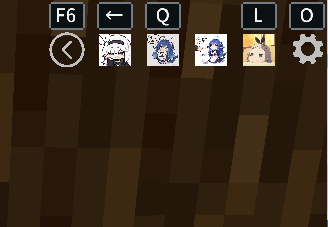
特性:
- 直接在 HUD 上显示按键绑定图标
- 支持 Minecraft 原版物品图标和资源纹理
- 支持 PNG、JPG 和 JPEG 格式的图标
- 配置原版和模组的按键绑定
- 即使按键未绑定,也可以通过 HUD 进行触发
- 使用动画切换展开和折叠 HUD
- 拖拽调整 HUD 的位置并缩放其大小
- 拖拽图标以更改其顺序
- 最多支持 9 个 HUD 槽位
- 保存和恢复整合包作者的预设
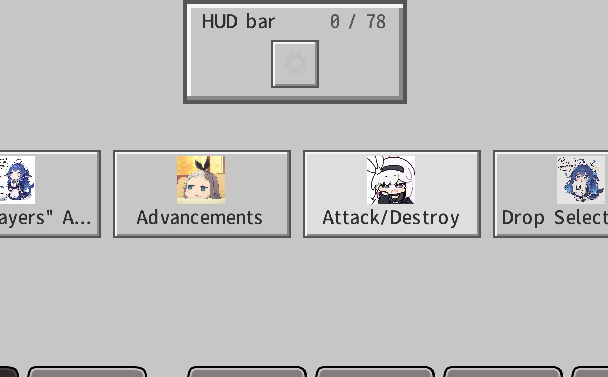
默认按键:
- O: 打开 HUD 编辑器
- F6: 展开或折叠 HUD
- Left Alt: 释放鼠标以便与 HUD 交互
- 按住 alt + 滚轮:选择一个图标并用左键点击使用
自定义图片路径: .minecraft/config/Hud_Menu/icons/
整合包预设: .minecraft/config/Hud_Menu/hud-menu-preset.json
“重置”按钮将恢复整合包作者的预设。“全部重置”会将所有按键、图标、槽位、HUD 位置和缩放到模组默认值。

你是这个资源的作者?登录后可认领此资源。
相似资源
 模组

玉Jade ?
Snownee
显示你正在注视的方块的信息。(适用于 Minecraft 1.16+ 的 Hwyla/Waila 分支)
实用前置
339
 模组
KubeJS
Lat
使用 JavaScript 编辑配方、添加自定义物品、编写世界事件!
前置实用
239
 模组

物品管理器Just Enough Items (JEI)
mezz
查看物品与配方
前置实用
239
 模组
Xaero的小地图
thexaero
在游戏画面角落显示附近世界地形、玩家、生物和实体的地图。可创建路径点,帮助你找到标记过的位置。
冒险交通
239
 模组
Applied Energistics 2
shartte
AE2:一款流行的自动化与存储模组
存储科技
217
 模组
WTHIT
deirn
那是什么?一个 Waila/Hwyla 的分支。
前置实用
165
评论 0
登录后参与评分
还没有评论,来抢沙发吧