IdleLens
为闲置玩家提供电影级摄像机。 IdleLens 是一款轻量级的 NeoForge 服务端挂机摄像机模组。
亮点
- 仅服务端: 可与未修改的原版客户端配合使用
- 32 种内置场景: 包含 26 种固定构图和 6 种径向缩放
- 使用 smootherstep 缓入缓出运动实现平滑的推近与拉远效果
- 连贯的手持晃动效果
- 原版操作栏中显示挂机计时器和退出提示
- 碰撞、世界边界、移动、维度、传送门及生命周期安全检查
- 当服务器 TPS 低于可配置阈值时,自动停止 cinematic(电影镜头)
- 在可用时使用 Spark 的滚动 5 秒 TPS 数据,并自带内置回退机制
摄像机行为
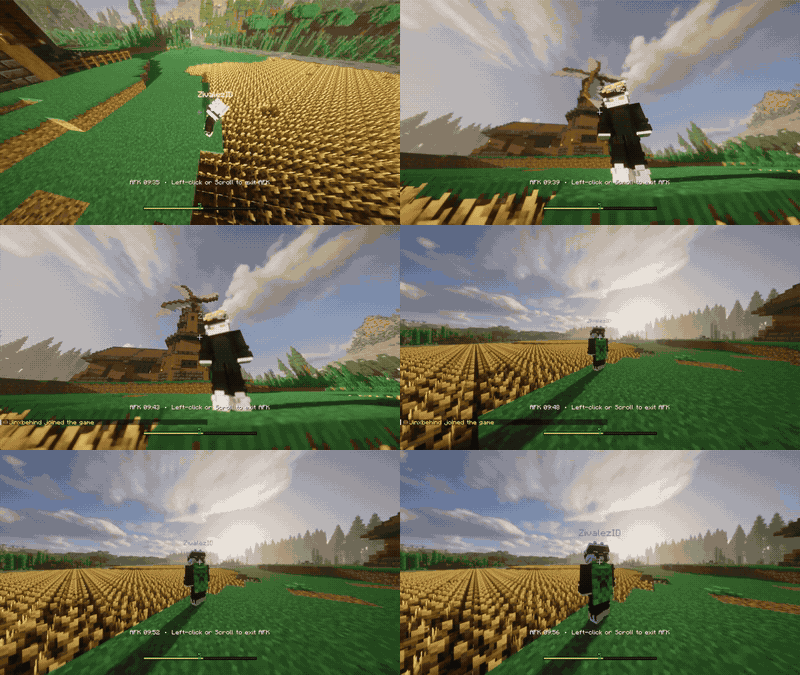
摄像机到达静止终点后,场景会以硬切方式结束。摄像机晃动会在基础姿态周围淡入淡出,且不会重新计算观看角度。
操作栏会显示累计挂机时间:
AFK 02:18 • 左键点击或滚动以退出挂机状态
移动、交互、滚动快捷栏或其他被检测到的活动将恢复正常的玩家摄像机视角。
要求
| 组件 |
所需版本 |
状态 |
| Minecraft |
1.21.1 |
必需 |
| NeoForge |
21.1.235 或更高版本 |
必需 |
| Spark |
1.x 或更高版本 |
可选(推荐) |
配置
Idle Lens 会生成 config/idlelens-server.toml 配置文件。
默认配置将在无活动 2 分钟后启动 cinematic。
常用设置:
[general]
enabled = true
idleSeconds = 120
cooldownSeconds = 10
maxConcurrentCinematics = 16
stopBelowTps = 15.0
exitHint = "左键点击或滚动以退出挂机状态"

[camera]
minimumRadius = 1.5
maximumRadius = 7.0
minimumHeight = 0.25
maximumHeight = 4.0
sceneSpeed = 1.0
handheldIntensity = 1.0
handheldSpeed = 1.0
collisionCheck = true
有用详情:
- 设置
exitHint = "" 可隐藏退出指令。
- 设置
stopBelowTps = 0 可禁用 TPS 安全检查。
- 推荐使用 Spark,因为它提供滚动 5 秒的 TPS 测量值。如果没有安装 Spark,IdleLens 仍完全可用,并使用 Minecraft 内置的平均刻时间作为回退方案。
- 空的
allowedDimensions 列表允许在所有维度中使用 cinematic。
maxConcurrentCinematics 限制同时存在的摄像机锚点和数据包处理数量。- 当最小值和最大值反转时,半径和高度限制会自动安全地归一化。
- 现有配置会保留其已保存的值。如果文件是由较早版本生成的,请手动更改旧的退出提示。
场景选择
默认场景列表接受精确名称和前缀匹配:
[scenes]
enabled = [
    "right_profile",
    "wide_orbit",
    "front_close",
    "rear_shoulder",
    "low_hero",
    "wide_reveal"
]
例如,wide_reveal 会启用其高空俯视、玩家下方、侧面轮廓和缩放变体。空列表或没有匹配场景的列表将回退到安全的内置场景。
高角度和低角度的静态镜头具有更高的默认选择权重。水平人像镜头仍以较低权重保留。所有六种缩放场景均通过其匹配的前缀保持启用状态。
安全性
当玩家处于死亡、睡眠、骑乘、坠落、游泳、位于传送门内、移动中或超出配置的维度规则外时,IdleLens 拒绝启动 cinematic。可选检查还可以阻止在敌对生物附近启动 cinematic。
在进行中的 cinematic 期间:
- 移动和不安全位移始终会恢复普通摄像机视角。
- 死亡、进入传送门、维度变化、登出和服务器关闭始终会恢复或丢弃摄像机锚点。
- 旋转、受伤、载具使用和睡眠遵循各自的取消设置。
- 碰撞检查从焦点进行射线投射,并将摄像机保持在固体方块和流体之外。
- 低 TPS 停止功能在安装 Spark 时使用它,并在缺失或其 API 未就绪时自动回退。
命令
所有命令都需要权限等级 2。
| 命令 |
操作 |
/idlelens test [player] |
使用正常场景选择启动 cinematic |
/idlelens scene <name> [player] |
启动特定场景 |
/idlelens stop [player] |
停止一名玩家,或在未指定玩家时停止所有会话 |
/idlelens status [player] |
显示会话状态和当前活跃场景 |
/idlelens debug true/false |
切换周期性诊断日志记录 |
/idlelens reload |
重置活跃会话;NeoForge 会监听服务器配置文件 |
常见问题
玩家需要安装 IdleLens 吗?
不需要。仅在 NeoForge 服务器上安装即可。
必须安装 Spark 吗?
不需要。Spark 是可选的,但建议安装以获得更好的低 TPS 检测能力。如果未安装 Spark,IdleLens 会使用其内置的回退机制。
IdleLens 会改变玩家的游戏模式或位置吗?
不会。它仅改变摄像机目标,并在会话结束时恢复玩家摄像机视角。
玩家如何退出挂机状态?
左键点击、滚动快捷栏、移动、交互或执行其他被检测到的活动。操作栏上的指令可以在配置文件中更改或隐藏。
为什么 cinematic 没有启动?
玩家可能处于不安全状态、超出了允许的维度、在该检查启用时靠近了敌对生物,或者服务器已达到会话上限。服务器 TPS 过低也会导致 cinematic 停止。
IdleLens
Give idle players a cinematic camera. IdleLens is a lightweight, server-side AFK camera mod for NeoForge.
Highlights
- Server-side only: works with unmodified vanilla clients
- 32 built-in scenes: 26 locked-off compositions and 6 radial zooms
- Smooth zoom in and zoom out using smootherstep ease-in-out motion
- Coherent handheld sway
- AFK timer and exit hint in the vanilla action bar
- Collision, world-border, movement, dimension, portal, and lifecycle safety checks
- Stops cinematics automatically when server TPS falls below a configurable threshold
- Uses Spark's rolling 5-second TPS when available, with a built-in fallback
Camera behavior
Scenes end with a hard cut after the camera reaches a stationary endpoint. Camera sway fades in and out around the base pose and does not recalculate the viewing rotation.
The action bar displays the cumulative AFK time:
AFK 02:18 • Left-click or Scroll to exit AFK
Movement, interaction, scrolling the hotbar, or other detected activity restores the normal player camera.
Requirements
| Component |
Required Version |
Status |
| Minecraft |
1.21.1 |
Required |
| NeoForge |
21.1.235 or newer |
Required |
| Spark |
1.x or newer |
Optional (Recommended) |
Configuration
Idle Lens generates config/idlelens-server.toml.
The default configuration starts a cinematic after 2 minutes without activity.
Common settings:
[general]
enabled = true
idleSeconds = 120
cooldownSeconds = 10
maxConcurrentCinematics = 16
stopBelowTps = 15.0
exitHint = "Left-click or Scroll to exit AFK"

[camera]
minimumRadius = 1.5
maximumRadius = 7.0
minimumHeight = 0.25
maximumHeight = 4.0
sceneSpeed = 1.0
handheldIntensity = 1.0
handheldSpeed = 1.0
collisionCheck = true
Useful details:
- Set
exitHint = "" to hide the exit instruction.
- Set
stopBelowTps = 0 to disable the TPS safety check.
- Spark is recommended for its rolling 5-second TPS measurement. Without Spark, IdleLens remains fully functional and uses Minecraft's built-in average tick time as a fallback.
- An empty
allowedDimensions list permits cinematics in every dimension.
maxConcurrentCinematics limits simultaneous camera anchors and packet work.- Radius and height limits are normalized safely when their minimum and maximum values are reversed.
- Existing configs keep their saved values. Change the old exit hint manually if the file was generated by an earlier version.
Scene selection
The default scene list accepts exact names and prefixes:
[scenes]
enabled = [
    "right_profile",
    "wide_orbit",
    "front_close",
    "rear_shoulder",
    "low_hero",
    "wide_reveal"
]
For example, wide_reveal enables its overhead, below-player, profile, and zoom variants. An empty list or a list with no matching scenes falls back to a safe built-in scene.
Elevated and low-angle static shots have higher default selection weights. Horizontal portraits remain available at lower weights. All six zoom scenes remain enabled by their matching prefixes.
Safety
IdleLens refuses to start a cinematic when the player is dead, sleeping, riding, falling, swimming, inside a portal, moving, or outside the configured dimension rules. Optional checks can also block cinematics near hostile mobs.
During an active cinematic:
- Movement and unsafe displacement always restore the normal camera.
- Death, portal entry, dimension changes, logout, and server shutdown always restore or discard the camera anchor.
- Rotation, damage, vehicle use, and sleep follow their respective cancellation settings.
- Collision checks raycast from the focus point and keep the camera outside solid blocks and fluids.
- A low-TPS stop uses Spark when installed and falls back automatically when it is absent or its API is not ready.
Commands
All commands require permission level 2.
| Command |
Action |
/idlelens test [player] |
Start a cinematic using normal scene selection |
/idlelens scene <name> [player] |
Start a specific scene |
/idlelens stop [player] |
Stop one player, or all sessions when no player is supplied |
/idlelens status [player] |
Show session state and the active scene |
/idlelens debug true/false |
Toggle periodic diagnostic logging |
/idlelens reload |
Reset active sessions; NeoForge watches the server config file |
FAQ
Do players need to install IdleLens?
No. Install it only on the NeoForge server.
Is Spark required?
No. Spark is optional but recommended for better low-TPS detection. IdleLens uses its built-in fallback when Spark is not installed.
Does IdleLens change the player's game mode or position?
No. It changes only the camera target and restores the player camera when the session ends.
How does a player exit AFK mode?
Left-click, scroll the hotbar, move, interact, or perform another detected activity. The action-bar instruction can be changed or hidden in the config.
Why did a cinematic not start?
The player may be in an unsafe state, outside the allowed dimensions, near a hostile mob when that check is enabled, or the server may have reached its session limit. Low server TPS can also stop cinematics.


 模组

 模组
 模组

 模组
 模组
 模组
评论 0
登录后参与评分
还没有评论,来抢沙发吧