
InstantXP
这个小巧的实用模组让经验吸收几乎瞬间完成,同时保留了部分经验球动画效果。InstantXP 仅改变经验球的收集速度:原版经验值数量、修补(Mending)机制以及经验球的数值均保持不变,该模组不会生成额外经验或手动丢弃经验球。
安装方法
单人游戏可以正常运行,因为 Minecraft 会在客户端内部运行一个集成服务器。经验逻辑仍然在服务端运行,只是位于你的本地游戏中。
对于多人游戏,请将 InstantXP 安装到服务端。玩家无需在客户端安装此模组。仅在客户端安装该模组不会影响专用服务器上的经验行为,因为经验拾取完全由服务端处理。
吸收时间基准测试
本表格基于 Fabric 加载器与 Minecraft 26.1 版本测量,估算了在受控环境下的经验吸收时间。测试世界最初为 Minecraft 1.21.1 创建,可在此下载 here。
| 经验等级 | MC 原版 | InstantXP V2.0 | 差异 | 减少幅度 |
|---|---|---|---|---|
| 5 | 00:00 | 00:00 | 00:00 | — |
| 10 | 00:01 | 00:00 | -00:01 | 100.00% |
| 15 | 00:02 | 00:01 | -00:01 | 50.00% |
| 20 | 00:03 | 00:01 | -00:02 | 66.67% |
| 25 | 00:05 | 00:01 | -00:04 | 80.00% |
| 30 | 00:07 | 00:02 | -00:05 | 71.43% |
| 35 | 00:11 | 00:03 | -00:08 | 72.73% |
| 40 | 00:15 | 00:04 | -00:11 | 73.33% |
| 45 | 00:22 | 00:05 | -00:17 | 77.27% |
| 50 | 00:29 | 00:07 | -00:22 | 75.86% |
| 55 | 00:38 | 00:09 | -00:29 | 76.32% |
| 60 | 00:47 | 00:11 | -00:36 | 76.60% |
| 65 | 00:57 | 00:13 | -00:44 | 77.19% |
| 70 | 01:10 | 00:16 | -00:54 | 77.14% |
| 75 | 01:24 | 00:19 | -01:05 | 77.38% |
| 80 | 01:39 | 00:23 | -01:16 | 76.77% |
| 85 | 01:54 | 00:26 | -01:28 | 77.19% |
| 90 | 02:11 | 00:30 | -01:41 | 77.10% |
| 95 | 02:28 | 00:34 | -01:54 | 77.03% |
| 100 | 02:47 | 00:39 | -02:08 | 76.65% |
| 105 | 03:03 | 00:44 | -02:19 | 75.96% |
| 110 | 03:22 | 00:49 | -02:33 | 75.74% |
| 115 | 03:49 | 00:54 | -02:55 | 76.42% |
| 120 | 04:13 | 01:00 | -03:13 | 76.28% |
| 125 | 04:36 | 01:05 | -03:31 | 76.45% |
| 130 | 05:02 | 01:12 | -03:50 | 76.16% |
| 135 | 05:27 | 01:18 | -04:09 | 76.15% |
| 140 | 05:55 | 01:25 | -04:30 | 76.06% |
| 145 | 06:24 | 01:32 | -04:52 | 76.04% |
| 150 | 06:53 | 01:39 | -05:14 | 76.03% |
| 155 | 07:23 | 01:47 | -05:36 | 75.85% |
| 160 | 07:56 | 01:54 | -06:02 | 76.05% |
| 165 | 08:31 | 02:03 | -06:28 | 75.93% |
| 170 | 09:06 | 02:11 | -06:55 | 76.01% |
| 175 | 09:43 | 02:20 | -07:23 | 75.99% |
| 180 | 10:22 | 02:29 | -07:53 | 76.05% |
| 185 | 11:00 | 02:38 | -08:22 | 76.06% |
| 190 | 11:41 | 02:47 | -08:54 | 76.18% |
| 195 | 12:20 | 02:57 | -09:23 | 76.08% |
| 200 | 13:01 | 03:07 | -09:54 | 76.06% |
| 205 | 13:45 | 03:18 | -10:27 | 76.00% |
| 210 | 14:29 | 03:28 | -11:01 | 76.06% |
| 215 | 15:13 | 03:39 | -11:34 | 76.01% |
| 220 | 16:00 | 03:50 | -12:10 | 76.04% |
| 225 | 16:49 | 04:02 | -12:47 | 76.02% |
| 230 | 17:37 | 04:14 | -13:23 | 75.97% |
| 235 | 18:26 | 04:26 | -14:00 | 75.95% |
| 240 | 19:16 | 04:38 | -14:38 | 75.95% |
| 245 | 20:08 | 04:51 | -15:17 | 75.91% |
| 250 | 21:02 | 05:04 | -15:58 | 75.91% |
| 255 | 21:55 | 05:17 | -16:38 | 75.89% |
| 260 | 22:52 | 05:30 | -17:22 | 75.95% |
| 265 | 23:50 | 05:44 | -18:06 | 75.94% |
| 270 | 24:49 | 05:58 | -18:51 | 75.96% |
| 275 | 25:48 | 06:12 | -19:36 | 75.97% |
| 280 | 26:46 | 06:27 | -20:19 | 75.90% |
| 285 | 27:47 | 06:42 | -21:05 | 75.88% |
| 290 | 28:52 | 06:57 | -21:55 | 75.92% |
| 295 | 29:55 | 07:12 | -22:43 | 75.93% |
| 300 | 31:01 | 07:28 | -23:33 | 75.93% |
| 305 | 32:07 | 07:44 | -24:23 | 75.92% |
| 310 | 33:15 | 08:00 | -25:15 | 75.94% |
| 315 | 34:23 | 08:17 | -26:06 | 75.91% |
| 320 | 35:31 | 08:34 | -26:57 | 75.88% |
| 325 | 36:43 | 08:51 | -27:52 | 75.90% |
| 330 | 37:58 | 09:08 | -28:50 | 75.94% |
| 335 | 39:07 | 09:26 | -29:41 | 75.88% |
| 340 | 40:20 | 09:44 | -30:36 | 75.87% |
| 345 | 41:35 | 10:02 | -31:33 | 75.87% |
| 350 | 42:49 | 10:21 | -32:28 | 75.83% |
| 355 | 44:06 | 10:40 | -33:26 | 75.81% |
| 360 | 45:28 | 10:59 | -34:29 | 75.84% |
| 365 | 46:48 | 11:18 | -35:30 | 75.85% |
| 370 | 48:08 | 11:38 | -36:30 | 75.83% |
| 375 | 49:30 | 11:58 | -37:32 | 75.82% |
| 380 | 50:54 | 12:18 | -38:36 | 75.83% |
| 385 | 52:19 | 12:38 | -39:41 | 75.85% |
| 390 | 53:43 | 12:59 | -40:44 | 75.83% |
| 395 | 55:08 | 13:20 | -41:48 | 75.82% |
| 400 | 56:37 | 13:42 | -42:55 | 75.80% |
| 405 | 58:06 | 14:03 | -44:03 | 75.82% |
| 410 | 59:37 | 14:25 | -45:12 | 75.82% |
| 415 | 61:07 | 14:47 | -46:20 | 75.81% |
| 420 | 62:39 | 15:10 | -47:29 | 75.79% |
| 425 | 64:13 | 15:33 | -48:40 | 75.79% |
| 430 | 65:48 | 15:56 | -49:52 | 75.79% |
| 435 | 67:24 | 16:19 | -51:05 | 75.79% |
| 440 | 69:01 | 16:43 | -52:18 | 75.78% |
| 445 | 70:41 | 17:06 | -53:35 | 75.81% |
| 450 | 72:20 | 17:31 | -54:49 | 75.78% |
| 455 | 73:59 | 17:55 | -56:04 | 75.78% |
| 460 | 75:42 | 18:20 | -57:22 | 75.78% | | 465 | 77:25 | 18:45 | -58:40 | 75.78% | | 470 | 79:08 | 19:10 | -59:58 | 75.78% | | 475 | 80:55 | 19:36 | -61:19 | 75.78% | | 480 | 82:43 | 20:01 | -62:42 | 75.80% | | 485 | 84:32 | 20:28 | -64:04 | 75.79% | | 490 | 86:25 | 20:54 | -65:31 | 75.81% | | 495 | 88:16 | 21:21 | -66:55 | 75.81% | | 500 | 90:09 | 21:48 | -68:21 | 75.82% |
命令方块
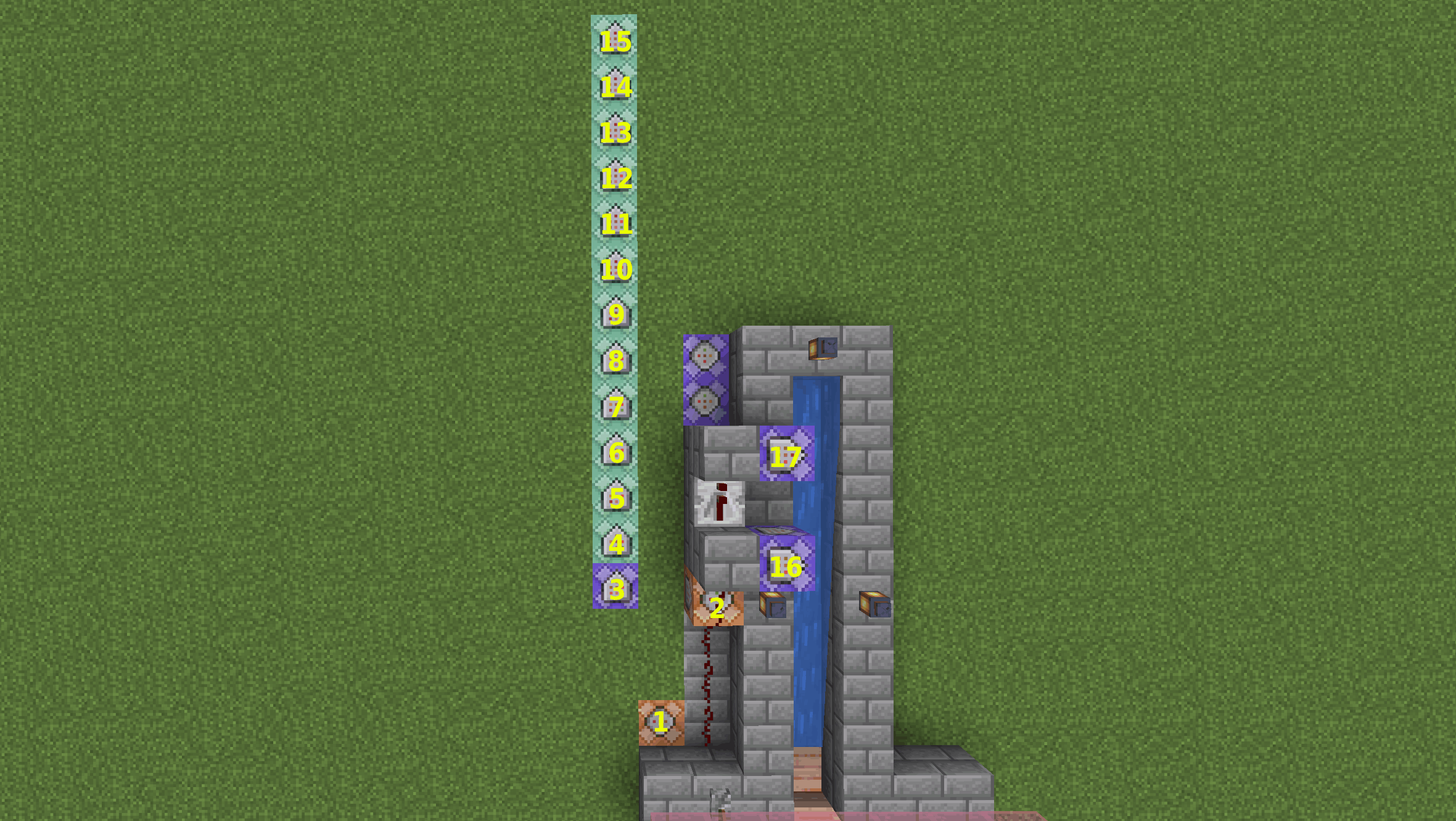
本节列出了用于创建游戏内等级计数器的命令(地图可在此处获取)。
| #1 | /xp set @p 0 points |
| #2 | /xp set @p 0 levels |
| #3 | /scoreboard players add @p tiempo 1 |
| #4 | /execute as @p store result score @s nivel run xp query @s levels |
| #5 | /execute as @p if score @s nivel matches 0 run scoreboard players set @s objetivo 5 |
| #6 | /execute as @p if score @s nivel matches 0 run scoreboard players set @s tiempo 0 |
| #7 | /execute as @p if score @s nivel >= @s objetivo run scoreboard players operation @s temp = @s tiempo |
| #8 | /execute as @p if score @s nivel >= @s objetivo run scoreboard players operation @s temp /= #20 tiempo |
| #9 | /execute as @p if score @s nivel >= @s objetivo run scoreboard players operation @s minutos = @s temp |
| #10 | /execute as @p if score @s nivel >= @s objetivo run scoreboard players operation @s minutos /= #60 tiempo |
| #11 | /execute as @p if score @s nivel >= @s objetivo run scoreboard players operation @s segundos = @s temp |
| #12 | /execute as @p if score @s nivel >= @s objetivo run scoreboard players operation @s segundos %= #60 tiempo |
| #13 | /execute as @p if score @s nivel >= @s objetivo if score @s segundos matches 0..9 run tellraw @s [{"text":"Level "},{"score":{"name":"@s","objective":"objetivo"}},{"text":" reached in "},{"score":{"name":"@s","objective":"minutos"}},{"text":":0"},{"score":{"name":"@s","objective":"segundos"}}] |
| #14 | /execute as @p if score @s nivel >= @s objetivo if score @s segundos matches 10.. run tellraw @s [{"text":"Level "},{"score":{"name":"@s","objective":"objetivo"}},{"text":" reached in "},{"score":{"name":"@s","objective":"minutos"}},{"text":":"},{"score":{"name":"@s","objective":"segundos"}}] |
| #15 | /execute as @p if score @s nivel >= @s objetivo run scoreboard players add @s objetivo 5 |
| #16 | /summon experience_orb ~1 ~ ~ {Value:10} |
| #17 | /summon experience_orb ~1 ~ ~ {Value:30} |

你是这个资源的作者?登录后可认领此资源。
相似资源
 模组

显示你正在注视的方块的信息。(适用于 Minecraft 1.16+ 的 Hwyla/Waila 分支)
 模组

查看物品与配方
 模组
在游戏画面角落显示附近世界地形、玩家、生物和实体的地图。可创建路径点,帮助你找到标记过的位置。
 模组
使用 JavaScript 编辑配方、添加自定义物品、编写世界事件!
 模组
AE2:一款流行的自动化与存储模组
 模组
添加区块认领和玩家组队功能,并与 Xaero's Minimap 和 World Map 集成
评论 0
登录后参与评分
还没有评论,来抢沙发吧