
Integrated Circuit
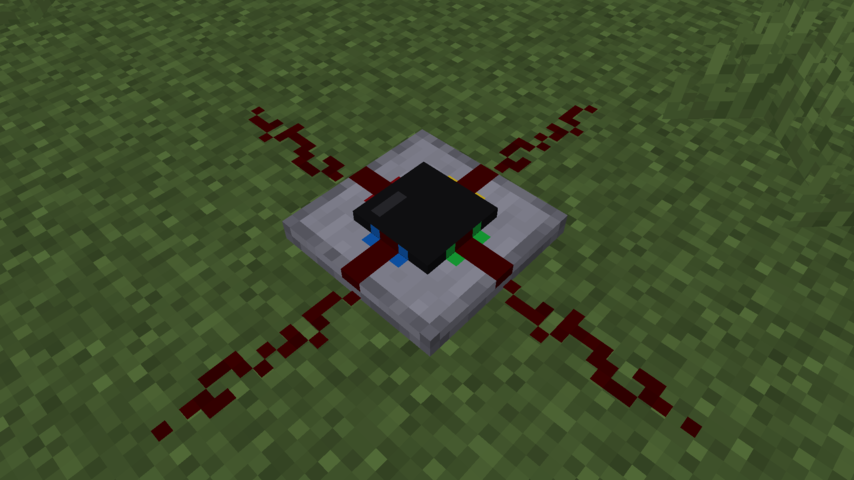
一款 Minecraft 模组,添加了集成电路红石组件。 每个集成电路方块都有一个 15x15 的网格,你可以在其中放置二维的红石组件。电路的每一侧都可以用作你电路的输入或输出。
使用方法
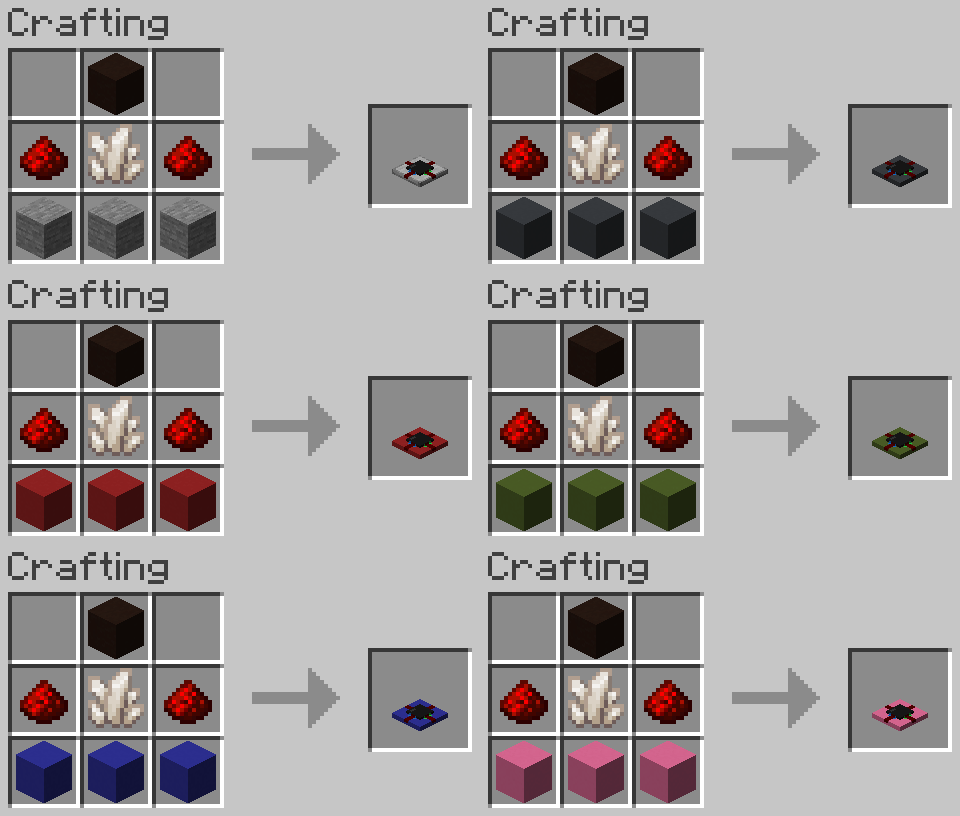
要合成一个集成电路,你需要 2 个红石粉、1 个石英、1 个黑色陶瓦以及按如下方式排列的 3 个混凝土或石头:
放置并点击它时,会打开电路编辑器界面。 你可以选择左侧的一个方块,然后像在 Minecraft 中一样将其放置在 15x15 的网格中。 要旋转组件,请使用滚轮。 调整中继器延迟或比较器模式是通过右键点击组件来完成的。
四个端口使用四种颜色进行标记,以关联它们与集成电路方块的侧面。 每个端口可以是输入或输出,这可以通过在编辑器中右键点击它来更改。
你还可以通过将集成电路放入合成网格, 连同空的集成电路一起复制电路,类似于书籍的复制方式,或者通过与染料物品(如羊毛或潜影盒)合成来重新染成其他颜色。
配置
当安装了 cloth-config 和 ModMenu 时, 可以从模组的 ModMenu 页面访问配置。 如果没有安装 cloth-config,该模组将使用原版的按键绑定和默认配置选项。
配置允许自定义放置、破坏和拾取组件的三个主要按键绑定。 你还可以更改滚动行为(旋转组件、滚动调色板)并反转滚动方向。
鸣谢
微调后的红石组件纹理(拉杆、侦测器)的鸣谢:
Vanilla Tweaks:
Integrated Circuit
A Minecraft mod that adds an integrated circuit redstone component. Each integrated circuit block has a 15x15 grid where you can place two-dimensional redstone components. Each side of the circuit can be used as an input or output for your circuit.
How to use
To craft an integrated circuit, you need 2 redstone dust, 1 quartz, 1 black terracotta, and 3 concrete or stone arranged like so:
When you place one down and click on it, it will open the circuit editor screen. You can select a block on the left, and place it in the 15x15 grid as you normally would in minecraft. To rotate a component, you use the scroll wheel. Adjusting repeater delay or the comparator mode is done by right clicking on a component.
The four ports are labeled using four colors to associate them with the sides of the integrated circuit block. Each port can be an input or output, which can be changed by right clicking it in the editor.
You can also copy circuits by putting an integrated circuit in the crafting grid, along with empty integrated circuits, similar to how books are copied, or re-dye them a different color by crafting them with a dye item, like with wool or shulker boxes.
Config
When having cloth-config and ModMenu installed, a config can be accessed from the Mod's modmenu page. Without cloth-config installed, the mod will use the vanilla keybindings and default config options.
The config allows to customize the three main keybindings for placing, destroying and picking components. You can also change the scroll behaviour (rotate component, scroll palette) and inverse the scroll direction.
Credits
Credits for the tweaked redstone component textures (levers, observers):
Vanilla Tweaks:
下载 Integrated circuit
下载 Integrated circuit
下载 Integrated circuit
下载 Integrated circuit
下载 Integrated circuit
下载 Integrated circuit
下载 Integrated circuit
下载 Integrated circuit
下载 Integrated circuit
需要联机服务器吗?
稳定流畅、一键部署,几分钟即可和朋友联机开服
最低仅需 8 元/月 即可畅快联机
下载 Integrated circuit
需要联机服务器吗?
稳定流畅、一键部署,几分钟即可和朋友联机开服
最低仅需 8 元/月 即可畅快联机
- 修复了放置物品时电路未被复制的问题(#49)
- 使打开背包的快捷键(E)关闭电路界面
关于这个资源的讨论、问题反馈与使用心得
还没有讨论,来发第一帖吧
你是这个资源的作者?登录后可认领此资源。
相似资源
 模组

一个用于收集生物掉落物的多区块模组。
 模组

显示你正在注视的方块的信息。(适用于 Minecraft 1.16+ 的 Hwyla/Waila 分支)
 模组
使用 JavaScript 编辑配方、添加自定义物品、编写世界事件!
 模组

查看物品与配方
 模组
在游戏画面角落显示附近世界地形、玩家、生物和实体的地图。可创建路径点,帮助你找到标记过的位置。
 模组
AE2:一款流行的自动化与存储模组
评论 0
登录后参与评分
还没有评论,来抢沙发吧