
物品物理
你的背包不再是一个整齐的网格。27 个主槽位变成了一个袋子,物品会相互堆叠、下落、弹跳和滚动。
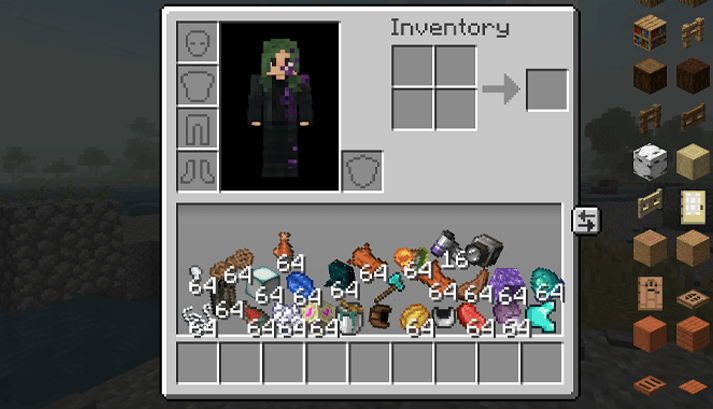
与物品互动
- 使用鼠标左键抓取物品并移动它。在鼠标移动时松开,物品会飞越整个袋子。
- 使用鼠标滚轮、方向键或 A 和 D 键旋转你手中的物品。
- 在背包窗口外松开物品,会将一个该物品扔出到世界中。按住 Shift 或 Ctrl 可以扔出整组。
- 在物品上按 Q 丢出一个,或按 Ctrl+Q 丢出整组。
- 右键点击袋中的物品,将一组物品分成两半。
- 将物品拖拽到快捷栏、护甲或合成槽位中将其放入。按住 Shift 只放入一个。
- 当光标持有物品组时?点击袋子内部,它就会落在你点击的位置。
物品表现得像真实物体
- 铁砧很重且几乎不弹跳,羽毛缓慢飘落,史莱姆球会弹跳,冰块会滑动。
- 跳跃或坠落时,袋子里的所有物品都会向上飞起。落地时袋子会震动。
- 两个相互碰撞的相同物品会合并为一组。
- 光标下的物品会稍微变大并倾向光标。
- 当物品撞击到其他东西时会产生火花、灰尘和轨迹,撞击音效取决于物品的重量。
新增:保留部分槽位为普通槽位
点击袋子右上角的小网格按钮。点击或拖动单元格将其标记为绿色。绿色单元格保持为普通槽位:其中的物品保持原位,袋子的其余部分围绕它堆叠。完成后再次点击该按钮。你的选择会被保存。
设置
你可以更改重力、弹性、摩擦力、悬停效果、自动堆叠、粒子和声音,或者关闭物理袋子。在 Forge 和 NeoForge 上打开模组列表并按下 Config。在 Fabric 上使用 Mod Menu。
须知
- 只有你需要安装此模组。服务器不需要,并且它可以与任何服务器配合使用,包括原版服务器。
- 快捷栏、护甲、副手和合成网格照常工作。创造模式下的背包未受影响。
- 箱子、熔炉和其他容器保持正常的网格布局。
- 不需要 Fabric API。
版本
| Minecraft | 加载器 |
|---|---|
| 1.12.2 | Forge |
| 1.20.1 | Fabric, Forge |
| 1.21.1 | Fabric, Forge, NeoForge |
| 26.3 | Fabric, Forge, NeoForge |
Inventory Physics
Your inventory is no longer a neat grid. The 27 main slots become a bag where items lie on top of each other, fall, bounce and roll around.
Playing with items
- Grab an item with the left mouse button and move it around. Let go while the mouse is moving and the item flies across the bag.
- Spin the item you are holding with the mouse wheel, the arrow keys or A and D.
- Let go of an item outside the inventory window to throw one of it into the world. Hold Shift or Ctrl to throw the whole stack.
- Press Q over an item to drop one, or Ctrl+Q to drop the whole stack.
- Right-click an item in the bag to split the stack in half.
- Drop an item on the hotbar, armor or crafting slots to put it there. Hold Shift to put just one.
- Holding a stack on the cursor? Click inside the bag and it lands where you clicked.
Items act like real things
- An anvil is heavy and barely bounces, a feather drifts down slowly, slime balls bounce, ice slides.
- Jump or fall and everything in the bag flies up. Land and the bag shakes.
- Two identical items that bump into each other merge into one stack.
- An item under the cursor grows a little and leans toward it.
- Sparks, dust and trails fly when items hit something, and the knock sound depends on how heavy the item is.
New: keep some slots as normal slots
Click the small grid button at the top right of the bag. Click or drag over cells to mark them green. Green cells stay normal slots: the item in them stays in place and the rest of the bag piles up around it. Click the button again when you are done. Your choice is saved.
Settings
You can change gravity, bounciness, friction, the hover effect, auto-stacking, particles and sounds, or turn the physics bag off. On Forge and NeoForge open the Mods list and press Config. On Fabric use Mod Menu.
Good to know
- Only you need the mod. Servers don't, and it works on any server, vanilla included.
- The hotbar, armor, offhand and crafting grid work as usual. The creative inventory is not changed.
- Chests, furnaces and other containers keep the normal grid.
- Fabric API is not required.
Versions
| Minecraft | Loaders |
|---|---|
| 1.12.2 | Forge |
| 1.20.1 | Fabric, Forge |
| 1.21.1 | Fabric, Forge, NeoForge |
| 26.3 | Fabric, Forge, NeoForge |

下载 Inventory Physics
下载 Inventory Physics
需要联机服务器吗?
稳定流畅、一键部署,几分钟即可和朋友联机开服
最低仅需 8 元/月 即可畅快联机
下载 Inventory Physics
下载 Inventory Physics
下载 Inventory Physics
下载 Inventory Physics
需要联机服务器吗?
稳定流畅、一键部署,几分钟即可和朋友联机开服
最低仅需 8 元/月 即可畅快联机
下载 Inventory Physics
下载 Inventory Physics
需要联机服务器吗?
稳定流畅、一键部署,几分钟即可和朋友联机开服
最低仅需 8 元/月 即可畅快联机
下载 Inventory Physics
需要联机服务器吗?
稳定流畅、一键部署,几分钟即可和朋友联机开服
最低仅需 8 元/月 即可畅快联机
下载 Inventory Physics
- 新增:可以选择将背包格子保留为普通物品栏。点击背包右上角的网格按钮即可切换。
- 现已支持 Fabric 和 Forge,适用于 Minecraft 1.12.2、1.20.1 以及 26.3 版本。
- 当鼠标悬停在一个物品堆上时,在背包内点击可将该物品放置到你所点击的位置。
- 修复了命中与投掷音效无法正常播放的问题。
- 在本版本中,箱子及其他容器内的物品不再具有物理效果。
- 物品物理效果现在适用于箱子、熔炉以及所有容器。
- 新增对 Curios API 的完整支持。
关于这个资源的讨论、问题反馈与使用心得
还没有讨论,来发第一帖吧
你是这个资源的作者?登录后可认领此资源。
相似资源
 模组

显示你正在注视的方块的信息。(适用于 Minecraft 1.16+ 的 Hwyla/Waila 分支)
 模组

查看物品与配方
 模组
在游戏画面角落显示附近世界地形、玩家、生物和实体的地图。可创建路径点,帮助你找到标记过的位置。
 模组
使用 JavaScript 编辑配方、添加自定义物品、编写世界事件!
 模组
AE2:一款流行的自动化与存储模组
 模组
添加区块认领和玩家组队功能,并与 Xaero's Minimap 和 World Map 集成
评论 0
登录后参与评分
还没有评论,来抢沙发吧