Item Filter
Item Filter 是一款 Minecraft Fabric 模组,添加了一个可配置的高速物品过滤方块。
它的运作方式类似于漏斗,但具备过滤槽、可切换的过滤模式以及最高可达 640× 的可调节传输速度。你可以选择允许哪些物品通过,或者禁用过滤以传输任何物品。
展示
特性
| 特性 |
描述 |
| ? Item Filter 方块 |
添加了一个专注于物品过滤的自定义漏斗类方块。 |
| ⚡ 高速传输 |
无需原版漏斗的冷却时间即可传输完整的一组物品。 |
| ? 可调速度 |
可将传输速度配置为 1× 至 640×。 |
| ⚙️ Mod Menu 集成 |
通过 Mod Menu 配置界面调整传输速度。 |
| ? 多人游戏支持 |
服务器控制传输速度,确保多人游戏中行为一致。 |
| ? 可配置过滤 |
选择允许通过的物品。 |
| ? 可切换模式 |
在过滤模式和不受限制的物品传输之间切换。 |
| ⬇️ 从上方抽取 |
从箱子、 barrels(桶)、熔炉、烟熏炉及其他容器中抽取物品。 |
| ? 大型箱子支持 |
支持大型箱子和带锁的大型箱子。 |
| ? 掉落物拾取 |
收集来自上方的掉落物品。 |
| ↪️ 定向输出 |
按照方块朝向的方向输出物品。 |
| ?️ 自定义 GUI |
包含过滤槽、内部物品槽以及开/关按钮。 |
工作原理
像放置原版漏斗一样放置 Item Filter。
物品可以通过顶部的漏斗进入、直接从上方容器中抽取,或作为掉落物被收集。
物品将从方块朝向的方向离开。
在可能的情况下,物品将直接在容器之间传输,而不经过内部存储槽。
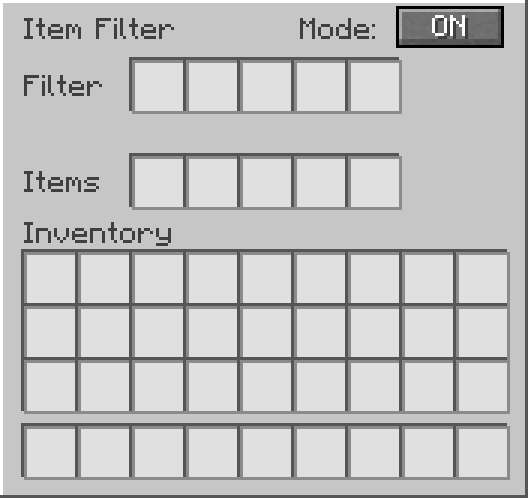
在 GUI 中:
- Filter 槽定义允许通过的物品。
- Items 槽作为内部库存。
- Mode ON 仅允许过滤后的物品通过。
- Mode OFF 允许任何物品通过。
当过滤模式为 ON 时,只有与过滤槽匹配的物品才能进入 Item Filter。
当过滤模式为 OFF 时,Item Filter 允许任何物品通过。
传输速度
从 版本 1.2.0 开始,Item Filter 具备高速传输功能,并支持可调节的吞吐量。
传输速度范围为 1× 至 640×,默认启用 640×。
传输速度参考
| 设置 |
最大传输速率 |
| 1× |
每秒 10 个物品 |
| 32× |
每秒 320 个物品 |
| 64× |
每秒 640 个物品 |
| 128× |
每秒 1,280 个物品 |
| 256× |
每秒 2,560 个物品 |
| 320× |
每秒 3,200 个物品 |
| 640× |
每秒 6,400 个物品 |
传输速率为 20 TPS 下的理论最大值。实际性能取决于可用物品数量、目标容量、库存限制以及服务器性能。
配置
安装 Mod Menu 后,导航至:
Mods → Item Filter → Configure → Transfer Speed
选择你喜欢的速度并保存配置。
在单人游戏中,传输速度可以在本地进行配置。在专用服务器上,服务器管理员控制所有玩家的传输速度。
Mod Menu 是可选的,在专用服务器上并非必需。
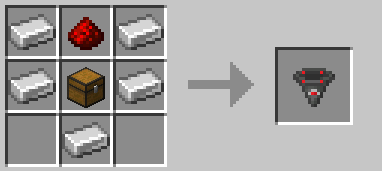
合成配方
GUI 预览
支持
需要帮助、发现错误或想要提出建议?
加入 Discord 支持论坛:
许可证
本项目采用 MIT 许可证授权。
Item Filter
Item Filter is a Minecraft Fabric mod that adds a configurable, high-speed item filter block.
It works like a hopper, but with filter slots, a toggleable filter mode, and adjustable transfer speeds of up to 640×. Choose which items are allowed to pass through, or disable filtering to transfer any item.
Showcase
Features
| Feature |
Description |
| ? Item Filter Block |
Adds a custom hopper-like block focused on item filtering. |
| ⚡ High-Speed Transfers |
Transfers full stacks without the vanilla hopper cooldown. |
| ? Adjustable Speed |
Configure transfer speeds from 1× to 640×. |
| ⚙️ Mod Menu Integration |
Adjust transfer speed through the Mod Menu configuration screen. |
| ? Multiplayer Support |
Server-controlled transfer speed for consistent multiplayer behavior. |
| ? Configurable Filter |
Choose which items are allowed to pass through. |
| ? Toggleable Mode |
Switch between filtered mode and unrestricted item transfers. |
| ⬇️ Pulls From Above |
Extracts items from chests, barrels, furnaces, smokers, and other inventories. |
| ? Double Chest Support |
Supports large chests and trapped large chests. |
| ? Dropped Item Pickup |
Collects dropped items from above. |
| ↪️ Directional Output |
Outputs items in the direction the block is facing. |
| ?️ Custom GUI |
Includes filter slots, internal item slots, and an ON/OFF button. |
How It Works
Place the Item Filter like a vanilla hopper.
Items can enter from the top through hoppers, be pulled directly from inventories above, or be collected as dropped items.
Items leave through the direction the block is facing.
Whenever possible, items transfer directly between inventories without passing through the internal storage slots.
Inside the GUI:
- Filter slots define which items are allowed to pass.
- Items slots work as the internal inventory.
- Mode ON allows only filtered items.
- Mode OFF allows any item to pass through.
When filter mode is ON, only items matching the filter slots can enter the Item Filter.
When filter mode is OFF, the Item Filter allows any item to pass through.
Transfer Speed
Starting with version 1.2.0, Item Filter features high-speed transfers with adjustable throughput.
Transfer speed ranges from 1× to 640×, with 640× enabled by default.
Transfer Speed Reference
| Setting |
Maximum Transfer Rate |
| 1× |
10 items/s |
| 32× |
320 items/s |
| 64× |
640 items/s |
| 128× |
1,280 items/s |
| 256× |
2,560 items/s |
| 320× |
3,200 items/s |
| 640× |
6,400 items/s |
Transfer rates are theoretical maximums at 20 TPS. Actual performance depends on available items, destination capacity, inventory restrictions, and server performance.
Configuration
With Mod Menu installed, navigate to:
Mods → Item Filter → Configure → Transfer Speed
Choose your preferred speed and save the configuration.
In single-player, transfer speed can be configured locally. On dedicated servers, the server administrator controls the transfer speed for all players.
Mod Menu is optional and is not required on dedicated servers.
Recipe
GUI Preview
Support
Need help, found a bug, or want to suggest something?
Join the Discord support forum:
License
This project is licensed under the MIT License.


 模组

 模组
 模组

 模组

 模组

 模组
评论 0
登录后参与评分
还没有评论,来抢沙发吧