Jail Mod (Fabric)
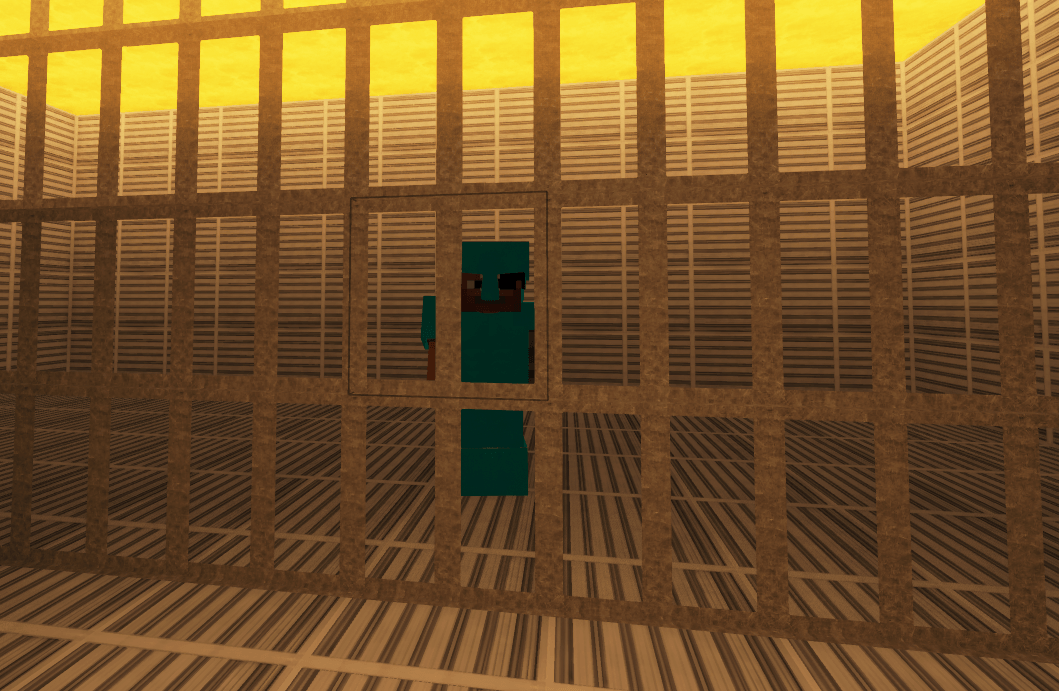
Jail Mod 是一个服务端模组,允许你将玩家囚禁在虚拟监狱中,直到他们被释放前禁止与世界互动。它非常适合那些希望对特定玩家施加临时惩罚或暂时限制其行动自由的 Minecraft 服务器。
主要功能
- 临时监禁:你可以将玩家囚禁一段特定的时间,在此期间阻止其与方块、实体和物品(如桶装岩浆或水)进行交互。
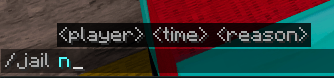
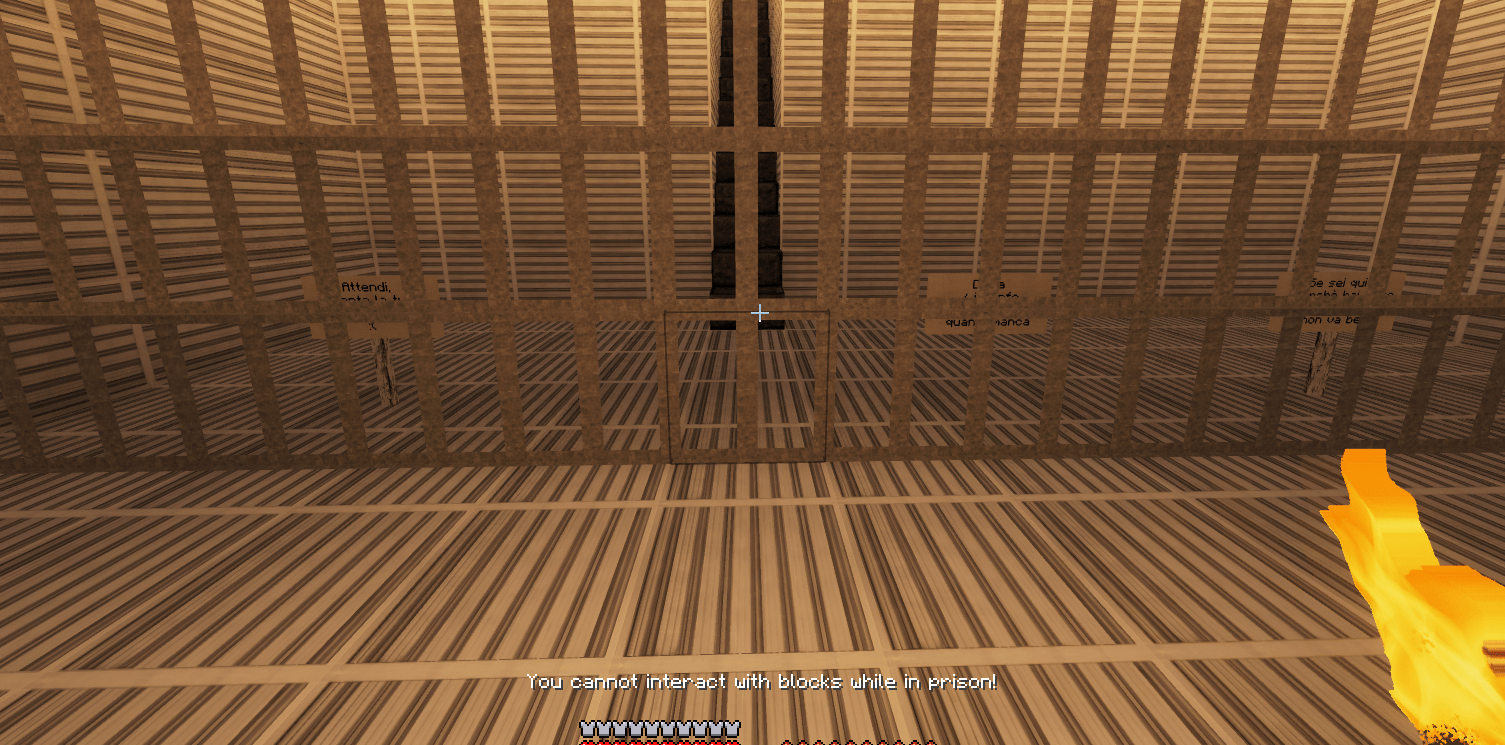
- 自动或手动释放:玩家在设定时间到达后会自动释放,或者管理员可以手动释放他们。
- 监禁原因:当你囚禁一名玩家时,你可以指定一个原因,该原因会告知玩家。
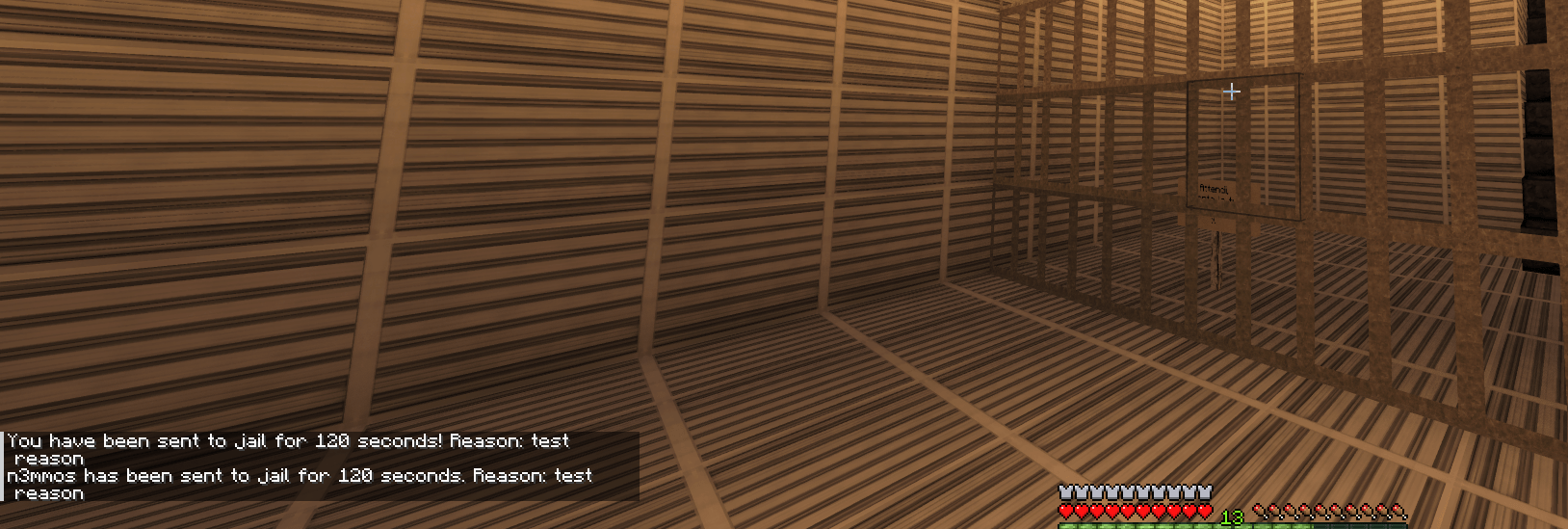
- 查询剩余时间的命令:被囚禁的玩家可以使用命令查看距离释放还有多少时间。

使用方法:
-
建造一座监狱(封闭的结构)。
-
使用命令 /jail set x y z 设置囚犯生成坐标(例如 /jail set 0 60 0)。
-
使用 /jail reload 重新加载配置。
-
使用 jail playerexample 120 Griefing 将某人送入监狱。
-
如果你不想等待设定的秒数(例如 120 秒),可以使用命令 /unjail playerexample 提前释放玩家。
要求
- Minecraft 1.21 或更高版本
- Fabric API
安装
- 将模组的
.jar 文件放入 Minecraft 服务器的 mods 文件夹中。
- 启动服务器以生成配置文件。
可用命令
1. /jail player time reason
- 描述:将玩家囚禁指定的秒数,并说明原因。
- 使用者:仅限管理员或服务器操作员。
- 语法:
/jail player_name time_in_seconds reason
- 示例:
/jail Steve 300 Griefing 此命令将玩家 Steve 囚禁 300 秒(5 分钟),原因为“破坏”。
2. /unjail player
- 描述:在时间到期前手动释放一名玩家。
- 使用者:仅限管理员或服务器操作员。
- 语法:
/unjail player_name
- 示例: /unjail Steve
此命令将手动释放 Steve 出狱。
3. /jail info
- 描述:允许被囚禁的玩家查看距离释放的剩余时间及囚禁原因。
- 使用者:仅限被囚禁的玩家。
- 示例:
/jail info 此命令将返回类似以下消息:“你将在 200 秒后获释。原因:破坏。”
4. /jail reload
- 描述:在不重启服务器的情况下重新加载模组配置和语言消息。
- 使用者:仅限管理员或服务器操作员。
- 示例:
/jail reload 此命令重新加载模组的配置,如果配置文件已修改,则非常有用。
5. /jail set
- 描述:设置被囚禁玩家的生成坐标。这是玩家被送入监狱时出现的位置。
- 使用者:仅限管理员或服务器操作员。
- 语法:
/jail set x y z
- 示例:
/jail set 0 60 0
此命令将监狱生成位置设置为坐标 (0, 60, 0)。
监禁期间禁止的交互
当玩家被囚禁时,他们无法执行以下操作:
- 使用方块,如门、拉杆或按钮。
- 与实体交互,如村民或动物。
- 使用岩浆桶或水桶。
- 破坏或放置方块。
自动释放
- 当设定的时间结束时,玩家将自动从监狱中释放。
- 在被囚禁期间,玩家可以使用
/jail info 命令查看剩余时间。
配置文件
config/jailmod/config.json
此文件自动生成,允许你配置监狱的位置以及玩家的释放位置。以下是你可以找到的选项:
use_previous_position:如果设置为 true,玩家将在被囚禁前的位置释放。如果设置为 false,他们将在特定位置释放。release_position:定义默认的释放位置坐标 x, y, z,当 use_previous_position 设置为 false 时生效。jail_position:定义监狱位置的坐标 x, y, z。
配置示例:
    {
    "use_previous_position": true,
    "release_position": {
      "x": 100,
      "y": 65,
      "z": 100
    },
    "jail_position": {
      "x": 0,
      "y": 60,
      "z": 0
    }
    }
config/jailmod/language.txt
此文件包含游戏中显示的消息,可根据服务器的语气或风格进行自定义。如果文件不存在,它将使用默认消息自动生成。以下是你可以修改的一些消息:
jail_player: 玩家被关押时收到的消息。使用变量 {time} 表示持续时间,{reason} 表示原因。
示例:"You have been jailed for {time} seconds! Reason: {reason}"jail_broadcast: 当一名玩家被关押时,向服务器所有玩家广播的消息。
示例:"{player} has been jailed for {time} seconds. Reason: {reason}"unjail_player_manual: 玩家被手动释放时收到的消息。
示例:"You have been manually released from jail!"unjail_broadcast_manual: 当一名玩家被手动释放时,向服务器所有玩家广播的消息。
示例:"{player} has been manually released from jail!"unjail_player_auto: 玩家因服刑期满而自动释放时收到的消息。
示例:"You have been released after serving your sentence."unjail_broadcast_auto: 当一名玩家因服刑期满而自动释放时,向服务器所有玩家广播的消息。
示例:"{player} has been released after serving their sentence."block_interaction_denied: 告知玩家在关押期间无法与方块交互的消息。
示例:"You cannot interact with blocks while in jail!"entity_interaction_denied: 告知玩家在关押期间无法与实体交互的消息。
示例:"You cannot interact with entities while in jail!"bucket_use_denied: 告知玩家在关押期间无法使用岩浆桶或水桶的消息。
示例:"You cannot use lava or water buckets while in jail!"item_use_denied: 告知玩家在关押期间无法使用物品的消息。
示例: "You cannot use items while in jail!"block_break_denied: 告知玩家在关押期间无法破坏方块的消息。
示例: "You cannot break blocks while in jail!"jail_info_message: 当玩家使用 /jail info 命令时,显示剩余刑期及关押原因的消息。
示例: "You are in jail for another {time} seconds. Reason: {reason}."not_in_jail_message: 如果玩家不在监狱中却尝试使用 /jail info 命令时显示的消息。
示例: "You are not in jail!"
默认语言文件 (Default language.txt) 示例:
    jail_player=You have been jailed for {time} seconds! Reason: {reason}
    jail_broadcast={player} has been jailed for {time} seconds. Reason: {reason}
    unjail_player_manual=You have been manually released from jail!
    unjail_broadcast_manual={player} has been manually released from jail!
    unjail_player_auto=You have been released after serving your sentence.
    unjail_broadcast_auto={player} has been released after serving their sentence.
    block_interaction_denied=You cannot interact with blocks while in jail!
    entity_interaction_denied=You cannot interact with entities while in jail!
    bucket_use_denied=You cannot use lava or water buckets while in jail!
    item_use_denied=You cannot use items while in jail!
    block_break_denied=You cannot break blocks while in jail!
    jail_info_message=You are in jail for another {time} seconds. Reason: {reason}.
    not_in_jail_message=You are not in jail!
使用技巧
更改配置或语言消息后,请使用 /jail reload 命令来应用更改,无需重启服务器。始终为关押指定明确的原因,以便玩家清楚自己为何被关押。
使用示例
设置监狱出生点位置:
/jail set 0 60 0
对不当行为进行关押:
/jail Alex 600 Offending another player
这将把 Alex 关押 10 分钟,原因为“冒犯其他玩家”。
检查关押时间:
/jail info
被关押的玩家可以使用此命令查看剩余时间。
Jail Mod (Fabric)
The Jail Mod is a server-side mod that allows you to imprison players in a virtual prison, preventing them from interacting with the world until they are released. It is perfect for Minecraft servers where you want to impose temporary penalties or temporarily limit the movement of certain players.
Key Features
- Temporary Imprisonment: You can imprison a player for a specific amount of time, blocking interactions with blocks, entities, and objects, such as buckets of lava or water.
- Automatic or Manual Release: The player is automatically released after the set time, or an admin can release them manually.
- Imprisonment Reason: When you imprison a player, you can specify a reason that will be communicated to the player.
- Command to know the remaining time: Imprisoned players can check the time remaining until their release.
How to use:
-
Build a prison (a closed structure).
-
Set the coordinates where you want the prisoner to spawn with the command /jail set x y z (example /jail set 0 60 0)
-
Reload the configuration using /jail reload .
-
Send someone to jail with /jail playerexample 120 Griefing.
-
If you don't want to wait for the prison time you set in seconds (example 120 seconds), you can release the player early with the command /unjail playerexample
Requirements
- Minecraft 1.21 or later
- Fabric API
Installation
- Place the mod's
.jar file in the mods folder of the Minecraft server.
- Start the server to generate configuration files.
Available Commands
1. /jail player time reason
- Description: Jails a player for a specified time in seconds, specifying the reason.
- Who can use it: Only admins or server operators.
- Syntax:
/jail player_name time_in_seconds reason
- Example:
/jail Steve 300 GriefingThis command jails the player Steve for 300 seconds (5 minutes) with the reason "Griefing".
2. /unjail player
- Description: Manually releases a player from jail before the time expires.
- Who can use it: Only admins or server operators.
- Syntax:
/unjail player_name
- Example: /unjail Steve
This command will manually release Steve from jail.
3. /jail info
- Description: Allows incarcerated players to see the time remaining until release and the reason for their incarceration.
- Who can use it: Only jailed players.
- Example:
/jail infoThis command will return a message similar to: "You are in jail for another 200 seconds. Reason: Griefing."
4. /jail reload
- Description: Reloads the mod configuration and language messages without restarting the server.
- Who can use it: Only admins or server operators.
- Example:
/jail reloadThis command reloads the mod's configuration, useful if the config files have been modified.
5. /jail set
- Description: Sets the coordinates where jailed players will spawn. This is where players will appear when they are sent to jail.
- Who can use it: Only admins or server operators.
- Syntax:
/jail set x y z
- Example:
/jail set 0 60 0
This command sets the jail spawn location to coordinates (0, 60, 0).
Interactions blocked during jail
When a player is jailed, they cannot do the following:
- Use blocks, such as doors, levers, or buttons.
- Interact with entities, such as villagers or animals.
- Use lava or water buckets.
- Break or place blocks.
Automatic release
- Players will be automatically released from jail when the set time is up.
- While jailed, players can check the remaining time using the
/jail info command.
Configuration file
config/jailmod/config.json
This file is automatically generated and allows you to configure the jail's location and the player's release location. Here are the options you can find:
use_previous_position: If set to true, players will be released in the position they were in before being jailed. If set to false, they will be released in a specific position.release_position: Defines the default release position with coordinates x, y, z, active if use_previous_position is set to false.jail_position: Defines the jail position with coordinates x, y, z.
Example configuration:
    {
    "use_previous_position": true,
    "release_position": {
      "x": 100,
      "y": 65,
      "z": 100
    },
    "jail_position": {
      "x": 0,
      "y": 60,
      "z": 0
    }
    }
config/jailmod/language.txt
This file contains the messages that are displayed in-game, customizable to match the tone or style of the server. If the file does not exist, it is automatically generated with default messages. Here are some of the messages you can modify:
jail_player: Message the player receives when they are jailed. Use the variables {time} for the duration and {reason} for the reason.
Example: "You have been jailed for {time} seconds! Reason: {reason}"jail_broadcast: Message broadcast to all players on the server when a player is jailed.
Example: "{player} has been jailed for {time} seconds. Reason: {reason}"unjail_player_manual: Message the player receives when they are manually released from jail.
Example: "You have been manually released from jail!"unjail_broadcast_manual: Message broadcast to all players on the server when a player is manually released from jail.
Example: "{player} has been manually released from jail!"unjail_player_auto: Message the player receives when they are automatically released from jail after the time expires.
Example: "You have been released after serving your sentence."unjail_broadcast_auto: Message broadcast to all players on the server when a player is automatically released from jail after the time expires.
Example: "{player} has been released after serving their sentence."block_interaction_denied: Message informing the player that they cannot interact with blocks while in jail.
Example: "You cannot interact with blocks while in jail!"entity_interaction_denied: Message informing the player that they cannot interact with entities while in jail.
Example: "You cannot interact with entities while in jail!"bucket_use_denied: Message informing the player that they cannot use lava or water buckets while in jail.
Example: "You cannot use lava or water buckets while in jail!"item_use_denied: Message informing the player that they cannot use items while in jail.
Example: "You cannot use items while in jail!"block_break_denied: Message informing the player that they cannot break blocks while in jail.
Example: "You cannot break blocks while in jail!"jail_info_message: Message that shows the remaining time and the reason for the jail sentence when the player uses the /jail info command.
Example: "You are in jail for another {time} seconds. Reason: {reason}."not_in_jail_message: Message shown if a player is not in jail and tries to use /jail info.
Example: "You are not in jail!"
Default language.txt example:
    jail_player=You have been jailed for {time} seconds! Reason: {reason}
    jail_broadcast={player} has been jailed for {time} seconds. Reason: {reason}
    unjail_player_manual=You have been manually released from jail!
    unjail_broadcast_manual={player} has been manually released from jail!
    unjail_player_auto=You have been released after serving your sentence.
    unjail_broadcast_auto={player} has been released after serving their sentence.
    block_interaction_denied=You cannot interact with blocks while in jail!
    entity_interaction_denied=You cannot interact with entities while in jail!
    bucket_use_denied=You cannot use lava or water buckets while in jail!
    item_use_denied=You cannot use items while in jail!
    block_break_denied=You cannot break blocks while in jail!
    jail_info_message=You are in jail for another {time} seconds. Reason: {reason}.
    not_in_jail_message=You are not in jail!
Usage Tips
Use the /jail reload command after changing configuration or language messages to apply the changes without having to restart the server. Always specify a clear reason for the jailing, so the player knows why they were jailed.
Usage Examples
Set Jail spawn position:
/jail set 0 60 0
Jailing a player for an unfair action:
/jail Alex 600 Offending another player
This jails Alex for 10 minutes with the reason "Offending another player".
Checking jail time:
/jail info
A jailed player can use this command to check how much time they have left.


 模组

 模组
 模组

 模组
 模组
 模组
评论 0
登录后参与评分
还没有评论,来抢沙发吧