JourneyMap Tracker 是一个模组,它会根据提供的 DynMap URL 创建并更新被追踪玩家的 JourneyMap 路标。
并非所有网页地图软件都能兼容,但到目前为止我还没有发现不能用的。
以下软件已知可以正常工作:
- Squaremap
- EarthMC 使用的地图(未能找到具体名称)
设置 URL 及其他参数
你可以输入 /jmtracker url <url here> 来设置,也可以通过 ModMenu 中的配置界面或运行 /jmtracker config 命令进行设置。
配置文件中有一个选项可以修改轮询延迟,但它似乎无法低于一秒。
对于其他参数,你需要按 F12 打开开发者工具,导航到 Network(网络) 面板,然后右键点击一个反复被请求的文件并选择“在新标签页中打开”。该文件的名称类似于 players.json 或 tiles.json。
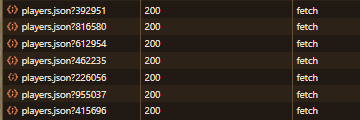
如果文件的实际 URL 不是 <your url>/tiles/players.json,你需要将 URL 后缀设置为 /tiles/players.json 的实际路径。
对于世界特定选项,如果单个玩家的对象不包含世界对象,则需要将其关闭。
对于位置子类别,情况相反:如果玩家对象直接包含 x、y 和 z 值,则留空。如果没有,请更改为包含这些值的对象的名称。
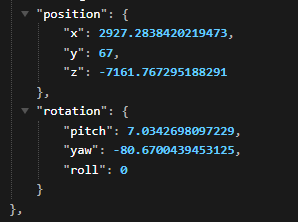
在此示例中,应设置为 position,因为 x、y 和 z 值位于一个名为 position 的对象中。
追踪/取消追踪玩家
遗憾的是,通过配置文件无法实现追踪或取消追踪玩家的功能。
要跟踪或取消跟踪玩家,请使用以下命令:
/jmtracker add/remove <玩家名称>
问题反馈和功能请求可以提交到我的问题追踪器。
JourneyMap Tracker is a mod that creates and updates JourneyMap waypoints of tracked players given a DynMap URL.
Not all web map software will work, but so far I haven't found one that doesn't work.
The following are known to work:
- Squaremap
- Whatever EarthMC uses (couldn't find it)
Setting the URL and other parameters
You can either type /jmtracker url <url here> or set it using the config through ModMenu or running /jmtracker config.
There is an option in the config for modifying the polling delay but it doesn't seem to go below one second.
For the other parameters, you're going to have to press f12, navigate to Network, and right click -> open in new tab a file that repeatedly gets fetched. It's name should be something like players.json or tiles.json.

If the exact URL of the file isn't <your url>/tiles/players.json, you're gonna have to set the url suffix to what the /tiles/players.json is instead.
For the world specific option, if an individual player's object doesn't contain a world object, you need to turn it off.
For the position sub category, it's the opposite: if the player object directly has x,y, and z values, leave it blank. If not, change it to the name of the object containing the values.

In this example, it would be set to position since the x y and z values are in a position object.
Tracking / Untracking players
Tracking and untracking players is unfortunately not possible through the config.
To track and untrack players, you have to use the commands:
/jmtracker add/remove <playername>
Issues and/or feature requests can be posted on my issue tracker.
评论 0
登录后参与评分
还没有评论,来抢沙发吧