Judicator

你的规则。你的工作流。你的服务器。
Judicator 是一款可配置的 Minecraft 服务器和网络审核插件,将处罚、玩家举报和员工监督整合在一起。
管理独立服务器或在整个网络中协调审核工作,拥有可配置规则、消息和 Discord 通知功能。
文档 • 源代码 • 问题与建议
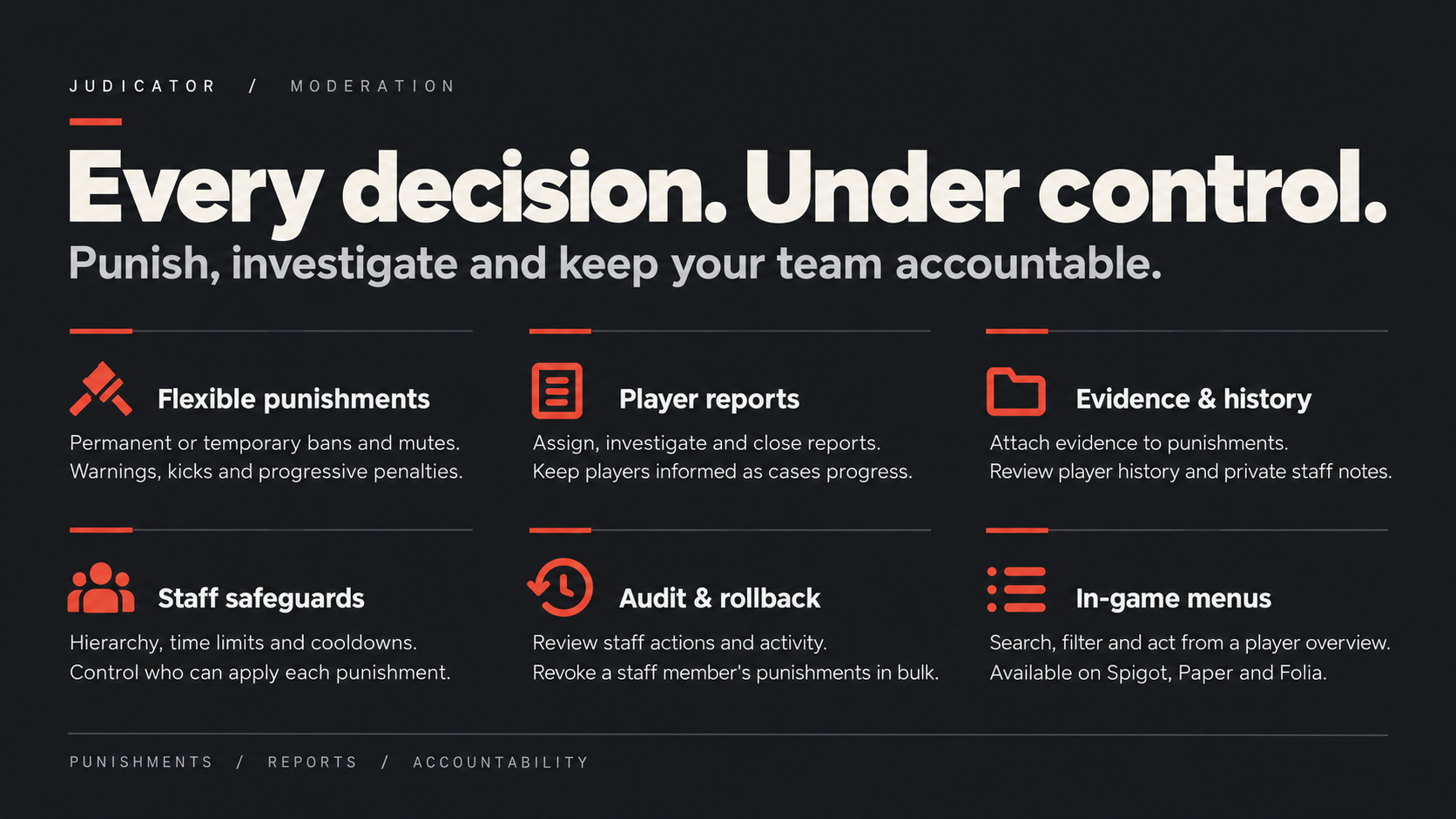
功能特性
- 灵活的处罚机制: 永久和临时封禁、静音和软静音,以及警告和踢出。
- 一致的执行标准: 渐进式处罚预设、警告阈值和员工时长限制。
- 玩家上下文信息: 历史记录、ID 查询、证据链接、私人笔记和关联账户检查。
- 举报处理: 分配、审查和关闭玩家举报。
- 员工监督: 活动摘要、层级检查和回滚预览。
- 网络审核: 共享存储、同步以及服务器/组范围设置。
- 个性化展示: 自定义消息、菜单和 Discord Webhook 嵌入内容。
- 灵活存储: 默认使用 SQLite,支持 MySQL、MariaDB 和 PostgreSQL。
从首次警告到最终决定
应用封禁、静音、软静音、警告和踢出操作。构建渐进式处罚规则,附上证据并在采取行动前审查玩家历史。员工笔记和可分配的举报队列让你的团队随时掌握上下文信息。
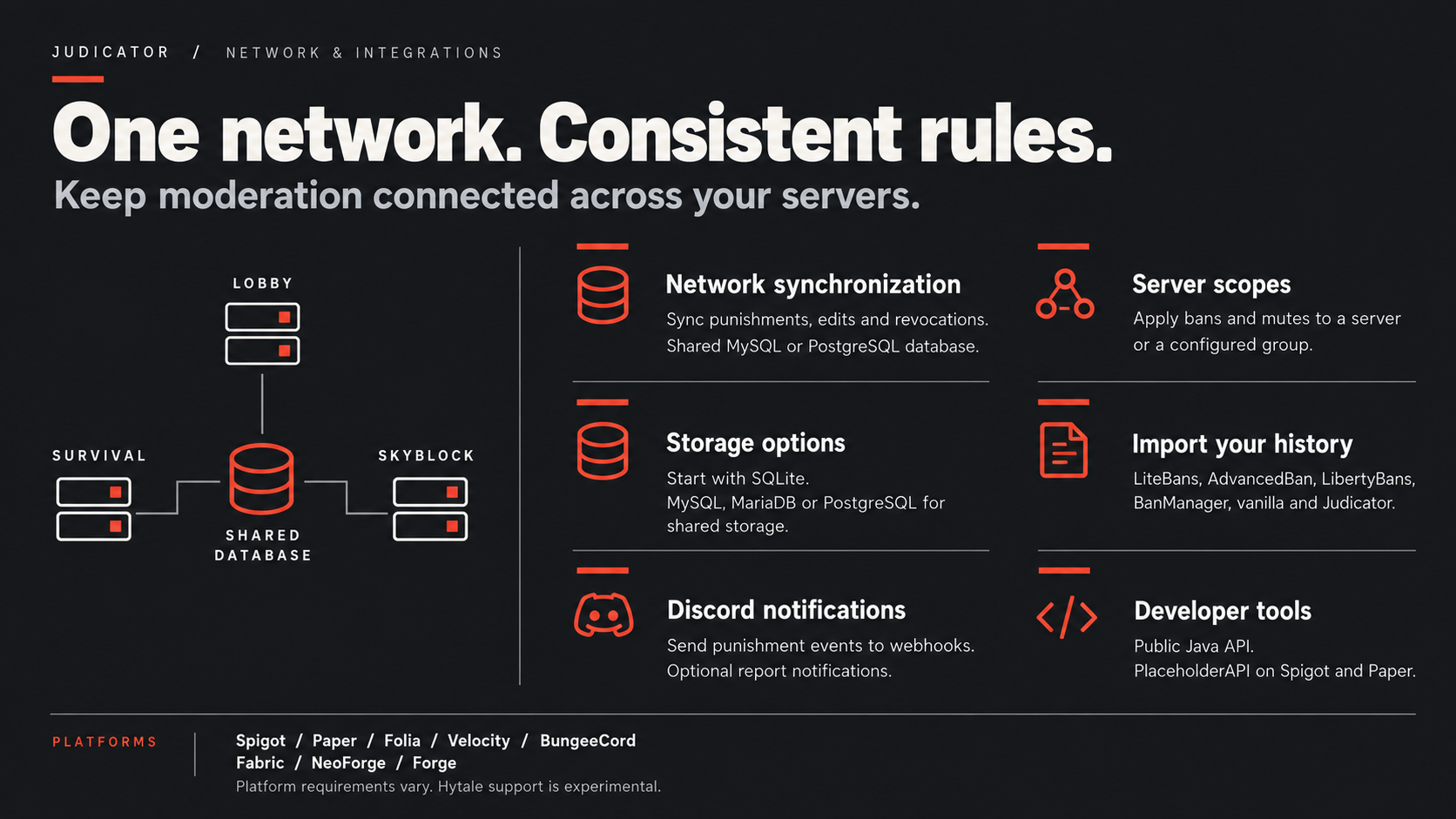
围绕你的审核政策构建
选择全网络或限定范围的处罚,设置员工层级和时长限制,并通过回滚预览审查员工活动。从 SQLite 开始,或将你的实例连接到共享的 MySQL、MariaDB 或 PostgreSQL 数据库。
查看你可以自定义的内容
以下默认值展示了项目随附的实际配置:处罚进度、冷却时间、员工限制、账户检查、保留策略、菜单、举报、存储和 Discord 嵌入内容。
包含英语、葡萄牙语、西班牙语、法语和德语。消息、处罚界面和菜单文本可以在语言文件中编辑。
展开任意文件以进行探索。这些是捆绑的示例默认值;请替换示例数据库凭据和服务器品牌标识为你自己的内容。标记为“需要重启”的设置需要重启才能生效。
config.yml — 审核规则、员工限制、菜单 & 网络行为
# ============================================================
# Judicator — 主配置文件
# ============================================================
# /judicator reload 命令会应用所有更改,但标记为“需要重启”的设置除外。
# 如果某个设置未在此文件中出现,则保持其默认值,因此旧版的 config.yml 仍可正常工作。
#
# 持续时间格式为 "<数值>:<单位>",多个之间用逗号分隔——例如 "30:m"、"7:d,2:h"、"1:mo"。
# 单位包括:s(秒)、m(分钟)、h(小时)、d(天)、w(周)、mo(月)、y(年),也可使用全称 second(s)、minute(s)、hour(s)、day(s)、week(s)、month(s)、year(s)。
# 权限说明请参阅 README 文件。
# ------------------------------------------------------------
# 语言
# ------------------------------------------------------------
language: en # messages_<语言>.yml:内置了 en、es、pt、fr 或 de;如需其他语言,请在此文件夹中创建 messages_<xx>.yml
per-player-language: false # true:当游戏语言为英语、西班牙语、葡萄牙语、法语或德语时,每位玩家都会在其游戏语言中收到消息(控制台、Discord 和登录界面使用 'language')
# ------------------------------------------------------------
# 处罚
# ------------------------------------------------------------
# 告知目标服务器的玩家有关处罚的信息(静默的处罚,即使用 -s 参数的,不会通知)。
# 每种类型的处罚可设置为 true 或 false,或者每类单独一行配置:
# announce:
# ban: true
# mute: true
# kick: false
# warn: false
announce: true
staff-notifications: true # 拥有 judicator.notify 权限的玩家会看到所有处罚;静默 (-s) 的处罚仅对拥有 judicator.notify.silent 权限的玩家可见
log-kicks: false # true: /kick 命令会被记录在处罚历史中 (/phistory, /pview, /blame, /activity)
# /punish <player> 的预设处罚理由,也可在任何命令中作为 #<key> 使用(例如:/ban Steve #reason2 x-ray)。
# reason: 存储为处罚理由的文本
# permission: 当 require-reason-permission 为 true 时需要此权限才能使用该理由(judicator.admin 始终可以使用)
# type: BAN、TEMPBAN、MUTE 或 TEMPMUTE duration: 仅适用于 TEMPBAN/TEMPMUTE
# ip: 若为 true,则处罚玩家的 IP 地址而非其账号
# icon: 在 /punish 菜单中显示的图标物品(物品 ID,例如 tnt);若未指定,则使用对应类型的默认物品
# steps: 渐进式处罚,替代 type/duration —— 首次违规使用第 1 步,第二次使用第 2 步……
# 最后一步之后将循环重复执行
require-reason-permission: false
reasons:
reason1: # 第一次 7 天 2 小时,第二次 30 天,第三次起永久
reason: "玩家违规"
icon: poisonous_potato
permission: "punish.helper"
ip: false
steps:
- type: TEMPMUTE
duration: "7:d,2:h"
- type: TEMPMUTE
duration: "30:d"
- type: MUTE
reason2:
reason: "作弊"
icon: diamond_sword
permission: "punish.moderator"
type: TEMPBAN
duration: "7:months,2:weeks"
ip: false
reason3:
reason: "严重散布"
icon: tnt
permission: "punish.moderator"
type: BAN
ip: false
# ------------------------------------------------------------
# 管理员规则
# ------------------------------------------------------------
# 控制台会跳过所有这些设置;judicator.admin 权限可忽略时间限制和冷却时间,但不会忽略层级关系。
hierarchy:
enabled: true # 只有拥有更低 judicator.level.<N> 的管理员才能惩罚玩家;没有等级的玩家可以被任何管理员惩罚
max-level: 100 # 检查的最高 N 值(即 judicator.level.<N>)
# 管理员组可以施加的最长封禁/静音时长,由显式权限 judicator.timelimit.<group> 决定。
# 有限制权限的管理员无法施加永久惩罚;如果存在多个组,则以最长限制为准。
# 继承自受限组的等级必须将其权限设置为 false。
time-limits:
helper: # judicator.timelimit.helper
ban: "1:d"
mute: "7:d"
# 同一玩家再次受到同类惩罚前的秒数(0 = 关闭)。
# 防止两名管理员同时惩罚同一名玩家两次。
cooldowns:
ban: 30
mute: 30
warn: 30
kick: 0
# ------------------------------------------------------------
# 被静音的玩家
# ------------------------------------------------------------
block-global-chat: true # false: 被静音的玩家仍然可以聊天(仅记录静音状态,且下方锁定的命令仍会被阻止)
commands-locked-when-silenced: # 被静音玩家无法使用的命令;也适用于带命名空间的形式 (/minecraft:tell) 或不带斜杠的情况
- "/g"
- "/l"
- "/tell"
soft-mute-format: "<{player}> {message}" # 仅限代理服务器(Velocity, BungeeCord):软静音玩家对自己发送的消息看到的格式(Spigot/Paper 保留服务器的聊天格式)
# ------------------------------------------------------------
# 警告
# ------------------------------------------------------------
# 当玩家达到一定数量的活跃警告时执行的控制台命令。每个步骤一条,名称任意;
# {player} 代表被警告的玩家。
warns:
tree:
warns: 3
commands:
- "tempban {player} '3:d' got three warns"
# ------------------------------------------------------------
# 账号与 IP 地址
# ------------------------------------------------------------
# 许多玩家共享的 IP 或 CIDR 范围(如学校网络、代理服务器本身):永远不会进行 IP 惩罚,在 alt 警告、alts.deny-if-banned 和 ip-limits 中将被忽略。
exempt-addresses:
- "127.0.0.1"
- "::1"
ip-limits: # 0 = 关闭
max-online: 0 # 来自同一 IP 的同时在线最大账号数
max-recent-accounts: 0 # 在最近时间段内可从同一 IP 加入的不同账号的最大数量
recent-period: "1:d"
alts:
notify-on-join: true # 拥有 judicator.alts.notify 权限的管理员会在有人与被封禁/静音的账号共享 IP 时收到警告
deny-if-banned: false # true: 如果另一个使用相同 IP 的账号处于封禁状态,则该账号无法加入(immune.yml 中的 'alts' 例外)
notes:
notify-on-join: true # 拥有 judicator.notes.notify 权限的管理员在有管理员备注(/note)记录的账号加入时会收到通知
# ------------------------------------------------------------
# 数据保留
# ------------------------------------------------------------
# 保留旧记录的天数(0 = 永久保存);较旧的记录将在启动时及每 12 小时自动删除。
# 玩家名称、IP 和历史记录属于个人数据。/judicator clear <player> 可删除单个玩家的数据。
retention:
kicks: 0 # 已记录的踢出操作 (log-kicks)
finished-punishments: 0 # 已结束或被撤销的封禁/静音记录;当前正在生效的记录不会被删除
finished-warns: 0 # 已过期的临时警告
addresses: 0 # 超过此时间段未被任何账号使用的 IP 地址(/alts 和离线 IP 封禁将无法再找到它们)
notes: 0 # 超过此时间段编写的美工备注
reports: 0 # 超过此时间段关闭的玩家举报
# ------------------------------------------------------------
# 网络:代理与多个服务器(参见 README 中的“Networks and Multiple Servers”)
# ------------------------------------------------------------
# Spigot/Paper 位于 Velocity/BungeeCord 之后,并启用 UUID 转发(它们报告 online-mode=false):true 表示像在线模式一样通过 UUID 检查封禁。切勿在真正的离线模式服务器上启用此功能,因为任何人都可以使用任意 UUID 加入。
trust-uuids: false
sync: # 共享同一个 MySQL/PostgreSQL 数据库的服务器:在一个服务器上应用、撤销或编辑的内容会同步到其他服务器的玩家
enabled: false # 在网络中的每个服务器上设为 true(需要重启)
poll-interval: 1 # 秒数,用于检查其他服务器所做的更改,范围 1 到 30(需要重启)
proxy-mode: false # Spigot/Paper 位于运行 Judicator 的 Velocity 或 BungeeCord 之后,且两端都启用了 sync:代理拒绝登录、踢出、公告和通知;此服务器仅屏蔽聊天静音(需要重启)
chat-on-backends: false # 仅限代理(Velocity, BungeeCord):当后端以 proxy-mode 运行 Judicator 时设为 true,这样代理自身永远不会拒绝被静音玩家的(已签名)聊天
scopes: # 针对单个服务器或网络中的一组服务器的处罚:/ban Steve -scope=survival hacking
server-name: '' # 仅限 Spigot/Paper:代理配置中调用的此服务器名称;为空 = 此处仅全局处罚
groups: {} # 例如 survival: [survival1, survival2](组的优先级高于同名服务器)
menus: # Spigot/Paper:/jmenu 的菜单
dialogs: mixed # Paper 1.21.6+,游戏版本为 1.21.6 或更高版本的玩家:mixed = 列表(及其顺序和过滤器)作为物品栏,所有内容(主菜单、页面、确认、问题、排序和过滤表单)作为对话框;all = 所有内容均为对话框;none = 所有内容均为物品栏。旧版游戏和 Spigot 始终使用物品栏
replace-commands: true # 查找命令为玩家打开菜单:/banlist, /mutelist, /reports, /phistory, /whistory, /notes, /alts, /blame, /playerinfo, /pview, /wview 和 /punish (player)(控制台保留聊天回复;带句点的 /blame 也是如此)。false:聊天回复,仅通过 /jmenu 访问菜单。在运行 Judicator 的代理后面,代理会优先响应这些命令
reports: # /report 和 /reports
require-permission: false # true:只有拥有 judicator.report 权限的玩家才能使用 /report(在代理上,如果没有权限插件,没有人拥有该权限)
cooldown: 60 # 秒数,玩家两次举报之间的等待时间
notify-on-join: true # 拥有 judicator.reports.notify 权限的管理员在加入时会听到有多少个未处理的举报
</details>
<details>
<summary>data.yml — 数据库连接 & 池设置</summary>
```yaml
# ============================================================
# Judicator — 数据库
# ============================================================
# /judicator reload 会使用这些设置重新连接;更改 'type' 需要重启。
# 要将数据迁移到另一个数据库(例如 SQLite -> MySQL),请参阅 import.yml 中的 'judicator'。
database:
# sqlite(默认值)将所有内容保存在一个文件中,且不需要数据库服务器:适用于单个服务器或小型
# 网络。对于共享处罚的多个 Spigot/Paper 服务器,请切换到 postgres 或 mysql(也适用于 MariaDB)。
type: 'sqlite' # sqlite, postgres 或 mysql
# 在每个表名前加上前缀,以免与同一数据库中另一个插件的表发生冲突:a-z, 0-9 和
# _,最多 16 个字符('' = 无前缀)。在所有共享数据库的服务器上保持一致;更改它需要
# 重启,且已创建的表保留其旧名称(手动重命名)。Judicator 1.x 的表会在首次启动时
# 重命名为带前缀的名称。
table-prefix: 'judicator_'
# --- sqlite:一个文件,无需数据库服务器(仅读取 'file')---
file: 'judicator.db' # 相对于插件文件夹
# --- postgres / mysql ---
host: 'localhost'
port: '' # 空:使用该类型的默认端口(postgres 为 5432,mysql 为 3306)
database: 'postgres'
user: 'postgres'
password: 'password'
properties: # 额外的 JDBC 驱动程序属性,例如 MySQL: useSSL: 'false' / PostgreSQL: sslmode: 'require'
pool:
maximum-size: 10 # 同时打开的最大连接数
minimum-idle: 2 # 空闲时保持打开的连接数
connection-timeout: 30 # 超时前等待可用连接的秒数
discord.yml — Webhook 事件、嵌入 & 颜色
# ============================================================
#  Judicator — Discord webhook
# ============================================================
# 对每次处罚向 Discord 频道发送嵌入消息。通过 /judicator reload 生效。
# 在 Discord 中创建 webhook(频道设置 > 集成 > Webhooks)并将 URL 粘贴到下方。
# 嵌入消息由应用处罚的服务器发送一次。
#
# 标题、描述和页脚占位符:
#   {player}   受罚玩家             {punisher}  执行处罚的管理员
#   {reason}   原因                 {type}      BAN, TEMPBAN, MUTE, SOFTMUTE, KICK...(警告使用 labels.warn)
#   {id}       数据库中的 ID        {expires}   结束日期,或下方的 'permanent'/'paused' 标签
# 颜色:十六进制,例如 "#FF0000"。

enabled: false

webhook-url: "" # 所有事件的频道;某个事件可以将其自己的 webhook-url 发布到另一个频道
username: "" # 显示为消息作者的名字(空:使用 webhook 的名字)
avatar-url: "" # 作者的图片(空:使用 webhook 的图片)
thumbnail-url: "https://mc-heads.net/avatar/{uuid}" # 玩家的图片;{uuid} 是其 UUID(未知时为 MHF_Steve)
footer: "Judicator • ID #{id}"
labels: # 嵌入字段的名称,以及无值文本
player: "玩家"
punisher: "处罚者"
type: "类型"
reason: "原因"
started-at: "开始时间"
expires: "过期时间"
scope: "仅适用于" # 针对单个服务器或组(config.yml 中的作用域)
permanent: "永久"
paused: "已暂停(仅限在线时长)"
no-reason: "未提供原因"
warn: "警告" # 警告显示的类型
report: "举报" # 玩家举报显示的类型
reporter: "由...举报"
server: "服务器" # 被举报玩家所在的服务器
events:
ban:
enabled: true
color: "#E74C3C"
title: "? 玩家被封禁"
description: "玩家 {player} 被 {punisher} 永久封禁。"
tempban:
enabled: true
color: "#E67E22"
title: "⏱️ 临时封禁"
description: "玩家 {player} 被 {punisher} 处以临时封禁。"
mute:
enabled: true
color: "#9B59B6"
title: "? 玩家被禁言"
description: "玩家 {player} 被 {punisher} 永久禁言。"
tempmute:
enabled: true
color: "#8E44AD"
title: "⏱️ 临时禁言"
description: "玩家 {player} 被 {punisher} 处以临时禁言。"
kick:
enabled: true
color: "#F39C12"
title: "? 玩家被踢出"
description: "玩家 {player} 被 {punisher} 踢出服务器。"
warn:
enabled: true
color: "#F1C40F"
title: "⚠️ 发出警告"
description: "玩家 {player} 收到了来自 {punisher} 的警告。"
# webhook-url: "" # 例如:在专属频道中发送警告
report: # /report:默认关闭,繁忙的服务器会产生大量举报
enabled: false
color: "#3498DB"
title: "? 玩家被举报"
description: "{punisher} 举报了 {player}。"
</details>

<details>
<summary>immune.yml — 玩家豁免</summary>

```yaml
# ============================================================
#  Judicator — 豁免设置
# ============================================================
# 无法受到以下列出的处罚的玩家,即使从控制台执行也不行。通过 /judicator reload 应用更改。
#
#   key:   玩家的 UUID(推荐:它能在改名后保持不变,且在离线模式下任何人都可以用任何名字加入)
#          或其名称(不区分大小写)
#   value: 一个列表,包含 all、ban、mute、kick、warn、alts、report
#          alts = 即使 alts.deny-if-banned (config.yml) 拒绝该账号,也允许加入
#          report = 无法通过 /report 被举报
#
# 如果使用该 IP 的任何账号都对此类 IP 处罚享有豁免权,则 IP 处罚将被拒绝。
players:
  # "069a79f4-44e9-4726-a5be-fca90e38aaf5": [all]
  # "Builder": [mute, warn]
import.yml — 迁移来源与数据库选项
# ============================================================
#  Judicator — 从其他插件导入数据
# ============================================================
# 仅由 /judicator import <source> [confirm] 命令使用,该命令可从服务器控制台执行。在命令运行时读取此配置。
#
# - 请先备份你的数据库。如果未提供 "confirm",该命令仅报告它将导入的内容,而不会实际执行。
# - 重复运行是安全的:Judicator 中已存在的处罚记录(相同目标、类型和开始时间)将被跳过。
# - Judicator 仅读取源数据;不会对源插件的数据进行任何更改。
#
# 每个数据源需配置以下参数:
#   jdbc-url, user, password    源插件所使用的数据库连接信息(MySQL/MariaDB: jdbc:mysql://host:3306/<db>,
#                               PostgreSQL: jdbc:postgresql://host:5432/<db>)
#   table-prefix                如果源插件使用了表名前缀,请在此指定
#   driver-jar, driver-class    仅当使用的数据库驱动程序未随 Judicator 内置时(如 H2、HSQLDB)需要配置:
#                               将驱动程序 jar 包放入 plugins/<Judicator 文件夹>/drivers 目录下,
#                               并将 driver-jar 设置为该 jar 文件的文件名,
#                               driver-class 设置为其对应的类名(H2: org.h2.Driver, HSQLDB: org.hsqldb.jdbc.JDBCDriver)
#
# 嵌入式数据库(H2、HSQLDB):请停止源插件,或者更推荐的做法是复制其数据文件,并将 JDBC URL 指向副本——
一个嵌入式的文件无法被两个程序同时打开。请使用源插件创建该文件时所用的用户/密码(如下所示为每个默认值),并添加 ;IFEXISTS=TRUE (H2) 或 ;ifexists=true (HSQLDB),这样路径输入错误时会失败,而不是创建一个空数据库。
litebans:
默认存储:H2(LibertyBans 的导入指南使用 h2-1.4.199.jar)。URL: jdbc:h2:<LiteBans 数据库文件的路径>;ACCESS_MODE_DATA=r(只读)。
jdbc-url: ''
user: ''
password: ''
table-prefix: 'litebans_'
driver-jar: ''
driver-class: ''
advancedban:
默认存储:HSQLDB,文件位于 plugins/AdvancedBan/data/storage.*,用户 'SA',密码为空。
URL: jdbc:hsqldb:file:<路径>/storage
jdbc-url: ''
user: ''
password: ''
driver-jar: ''
driver-class: ''
libertybans:
默认存储:HSQLDB 2.7,文件位于 plugins/LibertyBans/internal/hypersql/punishments-database.*。
URL: jdbc:hsqldb:file:<复制文件的路径>/punishments-database
jdbc-url: ''
user: ''
password: ''
table-prefix: 'libertybans_'
driver-jar: ''
driver-class: ''
banmanager:
MySQL/MariaDB:BanManager 的 config.yml 中的数据库。
默认存储:H2 1.4.200,文件 plugins/BanManager/local_bans(使用 H2 1.4.200 驱动 jar)。
仅支持表前缀:在 BanManager 的 config.yml 中逐个重命名的表将无法找到。
jdbc-url: ''
user: ''
password: ''
table-prefix: 'bm_'
driver-jar: ''
driver-class: ''
vanilla:
包含 banned-players.json 和 banned-ips.json 的文件夹(Essentials 也会使用)。留空表示服务器根目录。
directory: ''
judicator:
另一个 Judicator 数据库,例如:要从 SQLite 迁移到 MySQL/PostgreSQL,请将 data.yml 设置为新数据库,
重启服务器,然后在此导入旧数据。这将复制处罚记录、警告、员工备注以及 /alts 命令使用的 IP 历史记录。
SQLite: jdbc:sqlite:plugins/Judicator/judicator-old.db(旧文件的一个副本)。在 Velocity 上,仅当 data.yml 使用 SQLite 时才会下载 SQLite 驱动;否则,请将 sqlite-jdbc-3.46.1.2.jar 放入 drivers 文件夹,并将
driver-class 设为 'org.sqlite.JDBC'。
jdbc-url: ''
user: ''
password: ''
driver-jar: ''
driver-class: ''
table-prefix: 'judicator_' # 旧数据库的 data.yml 中的表前缀;Judicator 1.x 的数据库无需此前缀即可读取
</details>

<details>
<summary>messages_en.yml — 精选消息、处罚界面及菜单示例</summary>

完整的英文文件包含超过 1,000 行。以下摘录展示了证据提示、公告、封禁界面和菜单标签。其他部分涵盖命令响应、历史记录、举报、员工工具等。

OpenMine Network 以及下面示例中使用的 Discord/商店地址均为可编辑的示例文本。

```yaml
prompt:
  write-evidences: "&7在聊天框中逐个发送证据。完成后,点击或输入 \"{ready-prompt}\" 或 \"{cancel-prompt}\"。"
  next-link: "&a链接已成功附加。完成后,点击或输入 \"{ready-prompt}\" 或 \"{cancel-prompt}\"。"
  evidence-limit: "&c没有空间容纳此证据(总共 255 个字符)。输入 \"{ready-prompt}\" 以应用已附加的证据,或输入 \"{cancel-prompt}\" 取消。"
  ready: "confirm"
  cancel: "cancel"
  nothing: "&c没有什么可以确认或取消的。"
  dialog: # 弹窗中的证据(Paper,1.21.6+ 客户端);否则为聊天框
    title: "&8Evidence"
    label: "证据链接,用空格分隔(可选):"
    confirm: "&aApply"
    cancel: "&cCancel"

announcements:
  ban:
    - ""
    - "&c * 用户 {nickname} 被 {author} 封禁。"
    - ""
  mute:
    - ""
    - "&c * 用户 {nickname} 被 {author} 禁言。"
    - ""
  kick:
    - ""
    - "&c * 用户 {nickname} 被 {author} 踢出服务器。"
    - ""
  warn:
    - ""
    - "&c * 用户 {nickname} 被 {author} 警告。\n"
    - "&c * 原因:{reason}."
    - ""

runners:
  ban-kick:
    - "&6&lOpenMine Network\n"
    - "&c你已被封禁。\n"
    - "\n"
    - "&c * 原因:{reason}\n"
    - "&c * 开始时间:{startedAt}\n"
    - "&c * 结束时间:{finishAt}\n"
    - "&c * 证据:{evidence}\n"
    - "&c * 执行者:{author}\n"
    - "&c * 范围:{scope}\n"
    - "\n"
    - "&c使用 ID &e#{id} &c在我们的 Discord 上申请复核:&c&ndiscord.gg/your-server\n"
    - "&c&l商店:&cstore.your-server.com.\n"

menu:
  only-players: "&c菜单仅供游戏内的玩家使用。"
  error: "&c无法打开菜单;请参阅服务器控制台。"
  no-permission: "&c你没有权限执行此操作。"
  prompt: "&e在聊天框中输入 {what},或按 &f{cancel} &e返回。"
  # 弹窗中的问题(Paper,1.21.6+ 客户端),而非聊天框
  question:
    title: "&8Judicator"
    label: "&7输入 {what}:"
    confirm: "&aOK"
    cancel: "&cCancel"
  denied:
    name: "&c你无法查看此项"
    lore:
      - "&7你的权限已更改。"
  gone:
    name: "&7该条目已不存在"
    lore:
      - "&7它在此期间已被删除。"
  empty:
    name: "&7此处为空"
    lore: []
  navigation:
    back:
      name: "&e« 返回"
      lore:
        - "&7回到上一个菜单。"
    close:
      name: "&c关闭"
      lore: []
    previous:
      name: "&e« 上一页"
      lore:
        - "&7第 {page} 页,共 {pages} 页。"
    next:
      name: "&e下一页 »"
      lore:
        - "&7第 {page} 页,共 {pages} 页。"
    page:
      name: "&f第 {page}/{pages} 页"
      lore:
        - "&7共 {count} 项。"
        - "&7点击刷新。"
    page-filtered:
      name: "&f第 {page}/{pages} 页"
      lore:
        - "&7找到 {count} 项。"
        - "&e点击清除筛选条件。"
  main:
    title: "&8Judicator"
    bans:
      name: "&c生效的封禁 &7({count})"
      lore:
        - "&7当前生效 {count} 条。"
        - ""
        - "&e点击查看。"
    mutes:
      name: "&6生效的禁言 &7({count})"
      lore:
        - "&7当前生效 {count} 条。"
        - ""
        - "&e点击查看。"
    reports:
      name: "&e举报 &7({count})"
      lore:
        - "&7共有 {count} 条未处理。"
        - ""
        - "&e点击查看。"
    online:
      name: "&a在线玩家 &7({count})"
      lore:
        - "&7当前在线 {count} 人。"
        - ""
        - "&e点击查看。"
    search:
      name: "&b查找玩家"
      lore:
        - "&7无论在线与否均可搜索。"
        - ""
        - "&e点击并输入名称。"
    search-what: "玩家名称"
查看完整的英文语言文件
命令与权限
展开章节以查看命令概览、语法和权限节点。点击图片可查看原图。
处罚与玩家工具
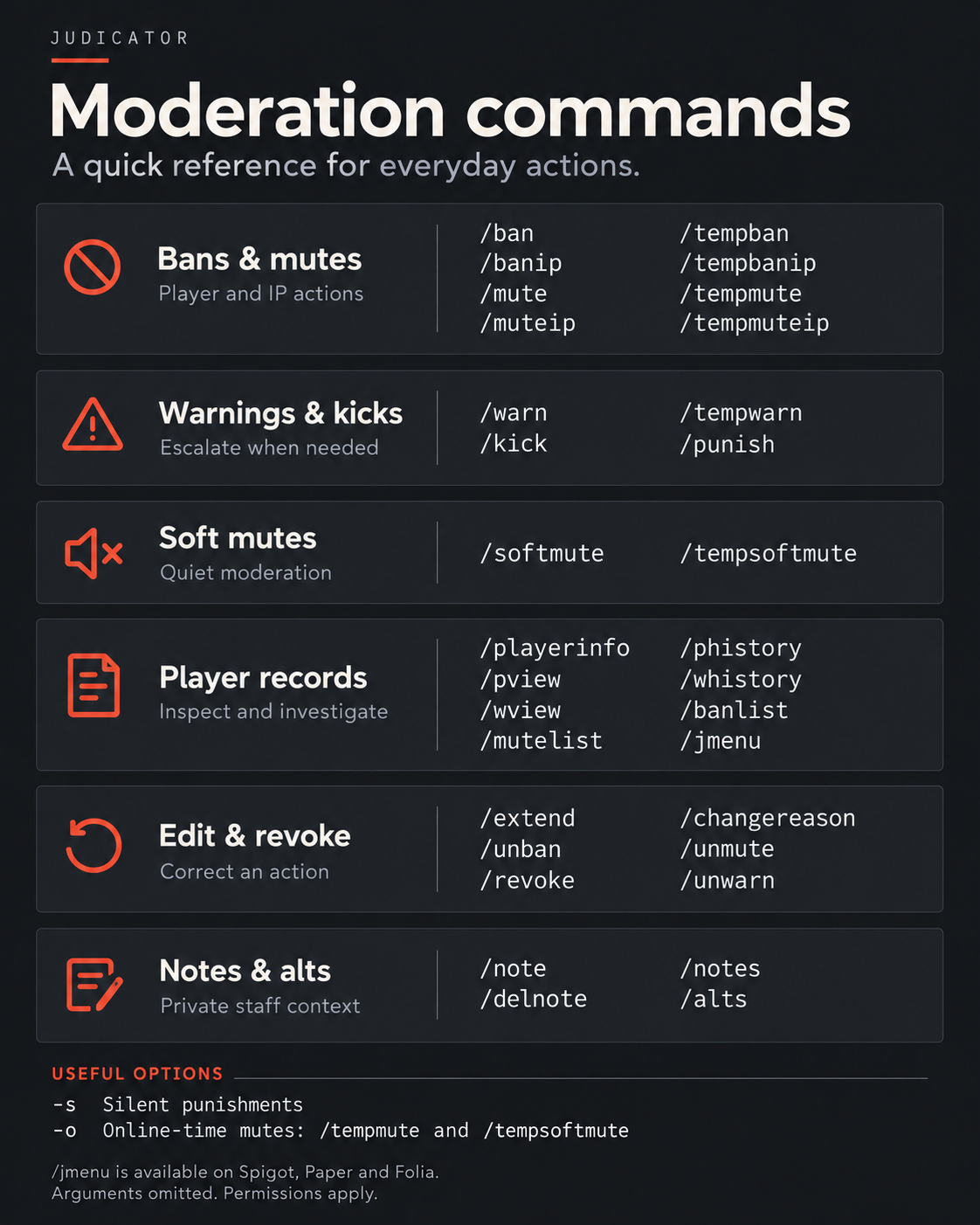
括号 () 中的参数为必填项;花括号 {} 中的参数为选填项。
永久处罚
/ban (player) {reason} → judicator.ban/banip (player) {reason} → judicator.ban.ip/mute (player) {reason} → judicator.mute/muteip (player) {reason} → judicator.mute.ip/softmute (player) {reason} → judicator.softmute
临时处罚
/tempban (player) (duration) {reason} → judicator.tempban/tempbanip (player) (duration) {reason} → judicator.tempban.ip/tempmute (player) (duration) {reason} → judicator.tempmute/tempmuteip (player) (duration) {reason} → judicator.tempmute.ip/tempsoftmute (player) (duration) {reason} → judicator.tempsoftmute
警告、踢出与渐进式惩罚
/warn (player) {reason} → judicator.warn/tempwarn (player) (duration) {reason} → judicator.tempwarn/kick (player) {reason} → judicator.kick/punish (player) {reason} → judicator.punish
玩家概览与历史记录
/playerinfo (player) → judicator.info/phistory (player) → judicator.history/pview (id) → judicator.view/whistory (player) → judicator.history/wview (id) → judicator.view/banlist {page} → judicator.banlist/mutelist {page} → judicator.mutelist/alts (player) → judicator.alts/jmenu {player} → judicator.menu — 仅限 Spigot/Paper/Folia。
编辑与移除
/extend (id) (duration) → judicator.extend/changereason (id) (reason) → judicator.changereason/unban (player) {-s} {reason} → judicator.unban/unmute (player) {-s} {reason} → judicator.unmute/revoke (id) → judicator.admin/unwarn (id) → judicator.unwarn
编辑操作同样会检查职员层级和惩罚规则。
私密职员备注
/note (player) (text) → judicator.note/notes (player) {page} → judicator.notes/delnote (id) → judicator.delnote
举报、职员审计与管理
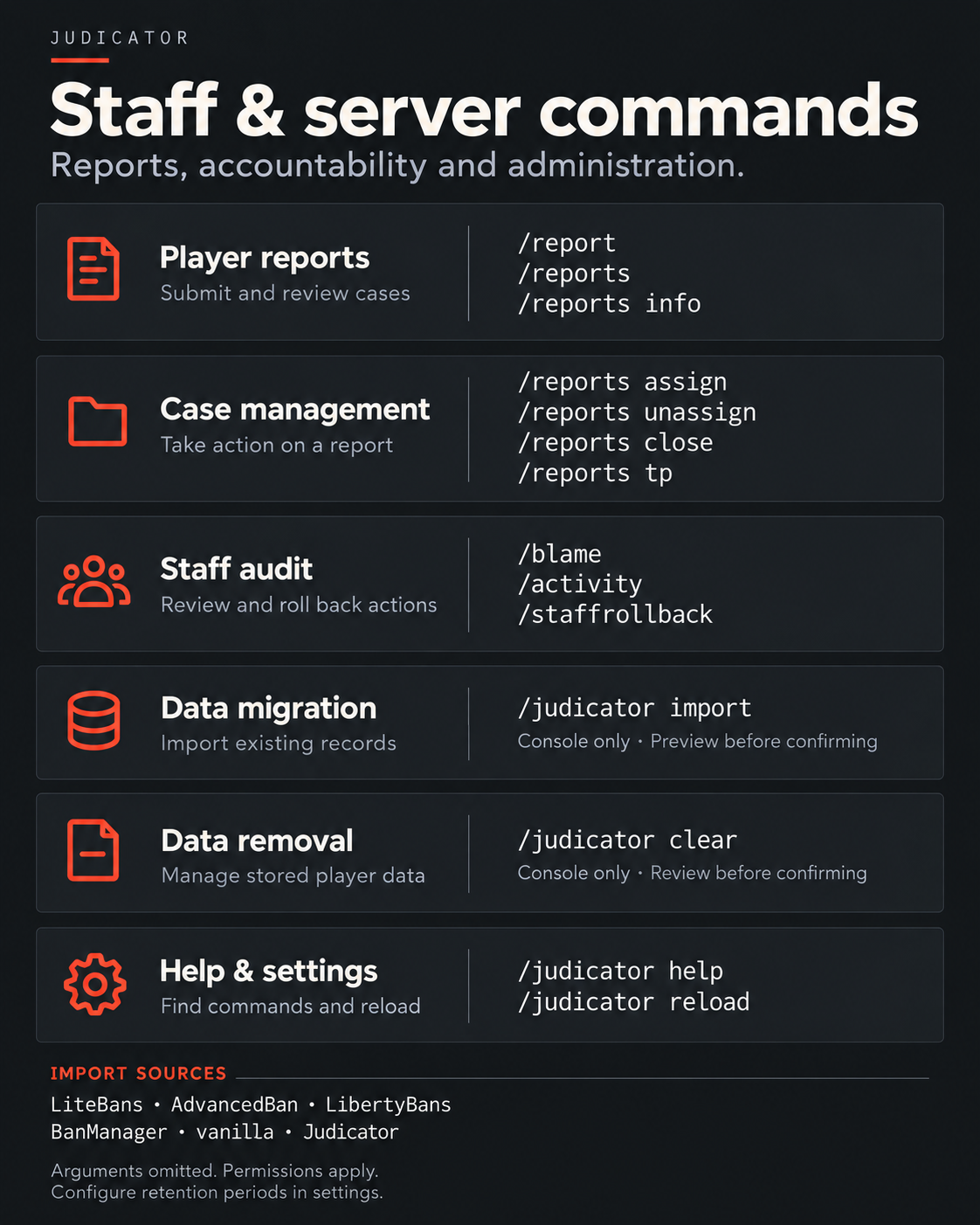
括号 ( ) 中的参数为必填项;花括号 { } 中的参数为可选项。
玩家举报
/report (player) (reason) → 默认对所有玩家开放;在启用权限检查时,需要 judicator.report 权限。/reports → judicator.reports/reports list (open|assigned|closed|all) {page} → judicator.reports/reports info (id) → judicator.reports/reports assign (id) {staff} → judicator.reports.manage/reports unassign (id) → judicator.reports.manage/reports close (id) {comment} → judicator.reports.manage/reports tp (id) → judicator.reports.tp- 举报离线玩家需要
judicator.report.offline 权限。
职员审计
/blame (staff) {period} {page} → judicator.blame/activity (period) {page} → judicator.activity/staffrollback (staff) (period) {confirm} → judicator.staffrollback
回滚功能会在确认前预览受影响的行动,且要求执行者的职员层级高于目标对象。
管理
/judicator help {category} → judicator.admin/judicator reload → judicator.admin/judicator version → judicator.admin/judicator import (source) {confirm} → 仅限控制台。/judicator clear (player) {confirm} → 仅限控制台。
导入来源包括:litebans、advancedban、libertybans、banmanager、vanilla 和 judicator。导入和清除操作会在确认前显示预览。
有用别名
/pinfo → /playerinfo/staffhistory → /blame/staffactivity → /activity/judicatormenu → /jmenu
设置与兼容性
支持的平台与要求
- Velocity: 3.4+,Java 17+。
- BungeeCord: 1.21+,Java 17+。
- Spigot / Paper: Minecraft 1.8.8+,Java 17+。
- Folia: 1.20.1+,使用 Spigot/Paper 构建版并需 Java 17+。
- Fabric: Minecraft 26.1+,Java 25 以及 Fabric API。
- NeoForge: Minecraft 26.1+,Java 25 以及 NeoForge 26.1+。
- Forge: Minecraft 26.1+,Java 25 以及 Forge 62+。
请选择适合您平台的构建版本。功能和需求因平台而异:/jmenu 仅在 Spigot/Paper/Folia 上可用,原生对话框需要兼容的 Paper 服务器和 1.21.6+ 客户端。
功能可用性
- 库存菜单:Spigot、Paper 和 Folia。
- 原生对话框:兼容的 Paper 服务器搭配 Minecraft 1.21.6+ 客户端。
- PlaceholderAPI:Spigot/Paper。
- Hytale:实验性功能;禁言玩家的命令不会被阻止,消息也不具备可点击的操作。
安装与网络设置
独立 Spigot / Paper / Folia
- 将 Judicator Bukkit 构建版安装到服务器的 plugins 文件夹中。
- 启动服务器以生成配置文件。
- 配置职员权限和管理规则。
SQLite 默认为启用状态,因此无需外部数据库服务器。
Fabric / NeoForge / Forge
将相应的服务端模组安装到 mods 文件夹中,并满足其平台要求。配置文件存储在 config/judicator/ 目录下。这些平台上不提供库存菜单。
Velocity 或 BungeeCord
使用匹配的代理构建版来管理整个网络的审查工作。
多个服务器共享审查数据
将每个实例指向相同的 MySQL 或 PostgreSQL 数据库及表前缀。在每个参与实例上启用 sync.enabled 并重启。
代理 + 后端:签名聊天与游戏内菜单
在代理端安装代理构建版,在后端安装 Bukkit 构建版。
- 代理端:sync.enabled: true 且 chat-on-backends: true。
- 后端:sync.enabled: true 且 proxy-mode: true。
- 对于正确配置了 UUID 转发的后端,请设置 trust-uuids: true。
请勿在真实的离线模式服务器上启用 trust-uuids。网络实例必须使用相同的数据库和表前缀。
数据库选择
SQLite 适用于本地存储。如需跨机器共享存储,请使用 MySQL、MariaDB 或 PostgreSQL。更改数据库类型需要重启服务器。
使用技巧与迁移
惩罚选项、示例与额外权限
持续时间格式
使用如 10:m、1:h、3:d 或 2:w 的值。组合值可以加引号:"1:h,30:m"。
示例
- /tempban Steve 3:d Cheating
- /tempmute Steve 1:h -o Spam
- /ban Steve -s Cheating
- /tempban Steve 7:d -scope=survival Cheating
- /activity 7:d
在使用带范围限制的示例之前,必须先配置生存模式(survival)范围。
可选行为
- -s:在支持的命令上静默执行操作;需要 judicator.silent 权限。
- -o:仅对 /tempmute(临时禁言)和 /tempsoftmute(临时软禁言)计算在线时长。不适用于基于 IP 的禁言。
- -scope=(server or group):将支持的封禁和禁言限制配置到特定的服务器或群组。
- #key:从 config.yml 中插入快捷原因。
- 软禁言允许发送者看到自己的消息,同时向其他玩家隐藏这些消息。
- 当被要求提供证据时,提交链接并确认或取消。
- 基于 IP 的操作需要目标已记录的地址。
消息与身份标识
内置英语、葡萄牙语、西班牙语、法语和德语。启用按玩家语言设置后,在支持的情况下使用玩家的游戏语言。通过受信任的 UUID,记录会跟随账户跨名称变更保持关联;纯离线模式服务器则使用基于名称的身份标识。
附加权限
- judicator.silent — 使用 -s 静默应用支持的处罚。
- judicator.notify — 接收处罚通知。
- judicator.notify.silent — 接收静默处罚通知。
- judicator.notes.notify — 接收带有员工备注的玩家加入提醒。
- judicator.alts.notify — 接收关联账户提醒。
- judicator.reports.notify — 接收举报通知。
- judicator.level.(number) — 分配员工层级等级。
- judicator.timelimit.(group) — 应用配置的处罚时长上限。
- judicator.admin — 管理访问权限。
导入数据 & 升级至 2.0
从其他管理系统导入
支持的来源:LiteBans、AdvancedBan、LibertyBans、BanManager、原版 Minecraft 以及另一个 Judicator 数据库。
在 import.yml 中配置源,然后从控制台运行:
/judicator import (source)
/judicator import (source) confirm
第一条命令预览导入结果。第二条写入数据。将 (source) 替换为 litebans、advancedban、libertybans、banmanager、vanilla 或 judicator。
迁移前请备份数据库。不同来源的导入覆盖率各不相同;H2/HSQLDB 源需要其对应的数据库驱动。
在 Judicator 数据库之间迁移
judicator 源可以将记录从另一个 Judicator 数据库导入,包括从 SQLite 迁移到 MySQL。
从 1.x 升级至 2.0
停止所有共享该数据库的服务端,更新所有实例,然后重新启动它们。版本 2.0 更改了数据库表结构;切勿在同一数据库上混合运行 1.x 和 2.0 实例。
保留与删除
在 config.yml 中配置旧记录的保留期限。对于单个删除请求,/judicator clear (player) 可预览存储的数据;添加 confirm 参数即可删除。此命令仅限控制台使用。
文档与反馈
请在 文档 中查看安装详情和开发者信息。如需报告错误或提出改进建议,请 在 GitHub 上创建 Issue。报告问题时请包含你的平台类型、Judicator 版本以及相关日志。
Judicator
Your rules. Your workflow. Your server.
Judicator is a configurable moderation plugin for Minecraft servers and networks, bringing punishments, player reports and staff oversight together.
Manage a standalone server or coordinate moderation across your network, with configurable rules, messages and Discord notifications.
Documentation • Source code • Issues & suggestions
Features
- Flexible punishments: permanent and temporary bans, mutes and soft mutes, plus warnings and kicks.
- Consistent enforcement: progressive punishment presets, warning thresholds and staff duration limits.
- Player context: history, ID lookup, evidence links, private notes and linked-account checks.
- Report handling: assign, review and close player reports.
- Staff oversight: activity summaries, hierarchy checks and rollback previews.
- Network moderation: shared storage, synchronization and server/group scopes.
- Your presentation: customizable messages, menus and Discord webhook embeds.
- Your storage: SQLite by default, with MySQL, MariaDB and PostgreSQL support.
From the first warning to the final decision
Apply bans, mutes, soft mutes, warnings and kicks. Build progressive punishment rules, attach evidence and review a player's history before taking action. Staff notes and an assignable report queue keep the context available to your team.
Built around your moderation policy
Choose network-wide or scoped punishments, set staff hierarchy and duration limits, and review staff activity with rollback previews. Start with SQLite or connect your instances to a shared MySQL, MariaDB or PostgreSQL database.
See what you can customize
The defaults below show the actual configuration shipped with the project: punishment progression, cooldowns, staff limits, account checks, retention, menus, reports, storage and Discord embeds.
English, Portuguese, Spanish, French and German are included. Messages, punishment screens and menu text can be edited in the language files.
Expand any file to explore it. These are bundled example defaults; replace the sample database credentials and server branding with your own. Settings marked "restart" require a restart.
config.yml — Moderation rules, staff limits, menus & network behavior
# ============================================================
#  Judicator — main configuration
# ============================================================
# /judicator reload applies every change, except the settings marked "restart".
# A setting missing from this file keeps its default, so an older config.yml keeps working.
#
# Durations: "<amount>:<unit>", several joined by commas — "30:m", "7:d,2:h", "1:mo".
#   units: s, m, h, d, w, mo, y (or second(s), minute(s), hour(s), day(s), week(s), month(s), year(s))
# Permissions are listed in the README.

# ------------------------------------------------------------
#  Language
# ------------------------------------------------------------
language: en # messages_<language>.yml: en, es, pt, fr or de are bundled; for another one, create messages_<xx>.yml in this folder
per-player-language: false # true: each player gets the messages in their game language when it is en, es, pt, fr or de (the console, Discord and login screens use 'language')

# ------------------------------------------------------------
#  Punishments
# ------------------------------------------------------------
# Tells the players of the target's server about the punishment (silent ones, with -s, never are).
# true/false for every kind, or one line per kind:
#   announce:
#     ban: true
#     mute: true
#     kick: false
#     warn: false
announce: true
staff-notifications: true # players with judicator.notify see every punishment; silent (-s) ones only judicator.notify.silent
log-kicks: false # true: /kick is stored in the punishment history (/phistory, /pview, /blame, /activity)

# Predefined reasons for /punish <player>, also usable in any command as #<key> (/ban Steve #reason2 x-ray).
#   reason: the text stored as the punishment's reason
#   permission: needed to use it when require-reason-permission is true (judicator.admin always can)
#   type: BAN, TEMPBAN, MUTE or TEMPMUTE      duration: for TEMPBAN/TEMPMUTE
#   ip: true punishes the player's IP address instead of the account
#   icon: the item that shows it in the /punish menu (an item id, e.g. tnt); without it, the item of its type
#   steps: progressive punishment instead of type/duration — the 1st offence uses the 1st step, the 2nd the 2nd...
#          and the last step repeats from then on
require-reason-permission: false
reasons:
  reason1: # 1st time 7 days and 2 hours, 2nd time 30 days, from the 3rd time on permanent
    reason: "Player Offense"
    icon: poisonous_potato
    permission: "punish.helper"
    ip: false
    steps:
      - type: TEMPMUTE
        duration: "7:d,2:h"
      - type: TEMPMUTE
        duration: "30:d"
      - type: MUTE
  reason2:
    reason: "Cheating"
    icon: diamond_sword
    permission: "punish.moderator"
    type: TEMPBAN
    duration: "7:months,2:weeks"
    ip: false
  reason3:
    reason: "Serious Dissemination"
    icon: tnt
    permission: "punish.moderator"
    type: BAN
    ip: false

# ------------------------------------------------------------
#  Staff rules
# ------------------------------------------------------------
# The console skips all of these; judicator.admin skips time-limits and cooldowns, but not the hierarchy.
hierarchy:
  enabled: true # staff can only punish players with a lower judicator.level.<N>; players without a level can always be punished
  max-level: 100 # highest N checked in judicator.level.<N>

# Longest ban/mute a staff group may apply, given by the explicit permission judicator.timelimit.<group>.
# A limited staff member cannot apply a permanent punishment; with several groups the longest limit wins.
# Ranks that inherit a limited group must set its permission to false.
time-limits:
  helper: # judicator.timelimit.helper
    ban: "1:d"
    mute: "7:d"

# Seconds before the same player can get another punishment of the same kind (0 = off).
# Stops two staff members from punishing the same player twice at once.
cooldowns:
  ban: 30
  mute: 30
  warn: 30
  kick: 0

# ------------------------------------------------------------
#  Muted players
# ------------------------------------------------------------
block-global-chat: true # false: muted players can still chat (mutes are only recorded, and locked commands below are still blocked)
commands-locked-when-silenced: # commands muted players cannot use; also caught with a namespace (/minecraft:tell) or without the slash
  - "/g"
  - "/l"
  - "/tell"
soft-mute-format: "<{player}> {message}" # proxy only (Velocity, BungeeCord): what a soft-muted player sees of their own message (Spigot/Paper keeps the server's chat format)

# ------------------------------------------------------------
#  Warns
# ------------------------------------------------------------
# Console commands run when a player reaches a number of active warns. One entry per step, with any name;
# {player} is the warned player.
warns:
  tree:
    warns: 3
    commands:
      - "tempban {player} '3:d' got three warns"

# ------------------------------------------------------------
#  Accounts and IP addresses
# ------------------------------------------------------------
# IPs or CIDR ranges shared by many players (a school network, the proxy itself): never IP-punished, ignored by alt
# warnings, alts.deny-if-banned and ip-limits.
exempt-addresses:
  - "127.0.0.1"
  - "::1"
ip-limits: # 0 = off
  max-online: 0 # most accounts online at the same time from one IP
  max-recent-accounts: 0 # most different accounts that may join from one IP within recent-period
  recent-period: "1:d"
alts:
  notify-on-join: true # players with judicator.alts.notify are warned when someone shares an IP with a banned/muted account
  deny-if-banned: false # true: an account cannot join while another account that used the same IP is banned ('alts' in immune.yml passes)
notes:
  notify-on-join: true # players with judicator.notes.notify are told when someone with staff notes (/note) joins

# ------------------------------------------------------------
#  Data retention
# ------------------------------------------------------------
# Days to keep old records (0 = forever); older ones are deleted at startup and every 12 hours.
# Player names, IPs and histories are personal data. /judicator clear <player> deletes one player's data.
retention:
  kicks: 0 # logged kicks (log-kicks)
  finished-punishments: 0 # bans/mutes that ended or were revoked this long ago; nothing in force is deleted
  finished-warns: 0 # temporary warns that ended this long ago
  addresses: 0 # IPs no account used for this long (/alts and offline IP bans no longer find them)
  notes: 0 # staff notes written this long ago
  reports: 0 # player reports closed this long ago

# ------------------------------------------------------------
#  Networks: proxy and several servers (see "Networks and Multiple Servers" in the README)
# ------------------------------------------------------------
# Spigot/Paper behind Velocity/BungeeCord with UUID forwarding (they report online-mode=false): true checks bans by
# UUID, as in online mode. Never on a real offline-mode server, where anyone can join with any UUID.
trust-uuids: false
sync: # servers sharing one MySQL/PostgreSQL database: what one applies, revokes or edits reaches the players of the others
  enabled: false # true on every server of the network (restart)
  poll-interval: 1 # seconds between checks for changes made by the other servers, 1 to 30 (restart)
proxy-mode: false # Spigot/Paper behind a Velocity or BungeeCord running Judicator, with sync on both: the proxy refuses logins, kicks, announces and notifies; this server only blocks muted chat (restart)
chat-on-backends: false # proxy only (Velocity, BungeeCord): true when the backends run Judicator in proxy-mode, so the proxy never denies (signed) chat of muted players itself
scopes: # punishments for one server or a group of servers of the network: /ban Steve -scope=survival hacking
  server-name: '' # Spigot/Paper only: this server's name as the proxy's config calls it; empty = only global punishments here
  groups: {} # e.g. survival: [survival1, survival2] (a group wins over a server with the same name)
menus: # Spigot/Paper: the menus of /jmenu
  dialogs: mixed # Paper 1.21.6+, players whose game is 1.21.6 or newer: mixed = the lists (with their order and filters) as inventories, everything else (main menu, pages, confirmations, questions, sort-and-filter form) as dialogs; all = everything as dialogs; none = everything as inventories. Older games and Spigot always get inventories
  replace-commands: true # the lookup commands open the menu for players: /banlist, /mutelist, /reports, /phistory, /whistory, /notes, /alts, /blame, /playerinfo, /pview, /wview and /punish (player) (the console keeps the chat answer; so does /blame with a period). false: chat answers, menus only through /jmenu. Behind a proxy running Judicator, the proxy answers those commands first
reports: # /report and /reports
  require-permission: false # true: only players with judicator.report can use /report (on a proxy nobody has it without a permissions plugin)
  cooldown: 60 # seconds a player waits between two reports
  notify-on-join: true # staff with judicator.reports.notify hear how many reports are open when they join
data.yml — Database connection & pool settings
# ============================================================
#  Judicator — database
# ============================================================
# /judicator reload reconnects with these settings; changing 'type' needs a restart.
# To move the data to another database (e.g. SQLite -> MySQL), see 'judicator' in import.yml.

database:
  # sqlite (default) keeps everything in one file and needs no database server: fine for a single server or a small
  # network. For several Spigot/Paper servers sharing punishments, switch to postgres or mysql (also for MariaDB).
  type: 'sqlite' # sqlite, postgres or mysql
  # Put before every table name so they never clash with another plugin's tables in the same database: a-z, 0-9 and
  # _, up to 16 characters ('' = no prefix). The same on every server sharing the database; changing it needs a
  # restart, and the tables already created keep their old names (rename them by hand). Tables of Judicator 1.x are
  # renamed to the prefixed names on the first start.
  table-prefix: 'judicator_'

  # --- sqlite: one file, no database server (only 'file' is read) ---
  file: 'judicator.db' # relative to the plugin folder

  # --- postgres / mysql ---
  host: 'localhost'
  port: '' # empty: the default port of the type (5432 for postgres, 3306 for mysql)
  database: 'postgres'
  user: 'postgres'
  password: 'password'
  properties: # extra JDBC driver properties, e.g. MySQL: useSSL: 'false' / PostgreSQL: sslmode: 'require'
  pool:
    maximum-size: 10 # most connections open at once
    minimum-idle: 2 # connections kept open while idle
    connection-timeout: 30 # seconds to wait for a free connection before failing
discord.yml — Webhook events, embeds & colors
# ============================================================
#  Judicator — Discord webhook
# ============================================================
# Posts an embed to a Discord channel for every punishment. Applied with /judicator reload.
# Create the webhook in Discord (channel settings > Integrations > Webhooks) and paste its URL below.
# The embed is posted once, by the server that applied the punishment.
#
# Placeholders for title, description and footer:
#   {player}   punished player          {punisher}  staff member who applied it
#   {reason}   reason                   {type}      BAN, TEMPBAN, MUTE, SOFTMUTE, KICK... (labels.warn for warns)
#   {id}       id in the database       {expires}   end date, or the 'permanent'/'paused' label below
# Colours: hex, e.g. "#FF0000".

enabled: false

webhook-url: "" # channel for every event; an event can post to another one with its own webhook-url
username: "" # name shown as the author of the message (empty: the webhook's name)
avatar-url: "" # picture of the author (empty: the webhook's picture)
thumbnail-url: "https://mc-heads.net/avatar/{uuid}" # picture of the player; {uuid} is their UUID (MHF_Steve when unknown)
footer: "Judicator • ID #{id}"

labels: # names of the embed fields, and texts for what has no value
  player: "Player"
  punisher: "Punisher"
  type: "Type"
  reason: "Reason"
  started-at: "Started At"
  expires: "Expires"
  scope: "Only on" # a punishment for one server or group (scopes in config.yml)
  permanent: "Permanent"
  paused: "Paused (online time only)"
  no-reason: "No reason provided"
  warn: "Warn" # the type shown for warns
  report: "Report" # the type shown for player reports
  reporter: "Reported by"
  server: "Server" # where the reported player was

events:
  ban:
    enabled: true
    color: "#E74C3C"
    title: "? Player Banned"
    description: "Player **{player}** was permanently banned by **{punisher}**."

  tempban:
    enabled: true
    color: "#E67E22"
    title: "⏱️ Temporary Ban"
    description: "Player **{player}** received a temporary ban from **{punisher}**."

  mute:
    enabled: true
    color: "#9B59B6"
    title: "? Player Muted"
    description: "Player **{player}** was permanently muted by **{punisher}**."

  tempmute:
    enabled: true
    color: "#8E44AD"
    title: "⏱️ Temporary Mute"
    description: "Player **{player}** received a temporary mute from **{punisher}**."

  kick:
    enabled: true
    color: "#F39C12"
    title: "? Player Kicked"
    description: "Player **{player}** was kicked by **{punisher}**."

  warn:
    enabled: true
    color: "#F1C40F"
    title: "⚠️ Warning Issued"
    description: "Player **{player}** received a warning from **{punisher}**."
    # webhook-url: "" # e.g. warns in a channel of their own

  report: # /report: off by default, a busy server gets many
    enabled: false
    color: "#3498DB"
    title: "? Player Reported"
    description: "**{punisher}** reported **{player}**."
immune.yml — Player exemptions
# ============================================================
#  Judicator — exemptions
# ============================================================
# Players who cannot get the punishments listed for them, not even from the console. Applied with /judicator reload.
#
#   key:   the player's UUID (recommended: it survives a name change, and in offline mode anyone can join with any
#          name) or their name (any case)
#   value: a list of all, ban, mute, kick, warn, alts, report
#          alts = may join even when alts.deny-if-banned (config.yml) would refuse the account
#          report = cannot be reported with /report
#
# An IP punishment is refused when any account that used that IP is exempt from it.
players:
  # "069a79f4-44e9-4726-a5be-fca90e38aaf5": [all]
  # "Builder": [mute, warn]
import.yml — Migration sources & database options
# ============================================================
#  Judicator — importing from other plugins
# ============================================================
# Used only by /judicator import <source> [confirm], from the server console. Read when the command runs.
#
# - Back up your database first. Without "confirm" the command only reports what it would import.
# - Running it again is safe: punishments already in Judicator (same target, type and start) are skipped.
# - Judicator only reads the source; nothing is changed there.
#
# Each source takes:
#   jdbc-url, user, password  the source plugin's database (MySQL/MariaDB: jdbc:mysql://host:3306/<db>,
#                             PostgreSQL: jdbc:postgresql://host:5432/<db>)
#   table-prefix              where the plugin has one
#   driver-jar, driver-class  only for a database whose driver Judicator does not ship (H2, HSQLDB): put the driver
#                             jar in plugins/<Judicator folder>/drivers, set driver-jar to its file name and
#                             driver-class to its class (H2: org.h2.Driver, HSQLDB: org.hsqldb.jdbc.JDBCDriver)
#
# Embedded databases (H2, HSQLDB): stop the source plugin or, better, copy its files and point the URL at the COPY —
# an embedded file cannot be opened by two programs at once. Use the user/password the source plugin created it with
# (shown below for each default) and add ;IFEXISTS=TRUE (H2) or ;ifexists=true (HSQLDB), so a mistyped path fails
# instead of creating an empty database.

litebans:
  # Default storage: H2 (LibertyBans' import guide uses h2-1.4.199.jar for it). URL: jdbc:h2:<path to the copy of
  # LiteBans' database file>;ACCESS_MODE_DATA=r (read-only).
  jdbc-url: ''
  user: ''
  password: ''
  table-prefix: 'litebans_'
  driver-jar: ''
  driver-class: ''

advancedban:
  # Default storage: HSQLDB, files plugins/AdvancedBan/data/storage.*, user 'SA', empty password.
  # URL: jdbc:hsqldb:file:<path to the copy>/storage
  jdbc-url: ''
  user: ''
  password: ''
  driver-jar: ''
  driver-class: ''

libertybans:
  # Default storage: HSQLDB 2.7, files plugins/LibertyBans/internal/hypersql/punishments-database.*.
  # URL: jdbc:hsqldb:file:<path to the copy>/punishments-database
  jdbc-url: ''
  user: ''
  password: ''
  table-prefix: 'libertybans_'
  driver-jar: ''
  driver-class: ''

banmanager:
  # MySQL/MariaDB: the database of databases.local in BanManager's config.yml.
  # Default storage: H2 1.4.200, file plugins/BanManager/local_bans (use the H2 1.4.200 driver jar).
  # Only the table prefix is supported: tables renamed one by one in BanManager's config are not found.
  jdbc-url: ''
  user: ''
  password: ''
  table-prefix: 'bm_'
  driver-jar: ''
  driver-class: ''

vanilla:
  # Folder with banned-players.json and banned-ips.json (also used by Essentials). Empty: the server folder.
  directory: ''

judicator:
  # Another Judicator database, e.g. to move from SQLite to MySQL/PostgreSQL: set data.yml to the new database,
  # restart, then import the old one here. Copies punishments, warns, staff notes and the IP history used by /alts.
  # SQLite: jdbc:sqlite:plugins/Judicator/judicator-old.db (a COPY of the old file). On Velocity the SQLite driver is
  # only downloaded while data.yml uses SQLite: otherwise put sqlite-jdbc-3.46.1.2.jar in the drivers folder, with
  # driver-class 'org.sqlite.JDBC'.
  jdbc-url: ''
  user: ''
  password: ''
  driver-jar: ''
  driver-class: ''
  table-prefix: 'judicator_' # table-prefix of the old database's data.yml; a database of Judicator 1.x is read without it
messages_en.yml — selected message, punishment screen & menu examples
The full English file contains more than 1,000 lines. The excerpts below show evidence prompts, announcements, a ban screen and menu labels. Other sections cover command responses, histories, reports, staff tools and more.
OpenMine Network and the example Discord/store addresses below are editable sample text.
prompt:
  write-evidences: "&7Send the evidence one by one in chat. To finish, click or type \"{ready-prompt}\" or \"{cancel-prompt}\"."
  next-link: "&aLink successfully attached. To finish, click or type \"{ready-prompt}\" or \"{cancel-prompt}\"."
  evidence-limit: "&cThere is no room for this evidence (255 characters in total). Type \"{ready-prompt}\" to apply with the evidence already attached or \"{cancel-prompt}\"."
  ready: "confirm"
  cancel: "cancel"
  nothing: "&cThere is nothing to confirm or cancel."
  dialog: # the evidence on a dialog (Paper, 1.21.6+ clients); the chat otherwise
    title: "&8Evidence"
    label: "Links of the evidence, separated by spaces (optional):"
    confirm: "&aApply"
    cancel: "&cCancel"

announcements:
  ban:
    - ""
    - "&c * User {nickname} was banned by {author}."
    - ""
  mute:
    - ""
    - "&c * User {nickname} was muted by {author}."
    - ""
  kick:
    - ""
    - "&c * User {nickname} was kicked by {author}."
    - ""
  warn:
    - ""
    - "&c * User {nickname} was warned by {author}.\n"
    - "&c * Reason: {reason}."
    - ""

runners:
  ban-kick:
    - "&6&lOpenMine Network\n"
    - "&cYou have been banned from the server.\n"
    - "\n"
    - "&c * Reason: {reason}\n"
    - "&c * Start: {startedAt}\n"
    - "&c * End: {finishAt}\n"
    - "&c * Evidence: {evidence}\n"
    - "&c * Author: {author}\n"
    - "&c * Where: {scope}\n"
    - "\n"
    - "&cUse ID &e#{id} &cto request a review on our Discord: &c&ndiscord.gg/your-server\n"
    - "&c&lSTORE: &cstore.your-server.com.\n"

menu:
  only-players: "&cMenus are for players in the game."
  error: "&cThe menu could not be opened; see the server console."
  no-permission: "&cYou do not have permission to do this."
  prompt: "&eType {what} in the chat, or &f{cancel} &eto go back."
  # a question on a dialog (Paper, 1.21.6+ clients) instead of the chat
  question:
    title: "&8Judicator"
    label: "&7Type {what}:"
    confirm: "&aOK"
    cancel: "&cCancel"
  denied:
    name: "&cYou cannot see this"
    lore:
      - "&7Your permissions changed."
  gone:
    name: "&7It no longer exists"
    lore:
      - "&7It was deleted meanwhile."
  empty:
    name: "&7Nothing here"
    lore: []
  navigation:
    back:
      name: "&e« Back"
      lore:
        - "&7To the previous menu."
    close:
      name: "&cClose"
      lore: []
    previous:
      name: "&e« Previous page"
      lore:
        - "&7Page {page} of {pages}."
    next:
      name: "&eNext page »"
      lore:
        - "&7Page {page} of {pages}."
    page:
      name: "&fPage {page}/{pages}"
      lore:
        - "&7{count} in total."
        - "&7Click to refresh."
    page-filtered:
      name: "&fPage {page}/{pages}"
      lore:
        - "&7{count} found."
        - "&eClick to clear the filters."
  main:
    title: "&8Judicator"
    bans:
      name: "&cBans in force &7({count})"
      lore:
        - "&7{count} in force."
        - ""
        - "&eClick to see them."
    mutes:
      name: "&6Mutes in force &7({count})"
      lore:
        - "&7{count} in force."
        - ""
        - "&eClick to see them."
    reports:
      name: "&eReports &7({count})"
      lore:
        - "&7{count} open."
        - ""
        - "&eClick to see them."
    online:
      name: "&aPlayers online &7({count})"
      lore:
        - "&7{count} online."
        - ""
        - "&eClick to see them."
    search:
      name: "&bFind a player"
      lore:
        - "&7Online or not."
        - ""
        - "&eClick and type the name."
    search-what: "the player's name"
View the complete English language file
Commands & Permissions
Expand a section to see the command overview, syntax and permission nodes. Click an image to view it at full size.
Punishments & player tools
Arguments in (parentheses) are required; arguments in {braces} are optional.
Permanent Punishments
/ban (player) {reason} → judicator.ban/banip (player) {reason} → judicator.ban.ip/mute (player) {reason} → judicator.mute/muteip (player) {reason} → judicator.mute.ip/softmute (player) {reason} → judicator.softmute
Temporary Punishments
/tempban (player) (duration) {reason} → judicator.tempban/tempbanip (player) (duration) {reason} → judicator.tempban.ip/tempmute (player) (duration) {reason} → judicator.tempmute/tempmuteip (player) (duration) {reason} → judicator.tempmute.ip/tempsoftmute (player) (duration) {reason} → judicator.tempsoftmute
Warnings, Kicks and Progressive Punishments
/warn (player) {reason} → judicator.warn/tempwarn (player) (duration) {reason} → judicator.tempwarn/kick (player) {reason} → judicator.kick/punish (player) {reason} → judicator.punish
Player Overview and History
/playerinfo (player) → judicator.info/phistory (player) → judicator.history/pview (id) → judicator.view/whistory (player) → judicator.history/wview (id) → judicator.view/banlist {page} → judicator.banlist/mutelist {page} → judicator.mutelist/alts (player) → judicator.alts/jmenu {player} → judicator.menu — Spigot/Paper/Folia only.
Edit and Remove
/extend (id) (duration) → judicator.extend/changereason (id) (reason) → judicator.changereason/unban (player) {-s} {reason} → judicator.unban/unmute (player) {-s} {reason} → judicator.unmute/revoke (id) → judicator.admin/unwarn (id) → judicator.unwarn
Editing also checks staff hierarchy and punishment rules.
Private Staff Notes
/note (player) (text) → judicator.note/notes (player) {page} → judicator.notes/delnote (id) → judicator.delnote
Reports, staff audit & administration
Arguments in (parentheses) are required; arguments in {braces} are optional.
Player Reports
/report (player) (reason) → open to everyone by default; judicator.report when permission checks are enabled./reports → judicator.reports/reports list (open|assigned|closed|all) {page} → judicator.reports/reports info (id) → judicator.reports/reports assign (id) {staff} → judicator.reports.manage/reports unassign (id) → judicator.reports.manage/reports close (id) {comment} → judicator.reports.manage/reports tp (id) → judicator.reports.tp- Reporting offline players requires judicator.report.offline.
Staff Audit
/blame (staff) {period} {page} → judicator.blame/activity (period) {page} → judicator.activity/staffrollback (staff) (period) {confirm} → judicator.staffrollback
Rollback previews the affected actions before confirmation and requires a higher staff hierarchy level than the target.
Administration
/judicator help {category} → judicator.admin/judicator reload → judicator.admin/judicator version → judicator.admin/judicator import (source) {confirm} → console only./judicator clear (player) {confirm} → console only.
Import sources: litebans, advancedban, libertybans, banmanager, vanilla and judicator. Import and clear show a preview before confirmation.
Useful Aliases
/pinfo → /playerinfo/staffhistory → /blame/staffactivity → /activity/judicatormenu → /jmenu
Setup & Compatibility
Supported platforms & requirements
- Velocity: 3.4+, Java 17+.
- BungeeCord: 1.21+, Java 17+.
- Spigot / Paper: Minecraft 1.8.8+, Java 17+.
- Folia: 1.20.1+, using the Spigot/Paper build and Java 17+.
- Fabric: Minecraft 26.1+, Java 25 and Fabric API.
- NeoForge: Minecraft 26.1+, Java 25 and NeoForge 26.1+.
- Forge: Minecraft 26.1+, Java 25 and Forge 62+.
Choose the build for your platform. Features and requirements vary: /jmenu is available on Spigot/Paper/Folia, and native dialogs require a compatible Paper server and a 1.21.6+ client.
Feature availability
- Inventory menus: Spigot, Paper and Folia.
- Native dialogs: compatible Paper servers with a Minecraft 1.21.6+ client.
- PlaceholderAPI: Spigot/Paper.
- Hytale: experimental; muted-player commands are not blocked and messages do not have clickable actions.
Installation & network setup
Standalone Spigot / Paper / Folia
- Install the Judicator Bukkit build in your server's plugins folder.
- Start the server to generate the configuration files.
- Configure staff permissions and your moderation rules.
SQLite is enabled by default, so no external database server is needed.
Fabric / NeoForge / Forge
Install the matching server mod in the mods folder and meet its platform requirements. Configuration files are stored in config/judicator/. Inventory menus are not available on these platforms.
Velocity or BungeeCord
Use the matching proxy build to manage moderation across the network.
Several servers sharing moderation
Point each instance to the same MySQL or PostgreSQL database and table prefix. Enable sync.enabled on each participating instance and restart.
Proxy + backends: signed chat and in-game menus
Install the proxy build and the Bukkit build on the backends.
- Proxy: sync.enabled: true and chat-on-backends: true.
- Backends: sync.enabled: true and proxy-mode: true.
- For backends with correctly configured UUID forwarding, set trust-uuids: true.
Do not enable trust-uuids on a real offline-mode server. Network instances must use the same database and table prefix.
Database choices
SQLite is suitable for local storage. Use MySQL, MariaDB or PostgreSQL for shared storage across machines. Changing the database type requires a restart.
Usage tips & migration
Punishment options, examples & extra permissions
Duration format
Use values such as 10:m, 1:h, 3:d or 2:w. Combined values can be quoted: "1:h,30:m".
Examples
- /tempban Steve 3:d Cheating
- /tempmute Steve 1:h -o Spam
- /ban Steve -s Cheating
- /tempban Steve 7:d -scope=survival Cheating
- /activity 7:d
The survival scope must be configured before using the scoped example.
Optional behavior
- -s: silent actions on supported commands; requires judicator.silent.
- -o: count online time only for /tempmute and /tempsoftmute. Not available for IP mutes.
- -scope=(server or group): limit supported bans and mutes to a configured server or group.
- #key: insert a reason shortcut from config.yml.
- Soft mutes let the sender see their own messages while hiding them from other players.
- When asked for evidence, submit the links and confirm or cancel.
- IP-based actions require a recorded address for the target.
Messages and identity
English, Portuguese, Spanish, French and German are included. Enable per-player-language to use the player's game language where supported. With trusted UUIDs, records follow the account through name changes; real offline-mode servers use name-based identity.
Additional Permissions
- judicator.silent — apply supported punishments silently with -s.
- judicator.notify — receive punishment notifications.
- judicator.notify.silent — receive silent punishment notifications.
- judicator.notes.notify — receive join alerts for players with staff notes.
- judicator.alts.notify — receive linked-account alerts.
- judicator.reports.notify — receive report notifications.
- judicator.level.(number) — assign a staff hierarchy level.
- judicator.timelimit.(group) — apply a configured punishment duration limit.
- judicator.admin — administrative access.
Importing data & upgrading to 2.0
Import from another moderation system
Supported sources: LiteBans, AdvancedBan, LibertyBans, BanManager, vanilla and another Judicator database.
Configure the source in import.yml, then run from the console:
/judicator import (source)
/judicator import (source) confirm
The first command previews the import. The second writes the data. Replace (source) with litebans, advancedban, libertybans, banmanager, vanilla or judicator.
Back up your database before migration. Import coverage varies by source; H2/HSQLDB sources require their database driver.
Move between Judicator databases
The judicator source can bring records from another Judicator database, including a move from SQLite to MySQL.
Upgrade from 1.x to 2.0
Stop every server sharing the database, update all instances, then start them. Version 2.0 changes the database tables; do not run mixed 1.x and 2.0 instances against the same database.
Retention and deletion
Configure retention periods for old records in config.yml. For individual deletion requests, /judicator clear (player) previews stored data; adding confirm deletes it. This command is console-only.
Documentation & feedback
Find setup details and developer information in the documentation. To report a bug or suggest an improvement, open an issue on GitHub. Include your platform, Judicator version and relevant logs when reporting a problem.


 模组

 模组

 模组

 模组
 模组
 模组
评论 0
登录后参与评分
还没有评论,来抢沙发吧