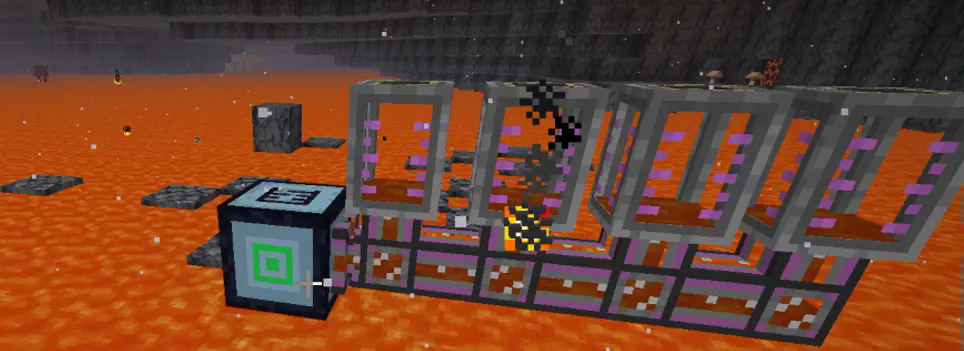
描述
这是一个简单的模组,其功能类似于抽水机滑轮。在自动模式下,它可以抽取下方的液体。当下方液体的量超过 10,000 单位时,将被视为无限。此外,还有范围抽取模式,可以抽取指定范围内的所有液体。另外,还有流体填充模式,可以在指定范围内填充流体。
安装
将 jar 文件放入 .minecraft 目录下的 mods 文件夹中。
配置设置
您可以配置每刻抽取的流体量、泵的默认容量以及被视为无限的阈值。
#每刻处理的方块数量
# 默认值: 4096
# 范围: > 1
blocksPerTick = 4096
#泵的流体存储容量(单位为毫桶 mB,1 桶 = 1000mB)
# 默认值: 16
# 范围: 1 ~ 64
pumpCapacity = 16
#超过此阈值的流体量将被视为无限
# 默认值: 10000
# 范围: > 0
infiniteThreshold = 10000
使用方法
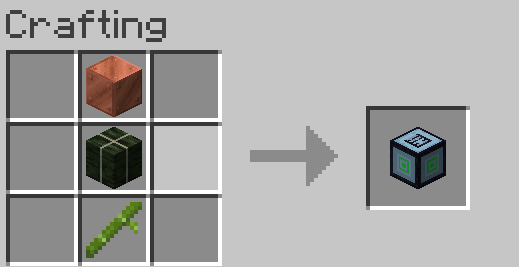
您可以使用铜块、海带块和竹子进行合成。
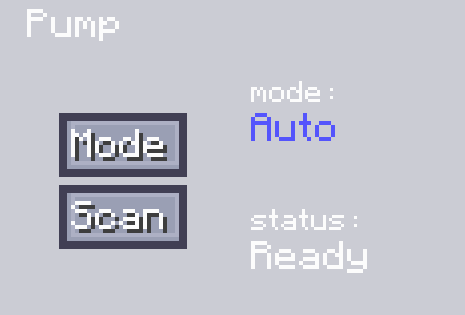
在自动模式下,您需要将机器放置在流体上方。然后点击“扫描”以获取可抽取流体的位置。之后,使用主动输出管道并将其连接到相应的流体储存容器,即可完成流体输出。
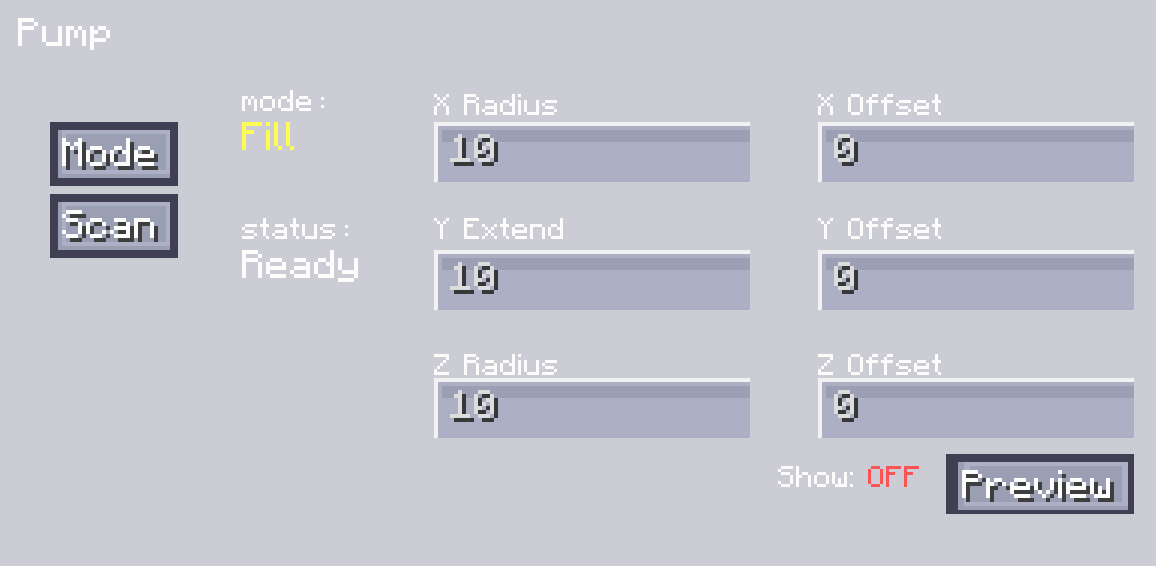
另一种液体范围抽取模式允许您设置范围。您可以通过设置 X、Y 和 Z 轴上的半径来实现这一点,并调整 XYZ 的偏移值来设置其具体位置。您可以通过点击“显示范围”按钮来查看范围。调整到合适的位置后,可以点击“扫描”以完成对所有可抽取流体的扫描。扫描完成后,与自动模式一样,您可以通过主动输出管道输出流体。
填充模式与抽取模式类似。区别在于您需要向我们的泵中输入流体。首先,设置范围并调整位置。之后,您可以点击“扫描”。它将扫描可以放置流体的位置并获取位置信息。然后,将流体输入到泵中,它将在相应的位置放置流体。

Description
A simple MOD is designed to function similarly to a hose pulley. In automatic mode, it can draw the liquid below. When the liquid below exceeds 10,000 units, it is considered infinite. There is also a range - extraction mode, which can extract all the liquid within a specified range. Additionally, there is a fluid - filling mode, which fills the fluid within a designated range.
Installation
Put the jar-file into the mods folder in your .minecraft directory.
Configuration setting
You can configure the amount of fluid extracted per tick, the default capacity of the pump, and the threshold considered as infinite.
#Number of blocks processed per tick
# Default: 4096
# Range: > 1
blocksPerTick = 4096
#Pump fluid storage capacity in mB (1 bucket = 1000mB)
# Default: 16
# Range: 1 ~ 64
pumpCapacity = 16
#Fluid amount above this threshold will be considered infinite
# Default: 10000
# Range: > 0
infiniteThreshold = 10000
How to use

You can use copper blocks, kelp blocks, and bamboo for synthesis.

When in the auto mode, you need to place the machine above the fluid. Then click "Scan" to obtain the position of the extractable fluid. After that, use a pipeline for active output and connect it to the corresponding fluid - storage container, and thus the fluid output can be completed.

Another mode for liquid range extraction allows you to set the range. You can do this by setting the radii on the X, Y, and Z axes, and adjust the offset values of XYZ to set its specific position. You can view the range by clicking the "Display Range" button. After adjusting it to the appropriate position, you can click "Scan" to complete the scanning of all extractable fluids. After the scanning is finished, just like in the automatic mode, you can output the fluid through a pipeline for active output.
The filling mode is similar to the extraction mode. The difference is that you need to input fluid into our pump. First, set the range and adjust the position. After that, you can click "Scan". It will scan for positions where the fluid can be placed and obtain the position information. Then, input the fluid into the pump, and it will place the fluid at the corresponding positions.
评论 0
登录后参与评分
还没有评论,来抢沙发吧