
Keep Inventory Orbs
一种跨平台的完全 服务端 墓碑概念方案,引入**“ orbs(球体)”*来在玩家死亡时_存储_其物品栏。
跨平台,兼容 Minecraft Bedrock 玩家!
(只要数据模组/模组已安装在 Java 服务器上即可)
死亡后:
- 会生成一个Orb,用于_保护_你的_inventory(物品栏)安全。[与背包类模组不兼容]
- 会给予你一枚指南针,帮助你_locate(定位)最后的 orb。[可自定义]
恢复物品栏:
-
当 Orb 被破坏时,它会_try(尝试)_将物品栏仅恢复到原主手中。
如果 orb 的所有者 不在附近(6 格内),则不会发生任何事,且 orb 不会被破坏。
默认情况下,窃取 orb 功能处于 [关闭] 状态。若要 窃取 一个 不属于你 的 orb,管理员需要在 菜单 [见下文] 中启用该功能。
-
Orb 会将你的护甲和物品 精确地 恢复到它们原本所在的槽位。
如果该 槽位 已被其他物品占据,则该 物品 会在玩家所在位置掉落。
Orb 行为:
- Orb 始终会在_玩家死亡的位置_ 生成。
- 如果玩家在虚空中死亡,orb 将在世界的最低高度处生成。
- Orb 永远不会 消失。
- Orb 具有重力,若无支撑则会 坠落。
- 若 orb 位于方块内部,它会向_上移动_。
- Orb 无法被活塞_移动_。
服务端优势
如果你是服务器所有者或管理员,将此数据包/模组安装到_server(服务器)中,即可让其在所有人_身上生效!
无需在_client side(客户端)_安装!
菜单(服务器管理员用)
以下命令会打开内置的聊天菜单:
/function #keep_inventory_orbs:menu
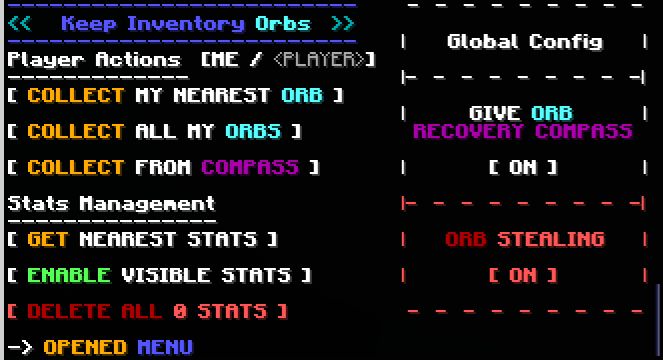
拾取 orbs
启用此功能后,所有玩家都可以 抢夺 orb,即使该 orb 不属于他们。
按钮:
- 切换 [ON/OFF] 所有玩家的 orb 抢夺功能
给予 orb 恢复指南针
切换是否在玩家重生后向其提供指向其最后一个 orb 的 orb 恢复指南针。
按钮:
- 切换所有玩家的 [开启/关闭] 球体恢复指南针
玩家操作
这些操作将应用于 你自己 或指定的 <player>。
要在这两者之间 切换,请点击 [我 / <玩家>] 部分。
按钮:
- 收集最近的我的经验球
- 收集加载区块内离你最近的经验球
- 收集所有的我的经验球
- 收集加载区块内所有的经验球
- 从指南针收集
- 收集玩家手中持有的经验球恢复指南针所指死亡地点附近最近的经验球,即使该区域未加载。
- 收集玩家手中持有的经验球恢复指南针所指死亡地点附近最近的经验球,即使该区域未加载。
状态管理
球体保留了关于玩家死亡状态的“Stats”信息。即使球体被收集,这些状态信息也会保留。
按钮:
- 获取最近的统计信息
- 显示来自最近 Stats/Orb 的统计信息
- 提供以下选项:
- 显示由 Stats/Orbs 保存的物品栏内容
- 收集/销毁/重生特定的 Orbs
- 清除特定的 Stats
- 启用/禁用可见的统计信息
- 启用后,会显示粒子以标记 16 格范围内的 Stats/Orb,并指向最近选定的一个
- 删除所有统计信息
- 统计当前加载区块中的所有 Stats/Orb 并将其删除
Keep Inventory Orbs
A cross-platform fully server-side approach to the gravestone concept introducing 'orbs' to store your inventory upon death.
Cross-platform, compatible with Minecraft Bedrock Players!
(as long as the datapack/mod is installed on a Java server)
Upon death:
- An Orb will spawn that will keep your inventory safe. [Incompatible with Backpack mods]
- A compass to help you locate your last orb will be given to you. [Customizable]
Recovering Inventory:
-
When an Orb is broken, it will attempt to restore its inventory only to its owner.
If the Orb's owner is not nearby (within 6 blocks), nothing will happen and the orb will not break.
Orb Stealing is [OFF] by default. To steal an Orb that is not yours, an Admin needs to enable it in the Menu [see below]
-
Orbs will re-equip your armor and items exactly into the slot they were.
If the slot is occupied by something else, the item will drop in the player's position.
Orb behavior:
- Orbs will always spawn on the player's death position
- Orbs will spawn in the world's minimum height if the player dies in the void
- Orbs will never despawn.
- Orbs have gravity and will fall if they have no support.
- Orbs will move upwards if they are inside of a block.
- Orbs cannot be moved by pistons
Server-side advantages
If you are a server owner or admin, installing this datapack/mod into the server makes it work for everyone!
There is no need to install it on the client side!
Menu (for Server Admins)
The following command opens the built-in Chat Menu:
/function #keep_inventory_orbs:menu
Orb Stealing
Orb Stealing will enable all players to steal an Orb even if it is not theirs
Buttons:
- Toggle [ON/OFF] orb stealing for all players
Give Orb Recovery Compass
Toggles whether players will receive an orb recovery compass pointing towards their last orb after respawning
Buttons:
- Toggle [ON/OFF] orb recovery compass for all players
Player Actions
These actions will apply to yourself or to a specified <player>.
To toggle between these, click the [ME / <PLAYER>] section.
Buttons:
- Collect My Nearest Orb
- Collects your nearest orb within loaded chunks
- Collect All My Orbs
- Collects all your orbs within loaded chunks
- Collect From Compass
- Collects the orb nearest to the death location indicated by the orb recovery compass held in the player's hand, even in unloaded chunks.
- Collects the orb nearest to the death location indicated by the orb recovery compass held in the player's hand, even in unloaded chunks.
Stats Management
Orbs keep 'Stats' with information about the player's death. These stats are kept even after the orbs are collected.
Buttons:
- Get Nearest Stats
- Shows the Stats from the nearest Stats/Orb
- Gives you options to:
- Show the inventory saved by the Stats/Orbs
- Collect/Destroy/Respawn specific Orbs
- Erase specific Stats
- Enable/Disible Visible Stats
- When enabled, shows particles locating Stats/Orb within 16 blocks, and points towards the nearest selected one
- Delete All Stats
- Counts all Stats/Orb in currently loaded chunks and deletes them

下载 Keep Inventory Orbs
需要联机服务器吗?
稳定流畅、一键部署,几分钟即可和朋友联机开服
最低仅需 8 元/月 即可畅快联机
下载 Keep Inventory Orbs
需要联机服务器吗?
稳定流畅、一键部署,几分钟即可和朋友联机开服
最低仅需 8 元/月 即可畅快联机
下载 Keep Inventory Orbs
需要联机服务器吗?
稳定流畅、一键部署,几分钟即可和朋友联机开服
最低仅需 8 元/月 即可畅快联机
下载 Keep Inventory Orbs
需要联机服务器吗?
稳定流畅、一键部署,几分钟即可和朋友联机开服
最低仅需 8 元/月 即可畅快联机
下载 Keep Inventory Orbs
需要联机服务器吗?
稳定流畅、一键部署,几分钟即可和朋友联机开服
最低仅需 8 元/月 即可畅快联机
下载 Keep Inventory Orbs
需要联机服务器吗?
稳定流畅、一键部署,几分钟即可和朋友联机开服
最低仅需 8 元/月 即可畅快联机
下载 Keep Inventory Orbs
需要联机服务器吗?
稳定流畅、一键部署,几分钟即可和朋友联机开服
最低仅需 8 元/月 即可畅快联机
下载 Keep Inventory Orbs
需要联机服务器吗?
稳定流畅、一键部署,几分钟即可和朋友联机开服
最低仅需 8 元/月 即可畅快联机
下载 Keep Inventory Orbs
需要联机服务器吗?
稳定流畅、一键部署,几分钟即可和朋友联机开服
最低仅需 8 元/月 即可畅快联机
下载 Keep Inventory Orbs
需要联机服务器吗?
稳定流畅、一键部署,几分钟即可和朋友联机开服
最低仅需 8 元/月 即可畅快联机
新增内容:
- 添加了 26.3 支持
- 在菜单中添加了 [ME/<PLAYER>],方便使用菜单命令来帮助其他玩家。
- 添加了从指南针收集按钮,现在该按钮会加载由手持的恢复球指南针指示的玩家死亡位置的区块,并从死亡位置收集最近的灵魂球。
更改:
- 灵魂球所有权检测现在使用玩家的 UUID 而不是名称,以确保账号重命名不会影响灵魂球。
修复问题:
- 数据包/模组之前需要玩家在不同维度之间移动才能正确初始化
关于这个资源的讨论、问题反馈与使用心得
还没有讨论,来发第一帖吧
你是这个资源的作者?登录后可认领此资源。
相似资源
 模组

显示你正在注视的方块的信息。(适用于 Minecraft 1.16+ 的 Hwyla/Waila 分支)
 模组
在游戏画面角落显示附近世界地形、玩家、生物和实体的地图。可创建路径点,帮助你找到标记过的位置。
 模组

查看物品与配方
 模组
使用 JavaScript 编辑配方、添加自定义物品、编写世界事件!
 模组
AE2:一款流行的自动化与存储模组
 模组
那是什么?一个 Waila/Hwyla 的分支。
评论 0
登录后参与评分
还没有评论,来抢沙发吧