Keep My Sword
耐久度归零时,装备保留在物品栏中而不是消失。
Keep My Sword 防止破损的工具、武器和盔甲消失。当耐久度耗尽时,物品会以破损且不可用的状态保留在其格子中,直到你修复它——开箱即用,支持铁砧、经验修补(Mending)以及模组提供的修复台。
工作原理
- 原地破损:达到
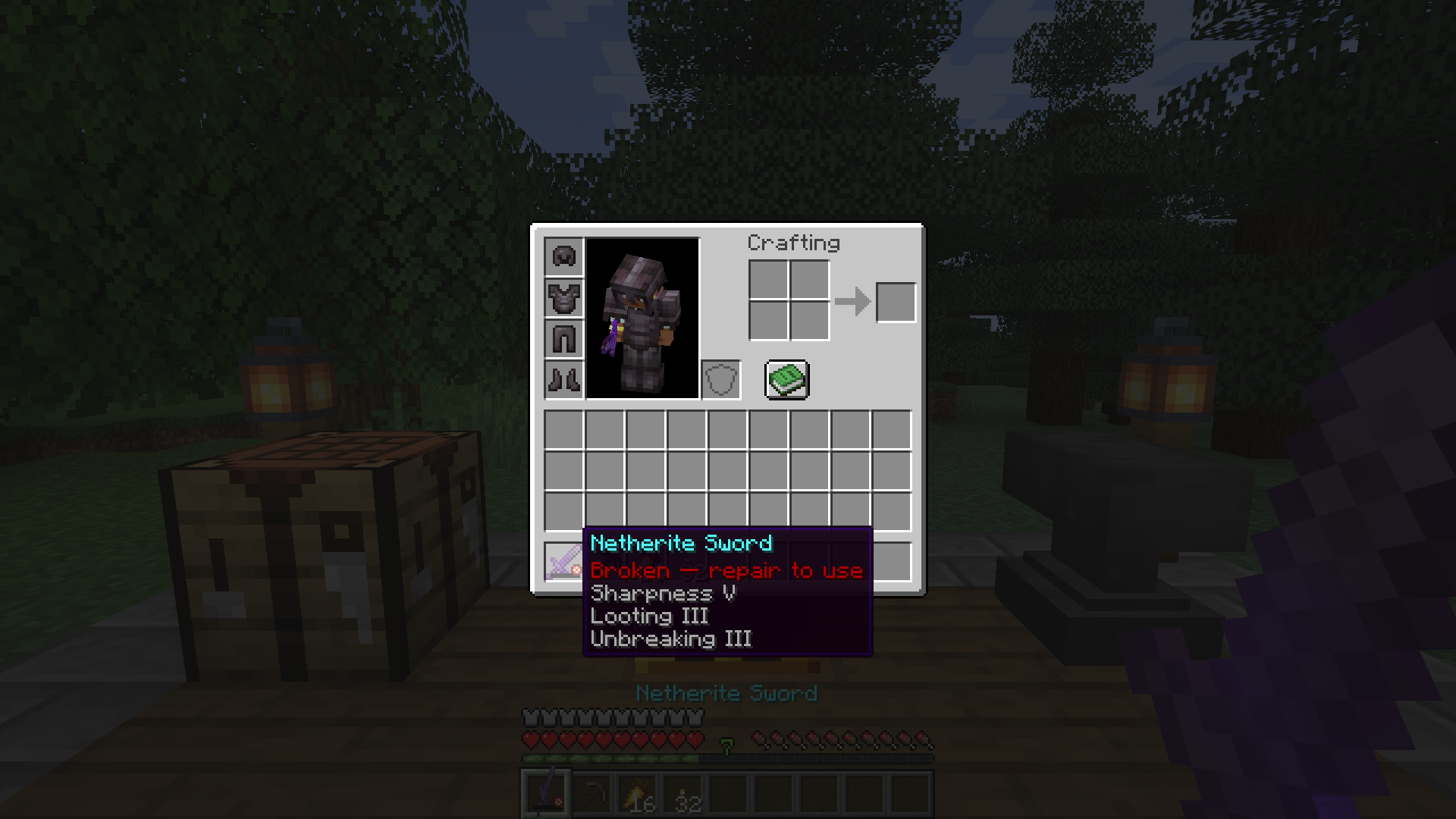
0耐久度时会播放一次破碎音效和粒子效果,将物品保留在你的物品栏中并显示一个小型的破损角标,同时禁用其攻击伤害、挖掘速度、工具掉落、护甲属性、被动效果和附魔,直到被修复。 - 永远不会阻塞箱子或工作台:手持破损物品右键点击箱子、铁砧、合成台、砂轮或模组工作台时,方块依然正常打开,破损装备不会被意外地当作普通合成材料消耗掉。
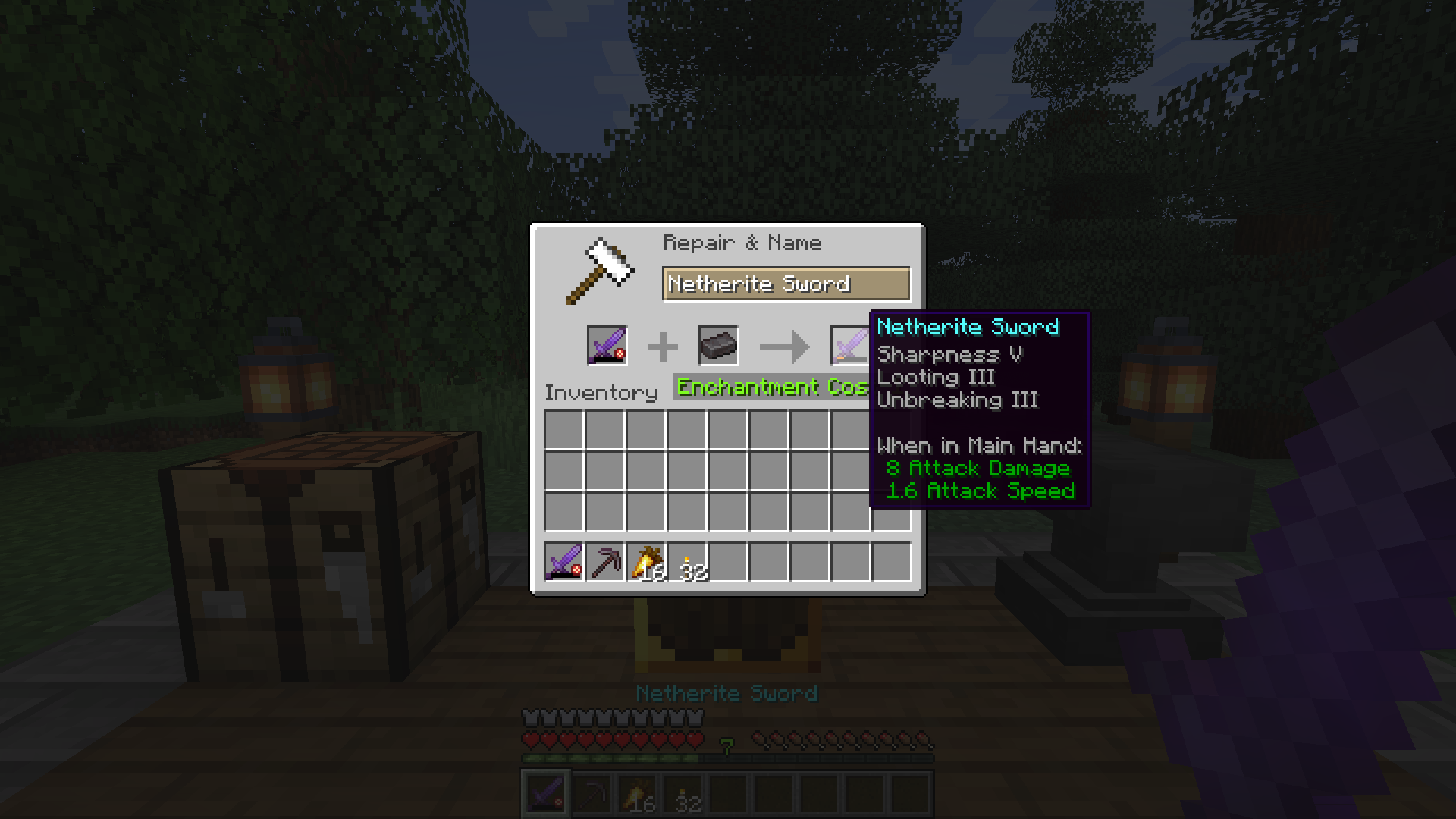
- 随处修复:由于破损装备仍然是真实存在的物品,原版铁砧、砂轮、合成修复、经验修补(可切换)、附魔注入器(Enchanting Infuser)、Sophisticated Backpacks 以及其他修复模组均可直接使用,无需额外的兼容性补丁。
- 合理的默认值:原版鞘翅保持其正常的
1点耐久度的破损翅膀行为,并且 SlashBlade、Tinkers' Construct 和 Tetra 中的模块化装备会被自动跳过。
配置
通过 Mod Menu(Fabric)或 Mods → Config(Forge / NeoForge)在游戏内切换选项,或者编辑 config/keep_my_sword.toml:
| Key | Default | Description |
|---|---|---|
allowMendingWhenBroken |
true |
允许在收集经验球时使用经验修补修复破损物品。 |
showBreakNotification |
true |
物品破损时在操作栏显示警告提示。 |
showBrokenOverlay |
true |
在 GUI 中破损物品的角落显示小型破损指示器。 |
excludedItems |
["#slashblade:swords", "#tconstruct:modifiable", "#tetra:modular_items"] |
Keep My Sword 忽略的物品 ID(如 "minecraft:diamond_sword")或物品标签(如 "#modid:tag")。 |
整合包和数据包也可以使用 #keep_my_sword:excluded 物品标签来排除物品。
支持版本
独立 JAR 文件,无必需库模组依赖(无需 Fabric API)。
| Minecraft | Loaders | Java |
|---|---|---|
1.20.1 |
Fabric, Forge | 17 |
1.21.1 |
Fabric, NeoForge | 21 |
26.1.2 |
Fabric, NeoForge | 25 |
26.2 |
Fabric, NeoForge | 25 |
26.3 |
Fabric, NeoForge | 25 |
构建
./scripts/setup-hooks.sh
./scripts/verify.sh [--container]
下载
Keep My Sword
Gear stays in your inventory at 0 durability instead of vanishing when it breaks.
Keep My Sword prevents broken tools, weapons, and armor from disappearing. When durability runs out, the item remains in its slot in a broken, unusable state until you repair it — working out of the box with anvils, Mending, and modded repair stations.
How It Works
- Breaks in place: Reaching
0durability plays the break sound and particles once, keeps the item in your inventory with a small broken-item corner indicator, and disables its attack damage, mining speed, tool drops, armor stats, passive effects, and enchantments until repaired. - Never blocks chests or workstations: Right-clicking a chest, anvil, crafting table, grindstone, or modded workstation while holding a broken item still opens the block normally, and broken gear won't be accidentally consumed as an ordinary crafting ingredient.
- Repair anywhere: Because the broken gear remains the real item, vanilla anvils, grindstones, crafting repair, Mending (toggleable), Enchanting Infuser, Sophisticated Backpacks, and other repair mods work without extra compat patches.
- Sensible defaults: Vanilla Elytra keeps its normal
1-durability broken-wing behavior, and modular gear from SlashBlade, Tinkers' Construct, and Tetra is skipped automatically.
Configuration
Toggle options in-game via Mod Menu (Fabric) or Mods → Config (Forge / NeoForge), or edit config/keep_my_sword.toml:
| Key | Default | Description |
|---|---|---|
allowMendingWhenBroken |
true |
Let Mending repair broken items when collecting XP orbs. |
showBreakNotification |
true |
Show an actionbar alert when an item breaks. |
showBrokenOverlay |
true |
Show a small broken indicator on the corner of broken items in GUIs. |
excludedItems |
["#slashblade:swords", "#tconstruct:modifiable", "#tetra:modular_items"] |
Item IDs ("minecraft:diamond_sword") or item tags ("#modid:tag") ignored by Keep My Sword. |
Modpacks and datapacks can also exclude items with the #keep_my_sword:excluded item tag.
Supported Versions
Standalone JAR with no required library mods (no Fabric API needed).
| Minecraft | Loaders | Java |
|---|---|---|
1.20.1 |
Fabric, Forge | 17 |
1.21.1 |
Fabric, NeoForge | 21 |
26.1.2 |
Fabric, NeoForge | 25 |
26.2 |
Fabric, NeoForge | 25 |
26.3 |
Fabric, NeoForge | 25 |
Building
./scripts/setup-hooks.sh
./scripts/verify.sh [--container]
Download

下载 Keep My Sword
需要联机服务器吗?
稳定流畅、一键部署,几分钟即可和朋友联机开服
最低仅需 8 元/月 即可畅快联机
下载 Keep My Sword
下载 Keep My Sword
需要联机服务器吗?
稳定流畅、一键部署,几分钟即可和朋友联机开服
最低仅需 8 元/月 即可畅快联机
下载 Keep My Sword
下载 Keep My Sword
需要联机服务器吗?
稳定流畅、一键部署,几分钟即可和朋友联机开服
最低仅需 8 元/月 即可畅快联机
下载 Keep My Sword
需要联机服务器吗?
稳定流畅、一键部署,几分钟即可和朋友联机开服
最低仅需 8 元/月 即可畅快联机
下载 Keep My Sword
需要联机服务器吗?
稳定流畅、一键部署,几分钟即可和朋友联机开服
最低仅需 8 元/月 即可畅快联机
下载 Keep My Sword
需要联机服务器吗?
稳定流畅、一键部署,几分钟即可和朋友联机开服
最低仅需 8 元/月 即可畅快联机
下载 Keep My Sword
下载 Keep My Sword
需要联机服务器吗?
稳定流畅、一键部署,几分钟即可和朋友联机开服
最低仅需 8 元/月 即可畅快联机
- 强化版旧式载体解封(
v121&v26):在ItemStack.CODEC.parse之前,对升级后的物品标签副本自动移除已退役/未注册的DataComponentType键(包括!删除条目),并在每次剥离组件时记录警告,同时在失败时保持原始载体不受影响。
- 新增了对 Fabric 和 NeoForge 的 Minecraft 26.3 支持。
- 修复了在 Minecraft 1.20.1 Forge 上缺少
pack.mcmeta(ResourcePackInfo启动警告)的问题。
2.0.1
- 专用服务器隔离:将仅客户端的配置界面注册和客户端生命周期类移至专用的客户端包(
KeepMySwordForgeClient、KeepMySwordNeoForgeClient、KeepMySwordModMenu),以确保专用服务器不会加载客户端 GUI 类。 - 验证:在完整的构建矩阵、基于属性的不变量测试、打包 JAR 的架构契约以及真实的 Minecraft 1.21.1 NeoForge GameTest E2E 中进行了验证。
Legacy 1.3.0 alpha build preserved for historical compatibility.
完全重写为原生的原地损坏物品状态,且零运行时依赖(无需 RinLib,无需 Fabric API)。
- 原地损坏状态:物品耐久度在归零时固定显示为
0而非消失,并播放破碎音效、粒子效果以及一次可选的操作栏提示。 - 6 项引擎级防护:徒手近战、无工具掉落的手速挖矿、零属性/护甲、跳过被动刻与战斗/保护/移动附魔、徒手方块交互回退的工具/武器右键门控,以及合成材料保护。
- 原生修复兼容性:开箱即用,支持铁砧、砂轮、合成修复、经验修补(可配置)、附魔灌注机、Sophisticated Backpacks 及其他模组修复机制。
- 自动 v1.x 存档迁移:旧版携带恢复之匙的物品会在加载时自动解封。
- 原生游戏内配置界面:ModMenu (Fabric) / Mods -> Config (Forge & NeoForge)。
Keep My Sword 1.3.0
- 当工作菜单打开时,使铁砧、附魔注入器、修理台及其他修理工作台能够通过暴露其确切的原始磨损状态来修复封存的装备。新的修理模组通常无需单独的兼容补丁即可正常使用其常规交易功能。
- 在物品被取出、转移至背包、菜单关闭、玩家断开连接或死亡掉落/丢弃时,重新封存仍损坏的物品;每秒扫描一次玩家背包。
- 使物品在箱子、漏斗、发射器和潜影盒中保持封存状态,并具备自动检测普通方块存储槽的功能。使用菜单 ID 或类名在
repairViewExcludedMenus中注册非常规存储菜单(需重启)。 - 移除仅针对注入器的修理访问器;保留封存输入状态的附魔与铁砧快照保护机制。快照编码和本地持久化行为保持不变。
Keep My Sword 1.2.1
- RinLib 现已内置于 Keep My Sword 中——无需单独下载 RinLib。
Keep My Sword 1.2.0
功能与改进
- TOML 配置文件:新增了
config/keep_my_sword.toml,在游戏启动时通过 NightConfig 加载(编辑后需重启游戏生效)。 - 物品排除列表:新增
excludedItems配置项,用于设置可绕过破损物品保护的物品。支持使用物品 ID(如"minecraft:diamond_sword")和物品标签(如"#slashblade:swords")。默认为空列表[]。 - 现有兼容性:原生的
#keep_my_sword:excluded物品标签在配置文件之外仍完全受支持。 - 核心行为保持不变:破损装备保护、铁砧修复机制以及物品数据持久化均未改变。
1.1.2
- 将 Fabric 和 NeoForge 加载器的清单文件对齐至 SPDX
GPL-3.0-only,并将仓库的LICENSE文件打包到两个 JAR 发行版中。 - 修正了 Modrinth 和 CurseForge 上的平台许可证元数据,以匹配项目的 GNU General Public License v3.0。
- 发布了适用于 Minecraft 1.21.1、26.1.2 和 26.2 的 Fabric 和 NeoForge 版本 1.1.2,无任何玩法变更。
关于这个资源的讨论、问题反馈与使用心得
还没有讨论,来发第一帖吧
你是这个资源的作者?登录后可认领此资源。
相似资源
 模组

让你能够在世界中的任何位置定位结构。
 模组

TerraFirmaCraft (TFC) 是一个全面转换模组,对生存模式进行了彻底的改造与重新设计。
 模组
一堆修复
 模组

如果游戏能告知重要的刷新点,会怎样?
 模组
一款适用于你选择的加载器的 Minecraft VR 模组!
 模组

为盔甲架添加图形用户界面,允许你配置其姿势和其他属性
评论 0
登录后参与评分
还没有评论,来抢沙发吧