
KeybindsGalore
当多个操作绑定到同一个按键时,打开一个选择菜单,以便你选择实际执行哪个操作。
Minecraft 的默认行为是选择一个绑定并静默忽略其余的。通常你会因为撞墙才发现某个模组“偷走”了 Space 键。KeybindsGalore 拦截冲突,而不是靠猜。
同时支持 Fabric 和 NeoForge。
功能
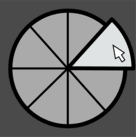
冲突选择 - 按下有冲突的按键,会打开一个列出所有绑定到该按键的操作的菜单。指向你想要的操作,其他操作在本次按键中被释放。
环形菜单和列表菜单 - 环形菜单是默认的。如果你更喜欢传统样式,也提供普通的列表菜单,可在配置中切换。
GPU 渲染环形菜单 - 楔形块通过 Minecraft 的延迟 GUI 渲染管线使用自定义 RingRenderer 绘制,因此环形菜单能与其他界面正确合成。无需捆绑或依赖外部渲染库。
优先级系统 - 对于你不想被询问的按键。将 Space 设置为始终跳跃,它就会跳跃,即使有其他操作也绑定到了它。
K 键优先级捕获 - 按 K,然后按你想锁定的按键,选择操作。无需编辑文件。
实时冲突检测 - 在启动、加入世界、关闭原版控制屏幕、保存配置以及优先级更改时重新扫描冲突。
类别过滤器 - 如果永远不想被询问某些类别,可将其从检测中排除。
鼠标支持 - 不仅适用于键盘,也适用于冲突的鼠标按钮绑定。
游戏内配置 - 通过 Cloth Config 提供完整的设置屏幕,包含滑块、带透明度的颜色字段以及每个条目的工具提示。
公共 API - 一个小版本化的 API 允许其他模组注册其操作,使其绑定参与冲突检测。
1.8.0 更新内容
现在同时支持 NeoForge 和 Fabric。 26.2 NeoForge 构建是与 Fabric 加载器相同的模组:相同的菜单、相同的优先级系统、相同的配置屏幕。它不需要 Fabric Loader、Fabric API 或 ModMenu。
Fabric 上的 Minecraft 26.3 支持。 26.3 构建将模组移植到 26.3,其中客户端从 GLFW 迁移到 SDL3,渲染迁移到较新的 RenderPipeline API。
配置屏幕在 26.2 上可用。 之前的 26.2 构建存在一个已知问题,即配置屏幕失败,因为当时可用的 Cloth Config 版本引用了一个已不存在的 Minecraft 类。此问题已解决。
除此之外,此版本重构建了冲突检测方式和环形菜单绘制方式:
- 扇区渐变 - 每个楔形块从较亮的内边缘到其外颜色进行着色,带有强度滑块。由于渲染器已接受单独的内色和外色,因此绘制免费。
- 打开动画 - 环形菜单出现时的短暂缓动动画,带有持续时间滑块。设置为 0 可实现即时菜单。标签在完成动画后显示。
- 环形菜单几何结构真正生效 - 缩放、边距和取消区域大小现已连接。它们之前在配置屏幕中暴露但被静默忽略。
- 选中扇区扩展 - 现在当你悬停在楔形块上时应用。
- 背景变暗强度 - 环形菜单背景的滑块。
- 标签文本阴影 - 遵循其设置,而不是永久开启。
- 修复标签位置 - 标签以径向方式定位并限制在屏幕内。之前底部楔形块的标签会被向上推入环形菜单中。
- 修复环形菜单平滑度 - 降低顶点数现在会使整个环形菜单均匀降级,而不仅仅是使取消圆圈呈现棱角化。
- 可靠的 K 键捕获 - 直接边缘触发路径与之前的轮询路径并行运行,因此首次按下不再有时被吞没。
- 独立的列表菜单设置选项卡 - 列表菜单的颜色和不透明度之前位于环形菜单选项卡中,那里它们无效且看起来损坏。
- 类型化配置 - 配置通过带原子文件替换的验证快照读取和写入,而不是通过反射静态字段。
- 自动清理废弃选项 - 九个未读取、冗余或遗留自 1.21.x 的设置会在加载时从你的配置文件中剥离,并在文件中注明替换情况。升级不再产生关于未知键的错误消息。
要求
选择与你的加载器匹配的行。
Fabric
- Minecraft 26.2 或 26.3
- Fabric Loader >= 0.19.3
- Fabric API >= 0.152.1+26.2
- Cloth Config >= 26.2.155
- ModMenu(可选,仅用于设置屏幕)
NeoForge
- Minecraft 26.2
- NeoForge >= 26.2.0.88
- Cloth Config >= 26.2.155
Java 25 或更高版本。仅限客户端:不适用于专用服务器。
配置
游戏内设置屏幕是配置模组的推荐方式,它编辑与你手动编辑的相同 config/keybindsgalore.properties 文件,因此你可以任选其一。在 Fabric 上,屏幕出现在 ModMenu 中;在 NeoForge 上,它出现在模组列表中。
四个选项卡:
- 常规 - 调试日志、脉冲持续时间、攻击解决方法、背景变暗。
- 行为 - 环形菜单或列表菜单、冲突警告、类别过滤器、优先级操作。
- 视觉(环形菜单) - 几何结构、颜色、渐变、动画、标签。
- 视觉(列表菜单) - 列表颜色和透明度。这些仅影响列表菜单。
颜色输入为 ARGB 十六进制值,例如 C0606060。此模组使用的 Cloth Config 版本提供十六进制字段而非 RGB 滑块控件。
手动设置优先级如下所示:
PRIORITY_KEYBINDS=[key.jump:key.keyboard.space]
PRIORITY_CATEGORIES=[Movement]
操作优先级始终优于类别优先级。
已知限制
- 圆形菜单仅支持鼠标操作。目前尚无键盘导航功能,这是最大的无障碍访问缺陷。
- 相邻扇区上的长操作名称可能会重叠。标签已被限制宽度,确保不会因超出屏幕边缘而被截断,但无法自动换行。
- 圆形菜单不会暂停游戏(此为设计意图),以便你可以看到其背后的世界。
- 颜色输入采用十六进制文本字段,而非拾色器。
- 运行时被其他模组更改的绑定不会被检测。仅列出的触发条件会引发重新扫描。
历史与致谢
- 原始项目与原作者: Cael
- KeybindsGalore Plus: AV306
- 1.20.x、1.21.x 及 26.x 更新与重写: HVB007
- 贡献者: 见模组元数据及 GitHub 仓库所列名单
AI 声明
本模组的代码部分由 AI 工具辅助编写。所有由 AI 生成的代码均已由开发者审查、测试并验证功能正常。
链接
KeybindsGalore
Opens a selection menu when multiple actions are bound to the same key, so you choose which action actually runs.
Minecraft's default behaviour is to pick one binding and silently ignore the rest. Usually you
find out by walking into a wall because a mod stole Space. KeybindsGalore intercepts the
conflict instead of guessing.
Available for both Fabric and NeoForge.
Features
Conflict selection - Press a contested key and a menu opens listing every action bound to it. Point at the one you meant, and the others are released for that press.
Pie menu and list menu - The pie is the default. A plain list menu is also available if you prefer something conventional, switchable in the config.
GPU-rendered pie - Wedges are drawn through Minecraft's deferred GUI render pipeline using
a custom RingRenderer, so the pie composites correctly with the rest of the interface. No
external rendering library is bundled or needed.
Priority system - For keys you never want to be asked about. Set Space to always jump and
it jumps, even when something else is bound to it.
K-key priority capture - Press K, press the key you want to lock down, pick the action. No
file editing.
Live conflict detection - Conflicts are re-scanned on startup, on joining a world, when you close the vanilla Controls screen, when you save your config, and when priorities change.
Category filters - Exclude entire categories from detection if you never want to be asked about them.
Mouse support - Works with conflicting mouse button bindings, not just keyboard.
In-game configuration - A full settings screen through Cloth Config, with sliders, colour fields with alpha, and tooltips on every entry.
Public API - A small versioned API lets other mods register their actions so their bindings take part in conflict detection.
What's New in 1.8.0
Now available on NeoForge as well as Fabric. The 26.2 NeoForge build is the same mod on the NeoForge loader: same menus, same priority system, same config screen. It needs no Fabric Loader, no Fabric API, and no ModMenu.
Minecraft 26.3 support on Fabric. The 26.3 build ports the mod to 26.3, where the client
moved from GLFW to SDL3 and rendering moved to the newer RenderPipeline API.
The config screen works on 26.2. The previous 26.2 build shipped with a known issue where the config screen failed, because the Cloth Config version available at the time referenced a Minecraft class that no longer exists. That is resolved.
Beyond that, this release rebuilds how conflicts are detected and how the pie is drawn:
- Sector gradation - each wedge shades from a lighter inner edge to its outer colour, with an intensity slider. Free to draw, since the renderer already accepted separate inner and outer colours.
- Open animation - a short eased animation when the pie appears, with a duration slider. Set it to 0 for an instant menu. Labels appear once it finishes.
- Pie geometry actually works - scale, margin, and cancel-zone size are now wired up. They were exposed in the config screen but silently ignored.
- Selected sector expansion now applies when you hover a wedge.
- Darken strength slider for the pie background.
- Label text shadow follows its setting instead of being permanently on.
- Fixed label placement - labels are positioned radially and clamped to the screen. Previously a label on a bottom wedge was pushed upward into the pie.
- Fixed pie smoothness - lowering the vertex count now degrades the whole pie evenly instead of only making the cancel circle faceted.
- Reliable K-key capture - a direct edge-triggered path runs alongside the previous poll-based one, so the first press is no longer sometimes swallowed.
- A separate list menu settings tab - the list menu's colours and opacity were in the pie tab, where they had no effect and looked broken.
- Typed configuration - config is read and written through a validated snapshot with atomic file replacement, instead of reflection over static fields.
- Retired options are cleaned up automatically - nine settings that were unread, redundant, or left over from 1.21.x are stripped from your config file on load, with the replacement noted in the file. Upgrading no longer produces error messages about unknown keys.
Requirements
Pick the row that matches your loader.
Fabric
- Minecraft 26.2 or 26.3
- Fabric Loader >= 0.19.3
- Fabric API >= 0.152.1+26.2
- Cloth Config >= 26.2.155
- ModMenu (optional, only for the settings screen)
NeoForge
- Minecraft 26.2
- NeoForge >= 26.2.0.88
- Cloth Config >= 26.2.155
Java 25 or newer on both. Client-side only: not for dedicated servers.
Configuration
The in-game settings screen is the recommended way to configure the mod, and it edits the same
config/keybindsgalore.properties file you can edit by hand, so you can use either. On Fabric
the screen appears in ModMenu; on NeoForge it appears in the mod list.
Four tabs:
- General - debug logging, pulse duration, attack workaround, background dimming.
- Behaviour - pie or list menu, conflict warnings, category filters, priority actions.
- Visual (Pie Menu) - geometry, colours, gradient, animation, labels.
- Visual (List Menu) - list colours and opacity. These affect the list menu only.
Colours are entered as ARGB hex values such as C0606060. The Cloth Config release this mod
uses provides a hex field rather than an RGB slider widget.
Setting a priority by hand looks like this:
PRIORITY_KEYBINDS=[key.jump:key.keyboard.space]
PRIORITY_CATEGORIES=[Movement]
An action priority always beats a category priority.
Known limitations
- The pie menu is mouse-only. There is no keyboard navigation yet, which is the largest accessibility gap.
- Long action names on neighbouring wedges can overlap. Labels are clamped so they are never cut off by the screen edge, but they cannot reflow.
- The pie menu does not pause the game, intentionally, so you can see the world behind it.
- Colour inputs are hex text fields, not pickers.
- Bindings changed by another mod at runtime are not detected. Only the listed triggers cause a rescan.
History and Credits
- Original project and original author: Cael
- KeybindsGalore Plus: AV306
- 1.20.x, 1.21.x, and 26.x updates and re-writes: HVB007
- Contributors listed in the mod metadata and the GitHub repository
AI Declaration
Portions of this mod's code were written with the assistance of AI tools. All AI-generated code has been reviewed, tested, and verified for functionality by the developer.
Links
下载 KeybindsGalore (HVB007)
下载 KeybindsGalore (HVB007)
下载 KeybindsGalore (HVB007)
下载 KeybindsGalore (HVB007)
下载 KeybindsGalore (HVB007)
下载 KeybindsGalore (HVB007)
下载 KeybindsGalore (HVB007)
下载 KeybindsGalore (HVB007)
下载 KeybindsGalore (HVB007)
下载 KeybindsGalore (HVB007)
需要联机服务器吗?
稳定流畅、一键部署,几分钟即可和朋友联机开服
最低仅需 8 元/月 即可畅快联机
1.9.1 的 Alpha 版本。已完成构建与单元测试;尚未在所有加载器上进行人工测试。为两个选择器添加了焦点丢失取消和窗口大小调整处理功能。
关于这个资源的讨论、问题反馈与使用心得
还没有讨论,来发第一帖吧
你是这个资源的作者?登录后可认领此资源。
相似资源
 模组
缓冲的原始输入和线程化的事件轮询
 模组

一个用于收集生物掉落物的多区块模组。
 模组

显示你正在注视的方块的信息。(适用于 Minecraft 1.16+ 的 Hwyla/Waila 分支)
 模组

原版世界生成优化模组
 模组
在游戏画面角落显示附近世界地形、玩家、生物和实体的地图。可创建路径点,帮助你找到标记过的位置。
 模组

查看物品与配方
评论 0
登录后参与评分
还没有评论,来抢沙发吧