
KISS – 保持物品栏整洁有序
轻量级物品栏整理模组,是 Inventory Sorting 的一个有特定理念的分支版本。
截图
| 整理前 | 整理后 |
|---|---|
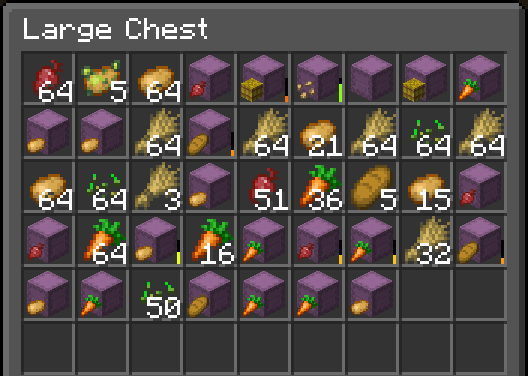 |
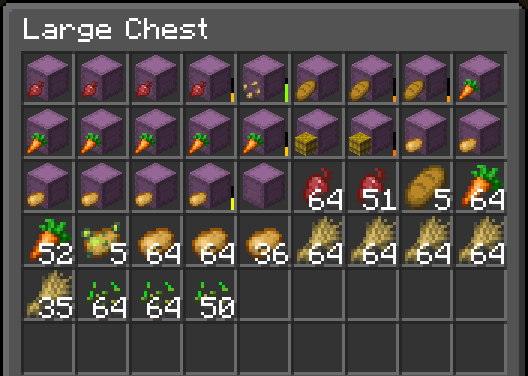 |
配置
使用 Mod Menu 进行图形界面配置,或者使用 /kiss 命令作为替代方案。
使用方法
你可以使用中键或 R 键来整理你当前查看的物品栏。这些按键绑定可以在 选项 -> 控制 -> 按键绑定 中更改。你还可以配置模组 从不 整理玩家自己的物品栏,或者总是同时整理非玩家物品栏(例如你打开的箱子)和玩家物品栏。
虽然该模组在技术上仅需安装在服务器上,但你仍应在服务器 和 客户端都安装它。如果你只安装在服务器上,原版客户端只能通过 /kiss 命令使用它。由于存在 Modrinth 的一个已知问题,我已将该模组标记为客户端 Required(必需)。
KISS – Keep Inventories Sorted, Simple
Lightweight inventory sorting mod, an opinionated fork of Inventory Sorting.
Screenshots
| Before sorting | After sorting |
|---|---|
|
|
Configuration
Use Mod Menu for GUI configuration, or the /kiss command alternatively.
Usage
You can use the middle mouse button or R to sort the inventory you're looking at. These keybindings can be changed in
Options -> Control -> Key Binds. You can also configure the mod to never sort the player inventory, or to always sort both the non-player inventory (e.g. a chest you opened) and the player inventory at the same time.
While the mod is technically only required on the server, you should install it on server and client. If you only
install it on the server, vanilla clients can use it via the /kiss commands only. Due to a known issue with Modrinth,
I've marked the mod as Required on the client.

下载 KISS – 保持物品栏整齐有序
下载 KISS – 保持物品栏整齐有序
下载 KISS – 保持物品栏整齐有序
下载 KISS – 保持物品栏整齐有序
下载 KISS – 保持物品栏整齐有序
下载 KISS – 保持物品栏整齐有序
下载 KISS – 保持物品栏整齐有序
- 移除了一些调试日志,抱歉刷屏了你的日志
关于这个资源的讨论、问题反馈与使用心得
还没有讨论,来发第一帖吧
你是这个资源的作者?登录后可认领此资源。
相似资源
 模组

显示你正在注视的方块的信息。(适用于 Minecraft 1.16+ 的 Hwyla/Waila 分支)
 模组
在游戏画面角落显示附近世界地形、玩家、生物和实体的地图。可创建路径点,帮助你找到标记过的位置。
 模组

查看物品与配方
 模组
使用 JavaScript 编辑配方、添加自定义物品、编写世界事件!
 模组
AE2:一款流行的自动化与存储模组
 模组
那是什么?一个 Waila/Hwyla 的分支。
评论 0
登录后参与评分
还没有评论,来抢沙发吧