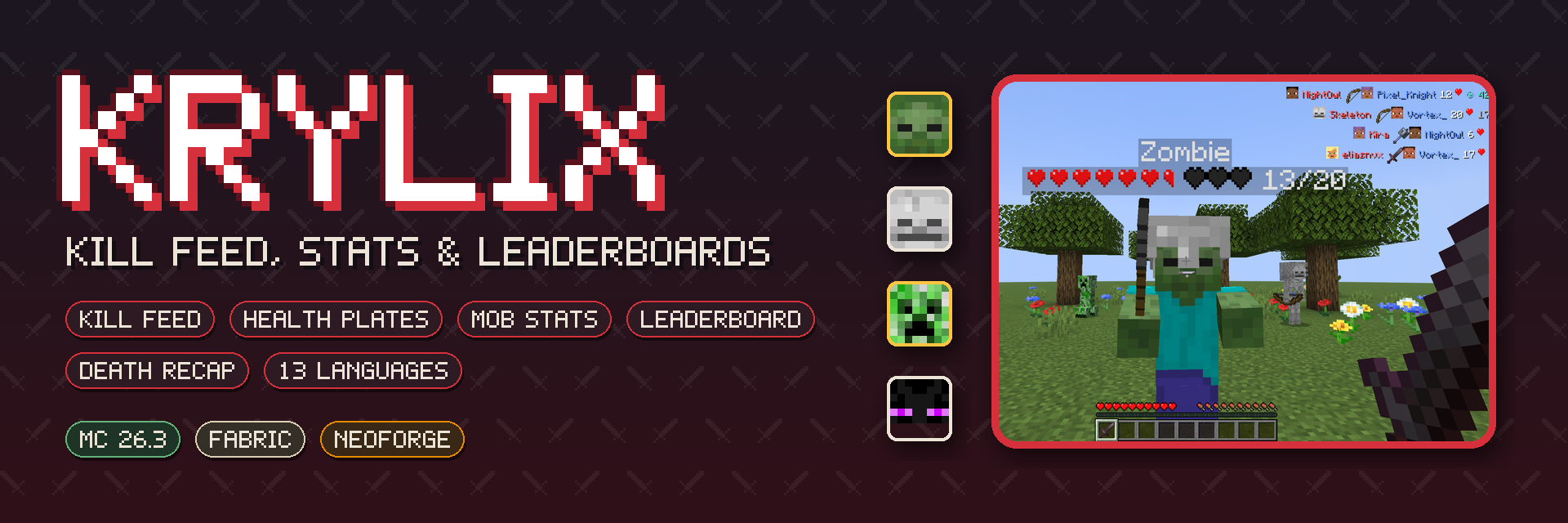
击杀信息、准星指向的生命值显示、每位玩家的生物统计数据以及全时间 PvP 排行榜 —— 适用于 Fabric 和 NeoForge,并提供插件 API。
简介
Krylix 将你在射击游戏中习惯的战斗信息带入 Minecraft,并采用游戏自身的风格绘制:谁杀了谁、使用了什么武器、目标还剩多少生命值、你在这个世界中击杀了多少种生物,以及谁是服务器中的最强者——全时间统计。
所有功能只需一个按键即可访问,并在不需要时自动隐藏,以免干扰视线。
语言支持: English, Русский, Беларуская, Українська, Polski, Deutsch, Nederlands, Svenska, Español, Português (Brasil), Français, 简体中文, 繁體中文

击杀信息
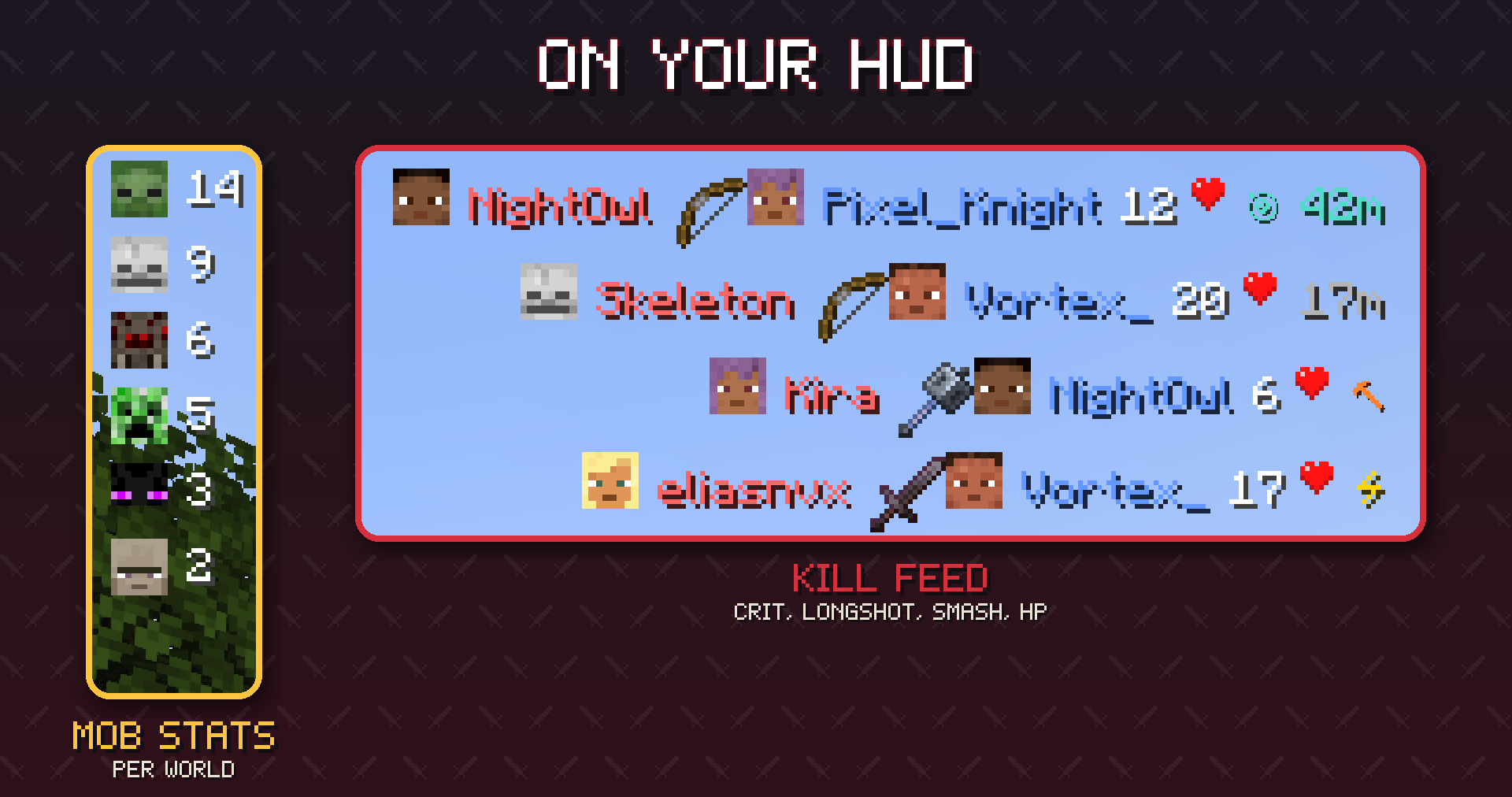
服务器上每一位玩家的死亡都会在右上角显示几秒钟:
- 击杀者与受害者头像 — 使用真实的玩家皮肤(包含帽子层),或者对于 43 种生物使用其面部图像
- 致死武器 以及当时击杀者的生命值
- 徽章 — 暴击、战锤重击以及远距离攻击(使用弓或三叉戟超过 30 格)并附带距离数值
- 处决计数。将某人击落悬崖、推入岩浆或虚空,击杀即归你所有;信息栏会显示终结他们的原因(羽毛代表摔死,岩浆桶代表岩浆伤害)
- 宠物代为战斗 — 驯服的狼造成的击杀算作你的,武器图标为狼的刷怪蛋
- 坠落、火焰、溺水、冻结、铁砧及其他环境伤害以及自杀行为会以简洁的单侧行显示,每种死因都有专属图标
- 行会在 15 秒后淡出;最多同时显示 5 行(均可配置)
- 服务器可以将击杀信息限制为仅向同一维度的玩家广播
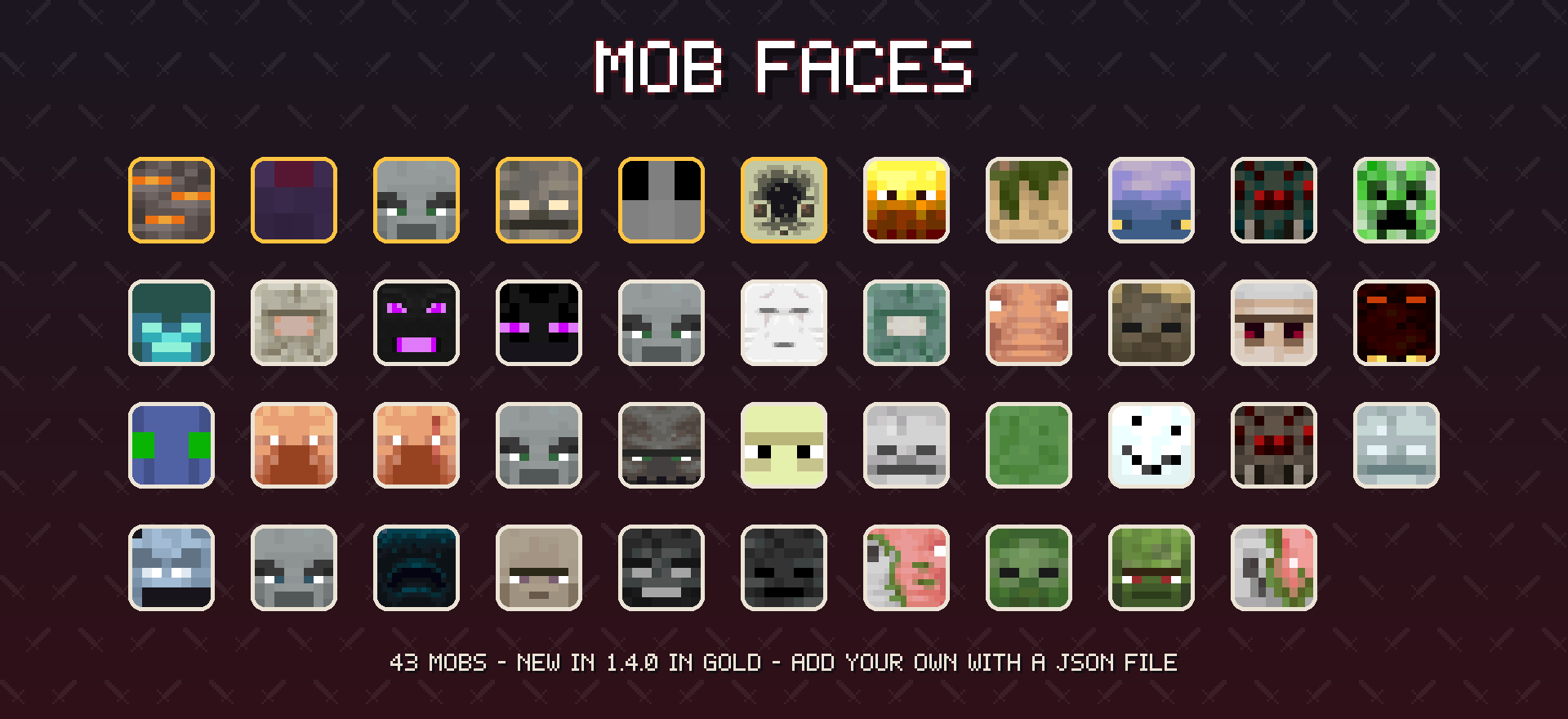
每个生物面部都是一个小型 JSON 文件,因此资源包可以重新设计它们的样式,整合包可以为模组生物添加面部——无需编写代码(格式说明)。

生命值显示
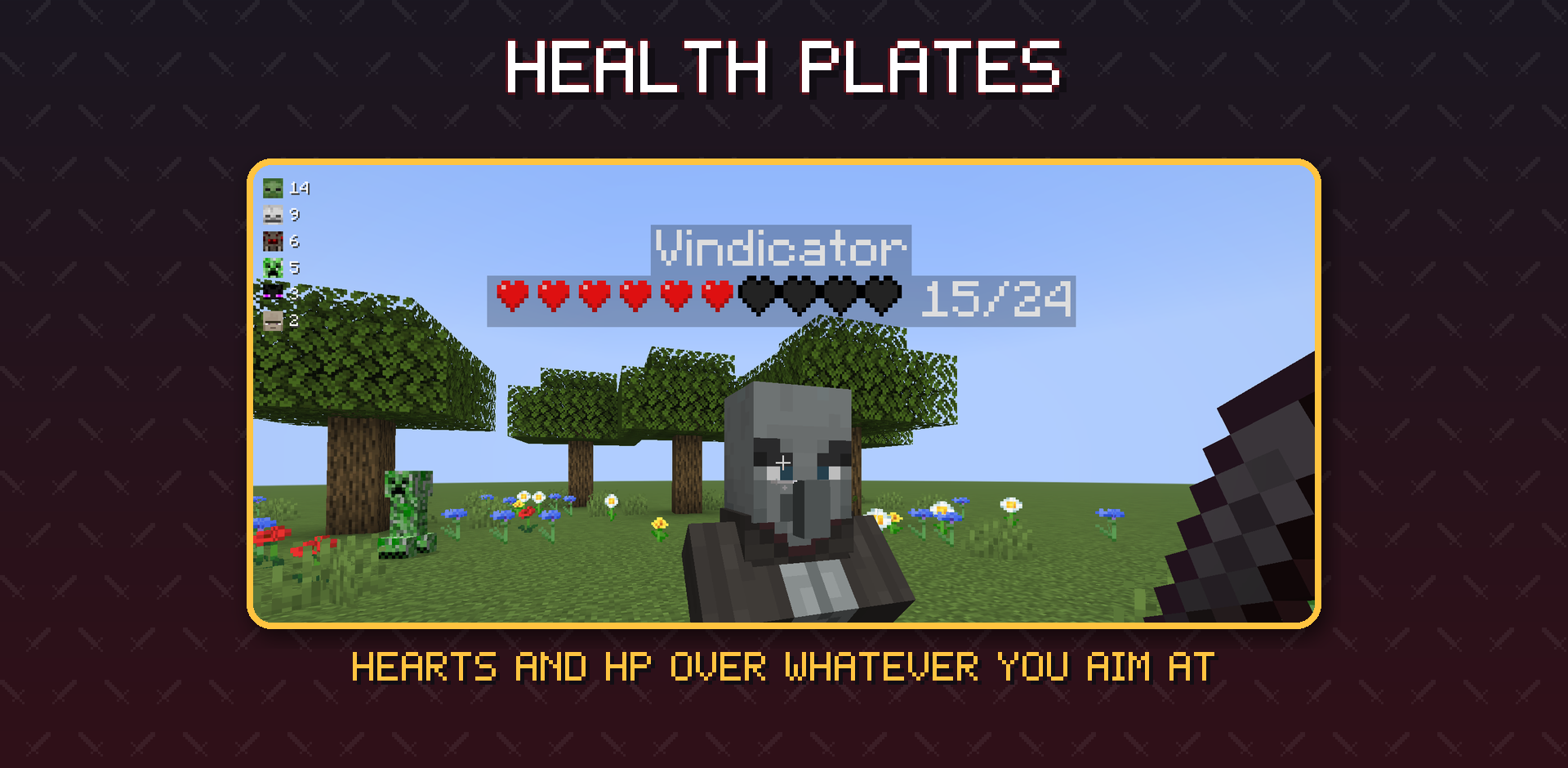
瞄准任何活体实体——最远 48 格——其头顶会出现一个显示板:名称、游戏原生的心形精灵图以及精确的当前 HP / 最大 HP。显示板以全亮度绘制,因此在洞穴、树荫下及夜晚依然清晰可读。它们遵循游戏原有的命名标签规则——不可见玩家、队伍可见性、远处潜行的玩家、服务器的命名标签距离以及 F1 模式——因此显示板绝不会显示游戏所隐藏的名称。按 H 键可隐藏它们。

生物统计
左上角有一个紧凑的面板,统计你在这个世界中击杀的敌对生物数量,按击杀数从高到低排列,每种生物都配有面部图标。每位玩家拥有独立的统计数据;由服务器保存,重启后不丢失,并在你加入时发送给你。按 J 键可隐藏它。

排行榜
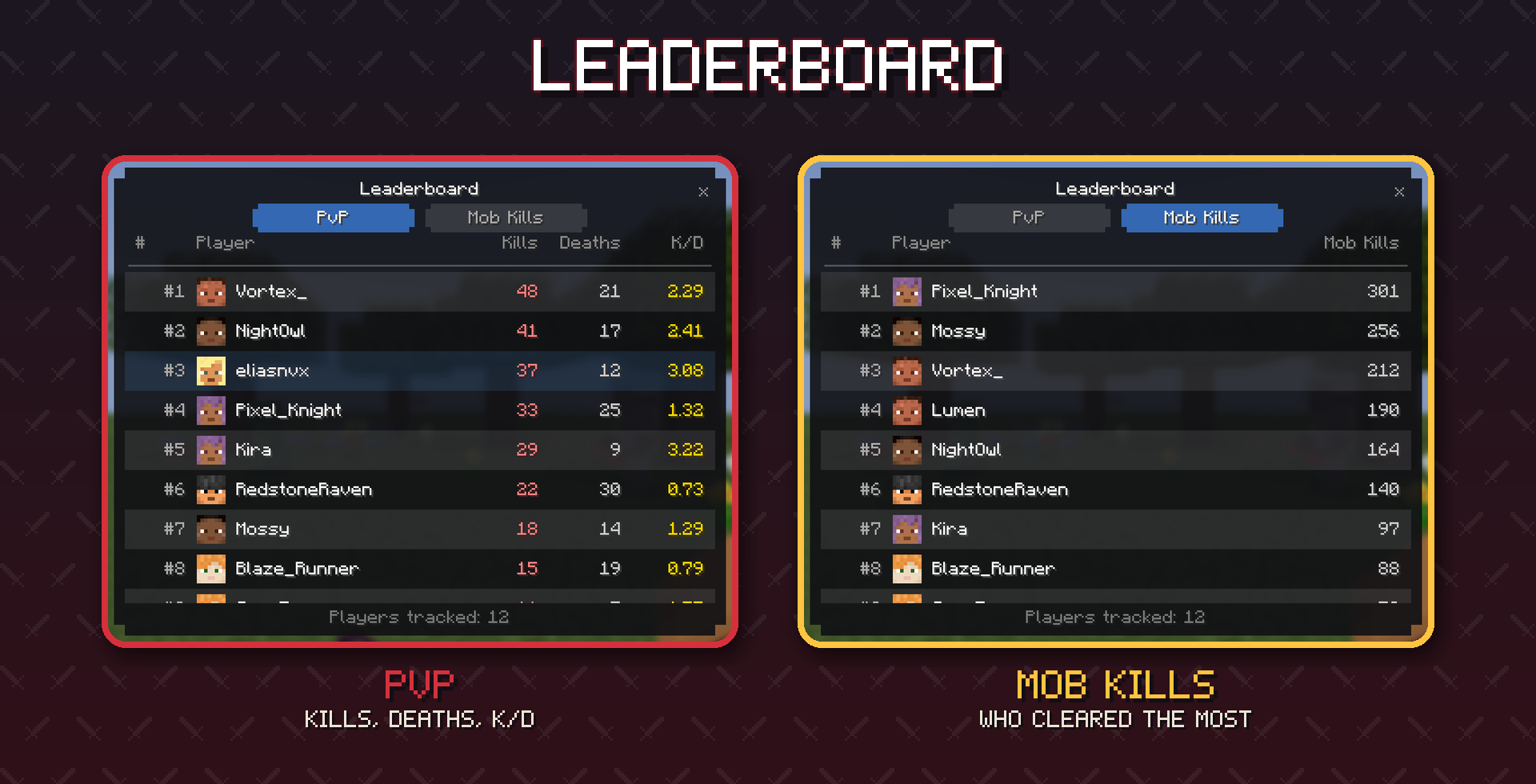
按 U 打开排行榜——这是一个完整的屏幕界面,而不是一堆聊天消息:
- PvP — 击杀、死亡和 K/D 比分别列在不同列中,涵盖服务器记录过的所有玩家
- 生物击杀 — 根据玩家击杀的生物数量进行排名
- 显示玩家头像,高亮显示你自己的行,平滑滚动,每页显示 60 名玩家,底部带有分页控件
- 按世界统计全时间数据,存储在服务器上,仅在打开屏幕时发送,因此游玩过程中零性能开销

死亡回顾
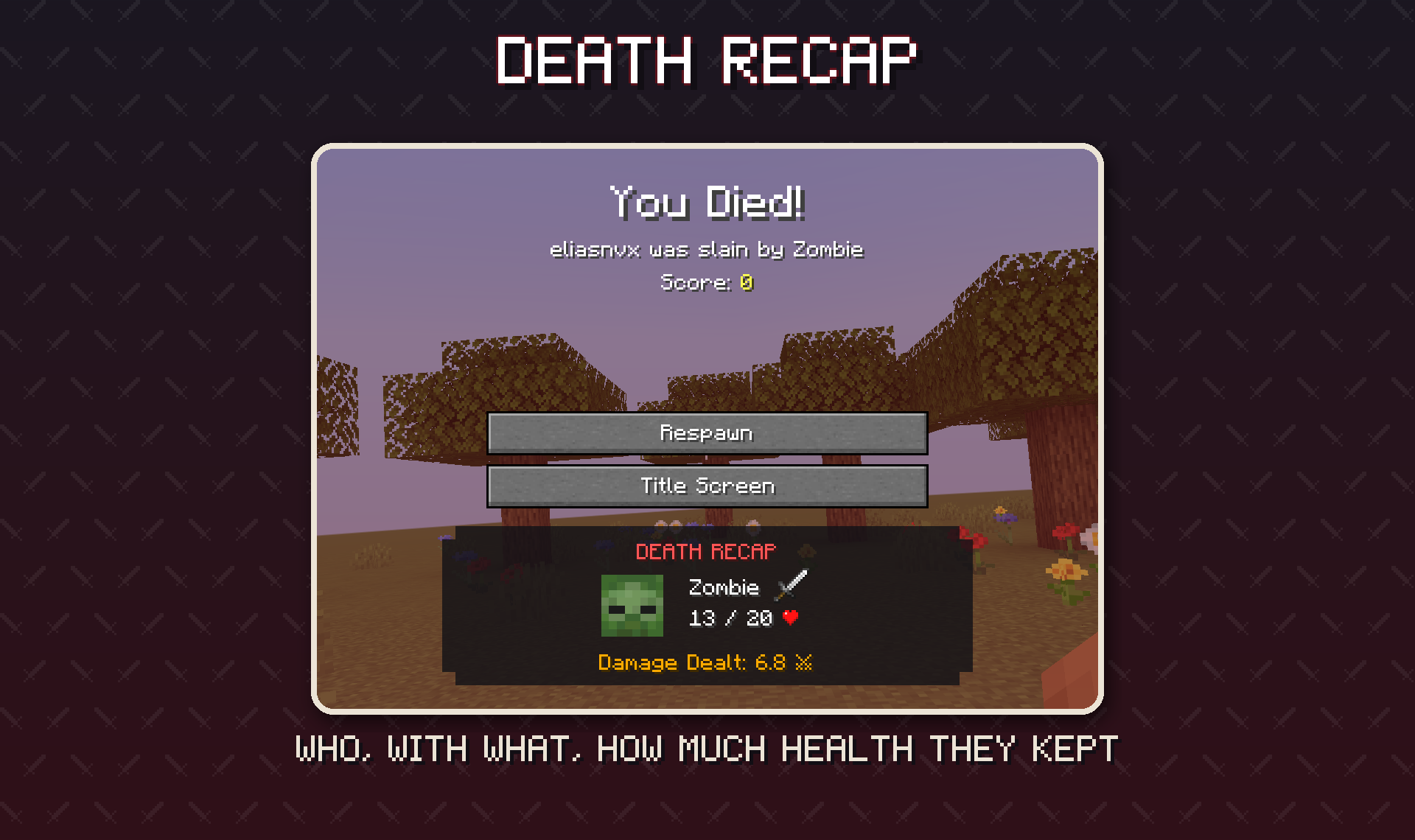
当你死亡时,重生按钮下方会显示一张卡片,展示谁击杀了你、对方的头像、对方剩余的生命值、你在战斗中对其造成的伤害量,以及与击杀信息栏相同的暴击/重击/远距离攻击徽章。

配置与按键
| 按键 |
操作 |
| K |
显示/隐藏击杀信息 |
| J |
显示/隐藏生物统计面板 |
| U |
打开排行榜 |
| H |
显示/隐藏生命值显示板 |
所有按键均可在 选项 → 控制,类别 Krylix 中重新绑定。(1.4 版本之前默认值为 L 和 O,这与 Minecraft 的原版“进度”和“好友”按键冲突。)设置位于游戏内 — 模组 → Krylix → 配置(通过 Mod Menu 进入 Fabric 版)— 以及 config/krylix.json5 文件中:
| 设置项 |
默认值 |
功能说明 |
displaySeconds |
15 |
击杀信息行在屏幕上停留的时间 |
maxEntries |
5 |
同时显示的击杀信息行数 |
killFeedEnabled / mobStatsEnabled / healthIndicatorEnabled |
true |
与 K / J / H 键相同的开关 |
mobStatsMaxEntries |
8 |
生物统计面板中的行数 |
restrictBroadcastToSameDimension |
false |
服务器端:仅向同一维度的玩家发送击杀信息 |
healthBarStyle |
HEARTS |
生命值显示板的样式:HEARTS(心形)、BLOCKS(方块)、ASCII(字符)、DOTS(点阵)或 NUMBER_ONLY(仅数字) |
命令
| 命令 |
适用位置 |
功能 |
/krylix toggle |
服务器端, 管理员 |
为所有玩家开启或关闭击杀提示 |
/krylix status |
服务器端, 管理员 |
显示提示是否开启以及正在追踪的玩家数量 |
/krylixclient hud toggle | clear | count |
客户端 |
与 K 键功能相同;清除你的击杀提示;统计行数 |

语言支持
Krylix 已完整翻译为 13 种语言:英语、俄语、白俄罗斯语、乌克兰语、波兰语、德语、荷兰语、瑞典语、西班牙语、巴西葡萄牙语、法语、简体中文和繁体中文(台湾)。切换游戏语言后,所有界面、按键名称和消息都会随之更改。

服务器设置
- 在服务器和每个客户端上都安装 Krylix。由服务器决定什么是击杀、保存统计数据并发送击杀提示、统计信息和总结;生命条仅由客户端绘制。
- 没有安装 Krylix 的玩家仍然可以加入安装了 Krylix 的服务器(Krylix 玩家也可以加入原版服务器)——他们只是看不到击杀提示。
- 统计数据保存在世界文件夹内,因此它们会随世界一起迁移。来自 Krylix 1.3 的世界会保留其原有数据。
/krylix toggle 会在下次重启前为所有玩家关闭击杀提示;restrictBroadcastToSameDimension 可将击杀限制在同一维度内。

插件 API
其他模组可以接入 Krylix —— 类似于 Jade 或 Thermal 的插件工作方式。API 是一个独立的小型构件(com.eliasnvx:krylix-api);它包含在 Krylix 内部,因此玩家无需额外安装任何东西。
@RegisterKrylixAddon                                   // NeoForge; 在 Fabric 上: "krylix" 入口点
public final class MyAddon implements KrylixAddon {
    @Override
    public void onInitialize(KrylixApi api) {
        // 在我迷你竞技场中的击杀:不显示行,不计入统计
        api.events().addListener(KillEvent.class, event -> {
            if (Arena.contains(event.victim())) {
                event.setBroadcast(false);
                event.setRecordStats(false);
            }
        });
    }
}
- 击杀归属 — 决定谁获得击杀(炮塔、召唤的仆从、友军伤害)
- 击杀事件 — 从击杀提示中隐藏某次击杀、使其不计入统计、更改武器图标和徽章
- 统计数据 — 响应每一次击杀和死亡(奖励、Discord Webhook)、读取所有人的保存数据
- 客户端 — 隐藏击杀提示行、通过代码添加生物头像、为主角和自定义生命系统提供生命值数字
指南:docs/api/README.md。适用于两种加载器的示例插件:example-addon。

安装说明
- 为 Minecraft 26.3 安装加载器、Fabric API(仅限 Fabric)和 Cloth Config。
- 从 Modrinth、CurseForge 或 发布页面 下载 Krylix。
- 将
.jar 文件放入 mods 文件夹 —— 客户端和服务器端都需要。
旧版 Minecraft 版本:Krylix 1.3.1 for 26.1.2 可在上述同一页面找到。1.4.0 中的所有新功能将在稍后移植到其他版本。
致谢与许可
MIT © eliasnvx
专为想知道谁拿到了最后一击的人而制作
源代码、问题反馈及插件 API 指南:github.com/eliasnvx/Krylix
A kill feed, health plates over whatever you aim at, per-player mob stats and an all-time PvP leaderboard — for Fabric and NeoForge, with an addon API.
About
Krylix brings the combat information you are used to from shooters into Minecraft, drawn in the game's own style: who killed whom and with what, how much health your target has left, how many of each mob you have taken down in this world, and who is on top of the server — all time.
Everything is one key away and stays out of the way when you don't need it.
Languages: English, Русский, Беларуская, Українська, Polski, Deutsch, Nederlands, Svenska, Español, Português (Brasil), Français, 简体中文, 繁體中文
Kill Feed
Every player death on the server appears in the top-right corner for a few seconds:
- Killer and victim heads — real player skins with the hat layer, or the mob's own face for 43 mobs
- The weapon that did it and the killer's health at that moment
- Badges — a critical hit, a mace smash, and a long shot (30+ blocks with a bow or trident) with the distance
- Knock-offs count. Push someone off a cliff, into lava or into the void and the kill is yours; the feed shows what finished them (a feather for the fall, a lava bucket for lava)
- Pets fight for their owner — a tamed wolf's kill goes to you, with the wolf's spawn egg as the weapon
- Falls, fire, drowning, freezing, anvils and other environmental deaths and self-kills get a clean one-sided row, each with its own icon
- Rows fade out after 15 seconds; up to 5 at once (both configurable)
- Servers can limit the feed to players in the same dimension
Every mob face is a small JSON file, so resource packs can restyle them and modpacks can add faces for modded mobs — no code needed (format).
Health Plates
Aim at any living entity — up to 48 blocks away — and a plate appears over its head: its name, the game's own heart sprites and the exact HP / max HP. Plates are drawn full-bright, so they stay readable in caves, under trees and at night. They follow the game's own nametag rules — invisible players, team visibility, sneaking players far away, the server's nametag distance and F1 — so a plate never shows a name the game hides. Press H to hide them.
Mob Stats
A compact panel in the top-left corner counts the hostile mobs you have killed in this world, most-killed first, each with its face. Every player has their own counts; they are kept by the server, survive restarts and are sent to you when you join. Press J to hide it.
Leaderboard
Press U for the leaderboard — a proper screen, not a wall of chat:
- PvP — kills, deaths and K/D in separate columns, for every player the server has seen
- Mob Kills — players ranked by how many mobs they have killed
- Player faces, your own row highlighted, smooth scrolling, 60 players per page with page controls at the bottom
- All-time per world, stored on the server and sent only when you open the screen, so it costs nothing while you play
Death Recap
When you die, a card under the Respawn button shows who killed you, their face, how much health they had left, the damage you dealt them in the fight, and the same crit / smash / long-shot badges as the feed.
Config & Keys
| Key |
Action |
| K |
Show / hide the kill feed |
| J |
Show / hide the mob stats panel |
| U |
Open the leaderboard |
| H |
Show / hide health plates |
All keys can be rebound in Options → Controls, category Krylix. (Before 1.4 the defaults were L and O, which clash with Minecraft's Advancements and Friends keys.) Settings are in game — Mods → Krylix → Config (on Fabric through Mod Menu) — and in config/krylix.json5:
| Setting |
Default |
What it does |
displaySeconds |
15 |
how long a kill feed row stays on screen |
maxEntries |
5 |
kill feed rows at once |
killFeedEnabled / mobStatsEnabled / healthIndicatorEnabled |
true |
the same switches as K / L / H |
mobStatsMaxEntries |
8 |
rows in the mob stats panel |
restrictBroadcastToSameDimension |
false |
server: send kills only to players in the same dimension |
healthBarStyle |
HEARTS |
the health plate's bar: HEARTS, BLOCKS, ASCII, DOTS or NUMBER_ONLY |
Commands
| Command |
Where |
What it does |
/krylix toggle |
server, op |
turn the kill feed on or off for everyone |
/krylix status |
server, op |
show whether the feed is on and how many players are tracked |
/krylixclient hud toggle | clear | count |
client |
the same as K; clear your feed; count its rows |
Languages
Krylix is fully translated into 13 languages: English, Russian, Belarusian, Ukrainian, Polish, German, Dutch, Swedish, Spanish, Brazilian Portuguese, French, Simplified Chinese and Traditional Chinese (Taiwan). Switch the game language and every screen, key name and message follows.
Servers
- Install Krylix on the server and on every client. The server decides what counts as a kill, keeps the statistics and sends the feed, the stats and the recap; health plates are drawn by the client alone.
- Players without Krylix can still join a Krylix server (and Krylix players can join vanilla servers) — they simply don't see the feed.
- Statistics are saved inside the world folder, so they move with the world. Worlds from Krylix 1.3 keep their numbers.
/krylix toggle switches the feed off for everyone until the next restart; restrictBroadcastToSameDimension keeps kills in their own dimension.
Addon API
Other mods can plug into Krylix — the way addons work for Jade or Thermal. The API is a small separate artifact (com.eliasnvx:krylix-api); it ships inside Krylix, so players install nothing extra.
@RegisterKrylixAddon                                   // NeoForge; on Fabric: the "krylix" entrypoint
public final class MyAddon implements KrylixAddon {
    @Override
    public void onInitialize(KrylixApi api) {
        // A kill in my minigame arena: no feed row, not counted
        api.events().addListener(KillEvent.class, event -> {
            if (Arena.contains(event.victim())) {
                event.setBroadcast(false);
                event.setRecordStats(false);
            }
        });
    }
}
- Kill credit — decide who gets a kill (turrets, summoned minions, friendly fire)
- Kill events — hide a kill from the feed, keep it out of the statistics, change the weapon icon and the badge
- Statistics — react to every kill and death (rewards, Discord webhooks), read everyone's saved numbers
- Client — hide feed rows, add mob faces from code, supply health numbers for bosses and custom health systems
Guide: docs/api/README.md. A working addon for both loaders: example-addon.
Installation
- Install the loader, Fabric API (on Fabric) and Cloth Config for Minecraft 26.3.
- Download Krylix from Modrinth, CurseForge or the releases.
- Drop the
.jar into mods — on the client and the server.
Older Minecraft versions: Krylix 1.3.1 for 26.1.2 is on the same pages. Everything new in 1.4.0 comes to the other versions next.
Credits & License
MIT © eliasnvx
Made for everyone who wants to know who got the last hit
Source, issues and the addon API guide: github.com/eliasnvx/Krylix


 模组

 模组
 模组

 模组
 模组
 模组
评论 0
登录后参与评分
还没有评论,来抢沙发吧