KubeJS Studio
KubeJS Studio 是 KubeJS 的游戏内前端。按下 K 键即可打开一个工作区,用于处理配方、标签、战利品表、物品与方块属性以及新的注册表条目,还包含一个能识别你整合包中已加载内容的代码编辑器。Studio 会在 kubejs/ 目录下生成纯文本文件:脚本、数据包 JSON、语言文件和模型。它没有需要导出的项目格式,生成的文件即使不使用 Studio 也能正常运行。
需要 KubeJS。在 Forge 1.20.1 上还需要 Kotlin for Forge。LDLib2 已打包在 jar 文件中。仅客户端使用,无需安装到服务器端。
GUI 或代码,由你决定
图形界面可能比手写脚本更快。但有时直接编辑脚本会更好。Studio 两者兼备,你可以随时切换,或者同时使用两者。
如果你从未写过 KubeJS 脚本,建议从五个可视化选项卡开始。选择一个配方、标签、战利品表或物品,通过真实的物品槽和常规字段进行修改,然后点击“排队”(Queue)。Studio 会在实际写入任何内容之前,向你展示它将生成的确切内容。
如果你已经在使用 KubeJS,那么“文件”(Files)选项卡就是一个真正的编辑器。自动补全、悬停文档和错误检查都基于正在运行的实例构建,而不是基于两个更新前就已过时的类型定义文件。输入 event.recipes. 后,列表会显示该整合包中加载的所有配方类型,包括来自模组的类型。
工作区
配方 (Recipes)
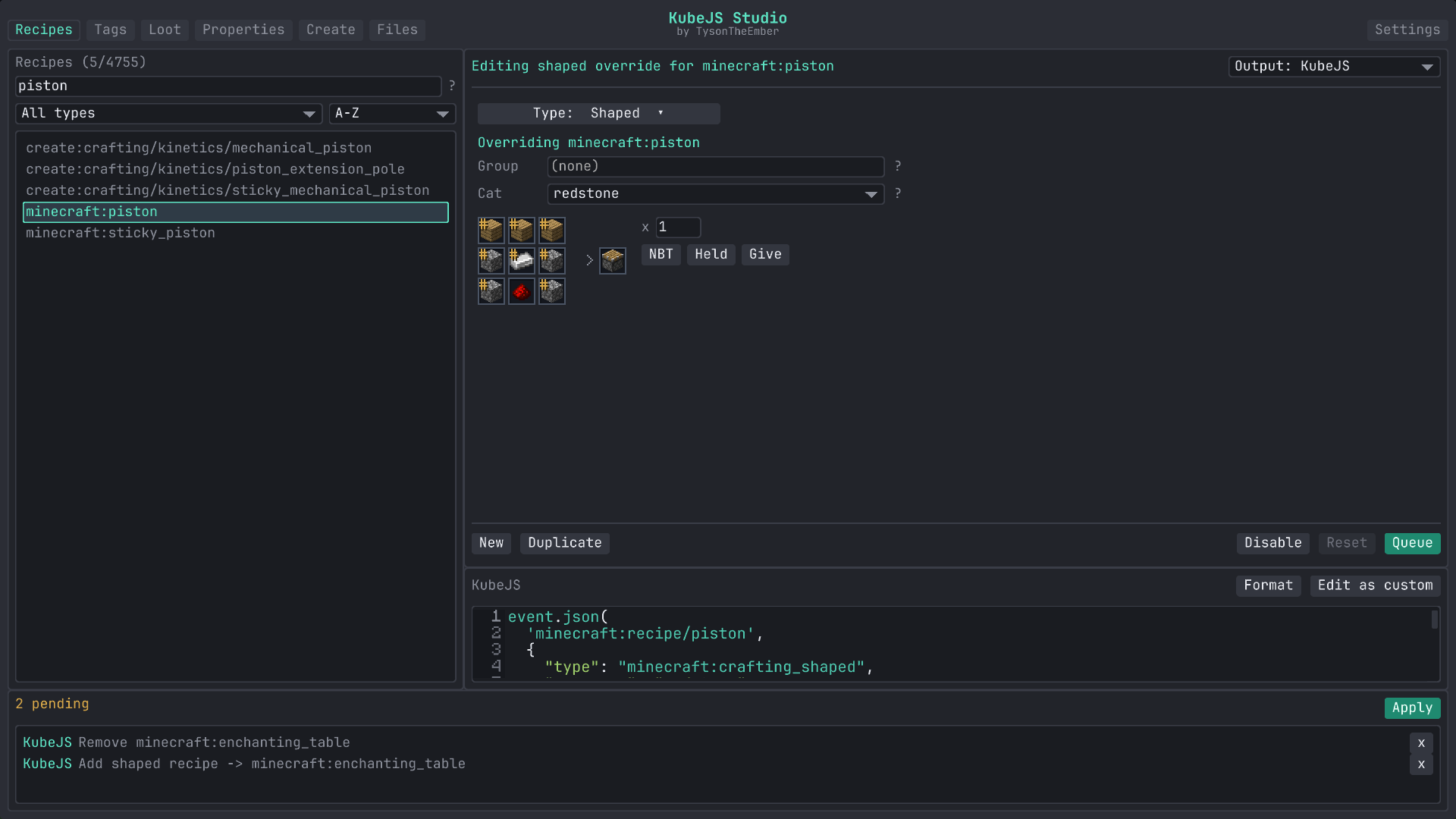
所有已加载的配方都在浏览器中,可按模组、类型或物品进行过滤。支持的类型会在表单中打开,物品槽会从选择器填充(或使用“手持”按钮将当前手中的物品堆叠复制到结果槽),并设有数量和分类字段,编辑时下方会实时显示生成的输出。你可以覆盖配方、禁用它、复制它,或从头开始创建一个空白配方。
原版合成、烹饪、切石机和锻造台拥有专门设计的表单。Create 的加工配方也是如此,包括加热混合和顺序组装。Farmer's Delight、Ars Nouveau 以及常见的 Mekanism 机器类型也拥有各自的布局。
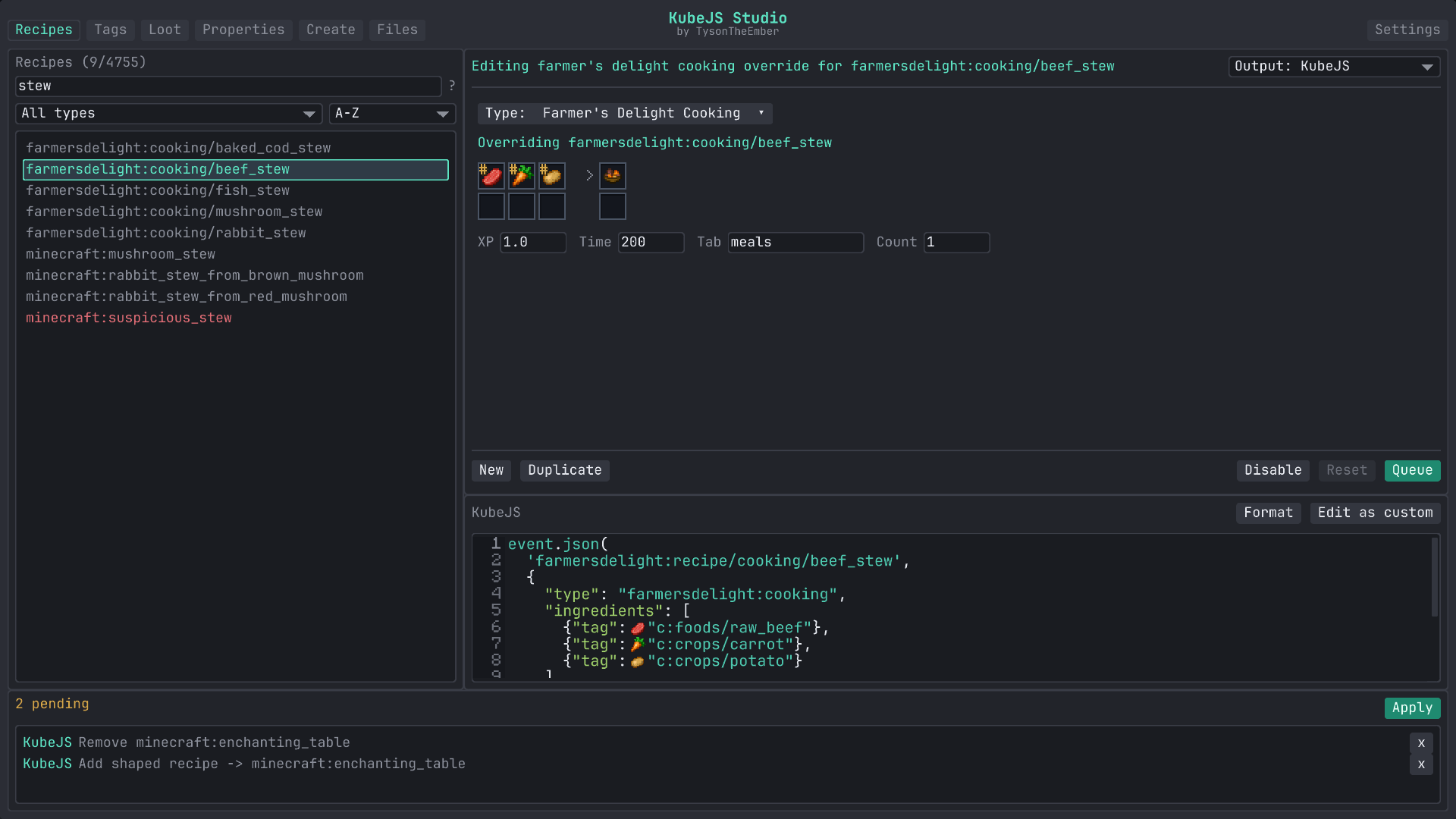
对于其他类型,Studio 会根据 KubeJS 已有的配方 schema 构建一个扁平化表单:物品和流体字段变为槽位,数字和标志变为字段。这涵盖了大量拥有 KubeJS 附加组件的模组,而无需我为每个模组单独编写代码。如果某种类型没有 schema,或者现有的 JSON 比该表单所能往返转换的内容更复杂,则以原始 JSON 形式打开,供你直接编辑。
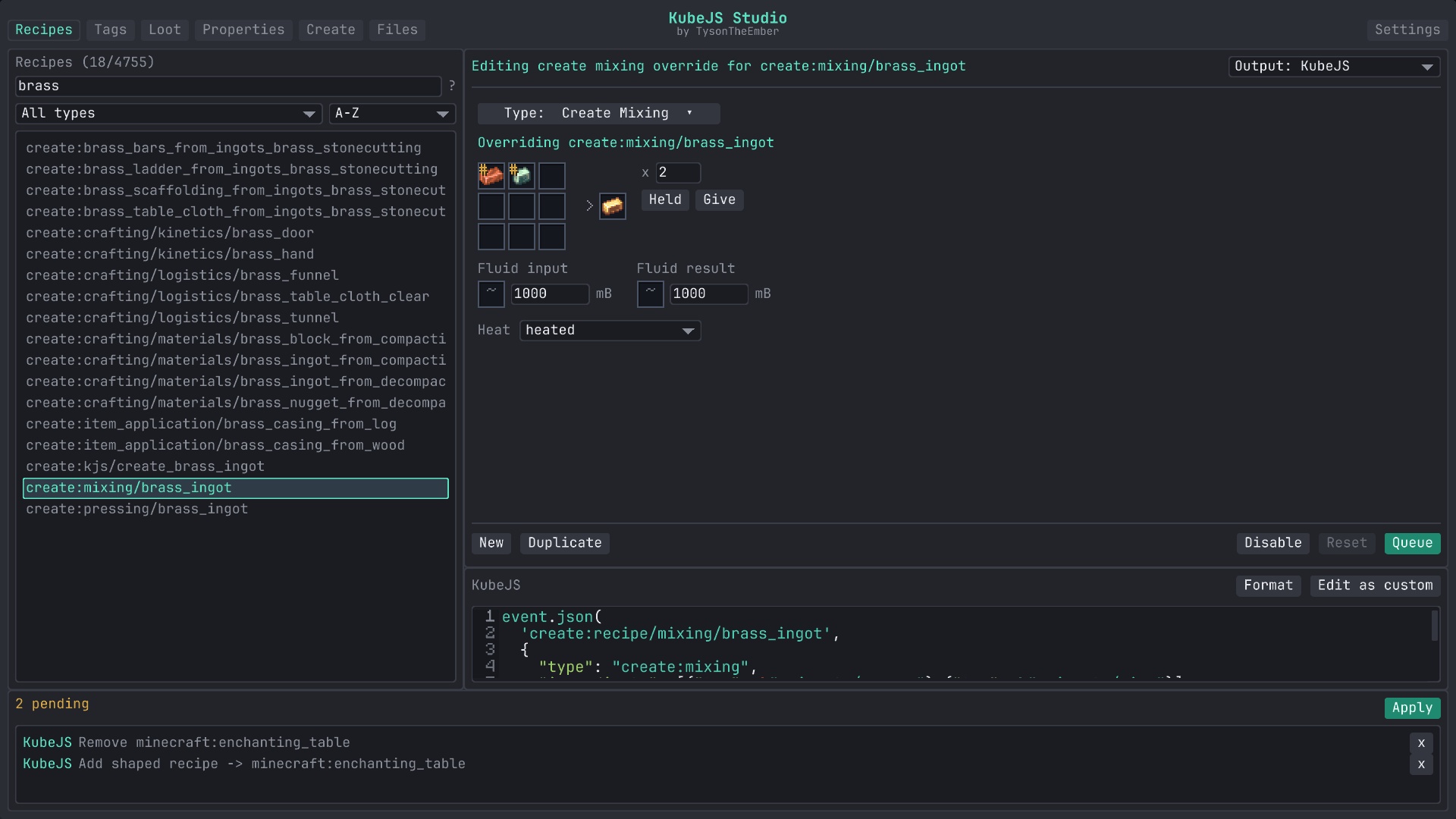
配方 JSON 来源于正在运行的世界,因此你所见即游戏所加载的内容。JEI 和 EMI 的配方页面会有一个“编辑”按钮,点击后可跳转到 Studio 并选中该配方(仅限单人模式、创造模式)。
标签 (Tags)
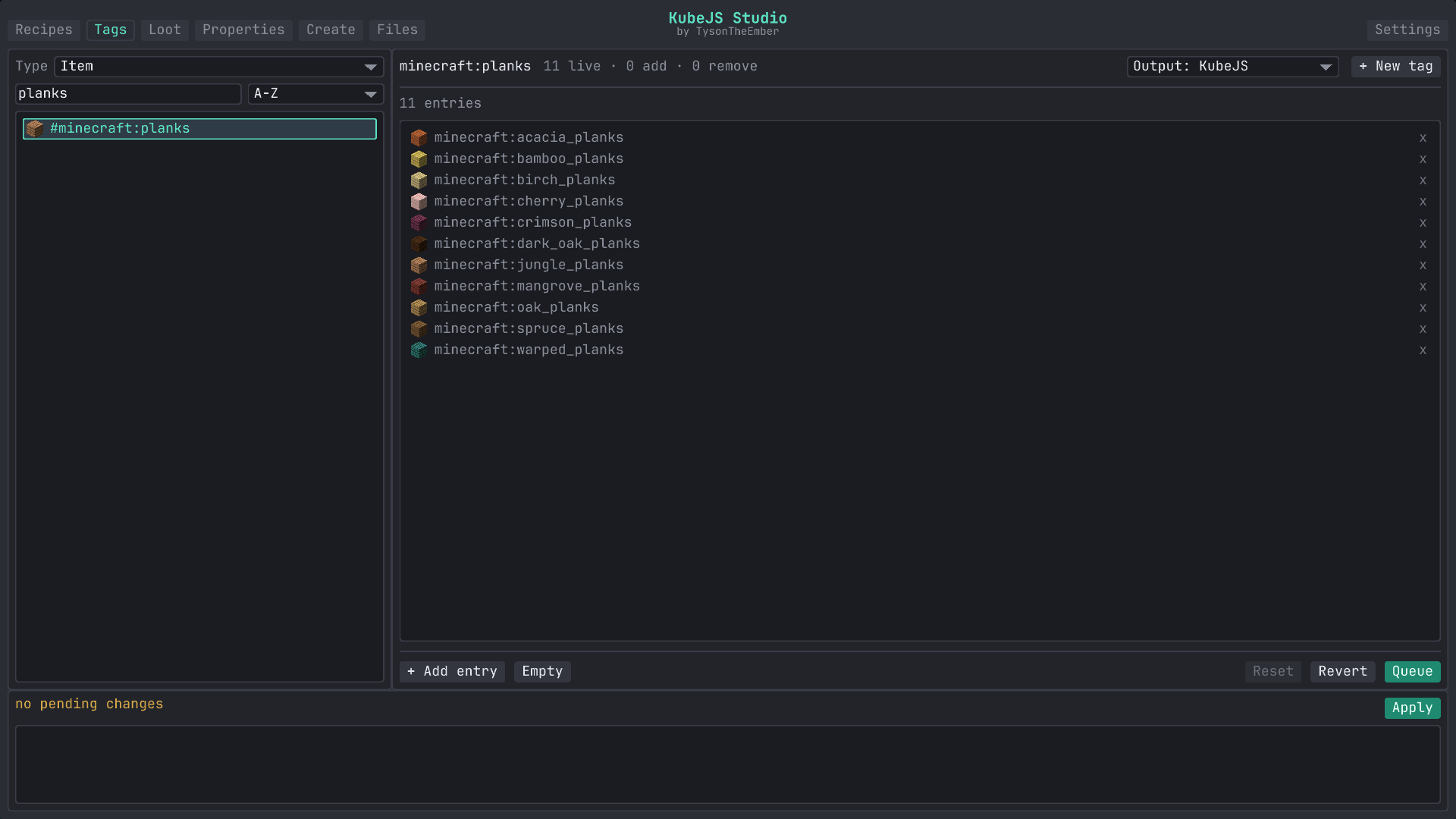
选择注册表(物品、方块、流体、实体,以及游戏暴露的任何动态注册表),找到目标标签,添加或删除成员。添加和删除操作会以行内方式显示在实时内容之上,以便你在将其加入队列之前查看差异。这是将模组物品快速添加到 #minecraft:planks 或 #c:ingots/copper 中的快捷方式,从而使配方和机制能够识别它们。
战利品 (Loot)
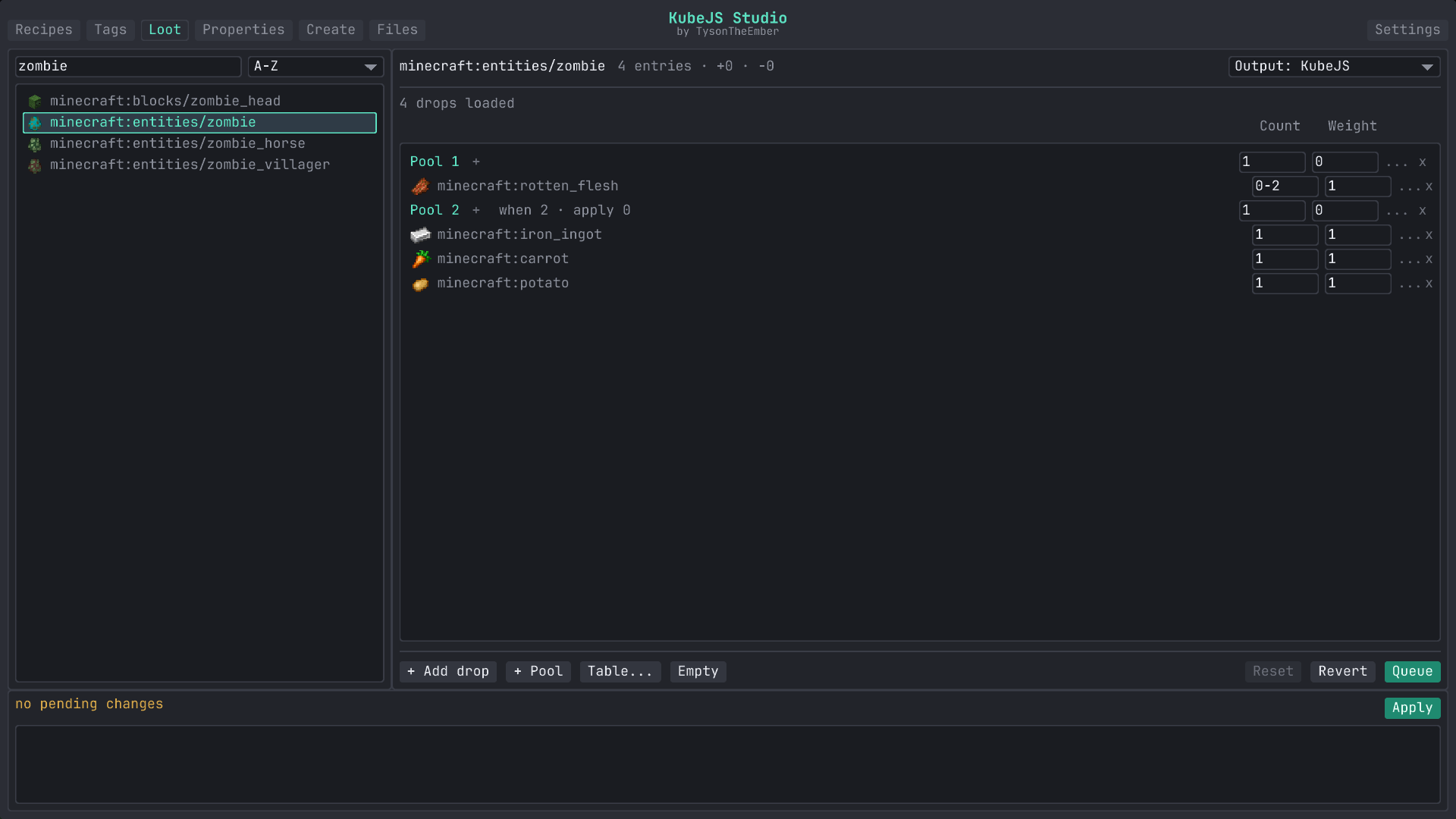
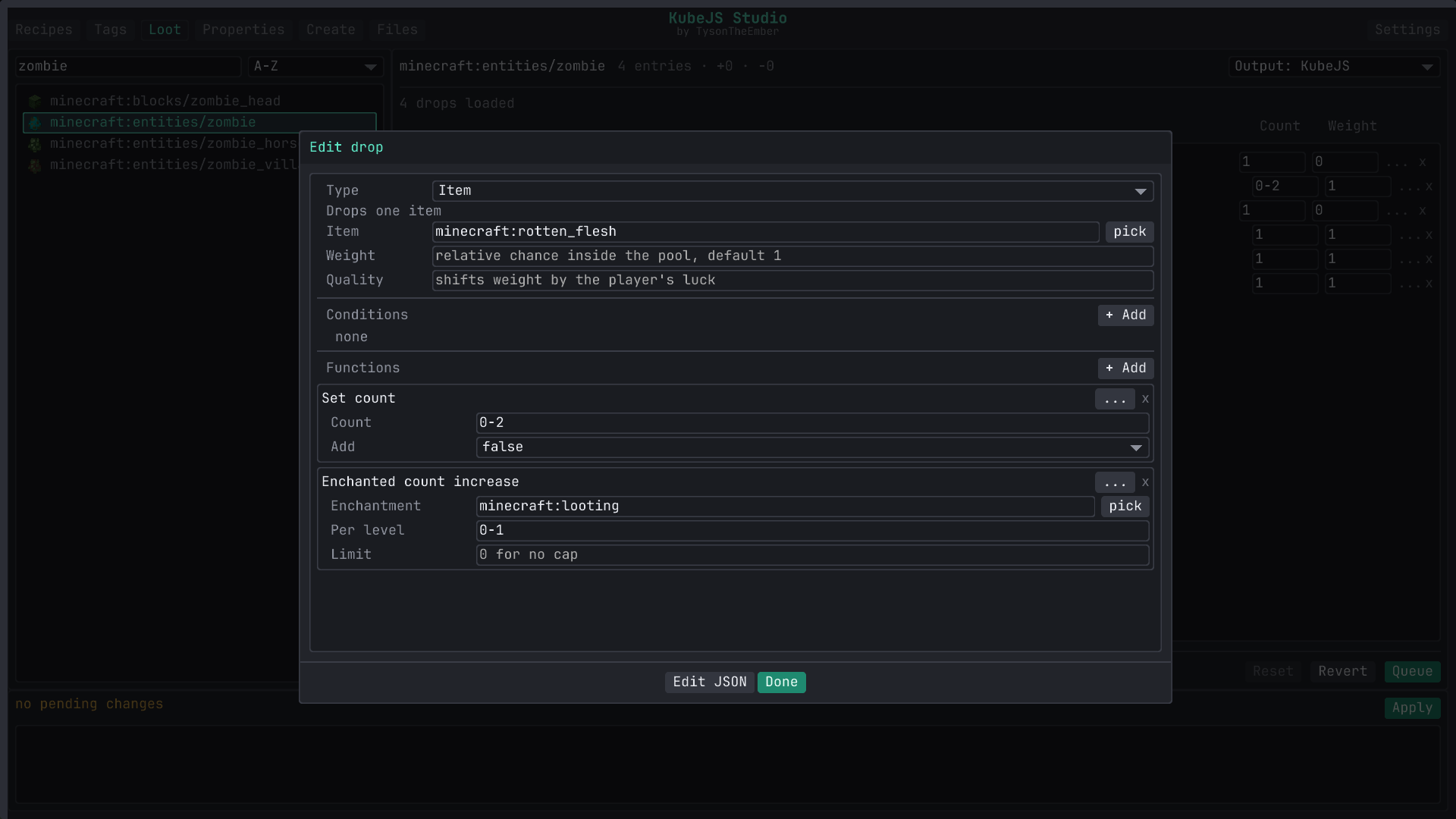
真实战利品表,以池和条目的树状结构就地编辑。掷骰次数、数量和权重保持行内显示。行尾的 ... 会打开该条目的完整编辑器,其中条件函数以类型化表单呈现:工具检查、随机概率、幸运风格加成、爆炸衰减、名称、描述、组件或 NBT,以及嵌套的 all_of / any_of 逻辑。表级别设置(上下文类型、随机序列、全局函数)位于 Table… 下。目录遵循 Minecraft 版本,任何没有类型化表单的内容仍可编辑为原始 JSON。
属性 (Properties)
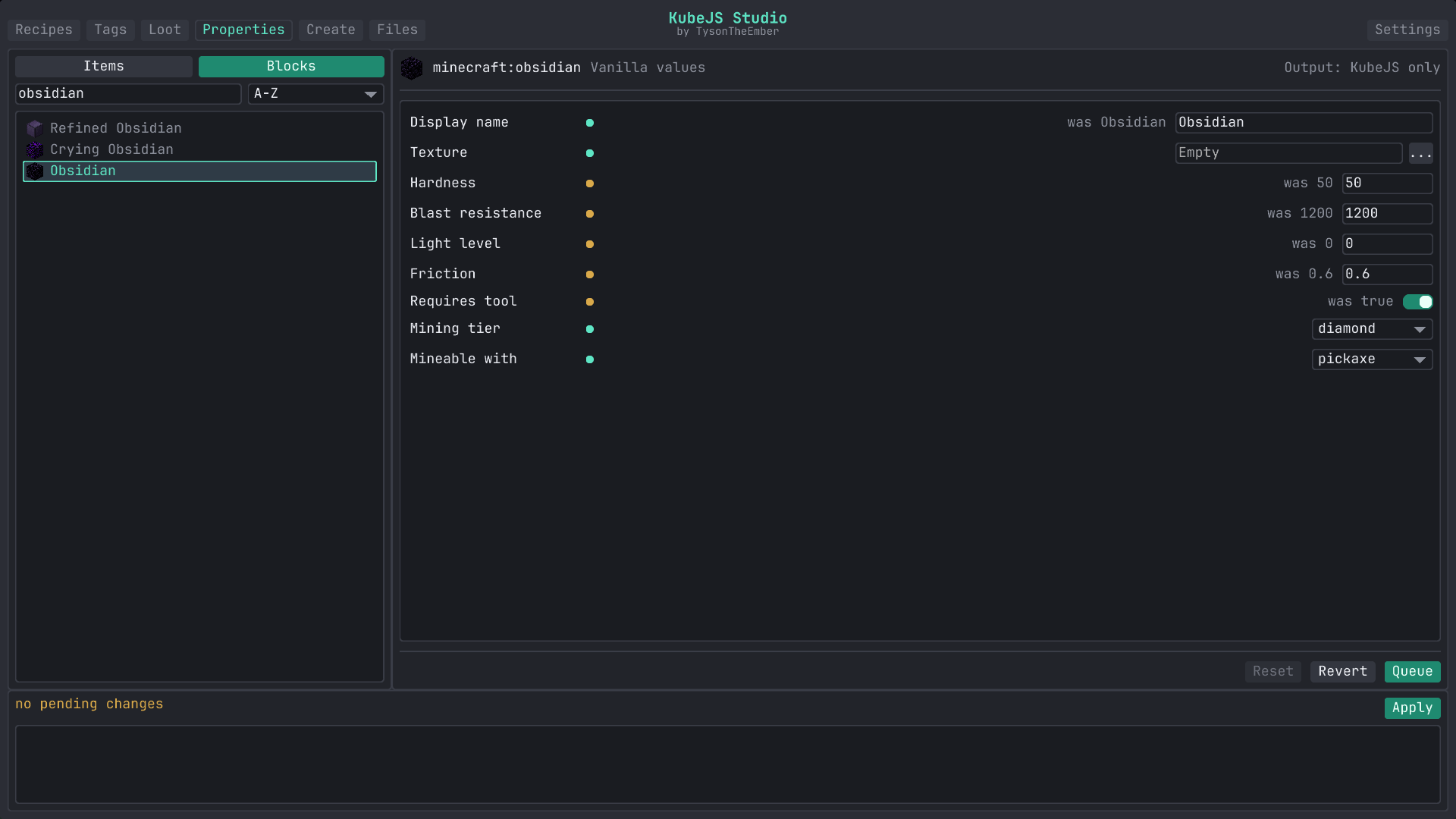
配方或标签无法触及的基础属性。物品暴露堆叠大小、耐久度、食物值、燃烧时间和仅启用的防火抗性标志。方块暴露硬度、防爆等级、光照等级、摩擦系数、是否需要工具、挖掘层级以及可使用的工具类型。Studio 会生成相应的 ItemEvents.modification 或 BlockEvents.modification 启动脚本。
同一选项卡还可重命名和重新纹理化游戏中已存在的一切内容,这将作为语言条目和模型覆盖保存在 kubejs/assets 下。属性更改需要重启游戏,挖掘标签在 /reload 时生效,名称和纹理在 F3+T 时生效。每一行都会标记其所需的操作类型。
Create
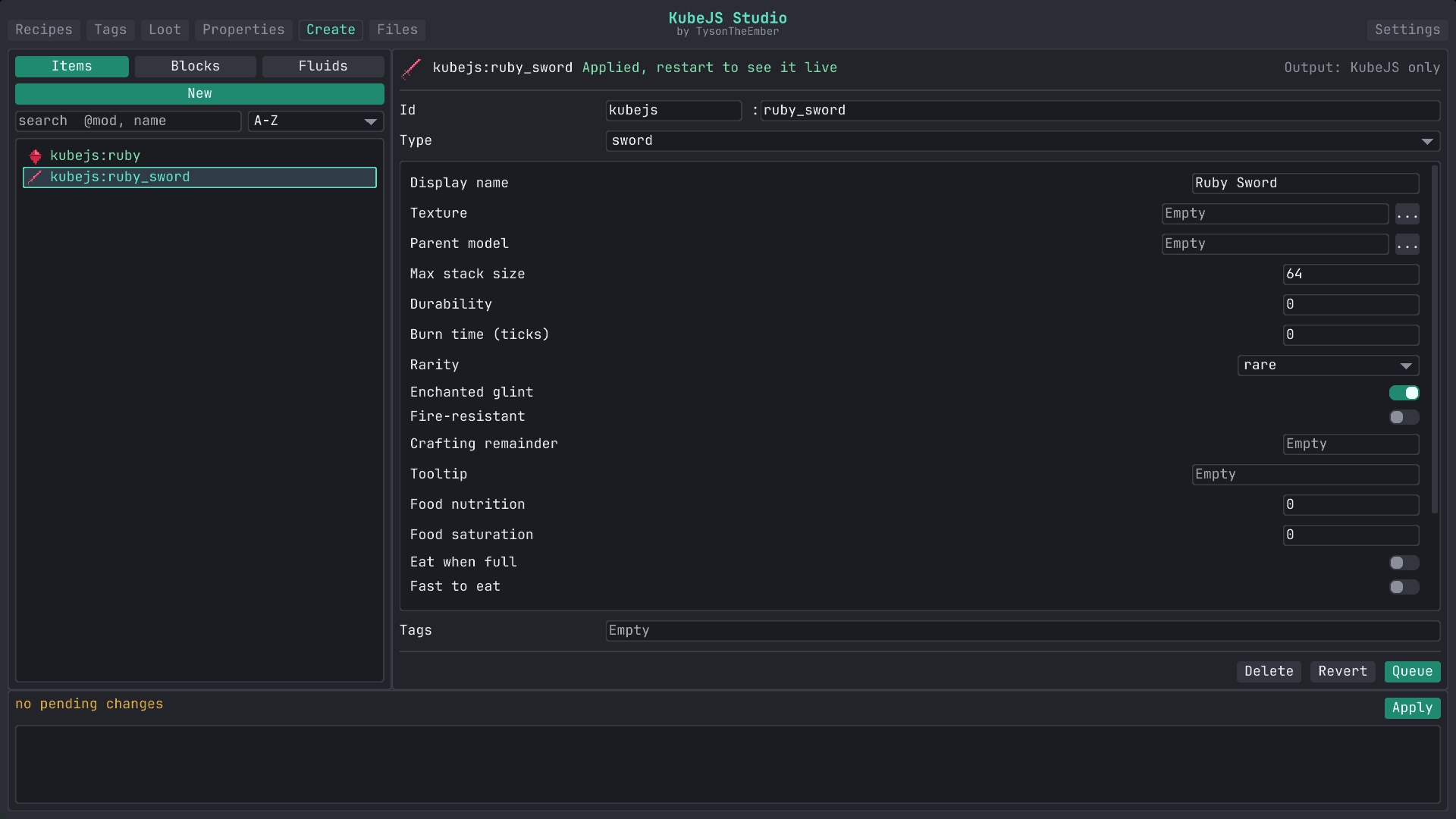
无需触碰启动脚本即可创建新物品、方块和流体。为其指定 ID,选择 Studio 的一种构建器类型(普通物品、工具、盔甲部件、台阶、楼梯、门、作物、带有桶的流体等),并填写你关心的字段。字段列表与版本正确对应,因此 1.20.1 仅显示 1.20.1 KubeJS 支持的内容。你创建的所有内容都会保留在左侧列表中,以便稍后重新打开或删除。
编辑器
如果你使用过 ProbeJS,那么这个目标你会感到熟悉。ProbeJS 生成类型定义,以便外部 IDE 能帮助你编写 KubeJS;而我希望这种帮助能直接在 Minecraft 内部实现。Studio 会反射你实际运行的 KubeJS 运行时环境(包括事件组和处理器、绑定到脚本作用域的全局变量以及包含的插件),并根据补全需求从开放世界中读取配方模式和游戏 ID。这里没有类型生成步骤,也没有第二个窗口,并且符号索引的缓存副本覆盖了实时反射失败时的特殊情况。
Files 标签页本身是一个文件浏览器和多标签编辑器,适用于你的整个实例,支持 JS、JSON、TOML 和日志文件的语法高亮。它可以编辑文本文件(最大 2 MB)、预览图像,并具备创建、重命名和删除功能的安全限制。收藏夹和固定文件夹让你的 kubejs/ 目录结构只需一次点击即可访问。
补全
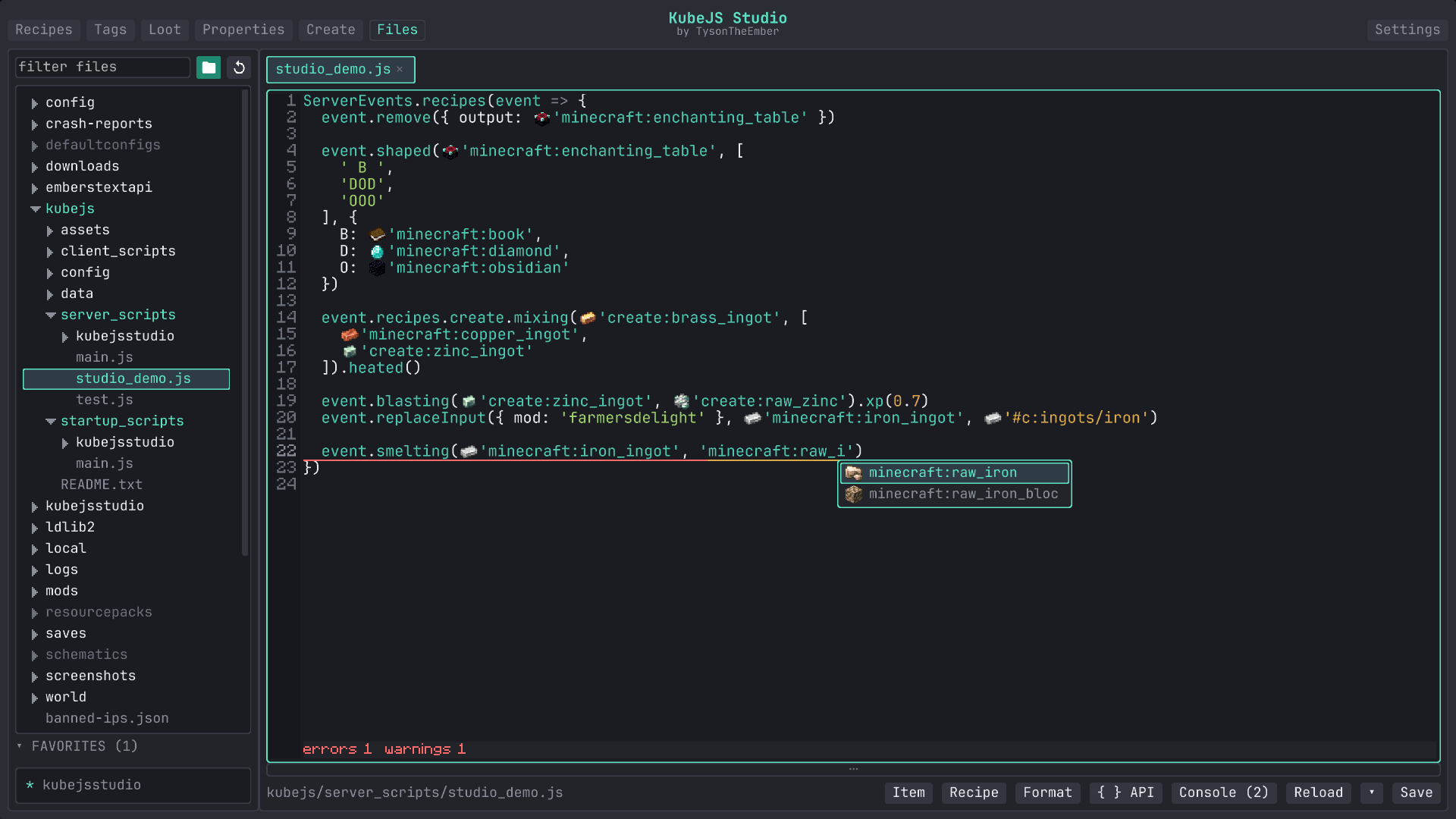
输入 event. 即可获得该事件的成员列表。输入 event.recipes. 则可以获得所有具有 KubeJS 配方模式的模组命名空间,然后是它们下的类型,接着是该类型支持的链式方法(例如 Create 混合中的 .heated(),熔炼中的 .xp())。字符串补全会根据上下文进行:在需要配方时使用物品和标签 ID(带图标),过滤器中使用模组 ID,注册表事件中用构建器类型,合适的位置使用战利品表 ID 和语言键。通过 Java.loadClass 加载的类可以获得静态成员补全,数据包 JSON 能够识别常见的 ID 字段(如 item、tag、id、type)。
悬停文档与签名提示
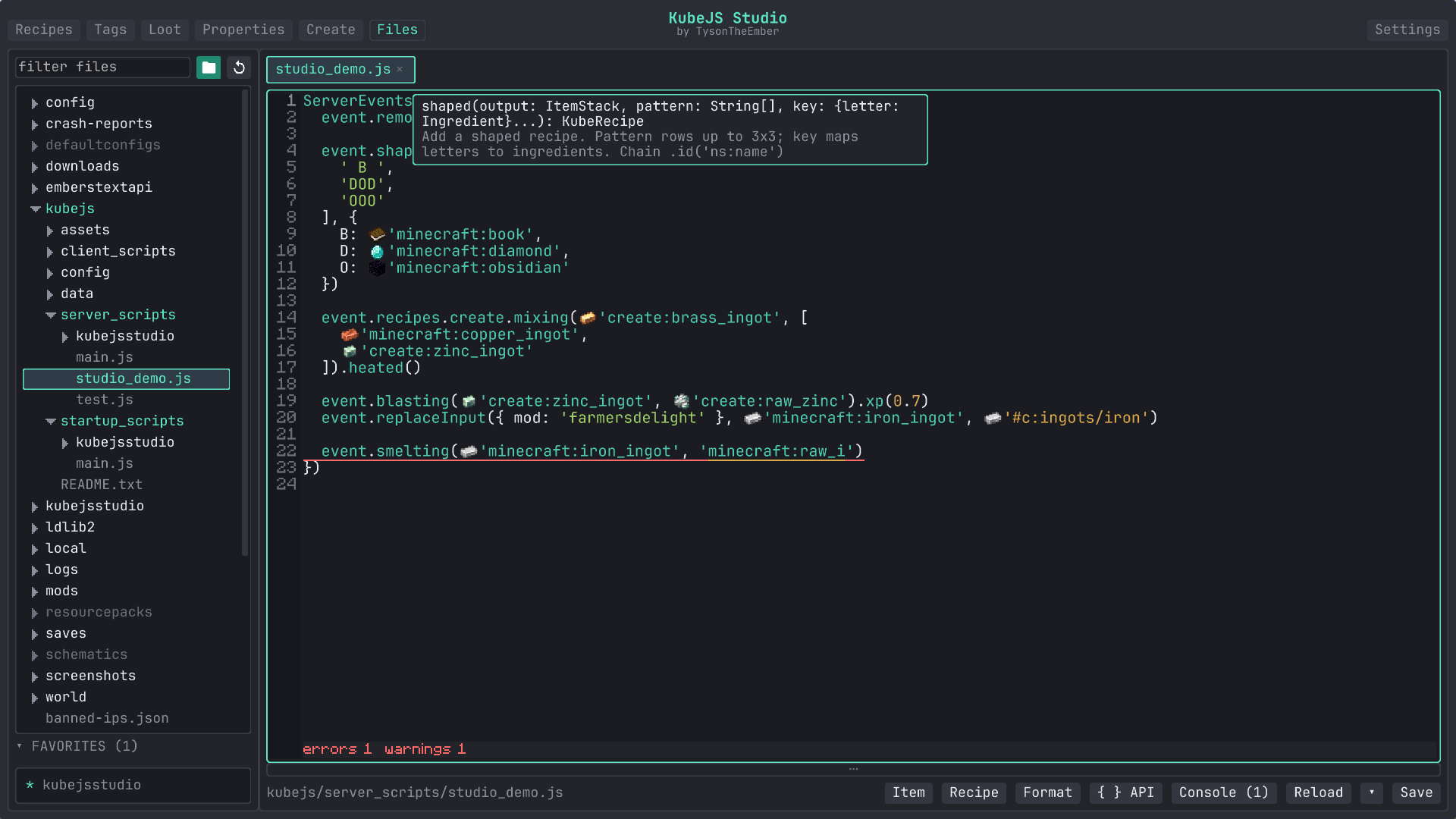
悬停在 KubeJS 成员、变量、ID 或诊断上时,可以看到它的具体信息:签名及简短描述、类型、ID 对应的物品、完整消息。当光标位于已识别的调用内时,会在其上方显示一个签名条。文档来源于采集的运行时索引(包括 KubeJS 自带的 @Info 注解)以及针对 KubeJS 自身未详细描述部分的小内置参考手册。
诊断
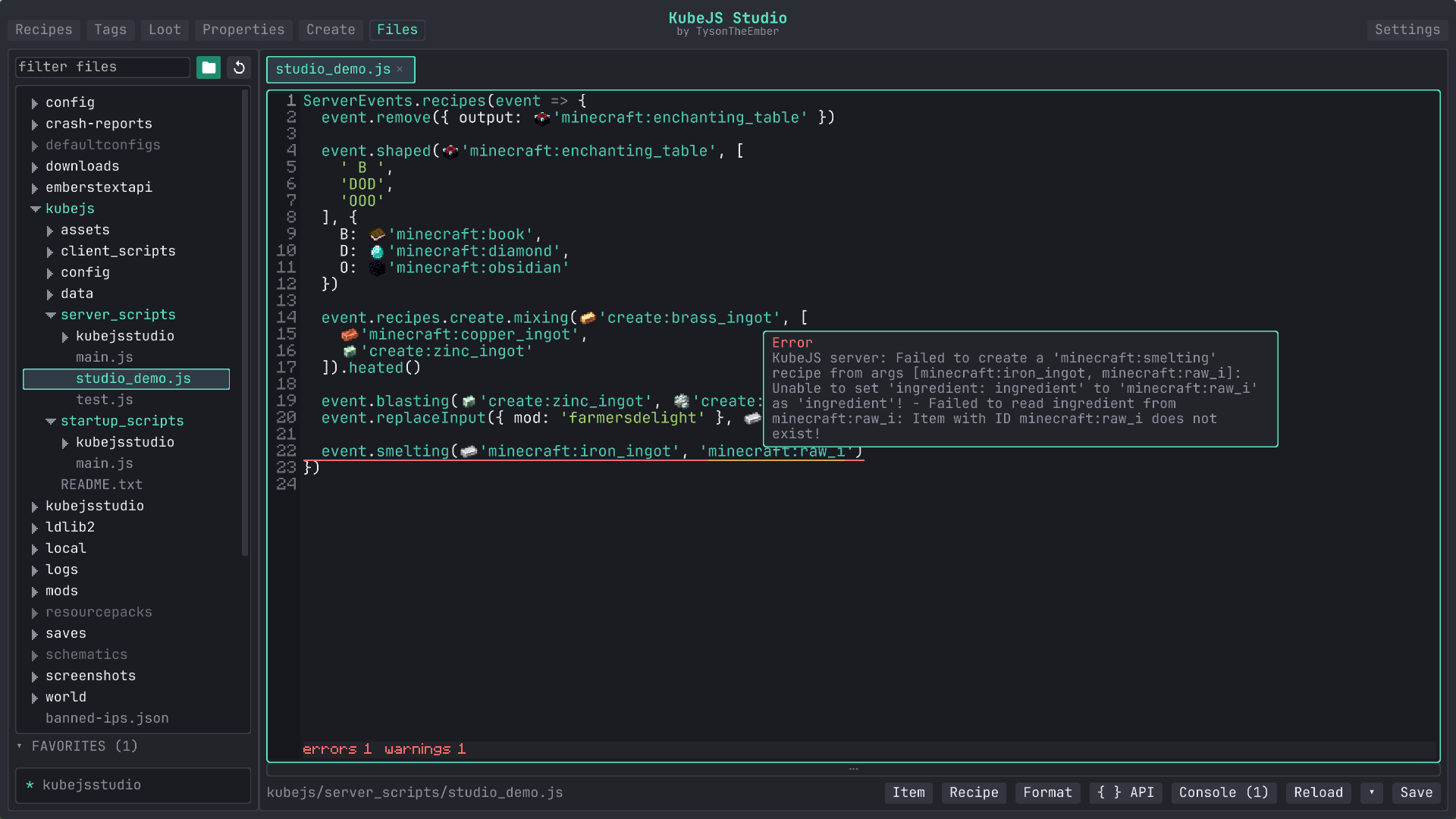
错误和警告会在你输入时立即出现,并在编辑器下方显示数量统计,悬停时展示完整消息。未知成员和标识符、拼写错误的物品、标签、模组和配方 ID、与配方模式不匹配的参数数量、放入错误槽位的 ID、从错误脚本类型中调用的事件(如在启动脚本中使用 ServerEvents)、格式错误的 // priority 和 // requires 头部、未匹配的括号和未终止的字符串,以及被 KubeJS 类过滤器拒绝的 Java 类都会受到检查。来自上次重载且带有源位置的 KubeJS 控制台错误也会直接定位到问题行,这样出错的配方可以直接指向语句而不是日志文件。
控制台与重载
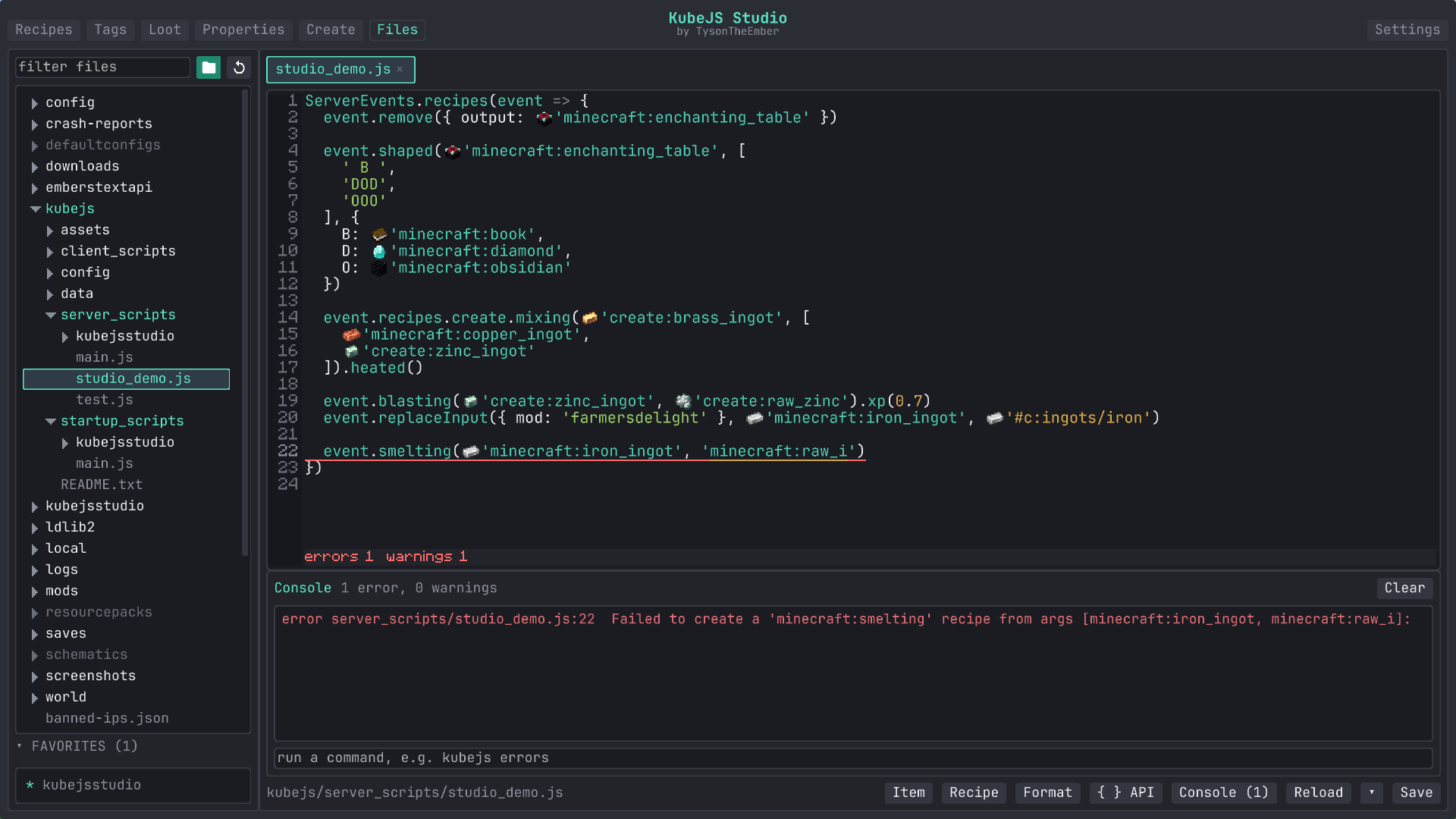
控制台面板列出最近一次重载产生的 KubeJS 错误和警告。点击某一项可跳转到对应行,或通过命令框运行 /kubejs errors、/reload 或其他命令而无需离开屏幕。“Reload”按钮会重载你所编辑文件的脚本类型(启动、服务器或客户端脚本,或者对于数据则是 /reload),因此你不需要为了测试客户端脚本而重建整个数据包。
其他功能
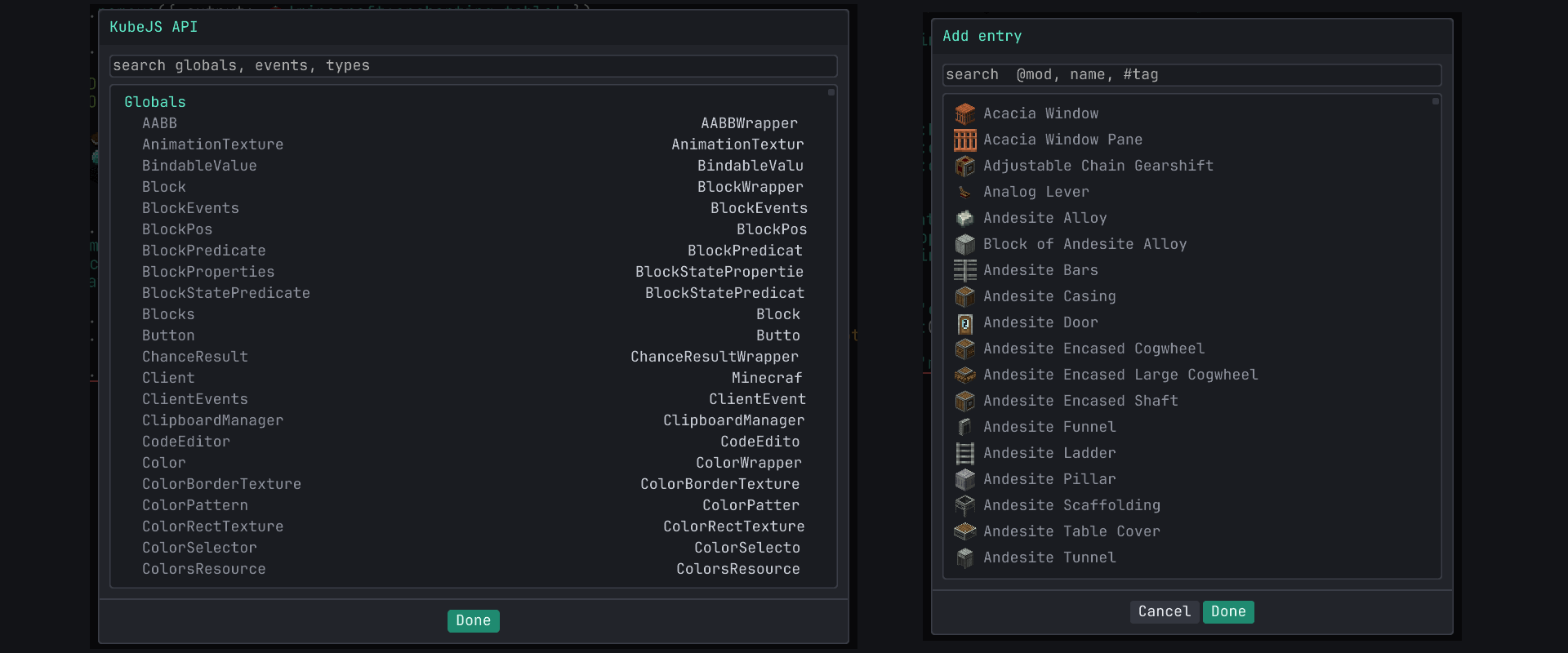
查找和替换支持大小写匹配、整词匹配和正则表达式格式化、代码片段调色板、自动换行、括号闭合与自动缩进、预览标签页、会话恢复以及将附近打字操作合并为单一步骤的撤销机制。按 Ctrl+I 可在光标处打开物品选择器并插入 ID(或将标签展开为其成员 ID),Ctrl+R 插入配方的 JSON,Ctrl+P 搜索采集到的 KubeJS 索引,而 { } API 按钮则以全局变量、事件和类型为分组方式打开相同的索引。语言文件有一个“缺失键”按钮,可以插入当前命名空间尚未翻译过的方块、物品、实体、效果和附魔键。
默认附带 JetBrains Mono 字体,在 1.20.1 版本中经过 SDF 管线处理,确保在任何 GUI 缩放比例下都保持清晰。你可以从资源包中选择其他字体(Embers Text API 扩展了可选范围)。
队列、审查与应用
视觉标签页中的更改不会直接写入磁盘。所有变更收集在屏幕底部的待处理列表中。默认情况下,“Apply”会展示即将写入的文件差异,在每个文件旁边保留 .bak 备份,并在之后重新加载。这三个行为均可通过设置关闭。
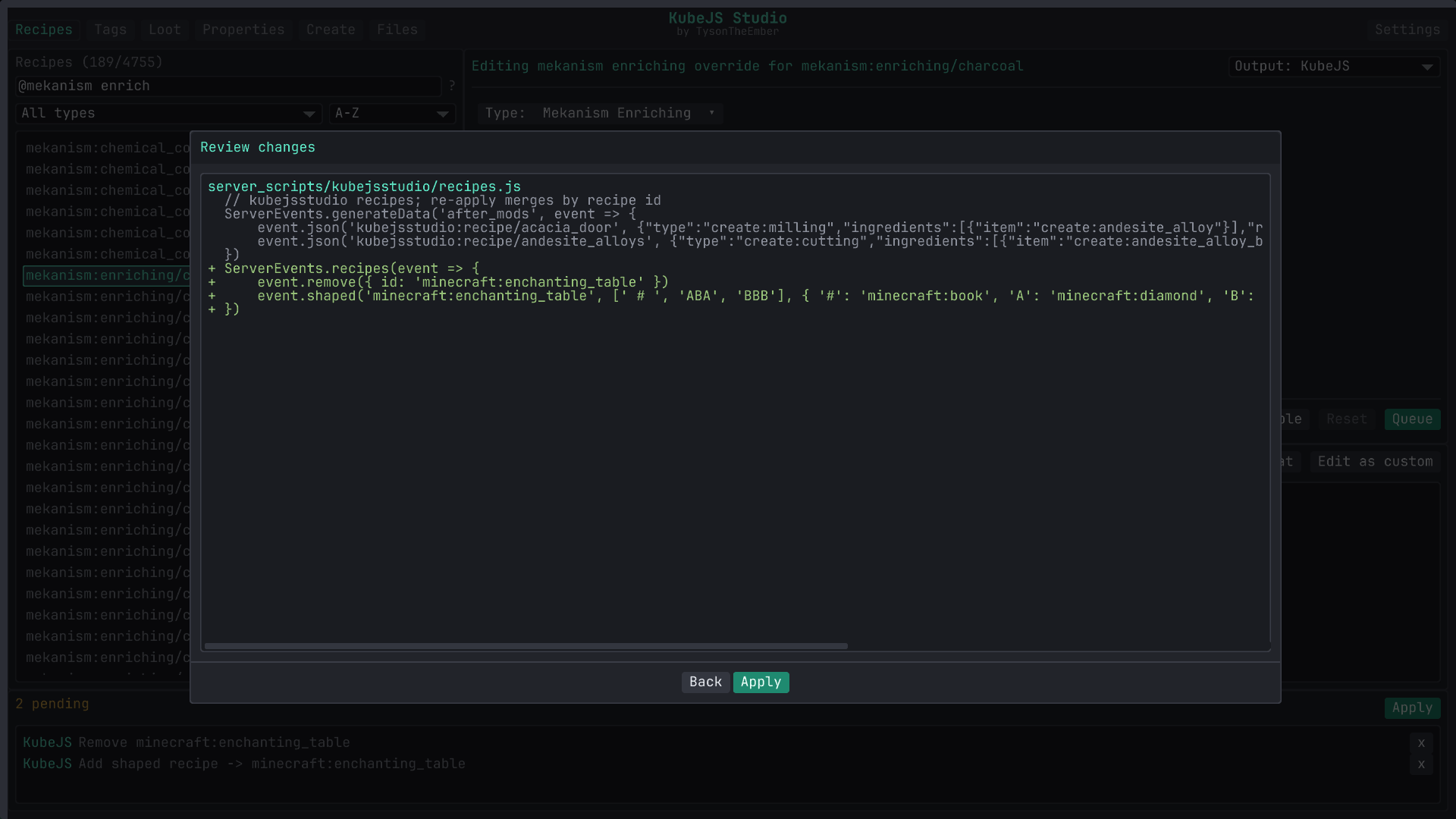
配方、标签和战利表的更改既可以作为 KubeJS 脚本写入,也可以作为 kubejs/data 下的数据包 JSON 写入,每次更改都可以单独选择,默认是数据包模式,除非你手动切换。状态变化和新的注册表条目始终作为启动脚本处理,名称和纹理始终是资源文件。脚本保存在 kubejs/server_scripts/kubejsstudio/ 和 kubejs/startup_scripts/kubejsstudio/ 目录下,每种类型各一个文件。重新应用时会按 ID 合并到 Studio 之前生成的内容中,而不是完全替换文件,但应将这些文件视为生成输出,并将你自己编写的脚本放在其他地方。任何由 Studio 写入的内容都可以从同一标签页重置。
小细节
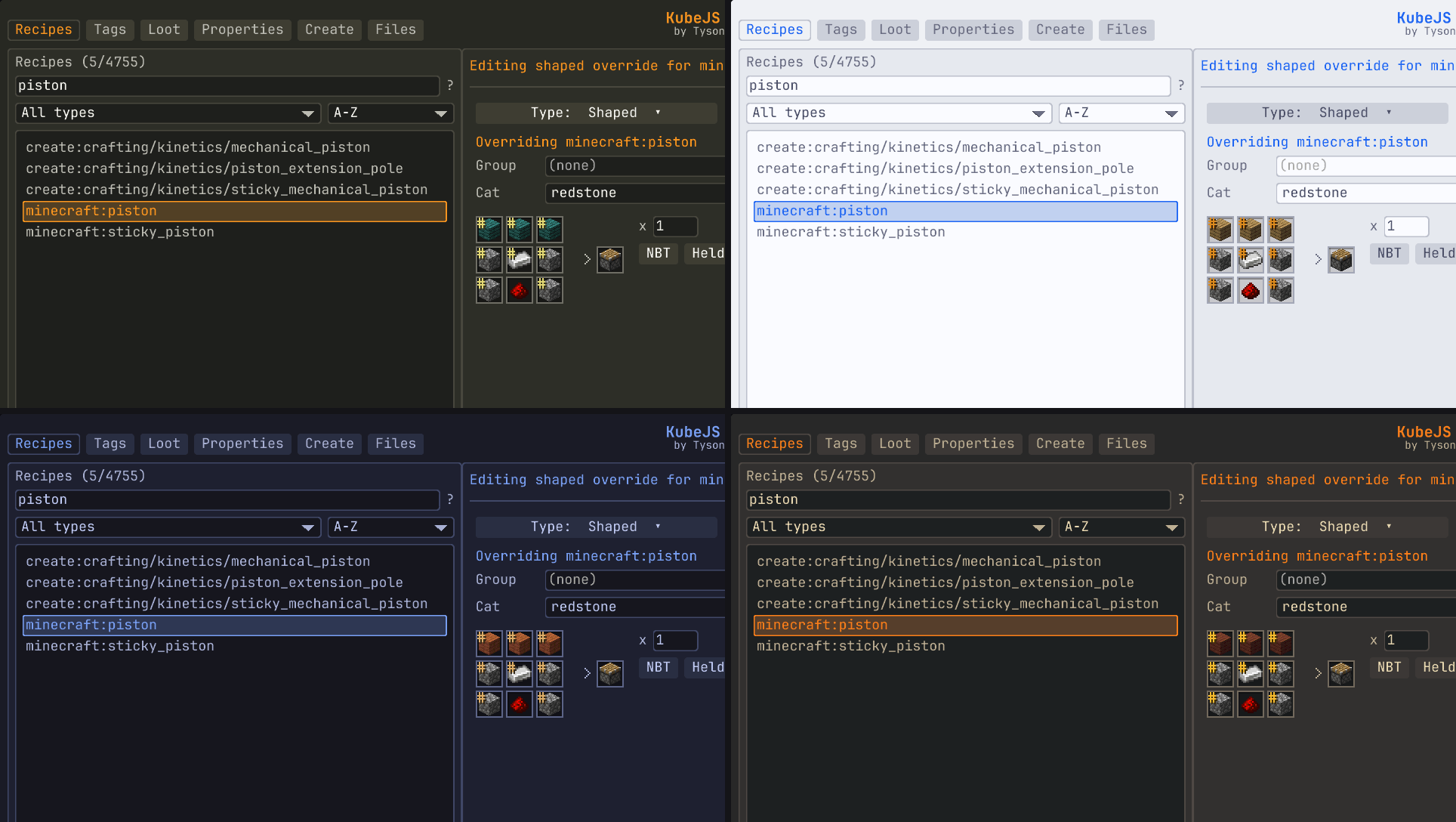
- 主题。内置 18 种:Studio Dark、Catppuccin(四种风格)、Dracula、Everforest、GitHub 深色和浅色、Gruvbox、Kanagawa、Monokai、Nord、One Dark、Rose Pine、Solarized 深色和浅色、Tokyo Night。将 JSON 文件放入
config/kubejsstudio/themes 即可使用自定义主题;首次运行时目录中会提供一个示例。
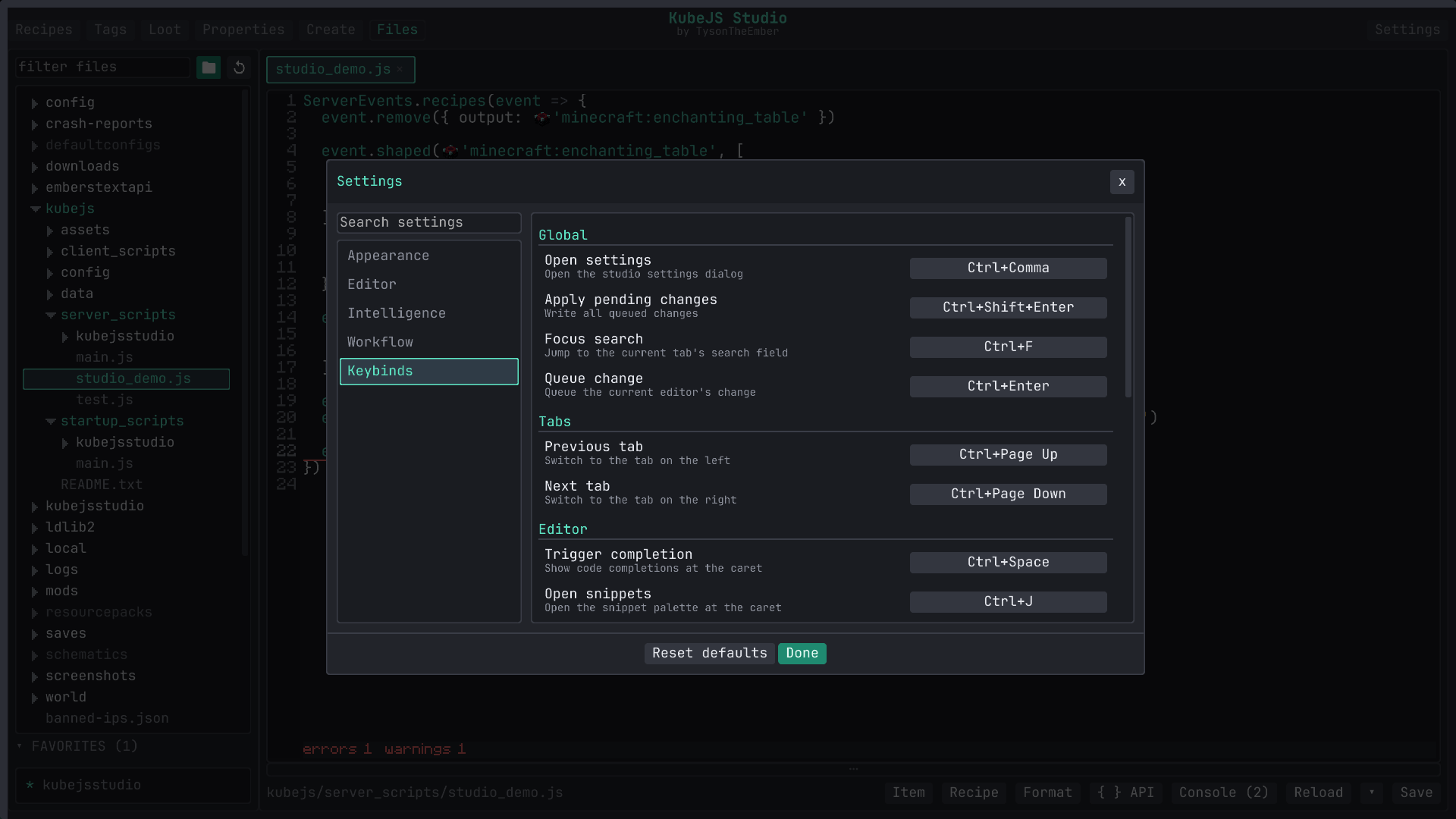
- 设置。一个可搜索的对话框涵盖字体、编辑器行为、智能功能的开启状态与激进程度,以及上述工作流开关。
- 按键绑定。用于切换标签页、搜索、队列与应用、补全、代码片段、格式化及文件操作的 Studio 快捷键均在该对话框中重新绑定。K 键及各标签页的可选直接绑定位于 Minecraft 的控制设置界面。
- 布局。主面板可调整大小并折叠,对话框会记住其尺寸,设置中提供一键重置功能,以防你把界面搞得一团糟。
/kubejsstudio 从聊天栏打开工作区,每个子命令对应一个标签页。
兼容性
| Minecraft |
加载器 |
Java |
依赖 |
| 1.21.1 |
NeoForge 21.1.216+ |
21 |
KubeJS |
| 1.20.1 |
Forge 47+ |
17 |
KubeJS, Kotlin for Forge 4.11+ |
清单文件未锁定 KubeJS 的具体版本。此版本基于 1.21.1 上的 KubeJS 2101.7.2 和 1.20.1 上的 2001.6.5 构建;其他构建版本可能也能正常工作,但我只测试了这两个版本。NeoForge 的最低要求来自捆绑的 LDLib2,这也是其要求高于加载器自身基线的原因。
可选:Create(解锁其配方表单)、JEI 或 EMI(在其配方界面上显示编辑按钮;Forge 上需 JEI 15.17.0.74+,NeoForge 上需 JEI 19.27.0.335+)。
Studio 是一个客户端侧的编辑工具。在你制作整合包的实例中安装它,发布生成的文件即可,它无需安装在服务器上,也不需要出现在其他玩家的客户端中。浏览器读取的是单人服务器的数据,因此在使用前请先打开一个世界。
许可协议
参见 tysontheember.dev/modding-licence。
捆绑的第三方作品(OFL 许可下的 JetBrains Mono,LGPL 许可下的 LDLib2)包含在 jar 包内的 licenses/NOTICE.txt 中,并附有完整的许可证文本。
KubeJS Studio
KubeJS Studio is an in-game front end for KubeJS. Press K and you get a workspace for recipes, tags, loot tables, item and block stats and new registry entries, plus a code editor that knows what is loaded in your pack. Studio writes plain files under kubejs/: scripts, datapack JSON, lang files and models. There is no project format to export, and the generated files keep working without Studio.
Needs KubeJS. On Forge 1.20.1 it also needs Kotlin for Forge. LDLib2 is bundled inside the jar. Client side only, it never has to go on a server.
GUI or code, your call
A GUI can be faster than writing a script by hand. Other times it's just better to edit the script. Studio does both, and you can switch whenever you like, or use both at once.
If you have never written a KubeJS script, start with the five visual tabs. Pick a recipe, a tag, a loot table or an item, change it with real item slots and normal fields, hit Queue. Studio shows you exactly what it is going to write before it touches anything.
If you already write KubeJS, the Files tab is a proper editor. Completion, hover docs and error checking are built from the running instance, not from a typings file that went stale two updates ago. Type event.recipes. and the list is the recipe types loaded in that pack, mods included.
The workspace
Recipes
Every loaded recipe is in the browser, filterable by mod, type or item. Supported types open in a form with item slots filled from a picker (or a Held button that copies the stack in your hand into the result), count and category fields, and the generated output shown underneath as you edit. Override a recipe, disable it, duplicate it, or start a blank one.
Vanilla crafting, cooking, stonecutting and smithing have hand-built forms. Create's processing recipes do too, including heated mixing and sequenced assembly. Farmer's Delight, Ars Nouveau and the common Mekanism machine types have their own layouts.
For other types, Studio builds a flat form from the recipe schema KubeJS already has for it: item and fluid fields become slots, numbers and flags become fields. That covers a lot of mods with a KubeJS addon without me writing anything per mod. If a type has no schema, or the existing JSON is more complicated than that form can round-trip, it opens as raw JSON and you edit that.
Recipe JSON comes from the running world, so what you see is what the game loaded. JEI and EMI recipe pages get an Edit button that jumps into Studio with that recipe selected (singleplayer, creative mode).
Tags
Pick a registry (items, blocks, fluids, entities, and any dynamic registry the game exposes), find the tag, add or remove members. Additions and removals are shown inline against the live contents so you can see the diff before you queue it. This is the quick way to get modded items into #minecraft:planks or #c:ingots/copper so recipes and mechanics pick them up.
Loot
Real loot tables, edited in place as a tree of pools and entries. Rolls, count and weight stay inline. The ... on a row opens the full editor for that entry, which is where conditions and functions live as typed forms: tool checks, random chance, Fortune style bonuses, explosion decay, names, lore, components or NBT, and nested all_of / any_of logic. Table-level settings (context type, random sequence, table-wide functions) are under Table…. The catalog follows the Minecraft version, and anything without a typed form stays editable as raw JSON.
Properties
Base stats that no recipe or tag can touch. Items expose stack size, durability, food values, burn time and an enable-only fire resistance flag. Blocks expose hardness, blast resistance, light level, friction, whether a tool is required, mining tier and the tool it is mineable with. Studio writes the matching ItemEvents.modification or BlockEvents.modification startup script.
The same tab renames and retextures anything already in the game, which lands as a lang entry and a model override under kubejs/assets. Stat changes need a game restart, mining tags apply on /reload, names and textures on F3+T. Each row is marked with which one it needs.
Create
New items, blocks and fluids without touching a startup script. Give it an id, pick one of Studio's builder types (plain item, tools, armor pieces, slab, stairs, door, crop, a fluid with its bucket, among others) and fill in the fields you care about. The field list is version correct, so 1.20.1 only shows what 1.20.1 KubeJS supports. Everything you create stays listed on the left so you can reopen it or delete it later.
The editor
If you have used ProbeJS, the goal will feel familiar. ProbeJS generates typings so an external IDE can help you write KubeJS; I wanted that help inside Minecraft. Studio reflects over the KubeJS runtime you actually have (the event groups and handlers, the globals bound into the script scopes, addons included) and reads recipe schemas and game ids from the open world as completion needs them. There is no typings step and no second window, and a cached copy of the symbol index covers the odd case where live reflection fails.
The Files tab itself is a file explorer and multi-tab editor for your whole instance with syntax highlighting for JS, JSON, TOML and logs. It edits text files (up to 2 MB), previews images, and does create, rename and delete with guard rails. Favorites and pinned folders keep your kubejs/ tree one click away.
Completion
Type event. and you get the members of that event. Type event.recipes. and you get the namespaces of every mod with a KubeJS recipe schema, then the types under them, then the chain methods that type supports (.heated() on Create mixing, .xp() on smelting). String completion follows context: item and tag ids (with icons) where a recipe wants one, mod ids in filters, builder types in registry events, loot table ids and lang keys where they fit. A class loaded through Java.loadClass gets static member completion, and datapack JSON recognizes the common id fields (item, tag, id, type).
Hover docs and signature help
Hover a KubeJS member, a variable, an id or a diagnostic to see what it is: the signature and a short description, the type, the item behind the id, the full message. While the caret sits inside a recognized call, a signature strip appears above it. Docs come from the harvested runtime index (KubeJS's own @Info annotations included) plus a small built-in reference for the parts KubeJS does not describe about itself.
Diagnostics
Errors and warnings appear as you type, with a count below the editor and the full message on hover. Unknown members and identifiers, misspelled item, tag, mod and recipe ids, argument counts that do not match the recipe schema, ids in the wrong kind of slot, events used from the wrong script type (ServerEvents in a startup script), malformed // priority and // requires headers, unbalanced brackets and unterminated strings, and Java classes the KubeJS class filter would reject. KubeJS console errors from the last reload that carry a source location land on the offending line as well, so a broken recipe points back at the statement instead of a log file.
Console and reload
The console panel lists KubeJS errors and warnings from the last reload. Click one to jump to its line, or use the command box to run /kubejs errors, /reload or anything else without leaving the screen. The Reload button reloads the script type of the file you are editing (startup, server or client scripts, or /reload for data), so you are not rebuilding the whole datapack to test a client script.
The rest
Find and replace with match case, whole word and regex, formatting, a snippet palette, word wrap, bracket closing and auto indent, preview tabs, session restore, and undo that batches nearby typing into single steps. Ctrl+I opens the item picker at the caret and inserts an id (or expands a tag into its member ids), Ctrl+R inserts a recipe's JSON, Ctrl+P searches the harvested KubeJS index, and the { } API button opens the same index grouped into globals, events and types. Lang files get a "Missing keys" button that inserts the block, item, entity, effect and enchantment keys the namespace has not translated yet.
It ships with JetBrains Mono, which on 1.20.1 goes through an SDF pipeline so it stays sharp at any GUI scale. Other fonts from your resource packs can be picked in Settings (Embers Text API widens what is selectable).
Queue, review, apply
Nothing in the visual tabs writes straight to disk. Changes collect in a pending list at the bottom of the screen. By default Apply shows a diff of the files it is about to write, keeps a .bak of the previous version next to each one, and reloads afterwards. All three are settings if you would rather it did not.
Recipe, tag and loot changes can be written either as KubeJS scripts or as datapack JSON under kubejs/data, per change, and datapack is the default until you flip it. Stat changes and new registry entries are always startup scripts, and names and textures are always resource files. Scripts go under kubejs/server_scripts/kubejsstudio/ and kubejs/startup_scripts/kubejsstudio/, one file per kind of thing. Re-applying merges by id into what Studio wrote before rather than replacing the file wholesale, but treat those files as generated output and keep your own hand-written scripts elsewhere. Anything Studio wrote can be reset from the same tab that made it.
The small stuff
- Themes. Eighteen built in: Studio Dark, Catppuccin in all four flavors, Dracula, Everforest, GitHub dark and light, Gruvbox, Kanagawa, Monokai, Nord, One Dark, Rose Pine, Solarized dark and light, Tokyo Night. Drop a JSON file in
config/kubejsstudio/themes for your own; an example is written there on first run.
- Settings. One searchable dialog covers fonts, editor behavior, which intelligence features are on and how eager they are, and the workflow toggles above.
- Keybinds. Studio shortcuts for tab switching, search, queue and apply, completion, snippets, formatting and file actions are rebound in that same dialog. The K key and optional direct binds for each tab live in Minecraft's Controls screen.
- Layout. The main panels resize and collapse, dialogs remember their size, and Settings has a one-click reset for when you paint yourself into a corner.
/kubejsstudio opens the workspace from chat, with a subcommand per tab.
Compatibility
| Minecraft |
Loader |
Java |
Requires |
| 1.21.1 |
NeoForge 21.1.216+ |
21 |
KubeJS |
| 1.20.1 |
Forge 47+ |
17 |
KubeJS, Kotlin for Forge 4.11+ |
The manifest does not pin a KubeJS version. This release was built against KubeJS 2101.7.2 on 1.21.1 and 2001.6.5 on 1.20.1; other builds will probably work, but those are the ones I test. The NeoForge floor comes from the bundled LDLib2, which is why it is higher than the loader's own baseline.
Optional: Create (unlocks its recipe forms), JEI or EMI (edit button on their recipe screens; JEI 15.17.0.74+ on Forge, 19.27.0.335+ on NeoForge).
Studio is a client-side authoring tool. Install it in the instance you build your pack in, ship the generated files, and it does not need to be on the server or in anyone else's client. The browsers read from the singleplayer server, so open a world before using them.
License
See tysontheember.dev/modding-licence.
Bundled third-party work (JetBrains Mono under the OFL, LDLib2 under the LGPL) is covered by licenses/NOTICE.txt inside the jar, alongside the full license texts.


 模组

 模组

 模组
 模组

 模组
 模组
评论 0
登录后参与评分
还没有评论,来抢沙发吧