

无需使用告示牌即可轻松为箱子、潜影盒、* barrels(木桶)*及其他容器贴标签的模组。
欢迎加入我的 Discord 服务器,提出功能建议并添加与其他模组的兼容性!
使用方法
本模组增加了一个标签打印机,它是一个可以为容器设置标签和图标的物品。
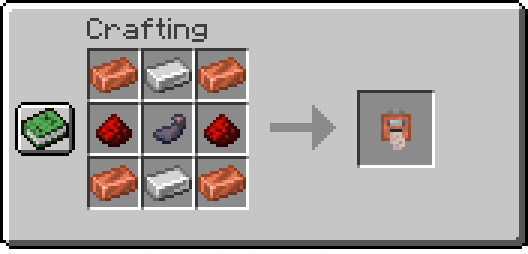
打印标签:
手持标签打印机时,_右键点击_以打开菜单,在其中设置你的图标和标签文本。最后,确保背包中有纸张,然后_按住 Shift 键右键点击_箱子或兼容的容器即可应用标签。
从已有标签复制:
手持标签打印机时,_按住 Shift 键右键点击_可切换至复制模式。 接着,_按住 Shift 键右键点击_一个已设置好标签的容器,即可复制其图标和文本。
命令
/labelposition
设置当前玩家的 HUD 位置。 可用的位置包括:
center-right(默认)center-leftlefttoptop-left
示例:
- 将当前 HUD 位置设置为
left:/labelposition left
/setlabel
需要管理员权限。用于设置选定容器的标签/图标。
示例:
- 设置坐标 <x> <y> <z> 处方块的标签:
/setlabel <x> <y> <z> label I'm a dirt chest! - 设置坐标 <x> <y> <z> 处方块的图标:
/setlabel <x> <y> <z> icon minecraft:dirt
/labelconfig
需要管理员权限。用于在配置文件中添加或移除可被贴标签的方块。
注意:所有关联了实体方块(Block Entity)的方块都可以被贴标签。
若要检查某个方块是否可以添加到配置中并正常使用,请尝试手持 标签打印机对该方块执行按住 Shift 键右键点击操作, 如果显示类似“你无法为此方块打标签”的提示,则该方块可以添加到配置中
示例:
- 将铃铛(Bell)方块添加到配置中:
/labelconfig add-item minecraft:bell - 将铃铛(Bell)方块添加到配置中(同时手中持有该方块):
/labelconfig add-hand - 从配置中移除铃铛(Bell)方块:
/labelconfig remove-item minecraft:bell - 从配置中移除铃铛(Bell)方块(同时手中持有该方块):
/labelconfig remove-hand
A mod that makes easy labelling chests, shulker boxes, barrels and other containers without the use of signs.
Check out my Discord Server to suggest features and add compatibility with other mods!
How to use
This mod adds a Label printer which is an item that can set a label and an icon to a container.
Printing labels:
To use the Label Printer, right-click while holding it, and it'll open a menu where you can set your icon and label. Finally, have paper in your inventory and shift-right-click a chest or compatible container to set them.
Copying labels from existing ones:
When holding the Label Printer, shift-right-click to switch to Copy mode. Then shift-right-click on a container that has a label already set to copy its icon and text.
Commands
/labelposition
Sets the current player's HUD position. Available positions are:
center-right(default)center-leftlefttoptop-left
Examples:
- Set the current HUD position to
left:/labelposition left
/setlabel
Requires admin permissions. Sets the label / icon of the selected container.
Examples:
- Setting the label of a block at <x> <y> <z> coordinates:
/setlabel <x> <y> <z> label I'm a dirt chest! - Setting the icon of a block at <x> <y> <z> coordinates:
/setlabel <x> <y> <z> icon minecraft:dirt
/labelconfig
Requires admin permissions. Adds/removes blocks that can be labeled from the config.
NOTE: All blocks that have a Block Entity associated with them can be labeled.
To check if a block can be added to the config and used correctly try shift-right-clicking on it with the Label Printer item, and if it displays something like "You can't tag this block", that block can be added to the config
Examples:
- Add the Bell block to the config:
/labelconfig add-item minecraft:bell - Add the Bell block to the config (while having the block in player's hand):
/labelconfig add-hand - Remove the Bell block from the config:
/labelconfig remove-item minecraft:bell - Remove the Bell block from the config (while having the block in player's hand):
/labelconfig remove-hand

下载 Labelling Containers
下载 Labelling Containers
下载 Labelling Containers
下载 Labelling Containers
下载 Labelling Containers
下载 Labelling Containers
下载 Labelling Containers
下载 Labelling Containers
下载 Labelling Containers
下载 Labelling Containers
容器标签
- 修复了 问题 #72。感谢 @max-champlin
关于这个资源的讨论、问题反馈与使用心得
还没有讨论,来发第一帖吧
你是这个资源的作者?登录后可认领此资源。
相似资源
 模组

显示你正在注视的方块的信息。(适用于 Minecraft 1.16+ 的 Hwyla/Waila 分支)
 模组
使用 JavaScript 编辑配方、添加自定义物品、编写世界事件!
 模组

查看物品与配方
 模组
在游戏画面角落显示附近世界地形、玩家、生物和实体的地图。可创建路径点,帮助你找到标记过的位置。
 模组
AE2:一款流行的自动化与存储模组
 模组

一个基于构建器的 Minecraft 配置库!
评论 0
登录后参与评分
还没有评论,来抢沙发吧