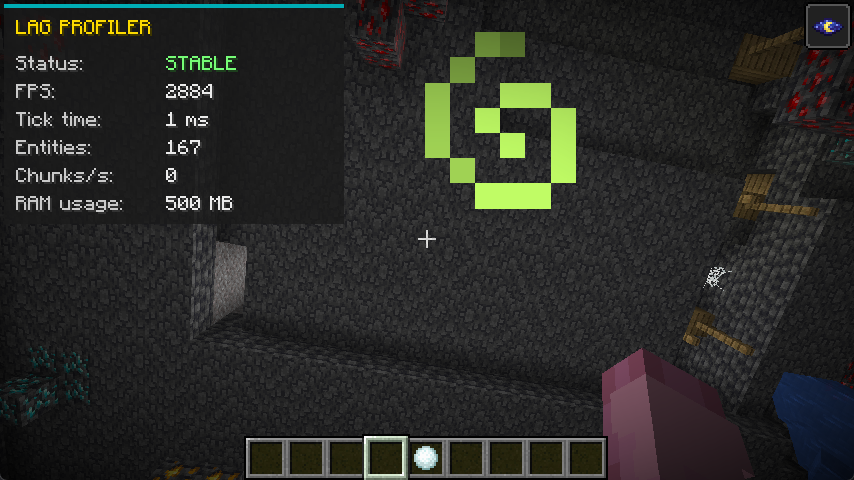
此模组引入了一个简洁、轻量的 HUD 覆盖层,专为帮助玩家监控本地游戏性能并实时诊断客户端卡顿或掉帧而设计。
无需依赖杂乱无章的 F3 调试界面,该模组提供了一个清晰的 UI,精确追踪影响你 PC 性能并导致游戏掉帧的因素。
主要功能:
动态卡顿检测(状态):自动监控客户端的处理时间。如果本地刻/帧时间超过 50ms(这会导致明显的卡顿或冻结),状态会立即变为红色,并提示“检测到卡顿”。否则,显示绿色的“稳定”状态。
实时客户端指标:HUD 持续跟踪五个关键数据点,帮助你定位卡顿的来源:
FPS:当前的每秒帧数。此处下降表明渲染吃力。
Tick Time:客户端处理周期的确切持续时间(毫秒)。数值过高意味着游戏正在冻结或难以处理数据。
Entities:当前在你周围渲染的实体总数。可用于发现由刷怪塔或掉落物品引起的卡顿。
Chunks/s:客户端加载新地图区块的速率。高速飞行或高渲染距离可能导致该数值飙升并产生卡顿。
RAM Usage:游戏当前正在消耗的内存量(MB)。非常适合识别内存泄漏或由 Java 垃圾回收引起的卡顿。
快速切换与自定义:你可以随时按下 F7 键来隐藏或显示整个 UI。如果这与你的其他控制冲突,可以在游戏的标准控制/按键绑定菜单中将此快捷键完全重新绑定到你选择的任意按键上。
This mod introduces a sleek, lightweight HUD overlay designed specifically to help players monitor their local game performance and diagnose client-side lag or stuttering in real-time.
Instead of relying on the cluttered F3 debug screen, this mod provides a clean UI that tracks exactly what is impacting your PC's performance and causing your game to drop frames.
Key Features:
Dynamic Stutter Detection (Status): Automatically monitors the client's processing time. If the local tick/frame time spikes above 50ms (which causes noticeable stuttering or freezing), the status instantly turns red and alerts you with "LAG DETECTED". Otherwise, it displays a green "STABLE" status.
Live Client Metrics: The HUD continuously tracks five crucial data points to help you pinpoint the source of your lag:
FPS: Your current Frames Per Second. Drops here indicate rendering struggles.
Tick Time: The exact duration of the client's processing cycle in milliseconds. High numbers mean your game is freezing or struggling to process data.
Entities: The total number of entities currently rendered around you. Useful for spotting lag caused by mob farms or dropped items.
Chunks/s: The rate at which your client is loading new map chunks. Fast flying or high render distances can cause this to spike and create lag.
RAM Usage: The current amount of memory (in MB) actively being consumed by the game. Perfect for identifying memory leaks or stuttering caused by Java Garbage Collection.
Quick Toggle & Customization: You can easily hide or show the entire UI at any time by pressing F7. If this conflicts with your other controls, the shortcut can be fully rebound to any key of your choice in the game's standard controls/keybinds menu.
评论 0
登录后参与评分
还没有评论,来抢沙发吧