LavaCan
一个小型的 Minecraft 物品管理模组。当你将 岩浆桶(Lava Bucket)放在快捷栏或鼠标指针上时,它可充当即时物品销毁器——将不需要的物品扔上去即可将其烧毁。防火物品以及配置排除列表中的物品始终受到保护,防止误删。
工作原理
右键点击销毁
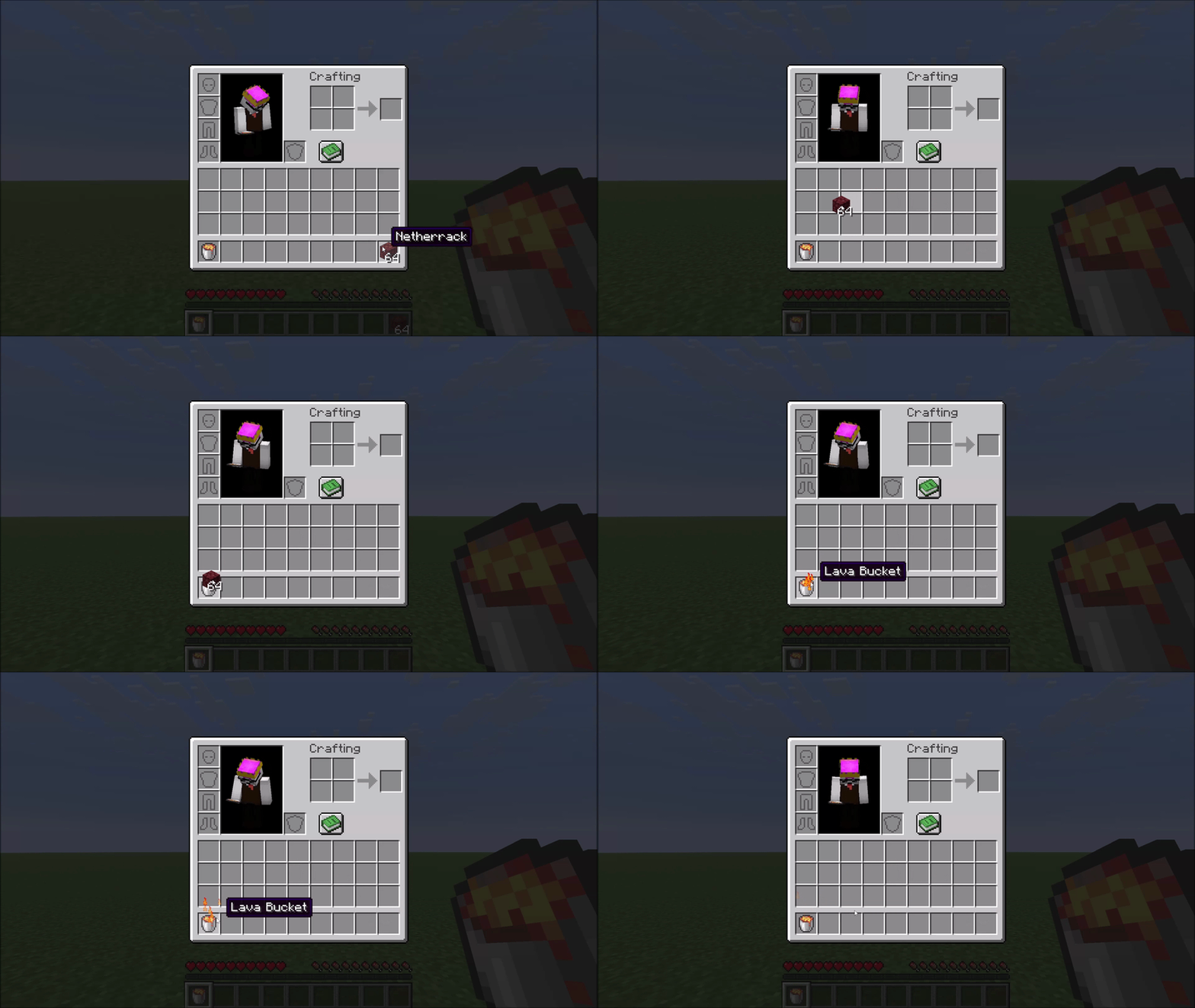
在鼠标指针上携带任意物品,然后右键点击背包中的 岩浆桶。该物品会瞬间被火焰粒子效果销毁。
快捷栏快捷键
如果你的岩浆桶位于快捷栏第 N 格,当你在任何物品界面悬停在某个物品上时,按下 N 键即可将该物品直接送入虚空——无需先拾取。
黑曜石合成
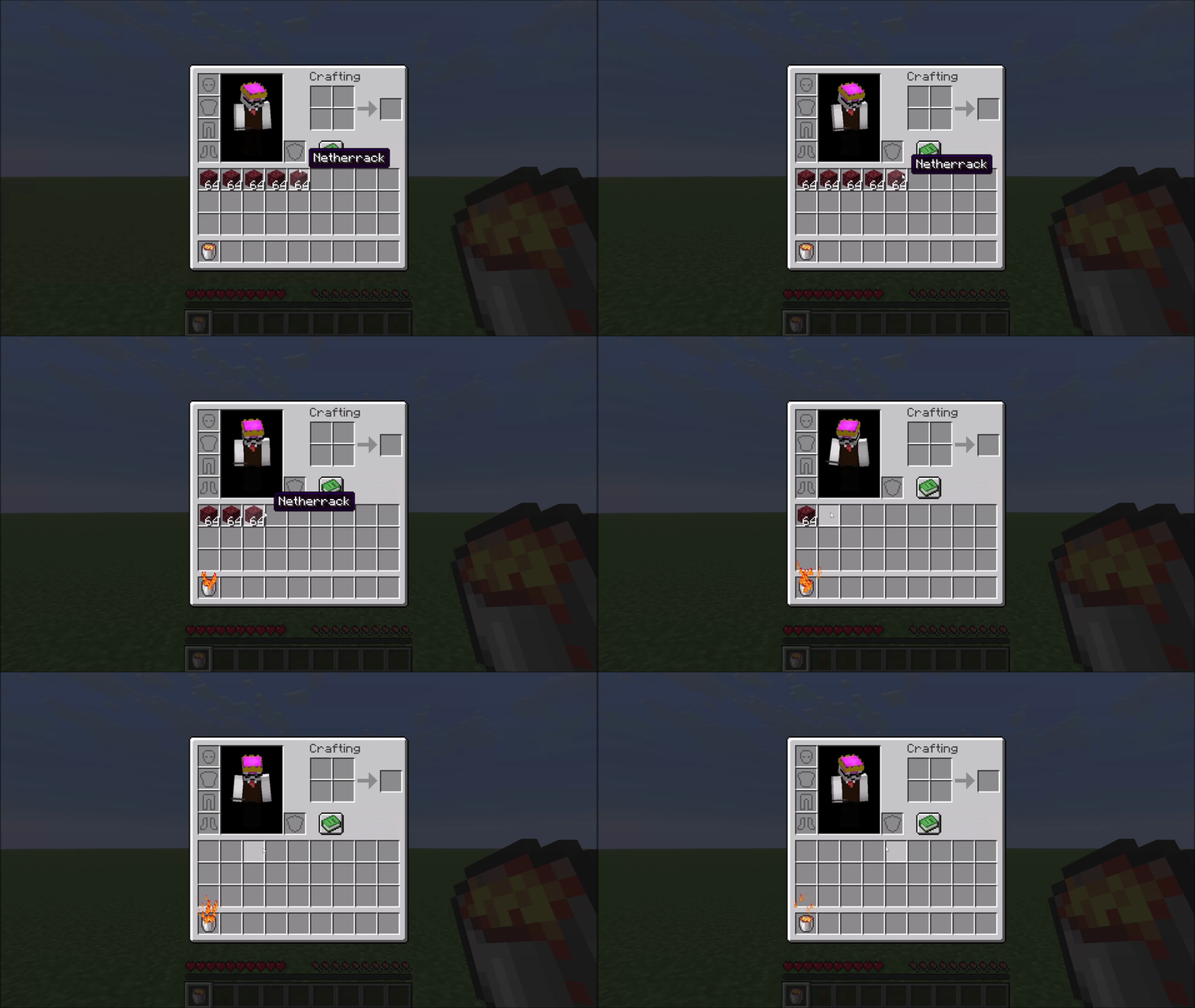
右键点击 水桶(Water Bucket) onto 岩浆桶 以合并它们。两个桶都会变成空桶,并获得一个 黑曜石(Obsidian),并伴有小型烟雾动画提示。
受保护物品
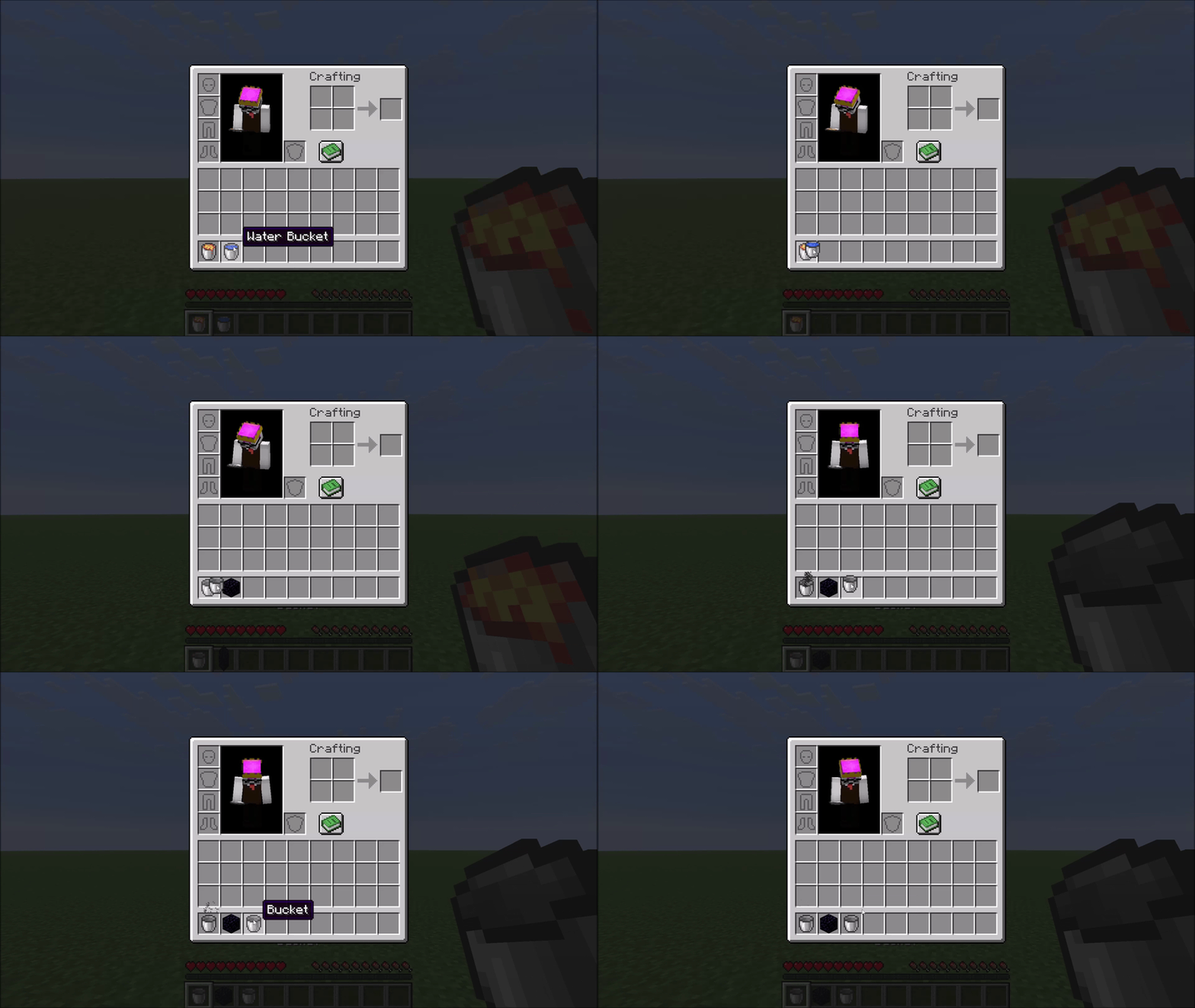
防火物品永远不会被删除。 该模组使用 Minecraft 自身的抗伤害系统,因此下界合金装备、远古残骸以及任何选择加入防火保护的模组物品都会自动受到保护——无需硬编码列表。
一个 可配置的排除列表 可保护其他贵重物品免受意外删除。默认情况下,这包括鞘翅、三叉戟、潜影盒、钻石装备以及其他你通常不希望丢失的物品。请参阅下方的配置部分。
配置
配置文件会在首次启动时自动生成于 config/lavacan.json:
{
  "excluded": [
    "minecraft:elytra",
    "minecraft:trident",
    "minecraft:diamond_sword",
    "..."
  ]
}
- 移除 某条目以允许该物品被 LavaCan 销毁。
- 添加 任意
namespace:item_id 以保护自定义或模组物品。
更改需在重启游戏后生效(或在专用服务器上重启世界)。
Mod Menu 支持
安装 Mod Menu 后,也可以在游戏内从模组列表中编辑此列表:提供一个双列选择器(受保护物品 / 所有其他物品),每列均可搜索,点击物品可在两列之间移动。更改在单机模式下点击 完成 后立即生效。Mod Menu 为可选组件——未安装时则使用 JSON 文件,对文件的编辑需在重启游戏后生效(或在专用服务器上重启世界)。
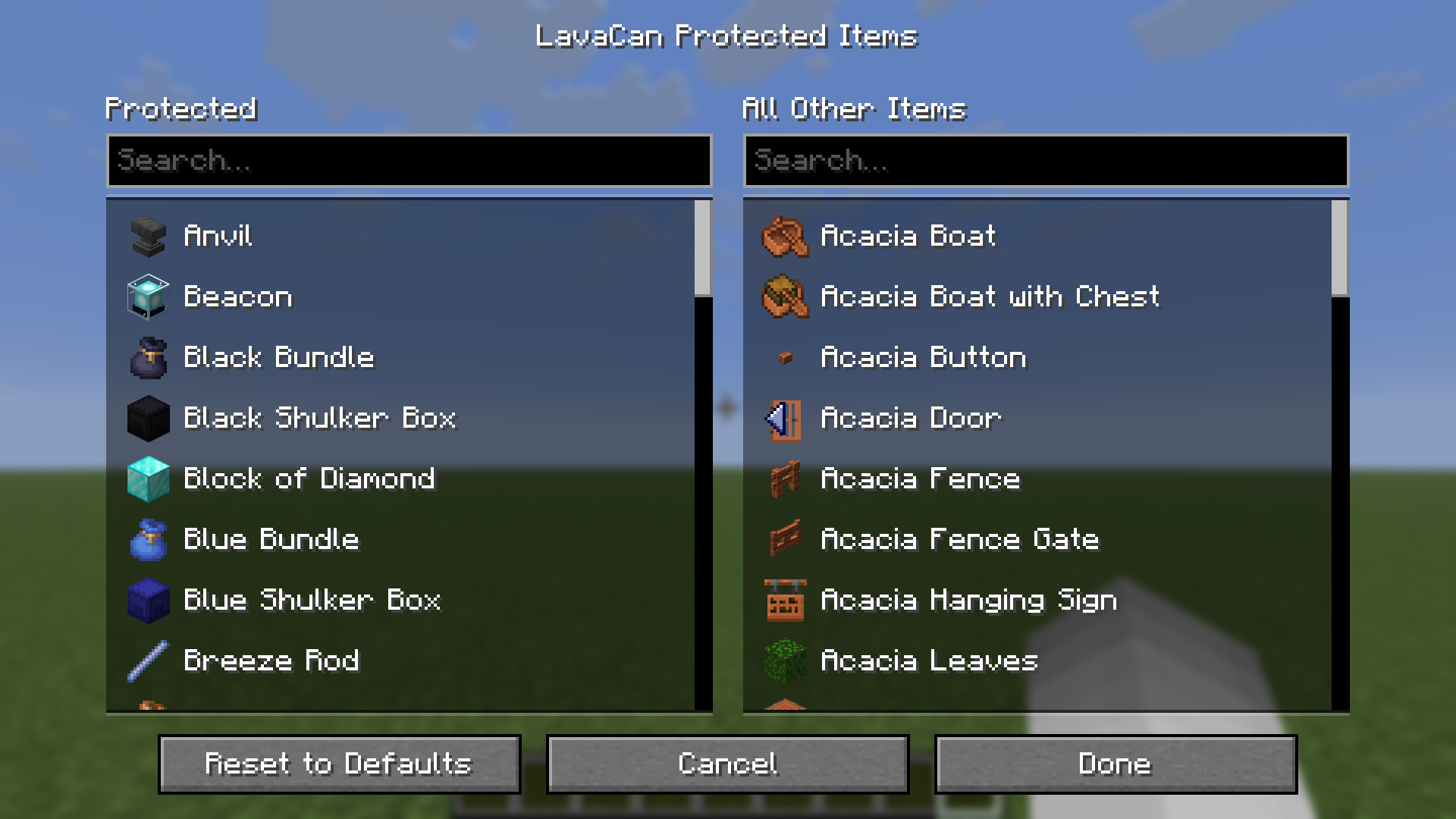
(出于技术原因,物品图标仅在当前会话加载过世界后才会显示——在此之前,条目仅显示名称。屏幕本身也对此进行了说明。)
兼容性
该模组通过 Mixin 钩入 AbstractContainerMenu.doClick ——这是一个常见且稳定的注入点。与其他针对相同方法的模组发生冲突的可能性存在,但在实践中不太可能遇到。
LavaCan
A small inventory utility mod for Minecraft. A Lava Bucket in your hotbar or cursor acts as an instant item destructor — toss unwanted items onto it to burn them away. Fire-resistant items and anything on the configurable exclusion list are always protected from accidental deletion.
How it works
Right-click to destroy
Carry any item in your cursor, then right-click it onto a Lava Bucket in your inventory. The item is destroyed instantly in a burst of flame particles.
Hotbar shortcut
If your Lava Bucket sits in hotbar slot N, pressing N while hovering over an item in any inventory screen sends that item straight to the void — no picking it up first.
Obsidian crafting
Right-click a Water Bucket onto a Lava Bucket to combine them. Both buckets become empty buckets and you receive one Obsidian, marked by a small smoke animation.
Protected items
Fire-resistant items are never deleted. The mod uses Minecraft's own damage-resistance system, so Netherite gear, Ancient Debris, and any modded item that opts into fire resistance are all automatically protected — no hardcoded lists.
A configurable exclusion list protects additional valuable items from accidental deletion. By default this covers things like Elytra, Tridents, Shulker Boxes, Diamond gear, and other items you generally don't want to lose. See the Configuration section below.
Configuration
The config file is created automatically at config/lavacan.json on first launch:
{
  "excluded": [
    "minecraft:elytra",
    "minecraft:trident",
    "minecraft:diamond_sword",
    "..."
  ]
}
- Remove an entry to allow that item to be deleted by the Lava Can.
- Add any
namespace:item_id to protect a custom or modded item.
Changes take effect after restarting the game (or the world on a dedicated server).
Mod Menu Support
With Mod Menu installed, the list can also be edited in-game from the mod list: a two-column picker (protected items / all other items) with per-column search, where clicking an item moves it between the columns. Changes apply immediately (singleplayer) on Done. Mod Menu is optional — without it the JSON file is used, and edits to the file take effect after restarting the game (or the world on a dedicated server).
(For technical reasons, item icons only appear once a world has been loaded in the current session — before that, entries show their names only. This is noted in the screen itself, too.)
Compatibility
The mod hooks into AbstractContainerMenu.doClick via a Mixin — a common and stable injection point. Conflicts with other mods targeting the same method are possible but unlikely in practice.


 模组

 模组
 模组

 模组
 模组
 模组
评论 0
登录后参与评分
还没有评论,来抢沙发吧