Lazy Utilities
这个小巧且极其简单的模组添加了一些随处可见的工具:伤害装置、伤害交互、伤害/元素反应以及通用工具。
此外,除了下文提到的模块外,该模组还添加了一些属于通用类别的功能。
? 开发者评论
大家好!由于存在多个问题,并且该项目此前在一个模组内处理了过多的系统,我决定将其拆分为六个独立的模组。这一改变旨在减少开销、资源消耗以及潜在的错误或不稳定情况。
⚠️ 重要提示:
以前,所有这些系统都打包在一个模组中。
现在它们被分发为独立模组,必须根据您想要使用的功能单独下载。
此外,您可能已经注意到 NeoForge 版本(v3.4)一直领先于 Forge 版本(v2.9.7)。此次重构将解决这一差异。拆分将主要在 Minecraft 1.21.1 上实施,然后逐步向后移植到 1.20.1。
? 名称变更
以前被称为 "LZM: X" 的模块现已更名为 "SLM: X"。
- SLM 代表 SL Modules,表明这些是基于 SL Library 构建的模块化扩展。
- 这反映了新的架构,其中 SL Library 作为核心,所有其他模组作为可选模块运行。
? 核心模块
中央系统将统一并与 LZM: Runner 合并,变为:
- SL Library → 处理工具、同步和核心系统。它与包含更多高级功能的 NeoForge 版本保持一致。
- SL Data-Driven → 负责在早期加载阶段从外部文件夹或直接从 JAR 文件中访问数据。
? 内容模块
- SLM: Shaders: 以前内置的光影内容已分离到其自己的模块中。一些次要错误也已修复。
- SLM: Codex: 现在是一个独立模块。Forge 和 NeoForge 版本完全同步(例如支持 curios API),并且可以通过 JSON 以数据包形式添加 Codex 条目。
- SLM: Elements: 原名 LZM: Elements。从 5 个扩展到 8 个元素,新增:Aero、Lumen 和 Umbra。名称已更新,系统经过全面重构。
- SLM: Epic Fight: 原名 LZM: Epic Fight。Forge 和 NeoForge 版本现在在两个平台上行为一致。
- SLM: Combat: 原名 LZM: Better Combat。不再依赖 Better Combat。它现在是一个独立系统,提供用于能力和基于物品的事件处理的工具。
? 此更改的目标
- 降低整体负载和资源使用量
- 提供完全模块化的系统(仅安装所需内容)
- 提高稳定性并减少错误
- 同步 Forge 和 NeoForge 版本
- 实现更好的长期可扩展性
感谢您的支持!
命令:
- /lazy-utilities reload mod <modid>
允许您重新加载模组的存储库,保留其在存储库链中的位置,避免与其他模组或依赖项发生错误或重叠。它与 /reload 命令相同,但更具针对性。
- /lazy-utilities reload mod-list <modid modid modid ...>
与上一个命令类似,它允许您重新加载多个模组或一次只重新加载一个。如果列表只包含一个,则将执行前一个命令(lazy-utilities reload mod <modid>>);否则,将使用此命令。
- /lazy-utilities reload mod-tree <modid>
此命令允许您重新加载目标 modid 及其所有“果实”,即所有依赖于它的东西。
- /lazy-utilities reload mod-root <modid>
此命令允许您重新加载目标 modid 及其所有“根”,即它用作依赖项以 functioning 的所有内容。
Forge 事件:
CameraControllerEvent:
添加了一个事件,允许通过在其上注册“数据包”来控制摄像机。您可以配置摄像机的偏移量、效果的进入/退出时间和保持时间。
Packagers:
粒子、冷却时间、焦点或非焦点标签、STC 和 CTS 的网络打包器
将资源包和数据包作为内置项添加:
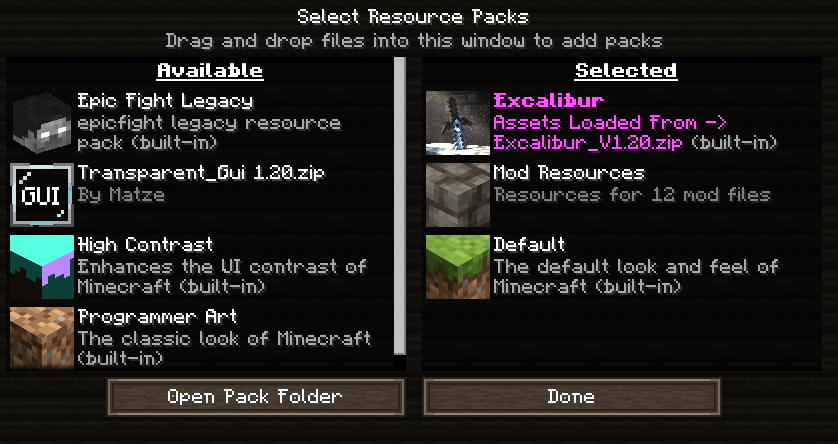
在 .minecraft/lazy_utilities/global 文件夹中,您将找到两个文件夹:datapacks 和 resourcepacks。您可以在那里放置表现得像内置的资源资产,以及同样表现的数据包,两者都具有全局优势。
资源包示例:
数据包示例:

Armor Codex:
为物品新增了一个法典(Codex),允许你为武器和护甲(以及未来可能考虑的其它物品)添加数据,用于展示其被动效果、主动效果、描述、属性或固有技能。
如果需要添加的文本量超过了普通工具提示(tooltip)的显示容量,此功能非常有用。
Armor Codex:
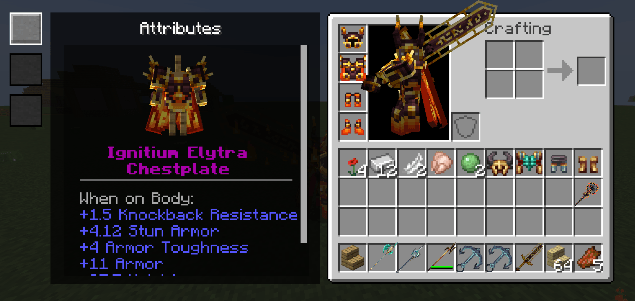
在 Cataclysmic Arsenal 模组的此示例中,展示了护甲的法典界面。
1) 属性
2) 被动效果
3) 主动效果
这些信息像按钮一样显示在左侧;护甲模型会旋转。
你可以配置是否显示盔甲架。
Weapon Codex:
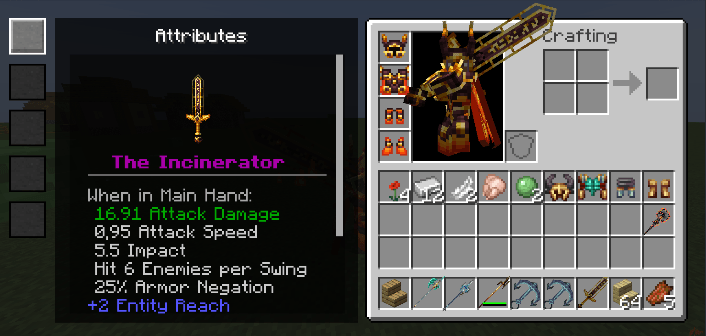
在 Cataclysmic Arsenal 模组的此示例中,展示了武器的法典界面。
1) 属性
2) 描述
3) 内部技能
4) 被动技能
5) 固有技能
这些信息像按钮一样显示在左侧;武器模型会旋转。
Codex Tooltip:
如果物品实现了相应接口,即可访问该法典。此外,如果将固有技能移至法典中,则不再能通过 EF 按钮显示,而是通过法典按钮(通常为 X 键)显示。
按下 X 键时显示的详细描述会根据具体的实现数据而有所不同。目前,只能通过代码为物品添加法典内容,但我正在评估是否可以通过 .json 文件来实现。
LZM: Epic Fight
该模块负责为 Epicfight 模组添加实用工具,帮助你构建工具提示、管理模型、添加文件以及一些事件。
除非你已安装 Epicfight 模组,否则该模块在默认情况下将与你的游戏“隔离”,仅有少数选项始终处于激活状态。
Packer:
Lazy Utilities 2.5 版本之前的读取、写入和索引系统已被移除。
文件现在直接挂载,且每种类型的文件以不同方式使用。此外,不再生成动态资源包。
目标文件夹已从
mods/Lazy Utilities/epicfight -> (更改为) -> lazy_utilities/epicfight
示例
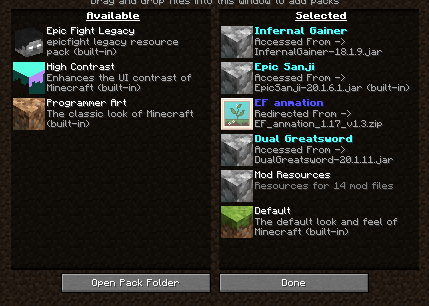
文件夹内的 .zip 文件将被重定向,而 .jar 文件将保留其原始命名空间。
命名空间由 .toml 文件决定,若不存在则由 assets 文件夹决定,且只能注册一个模组 ID。Minecraft 的命名空间被排除在外。因此,请勿将此作为全局数据包或资源包使用。
模型工具:
为玩家模型添加实用功能,例如获取坐标、根据模型或其周围环境生成粒子等。
这也是它为何对“刀刃上的粒子(Particles on the Blades)”和“天启武器库(Cataclysmic Arsenal)”的功能有用。
技能工具:
允许向对象(此处以护甲为例)添加虚拟函数,如 “OnIni”、“OnRemove”、“Update Container”、“onFail” 等。这对于例如在 Cataclysmic Arsenal 中持握武器时为护甲添加能力非常有用。
Forge 事件:
PlayerAttackEvent:
作用于玩家并分析动画期间攻击的每个阶段。这会自动为武器创建接口。在制作或修改物品时,可用于替换原版攻击系统。
这意味着,例如来自 Cataclysm 的“古矛(Ancient Spear)”在攻击时扬起沙尘暴的效果,在进入战斗模式时会失效。通过在物品层面实现此功能即可解决该问题,正如在 Cataclysmic Arsenal 中所见。
RegisterBladeModelConfig:
允许记录武器尺寸、位置等信息。用于记录武器尺寸,以便例如 “Particles On The Blades” 模组能在武器和模型上生成其粒子。
LZM: Elements
负责添加元素、伤害类型、属性、可配置文本粒子、战斗方法等的模块。
该模块天然与你的游戏“隔离”;除非你通过配置文件对其进行配置或从外部访问,否则其中的任何内容均不可用。
伤害类型:
- 直接伤害:元素直接伤害是一种对实体施加时会产生击退效果的伤害类型。在大多数情况下,这种伤害会大幅根据玩家武器的伤害值进行缩放;对于定向型反应(取决于外部条件),它会降低该反应带来的伤害削弱。此外,当为武器附魔元素时产生的伤害也属于此类,该方法能够将伤害转化为100%。
- 持续伤害 (Tick Damage):持续伤害是由相同类型的反应产生的辅助/支援型伤害。这种伤害会随时间略微增长,但随着武器伤害的提升,伤害增幅会逐渐降低;该伤害类型具有随时间趋于平缓的函数机制,最终变为固定值,从而防止攻击伤害无限成长。此伤害类型不会造成击退效果,且无视目标 100% 的护甲。尽管它使用相同的元素伤害参数(例如 OnTick 雷电伤害仍会根据目标的护甲进行缩放),但由于其无视护甲的特性,最终造成的仍是“真实”伤害。这一规则适用于所有 OnTick 类型的持续伤害。
元素及其效果:
- 火 (Pyro):施加 火之持续伤害 (Pyro Tick),即燃烧效果,每 tick 造成 1 点伤害。该效果受护甲影响:对低护甲目标更有效。如果目标已经处于燃烧状态,则不会重复施加。
- 水 (Hydro):无额外效果(目前)。
- 岩 (Geo):无额外效果。
- 冰 (Cryo):降低移动速度,并减缓自然生命恢复速度(增加食物消耗量)。
- 雷 (Electro):减少玩家获得的总经验值。
元素伤害类型:
- 火 (Pyro):伤害随目标护甲值变化。护甲越低,伤害越高(最高提升 +30%)。在 20 点护甲(下界合金)时无加成,而在 30 点护甲时伤害可能降低至 -10%。
- 水 (Hydro):伤害随目标最大生命值变化。最大生命值越低,伤害越高(最高提升 +25%)。如果目标当前生命值较低,伤害会降低(最高降低 -10%)。对飞行实体造成额外 +10% 的伤害。
- 岩 (Geo):如果目标处于地面接触状态,伤害增加 +20%;如果目标正在飞行或悬浮在空中,伤害降低 -10%。如果目标受到 “扎根 (Rooted)” 状态影响,伤害额外增加 +25%。
- 冰 (Cryo):伤害随目标最大生命值变化。最大生命值越高,伤害越高(最高提升 +50%)。不受任何其他状态或反应的影响。
- 雷 (Electro):伤害随目标护甲值变化。护甲越高,伤害越高(在 30 点护甲时最高提升 +75%)。如果目标受到 “导电 (Conductor)” 状态影响,伤害额外增加 +30%。
ERCS —— 实体反应冷却护盾 (Entity Reactions Cooldown Shield):
实体反应冷却系统 (Entity Reaction Cooldown System, ERCS) 为实体触发的反应引入了独立的冷却时间,防止反应被过于激进地触发或连续快速触发。
每种反应都有特定的冷却时间,具体取决于反应是 正向 (Direct)、逆向 (Reverse) 还是 静态 (Static):
- 正向 (Direct):由主导元素引发的反应,结果允许继续或连锁触发后续反应。
- 逆向 (Reverse):元素顺序相反的反应,通常造成最大伤害,但在此过程中会消耗两种元素。
- 静态 (Static):无论元素顺序如何,反应行为保持一致,因为它不遵循任何逻辑依赖关系。
重要的是,不同反应之间的冷却时间是互不共享的。例如,蒸发 (Vaporized)(火+水) 的冷却时间与 蒸发 (Vaporized)(水+火) 的冷却时间是不同的。
| 反应类型 |
正向 (Direct) |
逆向 (Reverse) |
静态 (Static) |
| 融化 (Melt) |
850 |
925 |
– |
| 超载 (Overload) |
– |
– |
420 |
| 蒸发 (Vaporized) |
580 |
605 |
– |
| 冻结 (Frozen) |
– |
– |
1200 |
| 感电 (Electrocharged) |
– |
– |
300 |
| 冷却 (Cooled) |
315 |
380 |
– |
| 燃烧 (Burning) |
315 |
335 |
– |
| 导电 (Conductor) |
– |
– |
335 |
| 超导 (Superconductor) |
– |
– |
530 |
| Rooted |
– |
– |
335 |
ERGCS – 实体反应全局冷却护盾:
实体反应全局冷却系统(ERGCS)引入了一种全局护盾机制,在激活期间防止实体触发任何元素反应。
该系统使用反应强度计数器(或称“护盾值”)。反应越具有破坏性,其强度值就越高,从而更快地填满护盾。当护盾处于激活状态时,实体将暂时免疫进一步的反应。
护盾会随时间衰减:
- 每受到一次攻击,减少1点。
- 此外,它还会每 2个游戏刻 被动衰减。
一旦护盾完全耗尽,实体将再次能够受到反应的影响。
此系统仅适用于高血量实体,这些实体更有可能触发多次反应。低血量或高抗性的实体通常会在护盾激活之前死亡或产生抗性。
| 反应类型 |
强度(正向) |
强度(逆向) |
强度(静态) |
| Melt |
13 |
17 |
– |
| Overload |
– |
– |
8 |
| Vaporized |
10 |
12 |
– |
| Frozen |
– |
– |
25 |
| Electrocharged |
– |
– |
3 |
| Cooled |
4 |
6 |
– |
| Burning |
4 |
5 |
– |
| Conductor |
– |
– |
6 |
| Superconductor |
– |
– |
10 |
| Rooted |
– |
– |
6 |
反应强度规则:
- Direct(正向):发起元素占主导地位,可能导致重复或连锁反应。
- Reverse(逆向):通过消耗两种元素造成最大伤害的反应。
- Static(静态):不受元素顺序或逻辑依赖影响的反应。
ICD – 内部冷却施法者:
内部冷却施法者(ICD)引入了连续元素附魔或转移之间的冷却机制。它确保元素施加不会因普通攻击而过于频繁,从而维持普通攻击与特殊技能之间的平衡。
当武器被元素附魔(例如火元素)时,它每 2.5秒 或每 3–4次连续命中 只能对目标施加或转移该元素一次。此限制仅适用于普通攻击。
特殊技能绕过此限制,并始终施加其对应的元素。
ICD 的行为是动态的,取决于:
- 源实体的特性。
- 武器的属性。
- 交互是通过普通攻击还是技能进行的。
元素转移:
当通过 ICD 转移元素时,额外数据会从源实体传递到目标实体。其中包括用于确定反应伤害缩放的元数据,这取决于源实体的武器属性和基础伤害。
反应伤害分为两大类(此处不详细说明)。
元素持续时间(以游戏刻为单位):
| 元素 |
持续时间 |
| 火 |
水 |
岩 |
雷 |
冰 |
仅在 "./config/lazy_utilities/LZM_Elements.toml" 配置文件中,将 "allowElementsInEnvironment" 设置为 true 时生效
- 水:通过游泳、站在水方块上、处于雨中或获得普通药水(本质为水)激活。
- 火:通过在岩浆中游泳、站在岩浆块上、被烈焰人或岩浆怪攻击或自身着火激活。
- 岩:通过长时间处于沙漠或类似生物群系、长时间处于地下或被方块困住导致窒息激活。
- 雷:被闪电击中时激活。
- 冰:通过处于暴风雪中、长时间处于冻结生物群系或高海拔地区,或被陷于粉雪中来激活。
好了,既然我们已经了解了伤害类型、特性以及一些功能,接下来让我们看看反应……
仅在 "./config/lazy_utilities/LZM_Elements.toml" 配置文件中,将 "allowReactions" 设置为 true 时生效
所有提供的信息可能会因平衡性调整、顺序变化而改变,或者在未来添加更多元素时被修改。
即时反应:
“即时”反应是指在单个 tick 内触发并完全解析的反应。它们分为两个子类别:
不确定反应: 这些反应不依赖于目标,而是完全从触发它们的实体获取伤害、行为和执行数据。
超载
- 继承执行武器 100% 的基础伤害。
- 激活时,对目标造成武器伤害的 125%。
- 触发爆炸效果,在范围效果 (AoE) 内造成相同伤害的 75%。
- 对目标产生击退效果。
- PvP 注意事项:玩家仅受直接反应伤害影响,不受 AoE 爆炸影响(如果启用了 PvP)。
蒸发
- 继承执行武器伤害的 100%。
- 在标准反应中造成武器伤害的 145%。
- 在逆反应(先水后火)中,伤害提升至 170%。
融化
- 继承执行武器伤害的 100%。
- 标准融化反应造成 165% 的伤害。
- 在逆反应(基于火)中,伤害增加至 170%。
- 如果使用双火(隐含叠加),反应可造成 200% 的伤害。
伤害类型说明:最后施加的元素定义反应的最终伤害类型。
示例:如果先施加水,再施加火,则反应类型为火。
确定反应:这些反应主要取决于目标,缩放机制受源武器特性的影响,但范围有限。
冻结
- 伤害根据武器的基础伤害进行缩放,且存在递减效应:
- 40 点伤害 → 无削弱(0%)。
- 20 点伤害 → 伤害减少 35%。
- 0 点伤害 → 伤害减少 70%。反应伤害等于
- 目标最大生命值的 14%。
- 针对高生命值目标,基于冰的冻结伤害可增加高达 +50%。
- 伤害上限:基础反应伤害上限为 175。应用最大冰加成后,上限增加至 262.5。
持续 Tick 元素反应:
这些反应施加的是持续伤害 (DoT),而非即时伤害。受影响的反应包括:
特性:
- 无视目标 100% 的护甲。
- 不产生击退。
- 动态缩放,基于施法者的武器伤害,而非固定值。
这种伤害类型被归类为“毒药风格”(即一致的周期性输出)。
逆向反应加成:
某些持续触发(On-Tick)的反应在特定元素作为基底时,会受益于逆向反应加成:
- Cold Reaction(寒凝反应):如果Geo(岩)是基底元素,总伤害增加 +15%。
- Burn Reaction(燃烧反应):如果Geo(岩)是基底元素,总伤害增加 +18%。
注意:这些反应也会与前面介绍的元素伤害缩放系统相互作用。它们完全受到元素增幅、抗性和反应修正器的影响。
功能性反应:
功能性反应修改实体与元素伤害及控制效果的交互方式。它们不直接造成伤害,而是放大其他效果或改变受影响实体的属性。
Conductor(导雷)
- 效果:使实体受到的Electro(雷)伤害增加 +30%。
- 次要效果:每 3 秒有 10% 的概率被闪电击中(成功时消耗该反应)。
Superconductor(超导)
- 效果:降低实体 全类型抗性 20%。
- 后备机制:如果无法降低抗性,则实体从所有来源受到的伤害额外增加 +10%。
Rooted(扎根)
- 效果:使实体受到的Geo(岩)伤害增加 +25%。
- 移动惩罚:移动速度降低 15%。
反应表:
| 基底 \ + |
Pyro(火) |
Hydro(水) |
Geo(岩) |
Cryo(冰) |
Electro(雷) |
| Pyro(火) |
— |
Vaporized(蒸发) |
Burn(燃烧) |
Melted(融化) |
Overload(超载) |
| Hydro(水) |
Vaporized(蒸发) |
— |
Rooted(扎根) |
Frozen(冻结) |
Electrocharged(感电) |
| Geo(岩) |
Burn(燃烧) |
Rooted(扎根) |
— |
Cold(寒凝) |
Conductor(导雷) |
| Cryo(冰) |
Melted(融化) |
Frozen(冻结) |
Cold(寒凝) |
— |
Superconductor(超导) |
| Electro(雷) |
Overload(超载) |
Electrocharged(感电) |
Conductor(导雷) |
Superconductor(超导) |
— |
其他特性:
它还添加了一种新的粒子类型,该粒子类型为“文本”类型。通常在对实体施加元素或执行元素反应时会看到它。反应需要(部分)访问 ICD;如果在尝试通过 /effect 将“反应”作为效果应用时没有相关数据,则会直接失败。
|
...
Lazy Utilities
This small and extremely simple mod adds a few utilities here and there: damage devices, damage interactions, damage/element reactions, and general utilities.
Although, aside from the modules mentioned below, the mod also adds a few things that fall into the general category.
? Developer comments
Hello! Due to several issues, and because this project previously handled too many systems within a single mod, I’ve decided to split it into six separate mods. This change is intended to reduce overhead, resource consumption, and potential bugs or instability.
⚠️ Important:
Previously, all of these systems were bundled into a single mod.
They are now distributed as independent mods, which must be downloaded separately depending on the features you want to use.
Additionally, you may have noticed that the NeoForge version (v3.4) has been ahead of the Forge version (v2.9.7). This restructuring will resolve that discrepancy. The split will be implemented primarily for Minecraft 1.21.1, and then gradually backported to 1.20.1.
? Naming Changes
Modules previously known as "LZM: X" have now been renamed to "SLM: X".
- SLM stands for SL Modules, indicating that these are modular extensions built on top of SL Library.
- This reflects the new architecture, where SL Library acts as the core, and all other mods function as optional modules.
? Core Modules
The central system will be unified with LZM: Runner, becoming:
- SL Library → Handles utilities, synchronization, and core systems. It is aligned with its NeoForge version, which includes more advanced features.
- SL Data-Driven → Responsible for accessing data from external folders or directly from JAR files during early loading stages.
? Content Modules
- SLM: Shaders: Previously built-in shader content has been separated into its own module. Minor bugs have also been fixed.
- SLM: Codex: Now a standalone module. Forge and NeoForge versions are fully synchronized (such as support for curios APIs, for example), and Codex entries can be added via JSON as datapacks.
- SLM: Elements: Formerly LZM: Elements. Expanded from 5 to 8 elements, adding: Aero, Lumen, and Umbra. Naming has been updated and the system fully refactored.
- SLM: Epic Fight: Formerly LZM: Epic Fight. Forge and NeoForge versions now behave consistently across both platforms.
- SLM: Combat: Formerly LZM: Better Combat. No longer depends on Better Combat. It is now a standalone system providing utilities for abilities and item-based event handling.
? Goals of This Change
- Reduce overall load and resource usage
- Provide a fully modular system (install only what you need)
- Improve stability and reduce bugs
- Synchronize Forge and NeoForge versions
- Enable better long-term scalability
Thank you for your support!
Commands:
- /lazy-utilities reload mod <modid>
Allows you to reload a mod's repositories, preserving its position in the repository chain, avoiding errors or overlapping with other mods or dependencies. It is identical to the /reload command but focused.
- /lazy-utilities reload mod-list <modid modid modid ...>
Like the previous command, it allows you to reload multiple mods or just one at a time. If the list only contains one, the previous command will be executed (lazy-utilities reload mod <modid>); otherwise, this one will be used.
- /lazy-utilities reload mod-tree <modid>
This command allows you to reload the target modid and all its "fruits," that is, all the things that depend on it.
- /lazy-utilities reload mod-root <modid>
This command allows you to reload the target modid and all its "roots," that is, all the things it uses as dependencies to function.
Forge Events:
CameraControllerEvent:
Adds an event that allows you to control the camera by registering a "packet" on it. You can configure the offset, in-out time, and hold time of the effect on the camera.
Packagers:
Network packers for particles, cooldowns, focal or non-focal tags, STC and CTS
Add Resourcepacks and Global Datapacks as In-Built:
In the .minecraft/lazy_utilities/global folder, you will find two folders, datapacks and resourcepacks. There you can put your assets that behave like built-in and your Datapacks that will do the same, both with the advantage of being global.
Resourcepack example:
Datapacks example:
Armor Codex:
A new codex has been added for items, allowing you to add data to weapons and armor (and perhaps later, if I consider it valid, items), adding space to display their passives, actives, descriptions, attributes, or innate abilities.
This is useful if the amount of text to be added becomes too much for the normal tooltip.
Armor Codex:
In this example from the Cataclysmic Arsenal mod, the codex for armor is displayed.
1) Attributes
2) Passives
3) Actives
Both are displayed on the left like those buttons; the armor rotates.
You can configure whether or not to display the armor stand.
Weapon Codex:
In this example from the Cataclysmic Arsenal mod, the codex for weapon is displayed.
1) Attributes
2) Description
3) Internal Skill
4) Passive Skill
5) Innate Skill
Both are displayed on the left like those buttons; the weapon rotates.
Codex Tooltip:
The codex is accessed if the item implements its interface. Likewise, if you transfer the innate skill to the codex, it will no longer be possible to display it with the EF button, but with the codex button, usually X.
The description of what will be displayed when pressing X varies depending on the implementation data. Currently, codex can only be added to items through code, but I will evaluate whether it is possible to do so with .json.
LZM: Epic Fight
This module is responsible for adding utilities to Epicfight, helping you build tooltips, managing models, adding files, and some events.
This module will naturally be "isolated" from your game unless you have Epicfight installed, except for a few options that will always be active.
Packer:
The reading, writing, and indexing system prior to Lazy Utilities 2.5 has been removed.
Files are now mounted directly, and each file is used differently depending on its type. Additionally, a dynamic resource bundle will no longer be generated.
The destination folder has been moved from
mods/Lazy Utilities/epicfight -> (to) -> lazy_utilities/epicfight
Example
Zip files within the folder will be redirected, while .Jar files will retain their original namespaces.
Namespaces are determined by the .toml file, and failing that, by the assets folder, and only one modid can be registered. The Minecraft namespace is excluded. Therefore, DON'T USE THIS as a Global Datapack or Resourcepack.
Model utilities:
Adds utilities to be used on the player model, such as obtaining coordinates, emitting particles based on the model or its surroundings, etc.
This is why it's useful for the functionality of "Particles on the Blades" and "Cataclysmic Arsenal."
Skills Utilities:
Allows you to add virtual functions such as "OnIni", "OnRemove", "Update Container", "onFail", etc. to objects, in this case for example armor. This is useful for example for "Cataclysmic Arsenal" when adding abilities to armor when holding a weapon.
Forge Events:
PlayerAttackEvent:
It runs on the player and analyzes each phase of the attack during an animation. This automatically creates an interface for weapons. It's useful for replacing the vanilla attack system when crafting or modifying items.
This means, for example, that weapons like the "Ancient Spear" from Cataclysm, which launches sandstorms when attacking, stop working when in combat mode. Implementing this in the item solves the problem, as seen in Cataclysmic Arsenal.
RegisterBladeModelConfig:
Allows you to record weapon sizes, positions, etc. It is used to record the size of the weapons so that the "Particles On The Blades" mod, for example, can generate its particles on the weapons and model.
LZM: Elements
Module responsible for adding elements, damage types, properties, configurable text particles, combat methods, etc.
This module is naturally "isolated" from your game; nothing here is accessible unless you configure it via a configuration file or access it externally.
Damage Types:
- Direct Damage: Elemental direct damage is a type of damage that causes knockback when applied to an entity, this type of damage scales in most cases with the damage of the player's weapon to a great extent, and for directed type reactions (depending on external conditions) will reduce the damage nerf of said reaction, this type of damage is also what occurs when imbuing a weapon with an element, this method being a way to translate the damage into 100%.
- Tick Damage: Tick damage is a utility/support damage type added by reactions of the same type, this damage type scales slightly and as your weapon damage rises the damage increase will be reduced, this damage type has a flattening function over time until it becomes flat, preventing the attack from scaling, this damage type does not pose knockback, and ignores 100% of the enemy's armor, despite using the same elemental damage parameters, which means that for example, OnTick Electro damage will still scale with the target entity's armor, but ignoring it will still result in "True" damage, this applies to all OnTick damage types.
Elements and their effects:
- Pyro: Applies Pyro Tick, a burn effect that deals 1 damage per tick. It scales with armor: more effective against low armor. It doesn't apply if the target is already on fire.
- Hydro: No additional effect (for now).
- Geo: No additional effect.
- Cryo: Reduces movement speed and slows down natural regeneration (increases food consumption).
- Electro: Reduces total experience gained by the player.
Elemental Damage Types:
- Pyro: Scales with the target’s armor. Lower armor = more damage (up to +30%). No bonus at 20 armor (Netherite), and damage can decrease up to -10% at 30 armor.
- Hydro: Scales with the target’s max health. Lower max HP = more damage (up to +25%). If the target’s current HP is low, damage is reduced (up to -10%). Deals +10% extra damage to flying entities.
- Geo: Deals +20% more damage if the target is grounded, -10% if flying or airborne. If the target is affected by "Rooted", damage increases by an additional +25%.
- Cryo: Scales with the target’s max health. Higher max HP = more damage (up to +50%). Not affected by any other status or reactions.
- Electro: Scales with the target’s armor. More armor = more damage (up to +75% at 30 armor). Damage increases by an additional +30% if the target is affected by "Conductor".
ERCS – Entity Reactions Cooldown Shield:
The Entity Reaction Cooldown System (ERCS) introduces individual cooldowns for reactions triggered by entities, preventing them from being triggered too aggressively or in rapid succession.
Each reaction has a specific cooldown period that varies depending on whether the reaction is Direct, Reverse, or Static:
- Direct: The reaction where the initiating element is dominant, and the result allows continued or chained reactions.
- Reverse: The inverse order of elements, typically causing maximum damage but consuming both elements in the process.
- Static: The reaction behaves the same regardless of the element order, as it follows no logical dependency.
Importantly, cooldowns are not shared between reactions. For example, Vaporized (Pyro + Hydro) has a different cooldown than Vaporized (Hydro + Pyro).
| Reaction |
Direct |
Reverse |
Static |
| Melt |
850 |
925 |
– |
| Overload |
– |
– |
420 |
| Vaporized |
580 |
605 |
– |
| Frozen |
– |
– |
1200 |
| Electrocharged |
– |
– |
300 |
| Cooled |
315 |
380 |
– |
| Burning |
315 |
335 |
– |
| Conductor |
– |
– |
335 |
| Superconductor |
– |
– |
530 |
| Rooted |
– |
– |
335 |
ERGCS – Entity Reactions Global Cooldown Shield:
The Entity Reaction Global Cooldown System (ERGCS) introduces a global shield mechanic that prevents an entity from triggering any elemental reactions while active.
This system uses a reaction intensity counter (or "shield value"). The more destructive a reaction is, the higher its intensity value, which fills the shield more quickly. While the shield is active, the entity becomes temporarily immune to any further reactions.
The shield decays over time:
- It is reduced by 1 point per hit received.
- It also decays passively every 2 ticks.
Once the shield is fully depleted, the entity can once again be affected by reactions.
This system only applies to high-health entities that are likely to trigger multiple reactions. Lower-health or high-resistance entities will typically die or resist before the shield activates.
| Reaction |
Intensity (Direct) |
Intensity (Reverse) |
Intensity (Static) |
| Melt |
13 |
17 |
– |
| Overload |
– |
– |
8 |
| Vaporized |
10 |
12 |
– |
| Frozen |
– |
– |
25 |
| Electrocharged |
– |
– |
3 |
| Cooled |
4 |
6 |
– |
| Burning |
4 |
5 |
– |
| Conductor |
– |
– |
6 |
| Superconductor |
– |
– |
10 |
| Rooted |
– |
– |
6 |
Reaction Intensity Rules:
- Direct: The initiating element is dominant and can lead to repeated or chained reactions.
- Reverse: Reactions that cause maximum damage by consuming both elements.
- Static: Reactions unaffected by element order or logical dependency.
ICD – Internal Cooldown Dealer:
The Internal Cooldown Dealer (ICD) introduces a cooldown mechanism between successive elemental infusions or transfers. It ensures that elemental application does not occur too frequently from regular attacks, maintaining balance between basic attacks and special abilities.
When a weapon is infused with an element (e.g. Pyro), it can only apply or transfer that element to a target once every 2.5 seconds, or after 3–4 consecutive hits. This restriction applies to normal attacks only.
Special abilities bypass this limitation and always apply their element.
The ICD behavior is dynamic and depends on:
- The source entity’s characteristics.
- The weapon’s properties.
- Whether the interaction is through basic attack or skill.
Elemental Transfer:
When an element is transferred via ICD, additional data is passed from the Source Entity to the Target Entity. This includes metadata to determine reaction damage scaling, which depends on the source’s weapon stats and base damage.
Reaction damage is categorized into two main types (not detailed here).
Elemental Durations (in Ticks):
| Element |
Duration |
| Pyro |
120 ticks (~6s) |
| Hydro |
105 ticks (~5.25s) |
| Geo |
140 ticks (~7s) |
| Electro |
80 ticks (~4s) |
| Cryo |
105 ticks (~5.25s) |
Each item when transferred has a life expectancy determined in the table above, keep this in mind!
Elemental Tracking:
Only if in "./config/lazy_utilities/LZM_Elements.toml", "allowElementsInEnvironment" was assigned as true
- Hydro: Activated by swimming, standing on a water block, being in the rain, or receiving a mundane potion (basically water).
- Pyro: Activated by swimming in lava, standing on a magma block, being attacked by a Blaze or magmacube, or being on fire.
- Geo: Activated by being in a desert or similar biome for a long time, being underground for a long time, or being trapped in a block while suffocating.
- Electro: Activated by being struck by lightning.
- Cryo: Activated by being in a snowstorm, in a frozen biome for a long time or at high altitude, or being trapped in powder snow.
Okay, now that we understand the type of damage, its characteristics and some functions, let's move on to the reactions...
Only if in "./config/lazy_utilities/LZM_Elements.toml", "allowReactions" was assigned as true
All information that will be provided to you is subject to changes in balance, order, or may be modified if more elements are added in the future.
Instant Reactions:
"Instant" reactions are those triggered and fully resolved in a single tick. They are categorized into two subgroups
Undetermined Reactions: These reactions are independent of the target and instead derive their damage, behavior, and execution data entirely from the entity that triggers them.
Overload
- Inherits 100% of the executing weapon’s base damage.
- On activation, it deals 125% of the weapon’s damage to the target.
- Triggers an explosion effect causing 75% of the same damage in an area of effect (AoE).
- Causes knockback to the target.
- PvP Consideration: Players are only affected by the direct reaction damage, not the AoE explosion (if PvP is enabled).
Vaporized
- Inherits 100% of the executing weapon’s damage.
- Deals 145% weapon damage in a standard reaction.
- In reverse reactions (Hydro first, then Pyro), the damage is boosted to 170%.
Melt
- Inherits 100% of the executing weapon’s damage.
- Standard Melt reaction deals 165% damage.
- In reverse reactions (Pyro-based), the damage increases to 170%.
- If double Pyro is used (implied stacking), the reaction can deal 200% damage.
Damage Type Note: The last element applied defines the final damage type of the reaction.
Example: If Hydro is applied first, then Pyro, the reaction is Pyro-type.
Determined Reactions: These reactions depend primarily on the target, with scaling mechanics influenced by the source weapon’s characteristics but limited in scope.
Frozen
- Damage scales based on the weapon's base damage, with diminishing returns:
- 40 damage → no nerf (0%).
- 20 damage → 35% damage reduction.
- 0 damage → 70% damage reduction.Reaction damage equals
- 14% of the target's max health.
- Against high-health targets, Cryo-based Frozen damage can be increased by up to +50%.
- Damage Cap: Base reaction damage is capped at 175. With the Cryo bonus applied at max, the cap increases to 262.5.
On-Tick Elemental Reactions:
These reactions apply damage over time (DoT) rather than instantly. The affected reactions include:
Characteristics:
- Ignores 100% of the target's armor.
- Does not cause knockback.
- Scales dynamically based on the caster's weapon damage, rather than a fixed value.
This damage type is classified as "Poison-style" (i.e., consistent periodic output).
Reverse Reaction Scaling:
Certain On-Tick reactions benefit from reverse reaction bonuses when a specific element acts as the base:
- Cold Reaction: If Geo is the base element, total damage is increased by +15%.
- Burn Reaction: If Geo is the base element, total damage is increased by +18%.
Note: These reactions also interact with the elemental damage scaling system introduced earlier. They are fully influenced by elemental amplification, resistances, and reaction modifiers.
Utilitie Reactions:
Utility reactions modify how an entity interacts with elemental damage and control effects. They do not deal damage directly, but instead amplify other effects or alter attributes of the affected entity.
Conductor
- Effect: Increases Electro damage taken by the entity by +30%.
- Secondary Effect: Every 3 seconds, there is a 10% chance the entity will be struck by lightning (consumes the reaction upon success).
Superconductor
- Effect: Reduces the entity's all-type resistance by 20%.
- Fallback: If resistance cannot be reduced, the entity takes +10% damage from all sources instead.
Rooted
- Effect: Increases Geo damage taken by the entity by +25%.
- Movement Penalty: Reduces movement speed by 15%.
Reaction table:
| Base \ + |
Pyro |
Hydro |
Geo |
Cryo |
Electro |
| Pyro |
— |
Vaporized |
Burn |
Melted |
Overload |
| Hydro |
Vaporized |
— |
Rooted |
Frozen |
Electrocharged |
| Geo |
Burn |
Rooted |
— |
Cold |
Conductor |
| Cryo |
Melted |
Frozen |
Cold |
— |
Superconductor |
| Electro |
Overload |
Electrocharged |
Conductor |
Superconductor |
— |
Other features:
It also adds a new particle type, this particle is of type "text", you will normally see it when applying an element on an entity or when performing an elemental reaction, reactions require (some) access to the ICD, if they don't have the data when trying to apply a "reaction" as an effect via /effect it will simply fail.
...


 模组

 模组

 模组

 模组
 模组

 模组
评论 0
登录后参与评分
还没有评论,来抢沙发吧