它是什么
LeafRTP 是一个随机传送(RTP)插件。 将 jar 文件放入服务器后,默认区域即可开箱即用:执行 /rtp 或 /wild 即可将玩家传送到随机的安全位置,并可通过浏览器地图(/rtp editor)或游戏内设置向导(/rtp admin setup)直观地调整边界范围。它会提前查找并检查落点,读取磁盘上的世界文件,并保持一个已检查落点的队列以备使用。
我自 2021 年起利用业余时间开发此插件。基准测试和测试工具包含在仓库中,本页面上的所有数据均可通过它们重新运行验证。
单个 jar 文件支持 Paper 和 Spigot(1.18+)、Folia(1.21.11+)、Fabric(1.20.1 和 1.21+,需要 Fabric API)以及 NeoForge(1.21.1+),最高版本至 26.3。它还可在 Velocity 上加载,以实现跨网络的 /rtp 功能。
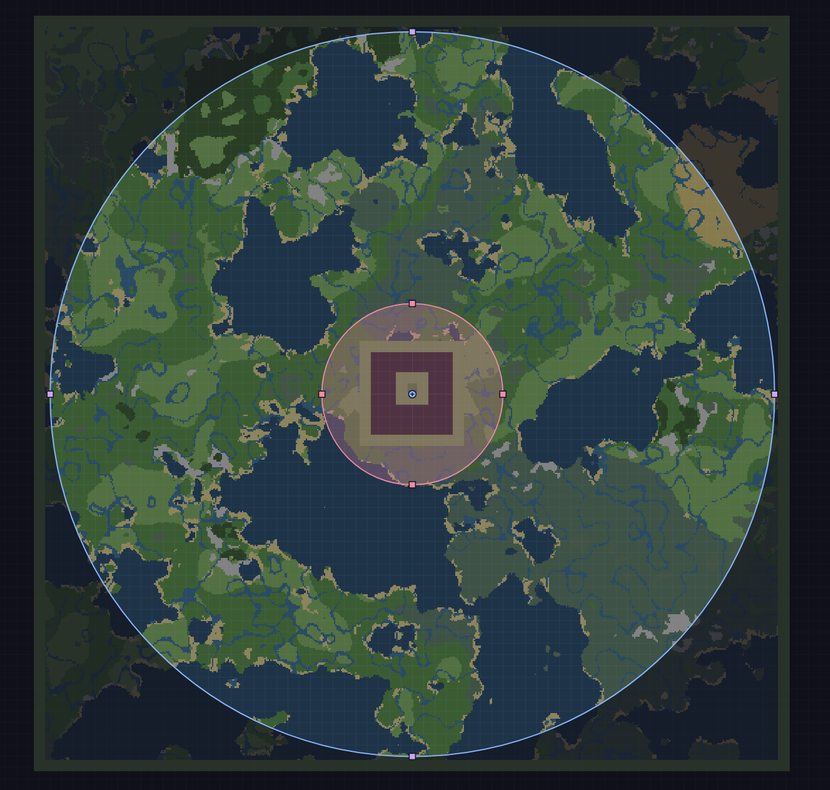
在浏览器编辑器中绘制玩家落点(/rtp editor)。
简要说明
从执行 /rtp 到到达目的地的中位时间为 5 毫秒,基于 4,194 次按节奏进行的传送测试(Paper)。
- 高效:在所有 4,194 次按节奏进行的传送过程中(最高每秒 20 次),服务器始终保持全速运行。
- 快速:在 Paper 上每秒可处理 40 次传送,在 Folia 上每秒可处理 180 次传送,且服务器保持全速。
- 分散:在两次 Paper 26.2 版本的 4,096 次传送测试中,没有任何两个落点之间的距离小于 48 格(最近的一对为 70 格);而在随机选取的情况下,每次测试大约有 80 对落点距离如此接近。
- 可移植:
/rtp config import 可读取你的 BetterRTP、JustRTP 或 EzRTP 配置文件,预览配置内容,且在没有 overwrite=true 参数时绝不会覆盖现有配置。
- 单文件:同一核心代码同时支持 Paper、Spigot、Folia、Fabric 和 NeoForge,并在 Velocity 上实现跨网络的
/rtp 功能。
更多亮点
- 峰值吞吐量:在 Folia 上峰值可达每秒 249.7 次传送。
- Web 工作区:在浏览器中的地图上绘制区域边界(
/rtp editor)。无需开放入站端口。
- 动作引擎:由触发器启动的脚本化传送,例如踏入某个区域或排队进行决斗。
- 自定义地形:落点从磁盘上的区域文件中读取,包括 Iris、Terra、数据包以及升级后的世界。
- 领地检测:支持 Bukkit / Paper / Folia 上的 16 个领地插件,以及 Fabric / NeoForge 上的 FTB Chunks 和 Open Parties and Claims;如果无法完成检测,则拒绝传送。可选 PvP 战斗标记检测。
基准测试对比和硬件指标详见 性能。
常见配置
以下配置无需额外插件即可正常工作:
- 出生点传送门与弹射板:在传送门框架或弹射板上方的触发区域执行传送,可选倒计时全息图和特效。
- 首次加入时的随机出生点:授予
rtp.onevent.firstjoin 权限,使新玩家在登录时被传送到随机位置。备用缓存会预先准备一个目的地。
- 生存和资源世界:玩家起始位置远离其他玩家的基地:在两次 Paper 26.2 版本的 4,096 次传送测试中,没有任何两个落点之间的距离小于 48 格(最近的一对为 70 格)。
更多配置方案:功能、配方、动作指南。
安装
要求: Paper 或 Spigot 1.18+、Folia 1.21.11+、Fabric 1.20.1 或 1.21+,或 NeoForge 1.21.1+,最高版本至 26.3。Java 17+(Minecraft 本身在 1.20.5 及更高版本需要 Java 21,26.x 版本需要 Java 25)。
- 将
LeafRTP-x.y.z.jar 放入 plugins/(适用于 Spigot、Paper、Folia、Velocity、BungeeCord)或 mods/(适用于 Fabric、NeoForge),然后启动服务器。
- 输入
/rtp(或 /wild)。
- 可选 - 调整边界或设置: 运行
/rtp editor 在浏览器地图中拖动区域边界(Web 编辑器指南),使用 /rtp admin setup 进行游戏内 60 秒向导配置(世界、半径预设、游戏玩法配置文件,以及裸命令 /rtp 是打开 GUI 选择器还是立即传送;快速入门指南),或使用 /rtp config import 从 BetterRTP、JustRTP 或 EzRTP 迁移配置(切换指南)。
(高级数据库、网络代理和缓存调优:请参阅 管理员指南。)
功能特性
- 设置方式: Web 编辑器、游戏内管理员书籍、聊天向导、
/rtp config import、/rtp scan、实时地图可视化、11 种语言支持。
- 玩家体验:
/rtp 和 /wild、区域/世界/生物群系选择、/rtp back、菜单、单人队列、特效、着陆平台。
- 玩法与世界: 支持六种形状的任意数量区域、到达点结构图、事件自动 RTP、Vault 定价机制、可选的战斗标签检查。
- 动作系统: 进入荒野传送门、发射台、队伍/团队荒野分散传送、领地或阵营锚点传送(动作插件中还包含可选的 1v1/2v2 决斗队列和 KOTH 模板)。
- 领地与安全: 兼容 Bukkit 系列服务器上的 16 种领地插件,以及 Fabric 和 NeoForge 上的 FTB Chunks 和 Open Parties and Claims,并配备可配置的方块安全过滤器。
- 网络与开发者: 支持通过 Velocity 实现跨服务器
/rtp;提供 rtp-api 插件扩展、SPI 可替换组件、PlaceholderAPI 支持、bStats 统计。
更多详情:功能列表。命令和权限说明见末尾折叠块。
性能表现
我对比了负载下的吞吐量、从执行 /rtp 到抵达目的地的延迟以及 TPS 稳定性。在 Paper 上,世界区块 ticking 运行在单个主线程上;而在 Folia 上,世界区块 ticking 分布在独立的区域工作线程中。LeafRTP 在非 ticking 阶段针对区域文件(.mca 和 .linear)检查候选目标,并保持一个已验证目的地队列,从而避免同步加载区块和阻塞主线程。
Paper 26.2 & Folia 26.2 负载下性能测试(Linux Threadripper 7970X,48 个机器人客户端,16k 半径):
这些数据是在我的硬件上,使用同一套压力测试工具对各个插件进行的快照记录。其他插件采用了不同的权衡策略,且大多数并未追求 100+ TP/s 的性能。
| 插件 |
Paper 安全最大值 |
Paper 峰值 |
Folia 安全最大值 |
Folia 峰值 |
| LeafRTP |
40 TP/s (MSPT 45 ms, 最低 TPS 19.2) |
103.3 TP/s |
180 TP/s (MSPT < 50 ms) |
249.7 TP/s (平均 TPS 19.0) |
| HuskHomes |
40 TP/s (MSPT 46 ms, 最低 TPS 16.4) |
46.0 TP/s |
60 TP/s |
60.0 TP/s |
| JakesRTP |
20 TP/s (MSPT 44 ms, 最低 TPS 18.4) |
86.6 TP/s (TPS < 5) |
- |
未加载(未声明 Folia 支持) |
| BetterRTP |
20 TP/s (MSPT 43 ms, 最低 TPS 16.2) |
39.5 TP/s (2% 失败) |
- |
在此机器上未完成测试 |
| JustRTP |
20 TP/s (MSPT 40 ms, 最低 TPS 19.5) |
25.7 TP/s |
10 TP/s |
18.7 TP/s |
| EzRTP |
5 TP/s (MSPT 24 ms, 最低 TPS 20.0) |
8.5 TP/s |
< 20 TP/s |
19.7 TP/s |
在 Paper 列中,MSPT 为安全最大值阶段的最高单次 p95 值,min TPS 为这些运行期间最低的 10 秒平均值。
方法、测试环境与术语
RTP 插件的大部分工作发生在服务器 API 调用内部,因此分析器通常会将其归类为通用的区块函数。helpers/StressTestRTP/ 中的公开测试工具将这些指标回溯归因于具体插件。测试环境:AMD Ryzen Threadripper 7970X(32 核 / 64 线程,128 GB RAM,NVMe 硬盘),Ubuntu 24.04 LTS,Java 25,16 GB 堆内存,48 个脚本化机器人客户端(devstack/clients/bench-swarm.js)。在 Paper 环境下,服务器以实时调度运行(SCHED_FIFO,优先级 10),仅加载待测插件,并在每次运行前重启。
每次 Paper 测试按每秒 5、10、20、40、80、160 和 320 次传送的速率分阶段进行,每个阶段持续 60 秒,若连续两个阶段失败则停止。其他插件的 Paper 数据行汇总自 2026-10-17 的 4 次运行结果;LeafRTP 的数据汇总自 3.3.0 构建版本的 2 次运行(20261018-022257, 20261018-023204)。Folia 列的数据来自单独的 Folia 压力测试过程,且可在当前构建版本中复现。每个插件均在其支持的最新版本下运行,冷却时间、延迟和倒计时均已设为零,若插件拥有队列功能,则保持默认大小。
其他插件均以其文档记录的默认设置运行,因为无法调整其作者未公开的参数。LeafRTP 附带的补充、队列和积压设置(每 20 tick 补充一次,50 个位置的就绪队列,1000 个位置的积压队列,当服务器速度下降时暂停)是针对典型玩家流量设计的,它们的作用仅限于限制新请求的处理速度。基准测试配置解除了该限制以便找到崩溃点:每 tick 补充(period: 1),无暂停,10 个位置的就绪队列,无积压(配置及完整变更列表)。无论哪种配置,每次传送的成本是相同的。
本页使用的术语:TP/s 是每秒传送次数。TPS 是服务器每秒刻数;20 为满速,也是其能达到的最大值,正常波动略低于此值。MSPT 是每刻毫秒数;超过 50 ms 时服务器 TPS 会低于 20,玩家会感到卡顿。Lag spike(卡顿尖峰)是指超过 50 ms 的一刻。Off-tick(非主线程刻)工作运行在服务器的主要 tick 线程之外,因此不会阻塞游戏循环。Ready queue(就绪队列)是提前检查好的一组位置库存,因此大多数 /rtp 调用无需实时检查即可响应。Chunk ticket(区块票)是一种持有机制,用于保持一个区块(16 x 16 的方块柱)处于加载状态,直到该持有被释放。Rejection sampling(拒绝采样)是选取一个随机位置,进行检查,失败则重新抽取,重试次数无上限。REROLL(默认)和 ACCUMULATE 是两种选择模式:REROLL 会跳过已知的坏区块并重新抽取,每个已知坏区块对应一次内存内检查;而 ACCUMULATE 仅从未知的坏区块中抽取,因此每次选取都是保证 O(1) 的(间距说明)。Safe max(安全最大值)是插件在所有运行阶段中通过的最高阶段,Paper 和 Folia 采用相同规则:它达到了至少 95% 的请求速率,MSPT p95 保持在 50 ms 或以下,且最多只有 1% 的传送失败。p95 / p99 是 95% / 99% 的传送耗时低于的时间点。
- Paper vs. Folia: Paper 将所有到达的玩家放置在主线程上,因此没有哪个模组能在 20 TPS 下达到超过 40 TP/s。在 Paper 上超出其 safe max 后,LeafRTP 仍完成了所有传送:在 80 和 160 TP/s 阶段,21,924 次传送全部完成(21,924 of 21,924), delivering up to 103.3 TP/s while the server slowed to about 9-10 TPS (MSPT p95 88-105 ms)。Folia 将这项工作分散到区域线程中,LeafRTP 在 19.6 区域 TPS 下达到了 180 TP/s(中位延迟 198 ms),峰值达到 249.7 TP/s。
同等负载下的延迟(Paper 26.2,p50 / p99 ms)
同等负载下的延迟: 从 /rtp 到抵达的时间,汇总自各模组在 Paper 上的运行数据。每个单元格显示的是以毫秒为单位的 p50 / p99(包含 p95 的完整表格)。
| Plugin |
5 TP/s |
10 TP/s |
20 TP/s |
40 TP/s |
| LeafRTP |
5 / 6 |
5 / 6 |
5 / 7 |
158 / 285 |
| JakesRTP [1] |
0 / 13 |
3 / 26 |
4 / 23 |
4 / 24 (MSPT p95 77-118 ms) |
| HuskHomes |
221 / 517 |
224 / 426 |
275 / 474 |
568 / 1,574 |
| BetterRTP |
156 / 709 |
199 / 806 |
199 / 815 |
510 / 4,323 (127 failed) |
| EzRTP |
154 / 905 |
failed (619 of 2,396) |
- |
- |
| JustRTP |
367 / 2,471 |
473 / 2,480 |
476 / 2,477 |
failed (25.5 of 40 TP/s delivered) |
- 表示在汇总运行中无结果。对于 LeafRTP 在 5、10 和 20 TP/s 时,在 4,194 次传送中最大值为 58 ms,其 MSPT p95 为每次运行 21-37 ms。[1] JakesRTP 在这些速率下具有最低的中位数,但其 MSPT p95 在 40 TP/s 时达到 77-118 ms。在 40 TP/s 时,LeafRTP 的就绪队列在此配置中耗尽,因此这些传送等待实时选择。
我对每个模组所做的更改,以使它们执行相同的任务
所有模组都使用相同的 1,024 至 16,384 方块的圆形范围,关闭了冷却时间、延迟和倒计时。这些更改使工作具有可比性;其中没有任何一项是为了速度而调优的。
| Plugin |
Change |
Why |
| EzRTP |
Water landings off |
默认情况下它可以落在水面上并在玩家脚下添加冰层,这会接受其他模组拒绝的位置 |
| EzRTP |
Biome checks on (plugins/EzRTP/rtp.yml) |
如果没有它们,它会跳过放置检查并报告 29.47 TP/s 的实际未获得的速率(运行 20261006-135938) |
| EzRTP |
Run through forcertp |
跳过其冷却时间和限制检查;它还附带一个 5 秒倒计时 |
| BetterRTP |
MaxRadius: 17408 |
它的圆形公式会从外边缘减去 MinRadius,因此 16384 只能达到 15,360 个方块 |
| BetterRTP |
Radius checked on the landing scatter |
它在关机时还原配置编辑 |
| HuskHomes |
Centered on /spawn |
它没有中心设置选项 |
| All |
Command checked with /<plugin>:rtp <TAB> |
当两个模组注册 /rtp 时,带前缀的命令可能会指向错误的模组;这导致早期运行中的一组被作废 |
源代码和其他控制项:PRE_WRITEUP.md,第 3、6 和 7 节。
完整的基准测试表、方法论和每次运行的分析:helpers/StressTestRTP/。
每个模组放置玩家的位置(Paper 26.2,4,096 次传送):
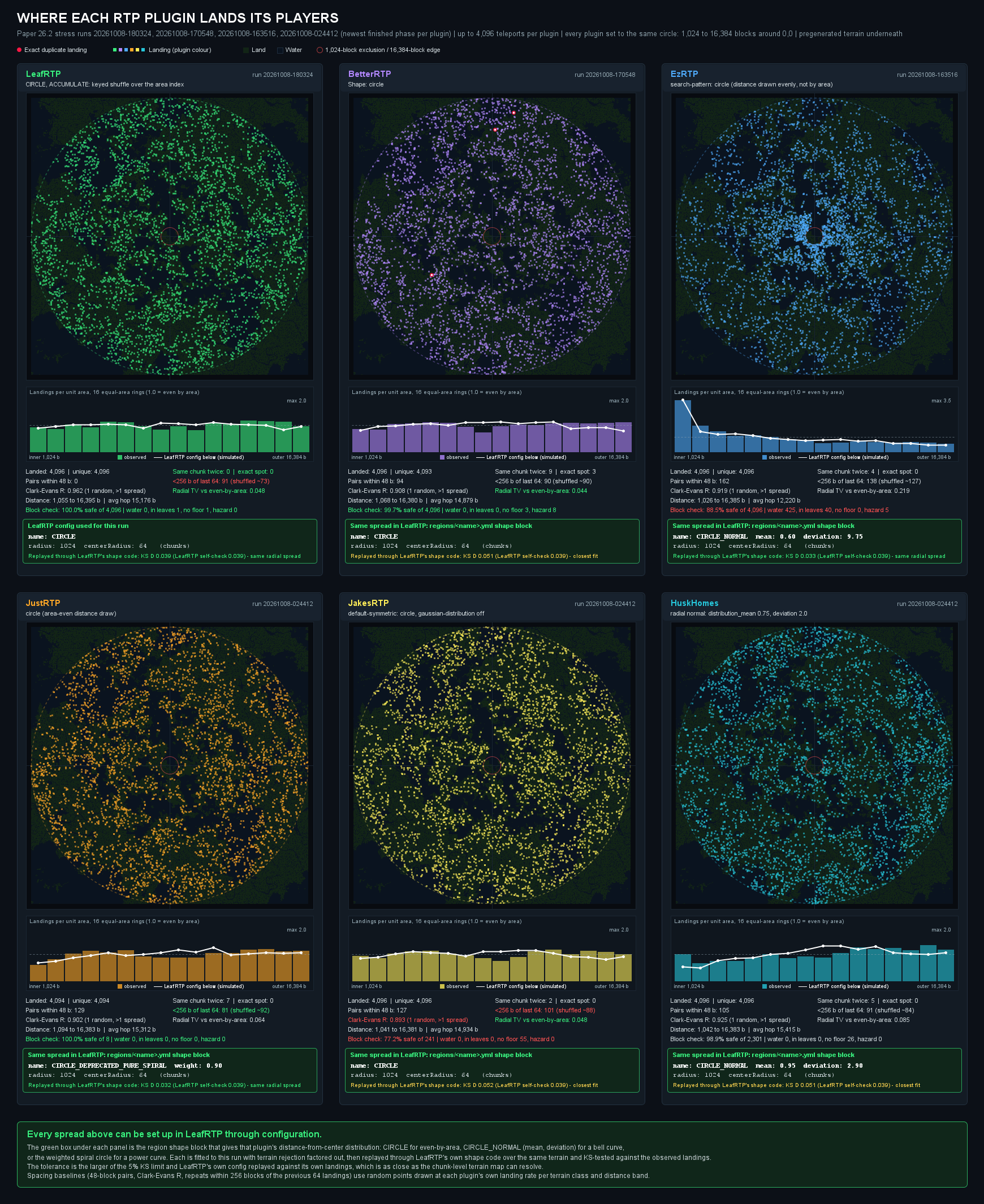
在 Paper 26.2 运行(20261008-003310)中,每个模组将 4,096 名玩家放置在围绕 0,0 的相同 1,024 至 16,384 方块圆形范围内。开箱即用,LeafRTP 使用标准的 CIRCLE 或 SQUARE,分布均匀(你只配置像 radius: 5000b 这样的方块半径,从不配置曲线)。为了进行基准测试,每个面板下方的绿色框显示了可选的 LeafRTP 预设,该预设在相同地形上重现了每个模组的距中心距离分布:LeafRTP 和 BetterRTP 匹配默认的 CIRCLE,EzRTP 和 HuskHomes 匹配 CIRCLE_NORMAL,JustRTP 和 JakesRTP 匹配中心加权 CIRCLE。
基准测试注意事项及其他运行
注意事项。 区域文件检查仅对已存在的地形有效;任何插件都必须生成一个从未被生成过的区块。Linux 压力测试使用了 48 个空闲机器人,服务器视距限制为 2:模拟真实连接和区块发送,且没有任何玩家移动或建造。硬件、视距、世界状态(其中有多少是不安全的,是否已预生成)以及其他插件都会影响数值。其他插件更新频繁;如果此处的数据过时,请提交包含复现步骤或文档链接的 GitHub Issue,我会进行更正。基准测试工具测量的是从分发到到达的延迟、每次尝试的成本以及上述定义的成功率;它不测量与领地插件的兼容性或安全规则。
完整的方法论、单次运行分析及此处未展示的测试运行结果(等半径 Folia、固定堆 GC 分析、大半径单插件运行):helpers/StressTestRTP/。在自定义世界生成器上执行 /rtp 的视频:youtu.be/V0NyNK9JydM。
工作原理
- 空间记忆: 生物群系和无效区块(含原因和 TTL)会在重启间以区块分辨率进行记忆。
- 区域文件预过滤: 候选位置从
.mca 和 .linear 区域文件中读取,并在非主线程中被拒绝。
- 预验证缓存: 安全目的地在后台队列中等待;在 Paper 上, paced 基准测试中从
/rtp 到到达的中位时间为 5 毫秒。
- 间距: 对区域进行带键洗牌。
详细信息、推导过程和图表:How it works。间距统计信息:Spacing between players。
我的测试方法及测试结果
一个插件可能通过其中一项工具测试,却在另一项中失败。
| 工具 |
驱动内容 |
捕获内容 |
压力基准测试工具 (helpers/StressTestRTP/) |
脚本化机器人客户端,像玩家一样加入,采用闭环、开环和限速模式,并附加了 spark 和 JFR |
吞吐量上限、MSPT 及超过 50 ms 的刻数、每次传送的区块数和 CPU 占用,以及由哪个线程承担这些开销 |
行为模糊测试工具 (scripts/bench_fuzz.py) |
基于种子的机器人程序:/rtp、移动、退出、使用新名称重新加入、死亡、控制台 reload。覆盖引导搜索,自动重放和缩小范围 |
完全 GC 后服务器仍保留的对象内存,并与无 RTP 插件的控制运行进行比较评分。每个插件都获得相同的种子、机器人和服务器环境 |
| Jazzer 目标 |
Anvil 区块和列读取器、LZ4 解码器、NBT 读取器和 Redis (RESP) 回复解析器;仅有两个 Anvil 读取器拥有真实区域种子 |
畸形输入导致的崩溃和意外异常;失败的输入会保存为复现用例 |
| 间距模拟 |
来自实际压力测试运行和形状模型的着陆坐标 |
重复着陆、聚集现象以及与最近一次早期着陆点的距离 |
| 安全性和变异测试 |
针对每项安全禁令的单项测试,以及对传送管道和其他三个 rtp-core 包进行的每周 PIT 测试 |
绝不应被破坏的规则,以及那些即使规则被破坏也无法察觉的测试 |
测试结果如下:
- 保留的玩家会话(模糊测试)。 LeafRTP 通过其最后传送记录使断开连接的玩家的对象保持存活。模糊测试标记了该问题并在重放中复现;它在 3.3.0 版本中得到修复,并由回归测试覆盖。最新的 3.3.0 运行在 86 个回合中保留了 0 个玩家,包括配置重载。该运行在其预算范围内未发现任何问题,但这并不能排除内存泄漏的可能性。
- 到达时的主线程区块加载(spark)。 Paper 压力测试的分析显示,在 115.7 秒的阶段中,有 14.1 秒(约每传送一次 3.4 毫秒)花费在到达玩家的第一次刻加载其着陆区块的同步操作上。原因是到达区块票证在玩家自己的票证持有之前就被释放了。修复方案是让票证持续到最初的几次刻。稍后对 Linux 100 TP/s 运行的 spark 分析(
20261009-085505,每个分析窗口 5.8k 次传送)显示,服务器线程上有 59.5 秒中,Entity.isInWall 占用了 0.02-0.03 秒,且其下没有区块加载操作。
- 间距下的重复着陆(模拟)。 建模连续着陆显示,当
expand: false 时,由于偏移量不断移位,“ACCUMULATE”模式下可能会出现已使用的区块再次出现的情况。这在 区域间距说明 中有披露。两种显而易见的修复方案均经过测试并被排除。
- 基准测试错误。 某次夜间驱动的 Linux 行加载了错误的插件集,导致它们测量的是没有该插件的服务器。我在检查时发现并丢弃了这些数据行。
- 模糊测试评分噪声。 控制运行中缺失的对象计数可能被计为泄漏,尽管保留的内存与控制运行匹配。我依据保留字节数来解读结论,并在信任之前重放每个候选对象。
在将其计入统计之前,我会根据记录的种子复现每一项发现。模糊测试方法、限制和运行日志位于 LEAK_FUZZING.md。
测试和质量门禁
- 安全规则即测试:每条禁令对应一项测试,编号从 S-001 到 S-007。
- 经过变异测试:每周对四个
rtp-core 包进行测试;若某个分片(shard)低于 60% 则失败。
- 覆盖率棘轮机制:基线只会上升;变更行需达到 80% 的覆盖率。
- 稳定的 API:使用 japicmp 对比 3.2.1 版本;移除操作需经过两个小版本的弃用期。
- 无遮蔽依赖
- 可复现的种子测试:一旦能从记录的种子中重放,即视为存在 bug;来自故障夹具的行将被丢弃。
- 架构决策记录 (ADRs):所有决策均已书面记录;AI 在我设计好的接口内工作,并由我进行审查。
创作初衷
我开始这个项目是为了解决一个难题的挑战。每当玩家执行 /rtp 时,聊天栏里总会刷“LAG”(延迟)。我认为问题出在纯拒绝采样上。如果我能想出一个高效的内存系统,这个问题似乎是可以解决的。在观看了 3Blue1Brown 的视频后,我决定从数学上证明空间内存可以解决这一问题,并使用内部空间填充曲线,使引擎在不重新掷骰的情况下均匀分布候选点。所有这些数学运算都在后台自动运行——作为服务器管理员,你无需配置曲线或数学参数;只需保留默认的 CIRCLE(圆形)或 SQUARE(方形),设置以方块为单位的半径(如 5000b 或 10km),或在 /rtp editor 地图上拖动边界即可。
其余部分我分阶段构建:
- v1: 证明了数学原理。构建了空间填充螺旋线以均匀映射 2D 区域,从而确保选择不会重复或聚集,且无需跟踪任何玩家位置。
- v2: 解决了初始 SPI 模型和平台兼容性问题,尽管在此过程中延迟显著增加。
- v3: 重构代码,使单个核心可在每个平台上运行。从区块强制加载切换到票证(ticketing)机制,增加了显式的任务跟踪和清理以防止泄漏,将功能拆分为模块化 SPI,使其无需服务器即可进行测试,并为 AI 工具制定了规则:我设计接口并记录在 ADR 中的决策,而 AI 在这些接口内编写代码(重复性的包装器、我不熟悉的平台 API、单元测试、开发栈 YAML),并在其生效前由我审查。
- 3.3.0: 添加了静态分析、模糊测试、变异测试以及 CPU 和内存性能分析,并利用它们消除了上述基准测试数据背后的瓶颈。
架构决策、基准测试结果和设计历史记录在 架构决策记录 和 LeafRTP 存在的理由 中。AI 使用情况 涵盖了 AI 工具在此处负责的工作以及我不使用它的领域:系统设计、代码审查和 Git 操作。
命令、权限、配置文件
日常命令(别名:/rtp, /wild;详见 完整命令与权限参考):
| 命令 |
描述 |
权限 |
/rtp / /wild |
随机传送至当前世界的默认区域(如果安装了 GUI 选择器插件,则为 GUI 选择器) |
rtp.use |
/rtp back |
返回上次 /rtp 之前的位置 |
rtp.back |
/rtp editor [local|trust|untrust|apply] |
Web 编辑器链接、离线副本、浏览器信任与撤销、令牌应用 |
rtp.editor |
/rtp admin setup <world|gameplay|perf|preview|confirm> |
从预设配置开始引导首次设置 |
rtp.admin.setup |
/rtp admin |
操作员书籍菜单 |
rtp.menu.admin |
/rtp config import [source] [path=<dir>] [overwrite=true] |
转换另一个 rtp 插件的配置(自动检测,或通过 path= 指定任意文件夹);除非设置 overwrite=true,否则从不覆盖 |
rtp.config |
/rtp info |
操作员诊断信息 |
rtp.info |
/rtp reload [file] |
重新加载所有配置,或仅重新加载某个文件 |
rtp.reload |
核心权限(完整列表见 完整命令与权限参考 和 plugin.yml):
| 权限 |
默认值 |
授予 |
rtp.use |
true |
使用 /rtp 和 /wild |
rtp.free |
op |
跳过 Vault 费用 |
rtp.back |
op |
使用 /rtp back |
rtp.editor |
op |
使用 /rtp editor 及其子命令 |
rtp.admin.setup |
op |
使用 /rtp admin setup 向导 |
rtp.admin |
op |
使用 /rtp clear,以及 rtp.reload、rtp.config、rtp.scan、rtp.info 和 rtp.menu.admin |
位于 plugins/RTP/ 下的配置文件。每个文件都可以在运行时重新加载(通过 /rtp reload),并接受人类可读的单位,如 10km 或 30s。大多数服务器仅需编辑核心文件:
| 文件 |
控制项 |
示例键 |
config.yml |
延迟、冷却时间、移动取消距离 |
teleportDelay, teleportCooldown, cancelDistance |
definitions/regions/<name>.yml |
形状、半径、中心点、价格、权限 |
shape.name, shape.radius, price, requirePermission |
safety.yml |
无敌时间、着陆平台、PvP 检查 |
invulnerabilityTime, platformRadius, pvpCheckEnabled |
advanced/blocks.yml |
不安全方块(熔岩、水)、空气方块及方块标签 |
unsafeBlocks, airBlocks |
economy.yml |
Vault 定价及取消退款 |
price, refundOnCancel |
definitions/actions/<name>.yml |
传送门、队伍间距和竞技场边界 |
minSeparation, confinement.damage |
黑名单令牌语法(advanced/blocks.yml 中的 unsafeBlocks 和 airBlocks):参见 安全配置 - 区块过滤器 和 功能 - 区域与安全。
(高级数据库、网络代理、自定义生物群系和消息模板均带有可用的默认值。详见 完整配置指南。)
软依赖项(均为可选): Vault(用于经济收费)、PlaceholderAPI,以及上述列出的区域、战斗标记和全息插件插件。不再需要 PaperLib。
常见问题解答
问:玩家会落在彼此头顶上或进入彼此的基地吗?
答:很少发生,且不跟踪任何玩家位置。在两次各包含 4,096 次传送的 Paper 26.2 运行中,没有重复的位置,没有两次落点相距在 48 格以内,最近的一对相距 70 格;这是测量结果,而非保证的最小距离。默认的 REROLL 模式在洗牌循环完成前不会重复使用同一个位置;而在 ACCUMULATE 模式下,已使用的位置可能会以大约随机选择的概率再次出现。参见 玩家间距。
问:它如何避免导致服务器卡顿?
答:大多数 /rtp 调用由队列提供,该队列中的地点会在任何人输入命令之前进行检查。队列在主线程上填充:它会跳过已经拒绝的地面,并在加载任何区块之前根据区域文件检查其余部分。详情见 工作原理。
问:设置复杂吗?
答:不复杂。您无需配置空间填充曲线或数学设置——默认区域是一个标准圆形(CIRCLE),具有区块半径。选择浏览器地图工作区(/rtp editor)或游戏内引导向导(/rtp admin setup)之一即可:两者都会配置您的世界、区域半径(通过在地图上拖动边界、点击预设或在 Anvil 提示中输入距离来操作),并在写入任何内容之前提供预设的差异预览。您也可以使用一条命令(/rtp config regions default shape.radius=10km)或游戏内的书(/rtp admin)设置半径。如果您是从另一个插件迁移过来的,/rtp config import 会找到其文件夹并翻译您现有的文件,并在写入任何内容之前提供预览。
问:网页编辑器是如何安全的?它会在我的服务器上打开端口吗?
答:不对外的。托管的编辑器不需要入站端口:它通过 TLS 连接到临时 WebSocket 中继进行出站连接。本地模式(/rtp editor local)仅在 127.0.0.1 上绑定一个经过令牌认证的套接字,外部机器无法访问。所有消息都需要 RSA-2048 签名,具有严格递增的序列计数器和使用一次即过期的信任非ces。
问:为什么现在叫 "LeafRTP" 而不是仅仅叫 "RTP"?
答:"RTP" 是随机传送的通用名称,旧名称只是指代该功能。这在搜索和口碑传播(以该名称下载量超过 40 万)方面运作了多年,但当前的搜索和市场索引将其与其他所有随机传送插件、命令和论坛帖子混在一起,导致它不再显示。"LeafRTP" 是一个指向此插件的名称。/rtp 命令、rtp-api、配置路径和数据文件保持原样,现有安装没有任何变化。
问:它在 Folia 上有效吗?
答:是的,适用于 Folia 1.21.11 及更高版本。Folia 处于实验阶段,仅维护当前构建,因此不支持较旧的 Folia 构建;它们可能会自行崩溃。它在这些平台上的区块加载方式见 区块加载,按平台分类。在 Folia 基准测试中,它没有遇到任何看门狗停滞。
问:我如何设置跨世界的传送?
答:解析顺序:玩家当前世界(或 world= 参数)-> 该世界的目标区域 -> 该区域的目标世界。参见 世界配置。
问:你支持三角形 / 菱形区域形状吗?
答:使用 Polygon 形状。三角形是一个 3 顶点多边形,菱形是一个旋转的正方形。
问:我需要 Chunky 或其他预生成器吗?
答:不需要,但它们配合得很好。/rtp scan 在非 tick 状态下遍历区域,验证安全性,并生成磁盘上尚不存在的区块,同时记录哪些扇区是不安全的。如果您希望整个地图提前存在于磁盘上,请先运行 Chunky;扫描然后通过这些块读取区域文件预过滤器。
问:Iris / Terra / 自定义数据包生成器,或者从旧版本升级的世界?
答:可以。直接读取区域文件:保留模组化和命名空间 ID,并且 /rtp biome=<x> 匹配磁盘上的内容。在使用实时噪声图查找的插件中,版本迁移后会出现错误。从未填充的区块回退到实时加载。
问:关于线性 (.linear) 区域格式呢?
答:可以,无需设置。LeafRTP 直接读取 Anvil (.mca) 和 Linear (.linear, v1 和 v2) 区域文件。在 Linear 服务器(如 Leaves、Gale、LinearPaper 或使用 Linear Region Format 模组的 Fabric)上,它使用服务器已有的 Zstandard 库,因此 jar 包捆绑了额外的库。它在启动时检查一次解压器,并在读取时检查每个文件的头部和边界。如果缺少 Zstandard 或文件损坏,则该位置将通过服务器的正常异步区块加载进行检查。
问:我在 NeoForge 上。
答:有一个原生 NeoForge 适配器,适用于 1.21.x / 26.x,运行与每个其他平台相同的内核。我对其进行的测试少于 Bukkit 系列和 Fabric,并且在 26.x 载体上的更广泛测试仍在进行中。如果你在那里遇到问题,它会排在我的列表最前面。
问:我使用的是 Forge。
答:请运行 Arclight 或 Mohist 并使用此 jar 文件。目前没有计划开发原生的 Forge 适配器。
问:内存和 MSPT(每刻钟服务器处理时间):我应该担心吗?
答:在规范的 Paper 基准测试中(两次运行,每次每秒传送 5 次,共 598 次传送),MSPT 的第 95 百分位数为每次运行 21.2-21.3 毫秒,TPS 保持在 19.98 或以上。当速度提升至每秒 40 次时,MSPT 为 42.6-45.2 毫秒,TPS 保持在 19.19 或以上。这些运行记录中没有空闲基线数据,因此这是整个服务器的刻耗时(包含在线的 48 个机器人),而不仅仅是 LeafRTP 所占用的部分。保留在热队列中的位置会持有区块票(chunk tickets),以确保到达时不会等待区块加载,并且 MemoryTracker 确保这些票被释放。在堆压力较大时(老年代使用率达到或超过 maxHeapPercent,默认为 85%;对于没有独立老年代池且空闲内存低于 512 MB 的 JVM,总堆使用情况也会被计入),后台填充暂停,持有的票会被丢弃回冷存储,从而立即释放固定的区块。
问:我可以在 GUI 菜单中使用 ItemsAdder、Oraxen、Nexo 或 CustomModelData 吗?
答:可以。guimenu.yml 中的图标支持 ia:<id>、oraxen:<id>、nexo:<id>、hdb:<id>、head:<player>、base64:<hash> 以及 <MATERIAL>:<cmd>。这些前缀背后的大多数物品插件是付费且闭源的,因此 CI 无法运行它们;这些钩子是通过存根和开源替代品进行测试的,对其支持尽最大努力。如果物品插件缺失或其 API 发生变化,图标将回退到原版材质。请参阅 自定义物品与菜单集成。
问:如何报告错误?
答:请在 GitHub 上提交 Issue,并提供你的服务器版本、LeafRTP 版本、平台、相关配置文件以及日志中的错误信息。管理员指南 提供了完整的复现模板。夜间 CI 构建启动的是 1.21.11 和 26.3,我接受 Minecraft 1.21.11 至最新发行版的错误报告;在较旧版本上它应该仍能运行,我有空时会查看(确切的各版本状态见 支持矩阵)。
支持
支持工作由我利用业余时间完成,因此属于尽力而为。
- 关于配置的问题,请先尝试 网页编辑器(命令
/rtp editor),查阅 管理员指南,或在 LeafCraft Plugin Support Discord 频道的 #support 论坛板块发起讨论(或 GitHub Discussions)。在此之后仍有不清楚的地方或遇到错误时,我会提供帮助。
- GitHub Issues 或
#support 论坛中的错误报告需要包含:/version、/rtp version、/rtp test 的输出结果、config.yml、definitions/regions/、safety.yml、advanced/blocks.yml,并将服务器日志上传至 mclo.gs。如果缺少某些内容,我会要求你补充。
- “它不起作用”这种描述我无法采取行动。请告诉我你做了什么、你期望发生什么以及实际发生了什么。
- 没有保证的响应时间。安全性相关的错误(如错误的落地位置、区块泄漏、绕过领地保护)会优先处理。
- 功能请求请首先在 GitHub Discussions 中提出。
链接
What it is
LeafRTP is a random teleport (RTP) plugin. Drop the jar in and the default region works out of the box: /rtp or /wild sends a player to a random safe spot, and you can resize borders visually on a browser map (/rtp editor) or through the in-game setup wizard (/rtp admin setup). It finds and checks spots ahead of time, reading the world files on disk, and keeps a queue of checked spots ready.
I've worked on it in my own time since 2021. The benchmarks and the test harness are in the repo, and every number on this page can be rerun from them.
One jar for Paper and Spigot (1.18+), Folia (1.21.11+), Fabric (1.20.1 and 1.21+, needs Fabric API) and NeoForge (1.21.1+), up to 26.3. It also loads on Velocity for /rtp across a network.
Drawing where players land, in the browser editor (/rtp editor).
The short version
5 ms median from /rtp to arrival over 4,194 paced teleports (Paper).
- Efficient: the server stayed at full speed through all 4,194 paced teleports, at up to 20 a second.
- Fast: 40 teleports per second on Paper and 180 per second on Folia, at full server speed.
- Distinct: across two Paper 26.2 runs of 4,096 teleports, no two landings were within 48 blocks (closest pair: 70); random picks put about 80 pairs that close in each run.
- Portable:
/rtp config import reads your BetterRTP, JustRTP or EzRTP config, previews it, and never overwrites without overwrite=true.
- One jar: the same core on Paper, Spigot, Folia, Fabric and NeoForge, and on Velocity for
/rtp across a network.
More highlights
- Peak throughput: 249.7 teleports per second peak on Folia.
- Web workspace: draw region borders on a map in your browser (
/rtp editor). No inbound port needed.
- Action engine: Scripted teleports that start from a trigger, like stepping into a zone or queueing for a duel.
- Custom terrain: Spots are read from the region files on disk, including Iris, Terra, datapack and upgraded worlds.
- Claim checks: 16 claim plugins on Bukkit / Paper / Folia plus FTB Chunks and Open Parties and Claims on Fabric / NeoForge, and the teleport is refused if a check cannot answer. Optional PvP combat-tag check.
Benchmark comparisons and hardware metrics are in Performance.
Common setups
These work without extra plugins:
- Spawn portals & launch pads: Step-in trigger zones over portal frames or launch pads run teleports, with an optional countdown hologram and effects.
- First-join random spawn: Grant
rtp.onevent.firstjoin to send new players to random spots on login. A reserve cache keeps a destination ready.
- Survival and resource worlds: Players start far from each other's bases: across two Paper 26.2 runs of 4,096 teleports, no two landings were within 48 blocks (closest pair: 70).
More setups: Features, recipes, actions guide.
Install
Requirements: Paper or Spigot 1.18+, Folia 1.21.11+, Fabric 1.20.1 or 1.21+, or NeoForge 1.21.1+, up to 26.3. Java 17+ (Minecraft itself needs Java 21 from 1.20.5 and Java 25 on 26.x).
- Drop
LeafRTP-x.y.z.jar into plugins/ (Spigot, Paper, Folia, Velocity, BungeeCord) or mods/ (Fabric, NeoForge) and start the server.
- Type
/rtp (or /wild).
- Optional - adjust borders or settings: Run
/rtp editor to drag region borders on a browser map (web workspace guide), /rtp admin setup for the 60-second in-game wizard (worlds, radius presets, gameplay profile, and whether bare /rtp opens the GUI picker or teleports immediately; quick-start guide), or /rtp config import to migrate from BetterRTP, JustRTP, or EzRTP (switching guide).
(Advanced database, network proxy, and cache tuning: see the admin guide.)
Features
- Setting it up: web editor, in-game admin book, chat wizard,
/rtp config import, /rtp scan, live map visualizations, 11 languages.
- For players:
/rtp and /wild, region, world and biome picks, /rtp back, menus, per-player queues, effects, landing platforms.
- Gameplay and worlds: any number of regions in six shapes, arrival schematics, auto-RTP on events, Vault pricing, an optional combat-tag check.
- Actions: step-in wilderness portals, launch pads, party and team wilderness scatter, and claim or faction anchor teleports (plus optional 1v1/2v2 duel queues and KOTH templates in the action addon).
- Claims and safety: 16 claim plugins on Bukkit-family servers plus FTB Chunks and Open Parties and Claims on Fabric and NeoForge, and a configurable block safety filter.
- Networks and developers: cross-server
/rtp over Velocity; rtp-api addons, SPI-swappable parts, PlaceholderAPI, bStats.
More: Features. Commands and permissions are in the collapsed block near the end.
Performance
I compare throughput under load, latency from /rtp to arrival, and tick stability. On Paper, world ticking runs on a single main thread, while on Folia, world ticking is distributed across independent regional worker threads. LeafRTP checks candidates against region files (.mca and .linear) off-tick and keeps a queue of verified destinations, avoiding synchronous chunk loading and main-thread stalls.
Paper 26.2 & Folia 26.2 Performance Under Load (Linux Threadripper 7970X, 48 bot clients, 16k radius):
These are snapshots of each plugin under one harness on my hardware. The other plugins make different trade-offs, and most don't aim for 100+ TP/s.
| Plugin |
Paper safe max |
Paper peak |
Folia safe max |
Folia peak |
| LeafRTP |
40 TP/s (MSPT 45 ms, min TPS 19.2) |
103.3 TP/s |
180 TP/s (MSPT < 50 ms) |
249.7 TP/s (19.0 avg TPS) |
| HuskHomes |
40 TP/s (MSPT 46 ms, min TPS 16.4) |
46.0 TP/s |
60 TP/s |
60.0 TP/s |
| JakesRTP |
20 TP/s (MSPT 44 ms, min TPS 18.4) |
86.6 TP/s (TPS < 5) |
- |
Not loaded (no Folia support declared) |
| BetterRTP |
20 TP/s (MSPT 43 ms, min TPS 16.2) |
39.5 TP/s (2% failed) |
- |
Did not complete on this rig |
| JustRTP |
20 TP/s (MSPT 40 ms, min TPS 19.5) |
25.7 TP/s |
10 TP/s |
18.7 TP/s |
| EzRTP |
5 TP/s (MSPT 24 ms, min TPS 20.0) |
8.5 TP/s |
< 20 TP/s |
19.7 TP/s |
In the Paper columns, MSPT is the highest per-run p95 at the safe-max stage, and min TPS is the lowest 10 s average in any of those runs.
Method, rig and terms
Most of an rtp plugin's work happens inside server API calls, so a profiler lists it under generic chunk functions. The public harness in helpers/StressTestRTP/ attributes it back to the plugin. Rig: AMD Ryzen Threadripper 7970X (32 cores / 64 threads, 128 GB RAM, NVMe), Ubuntu 24.04 LTS, Java 25, 16 GB heap, 48 scripted bot clients (devstack/clients/bench-swarm.js). On Paper, the server ran under realtime scheduling (SCHED_FIFO, priority 10) with only the plugin under test loaded, and restarted before every run.
Each Paper run steps through 60 s stages at 5, 10, 20, 40, 80, 160 and 320 teleports per second and stops after two failed stages in a row. The other plugins' Paper rows pool 4 runs each from 2026-10-17; LeafRTP's pool 2 runs of the 3.3.0 build (20261018-022257, 20261018-023204). The Folia columns come from separate Folia ramps, and they reproduce on the current build. Each plugin ran on the latest version it supported at the time of the run, with cooldowns, delays and countdowns zeroed and its queue on at its default size where it has one.
The other plugins ran at their documented defaults, because I can't tune settings their authors don't document. LeafRTP's shipped refill, queue and backlog settings (refill every 20 ticks, a 50-spot ready queue, a 1,000-spot backlog, a pause when server speed drops) are sized for typical player traffic, and all they do is limit how fast new requests are taken in. The bench config lifts that limit so the harness can find the break point: refill every tick (period: 1) with no pause, a 10-spot ready queue and no backlog (config and the full list of changes). The cost of each teleport is the same either way.
Terms used on this page: TP/s is teleports per second. TPS is server ticks per second; 20 is full speed and the most it can reach, and normal variation measures a little under it. MSPT is milliseconds per tick; above 50 ms the server falls below 20 TPS and players feel lag. A lag spike is a tick over 50 ms. Off-tick work runs off the server's main tick thread, so it doesn't stall the game loop. A ready queue is a stock of spots checked in advance, so most /rtp calls are answered without a live check. A chunk ticket is a hold that keeps one chunk (a 16 x 16 block column) loaded until the hold is released. Rejection sampling picks a random spot, checks it, and draws again on failure, with no cap on retries. REROLL (the default) and ACCUMULATE are two selection modes: REROLL skips known-bad chunks and draws again, at one in-memory check per known-bad chunk, and ACCUMULATE draws only from chunks not known to be bad, so every pick is a guaranteed O(1) (spacing notes). Safe max is the highest stage a plugin passed in every run, with the same rule on Paper and Folia: it delivered at least 95% of the requested rate, MSPT p95 stayed at or under 50 ms, and at most 1% of teleports failed. p95 / p99 is the time that 95% / 99% of teleports came in under.
- Paper vs. Folia: Paper places every arriving player on one main thread, so no plugin here gets much past 40 TP/s at 20 TPS. Above its safe max on Paper, LeafRTP still completed every teleport: 21,924 of 21,924 in the 80 and 160 TP/s stages, delivering up to 103.3 TP/s while the server slowed to about 9-10 TPS (MSPT p95 88-105 ms). Folia spreads that work across region threads, and LeafRTP reached 180 TP/s at 19.6 regional TPS (198 ms median latency), peaking at 249.7 TP/s.
Latency at equal load (Paper 26.2, p50 / p99 ms)
Latency at equal load: time from /rtp to arrival, pooled over each plugin's Paper runs. Each cell is p50 / p99 in milliseconds (full table with p95).
| Plugin |
5 TP/s |
10 TP/s |
20 TP/s |
40 TP/s |
| LeafRTP |
5 / 6 |
5 / 6 |
5 / 7 |
158 / 285 |
| JakesRTP [1] |
0 / 13 |
3 / 26 |
4 / 23 |
4 / 24 (MSPT p95 77-118 ms) |
| HuskHomes |
221 / 517 |
224 / 426 |
275 / 474 |
568 / 1,574 |
| BetterRTP |
156 / 709 |
199 / 806 |
199 / 815 |
510 / 4,323 (127 failed) |
| EzRTP |
154 / 905 |
failed (619 of 2,396) |
- |
- |
| JustRTP |
367 / 2,471 |
473 / 2,480 |
476 / 2,477 |
failed (25.5 of 40 TP/s delivered) |
- means no result in the pooled runs. For LeafRTP at 5, 10 and 20 TP/s the max was 58 ms over 4,194 teleports, and its MSPT p95 was 21-37 ms per run. [1] JakesRTP had the lowest median at those rates, but its MSPT p95 reached 77-118 ms at 40 TP/s. At 40 TP/s LeafRTP's ready queue runs out in this config, so those teleports wait on a live selection.
What I changed on each plugin so they do the same job
Every plugin used the same 1,024 to 16,384 block circle, with cooldowns, delays and countdowns off. These changes make the work comparable; none of them tune for speed.
| Plugin |
Change |
Why |
| EzRTP |
Water landings off |
By default it can land on water and add ice under the player, which accepts spots the others reject |
| EzRTP |
Biome checks on (plugins/EzRTP/rtp.yml) |
Without them it skipped placement checks and reported 29.47 TP/s it wasn't earning (run 20261006-135938) |
| EzRTP |
Run through forcertp |
Skips its cooldown and limit checks; it also ships a 5 s countdown |
| BetterRTP |
MaxRadius: 17408 |
Its circle formula cuts MinRadius off the outer edge, so 16384 would only reach 15,360 blocks |
| BetterRTP |
Radius checked on the landing scatter |
It reverts config edits on shutdown |
| HuskHomes |
Centered on /spawn |
It has no center setting |
| All |
Command checked with /<plugin>:rtp <TAB> |
When two plugins register /rtp, the prefixed command can reach the wrong one; this voided one earlier run set |
Source and the rest of the controls: PRE_WRITEUP.md, sections 3, 6 and 7.
Full benchmark tables, methodology, and per-run analyses: helpers/StressTestRTP/.
Where each plugin lands players (Paper 26.2, 4,096 teleports):
Where each plugin landed 4,096 players in the Paper 26.2 run (20261008-003310), every one set to the same 1,024 to 16,384 block circle around 0,0. Out of the box, LeafRTP uses a standard CIRCLE or SQUARE with an even spread (you only configure a block radius like radius: 5000b, never a curve). For benchmarking, the green box under each panel shows the optional LeafRTP preset that reproduces each plugin's distance-from-center spread over the same terrain: LeafRTP and BetterRTP match the default CIRCLE, EzRTP and HuskHomes match CIRCLE_NORMAL, and JustRTP and JakesRTP match a center-weighted CIRCLE.
Benchmark caveats and additional runs
Caveats. The region-file check only works on terrain that exists; any plugin has to generate a chunk that was never generated. The Linux stress test used 48 idle bots with server view distance capped at 2: real connections and chunk sends, with nobody moving or building. Hardware, view distance, world state (how much of it is unsafe, whether it's pregenerated) and other plugins will move the numbers. The other plugins update often; if a number here is out of date, open a GitHub issue with a repro or a doc link and I'll correct it. The harness measures dispatch-to-arrival latency, per-attempt cost, and success rate as defined above; it does not measure claim-plugin compatibility or safety rules.
Full methodology, per-run analyses, and the runs not shown here (equalized-radius Folia, pinned-heap GC profiling, the wide-radius single-plugin run): helpers/StressTestRTP/. Video of /rtp on a custom world generator: youtu.be/V0NyNK9JydM.
How it works
- Spatial memory: biomes and invalid chunks (with cause and TTL) are remembered at chunk resolution across restarts.
- Region-file pre-filter: candidates are read from
.mca and .linear region files and rejected off-tick.
- Pre-verified cache: safe destinations wait in background queues; on Paper the median from
/rtp to arrival was 5 ms in the paced benchmark.
- Spacing: a keyed shuffle of the region.
Details, derivations and charts: How it works. Spacing statistics: Spacing between players.
How I test it, and what the tests have found
A plugin can pass one of these tools and fail another.
| Tool |
What it drives |
What it catches |
Stress harness (helpers/StressTestRTP/) |
Scripted bot clients that join like players, in closed-loop, open-loop and paced modes, with spark and JFR attached |
Throughput ceiling, MSPT and ticks over 50 ms, chunks and CPU per teleport, and which thread pays for them |
Behavior fuzzer (scripts/bench_fuzz.py) |
Seeded bot programs: /rtp, move, quit, rejoin under a new name, die, console reload. Coverage-guided search, automatic replay and shrinking |
Memory the server still holds after a full GC, scored against a control run with no rtp plugin. Every plugin gets the same seeds, bots and server |
| Jazzer targets |
The Anvil chunk and column readers, the LZ4 decoder, the NBT readers and the Redis (RESP) reply parser; only the two Anvil readers have real-region seeds |
Crashes and unexpected exceptions on malformed input; failing inputs are saved as reproducers |
| Spacing simulations |
Landing coordinates from real stress runs and from the shape models |
Repeats, clustering and distance to the nearest earlier landing |
| Safety and mutation tests |
One test per safety prohibition, plus weekly PIT on the teleport pipeline and three other rtp-core packages |
Rules that must never break, and tests that wouldn't notice a broken rule |
What they found:
- Retained player sessions (fuzzer). LeafRTP kept a disconnected player's objects alive through its last-teleport records. The fuzzer flagged it and it reproduced on replay; it is fixed in 3.3.0 and covered by a regression test. The latest 3.3.0 run retained 0 players across 86 episodes, including config reloads. The run found nothing within its budget, which doesn't rule a leak out.
- Main-thread chunk load on arrival (spark). A profile of the Paper stress run put 14.1 s of a 115.7 s phase (about 3.4 ms per teleport) in the arriving player's first tick loading its landing chunk synchronously. The cause was the arrival chunk ticket being released before the player's own ticket held it. The fix keeps the ticket through the first ticks. A later spark profile of the Linux 100 TP/s run (
20261009-085505, 5.8k teleports per profile window) shows Entity.isInWall at 0.02-0.03 s of 59.5 s on the server thread, with no chunk load under it.
- Repeats under spacing (simulation). Modeling consecutive landings showed that with
expand: false a used chunk can come up again under "ACCUMULATE" mode due to continuously shifting offsets. This is disclosed in the region spacing notes. Both obvious fixes were tested and ruled out.
- Harness errors. An overnight driver loaded the wrong plugin set for four Linux rows, so they measured a server without the plugin. I caught it on inspection and threw those rows out.
- Fuzzer scoring noise. An object count the control run lacks can score as a leak while retained memory matches the control. I read verdicts against bytes retained and replay every candidate before trusting it.
I reproduce every finding from a recorded seed before counting it. The fuzzer method, limits and run logs are in LEAK_FUZZING.md.
Testing and quality gates
Why I made it
I started this project for the challenge of solving a hard problem. Every time a player ran /rtp, people wrote "LAG" in chat. I thought "the problem is with pure rejection sampling. This seems solvable if I can figure out an efficient memory system". After watching 3Blue1Brown videos, I set out to prove mathematically that spatial memory could fix that, using an internal space-filling curve so the engine spreads candidates evenly without rerolling. All of that math runs automatically under the hood - as a server owner, you never configure curves or math parameters; you just keep the default CIRCLE or SQUARE, set a radius in blocks (like 5000b or 10km), or drag the border on the /rtp editor map.
I built the rest in stages:
- v1: Proved the math. Built the space-filling spiral to map 2D territory uniformly, so picks don't duplicate or clump and no player positions need tracking.
- v2: Tackled initial SPI models and platform compatibility, though latency degraded significantly in the process.
- v3: Rebuilt so one core runs on every platform. Switched from chunk forceloading to ticketing, added explicit task tracking and cleanup so nothing leaks, split features into modular SPIs, made it testable without a server, and set rules for AI tooling: I design the seams and make the decisions recorded in the ADRs, and AI writes code inside those seams (repetitive wrappers, platform APIs I didn't know well, unit tests, devstack YAML) that I review before it lands.
- 3.3.0: Added static analysis, fuzzing, mutation testing and CPU and memory profiling, and used them to remove the bottlenecks behind the benchmark numbers above.
Architecture decisions, benchmarks, and design history are recorded in the Architecture Decision Records and Why LeafRTP Exists. AI Usage covers what AI tooling writes here and what I don't use it for: system design, code review and git operations.
Commands, permissions, configuration files
Everyday commands (aliases: /rtp, /wild; see the Full Command & Permission Reference):
| Command |
Description |
Permission |
/rtp / /wild |
Random teleport to the default region for your current world (or the GUI picker, if that addon is installed) |
rtp.use |
/rtp back |
Return to where you were before the last /rtp |
rtp.back |
/rtp editor [local|trust|untrust|apply] |
Web editor link, offline copy, browser trust and revocation, token apply |
rtp.editor |
/rtp admin setup <world|gameplay|perf|preview|confirm> |
Guided first-time setup from preset configs |
rtp.admin.setup |
/rtp admin |
Operator book menu |
rtp.menu.admin |
/rtp config import [source] [path=<dir>] [overwrite=true] |
Translate another rtp plugin's config (auto-detected, or any folder via path=); never overwrites without overwrite=true |
rtp.config |
/rtp info |
Operator diagnostics |
rtp.info |
/rtp reload [file] |
Reload all configuration, or one file |
rtp.reload |
Core permissions (full set in the Full Command & Permission Reference and plugin.yml):
| Permission |
Default |
Grants |
rtp.use |
true |
Use /rtp and /wild |
rtp.free |
op |
Skip the Vault charge |
rtp.back |
op |
/rtp back |
rtp.editor |
op |
/rtp editor and its subcommands |
rtp.admin.setup |
op |
/rtp admin setup wizard |
rtp.admin |
op |
/rtp clear, plus rtp.reload, rtp.config, rtp.scan, rtp.info and rtp.menu.admin |
Configuration files under plugins/RTP/. Every file reloads at runtime (/rtp reload) and accepts human units like 10km or 30s. Most servers only edit the core files:
| File |
Controls |
Example keys |
config.yml |
Delays, cooldowns, move-cancel distance |
teleportDelay, teleportCooldown, cancelDistance |
definitions/regions/<name>.yml |
Shape, radius, center, price, permissions |
shape.name, shape.radius, price, requirePermission |
safety.yml |
Invulnerability, landing platforms, PvP check |
invulnerabilityTime, platformRadius, pvpCheckEnabled |
advanced/blocks.yml |
Unsafe blocks (lava, water), air blocks and block tags |
unsafeBlocks, airBlocks |
economy.yml |
Vault pricing and cancellation refunds |
price, refundOnCancel |
definitions/actions/<name>.yml |
Portals, party spacing, and arena bounds |
minSeparation, confinement.damage |
Block-list token grammar (unsafeBlocks and airBlocks in advanced/blocks.yml): see Safety configuration - Block Filters and Features - Claims and safety.
(Advanced database, network proxy, custom biomes, and message templates come with working defaults. See the full configuration guide for details.)
Soft dependencies (all optional): Vault (for the economy charge), PlaceholderAPI, and the claim, combat-tag and hologram plugins listed above. PaperLib is no longer needed.
FAQ
Q: Will players land on top of each other or in each other's bases?
A: Rarely, and no player positions are tracked. In two Paper 26.2 runs of 4,096 teleports each, no spot repeated, no two landings were within 48 blocks and the closest pair was 70 blocks apart; that is a measured result, not a guaranteed minimum. The default REROLL mode doesn't repeat a spot until the shuffle has cycled; on ACCUMULATE a used spot can come up again at about the random-pick rate. See Spacing between players.
Q: How does it avoid lagging the server?
A: Most /rtp calls are served from a queue of locations checked before anyone typed the command. The queue refills off the main thread: it skips ground it has already rejected and checks the rest against the region files before loading any chunk. Details are in How it works.
Q: Is it complicated to set up?
A: No. You never configure space-filling curves or math settings - the default region is a standard circle (CIRCLE) with a block radius. Pick either the browser map workspace (/rtp editor) or the in-game guided wizard (/rtp admin setup): both configure your worlds, region radii (by dragging the border on the map, clicking a preset, or typing a distance in an Anvil prompt), and presets with a diff preview before anything is written. You can also set a radius with one command (/rtp config regions default shape.radius=10km) or in the in-game book (/rtp admin). If you are migrating from another plugin, /rtp config import finds its folder and translates your existing files, with a preview before anything is written.
Q: How is the web editor secured? Does it open ports on my server?
A: Not to the outside. The hosted editor needs no inbound port: it connects outbound over TLS to an ephemeral WebSocket relay. Local mode (/rtp editor local) binds a token-authenticated socket on 127.0.0.1 only, which nothing outside the machine can reach. All messages require RSA-2048 signatures with strictly increasing sequence counters and single-use, expiring trust nonces.
Q: Why is it called "LeafRTP" now instead of just "RTP"?
A: "RTP" is the generic name for random teleport, and the old name was just the function. That worked for years with older search and word of mouth (passing 400k downloads under that name), but current search and marketplace indexes lump it in with every other random-teleport plugin, command and forum thread, and it stopped showing up. "LeafRTP" is a name that points at this plugin. The /rtp command, rtp-api, config paths and data files stay exactly as they were, and nothing changes for existing installs.
Q: Does it work on Folia?
A: Yes, on Folia 1.21.11 and newer. Folia is experimental and only its current builds are maintained, so older Folia builds aren't supported; they can crash on their own. How it loads chunks there is under Chunk loading, by platform. In the Folia benchmarks it had 0 watchdog stalls.
Q: How do I set up teleportation between worlds?
A: Resolution order: the player's current world (or the world= parameter) -> that world's target region -> the region's target world. See World configuration.
Q: Do you support triangle / diamond region shapes?
A: Use the Polygon shape. A triangle is a 3-vertex polygon and a diamond is a rotated square.
Q: Do I need Chunky or another pre-generator?
A: No, but they work well together. /rtp scan walks a region off-tick, verifies safety and generates chunks that aren't on disk yet while recording which sectors are unsafe. Run Chunky first if you want the whole map on disk up front; scan then reads those chunks through the region-file pre-filter.
Q: Iris / Terra / custom datapack generators, or a world upgraded from an older version?
A: Yes. Region files are read directly: modded and namespaced IDs are kept, and /rtp biome=<x> matches what's on disk. Plugins that use the live noise-map lookup get this wrong after a version migration. Chunks that were never populated fall back to a live load.
Q: What about the Linear (.linear) region format?
A: Yes, with no setup. LeafRTP reads Anvil (.mca) and Linear (.linear, v1 and v2) region files directly. On Linear servers (such as Leaves, Gale, LinearPaper, or Fabric with the Linear Region Format mod) it uses the Zstandard library the server already has, so the jar bundles no extra libraries. It checks that decompressor once at startup and checks each file's header and bounds as it reads. If Zstandard is missing or a file is damaged, that spot is checked through the server's normal async chunk load instead.
Q: I'm on NeoForge.
A: There's a native NeoForge adapter for 1.21.x / 26.x running the same core as every other platform. I test it less than the Bukkit family and Fabric, and broader testing on the 26.x carrier is still ongoing. If you hit something there, it goes to the front of my list.
Q: I'm on Forge.
A: Run Arclight or Mohist and use this jar. A native Forge adapter isn't planned.
Q: Memory and MSPT: should I worry?
A: In the paced Paper benchmark (598 teleports at 5 per second across 2 runs), MSPT p95 was 21.2-21.3 ms per run and TPS stayed at or above 19.98. At 40 per second it was 42.6-45.2 ms, with TPS at or above 19.19. Those runs recorded no idle baseline, so this is the whole server's tick time with 48 bots online, not LeafRTP's share of it. Locations kept in the hot queue hold chunk tickets so arrival doesn't wait on chunk loading, and MemoryTracker makes sure those tickets are released. Under heap pressure (old-generation use at or above maxHeapPercent, 85% by default; on a JVM with no separate old-generation pool and under 512 MB free, total heap use counts too) background filling pauses and the held tickets are dropped back to cold storage, which frees the pinned chunks right away.
Q: Can I use ItemsAdder, Oraxen, Nexo, or CustomModelData in the GUI menu?
A: Yes. Icons in guimenu.yml take ia:<id>, oraxen:<id>, nexo:<id>, hdb:<id>, head:<player>, base64:<hash> and <MATERIAL>:<cmd>. Most of the item plugins behind these prefixes are paid and closed source, so CI can't run them; those hooks are tested against stubs and open-source stand-ins, and support for them is best effort. If the item plugin is missing or its API changes, the icon falls back to a vanilla material. See Custom Item & Menu Integration.
Q: How do I report a bug?
A: Open a GitHub issue with your server version, LeafRTP version, platform, the relevant config files and the error from the log. The admin guide has a full reproduction template. Nightly CI boots 1.21.11 and 26.3, and I take reports for Minecraft 1.21.11 through the latest release; on older versions it should still run, and I'll look when I can (exact per-version status is in the support matrix).
Support
Support is me, in my spare time, so it's best effort.
- For config questions, try the web workspace first (
/rtp editor), check the admin guide, or open a thread in the LeafCraft Plugin Support Discord #support Forum (or GitHub Discussions). I help with bugs and anything still unclear after that.
- A bug report in GitHub Issues or the
#support Forum needs: /version, /rtp version, /rtp test output, config.yml, definitions/regions/, safety.yml, advanced/blocks.yml, and the server log uploaded to mclo.gs. If something's missing I'll ask for it.
- "It doesn't work" isn't something I can act on. Tell me what you did, what you expected, and what happened instead.
- There's no guaranteed response time. Safety bugs (bad landings, chunk leaks, claim bypasses) get looked at first.
- Feature requests go in GitHub Discussions first.
Links


 模组

 模组

 模组

 模组

 模组
 模组
评论 0
登录后参与评分
还没有评论,来抢沙发吧