Legacy Bugs
Legacy Bugs 是一款基于研究的 Fabric 模组,旨在尽可能准确地还原选定的历史 Minecraft 漏洞。
该模组并非简单地模仿旧版故障,而是通过研究原始快照中的行为、进行文档记录与测试,并谨慎地在现代 Minecraft 中重新实现每个漏洞。
主要开发目标为 Minecraft Java Edition 26.2,使用 Java 25。另有一个分支用于支持 Minecraft Java Edition 1.21.11,使用 Java 21。由于更新可能会更改内部类、方法、映射、Fabric API、网络行为或 Mixin 目标,因此不保证与其他 Minecraft 版本的兼容性。
历史漏洞演示
LB-001 — 砂轮附魔合并漏洞
原始快照: 24w11a
状态: 已实现 / 已测试
此漏洞是在 24w11a 快照的物品数据组件重构期间引入的。它恢复了历史性的砂轮行为:在特定条件下,第二个输入物品的附魔可以复制到第一个输入物品中。这会产生非法合并的附魔物品,包括通常互不相容的附魔组合。
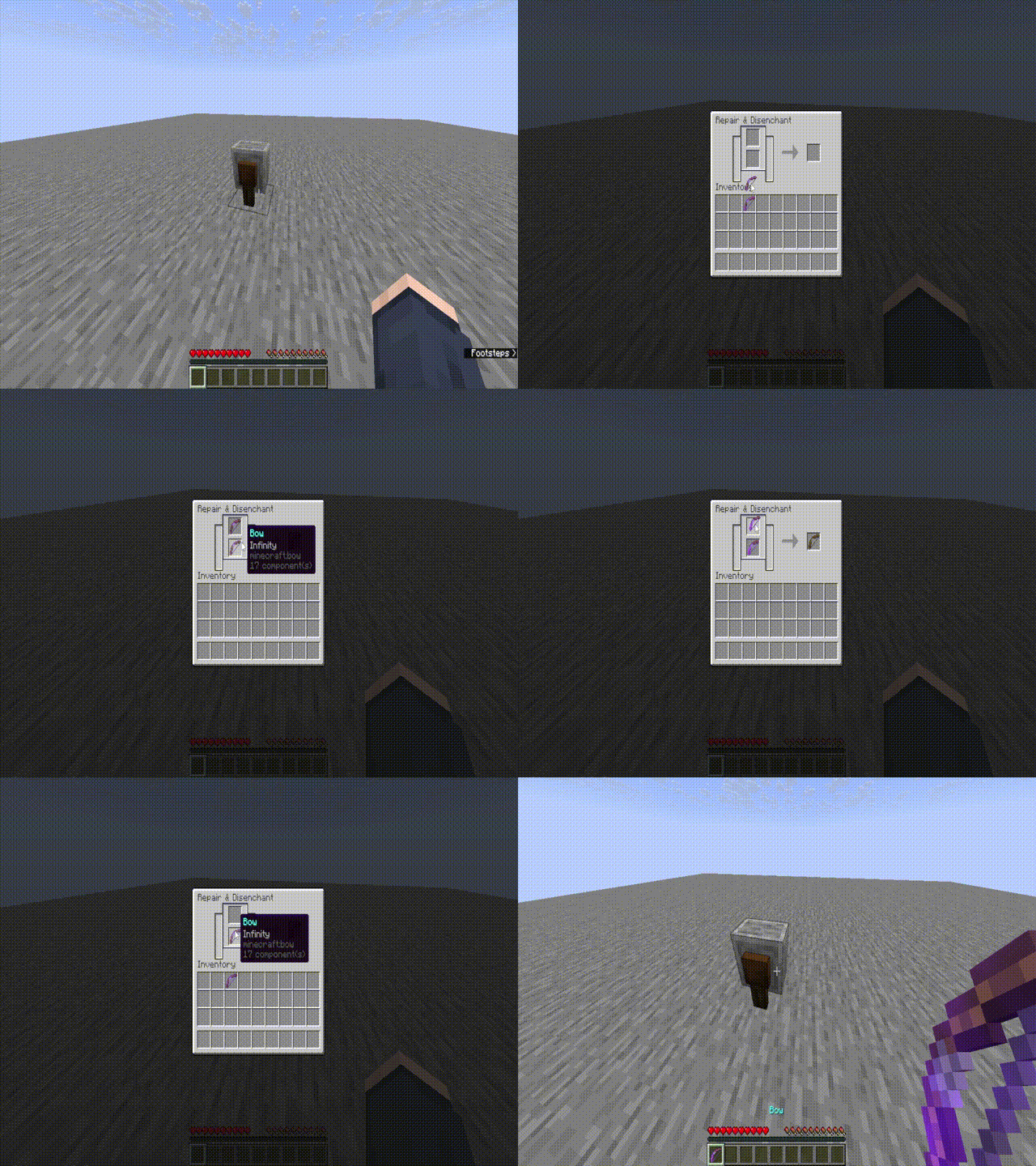
Open animated demonstration
确认的行为:
- 上方输入物品会接收来自下方输入物品的附魔。
- 下方输入物品保持不变。
- 输出槽显示正常的砂轮输出结果,不包含合并后的附魔。
- 互斥的附魔可以被合并到上方输入物品中。
- 正常的砂轮耐久度修复行为仍然适用于输出物品。
确认的测试示例:
- 带有火焰附加 II 的钻石剑 + 带有掠夺 III 的钻石剑。
- 带有锋利 V 的钻石剑 + 带有火焰附加 II 和掠夺 III 的钻石剑。
- 带有多种互斥保护附魔的钻石胸甲。
- 带有经验修补的弓 + 带有无限附魔的弓。
- 受损的钻石剑配合正常的砂轮修复输出。
LB-002 — MC-271398 合成结果漏洞
原始快照: 24w18a
状态: 已实现 / 已测试
此漏洞恢复了 24w18a 快照中的合成剩余物行为。当配方未放置在合成桌网格的左上角时,剩余的合成材料可能会被错误地返回到错误的合成格位置。
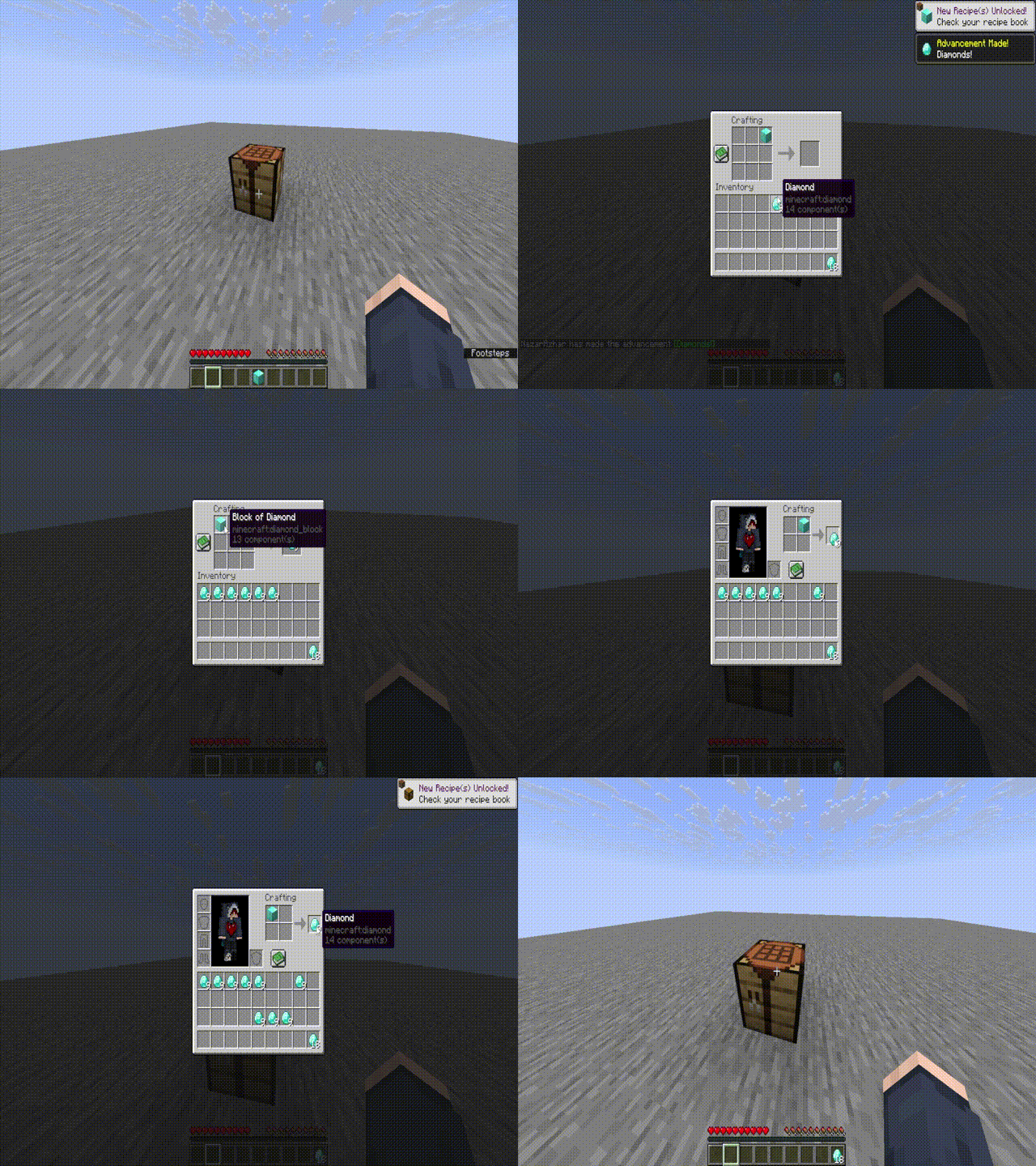
Open animated demonstration
确认的行为:
- 合成剩余物从合成桌网格的左上角槽位开始应用。
- 忽略了配方在合成桌网格内的原始位置。
- 容器物品可能出现在错误的槽位中。
- 当配方未放置在左上角时,原始输入物品可能保留在其原始槽位中。
确认的测试示例:
- 蜂蜜瓶放置在合成桌左上角槽位。
- 蜂蜜瓶放置在合成桌中心槽位。
- 蜂蜜瓶放置在合成桌右下角槽位。
- 当配方偏移时,糖的合成结果会在左上角槽位留下一个玻璃瓶。
相关实现区域:
ResultSlot.onTakeCraftingInput.PositionedgetRemainingItems
游戏内配置
Legacy Bugs 包含一个游戏内配置界面,允许用户在不手动编辑配置文件的情况下控制模组。
配置界面包括:
- 全局 Legacy Bugs 开关。
- LB-001 — 砂轮附魔合并 开关。
- LB-002 — 合成结果漏洞 开关。
- 刷新按钮。
- 当前权限和编辑状态。
- 以
TRUE 或 FALSE 显示的开关状态。
默认键位: -。可以在 Minecraft 的 控制 / 按键绑定 菜单中分配或更改该键位。
在单人世界中,世界所有者可以直接通过配置界面更改 Legacy Bugs 设置。
在专用的 Fabric 服务器上:
- 操作员(Operators)可以查看和修改 Legacy Bugs 设置。
- 非操作员可以查看当前设置,但无法修改它们。
- 非操作员会看到仅查看状态,表明需要操作员权限才能编辑设置。
- 服务器具有权威性:配置更改由服务器验证和保存,而不是信任客户端。
漏洞切换系统与配置文件
Legacy Bugs 允许全局或单独启用或禁用已恢复的漏洞行为。配置文件会在首次启动游戏或服务器(安装模组后)自动创建。
单人/客户端配置文件路径:
.minecraft/config/legacy-bugs.json
专用服务器配置文件路径:
config/legacy-bugs.json
默认配置:
{
  "enabled": true,
  "lb001GrindstoneMerge": true,
  "lb002CraftingResultBug": true
}
enabled 控制整个模组的启用状态。lb001GrindstoneMerge 控制 LB-001。lb002CraftingResultBug 控制 LB-002。
如果 enabled 设置为 false,即使各个漏洞选项仍设置为 true,所有已恢复的漏洞行为也将被禁用。
命令
Legacy Bugs 还提供了用于控制已恢复漏洞的游戏内命令。
/legacybugs status
/legacybugs enable
/legacybugs disable
/legacybugs lb001 enable
/legacybugs lb001 disable
/legacybugs lb002 enable
/legacybugs lb002 disable
/legacybugs status 显示当前 Legacy Bugs 的设置。/legacybugs enable 全局启用 Legacy Bugs。/legacybugs disable 全局禁用 Legacy Bugs。/legacybugs lb001 enable 启用磨石(grindstone)错误。/legacybugs lb001 disable 禁用磨石(grindstone)错误。/legacybugs lb002 enable 启用合成结果错误。/legacybugs lb002 disable 禁用合成结果错误。
在专用服务器上,Legacy Bugs 命令仅限操作员 / 管理员使用。通过命令进行的更改将保存到当前的 Legacy Bugs 配置文件中。
多人游戏与服务器行为
Legacy Bugs 已在运行 Minecraft Java Edition 26.2 的 Fabric 专用服务器上进行了测试。
已确认的服务器行为:
- Legacy Bugs 可在专用服务器上成功加载。
legacy-bugs.json 会在服务器配置目录中创建。- 操作员可以使用 Legacy Bugs 命令并通过配置界面修改设置。
- 非操作员可以通过配置界面查看服务器设置,但无法修改设置或使用受限的命令接口。
- 配置更改由服务器进行验证并保存。
版本兼容性
当前的 main 分支针对以下环境:
- Minecraft Java Edition: 26.2
- Java 运行时: Java 25
- Fabric Loader: 0.19.3
- Fabric API: 0.157.0+26.2
单独的 version/1.21.11 分支用于维护以下环境:
- Minecraft Java Edition: 1.21.11
- Java 运行时: Java 21
请为你的 Minecraft 版本使用正确的 JAR 文件。不保证对未列出或未测试版本的兼容性。
研究笔记
详细的错误研究、文档和测试进度详见 BUGS.md。
免责声明
Legacy Bugs 旨在用于单人游戏研究、历史保护、测试和教育目的。
某些恢复的行为在多人游戏中可能被视为不公平、非预期或不受欢迎的功能。未经服务器所有者或管理员明确许可,请勿在服务器上使用此模组。
本项目并非作弊模组、破解客户端或通用漏洞利用工具。其目的是记录并重现特定的历史 Minecraft 错误,以供学习、保护和受控实验之用。
要求 — 主分支 (Minecraft 26.2)
- Minecraft 版本: Java Edition
- Minecraft 版本: 26.2
- Java 运行时: Java 25
- 模组加载器: Fabric Loader 0.19.3
- 必需库: Fabric API 0.157.0+26.2
对于 Minecraft 1.21.11,请使用为独立 version/1.21.11 分支构建的 JAR 文件及其对应的要求。
Legacy Bugs
Legacy Bugs is a research-based Fabric mod that restores selected historical Minecraft bugs as accurately as possible.
Rather than simply imitating old glitches, each bug is researched from its original snapshot behavior, documented, tested, and carefully reimplemented for modern Minecraft.
The main development target is Minecraft Java Edition 26.2, using Java 25. A separate branch is maintained for Minecraft Java Edition 1.21.11, using Java 21. Compatibility with other Minecraft versions is not guaranteed because updates can change internal classes, methods, mappings, Fabric APIs, networking behavior, or Mixin targets.
Historical Bug Demonstrations
LB-001 — Grindstone Enchantment Merge Bug
Original snapshot: 24w11a
Status: Implemented / Tested
This bug was introduced during the Item Data Components refactoring in snapshot 24w11a. It restores the historical grindstone behavior where enchantments from the second input item can be copied into the first input item under specific conditions. This can produce an illegally merged enchanted item, including combinations of normally incompatible enchantments.
Open animated demonstration
Confirmed behavior:
- The top input item receives enchantments from the bottom input item.
- The bottom input item remains unchanged.
- The output slot shows a normal grindstone output without the merged enchantments.
- Mutually exclusive enchantments can be merged into the top input item.
- Normal grindstone durability repair behavior still applies to the output item.
Confirmed test examples:
- Diamond Sword with Fire Aspect II + Diamond Sword with Looting III.
- Diamond Sword with Sharpness V + Diamond Sword with Fire Aspect II and Looting III.
- Diamond Chestplate with multiple mutually exclusive protection enchantments.
- Bow with Mending + Bow with Infinity.
- Damaged Diamond Swords with normal grindstone repair output.
LB-002 — MC-271398 Crafting Result Bug
Original snapshot: 24w18a
Status: Implemented / Tested
This bug restores the crafting-remainder behavior found in snapshot 24w18a. When a recipe is positioned away from the top-left corner of the crafting grid, remaining items can be returned to the wrong crafting-grid position.
Open animated demonstration
Confirmed behavior:
- Crafting remainders are applied starting from the top-left crafting-grid slot.
- The original recipe position inside the crafting grid is ignored.
- Container items can appear in the wrong slot.
- The original input item can remain in its original slot when the recipe is placed away from the top-left corner.
Confirmed test examples:
- Honey Bottle placed in the top-left crafting slot.
- Honey Bottle placed in the center crafting slot.
- Honey Bottle placed in the bottom-right crafting slot.
- A Sugar crafting result leaves a Glass Bottle in the top-left slot when the recipe is offset.
Relevant implementation areas:
ResultSlot.onTakeCraftingInput.PositionedgetRemainingItems
In-Game Configuration
Legacy Bugs includes an in-game configuration screen for controlling the mod without manually editing the configuration file.
The configuration screen includes:
- Global Legacy Bugs toggle.
- LB-001 — Grindstone Enchantment Merge toggle.
- LB-002 — Crafting Result Bug toggle.
- Refresh button.
- Current permission and edit status.
- Toggle states displayed as
TRUE or FALSE.
Default keybind: -. The keybind can be assigned or changed in Minecraft's Controls / Key Binds menu.
In singleplayer worlds, the world owner can change Legacy Bugs settings directly through the configuration screen.
On dedicated Fabric servers:
- Operators can view and modify Legacy Bugs settings.
- Non-operators can view the current settings but cannot modify them.
- Non-operators see a view-only status indicating that operator permission is required to edit settings.
- The server is authoritative: configuration changes are validated and saved by the server rather than trusted from the client.
Bug Toggle System and Configuration File
Legacy Bugs allows restored bug behavior to be enabled or disabled globally or individually. The configuration file is created automatically after the game or server is launched once with the mod installed.
Singleplayer / client configuration path:
.minecraft/config/legacy-bugs.json
Dedicated server configuration path:
config/legacy-bugs.json
Default configuration:
{
  "enabled": true,
  "lb001GrindstoneMerge": true,
  "lb002CraftingResultBug": true
}
enabled controls the entire mod globally.lb001GrindstoneMerge controls LB-001.lb002CraftingResultBug controls LB-002.
If enabled is set to false, all restored bug behavior is disabled even if the individual bug options remain set to true.
Commands
Legacy Bugs also provides in-game commands for controlling the restored bugs.
/legacybugs status
/legacybugs enable
/legacybugs disable
/legacybugs lb001 enable
/legacybugs lb001 disable
/legacybugs lb002 enable
/legacybugs lb002 disable
/legacybugs status shows the current Legacy Bugs settings./legacybugs enable enables Legacy Bugs globally./legacybugs disable disables Legacy Bugs globally./legacybugs lb001 enable enables the grindstone bug./legacybugs lb001 disable disables the grindstone bug./legacybugs lb002 enable enables the crafting result bug./legacybugs lb002 disable disables the crafting result bug.
On dedicated servers, Legacy Bugs commands are restricted to operators / moderators. Changes made through commands are saved to the active Legacy Bugs configuration file.
Multiplayer and Server Behavior
Legacy Bugs has been tested on a Fabric dedicated server running Minecraft Java Edition 26.2.
Confirmed server behavior:
- Legacy Bugs loads successfully on the dedicated server.
legacy-bugs.json is created in the server configuration directory.- Operators can use Legacy Bugs commands and modify settings through the configuration screen.
- Non-operators can view server settings through the configuration screen but cannot modify them or use the restricted command interface.
- Configuration changes are validated and saved by the server.
Version Compatibility
The current main branch targets:
- Minecraft Java Edition: 26.2
- Java Runtime: Java 25
- Fabric Loader: 0.19.3
- Fabric API: 0.157.0+26.2
A separate branch, version/1.21.11, is maintained for:
- Minecraft Java Edition: 1.21.11
- Java Runtime: Java 21
Use the correct JAR for your Minecraft version. Compatibility with unlisted or untested versions is not guaranteed.
Research Notes
Detailed bug research, documentation, and testing progress are available in BUGS.md.
Disclaimer
Legacy Bugs is intended for singleplayer research, historical preservation, testing, and educational purposes.
Some restored behaviors may be considered unfair, unintended, or unwanted on multiplayer servers. Do not use this mod on a server without explicit permission from the server owner or administrators.
This project is not intended to be a cheat mod, hacked client, or general-purpose exploit tool. Its purpose is to document and reproduce selected historical Minecraft bugs for learning, preservation, and controlled experimentation.
Requirements — Main Branch (Minecraft 26.2)
- Minecraft Edition: Java Edition
- Minecraft Version: 26.2
- Java Runtime: Java 25
- Mod Loader: Fabric Loader 0.19.3
- Required Library: Fabric API 0.157.0+26.2
For Minecraft 1.21.11, use the JAR built for the separate version/1.21.11 branch and its corresponding requirements.


 模组

 模组
 模组

 模组
 模组
 模组
评论 0
登录后参与评分
还没有评论,来抢沙发吧