
让我看看(你的代码)
本模组添加了四个物品,用于导出任何类和物品渲染的 Java 代码。
导出的代码包含 mixin、patch 或其他修改部分。无法导出内部类。你可以导出包含内部类的顶级类。
该模组默认输出 .class 文件。如果你设置了 IntelliJ IDEA(或其他能打开 .class 文件的软件)或 Java 反编译器的路径,此模组可以输出 .java 文件并在游戏中显示反编译后的 Java 代码。
物品介绍
 扫描仪 (Scanner)
扫描仪没有 GUI,目前只能通过右键点击方块来使用。扫描物品功能正在计划中。
扫描一个方块会检测并导出以下类(如果存在):
- 方块类;
- 方块物品类;
- 方块实体类;
- 方块实体渲染器类;
你可以在 已导出类数据库物品 或 .minecraft/let_me_see_see/(包名)/(类名).class 中查看这些类。
 检索器 (Retriever)
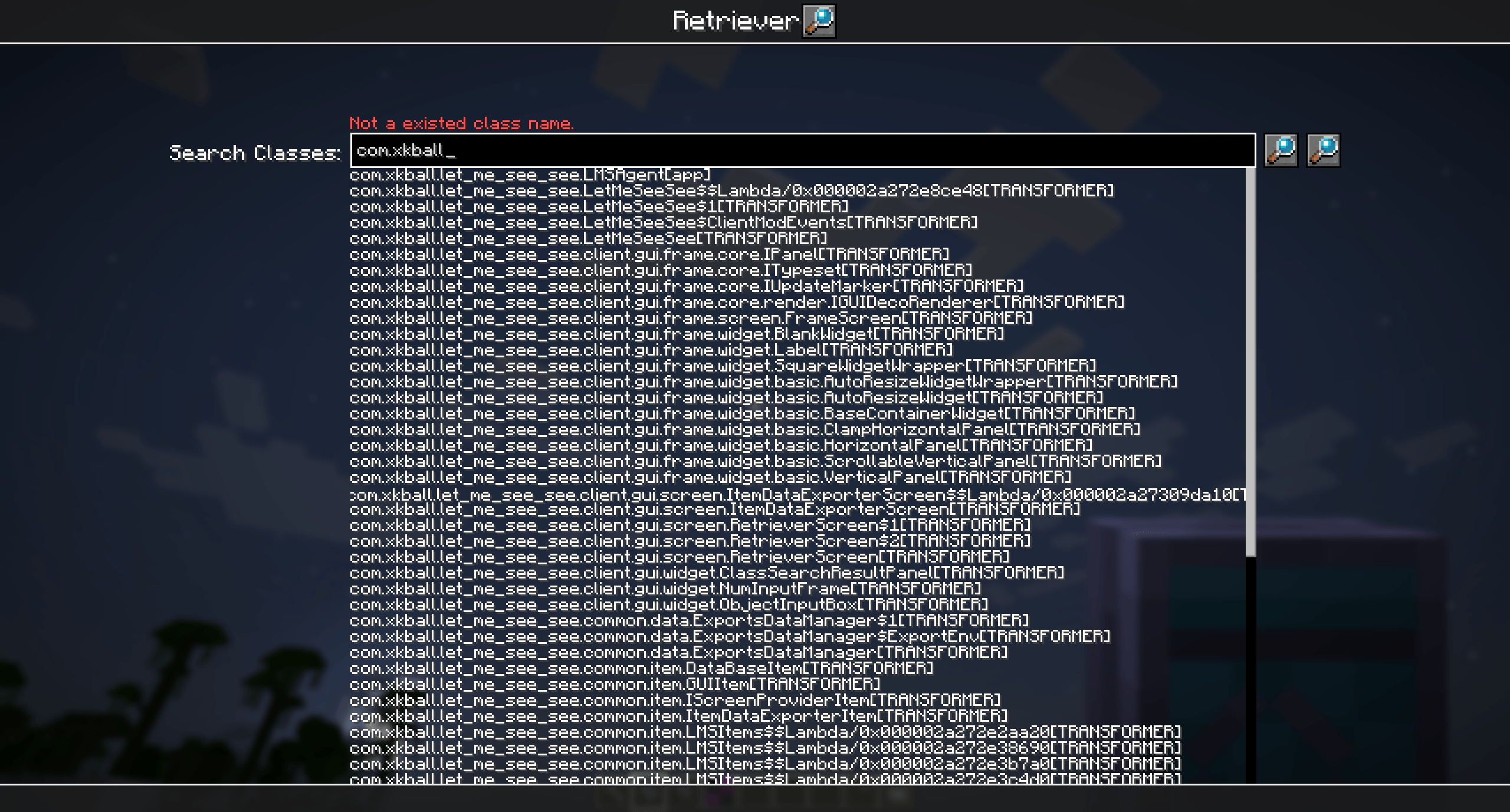
右键点击以打开所有已加载类的搜索界面。搜索结果包含内部类、lambda 表达式或其他一些生成的类,但你只能导出顶级类。
搜索栏忽略大小写。双击任意搜索结果可快速完成搜索栏输入。
如果搜索栏填入了类的完整名称(必须包含类加载器名称,因为不同的类加载器可以加载同名类),点击搜索栏后的第一个按钮即可导出该类。
点击搜索栏后的第二个按钮可重新扫描已加载的类。
 已导出类数据库 (Exported Classes Data Base)

左侧面板有一个用于搜索所有已导出类的搜索栏,下方列出这些类。白色类名表示它是在当前游戏会话中导出的。黄色名称表示它是在过去的游戏会话中导出的。红色名称表示自导出以来模组列表已更改。重新启动游戏并更改模组列表可能会导致类内容的变化。
右上角有两个按钮,分别用于在 IDEA 中打开 .class 文件和再次导出类。在左侧选择某个类后,右侧面板将显示反编译后的 Java 代码。
物品数据导出器 (Item Data Exporter)
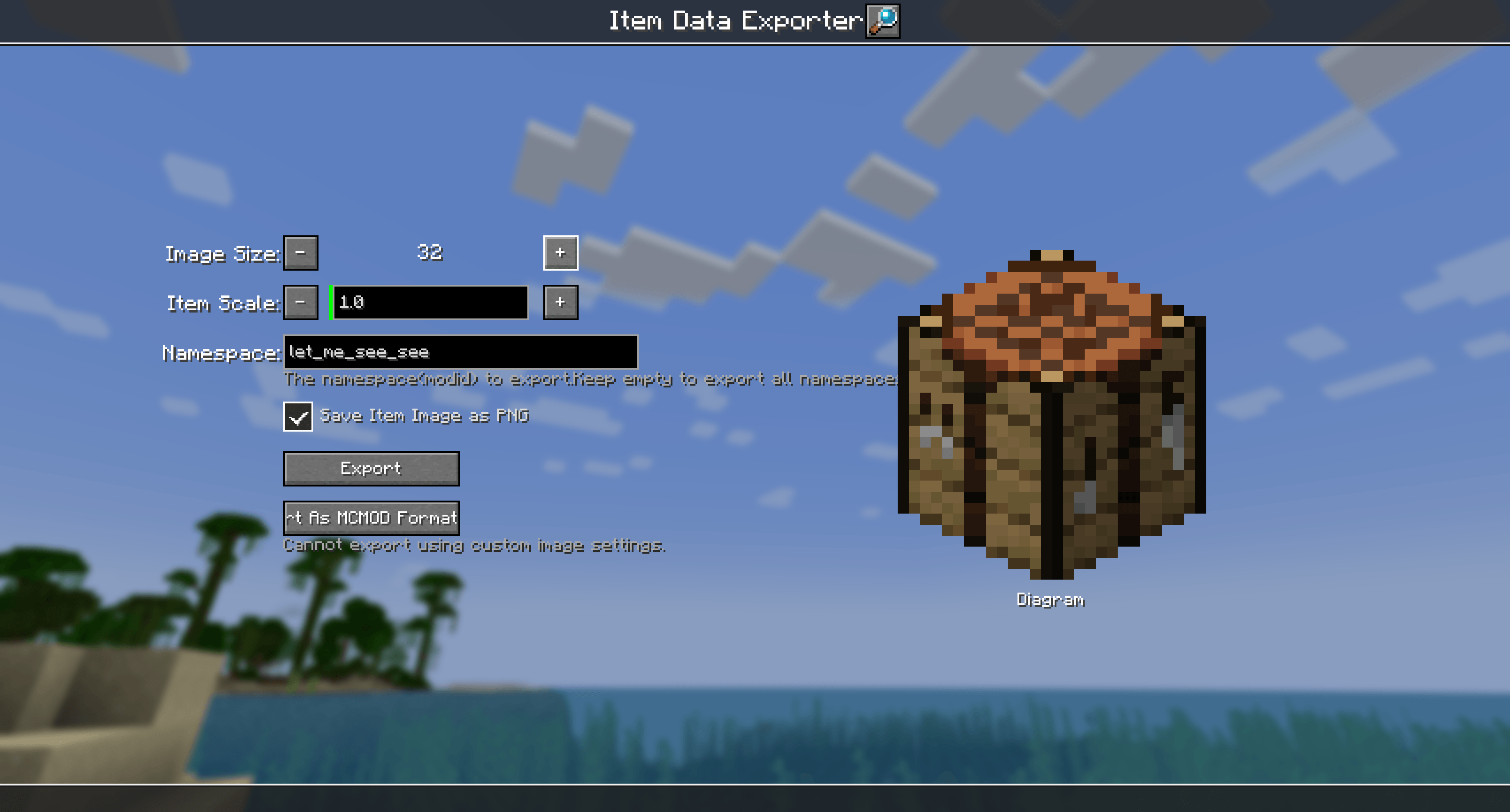
通过在游戏中像 GUI 中那样渲染它们,导出一些物品数据和物品渲染效果。
导出的图像文件位于 .minecraft/let_me_see_see/_data/(命名空间)/(物品名称).png
导出的物品数据文件位于 .minecraft/let_me_see_see/(命名空间).json
类浏览器 (Class Explorer)
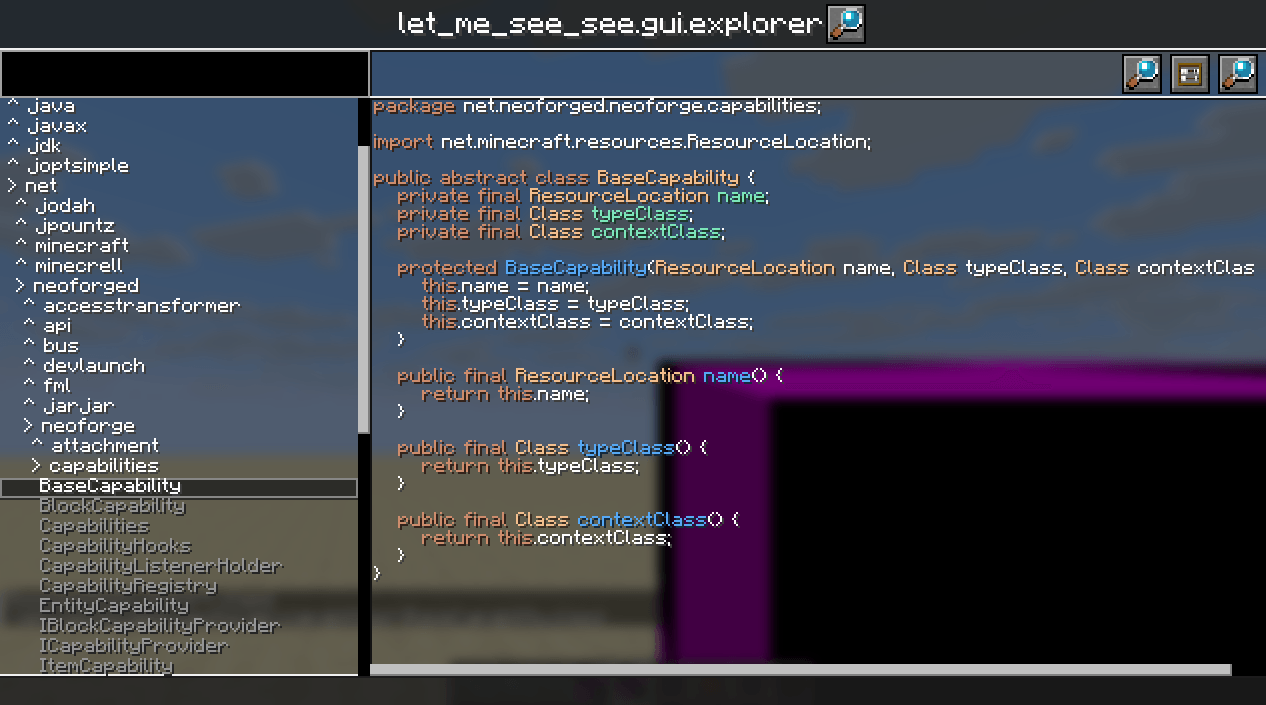
增强版的检索器和已导出类数据库。你可以找到所有已加载的顶级类。双击即可对其进行反编译。
Let Me See See (Your Code)
This mod adds four items to exports java codes of any class and item rendering.
Exproted code include mixin or patch or other modified parts.Can not exports inner classes. You can exprot top level class that contains inner classes.
The mod give out .class file as default. If you set the path of IntellJ IDEA (or other software can open .class file) or java decompiler, this mod can give out .java file and display decompiled java code in game.
Items Introducing
Scanner
Scanner have no gui, and you an only right click block to use it for now. Scanning item is planning.
Scan a block will detect and export following classes (if exist):
- The Block class;
- The Block Item class;
- The Block Entity class;
- The Block Entity Renderer class;
You can view these classes in Exproted Classes Data Base Item or in .minecraft/let_me_see_see/(package of class)/(class name).class.
Retriever
Right click to open a searcher of all loaded classes. Search result contains inner class and lambda or some other generated class, but you can only export top level class.
The search bar ignore word case. Double click any search result to fast complete search bar.
If search bar is filled with the full name of a class(Must Contains class loader name, because different class loader can load homonymous classes), click the first button after search bar can exprot the class.
Click the second button after search bar to re-scan loaded classes.
Exported Classes Data Base
Left panel have a search bar for all exported classes, and listed below are those classes. White class name means it was exported in current game session. Yellow name represent it was exported in past game session. Red name means mod list has changed since export. Relaunch game and change mod list may cause changing of class content.
Upper Right have two buttons for open .class file in IDEA and export class again. Right panel will display decomplied java code after select a class in left side.
Item Data Exporter
Export some item data and items rendering by render like them in gui.
Exported image files under .minecraft/let_me_see_see/_data/(namespace)/(item name).png
Exported item data files under minecraft/let_me_see_see/(namespace).json
Class Explorer
Enhanced Retriever and Exported Classes Data Base. You can find all loaded top level classes. Double-click to decompile it.

下载 Let Me See See (Your Code)
下载 Let Me See See (Your Code)
下载 Let Me See See (Your Code)
下载 Let Me See See (Your Code)
下载 Let Me See See (Your Code)
下载 Let Me See See (Your Code)
下载 Let Me See See (Your Code)
下载 Let Me See See (Your Code)
下载 Let Me See See (Your Code)
暂无更新日志
关于这个资源的讨论、问题反馈与使用心得
还没有讨论,来发第一帖吧
你是这个资源的作者?登录后可认领此资源。
相似资源
 模组

显示你正在注视的方块的信息。(适用于 Minecraft 1.16+ 的 Hwyla/Waila 分支)
 模组
在游戏画面角落显示附近世界地形、玩家、生物和实体的地图。可创建路径点,帮助你找到标记过的位置。
 模组

查看物品与配方
 模组
使用 JavaScript 编辑配方、添加自定义物品、编写世界事件!
 模组
AE2:一款流行的自动化与存储模组
 模组
那是什么?一个 Waila/Hwyla 的分支。
评论 0
登录后参与评分
还没有评论,来抢沙发吧