
Liberty 是一款面向 Minecraft 的客户端安全、隐私保护及防破坏工具包。作为仅针对客户端的 Fabric 模组,Liberty 在不依赖任何服务端组件的情况下,保护你的客户端免受基于网络的漏洞利用、私有数据泄露、服务端追踪以及聊天或数据包层面的恶意破坏。
无论你是参与公共多人网络游玩、向观众进行直播,还是审计服务器行为,Liberty 都能让你对客户端发送、接收和显示的内容进行精细控制。
反作弊与规则合规
Liberty 的设计旨在 对多人网络和反作弊系统(如 GrimAC、Vulcan、Matrix 等)完全安全:
- 本地处理: 用户名/皮肤掩码、坐标覆盖层以及 F3 调试界面信息脱敏等功能元素严格属于视觉效果,仅在客户端本地处理。
- 无数据包伪造: Liberty 不会修改发送给服务端的游戏玩法或移动数据包。你不会因为移动作弊或无效交互而触发误封禁。
- 安全的速率限制: 数据包速率限制仅过滤传入流量(如声音、粒子或记分板数据包泛滥),以防止游戏客户端卡顿。它不会改变你的出站连接状态。
展示 / 截图
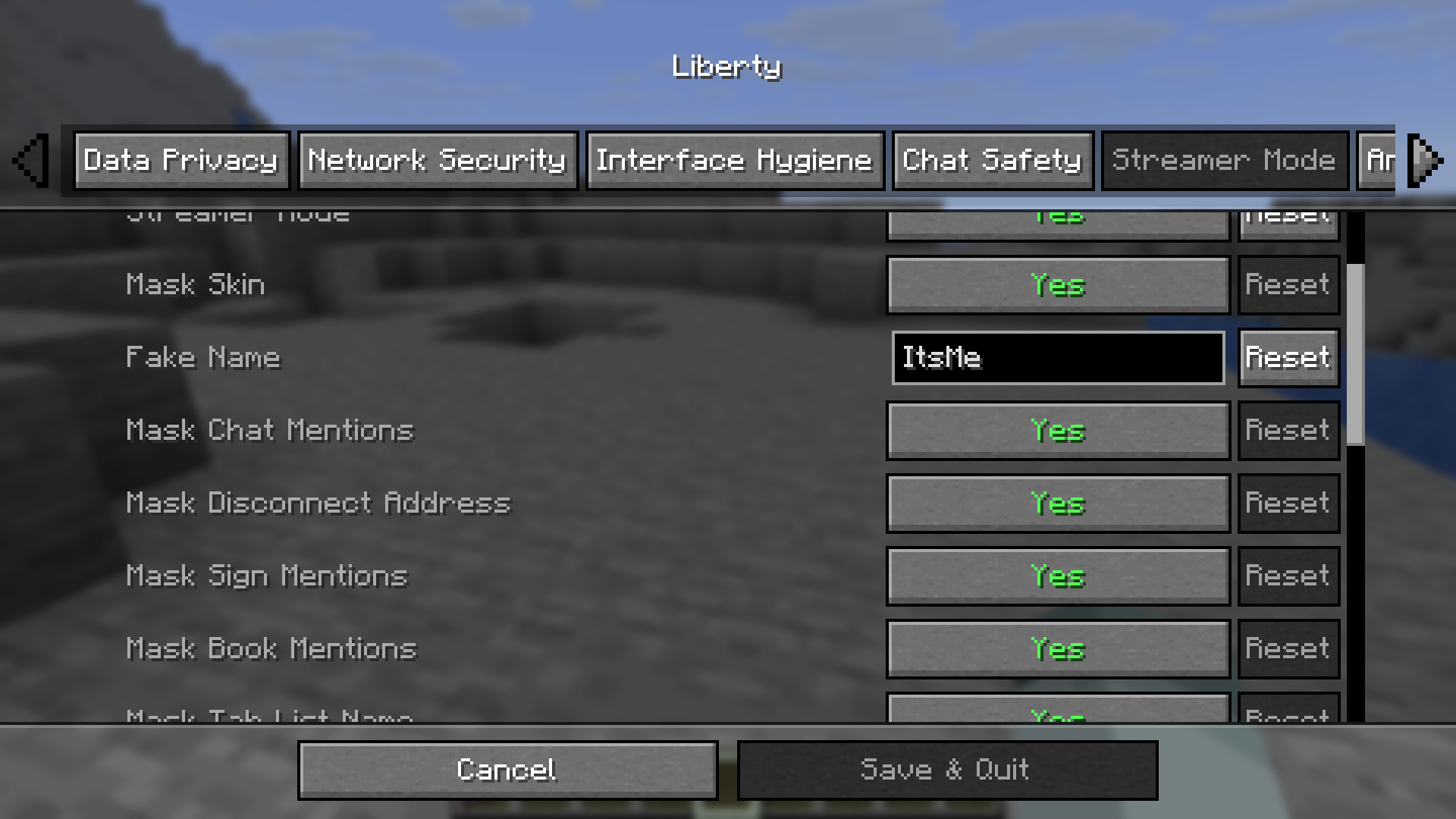
| 游戏内配置界面 |
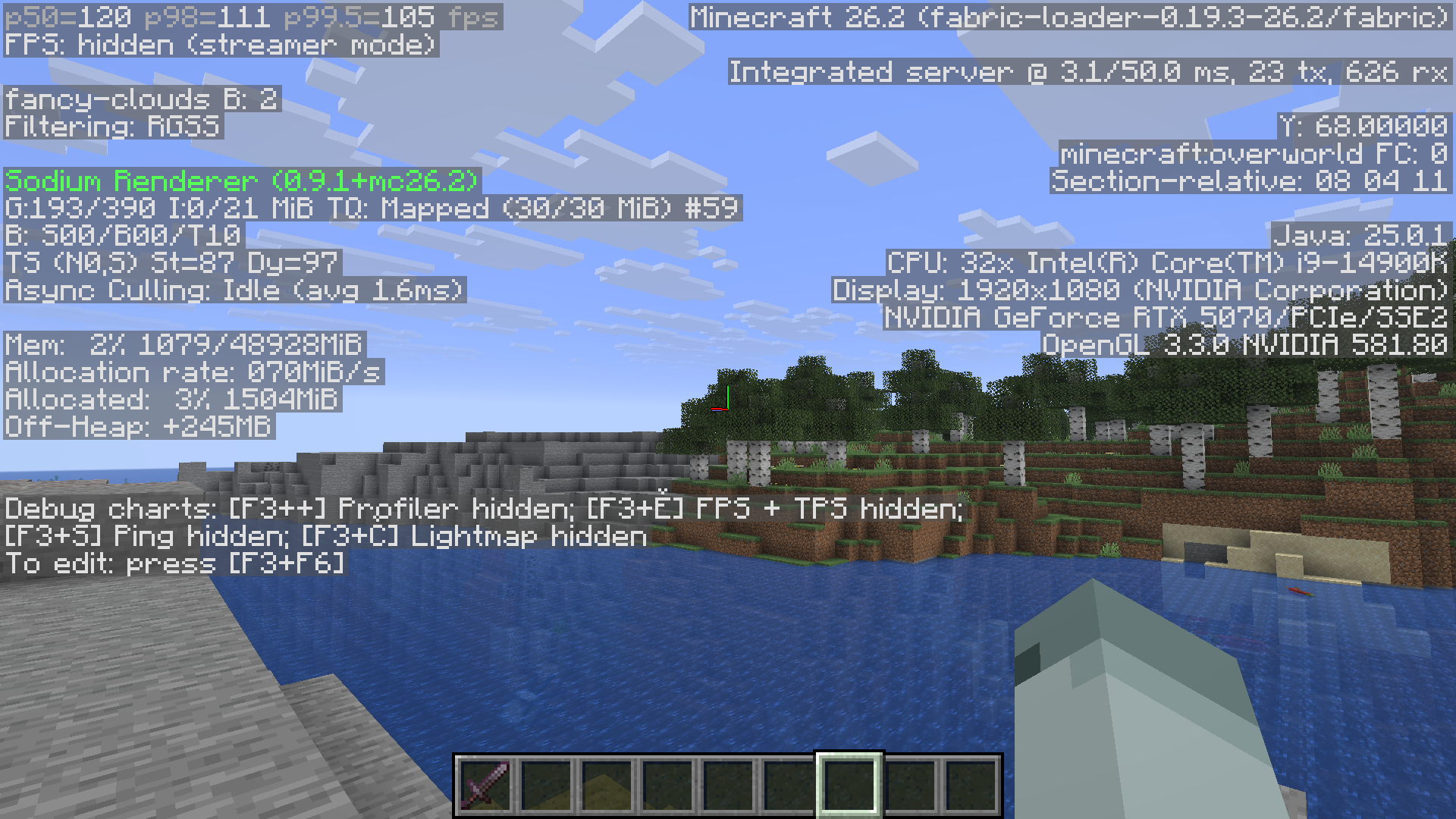
主播模式 HUD 掩码 |
 |
 |
| 通过 Cloth Config 提供的精细配置菜单 |
显示坐标被掩码的脱敏 F3 界面 |
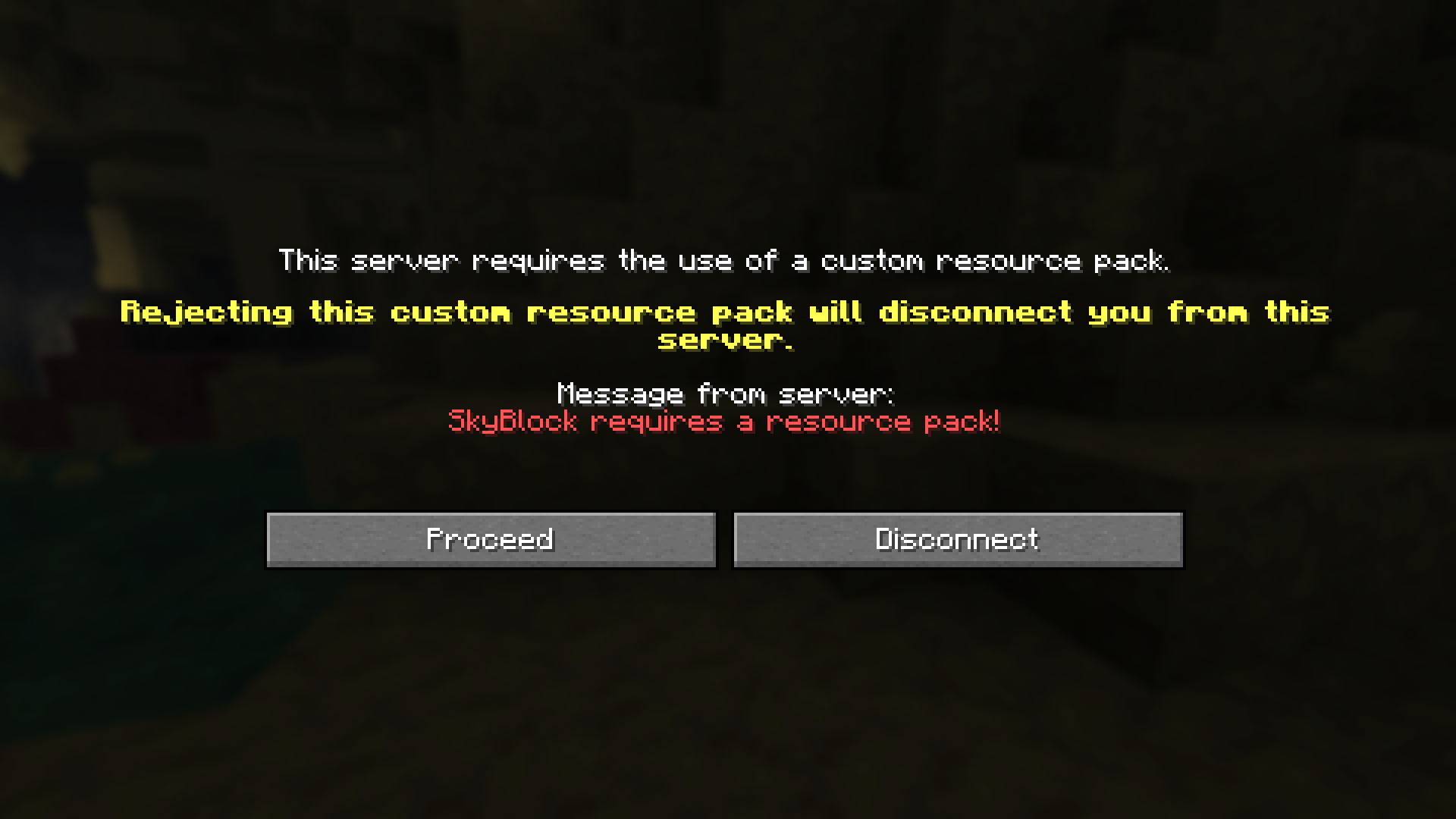
| 自定义资源包提示 |
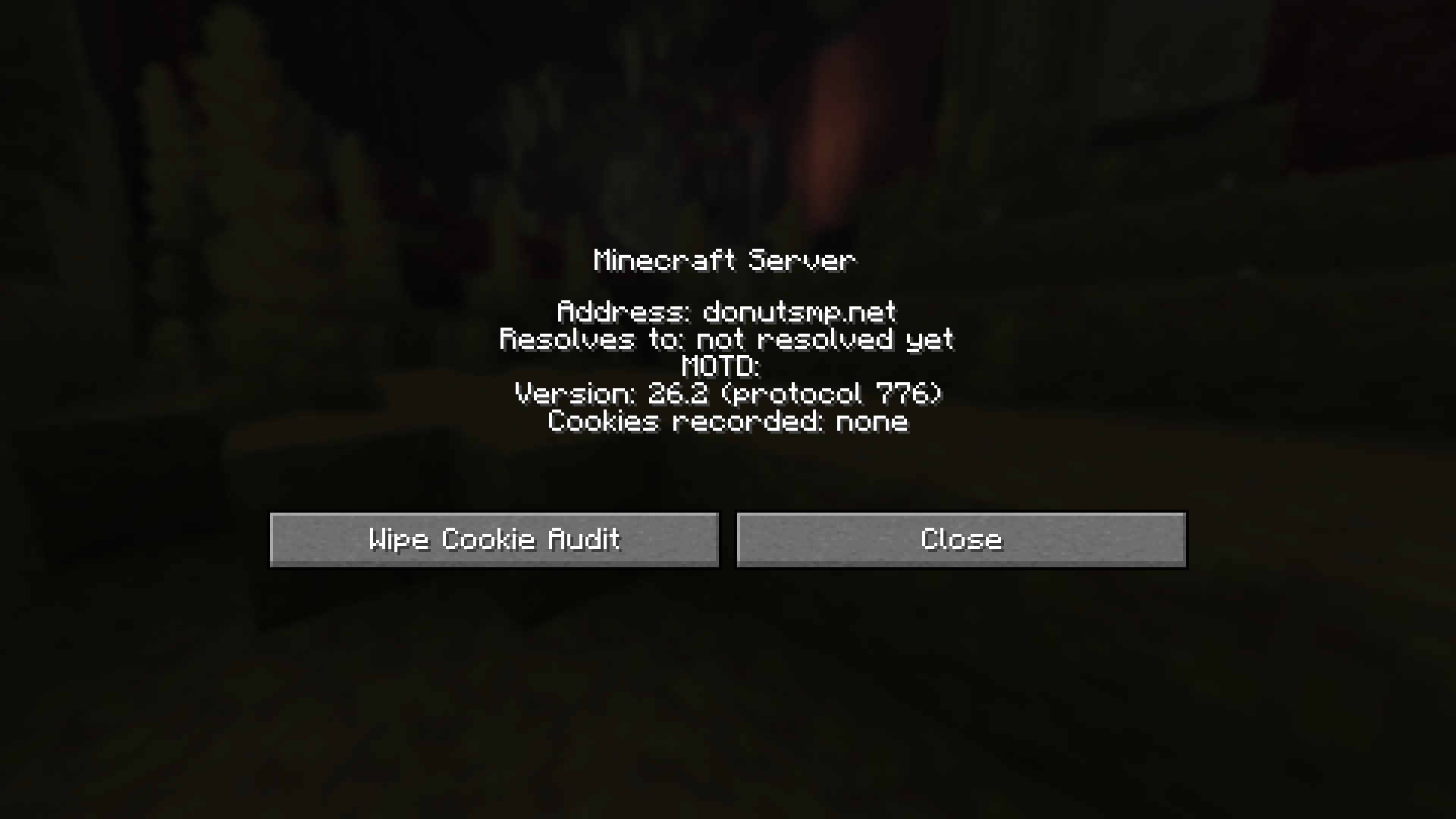
服务器信息检查器 |
 |
 |
| 在接受服务器资产前显示资源包大小探测的提示 |
右键点击服务器诊断面板,显示已解析的 IP 和连接审计 |
核心功能领域
Liberty 将其 60 多项可配置选项划分为五个核心领域:
1. 数据隐私遥测控制
- 阻止遥测数据: 停止所有发往 Microsoft 和 Mojang 的遥测流量。
- 日志与崩溃报告脱敏: 自动从日志和崩溃报告中清除个人身份信息(PII),包括你的操作系统用户名、主目录和本地 IP 地址。
- 草稿保护: 防止在输入时将草稿消息(包括以
# 开头的命令草稿)发送到服务器。
- 悬停时 Ping: 仅在鼠标悬停在服务器列表中的服务器上时才进行 Ping 操作,减少被动追踪。
- Cookie 隔离: 防止 Cookie 数据在服务器传输过程中共享。
2. 网络与资产安全
- SSRF 沙箱: 扫描资源包 URL,并阻止源自私有、本地或回环 IP 地址的下载。
- 安全的玩家皮肤: 将皮肤下载限制为通过严格 HTTPS 连接到受信任的 Mojang 域名,阻止通过自定义资产服务器进行的潜在网络追踪。
- 确认与提示: 拦截由服务器发起的传输、聊天链接和命令执行,并在采取操作前提示你获得同意。
- 聊天签名: 在聊天消息中添加颜色指示器,以显示它们是否由 Mojang 的身份验证系统正式签名。
3. 防破坏与速率限制
- 垃圾信息节流器: 对过多的传入数据包(声音、粒子、标题和记分板)进行速率限制,以防止性能下降或客户端崩溃。
- 整洁 UI: 对重复的连续聊天行(例如
[x5])进行分组,并对相同的Boss血条进行聚合(例如 Boss 名称 (x3)),以保持屏幕可读性。
- 地图与屏幕保护: 丢弃来自地图数据泛滥的冗余 GPU 纹理上传,并忽略容器打开的数据包泛滥。
4. 主播保护
- 坐标与系统掩码: 限制 F3 调试信息显示仅为 Y 轴高度(海拔)或完全隐藏。隐藏 FPS、硬件规格和基础坐标。
- 基岩隐藏: 自动将基岩纹理替换为石头或深板岩,防止通过自然地形图案泄露坐标。
- 身份混淆: 在所有渲染路径(包括玩家标签页列表、记分板、告示牌、书籍和聊天)中,用可定制的虚假资料替换你的用户名、皮肤和聊天提及。
5. 诊断与服务器审计
- 服务器检查器: 在服务器列表中添加右键诊断面板,显示已解析的服务器 IP、Ping 行为和活动的安全覆盖设置。
- Cookie 审计日志: 以本地 JSON 日志记录多人服务器设置的 Cookie 键(绝不记录有效载荷)。
- 传输审计日志: 跟踪所有服务器间传输的 CSV 历史记录。
命令与配置
游戏内命令速查表
Liberty 提供了一个 /liberty 命令行界面,用于管理设置、日志和诊断:
| 命令 |
操作 |
/liberty status |
查看按类别分组的当前所有选项状态。 |
/liberty toggle <option> |
启用或禁用特定功能。 |
/liberty log |
查看最近 100 个安全事件(例如,被阻止的链接、SSRF 标记)。 |
/liberty override add <server> <option> <value> |
定义加入服务器时自动应用的每服务器配置规则。 |
/liberty friend add/remove <name> |
管理允许白名单私聊的玩家白名单。 |
/liberty diag |
运行客户端诊断以验证 mixin 完整性,并检查是否强制执行安全聊天。 |
配置界面
- 图形化界面: 如果你安装了 Mod Menu 和 Cloth Config,可以通过标准的游戏内 GUI 配置所有选项(主菜单 > 模组 > Liberty > 配置)。
- 预设: 在配置菜单中使用内置预设(例如 Streamer Max、Privacy Max 和 Griefing Defense)快速配置 Liberty。
- 本地 JSON 文件: 在游戏关闭时直接编辑
<game-dir>/config/liberty.json。
安装与依赖
Liberty 是一个客户端模组。请勿安装在专用服务器上。
- 安装 Fabric Loader (>= 0.19.3)。
- 下载并将 Fabric API jar 文件放入你的
mods/ 目录中。
- (推荐)安装 Mod Menu 和 Cloth Config 以启用游戏内设置屏幕。
- 将
liberty-1.0.0.jar 放入你的 mods/ 文件夹并启动游戏。
版本兼容性
- Minecraft 版本: 26.2
- 所需 Fabric Loader: >= 0.19.3
- 所需 Fabric API: >= 0.153.0+26.2
- 推荐 Cloth Config: >= 26.2.155
- 推荐 Mod Menu: >= 20.0.0-beta.4
本地数据与透明度
Liberty 遵循“本地优先”的理念。它不会向外部服务器发送任何数据,并且会主动阻止原版遥测功能。所有数据均保存在本地:
config/liberty.json: 你的选项和运行时统计信息。config/liberty-cookie-audit.json: 由服务器设置的已审计 Cookie 密钥(有效载荷被排除)。config/liberty-transfers.csv: 服务器传输重定向的审计日志。config/liberty-backups/: 自动生成的设置备份。
注意:如果启用了“显示资源包大小”,Liberty 会在你下载之前向资源包主机发出轻量级 HTTP HEAD 请求,以计算文件大小。
Liberty is a client-side security, privacy, and anti-griefing toolkit for Minecraft. Built as a client-only Fabric mod, Liberty protects your client from network-based exploits, private data leaks, server-side tracking, and chat or packet-based griefing—without requiring any server-side components.
Whether you are playing on public multiplayer networks, streaming to an audience, or auditing server behavior, Liberty gives you granular control over what your client sends, receives, and displays.
Anticheat & Rule Compliance
Liberty is designed to be 100% safe for multiplayer networks and anticheat systems (such as GrimAC, Vulcan, Matrix, and others):
- Local-Only Processing: Feature elements like username/skin masking, coordinate overlays, and F3 redactions are strictly cosmetic and processed locally on your client.
- No Packet Spoofing: Liberty does not modify server-bound gameplay or movement packets. You will not trigger false-positive bans for movement hacks or invalid interactions.
- Safe Rate-Limiting: Packet rate-limiting only filters incoming traffic (like sound, particle, or scoreboard packet spam) to prevent your game client from freezing. It does not alter your outgoing connection status.
Showcase / Screenshots
| In-Game Config Screen |
Streamer Mode HUD Masking |
|
|
| Granular configuration menus via Cloth Config |
Redacted F3 screen showing coordinates masked |
| Custom Resource Pack Prompt |
Server Info Inspector |
|
|
| Prompt showing resource pack size probe before accepting server assets |
Right-click server diagnostics panel showing resolved IP and connection audits |
Key Feature Areas
Liberty organizes its 60+ configurable options into five core domains:
1. Data Privacy & Telemetry Control
- Block Telemetry: Stops all outbound telemetry traffic to Microsoft and Mojang.
- Log & Crash Redaction: Automatically scrubs personal identifiable information (PII) from logs and crash reports (including your OS username, home directory, and local IP addresses).
- Draft Protection: Prevents draft messages (including
#-prefixed command drafts) from being sent to the server as you type.
- Ping-on-Hover: Only pings servers in your server list when you hover over them, reducing passive tracking.
- Cookie Isolation: Prevents cookie data from being shared across server transfers.
2. Network & Asset Security
- SSRF Sandbox: Scans resource pack URLs and blocks downloads originating from private, local, or loopback IP addresses.
- Secure Player Skins: Restricts skin downloads to trusted Mojang domains over strict HTTPS, blocking potential network tracking via custom asset servers.
- Confirmations & Prompts: Intercepts server-initiated transfers, chat links, and command executions, prompting you for consent before action is taken.
- Chat Signatures: Adds a colored indicator to chat messages to show if they are officially signed by Mojang's authentication system.
3. Anti-Griefing & Rate Limiting
- Spam Throttlers: Rate-limits excessive incoming packets for sounds, particles, titles, and scoreboards to prevent performance drops or client crashes.
- Clean UI: Groups repeating consecutive chat lines (e.g.,
[x5]) and aggregates identical boss bars (e.g., Boss Name (x3)) to keep your screen readable.
- Map & Screen Protection: Drops redundant GPU texture uploads from map data spam and ignores container-open packet spam.
4. Streamer Protection
- Coordinate & System Masking: Restricts F3 debug info to show only Y-level (height) or hides it completely. Hides FPS, hardware specs, and base coordinates.
- Bedrock Hiding: Automatically swaps bedrock textures with stone or deepslate to prevent coordinates from being leaked via natural terrain patterns.
- Identity Obfuscation: Replaces your username, skin, and chat mentions with a customizable fake profile across all rendering paths (including player tab list, scoreboards, signs, books, and chat).
5. Diagnostics & Server Audits
- Server Inspector: Adds a right-click diagnostic panel to the server list, showing resolved server IPs, ping behavior, and active security overrides.
- Cookie Audit Logging: Records the keys (never the payloads) of cookies set by multiplayer servers in a local JSON log.
- Transfer Audit Logs: Tracks a CSV history of all server-to-server transfers.
Commands & Configuration
In-Game Command Cheatsheet
Liberty features a /liberty command line interface for managing settings, logs, and diagnostics:
| Command |
Action |
/liberty status |
View the current status of all options grouped by category. |
/liberty toggle <option> |
Enable or disable a specific feature. |
/liberty log |
View the last 100 security events (e.g., blocked links, SSRF flags). |
/liberty override add <server> <option> <value> |
Define per-server config rules applied automatically on join. |
/liberty friend add/remove <name> |
Manage a whitelist of players allowed to whitelist whispers. |
/liberty diag |
Run client-side diagnostics to verify mixin integrity and check if secure chat is enforced. |
Configuration Interfaces
- Graphical Interface: If you have Mod Menu and Cloth Config installed, you can configure all options via the standard in-game GUI (Main Menu > Mods > Liberty > Config).
- Presets: Quick-configure Liberty using built-in presets (e.g., Streamer Max, Privacy Max, and Griefing Defense) from the config menu.
- Local JSON File: Directly edit
<game-dir>/config/liberty.json when the game is closed.
Installation & Dependencies
Liberty is a client-side mod. Do not install it on a dedicated server.
- Install Fabric Loader (>= 0.19.3).
- Download and place the Fabric API jar in your
mods/ directory.
- (Recommended) Install Mod Menu and Cloth Config to enable the in-game settings screen.
- Place
liberty-1.0.0.jar in your mods/ folder and launch the game.
Version Compatibility
- Minecraft Version: 26.2
- Required Fabric Loader: >= 0.19.3
- Required Fabric API: >= 0.153.0+26.2
- Recommended Cloth Config: >= 26.2.155
- Recommended Mod Menu: >= 20.0.0-beta.4
Local Data & Transparency
Liberty operates under a local-first philosophy. It does not send any data to external servers, and actively blocks vanilla telemetry. All data is saved locally:
config/liberty.json: Your options and runtime statistics.config/liberty-cookie-audit.json: Audited cookie keys set by servers (payloads are excluded).config/liberty-transfers.csv: Audit log of server transfer redirects.config/liberty-backups/: Auto-generated backups of your settings.
Note: If Show Resource Pack Size is enabled, Liberty will issue a lightweight HTTP HEAD request to resource pack hosts before you download them to calculate file sizes.


 模组

 模组
 模组
 模组

 模组
 模组
评论 0
登录后参与评分
还没有评论,来抢沙发吧