
当玩家分配的 Java 内存过少 时显示提示,并在游戏加载完成后 播放声音。
该模组的所有配置项均位于 config/loadsupport.toml 文件中,支持完全自定义。
配置 ?
config/loadsupport.toml 中的配置项基本一目了然:
loadFinishSound = "minecraft:ui.toast.challenge_complete"
minMemory = 4.0
errorTitle = "错误:Java 内存不足!"
errorMinMemory = "请为您的 Minecraft 实例至少分配 {minMemory} GB 的 Java 内存!"
errorCurrentMemory = "您当前已分配 {currentMemory} GB 内存。"
memoryInfoLink = "https://github.com/vaporvee/LoadSupport/wiki/How-to-allocate-more-memory-to-your-Minecraft-instance"
{minMemory} 和 {currentMemory} 将被替换为它们的实际数值。
计划中的功能 ?
- ? 游戏内设置(支持 Modlist)
- ? 更多功能,帮助玩家了解 Minecraft 无法加载的原因
功能特性
当选择的 Java 内存过少时直接显示警告 ?
玩家无需等待即可知道自己是否选择了错误的 Java 内存数量。
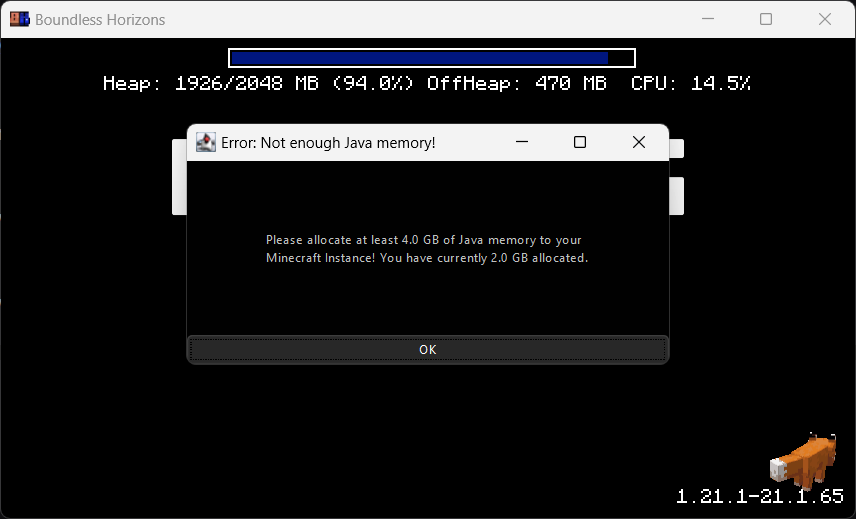
阻止游戏窗口?
确保玩家获得正确的性能体验。
Minecraft 加载完成后播放声音 ?
在后台运行时,也能立即知道 Minecraft 何时启动。
Shows when the player has too less Java memory allocated, and plays a sound when the game has finished loading.
It is fully configurable in config/loadsupport.toml.
Config ?
The config in config/loadsupport.toml is pretty self explainatory:
loadFinishSound = "minecraft:ui.toast.challenge_complete"
minMemory = 4.0
errorTitle = "Error: Not enough Java memory!"
errorMinMemory = "Please allocate at least {minMemory} GB of Java memory to your Minecraft instance!"
errorCurrentMemory = "You have currently {currentMemory} GB allocated."
memoryInfoLink = "https://github.com/vaporvee/LoadSupport/wiki/How-to-allocate-more-memory-to-your-Minecraft-instance"
{minMemory} and {currentMemory} get replaced by their actual values.
Planned Features ?
- ? Ingame settings (Modlist support)
- ? More features letting the player know why Minecraft is not loading
Features
Directly show a warning when too less Java Memory was selected ?
The player doesn't need to wait just to know that they selected the wrong amount of Java Memory.
Blocks the game window?
Make sure the player gets the correct performance experience.
Play a sound when Minecraft finished loading ?
Directly know when Minecraft started when beeing in the background.

下载 Load Support
需要联机服务器吗?
稳定流畅、一键部署,几分钟即可和朋友联机开服
最低仅需 8 元/月 即可畅快联机
下载 Load Support
需要联机服务器吗?
稳定流畅、一键部署,几分钟即可和朋友联机开服
最低仅需 8 元/月 即可畅快联机
下载 Load Support
下载 Load Support
下载 Load Support
需要联机服务器吗?
稳定流畅、一键部署,几分钟即可和朋友联机开服
最低仅需 8 元/月 即可畅快联机
下载 Load Support
需要联机服务器吗?
稳定流畅、一键部署,几分钟即可和朋友联机开服
最低仅需 8 元/月 即可畅快联机
下载 Load Support
需要联机服务器吗?
稳定流畅、一键部署,几分钟即可和朋友联机开服
最低仅需 8 元/月 即可畅快联机
下载 Load Support
需要联机服务器吗?
稳定流畅、一键部署,几分钟即可和朋友联机开服
最低仅需 8 元/月 即可畅快联机
下载 Load Support
下载 Load Support
- 更新到更新的“gAmE dRoPs”
关于这个资源的讨论、问题反馈与使用心得
还没有讨论,来发第一帖吧
你是这个资源的作者?登录后可认领此资源。
相似资源
 模组

显示你正在注视的方块的信息。(适用于 Minecraft 1.16+ 的 Hwyla/Waila 分支)
 模组

查看物品与配方
 模组

原版世界生成优化模组
 模组
在游戏画面角落显示附近世界地形、玩家、生物和实体的地图。可创建路径点,帮助你找到标记过的位置。
 模组
使用 JavaScript 编辑配方、添加自定义物品、编写世界事件!
 模组
缓冲的原始输入和线程化的事件轮询
评论 0
登录后参与评分
还没有评论,来抢沙发吧