
!!! 重要提示 !!!
在 Minecraft v1.21.6(LocationCopy v1.2.8)中,由于新功能“快捷操作”占用了默认按键 'G',因此 LocationCopy 的默认按键已从 'G' 更改为 'B'。
如果您之前使用过 LocationCopy,请确保在“选项 -> 控制 -> 键位绑定”中没有发生按键冲突。
Location Copy
此模组让在 Minecraft 中复制坐标变得更加便捷。

功能
只需按下 "B" 键(LocationCopy v1.2.8 或更高版本)即可复制您当前的位置和所在世界。
(您也可以根据需要在键位绑定设置中将按键自定义为其他按键。)
如果您额外安装了 ModMenu 模组,则可以从主屏幕轻松调整设置,非常方便。(可选)
您可以在游戏中按下 "I" 键或使用 ModMenu 界面来配置该模组。如果需要更精确的配置,可以在 config\LocationCopy.properties 文件中进行调整。
(v0.0.3 ~ v1.0.5 版本可在 config\locationcopy\config.properties 中找到)
如何设置“高级”模式(LocationCopy v1.2.0 或更高版本)
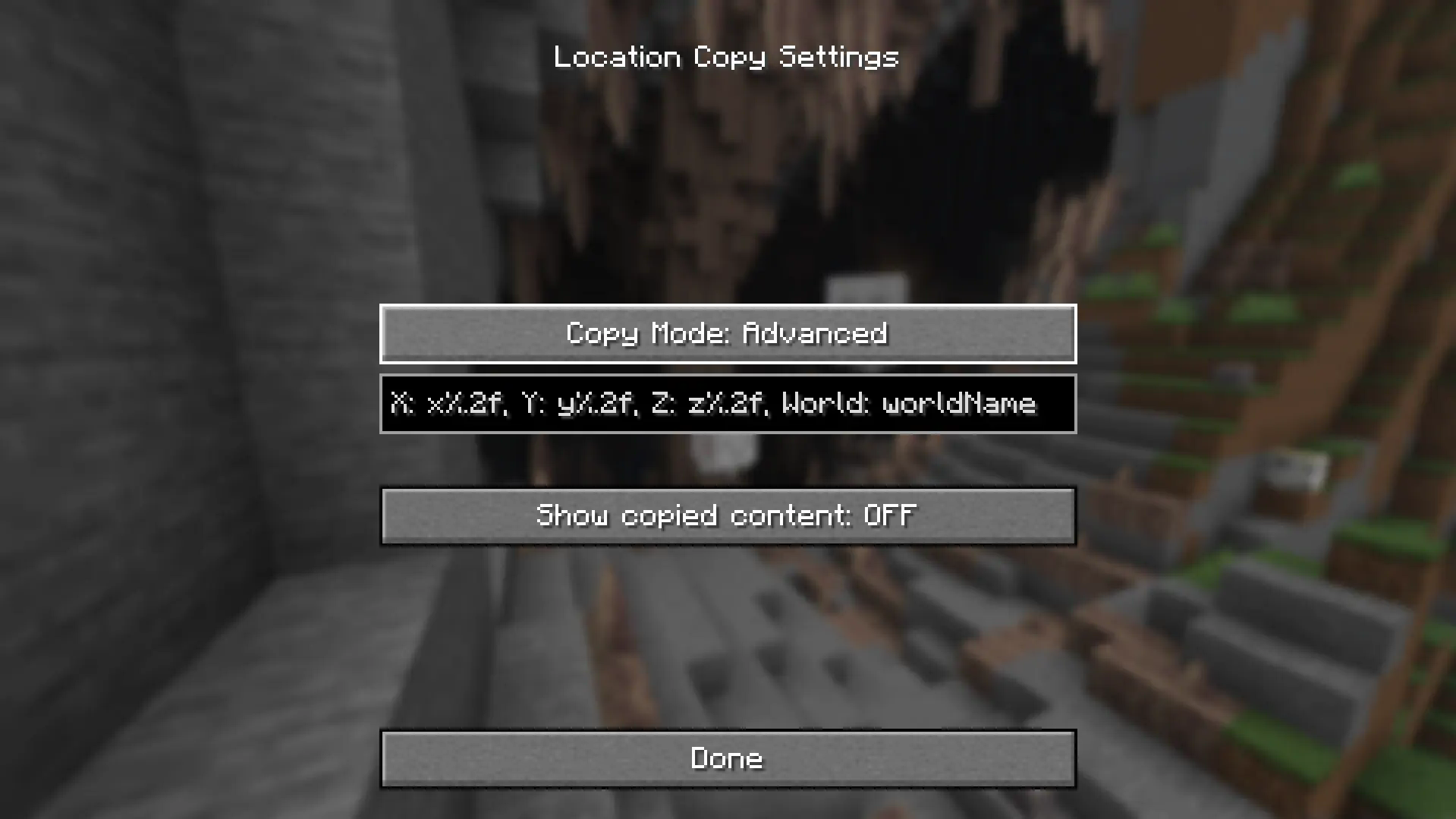
在高级设置中,“%.nf”中的 "n" 代表小数位数。默认设置为 2,您可以调整此数值。如果输入 0,则仅显示整数值。
如果您只想显示三个坐标中的某几个(例如:仅显示 x 和 z 坐标),请删除您希望清除的坐标部分(例如 y%.2f)。这样该部分将不会显示。
x 值: x%.2f
y 值: y%.2f
z 值: z%.2f
世界名称: worldName
"worldName" 代表世界名称。如果您希望显示世界名称,请使用此项。如果您不希望复制的内容中包含世界名称,请移除 "worldName"。
如何设置“高级”模式(LocationCopy v1.1.0 - v1.1.3)
在高级设置中,“%.nf”中的 "n" 代表小数位数。默认设置为 2,您可以调整此数值。如果输入 0,则仅显示整数值。
"%s" 代表世界名称。如果您希望显示世界名称,请使用此项。如果您不希望复制的内容中包含世界名称,请移除 "%s"。
但请注意,如果在高级模式中输入了错误的值,Minecraft 在复制坐标时可能会崩溃!
如果分配了错误的值,当您切换到其他模式然后再切回高级模式时,它将恢复为原始状态。
!! 重要提示 !!
请仅使用与您 Minecraft 版本兼容的版本,以避免出现错误。
问题反馈
如果您发现翻译问题或模组故障,请将它们报告至 Issues。
!!! IMPORTANT !!!
In Minecraft v1.21.6(LocationCopy v1.2.8), the default key for LocationCopy has been changed to 'G' -> 'B' because the new feature 'Quick Actions' uses the default key 'G'.
If you have used LocationCopy before, make sure that the key does not overlap in 'Options -> Controls -> Key Binds'.
Location Copy
This mod makes copying location in Minecraft much more convenient.
Function
Simply press the "B" key(LocationCopy v1.2.8 or higher) to copy your current location and world.
(You can also customize the key to something else in the key bind settings.)
If you install ModMenu as an additional mod, it's convenient because you can easily adjust the settings from the main screen. (Optional)
You can set the mod by pressing the "I" key in the game or using the ModMenu interface. If you want a more precise configuration, you can adjust it in "config\LocationCopy.properties".
(v0.0.3 ~ v1.0.5 are available in "config\locationcopy\config.properties")
How to set up "Advanced" mode (LocationCopy v1.2.0 or higher)
“%.nf” in advanced settings, "n" represents the number of decimal places. It is set to 2 by default and you can adjust this number. If you enter 0, only integer value will appear.
If you want to display only some of the three locations (e.g. Show only x and z locations), remove the location you want to clear (e.g. y%.2f). It will not be displayed.
x-value: x%.2f
y-value: y%.2f
z-value: z%.2f
World Name: worldName
"worldName" represents the world name. If you want to display the world name, use this. If you do not want the world name to be included in the copied field, remove "worldName".
How to set up "Advanced" mode (LocationCopy v1.1.0 - v1.1.3)
“%.nf” in advanced settings, "n" represents the number of decimal places. It is set to 2 by default and you can adjust this number. If you enter 0, only integer value will appear.
"%s" represents the world name. If you want to display the world name, use this. If you do not want the world name to be included in the copied field, remove "%s".
But be careful. If incorrect values are entered in advanced mode, Minecraft may crash when copying the location!
If an incorrect value is assigned, it will be restored to its original state when switching to another mode and then setting it back to advanced mode.
!! IMPORTANT !!
You can avoid errors only by using a version that is compatible with your version of Minecraft.
Issues
If you find translation problems or mod issues, please report them to Issues.

下载 Location Copy
下载 Location Copy
下载 Location Copy
下载 Location Copy
下载 Location Copy
下载 Location Copy
需要联机服务器吗?
稳定流畅、一键部署,几分钟即可和朋友联机开服
最低仅需 8 元/月 即可畅快联机
下载 Location Copy
下载 Location Copy
下载 Location Copy
下载 Location Copy
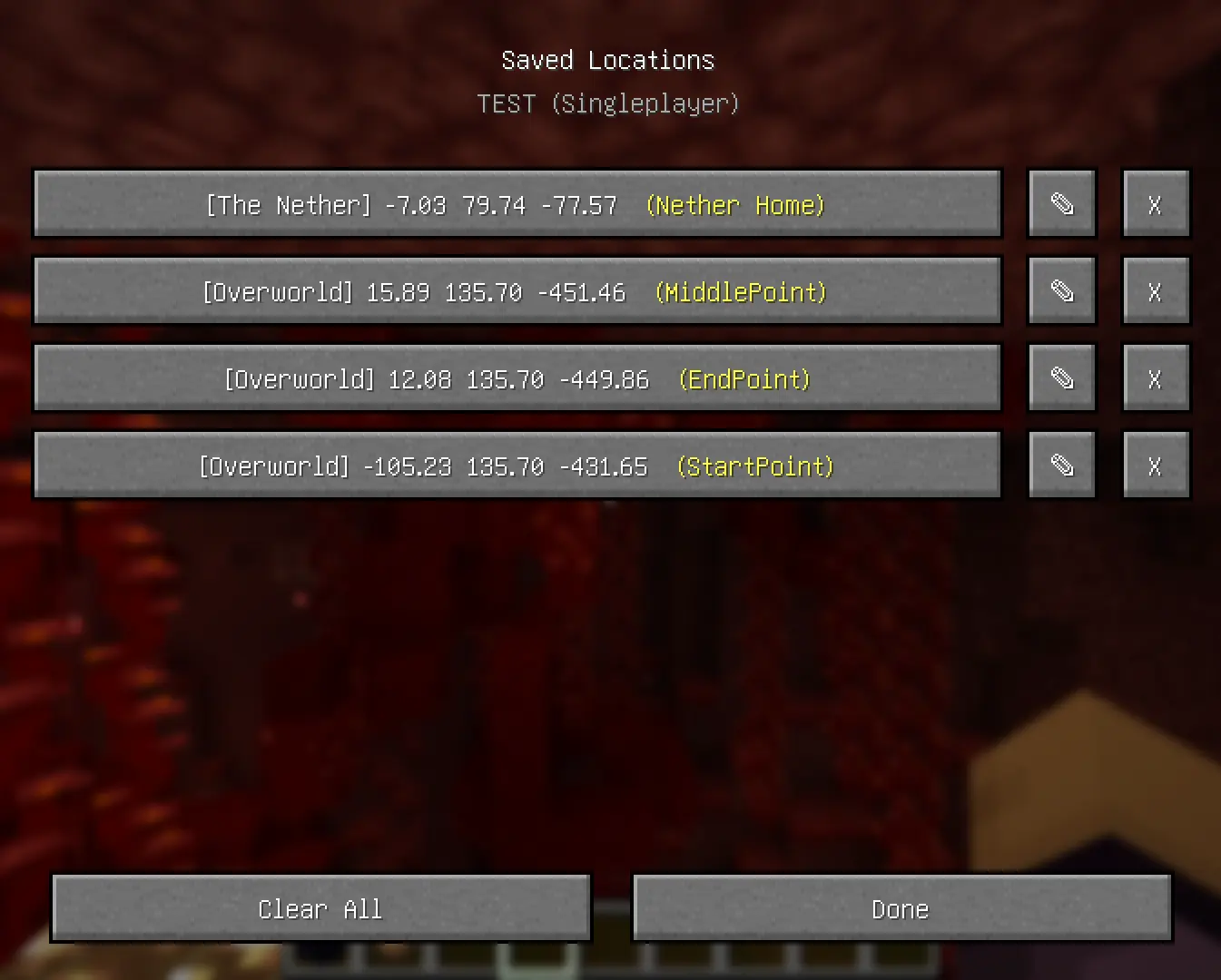
已添加新功能!
现在可以将世界位置保存为列表。 支持单人游戏和多人游戏,并且每个世界都可以使用。 还可以为每个位置添加备注。
如果您在新功能中发现任何错误,请通过 GitHub 报告!
关于这个资源的讨论、问题反馈与使用心得
还没有讨论,来发第一帖吧
你是这个资源的作者?登录后可认领此资源。
相似资源
 模组

显示你正在注视的方块的信息。(适用于 Minecraft 1.16+ 的 Hwyla/Waila 分支)
 模组

查看物品与配方
 模组
在游戏画面角落显示附近世界地形、玩家、生物和实体的地图。可创建路径点,帮助你找到标记过的位置。
 模组
使用 JavaScript 编辑配方、添加自定义物品、编写世界事件!
 模组
AE2:一款流行的自动化与存储模组
 模组
添加区块认领和玩家组队功能,并与 Xaero's Minimap 和 World Map 集成
评论 0
登录后参与评分
还没有评论,来抢沙发吧