
定位器三角测量
一款客户端 Fabric 模组,允许通过三角测量法确定玩家坐标。
该模组使用普通原版玩家可访问的公开数据来计算坐标,仅作为计算器运行。 如果服务器禁用了原版定位器或某位玩家对其隐藏,则此模组将无法确定其坐标。 本质上,该模组执行的所有计算均可使用计算器和原版客户端手动完成。
快速入门
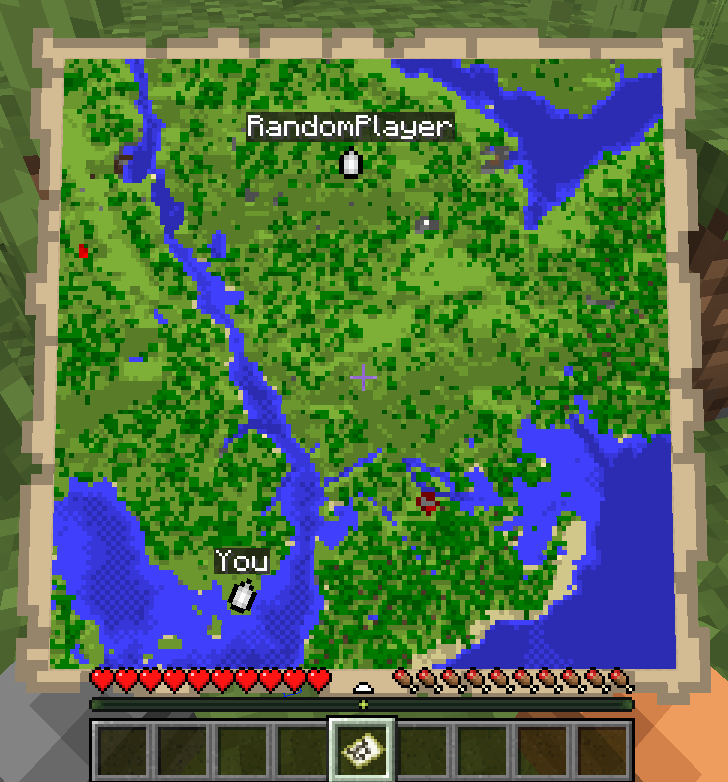
地图仅供参考。
- 运行
/locator_pos1— 模组将记录定位器的状态、你当前的位置以及你的视角偏航角(yaw)。 - 尽可能远离目标,使到目标的夹角尽可能大,然后运行
/locator_pos2。 - 运行:
/locator_locate <name>— 尝试计算玩家<name>的坐标,或/locator_locate_all— 尝试计算所有已知目标的坐标。
/locator_pos1
/locator_pos2
/locator_locate RandomPlayer

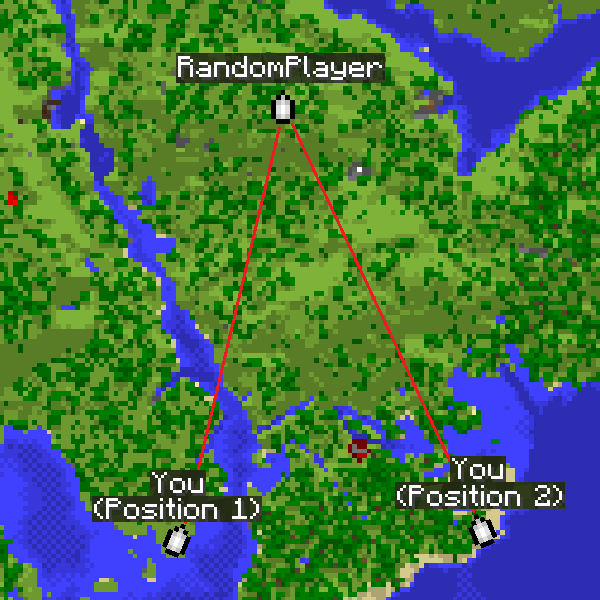
两点方向之间的夹角越大,坐标越精确。
对于常规三角测量,请使用相同的命令,但加上 triangulation 前缀。
命令说明
定位器命令
/locator_data- 打印当前定位器状态/locator_pos1- 保存第一个位置(定位器状态和你的坐标)/locator_pos2- 保存第二个位置(定位器状态和你的坐标)/locator_get_poses- 打印已保存的位置/locator_clear_pos1- 清除第一个位置/locator_clear_pos2- 清除第二个位置/locator_clear_poses- 清除两个位置/locator_locate <name>- 计算玩家<name>的坐标(如果已保存两个位置)/locator_locate_all- 计算所有已知目标的坐标(如果已保存两个位置)
常规三角测量命令
/triangulation_pos1- 保存第一个位置(你的坐标 + 偏航角)/triangulation_pos2- 保存第二个位置(你的坐标 + 偏航角)/triangulation_get_poses- 打印已保存的位置/triangulation_clear_pos1- 清除第一个位置/triangulation_clear_pos2- 清除第二个位置/triangulation_clear_poses- 清除两个位置/triangulation_locate— 计算视线方向的交点坐标(如果已保存两个位置)
按键绑定
为了方便起见,添加了用于定位器和三角测量的按键绑定。 目的是简化设置点和计算结果的过程。
工作原理:
- 首次按下选定的键将设置第一个点。
- 按住 Shift 键并按下该键将跳过设置第二个点。
- 再次按下该键将重置第一个点。
- 第三次按下该键将设置第二个点。
- 如果两个点都已设置,按住 Ctrl 键并按下该键将返回这两个点的计算结果。
精度说明
三角测量的精度很大程度上取决于从两个位置观察时的视线方向之间的夹角。 当方向之间的夹角在 20° 到 150° 之间时,可以获得良好的结果。 当夹角约为 70-100° 时,精度接近完美。 如果夹角太小(小于 20°)或太大(150° 及以上),精度会显著下降。
为了获得最大精度,请选取位置,使目标大致位于相对于你的直角方向上。
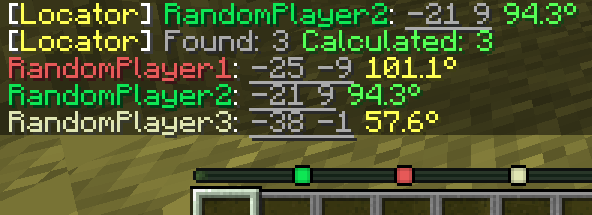
消息中的角标颜色表示计算质量。 绿色代表近乎完美的精度,黄色表示可接受但可能存在小误差,红色则表示精度较差。
如何躲避定位器
有几种方法可以躲避雷达扫描:潜行(Shift)、使用生物或另一名玩家的首级、雕刻南瓜,或者饮用隐身药水。
Locator Triangulation
A client-side Fabric mod that allows determining players' coordinates using triangulation.
The mod calculates coordinates using publicly available data accessible to regular vanilla players and acts solely as a calculator. If the vanilla locator is disabled on the server or a player has hidden from it, the mod will not be able to determine their coordinates. Essentially, all calculations performed by the mod can be done manually with a calculator and the vanilla client.
Quick start
The map is for example purposes only.
- Run
/locator_pos1- the mod will remember the locator's state, your current position and your view yaw. - Move away as far as possible so the angle to the target becomes as large as possible, then run
/locator_pos2. - Run:
/locator_locate <name>- attempt to compute the coordinates of player<name>, or/locator_locate_all- attempt to compute coordinates of all known targets.
/locator_pos1
/locator_pos2
/locator_locate RandomPlayer
The larger the angle between directions from the two points, the more accurate the coordinates.
For regular triangulation use the same commands but with the triangulation prefix.
Command description
Locator commands
/locator_data- print current locator state/locator_pos1- save the first position (locator state and your coordinates)/locator_pos2- save the second position (locator state and your coordinates)/locator_get_poses- print the saved positions/locator_clear_pos1- clear the first position/locator_clear_pos2- clear the second position/locator_clear_poses- clear both positions/locator_locate <name>- compute coordinates of player<name>(if both positions are saved)/locator_locate_all- compute coordinates for all known targets (if both positions are saved)
Regular triangulation commands
/triangulation_pos1- save the first position (your coordinates + yaw)/triangulation_pos2- save the second position (your coordinates + yaw)/triangulation_get_poses- print the saved positions/triangulation_clear_pos1- clear the first position/triangulation_clear_pos2- clear the second position/triangulation_clear_poses- clear both positions/triangulation_locate— compute the intersection coordinates of the view directions (if both positions are saved)
Keybinds
For convenience, keybinds have been added for locator and triangulation. The purpose is to simplify the process of setting points and calculating results.
How it works:
- The first press of the selected key will set the first point.
- Pressing the key with Shift will skip setting the second point.
- Pressing the key again will reset the first point.
- Pressing it again will set the second point.
- If both points are already set, pressing the key with Ctrl will return the calculated result for those two points.
Accuracy notes
Triangulation accuracy strongly depends on the angle between view directions from the two positions. Good results are achieved with an angle between directions from 20° to 150°. Near-perfect accuracy occurs at about 70-100°. If the angle is too small (less than 20°) or too large (150° and above), accuracy drops significantly.
For maximum accuracy, take positions so that the target is roughly at a right angle relative to you.
The corner color in the message indicates the calculation quality. Green means near-perfect accuracy, yellow is acceptable but may include a small error, and red indicates poor accuracy.
How to hide from the locator
There are several ways to hide from the radar: sneaking (Shift), a mob's or another player's head, a carved pumpkin, or an invisibility potion.
下载 Locator Triangulation
下载 Locator Triangulation
下载 Locator Triangulation
需要联机服务器吗?
稳定流畅、一键部署,几分钟即可和朋友联机开服
最低仅需 8 元/月 即可畅快联机
下载 Locator Triangulation
需要联机服务器吗?
稳定流畅、一键部署,几分钟即可和朋友联机开服
最低仅需 8 元/月 即可畅快联机
下载 Locator Triangulation
需要联机服务器吗?
稳定流畅、一键部署,几分钟即可和朋友联机开服
最低仅需 8 元/月 即可畅快联机
下载 Locator Triangulation
需要联机服务器吗?
稳定流畅、一键部署,几分钟即可和朋友联机开服
最低仅需 8 元/月 即可畅快联机
下载 Locator Triangulation
更新版本
关于这个资源的讨论、问题反馈与使用心得
还没有讨论,来发第一帖吧
你是这个资源的作者?登录后可认领此资源。
相似资源
 模组

显示你正在注视的方块的信息。(适用于 Minecraft 1.16+ 的 Hwyla/Waila 分支)
 模组
在游戏画面角落显示附近世界地形、玩家、生物和实体的地图。可创建路径点,帮助你找到标记过的位置。
 模组

查看物品与配方
 模组
使用 JavaScript 编辑配方、添加自定义物品、编写世界事件!
 模组
AE2:一款流行的自动化与存储模组
 模组
那是什么?一个 Waila/Hwyla 的分支。
评论 0
登录后参与评分
还没有评论,来抢沙发吧