基本信息
LOTR Info 是一款为 LOTR: Renewed Extended 制作的模组,它为拥有仇恨进度条的皮袋、木桶和武器添加了高度自定义的悬停提示框,并为 LOTR 昼夜循环提供了 HUD 显示以及关于路标(Waypoints)的额外信息。
Cloth Config API 是游戏内配置菜单所必需的依赖项。如果无法使用该依赖项,你可以使用自定义命令配置,或者编辑 .minecraft/config 文件夹中的 lotrinfo-client.toml 文件。如果你不使用图形界面,请阅读本说明中的配置部分,以便了解所有选项的含义。
如果你发现了本页底部“已知问题”列表中未提及的问题,请告诉我,我会尽力修复。你可以在我的 Google Doc 中提出建议或报告错误。
皮袋提示框
 你可以关闭或自定义彩色背景,并显示一些预设的传说文本行。
仇恨追踪器提示框

这些行始终按击杀数量排序,但你可以自定义它们的外观。
木桶提示框
 你可以禁用饮品的传说文本,或者要求按住 Shift 键(可重新绑定)来查看。
时间 HUD

剩余时间精确对应生物开始或停止生成的时刻,经我测试,在 48,000 tick 的周期中,这一时间段为 26,375-45,625 tick。
路标信息
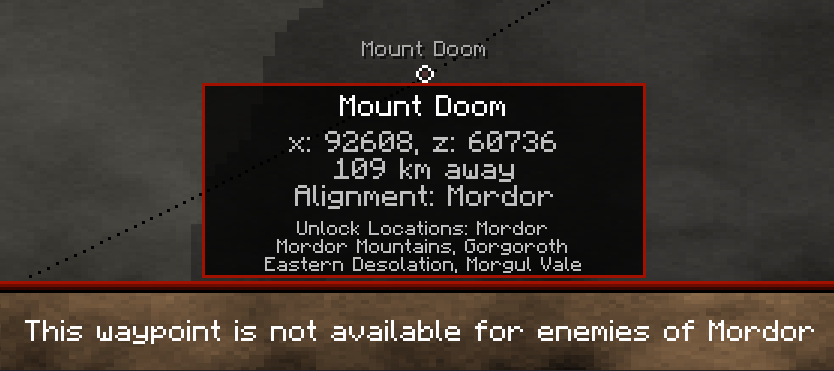
默认情况下,列出的解锁位置需要按住 Shift 键才能查看,但每一行都是可自定义的。(这些位置可以通过屏幕底部的文字与特定区域进行匹配,当鼠标悬停在上方时可见)
按键绑定
- 打开配置 GUI (默认:未绑定)
- 显示隐藏提示框 (默认:左 Shift)
- 切换 HUD (默认:Control + H)
- 切换模组 (默认:未绑定)
- 在皮袋内悬停 (默认:左 Control)
命令
你可以使用 /lotrinfo 或其简写 /li。配置文件目录被用作命令目录,因此你会看到每个配置标签页都作为一个参数出现,其后跟随特定的配置选项或子目录。
还有一些硬编码的选项,“all” 和 “reset”。All 会扁平化目录结构,使得在输入 /li all 后显示所有选项。Reset 允许你重置给定类别中的所有选项、每一个单独选项,或者来自此模组的按键绑定。
在设置配置选项的值时,还有两个其他可用选项:“help” 和 “reset”。Help 会在聊天栏发送一条消息,包含显示名称、描述、值类型和默认值。Reset 会将此特定设置重置为其默认值。
功能与配置
所有文本编辑均支持使用 格式化代码,因此 &e 表示黄色。
常规设置 general_settings
-
启用模组 - 切换模组的所有功能。enable_mod 默认值:true
-
百分比舍入 - 选择将百分比显示舍入到的数值,例如 0.1 表示舍入到十分位。percentage_rounding 默认值:0.01,范围:0.001-100
-
数值对齐 - 强制 HUD 上的对齐显示始终使用数字。numerical_alignment 默认值:true
皮袋提示框 pouch_display
-
启用皮袋提示框 - 切换皮袋提示框的显示。enable_pouch 默认值:true
-
皮袋提示框需按住按键 - 需要按下“显示隐藏提示框”的按键才能显示皮袋提示框。pouch_key_required 默认值:false
-
去除皮袋名称斜体 - 移除提示框中和热键栏上方皮袋名称的斜体样式。deitalicize_name 默认值:true
-
释放鼠标复位 - 将光标重置到你按下“在皮袋内悬停”按键之前的位置。mouse_reset 默认值:true
-
皮袋着色 - 根据皮袋颜色对背景槽位进行着色。pouch_coloring 默认值:true
-
默认背景颜色 - 如果关闭了皮袋着色或皮袋未染色,则使用的十六进制背景颜色 (#RRGGBB)。default_bg_color 默认值:"#FFFFFF"
传说文本隐藏选项
(第一个选项用于隐藏某一行,第二个选项用于在按住“显示隐藏提示框”按键时反转该隐藏效果。)
- 默认物品列表 - 切换 LOTR 提供的物品列表。
hide_item_list 默认值:true,invert_hide_item_list 默认值:false
- 已使用槽位 - 切换 LOTR 的已使用槽位计数器。
hide_slots_counter 默认值:true,invert_hide_slots 默认值:true
- 已染色 - 切换原版和 LOTR 的染色文本。
hide_dyed 默认值:true,invert_hide_dyed 默认值:true
- 拾取新物品 - 隐藏“拾取到新物品”文本。
hide_picked_up_new 默认值:true,invert_hide_picked_up 默认值:true
仇恨追踪器 bane_tracker
-
启用仇恨追踪器 - 切换仇恨追踪器的显示。enable_bane 默认值:true
-
仇恨追踪器需按住按键 - 需要按下“显示隐藏提示框”的按键才能查看木桶提示框。bane_key_required 默认值:true
-
显示在属性上方 - 将仇恨追踪器显示移动到属性修饰符部分的上方。bane_above_attributes 默认值:false
-
仇恨文本格式 - 仇恨追踪器显示的外观样式。bane_text_format 默认值:"&7%race% - %kills%/100"
分类特定变量:
- %race% - 需要获得克制效果的种族。
- %kills% - 对该种族的击杀数量。
时间 HUD time_hud
-
启用时间 HUD - 切换时间 HUD 的显示。enable_hud 默认值:true
-
显示格式 - 文本的外观样式。hud_format 默认值:"&e%h%:%m% %a% &7(%m_left%m %s_left%s left)"
-
文字阴影 - 切换 HUD 中文字的阴影效果。hud_shadow 默认值:true
-
文字背景 - 切换 HUD 中文字的背景。hud_background 默认值:false
-
背景颜色 - 文字背景的 ARGB (#AARRGGBB) 十六进制颜色。格式如下:透明度、红色、绿色和蓝色强度,使用从 0 到 F 的两位数,其中 A = 11,例如 #80FF0000 表示 50% 透明度和 100% 红色。hud_background_color 默认值:"#40000000"
-
文字大小 (%) - 时间 HUD 中文本的大小,50% 为原尺寸的一半,200% 为原尺寸的两倍。hud_scale 默认值:100 范围:1.0-1000.0
-
垂直位置 (%) - HUD 从其锚点向下出现在屏幕上的百分比位置。hud_y 默认值:1 范围:0.0-100.0
-
垂直锚点 - 在垂直位置的上方、中间或下方显示 HUD。(锚点顶部 = 在下方显示)hud_y_anchor 默认值:"TOP" 允许的值:TOP, MIDDLE, BOTTOM
-
水平位置 (%) - HUD 从其锚点从左向右出现在屏幕上的百分比位置。hud_x 默认值:0.5 范围:0.0-100.0
-
水平锚点 - 在水平位置的左侧、中心或右侧显示 HUD。(锚点左侧 = 在右侧显示)hud_x_anchor 默认值:"LEFT" 允许的值:LEFT, CENTER, RIGHT
分类特定变量:
-
%h% - 游戏内白昼循环的小时数。(12小时制)
-
%h24% - 游戏内白昼循环的小时数。(24小时制)
-
%m% - 游戏内白昼循环的分钟数。
-
%a% - 12小时制时钟的上午或下午。
-
%m_real% - 游戏 40 分钟白昼循环中的真实分钟数。
-
%s_real% - 游戏白昼循环中的真实秒数 % 60。(分钟后的余数)
-
%m_left% - 怪物开始/停止夜间刷新的剩余真实分钟数。
-
%s_left% - 怪物开始/停止夜间刷新的剩余真实秒数 % 60。
-
%dn% - 显示当前是“白天”还是“夜晚”用于剩余时间显示。
-
%!dn% - %dn% 的反转版本:白天 = 夜晚,夜晚 = 白天。
木桶工具提示 keg_tooltips
-
启用木桶工具提示 - 切换木桶工具提示的显示。enable_keg_info 默认值:true
-
按住按键以显示木桶工具提示 - 需要按下“显示隐藏工具提示”键绑定才能查看木桶工具提示。keg_key_required 默认值:false
-
显示饮品描述 - 在其它信息下方显示木桶中酿造饮品的描述(lore)。show_drink_lore 默认值:true
-
何时显示饮品描述 - 决定饮品描述何时可见,held 表示按住“显示隐藏工具提示”键绑定,finished 表示木桶酿造完成。lore_display_mode 默认值:"FINISHED_OR_HELD",允许的值:ALWAYS, IF_FINISHED, IF_HELD, FINISHED_OR_HELD, FINISHED_AND_HELD
-
隐藏 LOTR: Renewed Extended 的描述 - 隐藏 LOTR: Renewed Extended 现在默认显示的描述。hide_re_keg_lore 默认值:true
-
隐藏 LOTR:RE 的高级描述 - 当启用高级工具提示时,隐藏 LOTR: Renewed Extended 现在显示的额外描述。hide_re_adv_keg_lore 默认值:true
-
行编辑 - 未开始 - 配方尚未开始的木桶上显示的文本。not_started_lines 默认值:["&7%type%", "&7Not Started"]
-
行编辑 - 酿造中 - 正在酿造过程中的木桶上显示的文本。brewing_lines 默认值:["&7%type% - %potency%", "&7%percent%% %m%m %s%s Left", "&8%percent_max%% %m_max%m %s_max%s Max"]
-
行编辑 - 已完成 - 已完成酿造的木桶上显示的文本。finished_lines 默认值:["&7%type% - %potency%", "&7%count%/16 Remaining"]
分类特定变量:
-
%type% - 酿造饮品的名称,例如:"Athelas Brew"。
-
%potency% - 效力等级。(如果正在酿造,将显示当前正在酿造的效力等级,而不是已经达到的等级)
-
%count% - 剩余饮品的数量。
-
%percent% - 达到下一个效力等级的进度百分比。
-
%percent_max% - 达到最高效力等级的进度百分比。
-
%m% 距离下一个效力等级剩余的分钟数。
-
%s% 距离下一个效力等级剩余的秒数 % 60。(分钟后的余数)
-
%m_max% 距离最高效力等级剩余的分钟数。
-
%s_max% 距离最高效力等级剩余的秒数 % 60。
航标信息 waypoint_info
-
启用航标信息 - 切换自定义航标信息的显示。enable_waypoint_info 默认值:true
-
改进锁定航标信息 - 添加关于航标为何被锁定的额外信息 improve_locked_info 默认值:true
-
坐标可见性 - 决定何时在航标工具提示中显示坐标。
coords_visibility 默认值:"ALWAYS" 允许的值:ALWAYS, KEY_NOT_HELD, KEY_HELD, NEVER
-
距离可见性 - 决定何时在航标工具提示中显示距离。
distance_visibility 默认值:"ALWAYS" 允许的值:ALWAYS, KEY_NOT_HELD, KEY_HELD, NEVER
-
对齐可见性 - 决定何时在航标工具提示中显示对齐方式。
alignment_visibility 默认值:"ALWAYS" 允许的值:ALWAYS, KEY_NOT_HELD, KEY_HELD, NEVER
-
解锁位置可见性 - 决定何时在航标工具提示中显示解锁位置。
location_visibility 默认值:"KEY_HELD" 允许的值:ALWAYS, KEY_NOT_HELD, KEY_HELD, NEVER
-
描述可见性 - 确定在航点工具提示中何时显示描述。
description_visibility 默认值:"KEY_NOT_HELD" 允许的值:ALWAYS, KEY_NOT_HELD, KEY_HELD, NEVER
-
坐标顺序索引 - 从顶部开始,选择放置坐标的位置。 coords_order 默认值:1,范围:1-10
-
距离顺序索引 - 从顶部开始,选择放置距离的位置。 distance_order 默认值:2,范围:1-10
-
对齐方式顺序索引 - 从顶部开始,选择放置对齐方式的位置。 alignment_order 默认值:3,范围:1-10
-
解锁位置顺序索引 - 从顶部开始,选择放置解锁位置的位置。 location_order 默认值:5,范围:1-10
-
描述顺序索引 - 从顶部开始,选择放置描述的位置。 description_order 默认值:4,范围:1-10
已知问题
Basic Info
LOTR Info is a mod for LOTR: Renewed Extended that adds highly customizable hover tooltips to pouches, kegs, and weapons with bane progress along with a HUD for the LOTR daylight cycle and additional information on waypoints.
Cloth Config API Is required for the in-game config menu, if that’s not an option you can use the custom command config, or edit lotrinfo-client.toml in your .minecraft/config folder. If you’re not using the GUI you should read the config section of this description so you can understand all the options.
If you find an issue that isn't in "Known Issues" at the bottom of this page, let me know and I'll try to fix it. You can make suggestions or comment bugs in my Google Doc.
Pouch Tooltips
You can turn off or customize the colored background, and show some default lines of lore.
Bane Tracker Tooltips
The lines are always sorted by the number of kills, but you can customize how they will look.
Keg Tooltips
You can disable the drink’s lore, or require shift (rebindable)
Time HUD
Time left is exactly when mobs will start or stop spawning, which I tested to be 26,375-45,625 out of the 48,000 tick cycle.
Waypoint Info
By default, the listed unlock locations require holding Shift, but every line is customizable. (the locations can be matched with an area based on the text at the bottom of the screen when hovering over it)
Keybinds
- Open Config GUI (default: Not Bound)
- Show Hidden Tooltips (default: Left Shift)
- Toggle HUD (Default: Control + H)
- Toggle Mod (Default: Not Bound)
- Hover Inside Pouches (default: Left Control)
Commands
You can use /lotrinfo, or /li for short. The config file directory is used as the command directory, so you'll see each config tab show up as an argument, with specific config options or subdirectories after.
There are also hard coded options, "all" and "reset". All flattens the directory so that every option will show up after /li all. Reset allows you to reset all the options in a given category, every single option, or the keybinds from this mod.
When setting the value of a config option, there are always two other options, "help", and "reset". Help will send a message in chat with the display name, description, value type, and default value. Reset will reset this specific setting to it's default value.
Features and Configuration
All text editing allows the use of formatting codes, so &e is yellow.
General Settings general_settings
-
Enable Mod - Toggles all mod functionality. enable_mod default:true
-
Percentage Rounding - Choose what number to round the percentage displays to, for example 0.1 rounds to tenths. percentage_rounding default:0.01, range:0.001-100
-
Numerical Alignment - Forces the alignment display on the HUD to always use numbers. numerical_alignment default:true
Pouch Tooltips pouch_display
-
Enable Pouch Tooltips - Toggles the pouch tooltips display. enable_pouch default:true
-
Hold Key for Pouch Tooltips - Requires the "Show Hidden Tooltips" keybind to be pressed for the pouch tooltips display. pouch_key_required default:false
-
Deitalicize Pouch Names - Removes the italic styling on pouch names in tooltips and above the hotbar. deitalicize_name default:true
-
Return Mouse on Release - Resets the cursor to where it was before you pressed the "Hover Items in Pouch" key. mouse_reset default:true
-
Pouch Coloring - Color background slots based on pouch color. pouch_coloring default:true
-
Default Background Color - Hex color for the background if Pouch Coloring is off or pouch isn't dyed (#RRGGBB). default_bg_color default:"#FFFFFF"
Lore Hiding Options
(First option is to hide a line, second is to invert that when the "Show Hidden Tooltips" key is held.)
- Default Item List - Toggle the LOTR Provided item list.
hide_item_list default:true, invert_hide_item_list default:false
- Slots In Use - Toggle the slots in use counter from LOTR.
hide_slots_counter default:true, invert_hide_slots default:true
- Dyed - Toggle the dyed text from vanilla and LOTR.
hide_dyed default:true, invert_hide_dyed default:true
- Picked Up New Items - Hide "Picked up new items" text.
hide_picked_up_new default:true, invert_hide_picked_up default:true
Bane Tracker bane_tracker
-
Enable Bane Tracker - Toggles the bane tracker display. enable_bane default:true
-
Hold key for Bane Tracker - Requires the "Show Hidden Tooltips" keybind to be pressed to see the keg tooltips. bane_key_required default:true
-
Show Above Attributes - Move the bane tracker display above the attribute modifier section. bane_above_attributes default:false
-
Bane Text Format - How the bane tracker display will look. bane_text_format default:"&7%race% - %kills%/100"
Category Specific Variables:
-
%race% - The race to get bane against.
-
%kills% - The number of kills on that race.
Time HUD time_hud
-
Enable Time HUD - Toggles the time hud display. enable_hud default:true
-
Display Format - How the text will look. hud_format default:"&e%h%:%m% %a% &7(%m_left%m %s_left%s left)"
-
Text Shadow - Toggles text shadows in the HUD. hud_shadow default:true
-
Text Background - Toggles the text background of the HUD. hud_background default:false
-
Background Color - The color of the text background in ARGB (#AARRGGBB) Hex format. The format goes like this: alpha (transparency), red, green, and blue intensity, with two digit numbers from 0 to F where A = 11, #80FF0000 would be 50% transparency with 100% red. hud_background_color default:"#40000000"
-
Text Size (%) - The size of the text in the time hud, 50% would be half the size and 200% would be double. hud_scale default:100 range:1.0-1000.0
-
Vertical Position (%) - The percent of the way down your screen the hud will appear from the HUD's anchor point. hud_y default:1 range:0.0-100.0
-
Vertical Anchor - Display the HUD above, in the middle, or below the vertical position. (anchor top = display below) hud_y_anchor default:"TOP" allowed values:TOP, MIDDLE, BOTTOM
-
Horizontal Position (%) - The percent of the way across your screen from the left that the hud will appear from the HUD's anchor point. hud_x default:0.5 range:0.0-100.0
-
Horizontal Anchor - Display the HUD to the left, center, or right of the horizontal position. (anchor left = display right) hud_x_anchor default:"LEFT" allowed values:LEFT, CENTER, RIGHT
Category Specific Variables:
-
%h% - The in game daylight cycle's hours. (12-hour)
-
%h24% - The in game daylight cycle's hours. (24-hour)
-
%m% - The in game daylight cycle's minutes.
-
%a% - AM or PM for the 12 hour clock.
-
%m_real% - The amount of real minutes into the game's 40 minute daylight cycle.
-
%s_real% - The amount of real seconds into the game's daylight cycle % 60. (remainder after minutes)
-
%m_left% - The amount of real minutes until mobs will start/stop spawning for the night.
-
%s_left% - The amount of real seconds until mobs will start/stop spawning for the night % 60.
-
%dn% - says if it's currently "Day" or "Night" for the time left display.
-
%!dn% - inverted version of %dn% Day = Night, Night = Day.
Keg Tooltips keg_tooltips
-
Enable Keg Tooltips - Toggles the keg tooltips display. enable_keg_info default:true
-
Hold key for Keg Tooltips - requires the "Show Hidden Tooltips" keybind to be pressed to see the keg tooltips. keg_key_required default:false
-
Show Drink Lore - Shows the lore of the drink brewed inside the keg below the other info. show_drink_lore default:true
-
When to Show Drink Lore - Determines when the Drink Lore is visible, held means the "Show Hidden Tooltips" keybind is down, finished means the keg is done brewing. lore_display_mode default:"FINISHED_OR_HELD", allowed values:ALWAYS, IF_FINISHED, IF_HELD, FINISHED_OR_HELD, FINISHED_AND_HELD
-
Hide LOTR: Renewed Extended's Lore - Hides the lore LOTR: Renewed Extended now displays by default. hide_re_keg_lore default:true
-
Hide LOTR:RE's Advanced Lore - Hides the extra lore LOTR: Renewed Extended now displays when advanced tooltips is enabled. hide_re_adv_keg_lore default:true
-
Line Editing - Not Started - Text that will display on kegs with a recipe that haven't started. not_started_lines default:["&7%type%", "&7Not Started"]
-
Line Editing - Brewing - Text that will display on kegs that were in the middle of brewing. brewing_lines default:["&7%type% - %potency%", "&7%percent%% %m%m %s%s Left", "&8%percent_max%% %m_max%m %s_max%s Max"]
-
Line Editing - Finished - Text that will display on kegs that have finished brewing. finished_lines default:["&7%type% - %potency%", "&7%count%/16 Remaining"]
Category Specific Variables:
-
%type% - The name of the brewed drink, ex: "Athelas Brew".
-
%potency% - The Potency level. (if it's currently breing it'll show the potency level that it's brewing, not the one it already achieved)
-
%count% - The number of remaining drinks.
-
%percent% - The percentage progress towards the next potency tier.
-
%percent_max% - The percentage progress towards the maximum potency tier.
-
%m% The number of minutes left until the next potency tier.
-
%s% The number of seconds left until the next potency tier % 60. (remainder after minutes)
-
%m_max% The number of minutes left until the maximum potency tier.
-
%s_max% The number of seconds left until the maximum potency tier % 60.
Waypoint Info waypoint_info
-
Enable Waypoint Info - Toggles the custom waypoint info display. enable_waypoint_info default:true
-
Improve Locked Waypoint Info - Adds extra information on why a waypoint is locked improve_locked_info default:true
-
Coordinates Visibility - Determines when to show the coordinates in the waypoint tooltips.
coords_visibility default:"ALWAYS" allowed values:ALWAYS, KEY_NOT_HELD, KEY_HELD, NEVER
-
Distance Visibility - Determines when to show the distance in the waypoint tooltips.
distance_visibility default:"ALWAYS" allowed values:ALWAYS, KEY_NOT_HELD, KEY_HELD, NEVER
-
Alignment Visibility - Determines when to show the alignment in the waypoint tooltips.
alignment_visibility default:"ALWAYS" allowed values:ALWAYS, KEY_NOT_HELD, KEY_HELD, NEVER
-
Unlock Location Visibility - Determines when to show the unlock location(s) in the waypoint tooltips.
location_visibility default:"KEY_HELD" allowed values:ALWAYS, KEY_NOT_HELD, KEY_HELD, NEVER
-
Description Visibility - Determines when to show the description in the waypoint tooltips.
description_visibility default:"KEY_NOT_HELD" allowed values:ALWAYS, KEY_NOT_HELD, KEY_HELD, NEVER
-
Coordinates Order Index - Starting from the top, choose where to place the Coordinates. coords_order default:1, range:1-10
-
Distance Order Index - Starting from the top, choose where to place the Distance. distance_order default:2, range:1-10
-
Alignment Order Index - Starting from the top, choose where to place the Alignment. alignment_order default:3, range:1-10
-
Unlock Location Order Index - Starting from the top, choose where to place the Unlock Location. location_order default:5, range:1-10
-
Description Order Index - Starting from the top, choose where to place the Description. description_order default:4, range:1-10
Known Issues
-
Tooltips of variables on the config screen render behind the scrollbar.
-
Config word wrap doesn't preserve § color code formatting.
-
LOTR tooltips have a word wrap function which can the pouch tooltips on high GUI scale to resolution ratios.


 模组

 模组
 模组

 模组
 模组
 模组
评论 0
登录后参与评分
还没有评论,来抢沙发吧