
 Mapart Helper
如果遇到任何错误或体验不佳的地方,请在 Issues 页面报告——你的反馈将提供巨大帮助
Mapart Helper 旨在让处理地图艺术(maparts)变得尽可能便捷和愉快。
该模组直接从客户端生成方块调色板,为你提供每种特定颜色可用的完整方块列表。模组内置了一些默认过滤器以排除大多数不合适或有问题的方块,但可以在配置界面中进行自定义设置。
它还包含其他与地图相关的功能,例如将世界中的地图保存为 PNG 文件,或在地图区域的西北角位置显示光束。
支持的版本
| 版本 | 状态 |
|---|---|
| 1.21.8 | ✔️ 活跃 |
⚠️ 最后一个版本 0.12.0 |
|
| 1.21.11 | ✔️ 活跃 |
| 26.1 | ✔️ 活跃 |
| 26.2 | ✔️ 活跃 |
| 1.21.4-5 | ✔️ 移植版* 0.13.1 |
*移植版不会获得每一次更新。它们仅会在某些主要版本(延迟更新)和关键修复时进行更新。
使用方法:
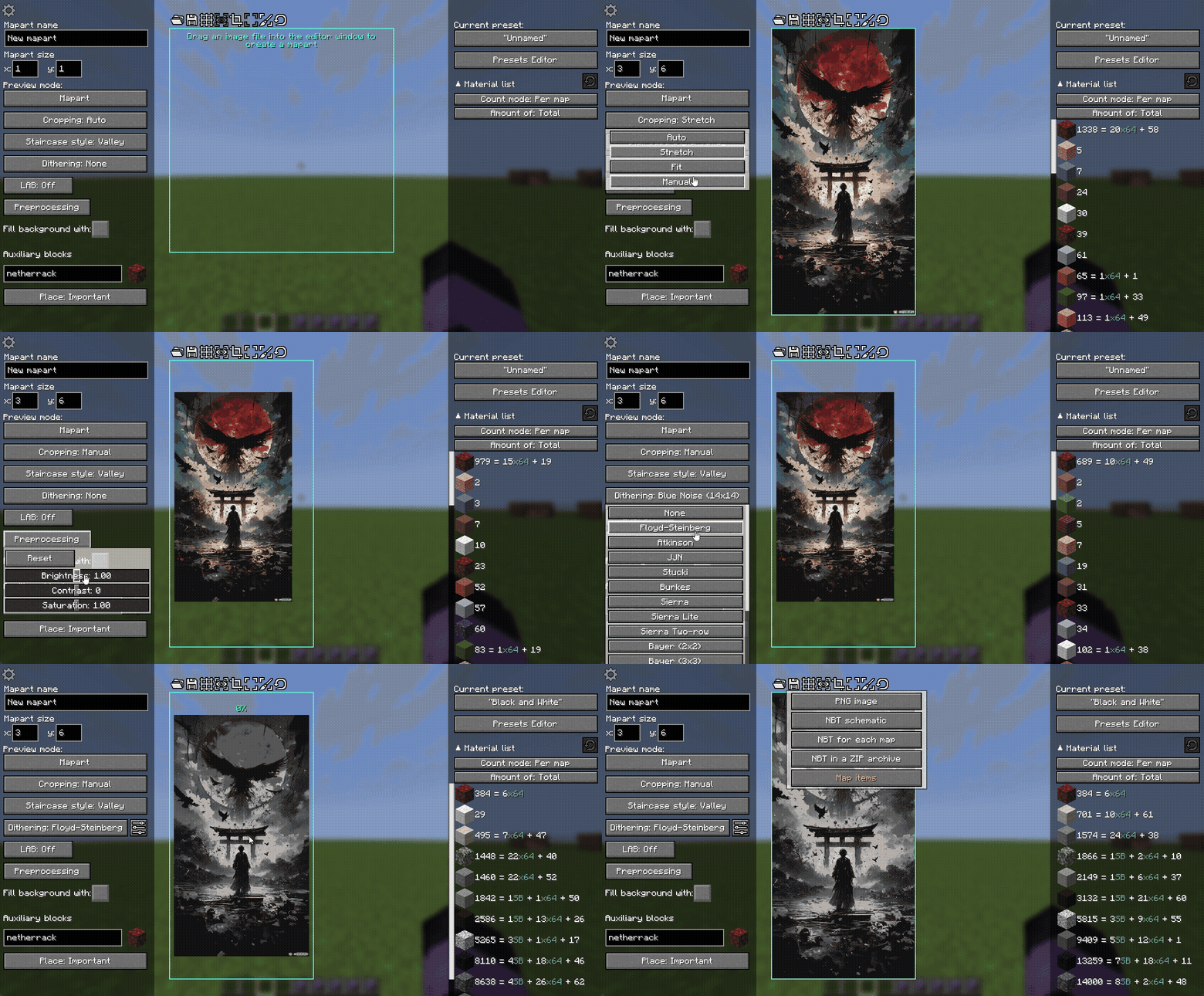
创建地图艺术(Mapart):
- 启动安装了该模组的游戏
- 加入一个世界或服务器
- 按
Y键打开 Mapart 编辑器 界面 (此按键可在“杂项”键位绑定设置中更改) - 使用用户友好的图形界面创建酷炫的地图艺术
- 将你的地图艺术保存为 NBT 文件
- 使用其他工具(如 Litematica)在世界中构建或放置你的 NBT 文件
- 在正确放置蓝图并建造完成后,你可以使用地图物品获取图像
(如果你尚未尝试过制作地图艺术,我强烈建议观看一些关于地图艺术的视频指南)
编辑地图艺术图像:
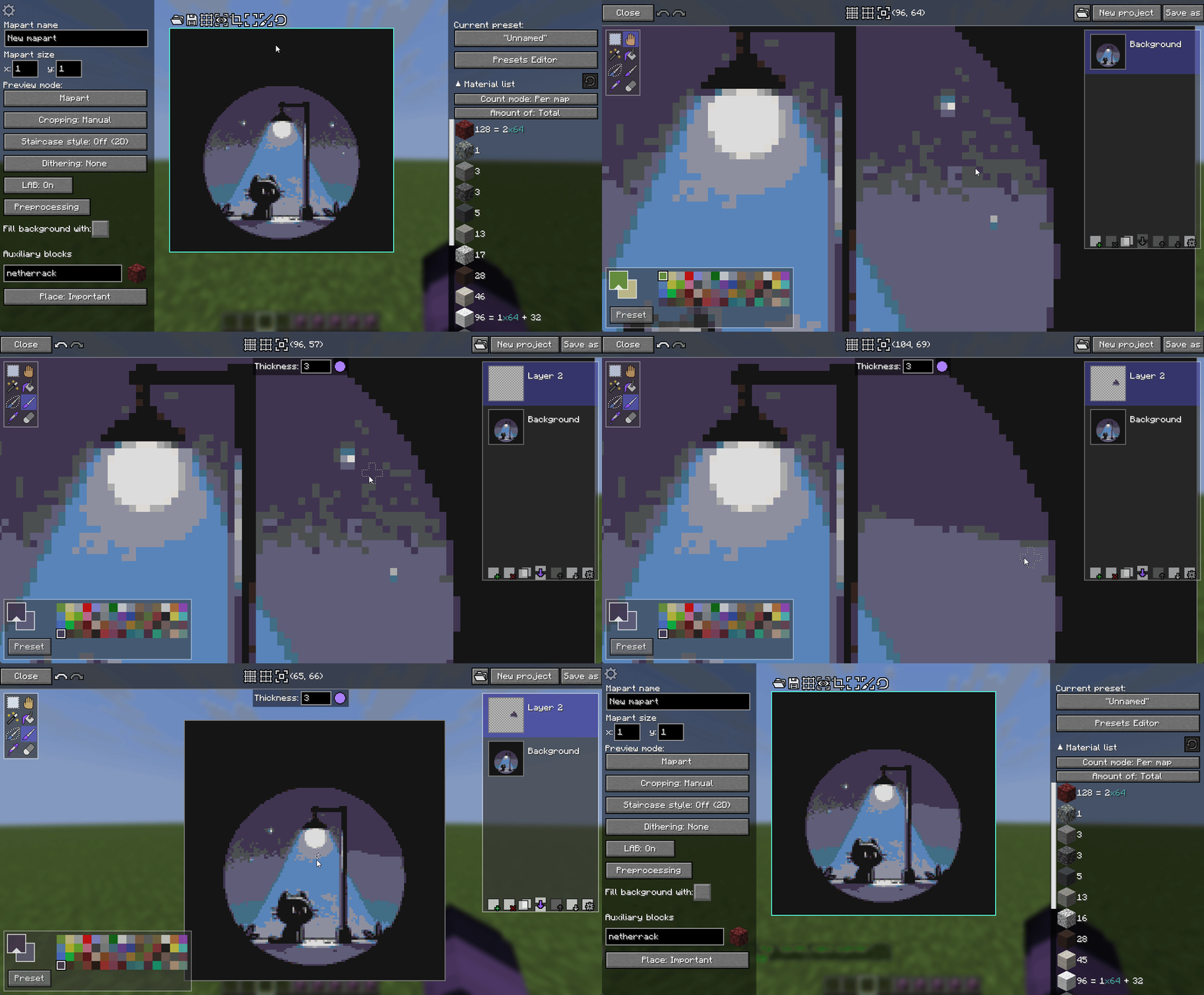
完成图像预处理后,图像可能仍存在一些瑕疵。 解决这些问题的最佳方法是使用任何图像编辑器。 Mapart Helper 提供了一个这样的编辑器——Mapart Painter。你可以从 Mapart 编辑器界面打开它。
Mapart Painter 是一个简单的图像编辑器,用于编辑你的图像或绘制全新的图像。它拥有相当直观的用户界面,且没有过于复杂的功能。
使用调色板预设:
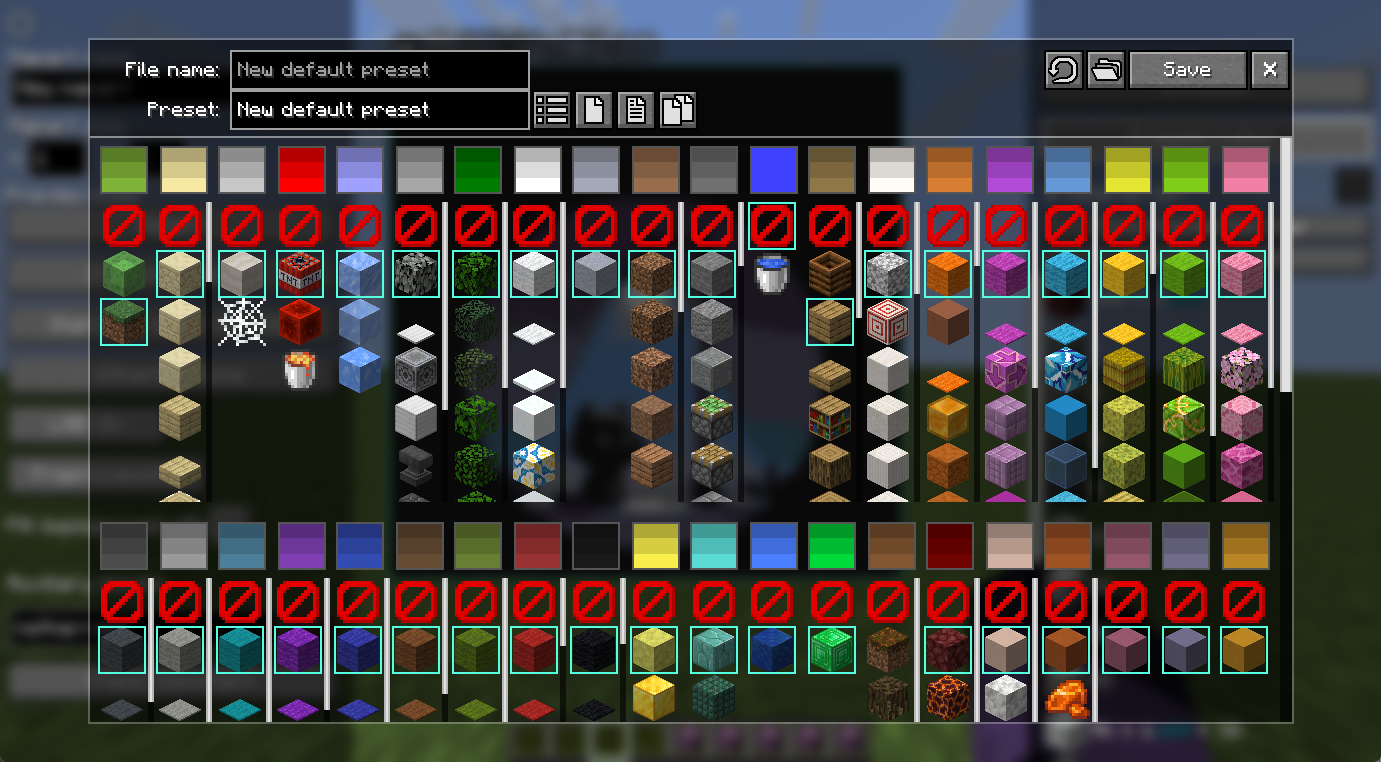
调色板预设允许你快速切换用于创建地图艺术的不同方块和颜色组合。
你可以在 预设编辑器 界面中管理这些预设,该界面可从地图艺术编辑器界面访问。
每个预设都存储为一个独立的 .json 文件,并且非常易于传输:只需将新的预设文件添加到 presets 文件夹,然后在游戏中更新预设列表即可。你可以在预设编辑器界面中找到“打开预设文件夹”和“从文件更新预设列表”选项。
将世界中的地图保存为 PNG:
Mapart Helper 提供了 /mart save 命令,可以从以下来源保存图片:
- 你手中拿着的地图;
- 你正在查看的物品框架中的地图;
- 一个地图区域,用于将多张地图合并为一张图片。
使用后,聊天栏会出现一条可点击的消息,同时图片会被保存到 saved_maps 文件夹中。
命令
以下命令可以在任何地方使用,包括服务器:
/mart— 在聊天栏中显示命令列表/mart save frame [文件名]— 将你正在查看的地图图像保存到saved_maps文件夹/mart save hand [文件名]— 将你正在查看的地图图像保存到saved_maps文件夹/mart save selection [文件名]— 将选区内的图像保存到saved_maps文件夹/mart beams— 切换显示地图区域西北角的射线/mart palette regenerate— 重新生成方块调色板/mart palette update— 从配置文件中更新调色板和预设
还有一些仅限单人模式的杂项命令,用于处理一些特殊情况:
/mart-creative palette give-map-palette— 给予你包含所有可用地图颜色的调色板地图/mart-creative palette place <height>— 从当前地图区域的起始坐标开始,在指定的 Y 坐标处,将生成区块调色板中的所有方块放置到世界中
模组的官方下载链接
联系方式
- GitHub:
- Discord: 服务器
Rebane's MapartCraft
作为一名在生存模式下制作地图艺术的玩家,我一直使用这个优秀的网站来实现这一目的。 因此,当然,这个模组的主要灵感来源于 MapartCraft。 作为一名新手模组开发者,我决定创建一个类似的工具,但直接集成到游戏中。
Mapart Helper 是一个替代品,它提供了用于相同目的的内置 GUI,具有一些差异和自身的特点。
MapartCraft 与 Mapart Helper 使用不同的编程语言、算法和逻辑。因此,结果可能且将会不同。如果你打算对同一幅地图艺术作品同时使用这两款工具,请务必注意这一点。
Mapart Helper
If you run into any bugs or rough edges, please report them on the Issues page — your feedback will be a huge help
Mapart Helper aims to make working with maparts as convenient and enjoyable as possible.
The mod generates blocks palette directly from the client, giving you a complete list of blocks available for each specific color. The mod has some default filters to exclude most of the unsuitable or problematic blocks, but it can be configured in the config screen.
It also includes other map-related features, such as saving maps from the world as PNG files or displaying beams at the north-western positions of map areas.
Supported versions
| Version | Status |
|---|---|
| 1.21.8 | ✔️ Active |
⚠️ Last version 0.12.0 |
|
| 1.21.11 | ✔️ Active |
| 26.1 | ✔️ Active |
| 26.2 | ✔️ Active |
| 1.21.4-5 | ✔️ Backport* 0.13.1 |
*Backport versions won't be getting every new update. They will be updated only for some major versions (with a delay) and critical fixes
How to:
Create a Mapart:
- Launch the game with the mod installed
- Join a world or server
- Open the Mapart editor screen with the
Ykey (this can be changed in the "Miscellaneous" key binds settings) - Use the user-friendly GUI to create some cool maparts
- Save your mapart as NBT file(s)
- Use other tools (such as Litematica) to build or place your NBT in the world
- After you correctly placed the schematic and built it, you can use map item to get the image
(If you haven't built maparts yet, I strongly recommend to watch some video guides about maparts)
Edit Mapart image:
After you completed image preprocessing, the image can still have some dirty places. The best solution to fix them is to use any image editor. And Mapart Helper provides such an editor - Mapart Painter. You can open it from the Mapart Editor screen.
Mapart Painter is a simple image editor to edit your image or to paint a completely new one. It has a fairly intuitive user interface and doesn't have too complicated features.
Use palette presets:
Palette presets let you quickly switch between different sets of blocks and colors used to create a mapart. You can manage them in the Presets Editor screen, accessible from the Mapart Editor screen.
Each preset is stored as a separate .json file, and they are very easy to transfer: just add a new preset file into
presets folder and update presets in the game. You can find "Open presets folder" and "Update presets list from files"
in the Presets Editor screen.
Save maps from the world as PNG:
Mapart Helper provides /mart save commands to save an image from:
- a map you are holding;
- a map from the item frame you are looking at;
- a map area to combine multiple maps into one image.
After you use it, you will get a clickable message in the chat, and the image will be saved to the saved_maps folder.
Commands
The following commands can be used everywhere, including servers:
/mart— Shows a list of commands in the chat/mart save frame [filename]— Saves the map's image you are looking at to thesaved_mapsfolder/mart save hand [filename]— Saves the map's image you are looking at to thesaved_mapsfolder/mart save selection [filename]— Saves the image from the selection area to thesaved_mapsfolder/mart beams— Toggles displaying the beams at the map areas' north-western points/mart palette regenerate— Regenerates blocks palette/mart palette update— Updates palette and presets from config files
There are also a few miscellaneous singleplayer-only commands for some unique cases:
/mart-creative palette give-map-palette— Gives you the map with every available map color/mart-creative palette place <height>— Places all blocks from the generated blocks palette into the world from the current map area's starting coordinates and at the given y-coordinate
Official links to download the mod
Contacts
- GitHub:
- Discord: Server
Rebane's MapartCraft
As someone who builds maparts in survival, I have always used this great website for that purpose. So, of course, the main idea for this mod was inspired by MapartCraft. As a novice modder, I decided to create a similar tool, but integrated directly into the game.
Mapart Helper is an alternative that provides in-game GUI for the same purposes, with some differences and its own features.
MapartCraft and Mapart Helper use different programming languages, algorithms, and logic. For this reason, the results may and will differ. Please keep this in mind if you want to use both tools for the same mapart.

下载 Mapart Helper
下载 Mapart Helper
下载 Mapart Helper
下载 Mapart Helper
下载 Mapart Helper
下载 Mapart Helper
下载 Mapart Helper
下载 Mapart Helper
下载 Mapart Helper
下载 Mapart Helper
更新与新功能
- 更新至 26.3
修复与细微更改
- 修复了在未启用颜色适配的情况下创建 Mapart Painter 项目的问题;
- 将保存到 saved_path 文件夹时的绝对路径替换为单个目录名;
关于这个资源的讨论、问题反馈与使用心得
还没有讨论,来发第一帖吧
你是这个资源的作者?登录后可认领此资源。
相似资源
 模组

显示你正在注视的方块的信息。(适用于 Minecraft 1.16+ 的 Hwyla/Waila 分支)
 模组
在游戏画面角落显示附近世界地形、玩家、生物和实体的地图。可创建路径点,帮助你找到标记过的位置。
 模组
使用 JavaScript 编辑配方、添加自定义物品、编写世界事件!
 模组

查看物品与配方
 模组
AE2:一款流行的自动化与存储模组
 模组
那是什么?一个 Waila/Hwyla 的分支。
评论 0
登录后参与评分
还没有评论,来抢沙发吧