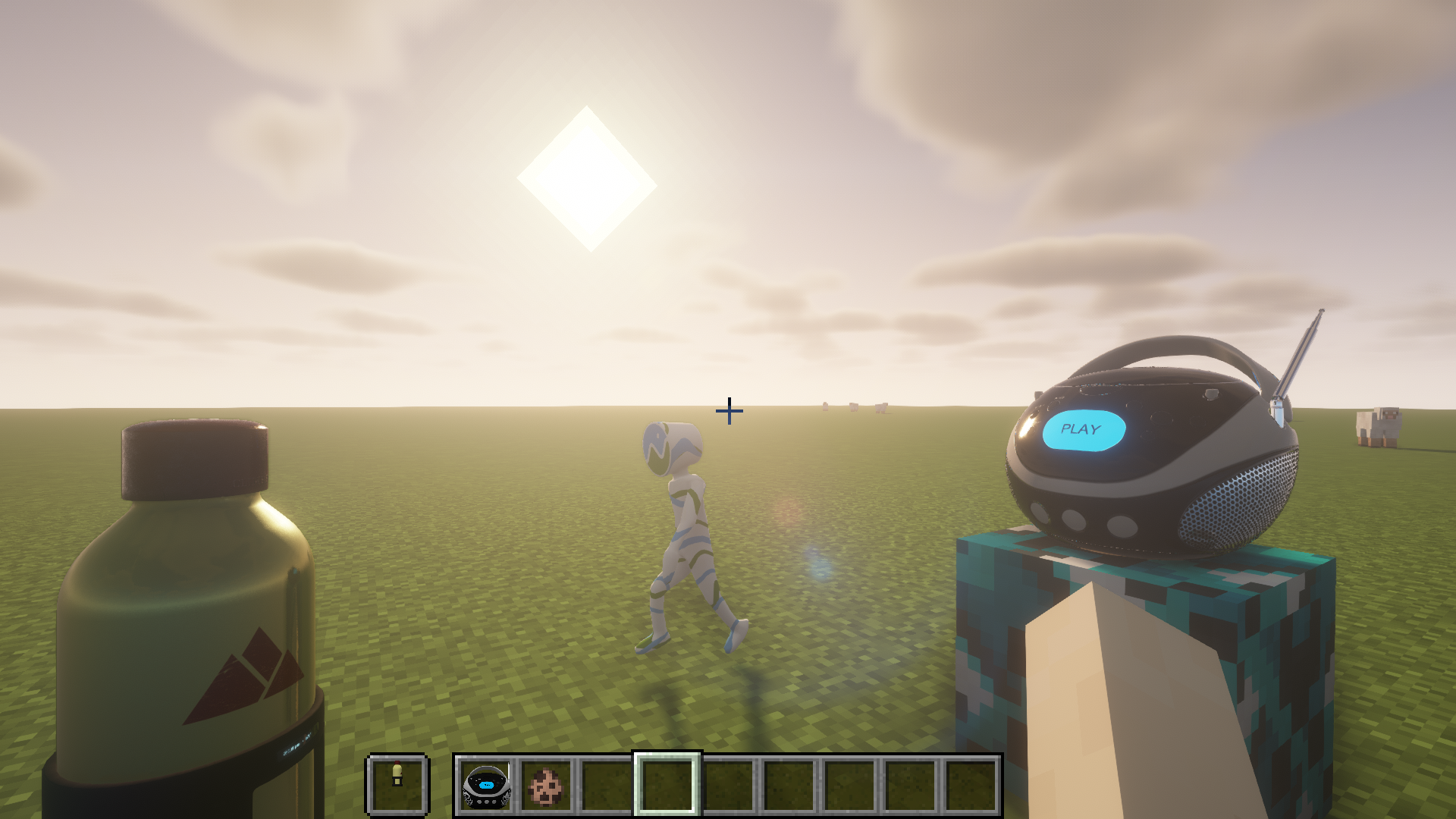
MCglTF 是一个 3D 模型加载库,用于加载 glTF 格式文件并为 Minecraft 模组开发环境准备渲染所需的各项技术。
它支持 glTF 规范中的多种特性,同时保持了良好的兼容性和性能。
用法
渲染方块、物品和实体的示例代码:
特性
- ✅ GLTF 格式(嵌入资源或通过 ResourceLocation 引用)
- ✅ GLB 格式
- ✅ UV 坐标
- ✅ 法线
- ✅ 切线
- ✅ 顶点颜色
- ✅ 材质(需要 OptiFine 或 Iris Shaders 以及支持 PBR 和法线贴图的光影包)
- ✅ 纹理
- ❎ 多重纹理坐标(出于与原版兼容性的考虑)
- ✅ 骨骼系统
- ✅ 动画(支持多组)
- ✅ 形变目标
- ✅ 零缩放节点剔除 ()
常见问题
Q. 为什么我的模型的纹理没有显示出来?
A. 你需要在 "materials" 的 "extras" 中定义材质以链接你的纹理。更多详情请访问 wiki 页面。
Q. 为什么两个动画无法在同一节点上同时控制平移/旋转/缩放/权重,导致其中一个动画无法播放?
A. glTF 规范中没有定义动画混合技术,因此由 GltfAnimationCreator 创建的动画也不支持动画混合。你需要根据你的场景创建自定义的动画处理器。
Q. 如何对我的模型应用自定义处理,例如自定义材质(如应用玩家皮肤)或为指定节点创建特殊的 OpenGL 命令?
A. 对于更高级的生成 glTF 模型 OpenGL 命令的方式,你可以在你的 IGltfModelReceiver 中重写 isReceiveSharedModel(GltfModel, GltfRenderDatas) 方法并返回 false。这将允许你基于提供的 GltfModel 创建自定义的 RenderedGltfModel。(注意:记得将你的 OpenGL 对象如 VBO、VAO、Texture 等添加到 GltfRenderDatas 中,以便在刷新资源时进行删除。)
致谢
- JglTF by javagl:
- Mikk Tangent Generator by jMonkeyEngine:
MCglTF is a 3D model loader library which load glTF format file and prepare the required techniques to render the model for Minecraft Modding enviroment.
Various features from glTF spec are available, but still remain a good compatibility and performance.
Usages
The example codes for rendering Block, Item, and Entity
Features
- ✅ GLTF format (Embedded resources or via ResourceLocation)
- ✅ GLB format
- ✅ UVs
- ✅ Normals
- ✅ Tangents
- ✅ Vertex colors
- ✅ Materials (Require OptiFine or Iris Shaders and supported ShaderPack for PBR and Normal map)
- ✅ Textures
- ❎ Mutiple texture coordinates (For compatibility reason with Vanilla)
- ✅ Rig
- ✅ Animations (multiple)
- ✅ Morph targets
- ✅ Zero-scale node culling ()
Frequently Asked Question
Q. Why my texture for my model does not show up?
A. You need to defined material inside "extras" of "materials" to link your texture. For more details please visit wiki page.
Q. Why two animations cannot control translation/rotation/scale/weight in same node at the same time and cause one of the animation not playing?
A. There is no animation blending technique defined in glTF specification, so the animations created by GltfAnimationCreator does not support animation blending too. You need to create your own animation processor based on your scenario.
Q. How to apply my custom processing to the model like custom material(e.g. apply player skin) or create special OpenGL commands for specified node?
A. For more advanced way to generate OpenGL commands for glTF model, you can override and return false to isReceiveSharedModel(GltfModel, GltfRenderDatas) in your IGltfModelReceiver. This allow you to create your custom RenderedGltfModel based on supplied GltfModel. (Beware to add your OpenGL objects like VBO, VAO, Texture, etc to GltfRenderDatas for deletion during refresh resource.)
Credit
- JglTF by javagl:
- Mikk Tangent Generator by jMonkeyEngine:

 模组

 模组

 模组
 模组

 模组
 模组
评论 0
登录后参与评分
还没有评论,来抢沙发吧