
MCLLM
如果你喜欢这个项目,请考虑在 GitHub 上给它一个 ⭐!
这是 MCChatGPT 的一个分支。
与原版不同,基础 URI 不再硬编码——你现在可以通过文件进行配置,使其兼容几乎所有 LLM 服务,而不仅仅是 OpenAI。
使用方法
-
下载与你的 Minecraft 版本兼容的 JAR 文件,来源为 Modrinth 或 GitHub,并将其放入
mods文件夹中。
(确保已安装相应的模组加载器。) -
下载所需的依赖项,同样放置于
mods文件夹中。
(它们通常列在 Modrinth 页面上。)- 支持的平台:Fabric (>= 1.20.1)、Forge (1.19.4–1.20.1) 以及 NeoForge (>= 1.21.1)
-
启动游戏一次以生成配置文件。
-
打开
config/mcllm.json并编辑以下字段:baseurl: 将其设置为你首选的 LLM 服务的端点,例如https://api.deepseek.com/v1model: 指定模型名称,例如deepseek-chat
-
重新启动游戏,然后运行:
/mcllm-auth YourToken
这将安全地存储你的令牌(它将在配置文件中被加密)。 -
使用
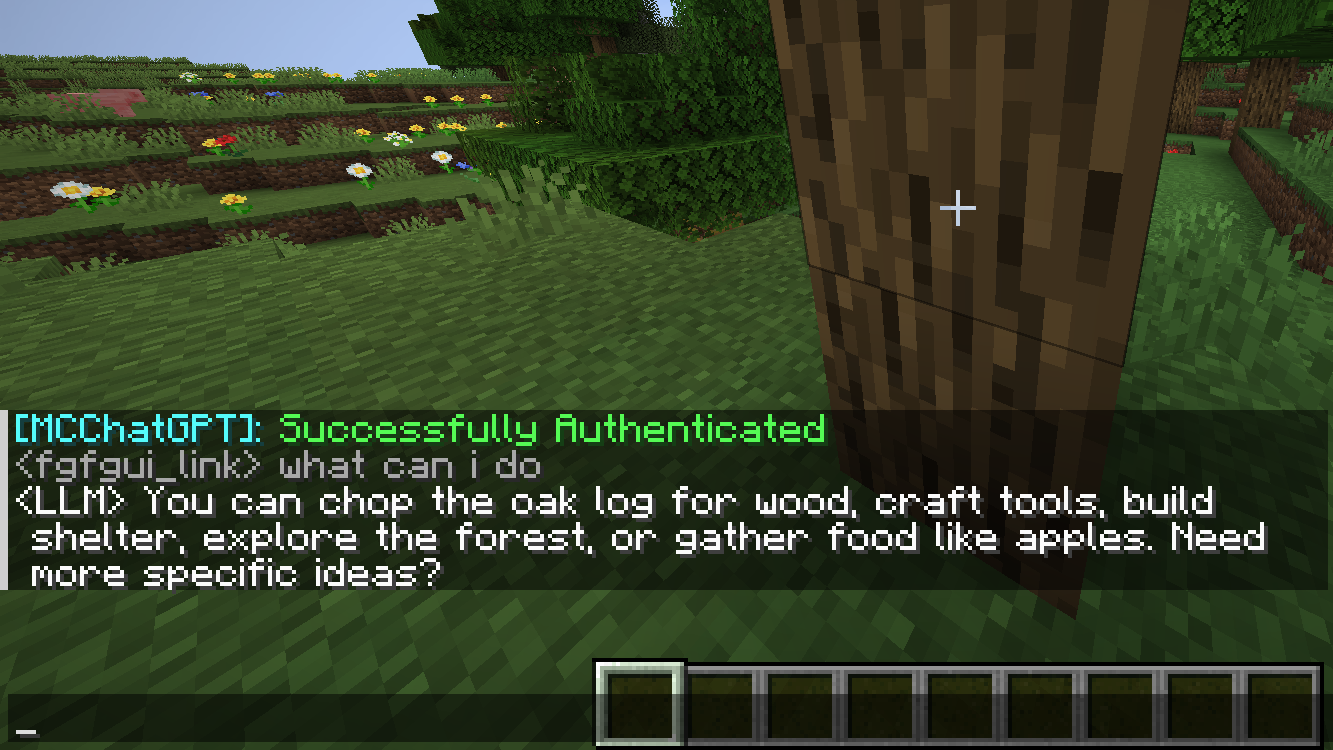
/ask YourQuestion向 LLM 发送消息。
LLM 的回复将出现在你的本地聊天中——只有你可见。
MCLLM
If you like this project, please consider giving it a ⭐ on GitHub!
This is a fork of MCChatGPT.
Unlike the original, the base URI is no longer hardcoded—you can now configure it via a file, making it compatible with nearly any LLM service, not just OpenAI.
How to Use
-
Download the JAR file compatible with your Minecraft version from Modrinth or GitHub, and place it in your
modsfolder.
(Make sure the appropriate mod loader is installed.) -
Download the required dependencies from the same source and also place them in the
modsfolder.
(They are usually listed on the Modrinth.)- Supported platforms: Fabric (>= 1.20.1), Forge (1.19.4–1.20.1), and NeoForge (>= 1.21.1)
-
Launch the game once to generate the configuration file.
-
Open
config/mcllm.jsonand edit the following fields:baseurl: Set this to the endpoint of your preferred LLM service, e.g.https://api.deepseek.com/v1model: Specify the model name, e.g.deepseek-chat
-
Re-launch the game, then run:
/mcllm-auth YourToken
This securely stores your token (it will be encrypted in the config file). -
Use
/ask YourQuestionto send a message to the LLM.
The LLM’s reply will appear in your local chat—only you can see it.

下载 MCLLM
下载 MCLLM
下载 MCLLM
下载 MCLLM
下载 MCLLM
下载 MCLLM
下载 MCLLM
下载 MCLLM
下载 MCLLM
下载 MCLLM
暂无更新日志
关于这个资源的讨论、问题反馈与使用心得
还没有讨论,来发第一帖吧
你是这个资源的作者?登录后可认领此资源。
相似资源
 模组

显示你正在注视的方块的信息。(适用于 Minecraft 1.16+ 的 Hwyla/Waila 分支)
 模组
使用 JavaScript 编辑配方、添加自定义物品、编写世界事件!
 模组

查看物品与配方
 模组
在游戏画面角落显示附近世界地形、玩家、生物和实体的地图。可创建路径点,帮助你找到标记过的位置。
 模组
AE2:一款流行的自动化与存储模组
 模组
添加区块认领和玩家组队功能,并与 Xaero's Minimap 和 World Map 集成
评论 0
登录后参与评分
还没有评论,来抢沙发吧