Sudo
该模组为游戏添加了若干常用的 Linux 命令,包括 sudo、echo、cat 和 export。
还引入了一些 Linux 机制,例如 home 文件夹和 .bashrc 文件。
使用说明
参数
部分命令支持参数,可使用 _ 加上参数进行调用。
变量
部分命令也支持使用变量。变量的格式为 ${变量名}。有关如何设置变量,请参阅 export。
动态变量
动态变量在每次执行时都会重新计算,以下是所有可用的动态变量:
-
home:当前用户的主文件夹路径
-
uuid:当前用户的 UUID
-
player:当前用户的用户名
-
exp:当前用户的经验值
-
level:当前用户的等级
-
health:当前用户当前的生命值
-
max_health:当前用户的最大生命值
-
world:当前世界名称
-
location:当前位置(格式为 x.y.z)
-
server:当前服务器名称
-
motd:当前服务器的 motd
-
time:当前时间(Unix 时间戳)
命令
echo
用法:
/echo <内容> # 输出内容
cat
用法:
/cat <文件路径> # 输出文件内容
write
用法:
/write <文件路径> <内容> # 写入文件内容,这将覆盖原有内容。
export
用法:
/export <变量名> <变量值> # 设置变量
/export public_<变量名> <变量值> # 设置公共变量,需要 sudo 权限
apt
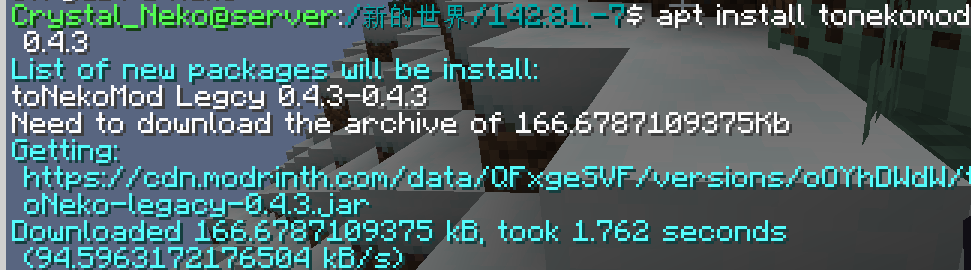
从 Modrinth 安装模组。
用法:
/apt install <slug> <version> # 安装模组
/apt search <slug> # 搜索模组
apt 命令截图:
bash
调用系统执行 bash 命令(仅支持 Linux)。
用法:
/bash <命令>
警告:此命令具有危险性,可能会损坏你的系统。
neofetch
你熟悉这个命令。
特殊文件
.bashrc
当玩家登录时,该文件会执行其中的命令。命令之间用 ; 分隔,且命令前不需要加 /。
该文件位于 home/<玩家名称>/.bashrc。玩家无需 sudo 权限即可修改此文件。

Sudo
This module adds some commonly used Linux commands to the game, including sudo, echo, cat, and export.
Some Linux mechanisms have also been added, such as the home folder and the .bashrc file.
Instructions
Parameters
Some commands support parameters, you can use _ plus parameters.
Variables
Some commands also support the use of variables. You can use variables in the form of ${variable name}. For how to set variables, please see export.
Dynamic variables
Dynamic variables are recalculated on every execution, here are all dynamic variables:
home: the current user’s home folder
uuid: uuid of the current user
player: the username of the current user
exp: the current user’s experience value
level: the level of the current user
health: current user’s health
max_health: the current user’s maximum health
world: current world name
location: current location (format is x.y.z)
server: current server name
motd: motd of the current server
time: current time (Unix timestamp)
Order
echo
usage:
/echo <content> # Output content
cat
usage:
/cat <file path> # Output file content
write
usage:
/write <file path> <content> #Write file content, which will overwrite the original content.
export
usage:
/export <variable name> <variable value> #Set variables
/export public_<variable name> <variable value> # Set public variables, sudo permissions are required
apt
Install mods from Modrinth.
usage:
/apt install <slug> <version> # Install module
/apt search <slug> # Search module
image of apt command:

bash
Call the system to execute bash commands (only supports Linux).
usage:
/bash <command>
WARNNING:THIS COMMAND IS DANGEROUS. IT MAYBE DAMAGE YOUR SYSTEM.
neofetch
You know the command.
Special files
.bashrc
This file executes the commands inside when the player logs in. The commands are separated by ; and there is no / before the command.
The file is located in home/<player name>/.bashrc. Players can modify this file without sudo permissions.
评论 0
登录后参与评分
还没有评论,来抢沙发吧