详细说明
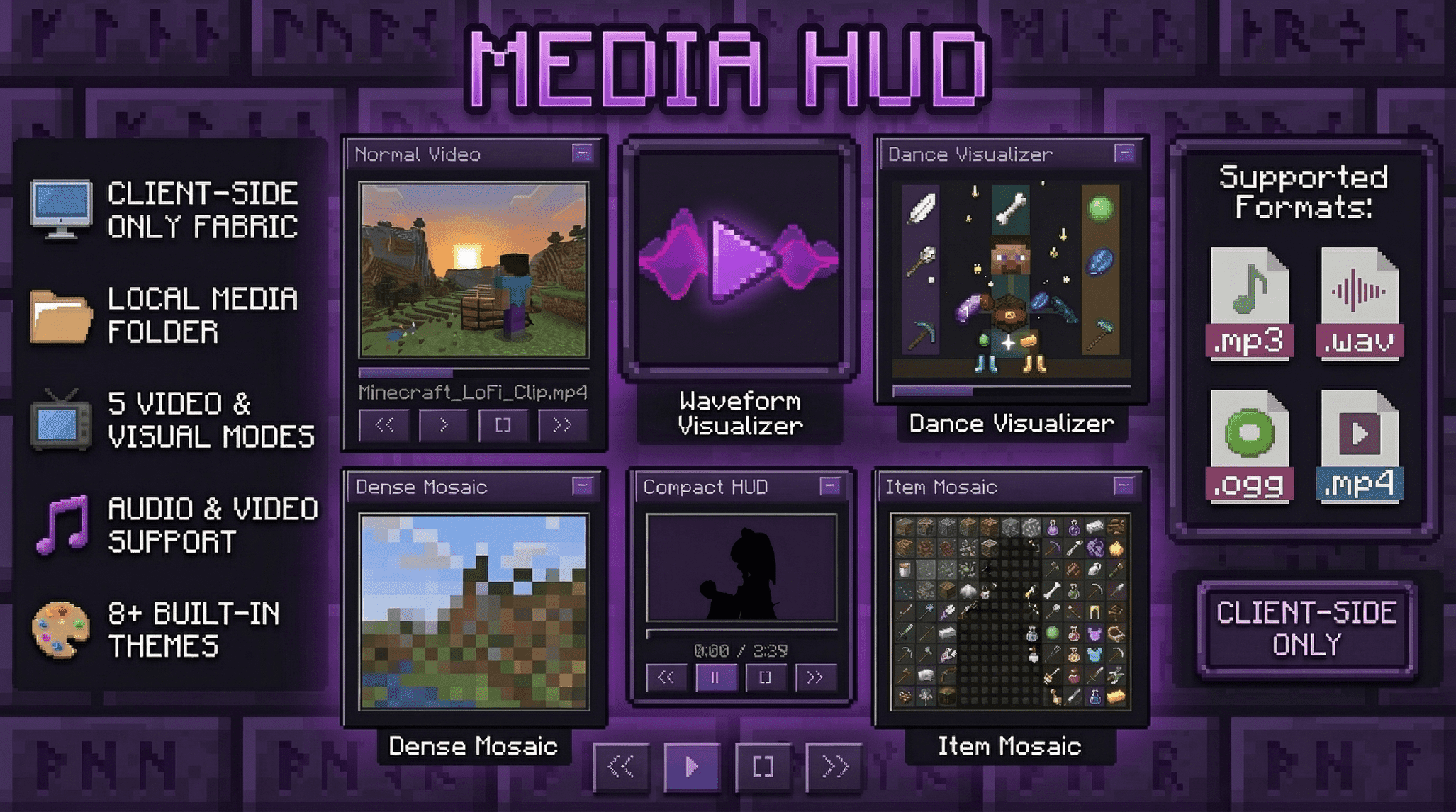
Media HUD 将本地媒体播放器直接集成到 Minecraft 的 HUD 中。
该模组专为希望在 Minecraft 内欣赏音乐、视频和可视化效果,而无需频繁切换窗口的玩家打造。你可以扫描本地媒体文件夹,直接加载文件,将播放器拖拽至屏幕任意位置,在全屏和紧凑布局之间切换,并选择多种可视化模式,从标准视频播放到 Minecraft 风格的马赛克渲染应有尽有。
本模组仅适用于客户端,且仅限本地文件。它不需要服务器安装,不使用流媒体服务,也不依赖在线播放。
功能特性
- 仅限客户端的 Fabric 模组
- 仅限本地文件播放
- 可拖拽的 HUD,支持保存位置
- 全屏和紧凑两种 HUD 布局
- 可扩展的库面板,用于管理文件夹和文件
- 可滚动的库面板,具备当前曲目跟随行为
- 音频播放支持
mp3、wav 和 ogg
- 视频播放支持
mp4
- 进度条支持点击跳转
- 播放、暂停、停止、下一首、上一首、循环、随机播放和音量控制
- 音频、视频或两者的过滤模式
- 保存的 HUD 缩放和透明度设置
- 内置的 HUD 颜色主题
- 支持通过十六进制输入自定义 HUD 主题颜色
- 具有自适应纵横比布局的标准视频模式
- 波形可视化模式
- 舞蹈可视化模式
- 密集马赛克视频模式
- 基于 Minecraft 物品图标视觉效果的物品马赛克视频模式
/media 和 /m 命令别名
支持的格式
为获得最流畅的效果,推荐使用以下视频格式:
H.264 视频编码AAC 音频编码.mp4 容器格式
支持的 Minecraft 版本
Media HUD 目前拥有以下版本的可用构建:
1.20.51.20.61.211.21.11.21.21.21.31.21.41.21.51.21.61.21.71.21.81.21.91.21.101.21.11
Fabric API 版本指南
请使用针对你确切 Minecraft 版本构建的 Media HUD jar 包,并将其与下方对应的 Fabric API 版本匹配:
- Minecraft
1.20.5 -> Fabric API 0.97.8+1.20.5
- Minecraft
1.20.6 -> Fabric API 0.100.8+1.20.6
- Minecraft
1.21 -> Fabric API 0.102.0+1.21
- Minecraft
1.21.1 -> Fabric API 0.116.9+1.21.1
- Minecraft
1.21.2 -> Fabric API 0.106.1+1.21.2
- Minecraft
1.21.3 -> Fabric API 0.114.1+1.21.3
- Minecraft
1.21.4 -> Fabric API 0.119.4+1.21.4
- Minecraft
1.21.5 -> Fabric API 0.128.2+1.21.5
- Minecraft
1.21.6 -> Fabric API 0.128.2+1.21.6
- Minecraft
1.21.7 -> Fabric API 0.129.0+1.21.7
- Minecraft
1.21.8 -> Fabric API 0.136.1+1.21.8
- Minecraft
1.21.9 -> Fabric API 0.134.1+1.21.9
- Minecraft
1.21.10 -> Fabric API 0.138.4+1.21.10
- Minecraft
1.21.11 -> Fabric API 0.141.3+1.21.11
推荐配置:
- Fabric Loader
0.18.4 或更高版本
- Java
21
安装步骤
- 为上述支持的任一版本安装 Minecraft Java Edition
- 安装 Fabric Loader
0.18.4 或更高版本
- 为你的 Minecraft 版本安装匹配的 Fabric API
- 使用 Java
21
- 将正确版本的
mediahud jar 放入你的 mods 文件夹
- 启动游戏并使用
/m ui 打开交互覆盖层
Media HUD 仅限客户端使用。多人服务器无需安装此模组。
此公开构建打包适用于 Windows x86_64 系统。
本次发布文件无需额外下载 FFmpeg 或 JavaCV。
此发布包包含捆绑运行时组件的第三方通知材料。
命令指南
你可以使用 /m 或 /media。
它们是相同的别名。
基础 HUD 命令
播放命令
库和文件命令
-
/m folder <path>
设置根媒体文件夹并扫描它。
示例:/m folder C:\Users\Name\Music
-
/m refresh
重新扫描当前媒体文件夹。
-
/m load <path>
直接加载特定的本地文件。
示例:/m load C:\Users\Name\Videos\clip.mp4
-
/m probe <path>
通过媒体后端探测本地文件。
在检查文件是否被正确检测时非常有用。
播放选项命令
过滤命令
-
/m filter audio
仅在库中显示音频文件。
-
/m filter video
仅在库中显示视频文件。
-
/m filter both
同时显示音频和视频文件。
渲染模式命令
-
/m mode normal
标准视频预览模式。
-
/m mode waveform
音频波形可视化模式。
-
/m mode dance
舞蹈可视化模式。
-
/m mode mosaic
密集马赛克视频模式。
-
/m mode itemmosaic
基于物品的马赛克视频模式。
分辨率命令
-
/m wave resolution <3-8>
设置波形分辨率。
-
/m video resolution <64-2048>
设置以像素为单位的视频预览分辨率。
-
/m mosaic resolution <4-160>
设置密集马赛克分辨率。
-
/m itemmosaic resolution <4-160>
设置物品马赛克分辨率。
较高的值看起来可能更好,但也可能会消耗更多性能。
HUD 布局命令
-
/m hud mode full
使用完整的 HUD 布局。
-
/m hud mode compact
使用紧凑的 HUD 布局。
-
/m hud scale <50-200>
设置 HUD 缩放比例(百分比)。
示例:/m hud scale 125
-
/m hud transparency <0-80>
设置 HUD 透明度(百分比)。
示例:/m hud transparency 25
内置主题命令
你可以使用 /m theme ... 或 /m hud theme ...。
-
/m theme
显示当前的 HUD 主题。
-
/m theme classic
使用经典主题。
-
/m theme midnightpurple
使用午夜紫主题。
-
/m theme bluemoon
使用蓝月主题。
-
/m theme hacker
使用黑客主题。
-
/m theme sunset
使用日落主题。
-
/m theme obsidian
使用黑曜石主题。
-
/m theme rosegold
使用玫瑰金主题。
-
/m theme frost
使用霜冻主题。
-
/m theme custom
切换回你保存的自定义主题颜色。
自定义主题颜色命令
输入十六进制颜色时不需要 #。
示例:
-
FFAABB
-
/m theme color
显示你当前的自定义主题颜色。
-
/m theme color gradientprimary <hex>
设置第一个渐变颜色。
-
/m theme color gradientsecondary <hex>
设置第二个渐变颜色。
-
/m theme color main <hex>
设置主要强调色。
-
/m theme color border <hex>
设置边框颜色。
-
/m theme color button <hex>
设置按钮颜色。
-
/m theme color text <hex>
设置文本颜色。
注意:
- 设置自定义颜色会自动将 HUD 切换至自定义主题。
gradientprimary 和 gradient_primary 均可使用。gradientsecondary 和 gradient_secondary 均可使用。
为什么使用它
- 在 Minecraft 内保持音乐或视频播放,无需切换窗口
- 使用具有 Minecraft 风格的 HUD,而不是外部桌面播放器
- 将视频转换为风格化的密集马赛克或基于物品的马赛克
- 在正常游戏期间使用紧凑布局,或在浏览媒体时使用完整面板
- 调整 HUD 缩放、透明度、渲染分辨率和主题颜色以匹配你的设置
- 通过内置主题或自定义调色板改变 HUD 氛围
- 离开世界或服务器时,无需担心媒体会在后台继续播放
注意事项与限制
- 仅限本地文件。不支持 YouTube、流媒体 URL 或任何在线媒体源。
- 此版本旨在围绕游戏内 HUD 的本地播放进行设计,而非作为完整的桌面媒体套件。
- 高视频、马赛克和物品马赛克分辨率仍可能因片段不同而消耗性能。
- 请使用针对你确切 Minecraft 版本构建的 jar 包。
- 使用干净的本地文件和专用的媒体文件夹可获得最佳效果。
- 此打包版本包含了 Windows
x86_64 FFmpeg 运行时组件。Linux 和 macOS 构建未包含在此文件中。
许可证与第三方组件
- Media HUD 源代码采用
MIT 许可证。
- 此版本捆绑了第三方运行时组件,包括 JavaCV、JavaCPP 以及通过 ByteDeco 提供的 Windows
x86_64 FFmpeg 运行时。
- 第三方声明及源码/合规性链接包含在
THIRD_PARTY_NOTICES.md 中。
- 本版本中的 FFmpeg 运行时来自标准的 ByteDeco 预设工件,而非单独的
-gpl 工件。
- 项目页面上需保留的公开通知文本:
- 本软件在 LGPL 许可下使用了 FFmpeg 项目的库。
- FFmpeg 法律/合规页面:
- 对应的 FFmpeg 7.1.1 源码:
- ByteDeco 预设源码/构建脚本:
Full Description
Media HUD adds a local media player directly to the Minecraft HUD.
It is built for players who want music, videos, and visualizers inside Minecraft without constantly alt-tabbing. You can scan a local media folder, load files directly, drag the player anywhere on the screen, switch between full and compact layouts, and choose between several visual modes ranging from standard video playback to Minecraft-style mosaic rendering.
This mod is client-side only and local-files only. It does not require server installation, it does not use streaming services, and it does not rely on online playback.
Features
- Client-side only Fabric mod
- Local file playback only
- Draggable HUD with saved position
- Full and compact HUD layouts
- Expandable library panel for folders and files
- Scrollable library panel with current-track follow behavior
- Audio playback for
mp3, wav, and ogg
- Video playback for
mp4
- Progress bar with click-to-seek
- Play, pause, stop, next, previous, loop, shuffle, and volume controls
- Filter modes for audio, video, or both
- Saved HUD scale and transparency settings
- Built-in HUD color themes
- Custom HUD theme colors with hex input
- Normal video mode with aspect-aware layout
- Waveform visualizer mode
- Dance visualizer mode
- Dense mosaic video mode
- Item mosaic video mode built around Minecraft item icon visuals
/media and /m command aliases
Supported Formats
- Audio:
mp3, wav, ogg
- Video:
mp4
Recommended video format for the smoothest results:
H.264 videoAAC audio.mp4 container
Supported Minecraft Versions
Media HUD currently has working builds for:
1.20.51.20.61.211.21.11.21.21.21.31.21.41.21.51.21.61.21.71.21.81.21.91.21.101.21.11
Fabric API Version Guide
Use the Media HUD jar built for your exact Minecraft version, and match it with the Fabric API version line below:
- Minecraft
1.20.5 -> Fabric API 0.97.8+1.20.5
- Minecraft
1.20.6 -> Fabric API 0.100.8+1.20.6
- Minecraft
1.21 -> Fabric API 0.102.0+1.21
- Minecraft
1.21.1 -> Fabric API 0.116.9+1.21.1
- Minecraft
1.21.2 -> Fabric API 0.106.1+1.21.2
- Minecraft
1.21.3 -> Fabric API 0.114.1+1.21.3
- Minecraft
1.21.4 -> Fabric API 0.119.4+1.21.4
- Minecraft
1.21.5 -> Fabric API 0.128.2+1.21.5
- Minecraft
1.21.6 -> Fabric API 0.128.2+1.21.6
- Minecraft
1.21.7 -> Fabric API 0.129.0+1.21.7
- Minecraft
1.21.8 -> Fabric API 0.136.1+1.21.8
- Minecraft
1.21.9 -> Fabric API 0.134.1+1.21.9
- Minecraft
1.21.10 -> Fabric API 0.138.4+1.21.10
- Minecraft
1.21.11 -> Fabric API 0.141.3+1.21.11
Recommended:
- Fabric Loader
0.18.4 or newer
- Java
21
Installation
- Install Minecraft Java Edition for one of the supported versions above
- Install Fabric Loader
0.18.4 or newer
- Install the matching Fabric API version for your Minecraft version
- Use Java
21
- Put the correct versioned
mediahud jar in your mods folder
- Launch the game and use
/m ui to open the interaction overlay
Media HUD is client-side only. A multiplayer server does not need to install it.
This public build is packaged for Windows x86_64.
No extra FFmpeg or JavaCV download is required for this release file.
This release package includes third-party notice material for bundled runtime components.
Command Guide
You can use either /m or /media.
They are identical aliases.
Basic HUD Commands
-
/m show
Shows the HUD.
-
/m hide
Hides the HUD.
-
/m toggle
Toggles the HUD on or off.
-
/m ui
Opens the drag-and-move interaction overlay.
-
/m pos reset
Resets the HUD position back to its default location.
Playback Commands
-
/m play
Starts playback of the currently selected media.
-
/m pause
Pauses playback.
-
/m stop
Stops playback.
-
/m next
Selects the next track or video.
-
/m prev
Selects the previous track or video.
-
/m seek <seconds>
Seeks to a specific time in seconds.
Example: /m seek 90
-
/m volume <0-200>
Sets volume from 0 to 200.
Example: /m volume 75
Library and File Commands
-
/m folder <path>
Sets the root media folder and scans it.
Example: /m folder C:\Users\Name\Music
-
/m refresh
Rescans the current media folder.
-
/m load <path>
Loads a specific local file directly.
Example: /m load C:\Users\Name\Videos\clip.mp4
-
/m probe <path>
Probes a local file through the media backend.
Useful when checking whether a file is detected correctly.
Playback Option Commands
-
/m loop
Toggles looping on or off.
-
/m loop on
Enables looping.
-
/m loop off
Disables looping.
-
/m shuffle
Toggles shuffle on or off.
-
/m shuffle on
Enables shuffle.
-
/m shuffle off
Disables shuffle.
-
/m shuffle toggle
Toggles shuffle explicitly.
Filter Commands
-
/m filter audio
Shows only audio files in the library.
-
/m filter video
Shows only video files in the library.
-
/m filter both
Shows both audio and video files.
Render Mode Commands
-
/m mode normal
Standard video preview mode.
-
/m mode waveform
Audio waveform visualizer mode.
-
/m mode dance
Dance visualizer mode.
-
/m mode mosaic
Dense mosaic video mode.
-
/m mode itemmosaic
Item-based mosaic video mode.
Resolution Commands
-
/m wave resolution <3-8>
Sets waveform resolution.
-
/m video resolution <64-2048>
Sets video preview resolution in pixels.
-
/m mosaic resolution <4-160>
Sets dense mosaic resolution.
-
/m itemmosaic resolution <4-160>
Sets item mosaic resolution.
Higher values can look better, but they may also cost more performance.
HUD Layout Commands
-
/m hud mode full
Uses the full HUD layout.
-
/m hud mode compact
Uses the compact HUD layout.
-
/m hud scale <50-200>
Sets HUD scale as a percentage.
Example: /m hud scale 125
-
/m hud transparency <0-80>
Sets HUD transparency as a percentage.
Example: /m hud transparency 25
Built-In Theme Commands
You can use either /m theme ... or /m hud theme ....
-
/m theme
Shows the current HUD theme.
-
/m theme classic
Uses the Classic theme.
-
/m theme midnightpurple
Uses the Midnight Purple theme.
-
/m theme bluemoon
Uses the Blue Moon theme.
-
/m theme hacker
Uses the Hacker theme.
-
/m theme sunset
Uses the Sunset theme.
-
/m theme obsidian
Uses the Obsidian theme.
-
/m theme rosegold
Uses the Rose Gold theme.
-
/m theme frost
Uses the Frost theme.
-
/m theme custom
Switches back to your saved custom theme colors.
Custom Theme Color Commands
You can type hex colors without #.
Examples:
-
FFAABB
-
/m theme color
Shows your current custom theme colors.
-
/m theme color gradientprimary <hex>
Sets the first gradient color.
-
/m theme color gradientsecondary <hex>
Sets the second gradient color.
-
/m theme color main <hex>
Sets the main accent color.
-
/m theme color border <hex>
Sets the border color.
-
/m theme color button <hex>
Sets the button color.
-
/m theme color text <hex>
Sets the text color.
Notes:
- Setting a custom color automatically switches the HUD to the custom theme.
gradientprimary and gradient_primary both work.gradientsecondary and gradient_secondary both work.
Why Use It
- Keep music or video playback inside Minecraft without switching windows
- Use a Minecraft-themed HUD instead of an external desktop player
- Turn videos into stylized dense mosaics or item-based mosaics
- Run a compact layout during normal gameplay or use the full panel while browsing media
- Tune HUD scale, transparency, render resolution, and theme colors to match your setup
- Change the HUD vibe with built-in themes or your own custom palette
- Leave a world or server without worrying about media continuing to play in the background
Notes and Limitations
- Local files only. No YouTube, no streaming URLs, and no online media sources.
- This release is designed around local playback inside the game HUD, not as a full desktop media suite.
- High video, mosaic, and item-mosaic resolutions can still cost performance depending on the clip.
- Use the jar built for your exact Minecraft version.
- The best results come from using clean local files and a dedicated media folder.
- This packaged release bundles the Windows
x86_64 FFmpeg runtime. Linux and macOS builds are not included in this file.
License and Third-Party Components
- Media HUD source code is licensed under
MIT.
- This release bundles third-party runtime components, including JavaCV, JavaCPP, and the Windows
x86_64 FFmpeg runtime via ByteDeco.
- Third-party notices and source/compliance links are included in
THIRD_PARTY_NOTICES.md.
- The FFmpeg runtime in this release comes from the standard ByteDeco preset artifacts, not the separate
-gpl artifacts.
- Public notice text to keep in the project page:
- This software uses libraries from the FFmpeg project under the LGPL.
- FFmpeg legal/compliance page:
- Corresponding FFmpeg 7.1.1 source:
- ByteDeco preset source/build scripts:


 模组

 模组

 模组
 模组

 模组
 模组
评论 0
登录后参与评分
还没有评论,来抢沙发吧