Melter Block
一个将方块转化为液体的简易熔炉方块。
你是否希望有一种比舀满桶并在早餐前跋涉五英里雪地更简单的方式来获取岩浆?作为一名老玩家,你是否怀念远古时代用圆石和熔炉炼出岩浆的日子?Melter 可能是你最喜欢的新机器方块!
默认配方
- 圆石 >>> 岩浆
- 雪 >>> 水
- 冰 >>> 水
- 蜂蜜块 >>> 蜂蜜(如果加载了模组 'Productive Bees')
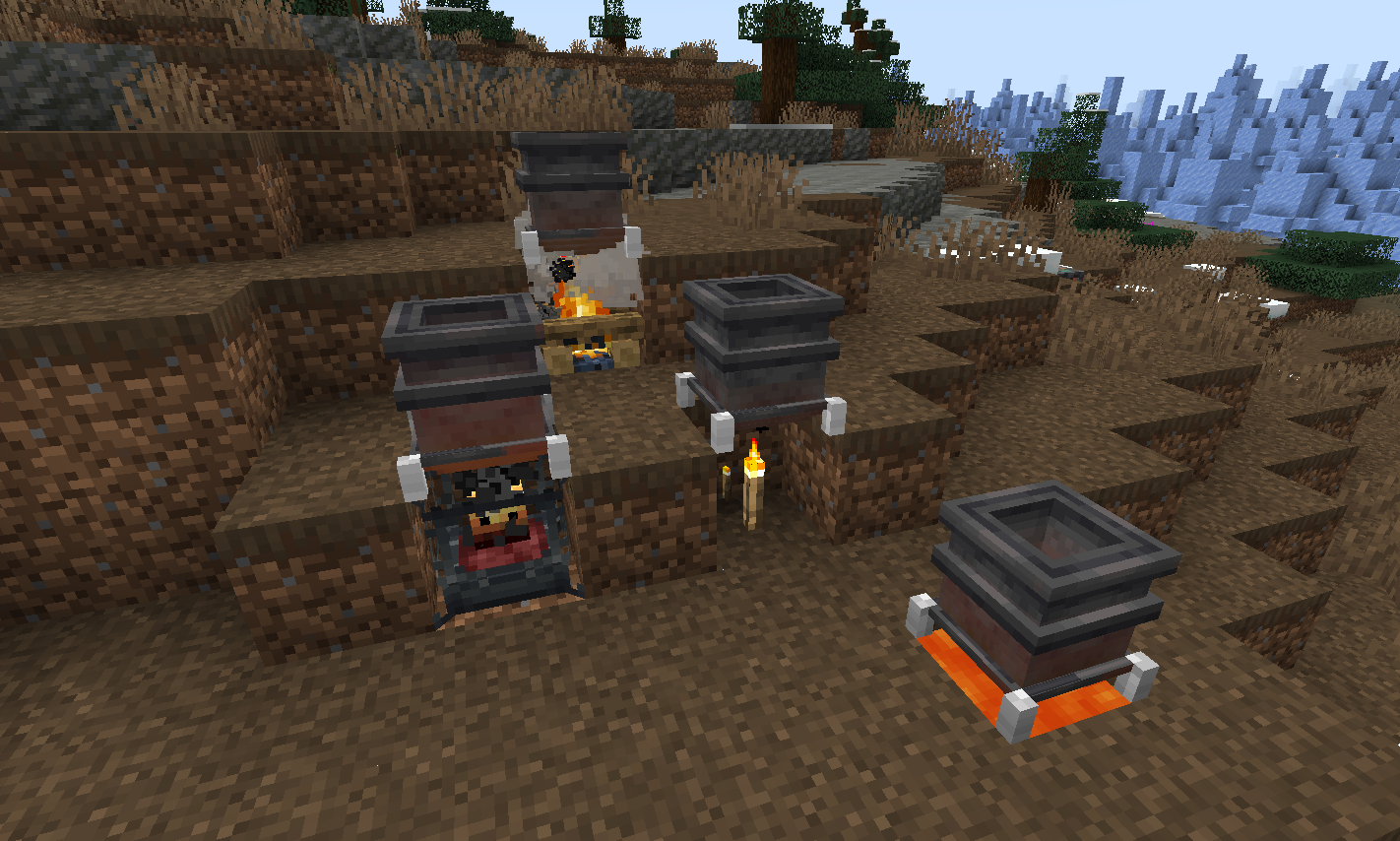
要将方块放入 Melter,请将其掉落其中,或使用来自存储位置的管道推入。手持方块右键点击插入的方式无效。只有拥有配方的方块才能被掉落/插入。
如果包含了模组 'Create',则烈焰燃烧室可作为可能的热源使用。
热源 + 热量等级
- 火把 - 1
- 灵魂火把 - 1
- 营火 - 2
- 灵魂营火 - 2
- 岩浆 - 3
- 烈焰燃烧室 - 5(活跃状态),1(消退中),0(未激活),8(过热状态)
添加额外配方
用于添加熔化配方的数据包 JSON 示例:
示例 - 创建一个与默认圆石配方同名的 JSON 文件,并将其放置在其数据位置以覆盖默认设置 -
data\melter\recipes\melting\cobble_melting.json
-- 基础配方示例
{
"type": "melter:melting",
"ingredient": {
"item": "minecraft:cobblestone",
"count": 1
},
"result": {
"fluid": "minecraft:lava",
"amount": 250
},
"processingTime": 500
}
-- 包含可选最低热量等级要求的配方示例
{
"type": "melter:melting",
"ingredient": {
"tag": "forge:stone",
"count": 1
},
"result": {
"fluid": "minecraft:lava",
"amount": 250
},
"processingTime": 2000,
"minimumHeat": 4
}
要引入新配方,您可以在数据包中添加带有不同文件名和配方值的 JSON 文件。
KubeJS 集成
可以使用 KubeJS 模组以简单的单行格式添加配方。
将如下示例中的代码行放置在位于 profile\kubejs\server_scripts\ 文件夹中的任何 *.js 脚本文件的 recipes 事件中即可!
- 请参阅下方关于如何构建添加配方的脚本行的说明。
- 注意:部分示例包含可选的最低热量等级要求。.minimumHeat 是可选参数。如果没有它,任何热源都可以与该配方配合使用。如果有它,只有当方块上的热量等级足够高时,放入的配方物品才会熔化。
ServerEvents.recipes((event) => {
// event.recipes.melterMelting(OUTPUT,INPUT).processingTime(INT);
// event.recipes.melterMelting(OUTPUT,INPUT).processingTime(INT).minimumHeat(INT);
event.recipes.melterMelting(Fluid.of('minecraft:water', 1000),"minecraft:ice").processingTime(200);
event.recipes.melterMelting(Fluid.of('minecraft:lava', 250),"#forge:stone").processingTime(1000).minimumHeat(4);
});
请注意,上述 KubeJS 示例是添加新配方,而不是替换现有配方。
- 如果您想替换现有配方(例如 melter:recipes/melting/ 文件夹中找到的默认 cobble_melting.json 配方),请先使用以下 KubeJS 行移除原始配方,然后使用上述示例添加您的新配方:
event.remove({id: 'melter:melting/cobble_melting'});
(本模组是模组 'melter' 的一个分支;其最初创建的契机是为了引入与最新版本 'create' 模组 0.5.1.+ 的兼容性)
Melter Block
A simple melter block that turn blocks into liquid.
Wish there was an easier way to get your lava rather than scooping buckets and trudging through the snow for 5 miles before breakfast? Are you an older MC user who misses the cobble to lava cauldrons of old days of yore? The Melter may be your favorite new machine block!
Default recipes
- Cobblestone >>> Lava
- Snow >>> Water
- Ice >>> Water
- Honey Block >>> Honey (If mod 'Productive Bees' is loaded)
To place blocks into the Melter drop them in, or push them in using pipes from a storage location. Holding blocks in hand to right-click-mouse insert will not work. Only blocks with recipes can be dropped-in / inserted.
If the mod 'Create' is included then blaze burners will be available as a possible heat source.
Heat sources + Heat level
- Torch -1
- Soul Torch - 1
- Campfire - 2
- Soul Campfire - 2
- Lava - 3
- Blaze burner - 5 (active), 1 (fading), 0 (inactive), 8 (superheated)
Adding additional recipes
Datapack JSON example for adding melting recipes:
example - creating a JSON file with the same name as the default cobble recipe and placing it in the data location of it to overwrite the default -
data\melter\recipes\melting\cobble_melting.json
-- Example recipe basic
{
"type": "melter:melting",
"ingredient": {
"item": "minecraft:cobblestone",
"count": 1
},
"result": {
"fluid": "minecraft:lava",
"amount": 250
},
"processingTime": 500
}
-- Example recipe with optional minimum heat level required to melt
{
"type": "melter:melting",
"ingredient": {
"tag": "forge:stone",
"count": 1
},
"result": {
"fluid": "minecraft:lava",
"amount": 250
},
"processingTime": 2000,
"minimumHeat": 4
}
To introduce new recipes you can add your own JSON files to datapacks with different filenames and recipe values.
KubeJS Integration
The KubeJS mod can be used to add recipes in a simple 1 line format.
Place lines like example below (in the recipes event) of any *.js script file located in the profile\kubejs\server_scripts\ folder location - that's it!
- See below for how to construct recipe adding script lines.
- Note that some of the examples have an optional minimum heat level needed. The .minimumHeat is optional. Without it any heat source will work with the recipe. With it, recipe items placed will only melt if the heat level on the block is high enough.
ServerEvents.recipes((event) => {
// event.recipes.melterMelting(OUTPUT,INPUT).processingTime(INT);
// event.recipes.melterMelting(OUTPUT,INPUT).processingTime(INT).minimumHeat(INT);
event.recipes.melterMelting(Fluid.of('minecraft:water', 1000),"minecraft:ice").processingTime(200);
event.recipes.melterMelting(Fluid.of('minecraft:lava', 250),"#forge:stone").processingTime(1000).minimumHeat(4);
});
Keep in mind that the above KubeJS examples add new recipes, not replace existing recipes.
- If you'd like to replace an existing recipe such as the default cobble_melting.json recipe found in the melter:recipes/melting/ folder - use the following KubeJS line first to remove the original recipe, and then add your new recipe using the examples above:
event.remove({id: 'melter:melting/cobble_melting'});
(This mod is a fork of the mod 'melter' - the impetus for it's initial creation was to introduce compatibility with the newest versions of the 'create' mod 0.5.1.+)

 模组

 模组

 模组
 模组

 模组
 模组
评论 0
登录后参与评分
还没有评论,来抢沙发吧