
mercurizer
一款为 sodium 无法拯救的硬件打造的 sodium 附加模组。
为什么选择 mercurizer?
sodium 已经是 Minecraft 中性能最好的模组之一。
但仍有瓶颈。
许多优化方案都假设你拥有独立显卡、充足的内存以及相对现代的 CPU。
mercurizer 专为那些被遗忘的硬件而打造。
目标很简单:让通常在运行 Minecraft 时会遇到困难的硬件也能流畅游玩。
它有何不同?
自动硬件调优
在前三次启动时,mercurizer 会对你的系统进行基准测试并测量:
- GPU 上传带宽
- 驱动往返延迟
- CPU 吞吐量
结果取三次运行的平均值,并据此为你的硬件自动调整区块上传预算和纹理动画阈值。
如果你的 GPU 或驱动发生变化,可以重新执行基准测试。
自适应优化
启动基准测试仅仅是开始。
在稳定游戏运行 30 秒后,mercurizer 会观察实际的游戏内帧时间,并根据你的硬件实际表现进一步优化配置。
防卡顿恢复
当帧时间突然飙升时,mercurizer 会迅速减少正在上传的工作量。
当性能恢复稳定后,它会逐步恢复工作量。
这有助于防止导致微卡顿的持续 增加 → 飙升 → 降低 → 增加 循环。
VSync 感知
当启用垂直同步(VSync)时,mercurizer 会自动应用更保守的上传预算,以降低阻塞渲染线程的可能性。
旧硬件安全保护
较旧的 Intel 硬件和某些 AMD 驱动配置会自动获得更保守的设置。
当激进调优可能影响稳定性时,mercurizer 优先确保游戏正常运行。
真实硬件。真实结果。
集成显卡上可达 Sodium 的 3.08 倍 FPS
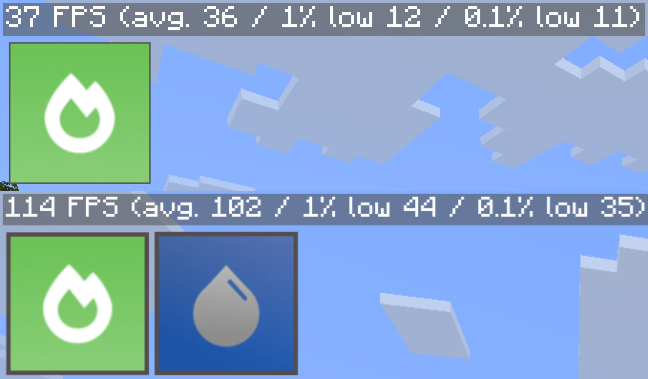
测试系统
| 组件 | 规格 |
|---|---|
| 设备 | MacBook Air 2017 |
| CPU | Intel Core i5-5350U |
| GPU | Intel HD Graphics 6000 |
| 内存 | 8 GB |
| 操作系统 | Debian 13 |
| 视距 | 16 区块 |
| 垂直同步 | 关闭 |
| 世界 | 普通 |
测试版本:
0.9.1-beta.2+mc26.2-1.1 · 0.9.1-beta.2+mc26.1.2-1.1 · 0.8.9+mc26.1.1-1.5 · 0.8.9+mc26.1-1.5 · 0.8.13-beta.2+mc1.21.11-1.1
基准测试结果会根据硬件、驱动、Minecraft 设置和工作负载的不同而变化。
适合谁使用?
mercurizer 主要面向以下玩家:
- 使用集成显卡,如 Intel HD、UHD 或 AMD Vega
- Minecraft 可用内存为 4 GB 或更少
- 已使用 Sodium 但仍受性能困扰
- 在旧笔记本电脑、办公电脑或入门级硬件上游玩
- 没有独立显卡来解决性能问题
你不需要一台游戏 PC。
这正是它的意义所在。
兼容性
- Minecraft: 1.21.11+
- 版本: Java 版
- 加载器: Fabric
- 必需: Sodium
- 兼容: Iris, Sodium Extra, 和 Reese's Sodium Options
开发状态
Mercurizer 仍在积极开发中。
在这个级别的性能调优高度依赖硬件,因此 可能出现错误、特定驱动的故障以及意外行为。
如果出现问题,请提供以下信息:
- GPU
- CPU
- 内存
- 操作系统
- GPU 驱动版本
- Minecraft 版本
- Sodium 版本
- Mercurizer 版本
提供的硬件信息越多,就越容易复现问题。
Potato Optimizer 的一部分

mercurizer 是 potato optimizer 背后的核心优化模组之一 —— 这是一个为难以运行现代 Minecraft 的 PC 打造的超轻量级整合包。
edonme studios
支持开发
如果 mercurizer 帮助你在老旧机器上多挤出几帧,请考虑支持开发工作。
每一份支持都有助于让低端优化得以延续。

mercurizer
a sodium addon for hardware that sodium can't save.
why mercurizer?
sodium is already one of the best performance mods for minecraft.
but there is still a floor.
a lot of optimization assumes that you have a dedicated gpu, plenty of ram, and a relatively modern cpu.
mercurizer is made for the hardware that gets left behind.
the goal is simple: make minecraft playable on hardware that normally struggles to run it.
what makes it different?
automatic hardware tuning
on its first three launches, mercurizer benchmarks your system and measures:
- gpu upload bandwidth
- driver round-trip latency
- cpu throughput
the results are averaged across all three runs and used to automatically tune chunk upload budgets and texture animation thresholds for your hardware.
if your gpu or driver changes, the benchmark can be performed again.
adaptive refinement
the startup benchmark is only the beginning.
after 30 seconds of stable gameplay, mercurizer observes real in-game frame times and refines its configuration based on how your hardware actually behaves.
anti-stutter recovery
when frame times suddenly spike, mercurizer quickly reduces the amount of work being uploaded.
when performance stabilizes, it gradually restores the workload.
this helps prevent the constant increase → spike → decrease → increase cycle that can cause micro-stutters.
vsync-aware
when vsync is enabled, mercurizer automatically applies a more conservative upload budget to reduce the chance of blocking the render thread.
legacy hardware safety
older intel hardware and certain amd driver configurations automatically receive more conservative settings.
when aggressive tuning could compromise stability, mercurizer prioritizes keeping the game running.
real hardware. real results.
up to 3.08× the fps of sodium on integrated graphics
test system
| component | specification |
|---|---|
| device | macbook air 2017 |
| cpu | intel core i5-5350u |
| gpu | intel hd graphics 6000 |
| ram | 8 gb |
| os | debian 13 |
| render distance | 16 chunks |
| vsync | off |
| world | normal |
tested with:
0.9.1-beta.2+mc26.2-1.1 · 0.9.1-beta.2+mc26.1.2-1.1 · 0.8.9+mc26.1.1-1.5 · 0.8.9+mc26.1-1.5 · 0.8.13-beta.2+mc1.21.11-1.1
benchmark results will vary depending on hardware, drivers, minecraft settings, and workload.
who is this for?
mercurizer is primarily aimed at players who:
- use integrated graphics such as intel hd, uhd, or amd vega
- have 4 gb of ram or less available to minecraft
- already use sodium but still struggle with performance
- play on older laptops, office pcs, or budget hardware
- don't have a dedicated gpu to throw at the problem
you don't need a gaming pc.
that's kind of the point.
compatibility
- minecraft: 1.21.11+
- edition: java edition
- loader: fabric
- required: sodium
- compatible with: iris, sodium extra, and reese's sodium options
development status
mercurizer is still actively developed.
performance tuning at this level is highly hardware-dependent, so bugs, driver-specific issues, and unexpected behavior are possible.
if something goes wrong, please include:
- gpu
- cpu
- ram
- operating system
- gpu driver version
- minecraft version
- sodium version
- mercurizer version
the more hardware information you provide, the easier it is to reproduce the problem.
part of potato optimizer
mercurizer is one of the core optimization mods behind potato optimizer — an ultra-lightweight modpack built for pcs that struggle with modern minecraft.
edonme studios
support development
if mercurizer helped you squeeze a few more frames out of an old machine, consider supporting development.
every bit of support helps keep low-end optimization alive.

下载 Mercurizer
下载 Mercurizer
下载 Mercurizer
需要联机服务器吗?
稳定流畅、一键部署,几分钟即可和朋友联机开服
最低仅需 8 元/月 即可畅快联机
下载 Mercurizer
需要联机服务器吗?
稳定流畅、一键部署,几分钟即可和朋友联机开服
最低仅需 8 元/月 即可畅快联机
下载 Mercurizer
需要联机服务器吗?
稳定流畅、一键部署,几分钟即可和朋友联机开服
最低仅需 8 元/月 即可畅快联机
下载 Mercurizer
需要联机服务器吗?
稳定流畅、一键部署,几分钟即可和朋友联机开服
最低仅需 8 元/月 即可畅快联机
下载 Mercurizer
需要联机服务器吗?
稳定流畅、一键部署,几分钟即可和朋友联机开服
最低仅需 8 元/月 即可畅快联机
下载 Mercurizer
需要联机服务器吗?
稳定流畅、一键部署,几分钟即可和朋友联机开服
最低仅需 8 元/月 即可畅快联机
下载 Mercurizer
下载 Mercurizer
- 修复:启动时崩溃(“framerateLimitTracker is null”),与 Remove Reloading Screen (rrls) 一起使用时
关于这个资源的讨论、问题反馈与使用心得
还没有讨论,来发第一帖吧
你是这个资源的作者?登录后可认领此资源。


评论 0
登录后参与评分
还没有评论,来抢沙发吧