Meshelium
看得更远。帧数更高。由网格着色器驱动。
Meshelium 使用显卡的网格着色器(mesh shaders)来渲染 Minecraft 的地形,
而不是采用游戏原本的方式。你能获得更高的每秒帧数(FPS),
并且可以将渲染距离远远推过滑块通常的限制。
快多少?
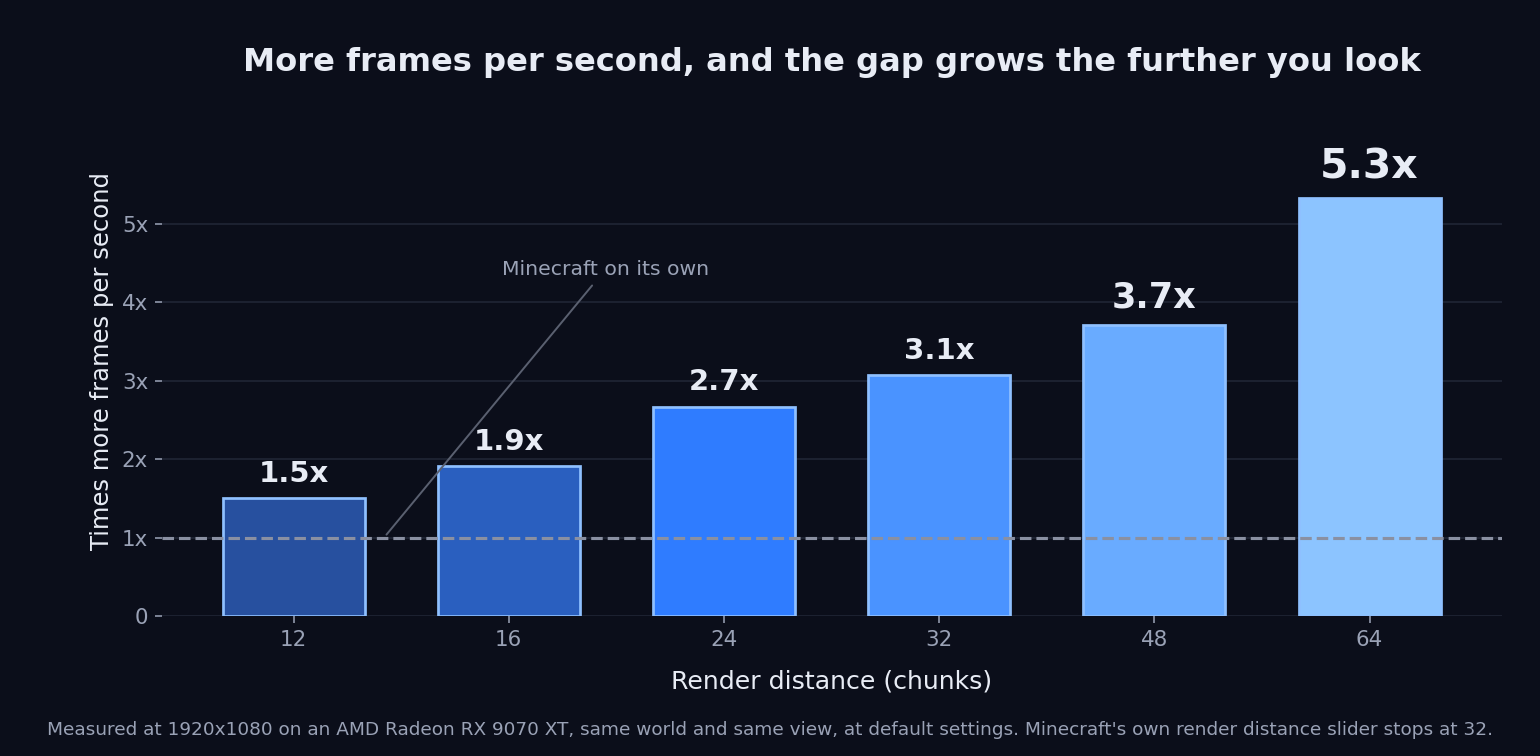
在 AMD Radeon RX 9070 XT 上以 1920x1080 分辨率测量,同一世界,同一视角,一次运行模组,一次不运行。未安装 Sodium 时测量。
| 渲染距离 |
Minecraft |
Meshelium |
差异 |
| 12,Minecraft 默认值 |
1,621 FPS |
2,437 FPS |
1.50× (+50%) |
| 16 |
1,115 FPS |
2,126 FPS |
1.91× (+91%) |
| 24 |
641 FPS |
1,709 FPS |
2.67× (+167%) |
| 32,Minecraft 的最大限制 |
393 FPS |
1,206 FPS |
3.07× (+207%) |
| 48 |
205 FPS |
761 FPS |
3.71× (+271%) |
| 64 |
114 FPS |
607 FPS |
5.32× (+432%) |
你看得越远,差距就越大。两列数据均基于 Minecraft 的 Vulkan 渲染器,因此它们之间唯一的变量就是 Meshelium 本身。
这些数字来自一台电脑。 你的结果会有所不同。
与 Sodium 配合更佳!
以前二选一:一个会取代另一个。现在你可以同时拥有两者。
Sodium 继续擅长它的事——构建区块——而 Meshelium 使用网格着色器绘制它们。同时安装两者即可自动生效;无需开启任何开关。
在 Radeon RX 9070 XT 上以 1920x1080 分辨率、在同一世界的相同位置测量:使用 Meshelium 绘制时,帧率约为仅使用 Sodium 的两倍——在渲染距离 64 时为 1.9 倍,在 96 时为 1.8 倍。
你还能获得GPU 可见性检测,这只有在这条路径上才存在:Meshelium 在图形卡本身上计算出你实际能看到的内容,而不是绘制所有交给它的东西。
对于你的游戏版本请使用 Sodium 0.9.2 ——正式版,而非更新的 0.9.3 alpha。(在 26.2 版本中,Sodium 0.9.2-beta.1 是同一个构建但版本号不同,也能正常工作。)Meshelium 接入了 Sodium 中从未打算让其他模组触碰的部分,因此其他版本可能不兼容;Meshelium 设置界面会显示你当前安装的版本,并告知是否匹配。
安装了 Sodium 后,Meshelium 的设置成为 Sodium 视频设置的一部分:左侧列表中的 Meshelium 条目,以及 Sodium 的“应用”和“撤销”按钮。只有仍然有效的设置才会显示。那些仅改变 Meshelium 如何构建区块的设置,当 Sodium 承担该工作时便无效,因此被隐藏——包括下文描述的内存设置。如果你移除 Sodium,它们会重新出现。
你需要什么
- Minecraft 26.2 或 26.3,使用 Fabric 或 NeoForge ——选择与你的游戏版本和加载器匹配的下载
- 在 Fabric 上,还需要 Fabric API。
NeoForge 不需要额外模组
- Windows 或 Linux。不支持 Mac:Mac 目前尚未在 Vulkan 上支持网格着色器
- 支持网格着色器的显卡:AMD RX 6000 或更新型号,NVIDIA GTX
16xx / RTX 20xx 或更新型号,Intel Arc,以及包括 Steam Deck 在内的近期笔记本和掌机芯片。Meshelium 向驱动程序查询而非检查型号列表,因此任何报告支持该功能的设备均可工作——如果缺失该功能,Meshelium 会自动关闭,告知原因,且游戏保持正常运行
仅限客户端。你的朋友和你的服务器都不需要它。
必须执行此操作,否则毫无效果
Minecraft 以旧的 OpenGL 绘图模式启动。Meshelium 仅在新的 Vulkan 模式下工作。
- 选项 → 视频设置 → 图形 API
- 选择 优先 Vulkan (实验性) ——这是 Minecraft 自己的名称
- 重启 Minecraft。它仅在加载游戏时生效
跳过此步骤,看起来就像模组没有起作用。如果出现这种情况,Meshelium 会在屏幕上显示一条消息,其中包含一个可以为你执行此操作的按钮。
在线游玩?
Bobby 是让长距离在服务端正常工作的关键。服务端只发送你附近的土地,因此无论你显卡多快,巨大的渲染距离都没有可绘制的远处内容。Bobby 记住服务端已经展示过的地方并将它们还原。Bobby 记住世界,Meshelium 绘制它。
设置
视频设置顶部的 Meshelium Settings 按钮。安装了 Sodium 后,请在 Sodium 的视频设置中查找 Meshelium。
距离上限 是你突破 32 的方法。它扩展了 Minecraft 自身的渲染距离滑块,最高可达 120 个区块(安装了 Sodium 时,使用 Sodium 的滑块,最高 96)。提高上限本身不会改变任何东西——你之后仍需移动正常的滑块。逐步提高:超过约 64 时,Minecraft 自身所需的内存超过默认启动器分配的量,而在 120 时可能会耗尽内存并崩溃。在大幅推高之前,请为 Minecraft 分配更多内存。
GPU 可见性检测(仅 Sodium,默认开启)在图形卡上计算你实际能看到的内容,而不是绘制 Sodium 交给它的所有东西。
距离雾效 默认为 关闭,这与 Minecraft 的外观有所不同。无论你看得多远,Minecraft 都会在固定的 1024 格处淡化远处地形,这在超过 64 个区块时覆盖了大部分视野。关闭会在边缘保留短暂的淡化,使地平线依然柔和。匹配视距会将雾气随渲染距离一起移动;Minecraft 默认则将其恢复为游戏原始状态。
遮挡剔除 询问你的显卡哪些地形被其他地形遮挡并跳过它们。设置为 自动 时,它在 48 个区块时自动开启。在低处平视长距离观看时收益最大,在高处俯视时会略微增加开销。无论哪种方式都不会导致问题,因此可以尝试两种设置并观察帧率计数器。
在 Advanced(高级)设置下,除非另有说明,否则默认关闭:Greedy Meshing(贪婪网格化)会合并相邻且相同的方块面。Cull Tiny Plants Beyond(裁剪远处微小植物)和 Cull Sub-Pixel Detail Beyond(裁剪远处亚像素细节)会跳过在远距离下无法看清的微小物体。Smart Leaves Beyond(智能树叶裁剪,开启,16 区块)会跳过被树冠遮挡的树叶面,同时保持树叶的半透明外观。Solid Leaves Beyond(实心树叶裁剪)会在超过一定距离后将树叶渲染为完全实体。
降低显存占用 - 这两项在安装了 Sodium 时会被隐藏,因为此时显存由 Sodium 管理而非本模组。Idle Memory Trim(空闲内存回收,开启)在游戏静止半分钟后,会将 Meshelium 未使用的显存归还给系统。Duplicate Terrain Memory(重复地形内存,释放)会释放 Minecraft 保留的地形第二份副本,尽管实际渲染是由 Meshelium 完成的,这可以在长渲染距离下节省数 GB 的显存。对于使用集成显卡的笔记本电脑和掌机来说,这一项的效果加倍重要,因为它们的显存与系统 RAM 共享。
除启动通知外,所有更改在修改后立即生效,该通知需等待下次启动游戏才会显示。切换 Meshelium 的开关、更改“重复地形内存”设置或调整“贪婪网格化”选项会导致地形重载,因此区块需要几秒钟重新生成。
致谢
Nvidium by MCRcortex 是促使本模组得以尝试的原因。他们率先在 Minecraft 中实现了基于网格着色器的地形渲染,并证明了该理念的可行性。Meshelium 是一个独立的模组,并非对其作品的移植:它针对跨厂商的 VK_EXT_mesh_shader 扩展,而非 NVIDIA 专用方言;运行于 Minecraft 的 Vulkan 后端之上;其架构、内存模型和剔除算法均为自主研发。MCRcortex 未参与 Meshelium 的开发,也未为其背书。
Sodium by CaffeineMC,提供了 Meshelium 现在所依赖的地形构建器。CaffeineMC 未参与 Meshelium 的开发,也未为其背书。
发现问题?
Bug 报告、崩溃问题,或者任何看起来不对劲的地方:
。请附上日志文件——这是最有用的部分。每次游戏启动时,Meshelium 都会记录其对硬件的判断及其原因。
NeoForge 与早期加载界面
在 Minecraft 26.2 版本上 - 已由您处理;以下是正在发生的情况。
NeoForge 的加载界面与 Minecraft 的 Vulkan 渲染器无法共存。加载界面以 OpenGL 模式创建游戏窗口,而 Vulkan(Meshelium 运行的渲染器)无法向以此方式创建的窗口进行绘制,导致游戏在启动过程中因 GLFW 错误而崩溃,错误信息会归咎于您的显卡驱动。但这并非驱动的问题,更新驱动也无济于事。这是一个已知的 NeoForge 问题(neoforged/NeoForge#3230),其修复方案尚未合并。
您无需对此采取任何操作。Meshelium 会在游戏创建窗口前的瞬间关闭该加载界面,从而使游戏正常启动。您将看不到加载界面,且游戏窗口的出现时间会比平时稍晚一点;除此之外没有任何变化。Meshelium 还会在 config/fml.toml 中将 earlyWindowControl 设置为关闭,因此即使在未来某个 NeoForge 版本中实时修复不再适用,游戏仍能正常启动。
在 Minecraft 26.3 版本上 - 无需处理。 目前适用于 26.3 版本的 NeoForge 已经完全禁用了其早期加载界面(其加载器会忽略相关设置),并且游戏会自行创建窗口,因此上述问题不会发生。Meshelium 在此情况下不做任何干预,并在日志中予以说明。
如果使用 OpenGL,则不涉及上述情况,加载界面保持不变。
Fabric 版本不受此影响。
Meshelium
See further. Get more frames. Powered by mesh shaders.
Meshelium draws Minecraft's terrain with your graphics card's mesh shaders
instead of the way the game normally does it. You get more frames per second,
and you can push the render distance far past the slider's usual limit.
How much faster?
Measured at 1920x1080 on an AMD Radeon RX 9070 XT, same world, same view, one
run with the mod and one without. Measured without Sodium.
| Render distance |
Minecraft |
Meshelium |
Difference |
| 12, Minecraft's default |
1,621 FPS |
2,437 FPS |
1.50× (+50%) |
| 16 |
1,115 FPS |
2,126 FPS |
1.91× (+91%) |
| 24 |
641 FPS |
1,709 FPS |
2.67× (+167%) |
| 32, as far as Minecraft goes |
393 FPS |
1,206 FPS |
3.07× (+207%) |
| 48 |
205 FPS |
761 FPS |
3.71× (+271%) |
| 64 |
114 FPS |
607 FPS |
5.32× (+432%) |
The further you look, the bigger the difference. Both columns are Minecraft's
Vulkan renderer, so the only thing that changes between them is Meshelium
itself.
These numbers are from one computer. Yours will land somewhere else.
Works better with Sodium!
They used to be a choice: one replaced the other. Now you get both.
Sodium keeps doing what it is best at - building the chunks - and Meshelium
draws them with mesh shaders. Install both and it happens on its own; there is
nothing to switch on.
Measured on a Radeon RX 9070 XT at 1920x1080, standing in the same spot in the
same world: with Meshelium drawing, the frame is about twice as fast as
Sodium on its own - 1.9x at render distance 64, and 1.8x at 96.
You also get GPU Visibility, which only exists on this path: Meshelium
works out what you can actually see on the graphics card itself, instead of
drawing everything it is handed.
Use Sodium 0.9.2 for your game version - the release, not the newer
0.9.3 alpha. (On 26.2, Sodium 0.9.2-beta.1 is the same build with a
different version number, and works too.) Meshelium plugs into parts of
Sodium that were never meant for other mods to touch, so another version may
not fit; the Meshelium settings screen shows which one you have and says
whether it matches.
With Sodium installed, Meshelium's settings are part of Sodium's video
settings: a Meshelium entry in the list on the left, with Sodium's Apply
and Undo. Only the settings that still do something are there. The ones that
only change how Meshelium builds chunks have nothing to do while Sodium is
doing that job, so they are hidden - including the memory settings described
below. They come back if you remove Sodium.
What you need
- Minecraft 26.2 or 26.3, on Fabric or NeoForge - pick the download
that matches your game version and your loader
- On Fabric, Fabric API as well.
NeoForge needs no extra mod
- Windows or Linux. No Mac: Macs don't do mesh shaders on Vulkan yet
- A graphics card with mesh shaders: AMD RX 6000 or newer, NVIDIA GTX
16xx / RTX 20xx or newer, Intel Arc, and recent laptop and handheld chips
including the Steam Deck. Meshelium asks your driver rather than checking a
list of models, so anything that reports the feature will work - and if it is
missing, Meshelium turns itself off, tells you why, and your game keeps
working normally
Client side only. Your friends do not need it, and neither does your server.
Do this or nothing will happen
Minecraft starts in the old drawing mode, OpenGL. Meshelium only works in the
new one, Vulkan.
- Options → Video Settings → Graphics API
- Choose Prefer Vulkan (Experimental) - that is Minecraft's own name for it
- Restart Minecraft. It only changes while the game is loading
Skip this and it looks like the mod did nothing. If that happens, Meshelium puts
a message on screen with a button that does it for you.
Playing online?
Bobby is what makes long distances work on a
server. A server only sends you the land close by, so a huge render distance
has nothing out there to draw no matter how fast your card is. Bobby remembers
the places the server already showed you and puts them back. Bobby remembers
the world, Meshelium draws it.
Settings
A Meshelium Settings button at the top of Video Settings. With Sodium
installed, look for Meshelium in Sodium's video settings instead.
Distance Cap is how you get past 32. It widens Minecraft's own render
distance slider, up to 120 chunks (with Sodium installed, Sodium's slider, up
to 96). Raising the cap changes nothing on its own -
you still move the normal slider afterwards. Raise it gradually: past about 64
Minecraft itself needs more memory than a default launcher gives it, and at 120
it can run out and close. Give Minecraft more memory before pushing it far.
GPU Visibility (Sodium only, on by default) works out what you can actually
see on the graphics card instead of drawing everything Sodium hands it.
Distance Fog ships Off, and that is a change from how Minecraft looks.
Minecraft fades distant terrain at a fixed 1024 blocks however far you can see,
which covers most of the view past 64 chunks. Off keeps a short fade at the very
edge, so the horizon still softens. Match View Distance moves the haze out with
your render distance; Minecraft Default puts it back exactly as the game has it.
Occlusion Culling asks your graphics card which terrain is hidden behind
other terrain and skips it. On Auto it switches itself on at 48 chunks. It
pays most at ground level looking across a long view, and costs a little from a
high camera looking down. Nothing breaks either way, so try both and watch your
frame counter.
Behind Advanced, off unless noted: Greedy Meshing merges identical
neighbouring block faces. Cull Tiny Plants Beyond and Cull Sub-Pixel
Detail Beyond skip things too small to see at range. Smart Leaves Beyond
(on, 16 chunks) skips leaf faces buried inside canopies, keeping the
see-through look. Solid Leaves Beyond builds leaves fully solid past a
distance.
Using less graphics memory - these two are hidden while Sodium is
installed, because Sodium owns that memory instead. Idle Memory Trim (on)
hands back graphics memory Meshelium is not using after half a minute of
standing still. Duplicate Terrain Memory (Freed) releases the second copy
of the terrain Minecraft keeps even though Meshelium is the one drawing from
it, which saves gigabytes at long render distances. On laptops and handhelds
with integrated graphics this counts double, because their graphics memory is
your system RAM.
Everything applies as soon as you change it, apart from the startup notice,
which waits for the next launch. Switching Meshelium off and on, changing
Duplicate Terrain Memory, or flipping Greedy Meshing reloads the terrain, so
chunks rebuild for a few seconds.
Thanks
Nvidium by MCRcortex is why this was
worth attempting. They pioneered mesh-shader terrain in Minecraft and proved
the idea works. Meshelium is its own mod, not a port of theirs: it targets the
cross-vendor VK_EXT_mesh_shader extension rather than the NVIDIA dialect,
runs on Minecraft's Vulkan backend, and its architecture, memory model and
culling are its own. MCRcortex has no involvement in Meshelium and has not
endorsed it.
Sodium by CaffeineMC, for the chunk
builder Meshelium now draws from. CaffeineMC has no involvement in Meshelium
and has not endorsed it.
Found a problem?
Bug reports, crashes, or just something that looks wrong:
. The log is the useful part to
attach - Meshelium writes down what it decided about your hardware, and why,
every time the game starts.
NeoForge and the early loading screen
On Minecraft 26.2 - handled for you; here is what is happening.
NeoForge's loading screen and Minecraft's Vulkan renderer cannot both
exist. The loading screen creates the game window in OpenGL mode, and
Vulkan - the renderer Meshelium runs on - cannot draw to a window made that
way, so the game dies during start-up with a GLFW error that blames your
graphics drivers. It is not your drivers, and updating them will not help.
It is a known NeoForge issue (neoforged/NeoForge#3230) and its fix has not
been merged.
You do not have to do anything about it. Meshelium closes that loading
screen in the instant before the game creates its window, so the game
starts normally. You get no loading screen and a game window that appears
a moment later than usual; nothing else changes. Meshelium also turns
earlyWindowControl off in config/fml.toml, so that even on a future
NeoForge build where the live fix no longer applies, the game still starts.
On Minecraft 26.3 - nothing to handle. NeoForge for 26.3 currently
ships with its early loading screen switched off altogether (its loader
ignores the setting), and the game makes its own window, so the problem
above cannot happen. Meshelium leaves everything alone there and says so in
the log.
On OpenGL none of this applies and the loading screen is left alone.
The Fabric build is unaffected.


 模组
 模组

 模组

 模组
 模组

 模组
评论 0
登录后参与评分
还没有评论,来抢沙发吧