
注意:**Methane 已停止开发。**在几周之后,该模组的代码库和功能变得过于庞大,加之其他事务以及 Minecraft 频繁的更新,这已经超出了我能持续开发的范围。
如果将来该模组被完成,它也不会取代 Methane。
目前,请在此处报告任何非 Bug 相关的问题 here
这是什么?
Methane 是一款高度可配置的优化模组,专注于通过破坏性手段大幅提升性能,其优化方面包括:
- 禁用光mapper(lightmapper)的大部分功能,从而极大地提升 CPU 性能。
- 允许用户调整雾效行为,使你能看到所有的区块,而不会被雾遮挡。(可选)
- 优化游戏内所有粒子的行为,使其在刷新时对计算机的性能消耗大幅降低。(仅 2.3+ 版本)
注意: Methane(默认情况下)由于不计算方块光照,会在客户端产生一种“全亮”效果。你可以在 Mod Menu 中禁用此效果,但这会限制潜在的收益,并使你只能使用粒子(始终开启)和破坏性(可选)优化。Methane 默认还会移除提示框(toasts),但你可以关闭此行为。
- 作为某些优化的副作用,世界保存机制与原版 Minecraft 有所不同,但通常不会引起注意(除了存档抖动减少),并且对于绝大多数崩溃和强制 ALT+F4 退出情况仍能正常保存。如果你对此感到担忧,请使用传统光照引擎。
如果你希望生物生成行为正常,请开启传统光照引擎。
优势
- 帧率提升,且卡顿明显减少。
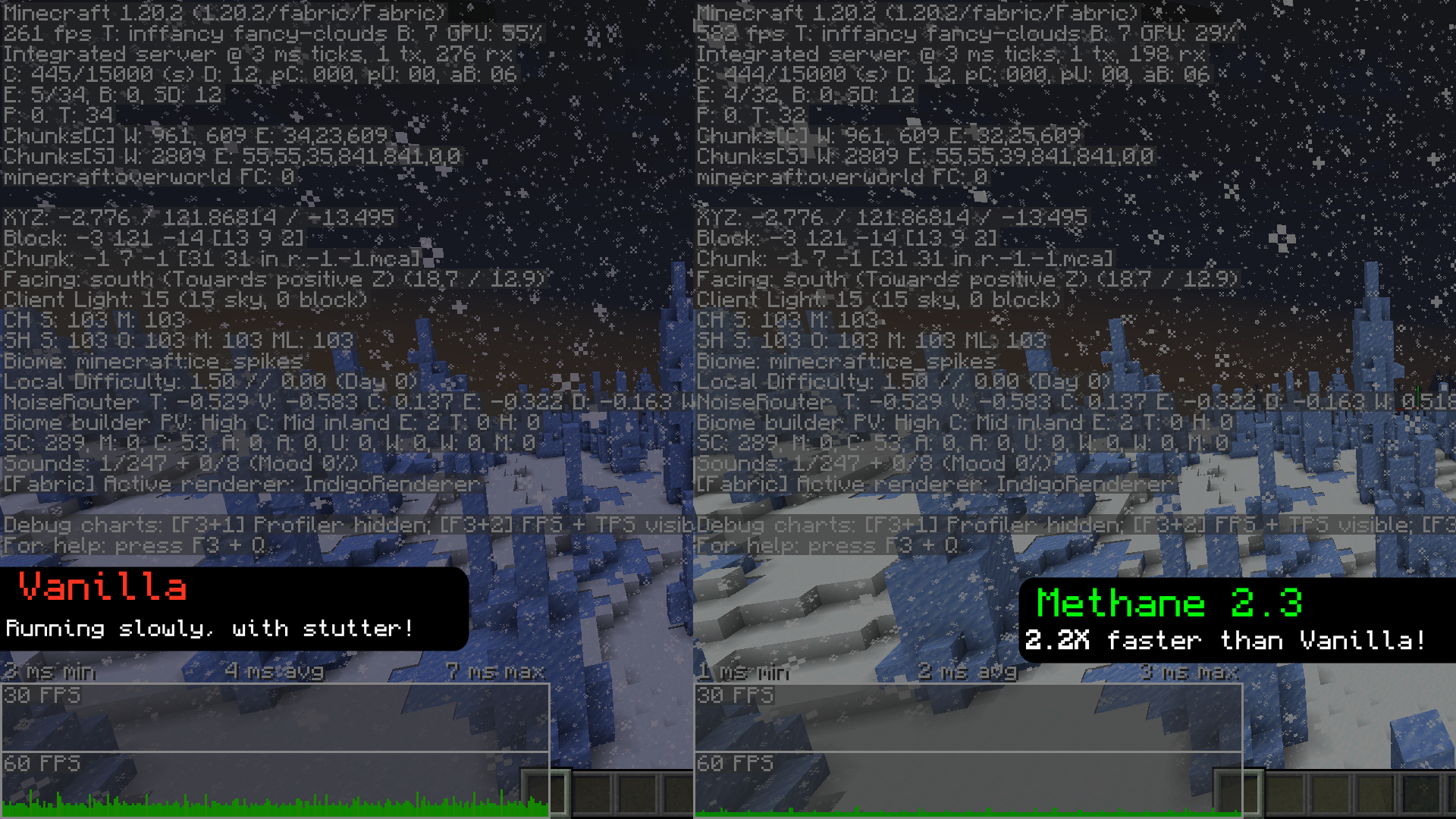 录制于 Methane 2.3,所有设置均为
Fancy,渲染距离和模拟距离均设为12。 - 具有与全亮相同的效果,但能带来实际的性能提升。
- Methane 可以帮助你的游戏在 Distant Horizons(需切换两次)上运行更快,但通常在 LoD 中会留下随机黑斑。
与全亮相比
虽然全亮(也称为“亮度”和“伽马值”)能让世界看起来完全照亮,但它仍然执行所有光照计算。Methane 则跳过这些计算,从而在获得相同视觉效果的同时提供更好的性能。
配置
- Methane 提供了多种选项,允许你自定义模组的许多方面,主要是启动行为和雾效行为。1.19.3 及以上版本还应具备使用
\键切换模组的功能(在 2.15+ 中默认未绑定),但在重新启用时存在一些 issues。 - 服务器管理员现在可以从 2.2 版本开始控制 Methane 客户端的设置,点击此处获取。
- 从 2.3 版本开始: 现在有一组名为“破坏性设置”的选项,允许你通过移除某些渲染器特性(例如 HUD 背景、天空渲染器等)来大幅提升性能。这在 GPU 受限的情况下会有所帮助。
我可以将其与 Starlight 一起使用吗?
Starlight 应该可以在 1.19.x 上正常工作(显然,只有在 Methane 关闭时才起作用),而 Methane 会在 1.20+ 上与 Starlight 发生崩溃(尽管 Starlight 的大部分功能已合并到 1.20 中)。
兼容性
- Methane 已经经过较长时间的成熟发展,自首个版本发布以来,兼容性已大幅改善。大多数模组应与 Methane 完美兼容。如果不兼容,请提交 issue!
通过 Sinytra Connector,Methane 应在 Forge 上可玩,但除此之外,Forge 的支持可能不多。
获取早期构建版本
通常情况下,一个完全稳定的更新会被推送到仓库,但模组本身不会上传,通常是因为我计划添加其他内容。如果你确实想提前获取,可以点击这里
依赖项
- Fabric API
- Mod Menu
- Cloth Config
modpacks
随意将 Methane 放入你的整合包中,但请链接回 Methane 的 Modrinth 和/或 GitHub 仓库。
翻译
Methane 包含少量(可能非常过时)的翻译。如果你想帮助翻译该模组,欢迎提交 PR。

Note: Methane is no longer being developed. The 'new' mod's codebase and features became far too large after a few weeks, which combined with other commitments + minecraft's frequent updates, really isn't something I can keep developing.
In the unlikely case that the mod is later finished, it will not replace Methane.
For now, report any non-bug related issues here
What is this?
Methane is a highly configurable optimization mod focused on destructively gaining lots of performance, with optimizations on the following:
- Disabling a lot of the functionality of the lightmapper, which improves performance on the CPU drastically.
- Allowing the user to adjust fog behavior, which allows you to see all your chunks, without them being occluded by fog. (optional)
- Optimizing how all particles behave in-game, causing them to be way less intensive on your computer when ticking. (2.3+ only)
Note: Methane (by default) will apply a "fullbright" effect on the client as a symptom of not calculating block lighting. You can disable this in Mod Menu, but this will limit the potential performance gains and restrict you to particle (always on) and destructive (optional) optimizations. Methane also removes toasts by default, but you can turn this behaviour off.
- As a side effect of some optimizations, world saving acts differently to vanilla MC, but shouldn't be noticable (aside from less save jitter), and will still save properly for the *vast* majority of crashes and rage ALT+F4's. If this scares you, please use the legacy lighting engine.
If you want mob spawning to behave properly, turn on the legacy lighting engine.
Benefits
- increased framerate, with significantly less noticable stutter.
*recorded with Methane 2.3, with everything set to
Fancy, and with render + sim distance set to12. - The same effect as fullbright, but with actual performance gains.
- Methane can help your game run faster on Distant Horizons (toggle twice), but usually leaves random dark patches in LoD's.
Compared to fullbright
while fullbright (also known as "brightness" and "gamma") makes the world look fully lit, it still performs all those lighting calculations. Methane instead skips those, resulting in the same end product but with much better performance.
Configuration
- Methane has a variety of options available to customize a lot of the aspects of the mod, mainly its startup and fog behavior. 1.19.3 and up should also have the ability to toggle the mod with
\(will be unbound by default on 2.15+), but has some issues when re-enabling. - Server admins are now able to control the settings of Methane clients from version 2.2 onward, and you can get it here.
- Starting from 2.3 onwards: There are now a handful of settings called "Destructive Settings", that allow you to gain a lot of performance by removing certain renderer features (e.g. HUD backgrounds, sky renderers, etc). This can help in GPU-constrained scenarios.
Can i use this with starlight?
Starlight should work on 1.19.x (obviously it only does things when Methane is OFF), and Methane will crash on 1.20+ with starlight (although most of Starlight's functionality has been merged into 1.20).
Compatibility
- Methane has had quite a bit of time to mature, and compatibility has improved greatly since the first release. Most mods should work just fine with methane. If not, make an issue!
Methane should be playable on forge via Sinytra Connector, but past that there probably wont be much in the way of forge support.
Getting early builds
Most of the time, a perfectly stable update will be pushed to the repository, but the mod wont be uploaded, usually because I'm planning on adding other things. If you really want to grab one early, you can do it here
Dependencies
- Fabric API
- Mod Menu
- Cloth Config
modpacks
feel free to put Methane in your modpack, but please link back to Methane's Modrinth and/or GitHub repo.
Translations
Methane has a small amount of (likely very outdated) translations. If you want to help translate the mod, feel free to make a PR.

下载 Methane
下载 Methane
下载 Methane
下载 Methane
下载 Methane
需要联机服务器吗?
稳定流畅、一键部署,几分钟即可和朋友联机开服
最低仅需 8 元/月 即可畅快联机
下载 Methane
需要联机服务器吗?
稳定流畅、一键部署,几分钟即可和朋友联机开服
最低仅需 8 元/月 即可畅快联机
下载 Methane
需要联机服务器吗?
稳定流畅、一键部署,几分钟即可和朋友联机开服
最低仅需 8 元/月 即可畅快联机
下载 Methane
需要联机服务器吗?
稳定流畅、一键部署,几分钟即可和朋友联机开服
最低仅需 8 元/月 即可畅快联机
下载 Methane
需要联机服务器吗?
稳定流畅、一键部署,几分钟即可和朋友联机开服
最低仅需 8 元/月 即可畅快联机
下载 Methane
移除了一些旧代码,并进行了一些其他小改动以支持 1.21。
关于这个资源的讨论、问题反馈与使用心得
还没有讨论,来发第一帖吧
你是这个资源的作者?登录后可认领此资源。
相似资源
 模组
缓冲的原始输入和线程化的事件轮询
 模组

显示你正在注视的方块的信息。(适用于 Minecraft 1.16+ 的 Hwyla/Waila 分支)
 模组

查看物品与配方
 模组

原版世界生成优化模组
 模组
在游戏画面角落显示附近世界地形、玩家、生物和实体的地图。可创建路径点,帮助你找到标记过的位置。
 模组
使用 JavaScript 编辑配方、添加自定义物品、编写世界事件!
评论 0
登录后参与评分
还没有评论,来抢沙发吧