Metrognome
在 Instruments 插件提供的游戏内乐器上播放 MIDI 文件。
选择一个 .mid 文件,调整至听起来合适后,将其保存到你稍后可用的库中。
适用于 Minecraft 1.21.11,Fabric。仅客户端使用。服务器端无需安装任何内容。
播放歌曲
手持一件乐器并右键点击以打开它。保持该界面打开。
Metrognome 通过点击其琴键来播放音乐,因此关闭界面会停止播放。
按 M 打开菜单,选择 Browse(浏览)来选择 MIDI 文件,然后点击 Play(播放)。
| 按键 |
功能 |
| M |
菜单 |
| B |
播放 / 停止 |
| H |
暂停 / 恢复 |
| U |
试听。仅在本地播放,不向服务器发送数据 |
改善音质
该乐器拥有 24 个琴键,涵盖两个八度。大多数音乐的音域都比这宽,因此超出范围的部分会被移至最近的适配八度。
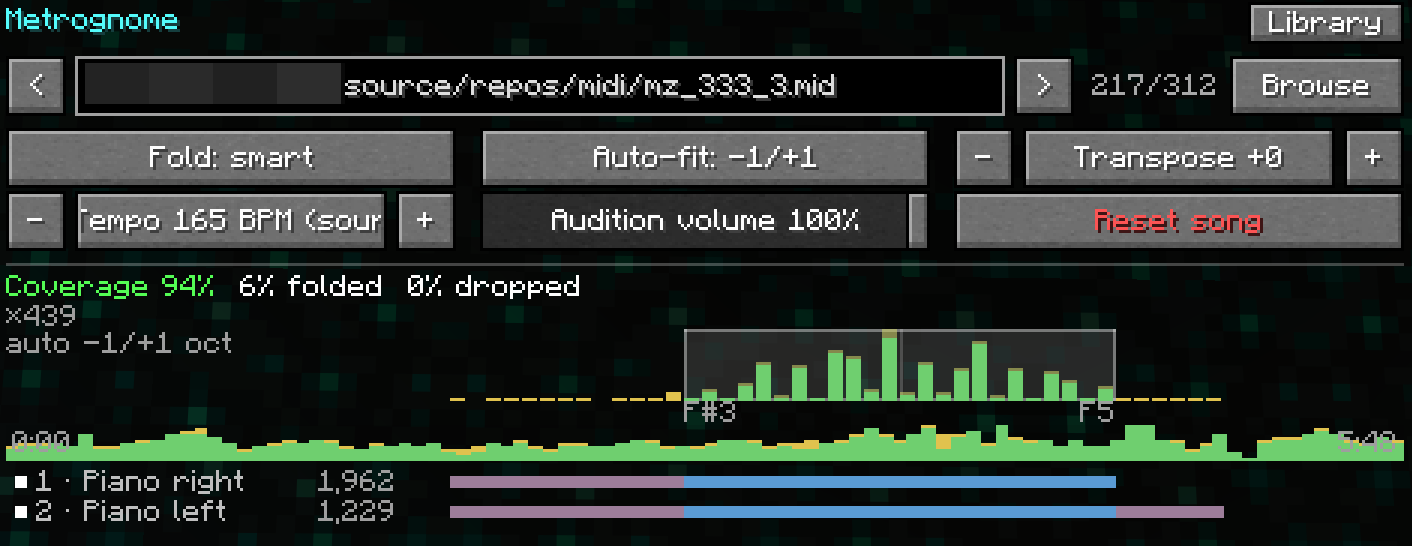
控制面板下方的 Coverage(覆盖率)行显示了当前设置下有多少比例的音乐能够原样呈现:
- 绿色:接近原始版本。
- 黄色:可辨认,部分音符被移动。
- 红色:大量音符被挤压变形。
对于显示为红色的歌曲,请按顺序尝试以下操作。
静音音轨。 文件中的每个音轨都会在统计信息下方列出,包含其音符数量和音域。左击可静音一个音轨,右击可独奏一个音轨。通常,移除贝斯或鼓音轨比任何其他操作都更有效,而独奏主旋律往往优于强行将所有部分塞入两个八度。
移调。 整体移动整首歌曲的音高。音轨列表上方的寄存器映射图显示了音符与可演奏范围的对应关系,微调直至大部分音符落在范围内。
折叠。 决定如何处理仍然无法容纳的音符。smart(智能)模式能保持旋律连贯,适合大多数音乐。simple(简单)模式按完整八度进行移位。none(无)则直接丢弃这些音符。
更改设置时歌曲会自动重新转换,因此按 U 即可听到结果。时间轴条会显示问题出现的位置。点击时间轴即可从该位置开始播放,而非从头开始。
当效果满意时,按下 Save(保存)。歌曲及其设置将存入库中。
库
Library(库)列出了你保存的歌曲。你可以播放、试听、编辑或删除其中任何一首,并通过拖拽行来设置播放顺序。已保存的歌曲会保留保存时的设置,因此在其他地方进行的后续编辑不会影响它们。
服务器负载
每个音符都是发送给服务器的一次点击动作,因此繁忙的歌曲会发送大量点击请求。并非所有服务器都愿意承受这种负载,因此可能会部署相应的防护机制。如果服务器 TPS(每秒刻数)下降,这也可能导致部分音符被延迟并在其他音符之上重叠播放。我不认为这会对服务器造成实质性的性能影响,并且在整个开发过程中也未测量到此类影响。
Metrognome
Plays MIDI files on the in-game instruments from the
Instruments plugin.
Pick a .mid, adjust it until it sounds right, then save it to a library you
can play from later.
Minecraft 1.21.11, Fabric. Client-side. Nothing to install on the server.
Play a song
Hold an instrument and right-click to open it. Leave that screen open.
Metrognome plays by clicking its keys, so closing it stops the song.
Press M for the menu, Browse to pick a MIDI, then Play.
| Key |
|
| M |
Menu |
| B |
Play / stop |
| H |
Pause / resume |
| U |
Audition. Plays locally, sends nothing to the server |
Making it sound better
The instrument has 24 keys, two octaves. Most music is wider than that, so
anything outside the range moves to the nearest octave that fits. The
Coverage line under the controls says how much of the song fits as written:
- Green: close to the original.
- Yellow: recognisable, some notes moved.
- Red: a lot of it is being squashed.
For a red song, try these in order.
Mute tracks. Every track in the file is listed under the stats with its note
count and range. Left-click mutes one, right-click solos it. Dropping a bass or
drum track usually helps more than anything else, and soloing the melody often
beats forcing every part into two octaves.
Transpose. Shifts the whole song. The register map above the track list
shows where the notes sit against the playable range, so nudge it until most of
them land inside.
Fold. Decides what happens to notes that still do not fit. smart keeps a
melody connected and suits most music. simple shifts by whole octaves. none
drops them.
The song reconverts as you change things, so press U to hear the result. The
timeline strip shows where the trouble is. Click it to start from that point
instead of the beginning.
Press Save when it sounds right. The song and its settings go to the library.
Library
Library lists your saved songs. Play, audition, edit or remove any of them,
and drag rows to set a running order. A saved song keeps the settings it had at
save time, so later edits elsewhere leave it alone.
Server load
Each note is one click sent to the server, so a busy song sends a lot of them.
Not every server will want that, so may have prevention mechanisms in place. This may also result in notes being held back and played over the top of one another here and there if the server TPS dips. I don't expect an actual performance impact against the server, and have not measured any such impacts throughout the development process.


 模组

 模组
 模组

 模组

 模组
 模组

评论 0
登录后参与评分
还没有评论,来抢沙发吧