
使用鼠标中键放置一个标记(Ping),在多人游戏中为朋友指示位置。
当光标对准方块时,会在该方块对应的位置生成一个标记;当光标对准实体时,会在实体头顶上方生成一个标记。
默认情况下,按下鼠标中键会创建一个显示“Marks a location.”的标记。当指向敌对实体时,会创建显示“There are enemy here.”的标记。
此外,你还可以使用小键盘上的 1、2 和 3 键来分别创建显示 “Be careful here.”、“Go here.” 和 “There are enemy here.” 的标记。
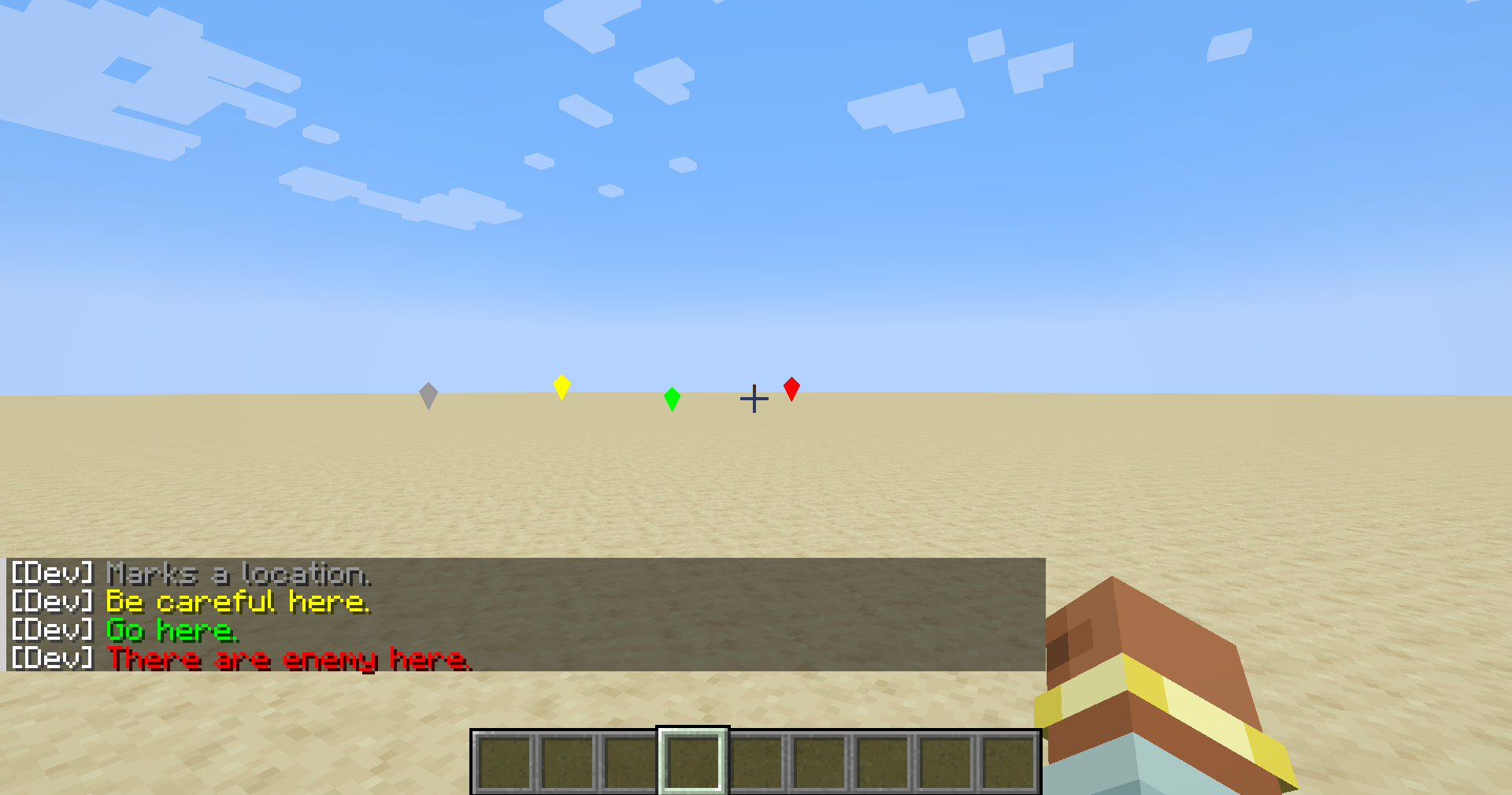
Use the middle mouse button to place a Ping, indicating locations for your friends in multiplayer games.
When the cursor is aimed at a block, a Ping will be created at the corresponding location of the block. When the cursor is aimed at an entity, a Ping will be created above the entity's head.
By default, the middle mouse button creates a Ping that says Marks a location.. When pointing at an unfriendly entity, it creates There are enemy here..
Additionally, you can use the numeric keypad keys 1, 2, and 3 to create Pings that say Be careful here., Go here., and There are enemy here. respectively.

下载 MiddleKeyPing
下载 MiddleKeyPing
下载 MiddleKeyPing
下载 MiddleKeyPing
下载 MiddleKeyPing
下载 MiddleKeyPing
下载 MiddleKeyPing
下载 MiddleKeyPing
下载 MiddleKeyPing
下载 MiddleKeyPing
暂无更新日志
关于这个资源的讨论、问题反馈与使用心得
还没有讨论,来发第一帖吧
你是这个资源的作者?登录后可认领此资源。
相似资源
 模组

显示你正在注视的方块的信息。(适用于 Minecraft 1.16+ 的 Hwyla/Waila 分支)
 模组
使用 JavaScript 编辑配方、添加自定义物品、编写世界事件!
 模组

查看物品与配方
 模组
在游戏画面角落显示附近世界地形、玩家、生物和实体的地图。可创建路径点,帮助你找到标记过的位置。
 模组
AE2:一款流行的自动化与存储模组
 模组
那是什么?一个 Waila/Hwyla 的分支。
评论 0
登录后参与评分
还没有评论,来抢沙发吧