
MineMention
MineMention 是一款用于聊天的提及(mention)模组,让你可以更精准地指定消息的接收者。
MineMention 允许你在聊天中提及个人或群组。当你的消息包含至少一个提及时,该消息不会显示给所有用户,而仅会显示给你提及的对象。当然,你也可以同时提及多个人。

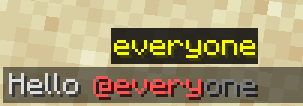
当你输入 @ 时,系统会自动补全你的提及对象:
MineMention 内置了三个可供提及的群组,其他模组也可以轻松添加更多:
@everyone提及服务器上的每位玩家。@here提及同一维度内的每位玩家。@near提及距离在 100 格以内的每位玩家。
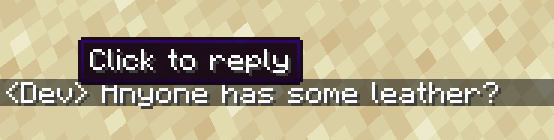
你还可以点击聊天中的提及对象或某条消息的发件人名称来回复:
此时你可能会想:“当我与其他玩家发送私聊消息时,我不想每次都输入 @PlayerName。”
幸运的是,你可以运行命令 /d PlayerName 来更改你的默认提及对象(如果你没有显式提供提及对象,将应用这些默认设置)。
要更改默认提及对象,请运行 /d 并附带一组作为新默认提及对象的参数(但不需要前置的 @ 符号)。如果 /d 后不跟任何参数,则将其重置为 @everyone。
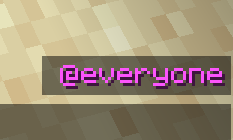
你还可以在你的聊天栏正上方查看当前的默认提及对象:
当多个模组注册了相同的特殊提及(例如 @team 经常发生这种情况),它们默认都不会生效。但你可以在配置文件中修改此行为。配置中有一个名为 mentions 的映射表,你可以在其中指定某个特殊提及对应哪个功能。键始终是特殊提及的名称,值则是该提及对应的 ID。你可以重定向除 @everyone 之外的所有提及。如果你将某个提及重定向到 minemention:none,则可以移除它。
示例:
{
  "mentions": {
    "here": "minemention:none",
    "near": "minemention:none",
    "close": "minemention:near"
  }
}
这将移除 @here 并将 @near 重命名为 @close。
内置提及的 ID 分别为 minemention:everyone、minemention:here、minemention:near、minemention:ftb 和 minemention:none。
MineMention
MineMention is a mention mod for the chat so you can specify who should get your messages better.
MineMention allows you to mention people or groups in chat. Whenever your message contains at least one mention, it will not be displayed to all users but only to the ones you mentioned. But you can mention multiple people.
whenever you type an @ you'll get autocompletion for your mentions:
MineMention has three builtin Groups you can mention but other mods can easily add more:
@everyonementions every player on the server.@herementions every player in the same dimension.@nearmentions every player within a 100 block distance
You can also click on mentions or the sender name of a message in the chat to write a reply:
Now you might think: when I write private messages with another payer I don't want to type @PlayerName all the time.
Luckily you can run the command /d PlayerName to change your default mentions (those are applied if you don't provide a mention explicitly)
To change the default mentions run /d with a list of mentions as arguments that should be your new default mentions (but without the preceding @ character). Run /d without arguments to reset it to @everyone.
You can also see your current default mentions right over your chat:
Whenever multiple mods register the same special mention (seems to happen a lot with @team), none of them will be available by default. You can however change that in the config. There's a map called mentions where you can specify what special mention should be what. The key is always the name of the special mention and the value is an id of what the mentions does. You can redirect all mentions except @everyone. If you redirect a mention to minemention:none, you can remove it.
Example:
{
  "mentions": {
    "here": "minemention:none",
    "near": "minemention:none",
    "close": "minemention:near"
  }
}
This would remove @here and rename @near to @close.
The ids of the builtin mentions are minemention:everyone, minemention:here, minemention:near, minemention:ftb and minemention:none.

下载 MineMention
下载 MineMention
下载 MineMention
下载 MineMention
下载 MineMention
需要联机服务器吗?
稳定流畅、一键部署,几分钟即可和朋友联机开服
最低仅需 8 元/月 即可畅快联机
下载 MineMention
下载 MineMention
下载 MineMention
下载 MineMention
修复因发布的是去混淆文件而非重新混淆文件的崩溃问题。
关于这个资源的讨论、问题反馈与使用心得
还没有讨论,来发第一帖吧
你是这个资源的作者?登录后可认领此资源。
相似资源
 模组

显示你正在注视的方块的信息。(适用于 Minecraft 1.16+ 的 Hwyla/Waila 分支)
 模组
在游戏画面角落显示附近世界地形、玩家、生物和实体的地图。可创建路径点,帮助你找到标记过的位置。
 模组

查看物品与配方
 模组
使用 JavaScript 编辑配方、添加自定义物品、编写世界事件!
 模组
AE2:一款流行的自动化与存储模组
 模组
那是什么?一个 Waila/Hwyla 的分支。
评论 0
登录后参与评分
还没有评论,来抢沙发吧