Mod Menu Pro
在 Minecraft 内管理、发现并追踪你的模组。
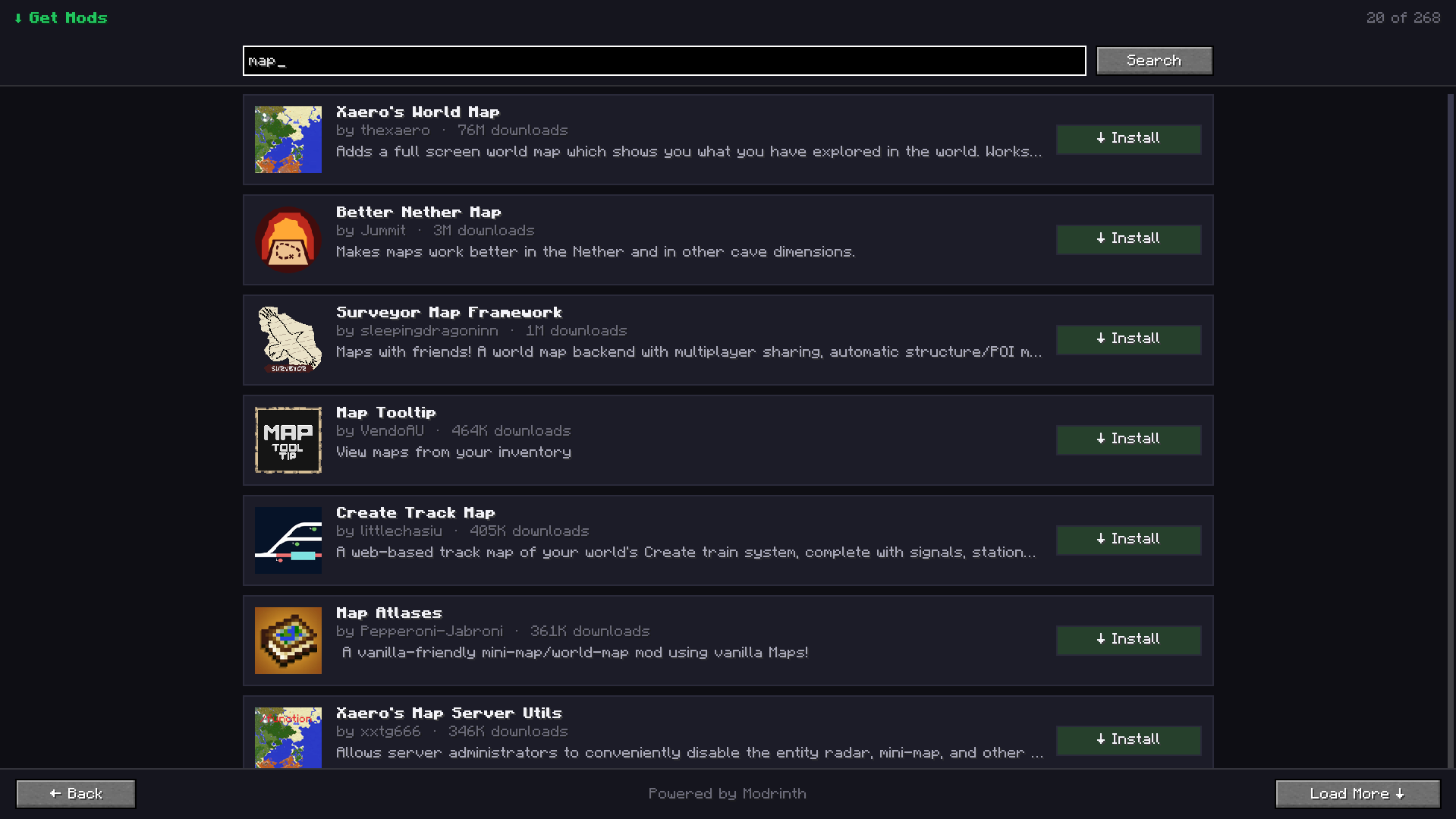
Mod Menu Pro 是一款为 Fabric 打造的简洁现代模组管理界面。无需离开游戏,即可浏览已安装的模组、查看重要详情、整理收藏夹、添加个人备注、检查更新,并从 Modrinth 发现新项目。
使用 AI 构建 Minecraft 模组
CubeWright AI 即将推出——描述你的模组创意,将其转化为可运行的 Minecraft 项目。
功能特性
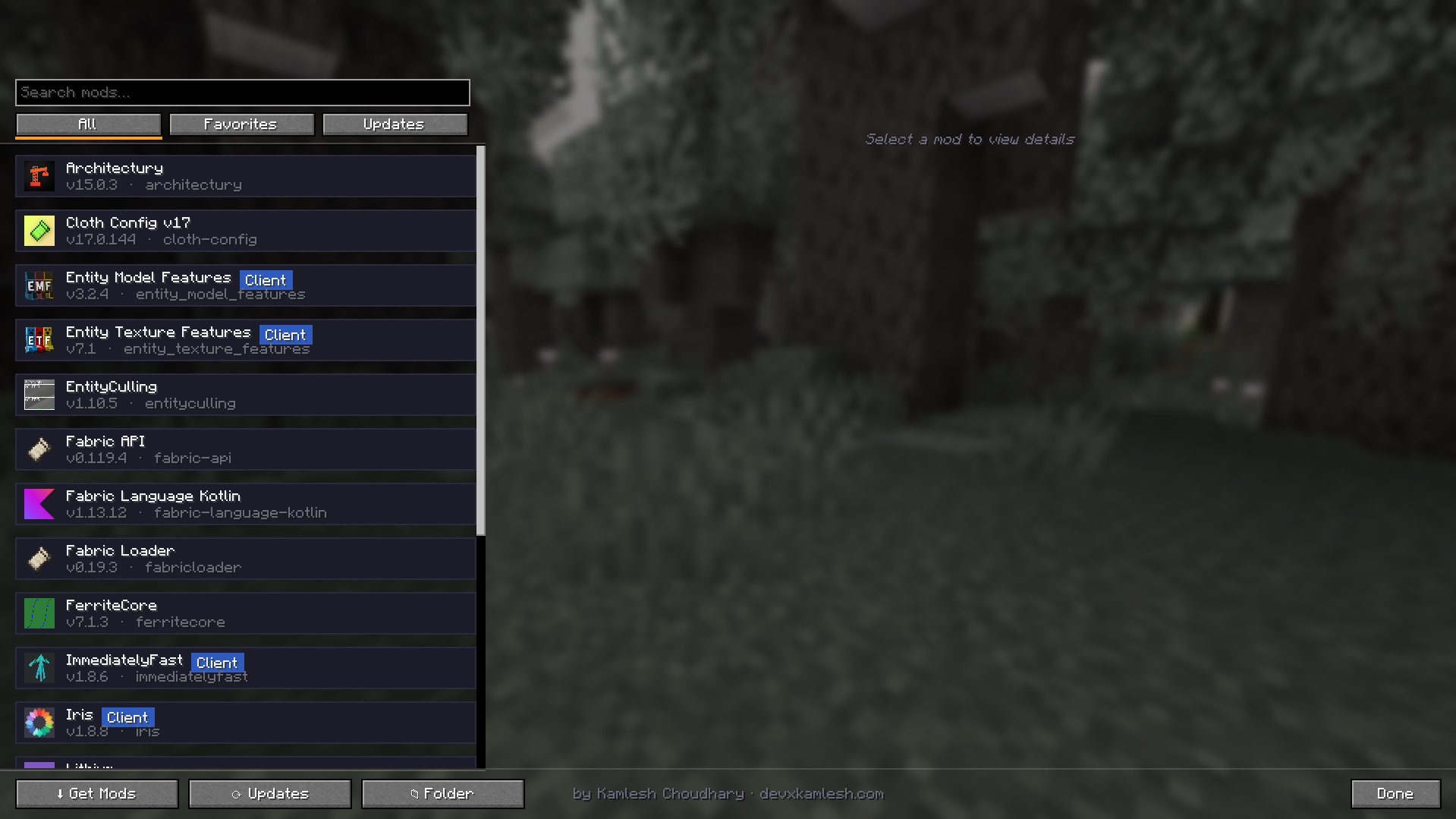
- 现代化模组列表 — 快速搜索已安装的模组,并按全部、收藏夹或更新进行筛选。
- 丰富的模组详情 — 查看图标、版本、作者、描述、环境要求,以及网站、源码和 Issue 链接。
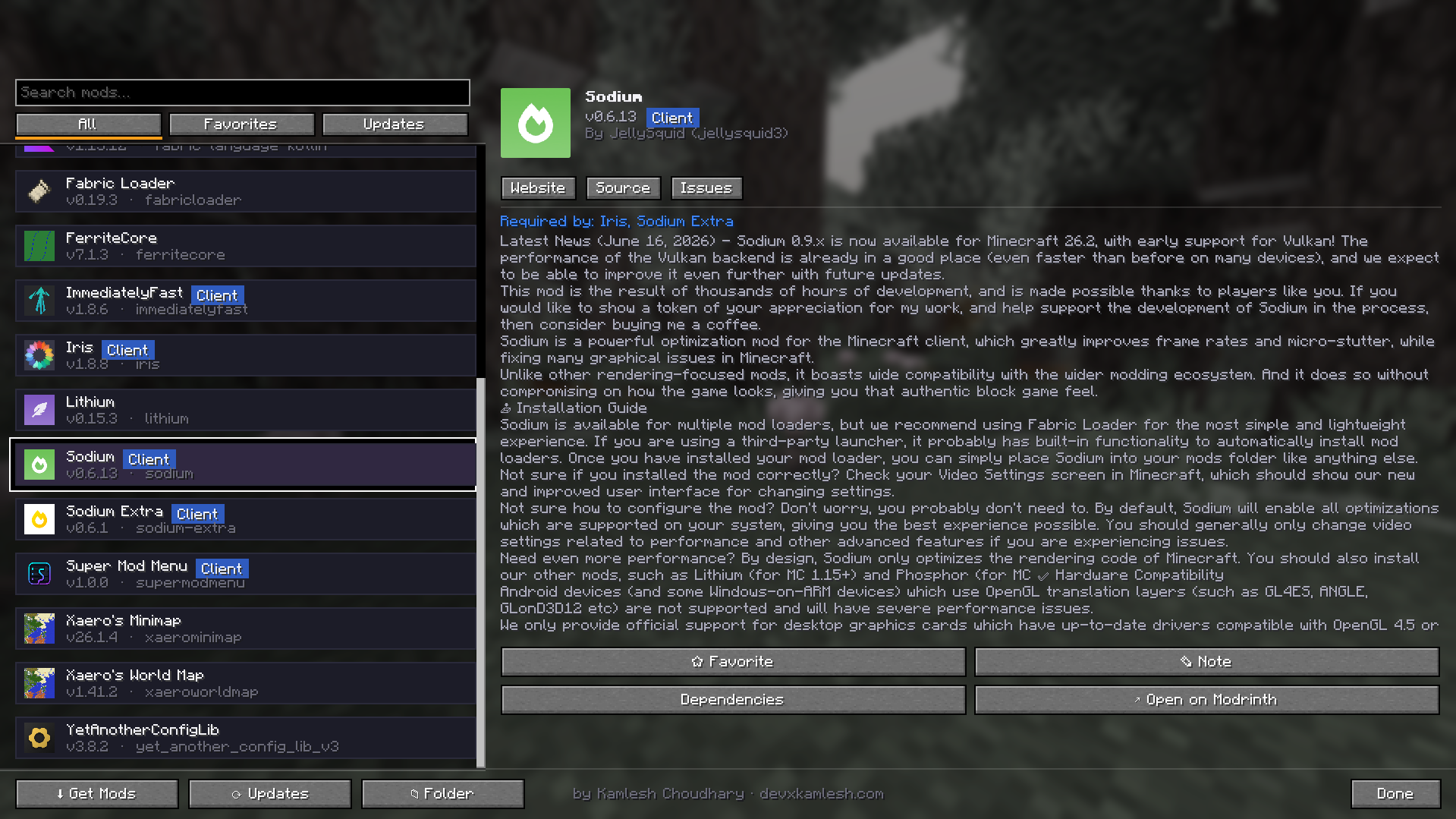
- 收藏夹 — 将常用模组置顶显示。
- 个人备注 — 为任意已安装模组添加私密备注。
- 更新检测 — 通过 Modrinth 检测是否有更新的兼容版本,并打开相应的更新页面。
- 游戏内模组浏览器 — 搜索 Modrinth 并将兼容的 Fabric 模组直接安装至 mods 文件夹。
- 依赖关系洞察 — 查看依赖项,并了解哪些已安装模组依赖于当前选中的项目。
- 配置集成 — 当 Mod Menu 提供配置界面时,可直接打开模组的配置屏幕。
- 快捷文件夹访问 — 一键打开 Minecraft 的 mods 文件夹。
- 纯客户端工具 — 无需在服务器端安装。
使用方法
- 在主菜单或暂停菜单中点击 Mods(模组)。
- 左击某个模组以查看其详细信息。
- 右击某个模组以添加或编辑备注。
- 使用 Updates(更新)扫描已安装文件,查找更新的兼容版本。
- 使用 Get Mods(获取模组)从 Modrinth 搜索并安装 Fabric 模组。
- 安装新模组后重启 Minecraft。
运行环境要求
- Minecraft: 26.2
- Fabric Loader: 0.19.3 或更高版本
- Fabric API: 必需
- Java: 25
- Mod Menu: 可选,用于第三方配置界面集成
网络访问说明
Mod Menu Pro 会连接 Modrinth 以搜索项目、获取描述和图标、检测已安装文件的更新,以及下载用户选择的模组。不会收集或传输任何个人数据。仅在用户主动选择安装操作后才进行下载。
注意事项
- 新安装的模组需在重启 Minecraft 后生效。
- 更新状态通过 Modrinth 识别;执行更新操作时会打开对应的 Modrinth 项目页面,以便安全地进行手动安装。
- Mod Menu Pro 是纯客户端模组,服务器端无需安装。
- 原有的 Super Mod Menu 设置保持兼容,因为内部模组 ID 故意未作更改。
版本信息
| 字段 |
值 |
| 版本号 |
1.2.0 |
| 版本标题 |
Mod Menu Pro 1.2.0 — Minecraft 26.2 升级 |
| 发布渠道 |
Release |
| 游戏版本 |
Minecraft 26.2 |
| 加载器 |
Fabric |
| 必需依赖 |
Fabric API |
| 可选依赖 |
Mod Menu |
| Java 版本 |
Java 25 |
| 文件 |
supermodmenu-1.2.0.jar |
版本说明 / 更新日志
Mod Menu Pro 1.2.0
本次发布正式更名为 Mod Menu Pro,并将模组全面升级适配至 Minecraft 26.2,同时保留所有现有功能及用户数据。
变更内容
- 将面向用户的模组名称从 Super Mod Menu 更改为 Mod Menu Pro。
- 全面迁移至 Minecraft 26.2 的非混淆 GUI、渲染、输入和纹理 API。
- 更新至 Fabric Loader 0.19.3 和 Fabric API 0.158.0+26.2。
- 构建系统更新至 Fabric Loom 1.17、Gradle 9.5.1 和 Java 25。
- 保留了搜索、筛选、收藏夹、个人备注、依赖视图、更新检测、Modrinth 浏览、模组安装、图标、链接及配置集成等功能。
- 保留了内部模组 ID 和配置文件位置,确保现有的收藏夹和备注继续正常工作。
- 将兼容性元数据限制为仅 Minecraft 26.2,不再使用不安全的通配符。
Mod Menu Pro
Manage, discover, and keep track of your mods without leaving Minecraft.

Mod Menu Pro is a clean, modern mod management screen for Fabric. Browse installed mods, find important details, organize favorites, add personal notes, check for updates, and discover new projects from Modrinth—all from inside the game.
Build Minecraft Mods with AI

CubeWright AI is coming soon—describe your mod idea and turn it into a buildable Minecraft project.
Features
- Modern mod list — quickly search installed mods and filter by All, Favorites, or Updates.
- Rich mod details — view the icon, version, authors, description, environment, and Website, Source, and Issues links.
- Favorites — pin frequently used mods to the top of the list.
- Personal notes — attach a private note to any installed mod.
- Update checker — detect newer compatible releases through Modrinth and open the correct update page.
- In-game mod browser — search Modrinth and install compatible Fabric mods directly into the mods folder.
- Dependency insights — inspect dependencies and see which installed mods require a selected project.
- Config integration — open a mod's configuration screen when Mod Menu provides one.
- Quick folder access — open the Minecraft mods folder with one click.
- Client-side utility — no server installation is required.

Usage
- Open Mods from the title screen or pause menu.
- Left-click a mod to inspect its details.
- Right-click a mod to add or edit a note.
- Use Updates to scan installed files for newer compatible releases.
- Use Get Mods to search for and install Fabric mods from Modrinth.
- Restart Minecraft after installing a new mod.

Requirements
- Minecraft: 26.2
- Fabric Loader: 0.19.3 or newer
- Fabric API: Required
- Java: 25
- Mod Menu: Optional, for third-party configuration-screen integration
Network access
Mod Menu Pro connects to Modrinth to search for projects, retrieve descriptions and icons, check installed files for updates, and download mods chosen by the user. No personal data is collected or transmitted. Downloads happen only after the user selects an install action.
Notes
- New mod installations take effect after Minecraft is restarted.
- Updates are identified through Modrinth; the update action opens the relevant Modrinth project page for safe manual installation.
- Mod Menu Pro is a client-side mod and is not required on servers.
- Existing Super Mod Menu settings remain compatible because the internal mod ID is intentionally unchanged.
Version information
| Field |
Value |
| Version number |
1.2.0 |
| Version title |
Mod Menu Pro 1.2.0 — Minecraft 26.2 Upgrade |
| Release channel |
Release |
| Game version |
Minecraft 26.2 |
| Loader |
Fabric |
| Required dependency |
Fabric API |
| Optional dependency |
Mod Menu |
| Java version |
Java 25 |
| File |
supermodmenu-1.2.0.jar |
Version description / changelog
Mod Menu Pro 1.2.0
This release introduces the Mod Menu Pro name and fully upgrades the mod to Minecraft 26.2 while retaining every existing feature and existing user data.
Changes
- Renamed the user-facing mod from Super Mod Menu to Mod Menu Pro.
- Fully migrated the interface to Minecraft 26.2's unobfuscated GUI, rendering, input, and texture APIs.
- Updated to Fabric Loader 0.19.3 and Fabric API 0.158.0+26.2.
- Updated the build system to Fabric Loom 1.17, Gradle 9.5.1, and Java 25.
- Preserved search, filters, favorites, personal notes, dependency views, update checking, Modrinth browsing, mod installation, icons, links, and config integration.
- Preserved the internal mod ID and config location so existing favorites and notes continue to work.
- Restricted compatibility metadata to Minecraft 26.2 instead of using an unsafe wildcard.
评论 0
登录后参与评分
还没有评论,来抢沙发吧