
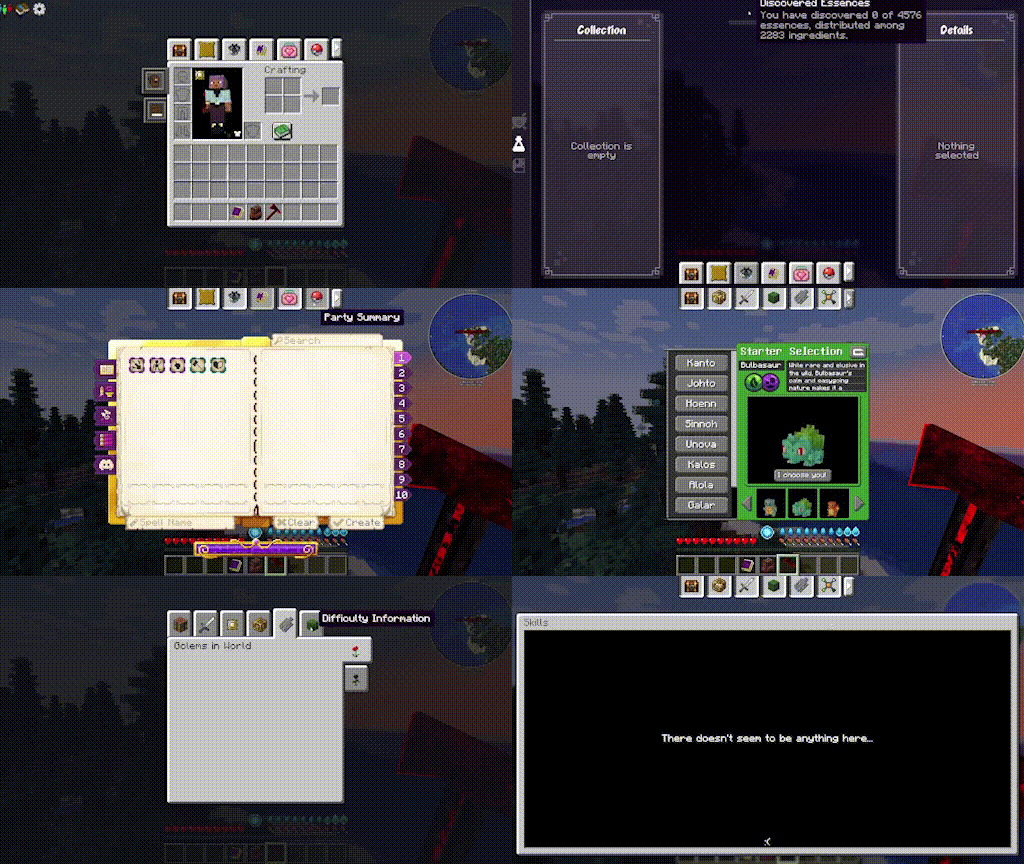
- 直接从你的物品栏访问各种模组界面
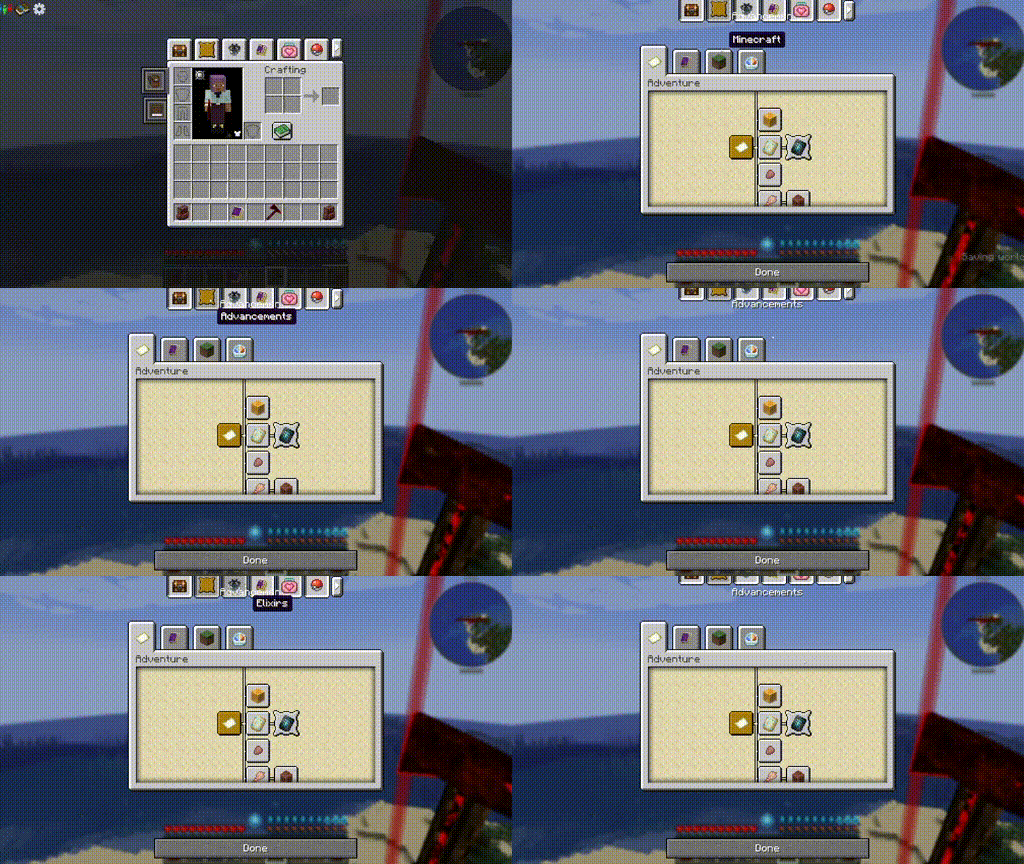
- 在支持的模组界面上显示标签页,方便来回切换
- 按下物品栏按键(默认 e)可从点击的标签页返回物品栏
- 标签页循环:在任何带有标签页的界面上,按 Shift+Tab 可依次切换到下一个标签页(可在键位绑定中配置)
- 最左侧固定显示“物品栏”标签页(可配置)
- 按你喜欢的顺序排列标签页(可配置)
- 可通过配置文件优先选择 Sophisticated Backpacks 中的打开槽位
- 完整兼容性列表见下方。请注意,由于该模组现已支持多平台(Neoforge/Fabric/Forge),只有支持相应版本的模组才能与 Mod Tabs 配合使用,因此以下列表中可能包含仅 Fabric、仅 Neoforge 或仅 Forge 的模组:
- Ars Nouveau
- L2 mods (hostility / artifacts) etc
- Apothic Attributes (forge and neo)
- Advanced Team (forge)
- Villager Recruits (forge)
- Diet / Bulk (forge)
- The Aether
- Curios
- Epic Fight
- Epic Skills
- Mine and Slash (forge)
- Completionists Index
- Blue Skies (forge)
- SDM Shop
- Quest Log
- mapwright (neoforge)
- Field Guide
- Modnomicon
- Quark Oddities Backpacks
- Origins
- NeoOrigins
- Modular Backpacks
- Kindred
- Item Collectors
- Yttr
- Ars Zero
使用说明:
1. 前往安装目录:config/modtabs/icons(首次运行安装了该模组的游戏时会自动创建此文件夹结构),并将你想要使用的任何 PNG 图片放入其中。它们应为 16x16 像素
2. 进入游戏,点击并长按你想替换图标的标签页
3. 在打开的编辑菜单中,点击屏幕左侧中间的箭头。点击自定义图标下拉菜单,选择你的新图标。
折叠选项:
以下是 Ars Nouveau 教程书的示例。
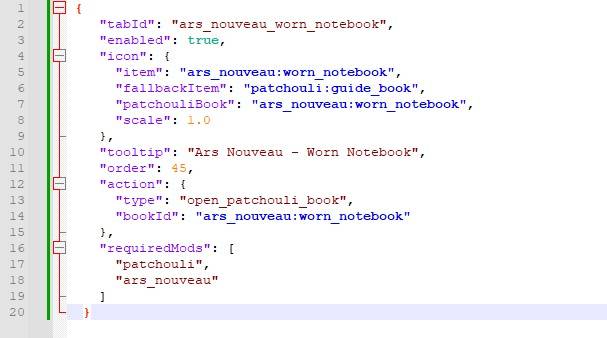
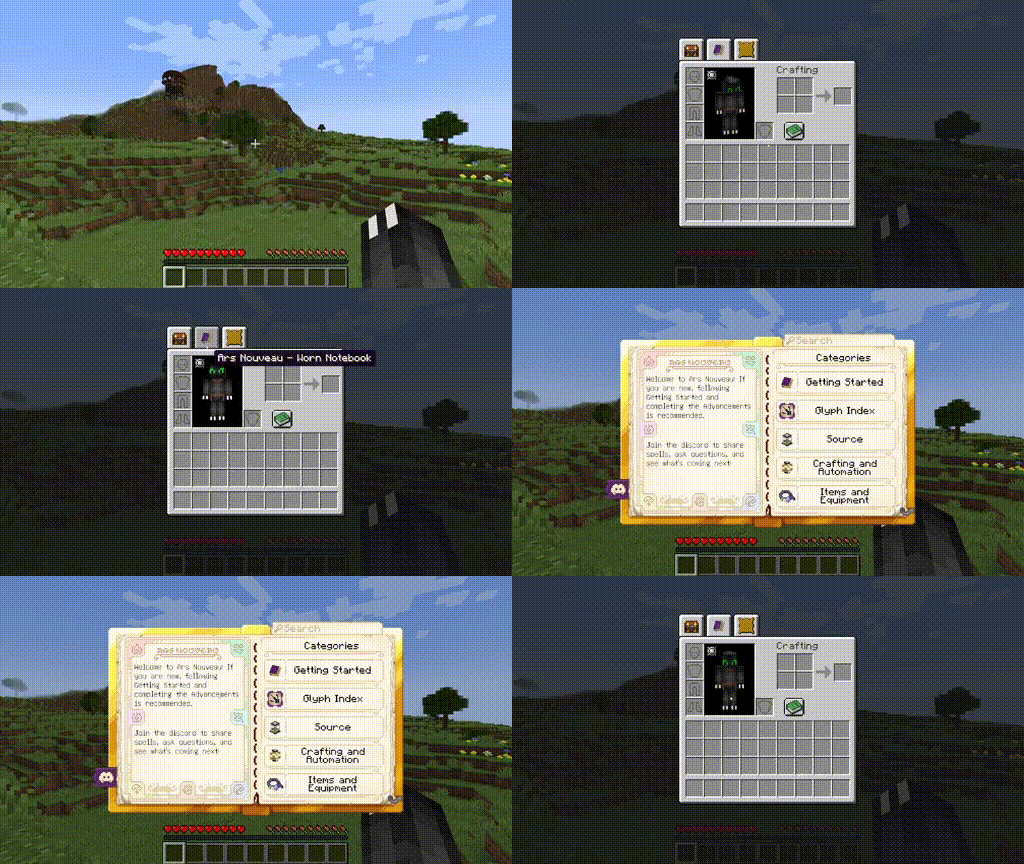
我的自定义标签页支持完整的 Patchouli 集成,以及许多其他选项。请访问维基以了解更多可能性和限制
本模组最初由 legendary_workshop 以 “Legendary Tabs” 为名开发,支持多个版本的 Forge。后由 vodmordia(我)进行更新,使其兼容 Neoforge,并在 fork 时采用 MIT 许可证。
感谢以下赞助者让我的项目得以持续:
Whiro (Ultimate Patron)
Cabo Sneaker (Plus Patron)
如果您希望参与开发并解锁其他酷炫功能,请访问:
通用常见问题解答:
- 遇到此模组的问题请联系谁:
- 通过评论、私信或 GitHub Issue 联系我:
- 我始终欢迎合作!我是一名经验丰富的开发者,但绝非纹理艺术家或建模师。如果您能创作艺术图和模型,并且有模组创意,我很可能愿意与您合作!请私信我或在 Discord 上找到我:discord.gg/DQWYpZqj
- Access various mod screens directly from your inventory
- Tabs will appear on the supported mods screens for easy back and forth tabbing
- Press the inventory key (default e) to return to the inventory from a clicked tab
- Tab Cycling: When on any screen with tabs, press shift+tab to go to the next tab in order (configurable in keybinds)
- Sticky Inventory tab on far left (configurable)
- Sort tabs in your prefered order (configurable)
- Prioritize which slot to open on Sophisticated Backpacks via config
- Full compatability list below, just note that now that the mod is multiplatform (Neoforge/Fabric/Forge) only mods that support that version will be able to work with Mod Tabs, so there may be some Fabric only or Neoforge or Forge only mods listed here:
- Ars Nouveau
- L2 mods (hostility / artifacts) etc
- Apothic Attributes (forge and neo)
- Advanced Team (forge)
- Villager Recruits (forge)
- Diet / Bulk (forge)
- The Aether
- Curios
- Epic Fight
- Epic Skills
- Mine and Slash (forge)
- Completionists Index
- Blue Skies (forge)
- SDM Shop
- Quest Log
- mapwright (neoforge)
- Field Guide
- Modnomicon
- Quark Oddities Backpacks
- Origins
- NeoOrigins
- Modular Backpacks
- Kindred
- Item Collectors
- Yttr
- Ars Zero
Instructions:
1. Go to your install: config/modtabs/icons (this folder structure will be created the first time you run the game with the mod installed) and add any png images you want. They should be 16x16 px
2. Go into the game, click and hold on the tab you want to swap icons for
3. In the opened edit menu, click the arrow in the left middle side of the screen. Click the custom icon dropdown and choose your new icon.
Tuck option:
Here is an example with Ars Nouveau's tutorial book.
My custom tabs come with full patchouli integration, as well as many other options. Visit the wiki for more information on possibilities and limitations
This mod was originally created by legendary_workshop, under the name Legendary Tabs, for several versions of Forge and has been updated by vodmordia (me) to work with Neoforge under (at the time of fork) MIT license.
Thank you to the following Patrons for keeping my projects alive:
Whiro (Patron Ultimate)
Cabo Sneaker (Patron Plus)
If you would like to assist with development and get access to other cool features you can do so here:
General FAQ:
- Who do I contact for issues with this mod:
- Contact me via comment, message, or github issue:
- I am always interrested in collaboration! I am a seasoned developer, but not a texture artist or modeler by any means. If you can create art and models and have an idea for a mod I may be interested in collaborating! Private message me or find me on discord: discord.gg/DQWYpZqj
下载 Mod Tabs
需要联机服务器吗?
稳定流畅、一键部署,几分钟即可和朋友联机开服
最低仅需 8 元/月 即可畅快联机
下载 Mod Tabs
需要联机服务器吗?
稳定流畅、一键部署,几分钟即可和朋友联机开服
最低仅需 8 元/月 即可畅快联机
下载 Mod Tabs
需要联机服务器吗?
稳定流畅、一键部署,几分钟即可和朋友联机开服
最低仅需 8 元/月 即可畅快联机
下载 Mod Tabs
需要联机服务器吗?
稳定流畅、一键部署,几分钟即可和朋友联机开服
最低仅需 8 元/月 即可畅快联机
下载 Mod Tabs
需要联机服务器吗?
稳定流畅、一键部署,几分钟即可和朋友联机开服
最低仅需 8 元/月 即可畅快联机
下载 Mod Tabs
需要联机服务器吗?
稳定流畅、一键部署,几分钟即可和朋友联机开服
最低仅需 8 元/月 即可畅快联机
下载 Mod Tabs
需要联机服务器吗?
稳定流畅、一键部署,几分钟即可和朋友联机开服
最低仅需 8 元/月 即可畅快联机
下载 Mod Tabs
需要联机服务器吗?
稳定流畅、一键部署,几分钟即可和朋友联机开服
最低仅需 8 元/月 即可畅快联机
下载 Mod Tabs
需要联机服务器吗?
稳定流畅、一键部署,几分钟即可和朋友联机开服
最低仅需 8 元/月 即可畅快联机
下载 Mod Tabs
需要联机服务器吗?
稳定流畅、一键部署,几分钟即可和朋友联机开服
最低仅需 8 元/月 即可畅快联机
ModTabs 2.6.0
新增
- 特色标签页:选择一到多个标签页作为优先显示,并使其比其他标签页更大。在布局编辑器中设置(齿轮图标 → 特色)。大小可在“常规”选项下调整。
- Modular Backpacks:新增标签页,用于打开你装备的背包(Forge & NeoForge)。
- Kindred:新增伙伴标签页,用于打开你的伙伴列表(Forge & NeoForge)。
- Item Collectors:标签页现在会出现在物品收集器界面上(所有版本)。
- Yttr:标签页现在会出现在 Yttr 的机器和弹药包界面上(Fabric)。
- Ars Zero:当你手持法术法杖或头环时,Ars 标签页现在可与 Ars Zero 配合使用。
修复
- 修复了在部分大型整合包启动时崩溃的问题。
- 修复了 Curios 标签页图标过大的问题。
- 修复了 Eccentric Tome 标签页未切换书籍的问题,除非你正手持该书。
- 修复了在没有 Wildex 时仍显示 Wildex 标签页的问题。
- 修复了地图图册界面上标签页显示异常的问题。
- 修复了 FTB Chunks 地图网格线绘制在标签页上方的问题。
- 修复了 FTB Chunks 地图标签页设置(如折叠)错误地更改了 FTB Quests 设置的问题。
- 现在你可以在箱子和其他容器界面重新排列标签页,而不仅仅是玩家背包。
- Sophisticated Backpacks 的标签页现在能与各种尺寸的背包正确对齐。
关于这个资源的讨论、问题反馈与使用心得
还没有讨论,来发第一帖吧
你是这个资源的作者?登录后可认领此资源。
相似资源
 模组

显示你正在注视的方块的信息。(适用于 Minecraft 1.16+ 的 Hwyla/Waila 分支)
 模组

查看物品与配方
 模组
使用 JavaScript 编辑配方、添加自定义物品、编写世界事件!
 模组
在游戏画面角落显示附近世界地形、玩家、生物和实体的地图。可创建路径点,帮助你找到标记过的位置。
 模组
AE2:一款流行的自动化与存储模组
 模组
添加区块认领和玩家组队功能,并与 Xaero's Minimap 和 World Map 集成
评论 0
登录后参与评分
还没有评论,来抢沙发吧