
用于交流和错误报告的 Discord:@swakoza
ModelViewer 是 Minecraft Java Edition 的一个客户端 Fabric 模组,它可以帮助你了解游戏中实际使用的是哪个物品模型。
该模组会显示模型路径、当前生效的资源包、最终的 model JSON、父级链、绑定的纹理、缺失的资源以及 Minecraft 为定位所选模型所遵循的完整路径。
对于使用资源包、自定义物品、custom_model_data 和 Blockbench 模型的用户来说,它尤其有用。
这个模组有什么用?
通常,当物品模型显示不正确或完全不显示时,你需要手动在资源包中搜索正确的文件,检查覆盖项、路径、纹理、父级以及其他 JSON 文件。
ModelViewer 可以直接在游戏内完成这些操作。
你只需选中一个物品,模组就会显示其模型的来源、哪个资源包胜出、找到了哪些文件、缺少哪些文件,以及 Minecraft 究竟试图渲染什么。
ModelViewer 能做什么?
- 检查主手物品。
- 检查副手物品。
- 检查鼠标悬停在背包中的物品。
- 检查附近的物品:物品实体、物品展示框和物品展示板。
- 显示当前的
minecraft:item_model。 - 从当前生效的资源包中查找物品定义。
- 显示真正胜出的资源包。
- 显示来自其他资源包的覆盖变体。
- 递归分析物品模型树。
- 如果存在,显示最终的模型 JSON。
- 显示模型父级链。
- 显示纹理绑定。
- 查找缺失的物品定义、模型和纹理。
- 在资源重载后更新数据,例如按下
F3 + T后。

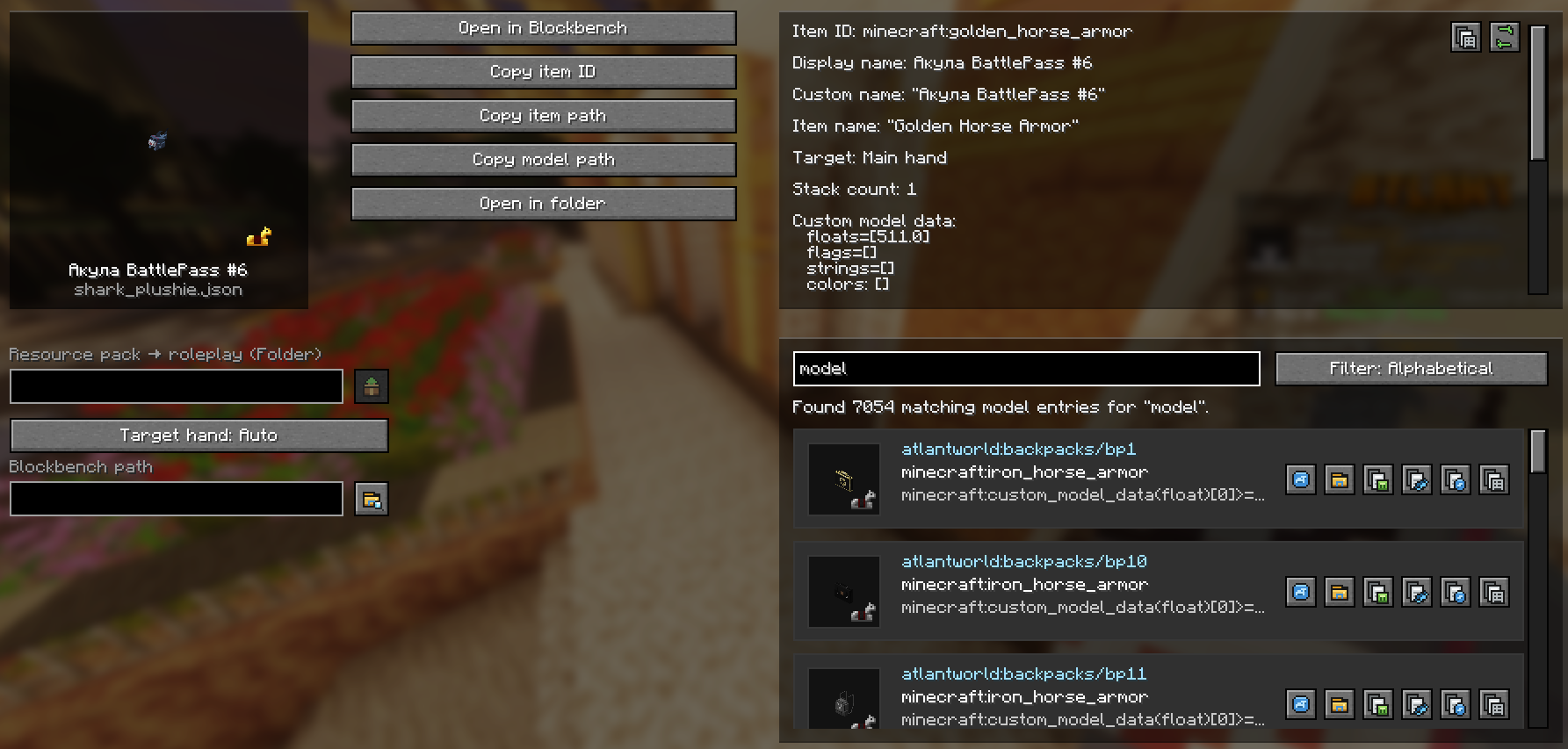
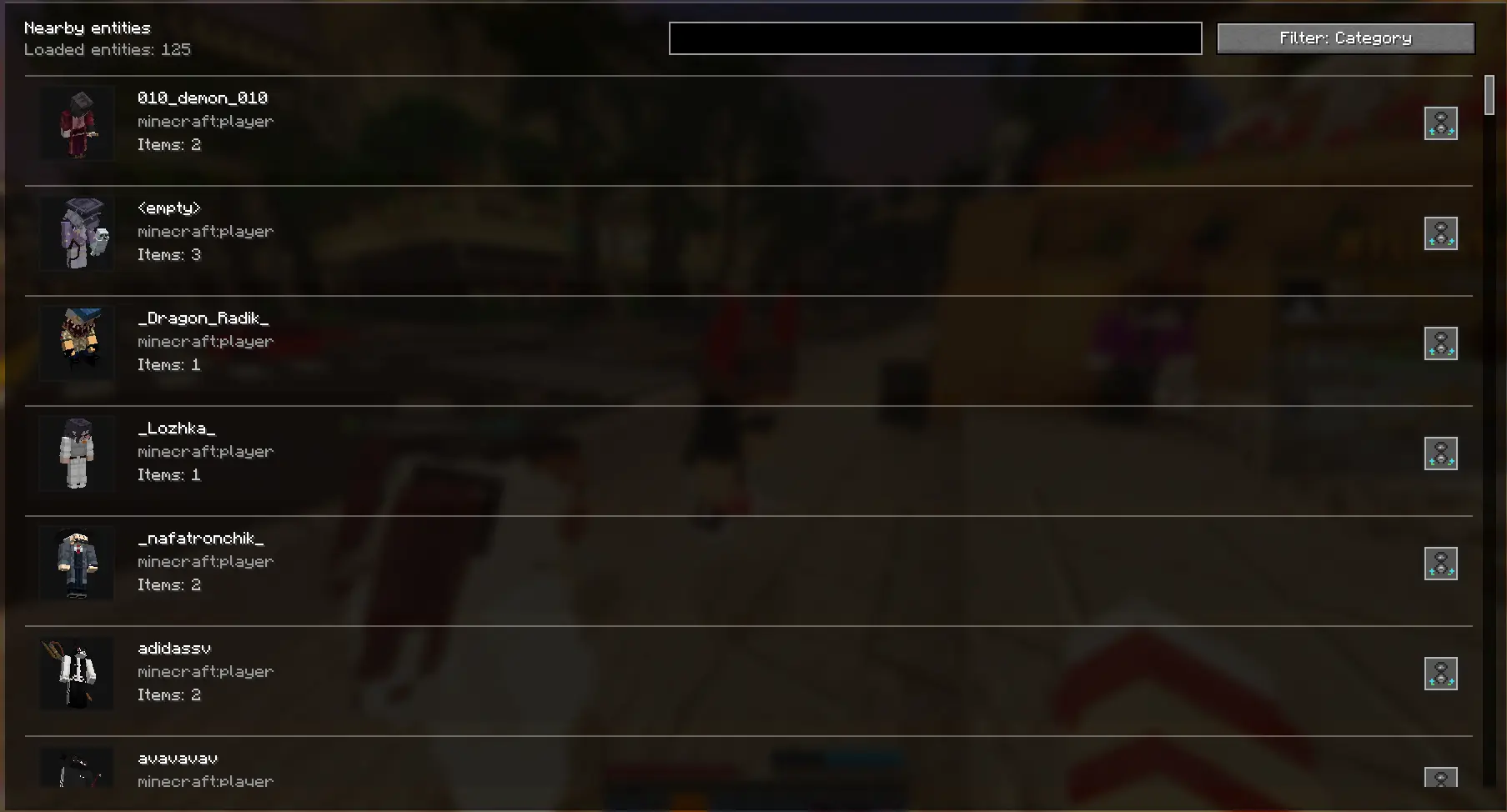
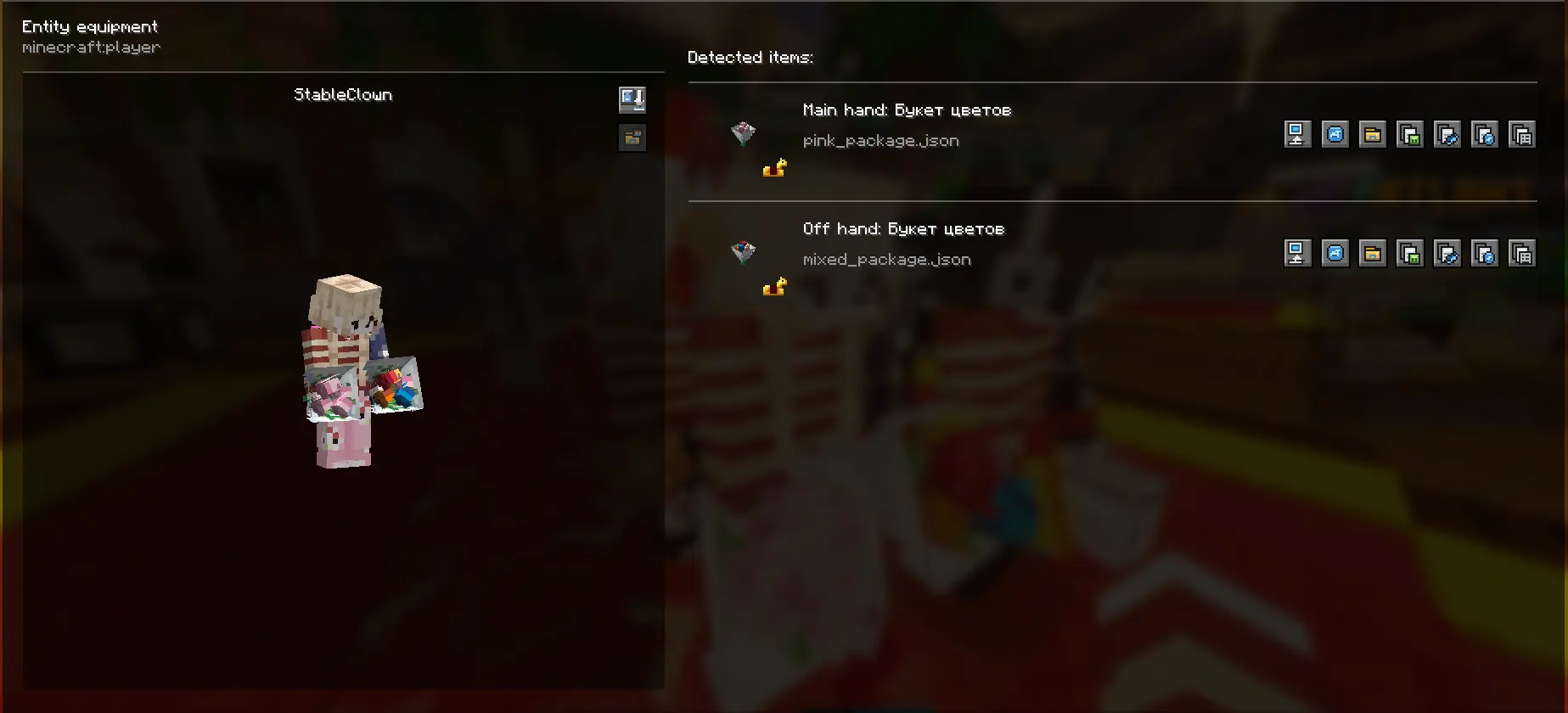
对现代物品模型的支持
ModelViewer 可以分析现代物品模型结构,包括:
modelconditionselectrange_dispatchcompositeemptybundle_selected_itemspecial
它还支持现代的 minecraft:custom_model_data 格式:
floatsflagsstringscolors
当资源包使用复杂条件、不同的模型变体或自定义物品数据时,这将非常有用。
在 Blockbench 中打开模型
ModelViewer 可以直接在 Blockbench 中打开找到的模型。
如果模型位于常规的资源包文件夹中,模组会打开原始的 JSON 文件。
如果模型位于压缩的资源包内部,模组会创建一个本地工作文件夹并将所需的模型文件、父级模型和链接的纹理复制到其中,以便 Blockbench 能够正确打开模型。
这消除了手动在资源包内搜索文件的需求。
检查器屏幕
在详细检查器窗口中,你可以看到:
- 物品预览;
- 当前的
item_model; - 物品定义的路径;
- 胜出的资源包;
- 模型追踪树;
- 最终模型路径;
- 父级链;
- 绑定的纹理;
- 警告和缺失的资源。
可用操作:
- 切换检查目标;
- 复制物品 ID;
- 复制物品路径;
- 复制模型路径;
- 复制元数据;
- 刷新数据;
- 查找模型;
- 在 Blockbench 中打开模型;
- 打开包含文件的文件夹;
- 解压资源包;
- 检查附近的实体;
- 复制可见玩家的 PNG 皮肤。
检查附近实体
模组可以显示可被检查的附近实体和物品。
菜单包括搜索和排序功能:
- 按字母顺序;
- 按距离;
- 按类别。
你还可以打开选定实体或玩家的装备屏幕,并检查他们手持或在盔甲槽位中穿戴的物品。
热键
| 按键 | 操作 |
|---|---|
F6 |
切换检查目标:自动 / 主手 / 副手 |
F7 |
打开详细检查器屏幕 |
F8 |
切换 HUD 叠加层开/关 |
F9 |
切换自动检查开/关 |
F10 |
将简短结果复制到剪贴板 |
这个模组适合谁?
ModelViewer 适用于:
- 资源包创作者;
- 模型作者;
- Blockbench 用户;
- 整合包开发者;
- 使用自定义物品的服务器管理员;
- 任何修复损坏模型的人;
- 任何使用
custom_model_data的人。
如果你需要理解为什么物品显示了错误的模型、哪个资源包覆盖了它,或者所需的 JSON 文件位于何处,此模组可以极大地加快你的工作进度。
Discord for communication and bug reports: @swakoza
ModelViewer is a client-side Fabric mod for Minecraft Java Edition that helps you understand which item model is actually being used in the game.
The mod shows the model path, the active resource pack, the final model JSON, the parent chain, bound textures, missing resources, and the full path Minecraft followed to reach the selected model.
It is especially useful for people working with resource packs, custom items, custom_model_data, and Blockbench models.
What is this mod for?
Usually, when an item model does not display correctly or does not display at all, you have to manually search for the correct file in the resource pack, check overrides, paths, textures, parents, and other JSON files.
ModelViewer does this directly in-game.
You select an item, and the mod shows where its model came from, which resource pack won, which files were found, which ones are missing, and what exactly Minecraft is trying to render.
What can ModelViewer do?
- Inspect the item in the main hand.
- Inspect the item in the offhand.
- Inspect the item under the cursor in the inventory.
- Inspect nearby items: item entities, item frames, and item displays.
- Show the active
minecraft:item_model. - Find the item definition from the active resource packs.
- Show the resource pack that actually won.
- Show overridden variants from other resource packs.
- Recursively analyze the item model tree.
- Show the final model JSON, if it exists.
- Show the model parent chain.
- Show texture bindings.
- Find missing item definitions, models, and textures.
- Update after resource reloads, for example after pressing
F3 + T.
Support for modern item models
ModelViewer can analyze modern item model structures, including:
modelconditionselectrange_dispatchcompositeemptybundle_selected_itemspecial
It also supports the modern minecraft:custom_model_data format:
floatsflagsstringscolors
This is useful when a resource pack uses complex conditions, different model variants, or custom item data.
Opening models in Blockbench
ModelViewer can open the found model directly in Blockbench.
If the model is located in a regular resource pack folder, the mod opens the original JSON file.
If the model is located inside a zipped resource pack, the mod creates a local working folder and copies the required model files, parent models, and linked textures there, so Blockbench can open the model correctly.
This removes the need to manually search for files inside resource packs.
Inspector screen
In the detailed inspector window, you can see:
- an item preview;
- the active
item_model; - the path to the item definition;
- the winning resource pack;
- the model trace tree;
- the final model path;
- the parent chain;
- bound textures;
- warnings and missing resources.
Available actions:
- switch the inspection target;
- copy the item ID;
- copy the item path;
- copy the model path;
- copy metadata;
- refresh data;
- find models;
- open the model in Blockbench;
- open the folder containing the file;
- extract the resource pack;
- inspect nearby entities;
- copy the visible player’s PNG skin.
Inspecting nearby entities
The mod can show nearby entities and items that can be inspected.
The menu includes search and sorting:
- alphabetically;
- by distance;
- by category.
You can also open the equipment screen of the selected entity or player and inspect the items they are holding or wearing in armor slots.
Hotkeys
| Key | Action |
|---|---|
F6 |
Switch inspection target: auto / main hand / offhand |
F7 |
Open the detailed inspector screen |
F8 |
Toggle the HUD overlay on or off |
F9 |
Toggle auto-inspect on or off |
F10 |
Copy a short result to the clipboard |
Who is this mod for?
ModelViewer is useful for:
- resource pack creators;
- model authors;
- Blockbench users;
- modpack developers;
- server administrators using custom items;
- anyone fixing broken models;
- anyone working with
custom_model_data.
If you need to understand why an item is showing the wrong model, which resource pack is overriding it, or where the required JSON file is located, this mod can greatly speed up your work.

下载 Model Viewer
需要联机服务器吗?
稳定流畅、一键部署,几分钟即可和朋友联机开服
最低仅需 8 元/月 即可畅快联机
下载 Model Viewer
下载 Model Viewer
下载 Model Viewer
下载 Model Viewer
下载 Model Viewer
下载 Model Viewer
需要联机服务器吗?
稳定流畅、一键部署,几分钟即可和朋友联机开服
最低仅需 8 元/月 即可畅快联机
下载 Model Viewer
下载 Model Viewer
下载 Model Viewer
添加了通过 Blender 打开模型的功能。(Beta)
关于这个资源的讨论、问题反馈与使用心得
还没有讨论,来发第一帖吧
你是这个资源的作者?登录后可认领此资源。
相似资源
 模组

一个用于收集生物掉落物的多区块模组。
 模组

显示你正在注视的方块的信息。(适用于 Minecraft 1.16+ 的 Hwyla/Waila 分支)
 模组

查看物品与配方
 模组
在游戏画面角落显示附近世界地形、玩家、生物和实体的地图。可创建路径点,帮助你找到标记过的位置。
 模组
使用 JavaScript 编辑配方、添加自定义物品、编写世界事件!
 模组

适用于 MC 1.18+ 的 Effekseer 加载器
评论 0
登录后参与评分
还没有评论,来抢沙发吧