
[请在 此处 的 Issue Tracker 中提交任何错误报告]
Modpack Configuration Checker
Modpack Configuration Checker 是一个高度可配置的模组,允许整合包制作者自定义 Minecraft,以更好地支持整合包。它提供了一些功能,例如在启动时显示网页,以及检查用户是否为整合包分配了足够的内存等。该模组极大地扩展了整合包作者可用的选项数量。
该模组可以在游戏内轻松配置(说明见下文)。然而,即使未进行配置,Modpack Configuration Checker 也会验证是否为整合包分配了至少 2GB 的内存,从而大幅提高性能并最小化崩溃的发生。
该模组提供的一些功能:
- 设置运行整合包所需的最低内存量。如果未达到此要求,系统会提醒用户并关闭游戏。
- 设置运行整合包推荐的内存量。如果未达到此推荐值,系统会提醒用户。
- 设置在游戏启动时打开的网站。适用于打开整合包官网或支持页面。
- 设置在游戏加载过程中显示的自定义消息,例如用于显示制作人员名单。
- 设置当内存要求未满足时显示的自定义消息。有助于使模组提示与你的整合包风格保持一致。
- 能够更改消息框是否显示在其他窗口之上。
- 设置在游戏加载完成时在聊天栏中出现的自定义问候语。
许可证
欢迎在任何整合包中使用本模组,并可在其他论坛发布。只需确保附上指向此处的链接即可。
截图
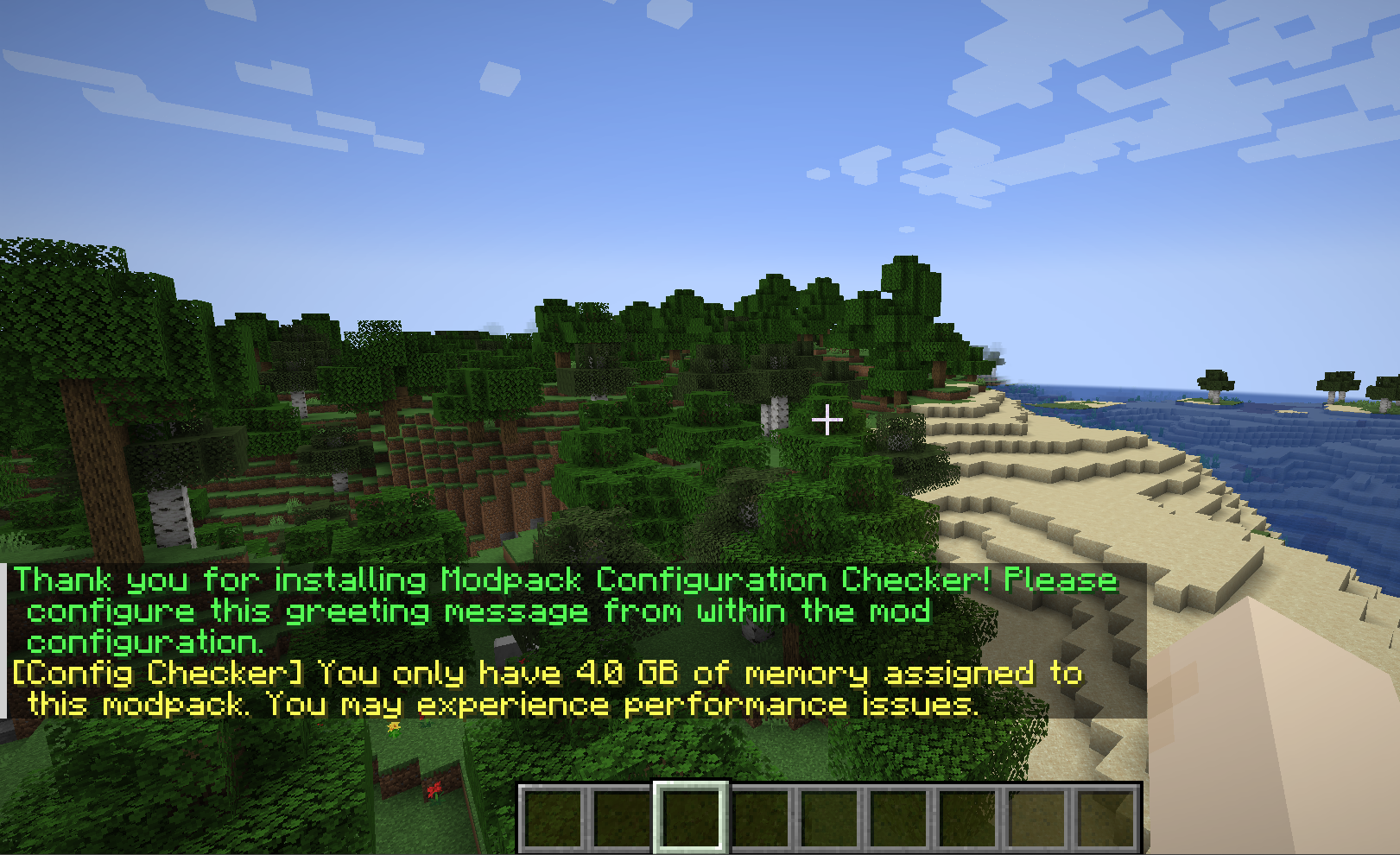


配置指南
剧透
步骤 1) 在主菜单屏幕上点击“Mods”按钮。
 步骤 2) 从左侧的模组列表中选择“Modpack Config Checker”。
 步骤 3) 点击左下角的“Config”按钮。
 注意:
如果你不确定某个设置的作用,将鼠标悬停在其上会显示简短描述,这应该能帮助你理解。但如果仍感到困惑,不妨尝试实验!或者,如果你更倾向于直接沟通,可以发送私信给我,或在此帖子下留言。我很乐意为你解释该模组的任何机制。

Please file any bugs in the issue tracker here
Modpack Configuration Checker
Modpack Configuration Checker is a highly configurable mod that allows modpack creators to customise Minecraft to better support modpacks. It allows features such as displaying webpages on launch to features such as checking the modpack user has assigned enough RAM to the modpack. This mod significantly expands amount of options a modpack author has.
The mod can easily be configured from in game (instructions below). However without configuration Modpack Configuration Checker verifies that at least 2gb of RAM has been assigned to a modpack, greatly increasing performance and minimising crashes.
Some of the features the mod offers:
- Setting a required amount of RAM that is needed for the modpack to run. If this requirement is not met it alerts the user and closes the game.
- Setting a recommended amount of RAM that is recommended for the modpack to run. If this requirement is not met then the user is alerted.
- Setting a website to open as the game launches. Useful for opening modpack website or support pages.
- Setting a custom message to be displayed as the game loads for example to display credits.
- Setting custom messages to be displayed when RAM requirements not met. Useful for making the mod fit in with the feel of your pack.
- Ability to change if message boxes appear on top of other windows. Set custom greeting messages that appear in chat when a game is loaded.
License
Feel free to use this mod in any modpacks and post on other forums. Just make sure to put a link back here.
Screenshots
Configuration Guide
Spoiler
Step 1) Click on the 'Mods' button on the main menu screen.
Step 2) Select 'Modpack Config Checker from the list of mods the left.
Step 3) Click on the 'Config' button in the bottom left.
Notes:
If you are unsure of what a setting does, hovering over it will display a small description which should make things clearer. However if you are still unsure, experiment! Or if you prefer, either send me a PM or leave a comment on this thread. I will be happy to explain any of the mods mechanics to you.

下载 Modpack Configuration Checker
需要联机服务器吗?
稳定流畅、一键部署,几分钟即可和朋友联机开服
最低仅需 8 元/月 即可畅快联机
下载 Modpack Configuration Checker
下载 Modpack Configuration Checker
下载 Modpack Configuration Checker
需要联机服务器吗?
稳定流畅、一键部署,几分钟即可和朋友联机开服
最低仅需 8 元/月 即可畅快联机
下载 Modpack Configuration Checker
下载 Modpack Configuration Checker
需要联机服务器吗?
稳定流畅、一键部署,几分钟即可和朋友联机开服
最低仅需 8 元/月 即可畅快联机
下载 Modpack Configuration Checker
需要联机服务器吗?
稳定流畅、一键部署,几分钟即可和朋友联机开服
最低仅需 8 元/月 即可畅快联机
暂无更新日志
关于这个资源的讨论、问题反馈与使用心得
还没有讨论,来发第一帖吧
你是这个资源的作者?登录后可认领此资源。
相似资源
 模组

显示你正在注视的方块的信息。(适用于 Minecraft 1.16+ 的 Hwyla/Waila 分支)
 模组
在游戏画面角落显示附近世界地形、玩家、生物和实体的地图。可创建路径点,帮助你找到标记过的位置。
 模组

查看物品与配方
 模组
使用 JavaScript 编辑配方、添加自定义物品、编写世界事件!
 模组
AE2:一款流行的自动化与存储模组
 模组
那是什么?一个 Waila/Hwyla 的分支。
评论 0
登录后参与评分
还没有评论,来抢沙发吧