这是一个 Functional Storage 的插件,为抽屉添加了具有更高级功能的升级模块。
破坏器升级
破坏方块并将其放入抽屉中。需要在升级模块中插入工具(不会消耗耐久度)。
放置器升级
从抽屉中取出并放置方块。
补充升级
将物品从抽屉中补充到玩家的热键栏、背包或末影箱中。仅会补充至少含有一个物品的槽位。如需跨维度工作,请使用其维度变体。
切石机升级
自动从抽屉中切割物品。切割输出可以通过过滤器进行配置。因此,可以使用标签过滤器,例如通过匹配楼梯标签将任何石头转换为楼梯。
升级模块的方向可以在 GUI 中使用箭头按钮进行配置。
本模组添加的所有升级模块都有一个基础处理时间(通常为每 3 秒一次),可以通过速度升级增强件来减少(放置最大数量的 6 个增强件将使升级模块每个刻都工作)。
通过将升级模块放置在抽屉的工具槽中,悬停在其上然后右键点击,可以访问升级模块的 GUI。在那里你可以配置升级模块(红石控制、槽位选择、过滤、增强件等)。
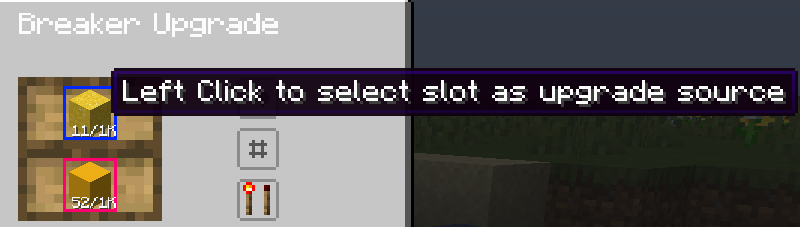
升级模块支持红石控制,使其仅在抽屉接收到的功率满足配置条件时工作。升级模块交互的槽位可以通过逐个点击来选择:
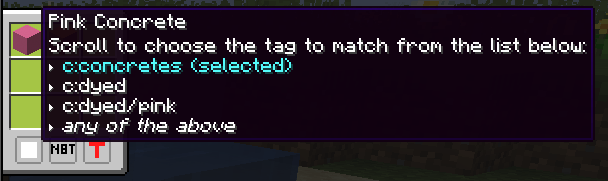
还支持过滤功能,通过点击第二个按钮(位于方向按钮下方)打开面板。过滤器支持黑名单或白名单模式,支持严格匹配 NBT 数据或基于标签进行匹配(见下图)
未来将添加更多升级模块!
This is a Functional Storage addon that adds drawer upgrades with more advanced functionality.
Breaker Upgrade
Breaks blocks and places them in the drawer. Requires a tool inserted in the upgrade (durability is not consumed).
Placer Upgrade
Places blocks from the drawer.
Refill Upgrade
Refills the player's hotbar, inventory or ender chest with items from the drawer. Will only refill slots with at least one item. Use the dimensional variant for it to work cross dimensionally.
Stonecutting Upgrade
Stonecuts items from the drawer automatically. The stonecutting output can be configured via the filter. Therefore, a tag filter can be used to for example turn any stones into stairs by matching on the stairs tag.
The direction of the upgrades can be configured in the GUI using the arrow button.
All upgrades added by this mod have a base processing time (usually once every 3 seconds) which can be reduced via Speed Upgrade Augments (placing the maximum 6 augments will make the upgrade work every tick).
Upgrade GUIs can be accessed by placing the upgrade in a drawer's utility slot, hovering over it and then right clicking. There you can configure the upgrade (redstone control, slot selection, filtering, augments etc.).
Upgrades have redstone control which makes them work only if the power the drawer receives meets the configured criteria. The slots with which an upgrade interacts can be selected on a per-upgrade basis by clicking them:

Filtering is also supported, in a panel opened by clicking the second button (the one below the direction button). The filters support blacklisting or whitelisting, matching NBT strictly or matching based on tags (see the image below)

More upgrades will be added in the future!
评论 0
登录后参与评分
还没有评论,来抢沙发吧