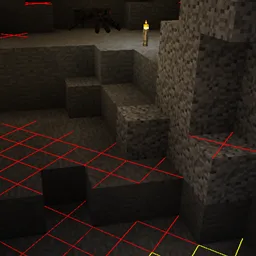
本模组添加了 NEI 中的一些覆盖层(Overlays)。
仅限客户端的模组!
更新 / 信息:
你们中的大多数人可能已经注意到,这个模组仍然停留在 1.14 版本。虽然我之前尝试过更新此模组,但这需要完全重写。由于我目前并不活跃于 Minecraft,尤其是 Modded Minecraft 社区,因此我没有太多兴趣去更新它。很抱歉,你可以查看由 RiDGo8 独立更新的版本:
请在此处报告任何问题和反馈建议(Github Issue 页面)。
我可能不会在评论区看到问题或建议。
(在提交问题之前,请检查模组/整合包版本)
覆盖层功能:
- 区块边界(Chunk Boundaries)
- 光照等级 / 怪物生成(16 格范围)
- 物品搜索(仅当安装了 JEI 时可用)
默认按键:
- F9 :区块边界
- F7 :光照等级 / 怪物生成
- 双击 JEI 搜索栏以使用物品搜索
在 0.5 或更高版本中,你可以在游戏内更改配置:
- 从主屏幕: Mods -> MoreOverlays -> Config
- 从暂停菜单: Mod Options... -> MoreOverlays -> Config [在 Minecraft 1.14.x 中无效,因为暂停菜单中缺少“Mod Options...”选项]
怪物生成 / 光照等级:
如果怪物可以在夜间生成,则在方块上显示黄色 X;如果随时都可能生成,则显示红色 X。
区块边界:
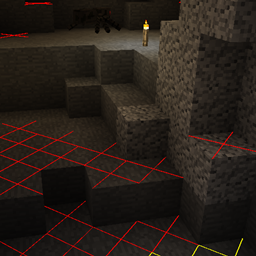
具有三种模式:它在区块角落显示红线,并在区块中间显示黄线。
在第二种模式中,它还会在区块边缘显示绿色网格。
在第三种模式中,绿色网格勾勒出 Minecraft 或 cubicchunks 的区域,并在左上角显示相应的区域存档文件。(自 1.15.0 版本起适用于 Minecraft 1.12.2)
物品搜索:
仅当安装了 JEI 时才有效。
如果启用该功能,你可以在 JEI 中搜索物品,所有当前打开的背包中与过滤器不匹配的物品将被遮黑。
在 1.10 之前(适用于 MC 1.10.2/1.11.2),有一个快捷键可以启用此功能。
自 1.10 版本起,你可以双击 JEI 搜索栏来启用此功能(就像在 NEI 中一样)。
集成
本模组与其他一些模组集成,以修复错误或添加功能。
- JustEnoughItems (by mezz):物品搜索仅在安装 JEI 时有效,因为它使用 JEI 的搜索算法来高亮显示物品。
- Custom Mob Spawner (by DrZharks):光照覆盖层与该模组集成,以根据该模组实现的自定义生成逻辑显示怪物的生成位置。(在 1.16.0 版本中暂时移除)
- OpenCubicChunks (by barteks2x):区域覆盖层显示 cubic chunks 使用的存档文件。(区块和区域网格仍需改进)
- Mantle:物品搜索与 Mantle 中包含的 GUI API 集成,以便在屏幕上显示对应的位置槽位。
我允许在其他整合包中分发我的模组。如果你能注明出处,我将不胜感激。
允许重新上传文件(但前提是下载免费,因为商业使用此模组违反 Minecraft EULA,但你可以根据需要自由使用我的代码)
请尽量保持你网站上的文件为最新版本,并且不要对模组和 Minecraft 版本撒谎。(如果没有适用于 MC 1.13 的文件,请不要在标题中写“More Overlays 1.12 / 1.13”)
This mods adds some of the overlays from NEI.
Client Side only mod!
Update / Info:
Most of you probably notices that this mod is still stuck in 1.14. While I've made attempts to get this mod updated in the past, it would require a full rewrite. Since I'm currently not really active in Minecraft especially Modded Minecraft, I don't have much interest updating it. I'm sorry, you can checkout a independently updated version made by RiDGo8 here:
Please report any Issues and Suggestions here (Issue Page on Github).
I might not notice issues or suggestions in the Comments.
(Check the Mod / Modpack version before you write an Issue)
Overlays:
- Chunk Boundaries
- Light Level / Mob spawns ( 16 block range )
- Item search (only if JEI is installed)
Default Keys:
- F9 : Chunk Boundaries
- F7 : Light Level / Mob spawns
- Double click on the JEI Search Field for Item Search
In version 0.5 or above you can change the config ingame:
- from the Main Screen: Mods -> MoreOverlays -> Config
- from the Pause Menu: Mod Options... -> MoreOverlays -> Config [Not working in Minecraft 1.14.x since "Mod Options..." is missing in the pause menu]
Mob Spawns / Light Level:
Shows a yellow X on blocks if monsters can spawn at night or a red X if spawns are always possible.
Chunk Boundaries:
Has three modes it shows red lines in the corners and a yellow line in the middle of the chunk.
In the 2. mode it also shows a green grid on the edges of the chunk.
In the 3. mode the green grid outlines a minecraft or cubicchunks region and displays the corresponding region save file in the top left corner. (since version 1.15.0 for minecraft 1.12.2)
Inventory Search:
Only works if JEI is installed.
If it is enabled you can search in JEI for items and all items in the currently open inventory that doesn't match the filter will get blacked out.
Before 1.10 (for MC 1.10.2/1.11.2) there was a Keybinding to enable that feature.
Since 1.10 you can double click on the JEI Search bar to enable that feature (Just like in NEI).
Integration
This mod integrates with some other mods to fix bugs or add features.
- JustEnoughItems (by mezz): Item Search only works when JEI is installed since it uses the search algorithm from JEI to highlight items.
- Custom Mob Spawner (by DrZharks): Light Overlay integrates with that mod to show where mobs can spawn according to the custom spawn handling implemented by that mod. (temporary removed in 1.16.0)
- OpenCubicChunks (by barteks2x): Region Overlays show the save files that cubic chunks uses. (Chunk & Region grids needs improvement)
- Mantle: Item Search integrates with the GUI API that is part of mantle in order to show slots at the position they appear on screen.
I allow distribution of my mod in modpacks. Would be nice if you give credits
Reuploading the file is allowed ( But only if the download is free, because commercial use of this mod is against the Minecraft EULA, but you can use my code for anything you want)
Please try to keep the files on your website updated and don't lie about the Mod and Minecraft Version. (If there is no file for MC 1.13 don't write in the Tile "More Overlays 1.12 / 1.13" )
下载 More Overlays
需要联机服务器吗?
稳定流畅、一键部署,几分钟即可和朋友联机开服
最低仅需 8 元/月 即可畅快联机
下载 More Overlays
需要联机服务器吗?
稳定流畅、一键部署,几分钟即可和朋友联机开服
最低仅需 8 元/月 即可畅快联机
下载 More Overlays
需要联机服务器吗?
稳定流畅、一键部署,几分钟即可和朋友联机开服
最低仅需 8 元/月 即可畅快联机
下载 More Overlays
需要联机服务器吗?
稳定流畅、一键部署,几分钟即可和朋友联机开服
最低仅需 8 元/月 即可畅快联机
下载 More Overlays
需要联机服务器吗?
稳定流畅、一键部署,几分钟即可和朋友联机开服
最低仅需 8 元/月 即可畅快联机
下载 More Overlays
需要联机服务器吗?
稳定流畅、一键部署,几分钟即可和朋友联机开服
最低仅需 8 元/月 即可畅快联机
下载 More Overlays
下载 More Overlays
需要联机服务器吗?
稳定流畅、一键部署,几分钟即可和朋友联机开服
最低仅需 8 元/月 即可畅快联机
下载 More Overlays
需要联机服务器吗?
稳定流畅、一键部署,几分钟即可和朋友联机开服
最低仅需 8 元/月 即可畅快联机
下载 More Overlays
需要联机服务器吗?
稳定流畅、一键部署,几分钟即可和朋友联机开服
最低仅需 8 元/月 即可畅快联机
- * 修复了在范围内存在使用实体类型来决定刷新的方块(如 Magmablock)时,开启 LightOverlays 导致的空指针异常
- * 修复了部分配置描述和分类不正确的问题(这将导致现有配置文件失效)
- * 修复了启动时会生成两个配置文件的问题
- * 添加了更简单的刷新检查配置选项(降低精度但提升性能)
- * 重新添加了首个模组配置 GUI 版本。仅可通过主菜单中的“模组”按钮访问(目前无法在游戏内访问)
关于这个资源的讨论、问题反馈与使用心得
还没有讨论,来发第一帖吧
你是这个资源的作者?登录后可认领此资源。
相似资源
 模组

显示你正在注视的方块的信息。(适用于 Minecraft 1.16+ 的 Hwyla/Waila 分支)
 模组
在游戏画面角落显示附近世界地形、玩家、生物和实体的地图。可创建路径点,帮助你找到标记过的位置。
 模组

查看物品与配方
 模组
使用 JavaScript 编辑配方、添加自定义物品、编写世界事件!
 模组
AE2:一款流行的自动化与存储模组
 模组
那是什么?一个 Waila/Hwyla 的分支。
评论 0
登录后参与评分
还没有评论,来抢沙发吧