
MoveWand
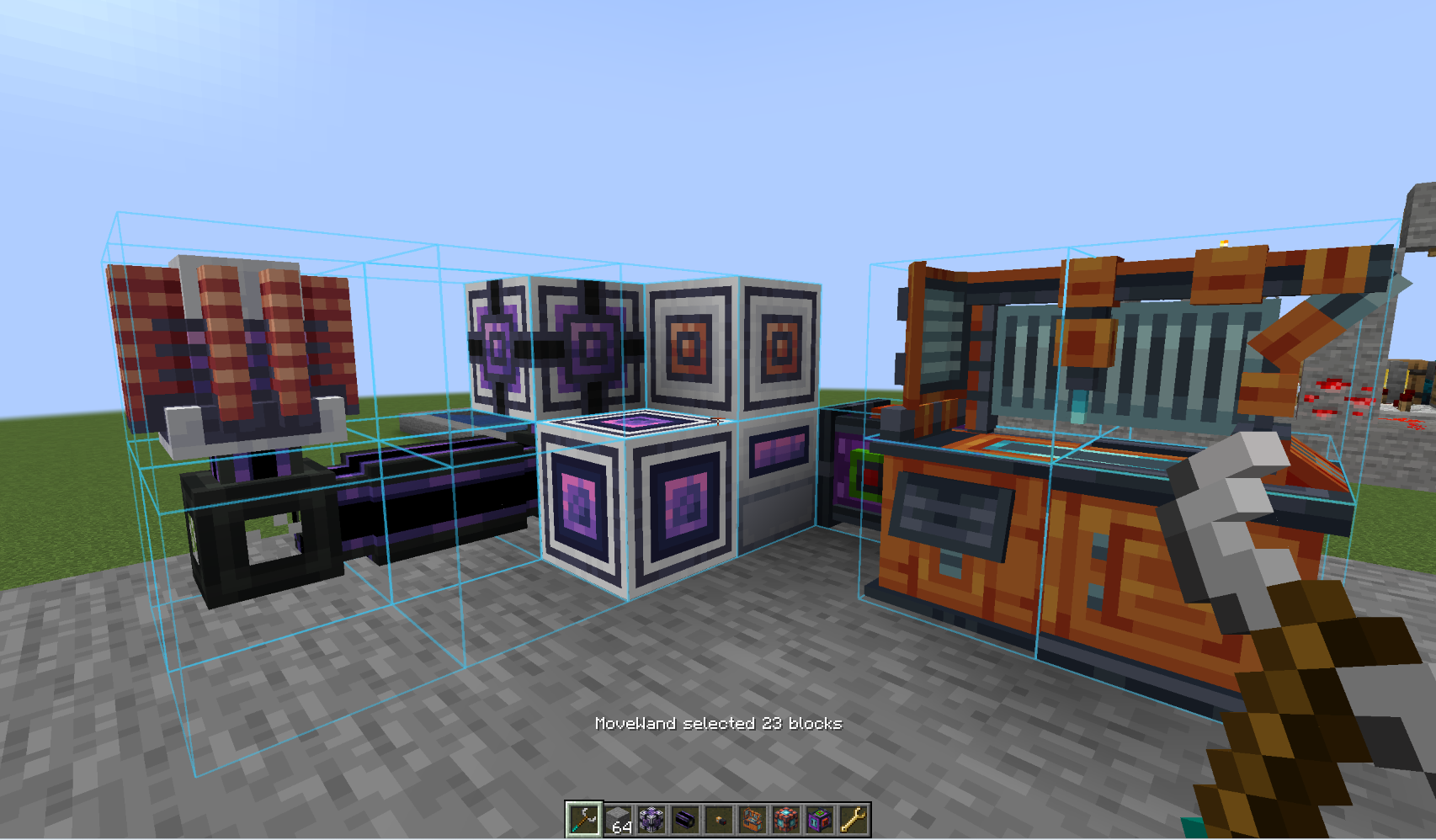 MoveWand 是一款适用于 Fabric 和 NeoForge 的模组,为安全移动和旋转现有建筑提供了一种生存友好的工具。
它并非 WorldEdit 的替代品,也不具备复制粘贴建筑的功能。你可以使用此法杖来修正机械装置的位置、腾出空间,或者在不手动拆除重建的情况下旋转建筑的某一部分。
合成
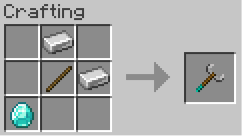
MoveWand 的合成配方需要一根木棍、两个铁锭和一个钻石。变换操作不会消耗耐久度或饥饿值。
使用方法
- 在主手持有 MoveWand。
- 右键点击两个方块以选择区域,或使用
Shift+ 右键点击以添加或删除单个方块。 - 按下移动或旋转键以打开变换预览。
- 按
Enter应用变换,或按Backspace/Esc取消。
开始单独选择方块会清除待定的第一个框角。选择覆盖层仅在主手持有时可见;按 Delete 可显式清除它。
| 默认按键 | 动作 |
|---|---|
| 方向键 | 相对于玩家水平视角向前、向后、向左或向右移动 |
R / V |
沿世界轴 Y 向上/向下移动 |
[ / ] |
绕轴 Y 旋转整个选择区域 |
Enter |
应用预览的变换 |
Backspace or Esc |
取消当前预览 |
Delete |
清除选择 |
所有按键绑定均可在 Minecraft 控制设置中更改。安装 Mod Menu 后,MoveWand 的配置按钮将打开其按键绑定设置。
安全性与限制
- 一个选择区域最多可包含 512 个方块。
- 枢轴最多可从其原始位置移动 16 个方块。
- 服务器会在更改世界之前验证每个操作。如果目标位置冲突,整个变换将被拒绝;不会应用部分移动。
- 目标位置可以是空的、属于同一移动选择的一部分,或者是非源流体位置。源流体会被阻止。
- 需要支撑的方块(如短草、花朵、火把和滴水石锥)必须在完整变换后能够在目标位置存活。
- 门和床会被扩展以包含其配套部分。双箱必须包含两半;仅移动一半将被拒绝并附带说明。
第一个框角或第一个单独选择的方块将成为枢轴。操作成功后,服务器会将选择和枢轴更新到结构的新坐标,以便下一次操作从已移动的组继续。
MoveWand 保留 BlockState 并通过 NBT 传输 BlockEntity 数据。对于第三方方块,这是尽力而为:某些存储了对旧坐标外部引用的模组可能需要专门的集成支持。
范围
- 不支持复制、粘贴、删除、目标位置替换或大规模建造。
- 仅支持绕垂直
Y轴的 90 度旋转。 - 当前版本范围内没有撤销命令。
反馈
欢迎提供您的想法和建议。任何反馈都将不胜感激。如果您需要将模组移植到特定版本,请告诉我,我很乐意提供帮助。
MoveWand
MoveWand is a mod for Fabric and NeoForge that adds a survival-friendly tool for safely moving and rotating existing structures.
It is not a WorldEdit replacement and it does not copy or paste buildings. Use the wand to correct a mechanism's position, free some space, or rotate part of a build without dismantling and rebuilding it by hand.
Crafting
The MoveWand recipe uses one stick, two iron ingots, and one diamond. Transformations do not consume durability or hunger.
Using the wand
- Hold MoveWand in the main hand.
- Right-click two blocks to select a box, or use
Shift+ right-click to add or remove individual blocks. - Press a movement or rotation key to open the transform preview.
- Press
Enterto apply the transform, orBackspace/Escto cancel it.
Starting an individual-block selection clears a pending first box corner. The selection overlay is visible only while MoveWand is held in the main hand; press Delete to clear it explicitly.
| Default key | Action |
|---|---|
| Arrow keys | Move forward, backward, left, or right relative to the player's horizontal view |
R / V |
Move up / down along world axis Y |
[ / ] |
Rotate the whole selection around axis Y |
Enter |
Apply the previewed transform |
Backspace or Esc |
Cancel the active preview |
Delete |
Clear the selection |
All bindings can be changed in Minecraft Controls. With Mod Menu installed, MoveWand's Configure button opens its key-binding settings.
Safety and limits
- A selection may contain up to 512 blocks.
- The pivot may move up to 16 blocks from its original position.
- The server validates every operation before changing the world. A conflicting destination rejects the whole transform; no partial move is applied.
- A destination may be empty, part of the same moving selection, or a non-source fluid position. Source fluids are blocked.
- Blocks that require support, such as short grass, flowers, torches, and dripstone, must be able to survive at their destination after the complete transform.
- Doors and beds are expanded to include their companion part. A double chest must include both halves; moving only one half is rejected with an explanation.
The first box corner, or the first individually selected block, becomes the pivot. After a successful operation the server updates the selection and pivot to the structure's new coordinates, so the next operation continues from the moved group.
MoveWand preserves BlockState and transfers BlockEntity data through NBT. This is best effort for third-party blocks: a mod that stores external references to old coordinates can require a dedicated integration.
Scope
- No copying, pasting, deleting, destination replacement, or mass building.
- Only 90-degree rotations around the vertical
Yaxis. - No Undo command in the current release scope.
Feedback
Feel free to write your ideas and suggestions. I'd appreciate any feedback. If you need a mod ported to a specific version, let me know, I'll be happy to help.

下载 MoveWand
需要联机服务器吗?
稳定流畅、一键部署,几分钟即可和朋友联机开服
最低仅需 8 元/月 即可畅快联机
下载 MoveWand
下载 MoveWand
需要联机服务器吗?
稳定流畅、一键部署,几分钟即可和朋友联机开服
最低仅需 8 元/月 即可畅快联机
下载 MoveWand
需要联机服务器吗?
稳定流畅、一键部署,几分钟即可和朋友联机开服
最低仅需 8 元/月 即可畅快联机
下载 MoveWand
需要联机服务器吗?
稳定流畅、一键部署,几分钟即可和朋友联机开服
最低仅需 8 元/月 即可畅快联机
下载 MoveWand
需要联机服务器吗?
稳定流畅、一键部署,几分钟即可和朋友联机开服
最低仅需 8 元/月 即可畅快联机
下载 MoveWand
需要联机服务器吗?
稳定流畅、一键部署,几分钟即可和朋友联机开服
最低仅需 8 元/月 即可畅快联机
下载 MoveWand
下载 MoveWand
需要联机服务器吗?
稳定流畅、一键部署,几分钟即可和朋友联机开服
最低仅需 8 元/月 即可畅快联机
下载 MoveWand
需要联机服务器吗?
稳定流畅、一键部署,几分钟即可和朋友联机开服
最低仅需 8 元/月 即可畅快联机
参见
关于这个资源的讨论、问题反馈与使用心得
还没有讨论,来发第一帖吧
你是这个资源的作者?登录后可认领此资源。
相似资源
 模组

显示你正在注视的方块的信息。(适用于 Minecraft 1.16+ 的 Hwyla/Waila 分支)
 模组
使用 JavaScript 编辑配方、添加自定义物品、编写世界事件!
 模组

查看物品与配方
 模组
在游戏画面角落显示附近世界地形、玩家、生物和实体的地图。可创建路径点,帮助你找到标记过的位置。
 模组
AE2:一款流行的自动化与存储模组
 模组
那是什么?一个 Waila/Hwyla 的分支。
评论 0
登录后参与评分
还没有评论,来抢沙发吧