音乐配置
配置 Minecraft 中各首音乐曲目的播放频率。
功能
- 按上下文(Context)分组,设置每首音乐曲目的播放频率
- 通过名称和艺术家搜索所有曲目
- 预览随机选取的、特定上下文下的音乐
- 支持来自资源包或其他模组的额外音乐!
工作原理
通常情况下,当 Minecraft 播放背景音乐时,它会从当前上下文中随机选择一首音乐进行播放。这些曲目存在于一个基于当前上下文的池中(例如你的位置、游戏模式、是否处于世界中等)。例如,当你进入沼泽生物群系时,Minecraft 会尝试播放音乐,它会从三首曲目(Aerie、Firebugs 和 Labyrinthine)中随机挑选一首。(这在内部被称为音效事件 minecraft:music.overworld.swamp,可通过 /playsound 命令访问。)
Music Config 允许你设置每首曲目在每个上下文中的播放频率。你可以调整每首曲目的播放频率,使得某些曲目比其他曲目更频繁地播放,或者完全禁用某些曲目。在前面的例子中,该上下文为 "overworld: swamp."。你可以将 Aerie 的频率设置为“频繁”(Often),Firebugs 设置为“偶尔”(Sometimes),而 Labyrinthine 设置为“从不”(Never)。这意味着在沼泽中 Minecraft 尝试播放音乐时,几乎每次都会播放 Aerie,偶尔播放 Firebugs,而 Labyrinthine 则永远不会播放。
使用方法
- 安装模组并启动 Minecraft
- 进入配置界面(选项 > 音乐与音效 > Music Config)
- 可选:通过名称或艺术家搜索曲目,以及折叠不重要的上下文
- 在某个上下文中,通过调整滑块来设置每首曲目的播放频率
- 点击上下文名称旁边的播放按钮(▶️),测试来自该上下文的音乐随机性
- 点击“完成”以保存更改(写入文件
.minecraft/music_config.json)
现在你可以在 Minecraft 中享受自定义的音乐体验了!
 示例: 设置来自 "nether: crimson forest" 上下文中每首曲目的播放频率。
以下是游戏中每个上下文具体含义的简要总结:
| 上下文 |
描述 |
| 以 "overworld:" 开头的上下文 |
代表主世界中的一个生物群系。当玩家位于该生物群系时播放音乐。 |
| 以 "nether:" 开头的上下文 |
代表下界中的一个生物群系。当玩家位于该生物群系时播放音乐。 |
| "end" |
当玩家位于末地时播放音乐。 |
| "creative" |
当玩家处于创造模式时播放音乐。 |
| "credits" |
在游戏片尾字幕期间播放音乐。 |
| "dragon" |
在与末影龙战斗时播放音乐。 |
| "game" |
一种后备机制;当不满足其他任何上下文条件时播放音乐。 |
| "menu" |
在主菜单时播放音乐。 |
| "under water" |
当玩家在水下时被淹没时播放音乐。 |
报告问题
请使用 GitHub Issue Tracker 报告诸如请求或错误之类的问题。
Music Config
Configure how much a music track should be played in Minecraft.
Features
- Set frequency of each music track grouped by context
- Search through every track by name and artist
- Preview randomly selected, context-specific, music
- Support for additional music from resource packs or other mods!
How it works
Usually, when Minecraft plays background music, it selects a random music track to play. These tracks exist in a pool based on the current context (things such as your location, your gamemode, whether you're in a world at all, etc.). For example, when you visit a Swamp Biome Minecraft attempts to play music, it picks a random track from a list of three (Aerie, Firebugs and Labyrinthine). (This is internally known as the sound event minecraft:music.overworld.swamp and is accessible with the /playsound command.)
Music Config allows you to set how often each track should be played in each context. You can select the frequency of each track, so that some tracks play more often than others, or you can disable some tracks entirely. In the previous example, the context would be "overworld: swamp." You could set the frequency of Aerie to Often, Firebugs to Sometimes and Labyrinthine to Never. This would mean that Aerie plays almost every time Minecraft attempts to play music in a Swamp, Firebugs plays occasionally and Labyrinthine never plays.
How to use
- Install the mod & start Minecraft
- Go to the config screen (Options > Music & Sounds > Music Config)
- Optionally, search for tracks by name or artist and/or collapse unimportant contexts
- In a context, set the frequency of each track by adjusting the slider
- Test the randomness of the music from this context, by clicking the play button (▶️) next to the context name
- Click "Done" to save your changes (writes to file
.minecraft/music_config.json)
Now you can enjoy your custom music experience in Minecraft!
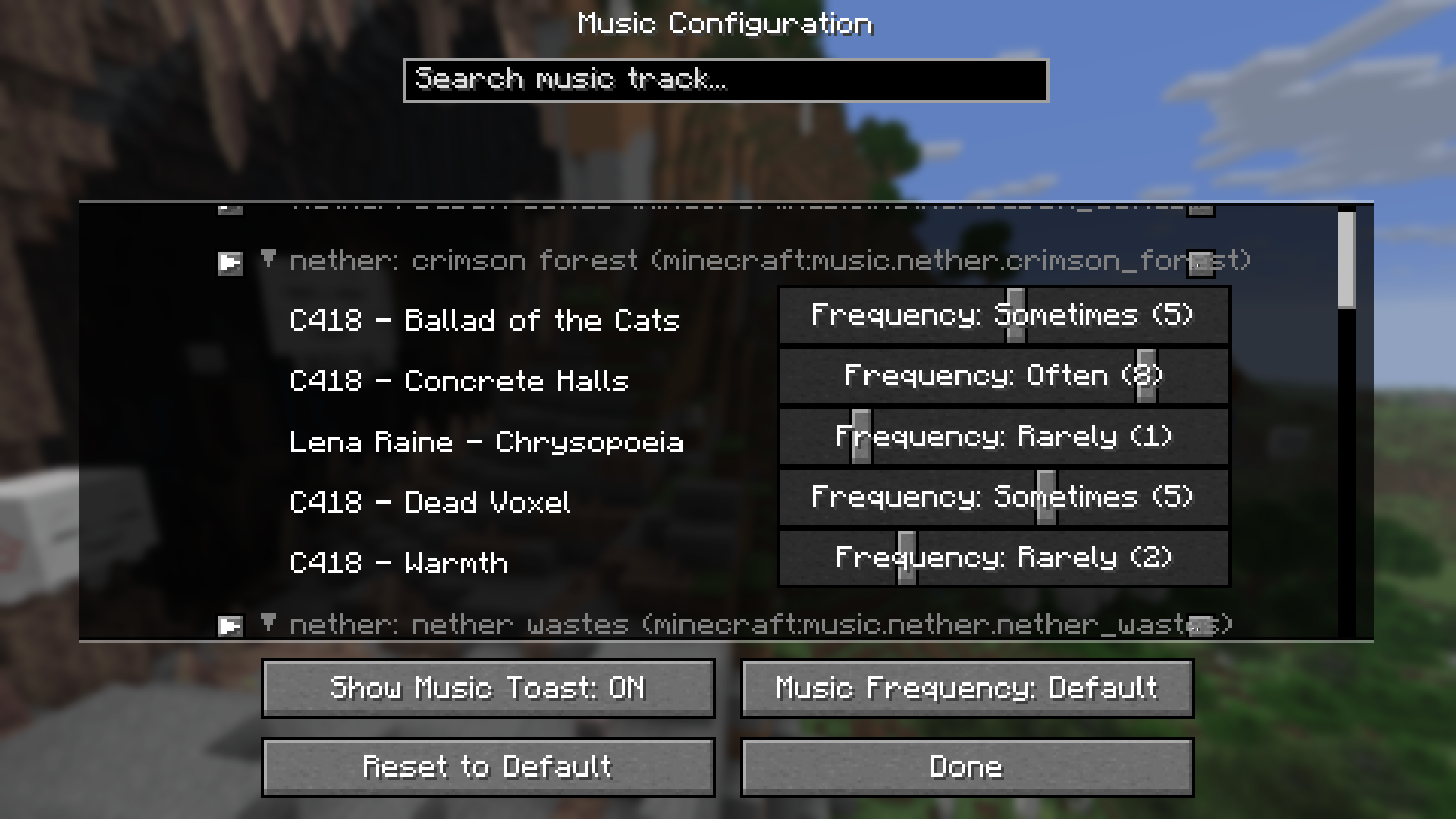 Example: setting play frequency per track from the "nether: crimson forest" context.
Here's a short summary of what every context in the game exactly represents:
| Context |
Description |
| A context prefixed by "overworld:" |
Represents a biome in the Overworld. Music plays when player is in that biome. |
| A context prefixed by "nether:" |
Represents a biome in the Nether. Music plays when player is in that biome. |
| "end" |
Music plays when player is in the End. |
| "creative" |
Music plays when player is in Creative mode. |
| "credits" |
Music plays during the game's credits sequence. |
| "dragon" |
Music plays when fighting the Ender Dragon. |
| "game" |
A sort of fallback; music plays when no other context requirement is met. |
| "menu" |
Music plays on the Main Menu. |
| "under water" |
Music plays when the player is submerged in water. |
Report an Issue
Use GitHub's Issue Tracker to report Issues such as requests or bugs.
 模组

 模组
 模组

 模组
 模组
 模组
评论 0
登录后参与评分
还没有评论,来抢沙发吧