没有计划移植到 Forge! (但你可以自行移植并链接它)
该模组完全可配置,仅启用你喜欢的更改
描述
此模组允许你全面掌控 Minecraft 的音乐。如果你曾觉得音乐之间的等待时间太长,或者想要跳过当前音乐,那么这个模组就是为你而设计的。
而且不仅如此!你可以切换音乐播放器模式,以播放之前的音乐、仅播放唱片、仅播放资源包/模组音乐,或游戏中的任意音乐。你还可以重播音乐、显示其名称,甚至直接使用键位绑定来更改音乐音量。
最后但同样重要的是,你可以使用新的图形界面完全自定义何时播放哪些音乐。在这个音乐面板中,你可以选择任何音乐或声音事件进行播放。你还可以为每种音乐配置它可以在哪些声音事件中播放,反之亦然。新增了针对每个生物群系、维度甚至一些杂项的声音事件。
这是一个简短的描述,完整描述如下。
常见问题
-
我需要在服务器上安装吗? 不需要。此模组仅适用于客户端,因此你不应该将其放在服务器上。
-
我可以将它包含在我的整合包中吗? 可以,你可以自由地将此模组包含在你的整合包中。
-
其他任何问题: 欢迎在 Discord 服务器中分享你的体验、问题或改进想法,或者直接创建 GitHub Issue。
完整描述
命令
键位绑定
-
音乐面板: 打开音乐面板。M 键
-
上一首/下一首音乐: 播放上一首/下一首音乐。左箭头/右箭头键
-
音量增大/减小: 增加/减小音乐类别的音量。上箭头/下箭头键
-
暂停/恢复音乐: 暂停或恢复音乐。右 Shift 键
-
上一首/下一首音乐类别: 更改当前音乐类别并从该类别播放一首音乐。Page Up/Page Down 键
-
显示音乐: 显示当前正在播放的音乐名称。右 Ctrl 键
-
循环: 启用/禁用同一音乐的循环播放。未分配键
请注意,你可以在 Minecraft 的控制选项随时更改键位绑定。
资源包
如果你想让 Minecraft 播放其他自定义音乐,可以通过资源包实现。这很简单:只需按照 此处 描述的说明操作。
示例资源包可以在 这里 找到。
音乐类别
默认音乐播放器模式是原版行为,取决于由生物群系或位置触发的事件。你可以使用键位绑定更改模式,也可以配置模组在游戏启动时默认处于另一个类别。
- default: Minecraft 默认行为,根据声音事件(如生物群系或水下)播放音乐
- disc: Minecraft 音乐唱片,同时也检测来自模组的自定义唱片
- all: Minecraft 中可播放的任何音乐,包括资源包和模组的音乐
- namespace: 对于为游戏添加自定义音乐的每个模组和资源包,将创建一个新类别,其中包含它们自己的音乐
音乐面板
播放
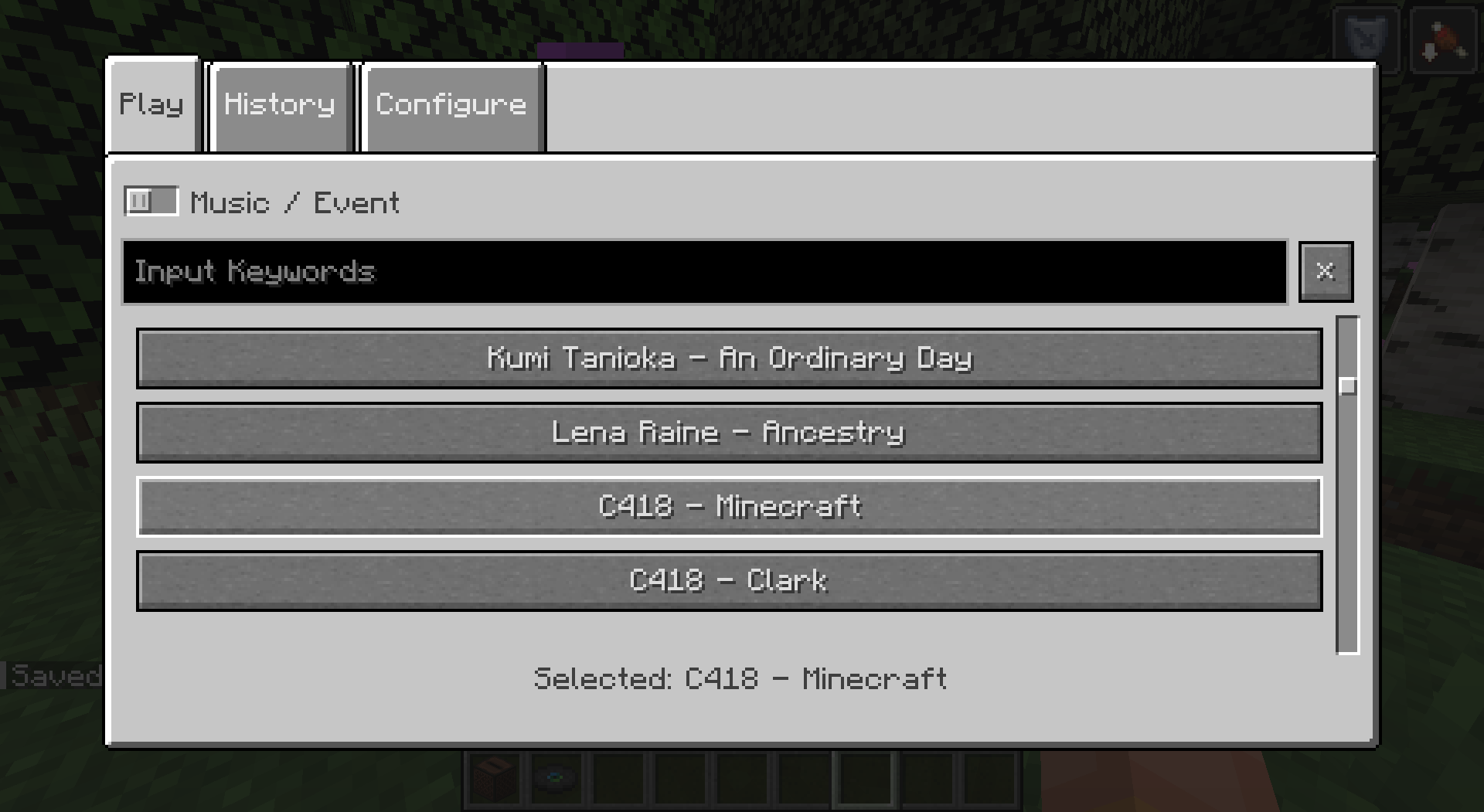
在 Play 标签页中,你可以选择任何音乐或声音事件,关闭面板时将播放所选内容。声音事件可能包含多首音乐,因此选择声音事件将从其列表中随机选取一首。
历史记录
你可以在此标签页中跟踪最近播放过的音乐。除非当前声音事件中的所有音乐都已播放过,或者你手动选择了一首,否则历史记录中的音乐不会再次被随机选中。可保留在历史记录中的音乐数量是可配置的。
配置
概述
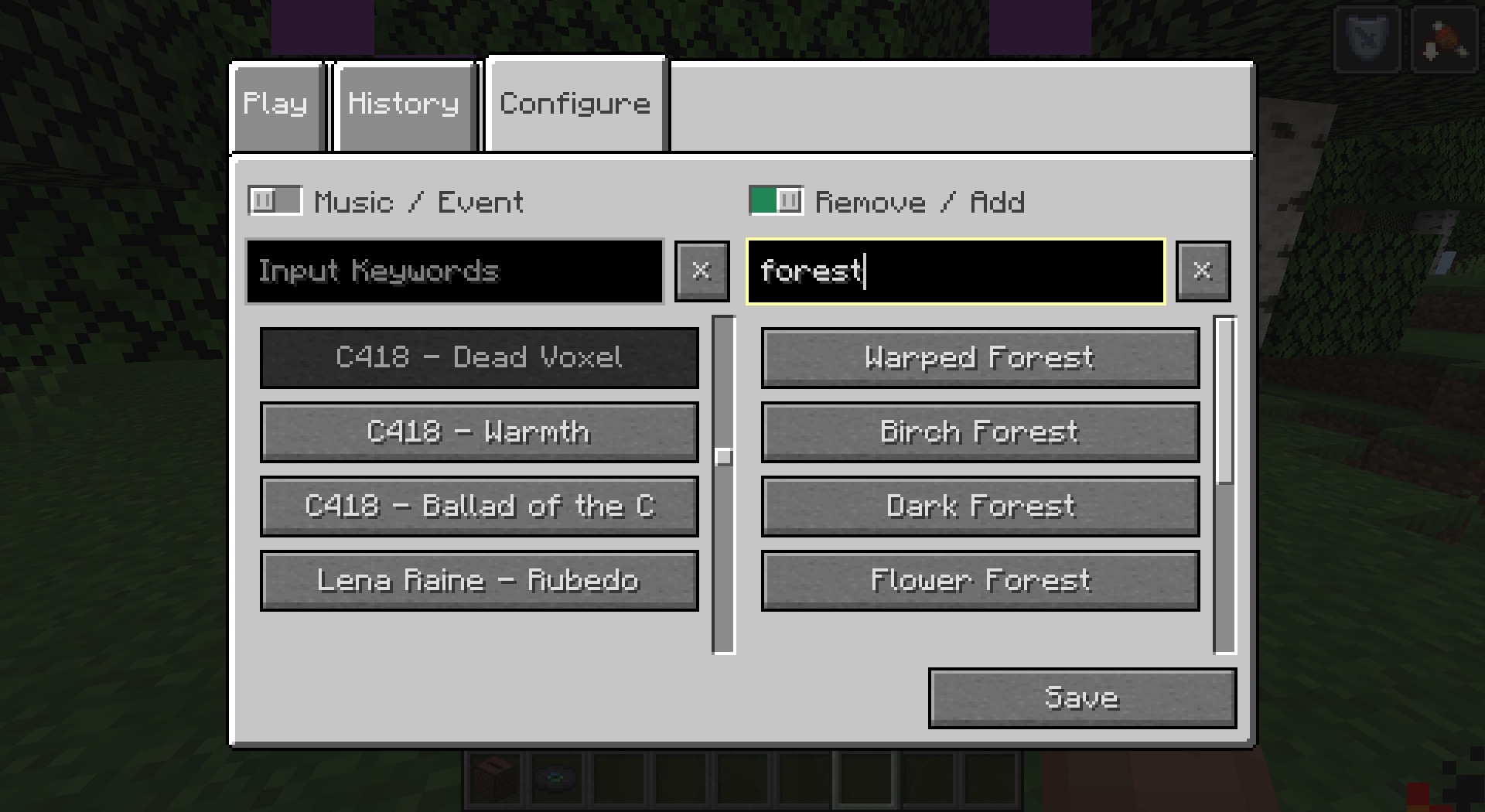
你可以完全自定义何时播放哪些音乐。确实,你可以为每种音乐配置它可以在哪些声音事件中播放,或者为每个声音事件配置它可以播放哪些音乐。同样,这包括添加到游戏中的任何自定义音乐/声音事件。声音事件还可以包含其他声音事件,以简化配置。
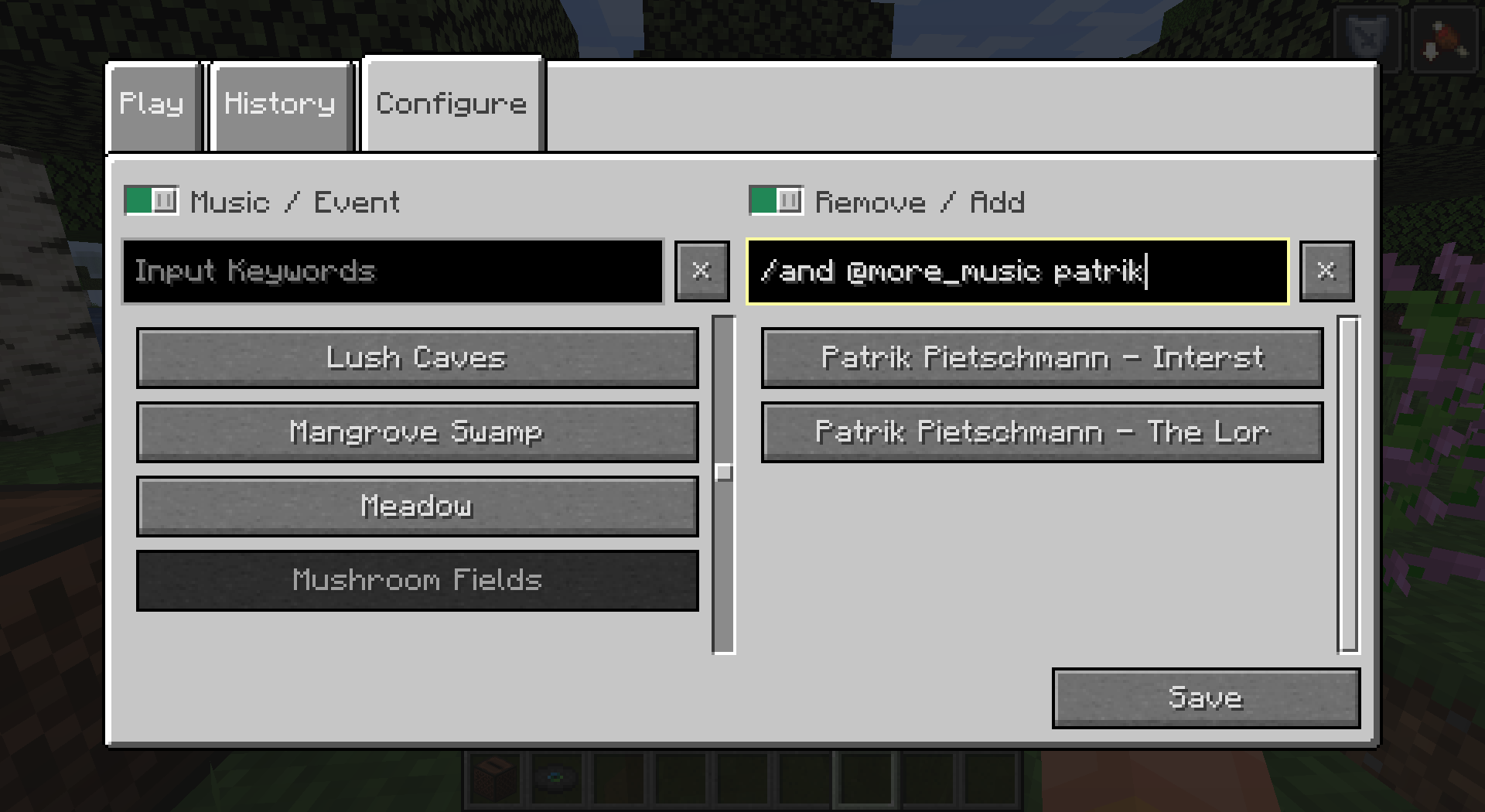
为了便于导航,添加了过滤器。只需填写文本区域即可过滤名称中包含你所输入内容的音乐/事件。一些特殊字符允许你进行更高级的过滤(参见工具提示)。
事件
为了实现更多自定义,我为游戏中的每个生物群系添加了新的声音事件。这包括来自末地维度的生物群系。默认情况下,它们保持为空,但你可以按自己喜欢的方式配置它们。
添加了维度声音事件以替换常见的“Game”事件,该事件原本会在主世界(以及如果存在没有声音事件的生物群系时的下界)播放。它们具有特定的行为来替换“Game”的行为。你可以选择是否希望在回退时播放(类似于默认的“Game”事件,当某个生物群系没有音乐时)、一半的时间、与维度/生物群系事件包含的音乐数量成比例,或从不播放(这允许没有音乐的生物群系完全不播放音乐,以营造恐怖氛围)。
还添加了用于诸如“下雨”、“打雷”或“夜晚”等情形的杂项声音事件。它们具有特定行为,因为它们比生物群系事件发生得更频繁。你可以选择是否希望它们在可以发生时始终播放、一半的时间,或与杂项/生物群系事件包含的音乐数量成比例。
趣味彩蛋: 音乐唱片拥有独立的声音事件。这意味着你可以为一张音乐唱片添加多首音乐,使用时会随机播放其中一首。
NO PORT TO FORGE PLANNED! (but feel free to port it by yourself and link it)
The mod is fully configurable to enable only changes that you like
Description
This mod allows you to take full control of Minecraft music. If you ever felt like you had to wait too much time between music, or if you ever wanted to skip a music, this mod is made for you.
And it doesn't stop here! You can switch music player mode to play music as before, discs only, resource pack/modded music only, or any music of the game. You may also replay a music, display its name, and even change music volume directly with keybinds.
Last but not least, you can completely customize which music plays when with a new GUI. In this music panel, you can select any music or sound event to play it. You can also configure for each music, in which sound events it can be played, and vice versa. New events are added for each biomes, dimensions, and even some miscellaneous ones.
This is a short description, full description below.
FAQ
-
Do I need it on my server? No. This mod is client side, so you shouldn't put it on your server
-
Can I include it in my modpack? Yes, you are free to include this mod into your modpack
-
For any other things: Feel free to share your experience, problems, enhancement ideas in the Discord server, or directly creating issues on the GitHub
Full description
Commands
Keybinding
-
Music panel: Open the music panel. M key
-
Previous/next music: Play the previous/next music. LEFT/RIGHT ARROW keys
-
Volume up/down: Increase/Decrease music category volume. UP/DOWN ARROW keys
-
Pause/resume music: Pause or resume music. RIGHT SHIFT key
-
Previous/next music category: Change the current music category and play a music from this category. PAGE UP/DOWN keys
-
Display music: Display the name of the music currently playing. RIGHT CTRL key
-
Loop: Enable/Disable loop over the same music. unassigned key
Note that you can change the keybinds at any moment in Minecraft control options.
Resourcepacks
If you want Minecraft to play other custom music, you can do this via resource packs. For this, nothing hard: just follow the instructions described there.
An example resourcepack can be found here.
Music category
Default music player mode is vanilla, which depends on events triggered by biome or location. You can change mode with keybinds and also configure the mod to be by default on another category when launching the game.
- default: Minecraft default behavior, playing a music depending on sound events like biomes or under water
- disc: Minecraft music discs, also detecting custom discs from mods
- all: any music playable in Minecraft, including resource packs and mods' ones
- namespace: for each mod and resource pack adding custom music to the game, there will be a new category created with their own music
Music panel
Play
In the Play tab, you can select any music or sound event and it will be played when closing the panel. Sound events may contain several music, so selecting a sound event will randomly pick one in its list.
History
You can keep track of the last music that were played in this tab. Music in history won't be picked again randomly, unless every music of the current sound event are in, or if you select one manually. Number of music to be kept in history is configurable.
Configure
Overview
You can completely customize which music plays when. Indeed, you can configure for each music, in which sound events it can be played, or for each sound event, what music it can play. Once again, this includes any custom music/sound event added to the game. Sound events can also contain other sound event, to ease the configuration.
For your comfort, filters were added to navigate easily on the menu. Just fill in the text area to filter music/events containing what you typed in their name. Some special character allow you an even more advanced filtering (see the tooltip).
Events
For more customization, I added new sound events for each biomes in the game. This includes biomes from the End dimension. By default, they remain empty but it's up to you to configure them how you like.
Dimension sound events were added to replace the common "Game" event that would play in the Overworld (and in the Nether if there was biomes without sound events). They have a specific behavior to replace the "Game" behavior. You can choose if you want them to play on fallback (similarly to default "Game" event, when a biome has no music), half the time, proportionnally to the number of music the dimension/biome event contain, or never (this allows biomes without music to not play music at all for a creepy atmosphere).
Miscellaneous sound events were also added for things like "Raining", "Thundering" or "Night" for example. They have a specific behavior as they can happen more often than the biome ones. You can choose if you want them to play always when they can, half the time, or proportionnally to the number of music the misc/biome event contain.
Fun bonus: music discs have their own sound event. This means you can add more than one music to a music disc, so it will play a random music when used.
下载 Music Control
下载 Music Control
需要联机服务器吗?
稳定流畅、一键部署,几分钟即可和朋友联机开服
最低仅需 8 元/月 即可畅快联机
下载 Music Control
下载 Music Control
下载 Music Control
下载 Music Control
下载 Music Control
下载 Music Control
下载 Music Control
下载 Music Control
暂无更新日志
关于这个资源的讨论、问题反馈与使用心得
还没有讨论,来发第一帖吧
你是这个资源的作者?登录后可认领此资源。
相似资源
 模组

显示你正在注视的方块的信息。(适用于 Minecraft 1.16+ 的 Hwyla/Waila 分支)
 模组
在游戏画面角落显示附近世界地形、玩家、生物和实体的地图。可创建路径点,帮助你找到标记过的位置。
 模组

查看物品与配方
 模组
使用 JavaScript 编辑配方、添加自定义物品、编写世界事件!
 模组
AE2:一款流行的自动化与存储模组
 模组
那是什么?一个 Waila/Hwyla 的分支。
评论 0
登录后参与评分
还没有评论,来抢沙发吧